seekwide
Health Warn
- License — License: MIT
- Description — Repository has a description
- Active repo — Last push 0 days ago
- Low visibility — Only 5 GitHub stars
Code Pass
- Code scan — Scanned 12 files during light audit, no dangerous patterns found
Permissions Pass
- Permissions — No dangerous permissions requested
No AI report is available for this listing yet.
Claude Code plugin for site audits you can re-run and trust: scripted SEO, Core Web Vitals, links, signs of a hacked site, images and video, with evidence for every finding, repeatable scores, a client-ready report and fixes verified by a second audit.
Seekwide


Claude Code plugin for site audits you can re-run and trust: scripted SEO, Core Web Vitals, links, signs of a hacked site, images and video, social sharing previews, app links, AI access and readiness, forms and contact paths and the search experience, with evidence for every finding, repeatable scores, a client-ready report and fixes verified by a second audit.
Status: 0.5.0. Nine modules work today,
seo,links,security,media,smo(social sharing),aso(the site's side of its apps),ai(AI access and readiness),cro(forms and contact paths) andsxo(search experience), plus fixes for metadata, internal links and image markup (including alt text) in a project in its own folder, imports of server access logs and of the AI reports of Search Console and Bing, and checks of Organization markup and of button names for agents. The roadmap lists what is planned and not built yet.
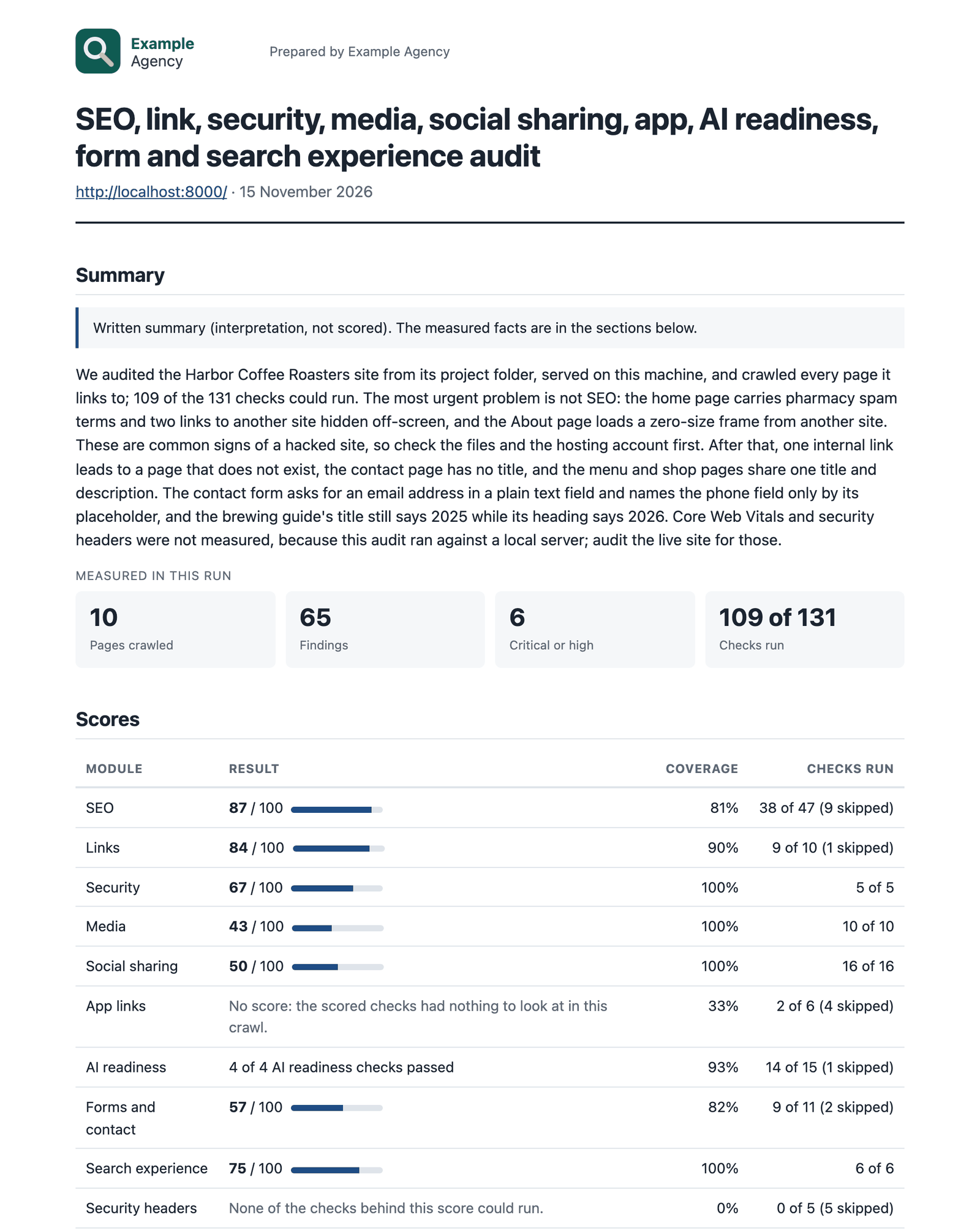
The top of the sample report, branded for a made-up agency. Open the whole report.
Install
You need Claude Code, and Node.js 22 or later with npm on your PATH (the plugin's server runs with node).
From GitHub
In Claude Code, add this repository as a plugin marketplace, then install the plugin from it:
/plugin marketplace add omerbatutandogan/seekwide
/plugin install seekwide@seekwide
The same from a terminal:
claude plugin marketplace add omerbatutandogan/seekwide
claude plugin install seekwide@seekwide
Claude Code clones the repository, copies only the plugin folder, plugin/, into its own cache and installs the two dependencies there itself, from plugin/package-lock.json: the exact versions it pins, with npm from your PATH and without running any package's install scripts. Start a new Claude Code session, then audit a site:
/seekwide:basic https://www.your-site.com
The agency name, the logo and the Google API key for Core Web Vitals are optional settings.
From a local copy
The plugin is the plugin/ folder of the repository. With --plugin-dir, Claude Code loads it in place and does not install packages into it, so install the plugin's one small dependency (parse5) in plugin/ first, with the exact versions the lockfile pins:
npm ci --ignore-scripts --prefix /path/to/seekwide/plugin
(Or run npm ci --ignore-scripts from inside plugin/.) From a local copy, for one session:
claude --plugin-dir /path/to/seekwide/plugin
As an installed plugin, using your copy as its own marketplace (the marketplace is the root of the repository, and its plugin is plugin/). Claude Code then copies plugin/ into its cache and installs the dependency there itself, as it does for the install from GitHub (tried with Claude Code 2.1.322 on 2026-11-13), so this way needs no npm ci:
claude plugin marketplace add /path/to/seekwide
claude plugin install seekwide@seekwide
See it on a sample site
The pictures below come from one run of the plugin on fixtures/sample-site: a small, fictional café site with problems put in on purpose, a broken link, a page without a title, hidden spam links, images without alt text and a contact form with ordinary mistakes among them. It was served from this machine with Python's static server, which is why the addresses are http://localhost:8000/, why the report finds no HTTPS, and why Core Web Vitals and security headers were not measured. It was audited as a project in its own folder with all nine modules, with https://www.harbor-coffee.example given as the address the site is deployed at (the home page's canonical link names it), and the report was branded for "Example Agency", a name and logo made up for the sample.
- The sample report: the HTML file the plugin wrote, unchanged. GitHub shows HTML files as source, so this link goes through raw.githack.com, a third-party service that serves files from GitHub with the right content type. The file is
docs/sample-report.html; it is self-contained, runs no scripts and opens in any browser. - The report after the fixes (
docs/sample-report-after-fix.html): the 22 metadata fixes in the plan the plugin made for the first run were written into the site's files, as/seekwide:fixwrites them after your yes, and a second audit checked them. Its report says what became of each fixed finding and what changed since the first run.
In Claude Code. /seekwide:basic crawls, scores and answers with what to fix first, naming the source file and line of each finding:
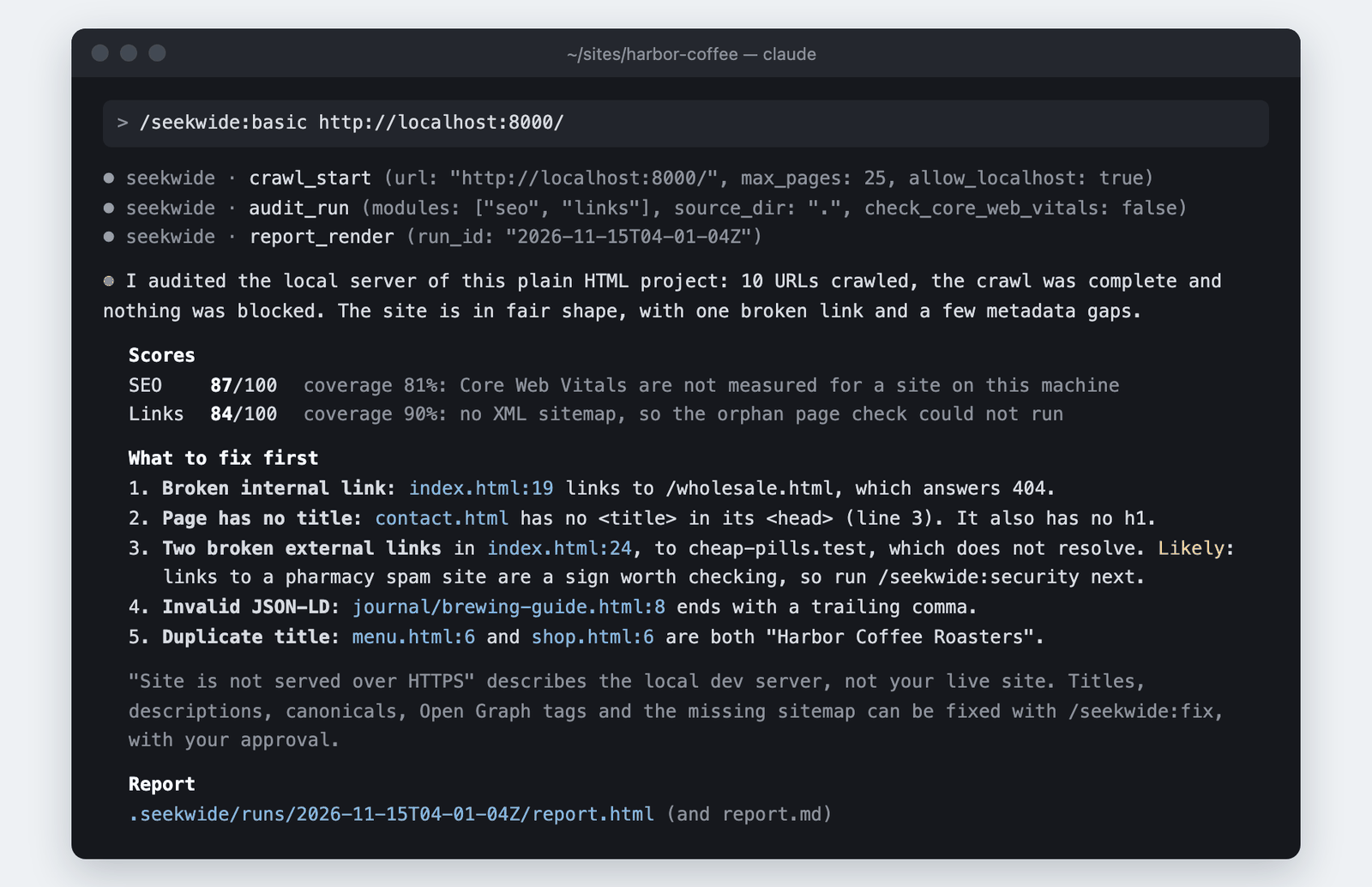
Redrawn from the results of the sample run: the scores, files and lines are the run's; the wording of a real answer varies.
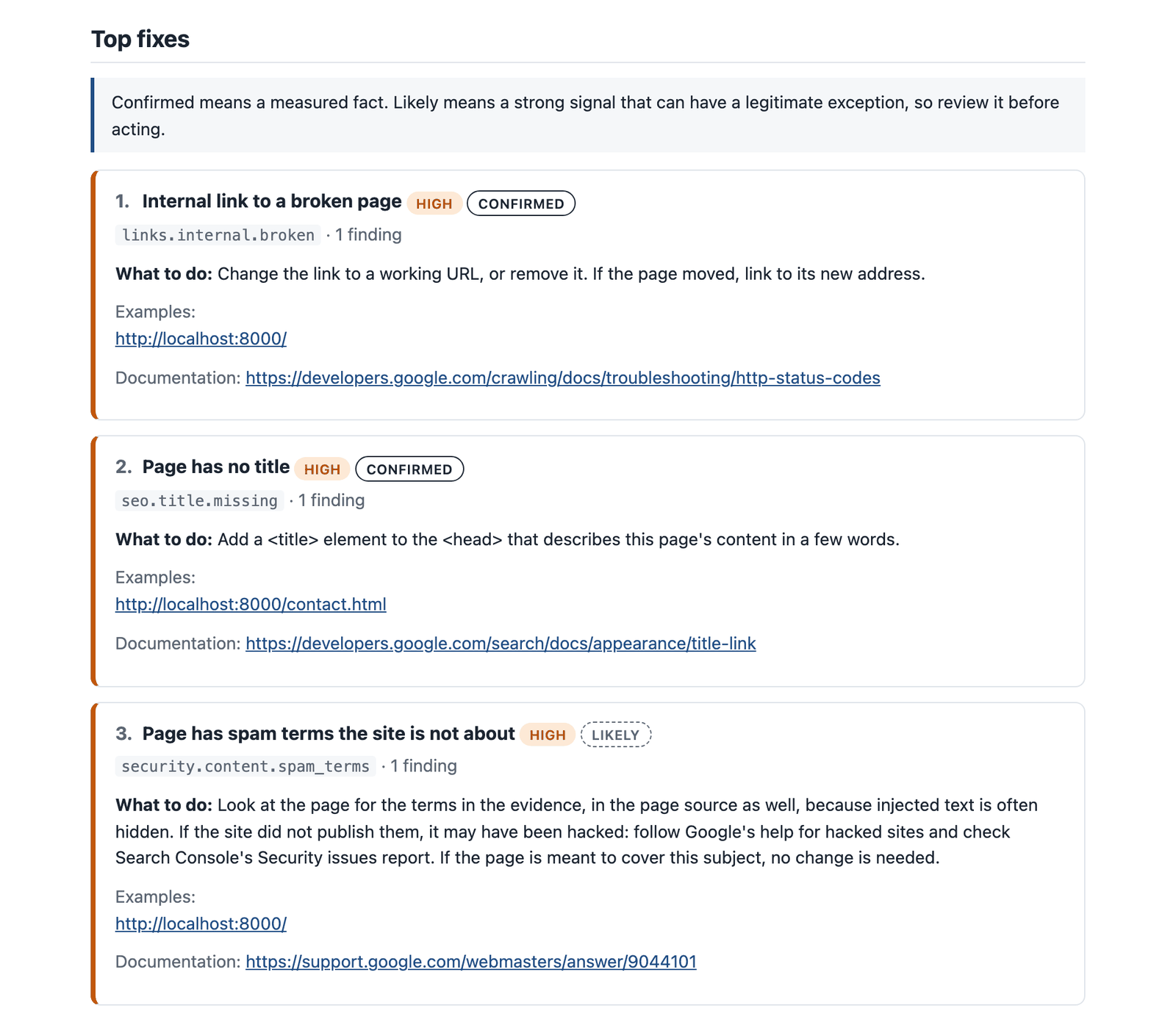
Top fixes. The findings that matter most come first, each with its severity, a confidence label, what to do and the documentation the rule is based on:
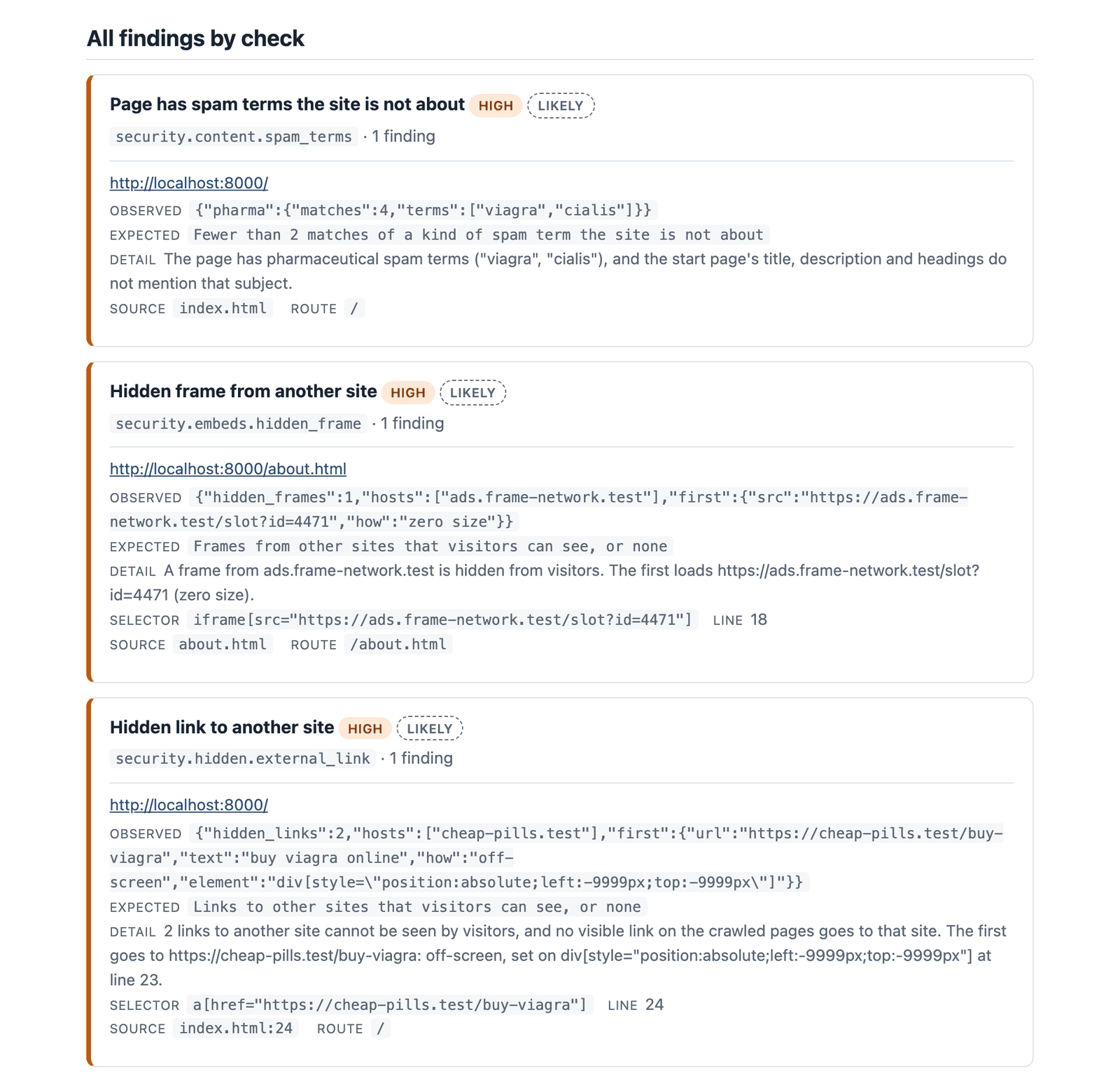
Signs of a hacked site, with evidence. Every finding shows what was observed, what was expected and the source file, and the element and its line when one element is the place:
Fixes verified by a second audit. After /seekwide:fix, the re-audit marks each fixed finding closed, still open, replaced or not verified:
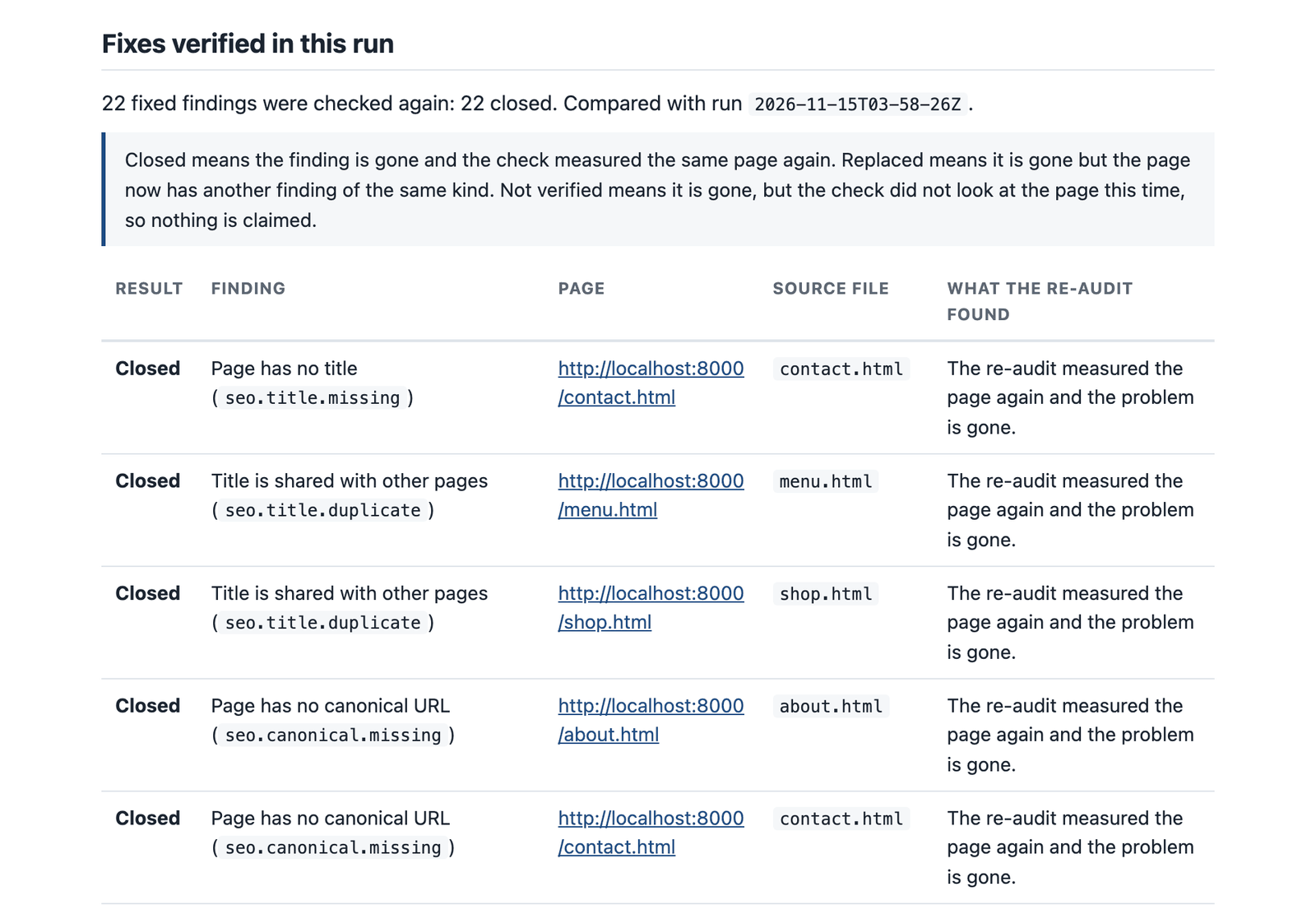
What it does today
- Crawls like a well-behaved bot. It obeys robots.txt for every page, sitemap and redirect step it requests, identifies itself, sends about one request per second, stays on the site you named, and stops when a site challenges it.
- Runs 143 scripted checks (104 scored, 39 informational): robots.txt, indexing, canonicals, hreflang, sitemaps, redirects, HTTPS, titles, meta descriptions, headings, duplicate content, structured data syntax, Core Web Vitals, broken and redirected links, links search engines cannot follow, anchor text, orphan pages, broken external links, signs of a hacked site, security headers, alt text, image sizes and formats, broken images, images robots.txt keeps from Google, video captions and video structured data, Open Graph tags and sharing images, the Smart App Banner and app association files, and which AI crawlers robots.txt lets in, the training preferences a site states, whether its pages may be quoted in AI answers, Organization markup, button names for agents, form fields and contact links, titles Google is likely to rewrite, and viewports that stop zooming. The full list is in docs/checks.md.
- Measures Core Web Vitals for the pages that matter most: the start page, then one page from each of the largest groups of similar pages (three pages with
/seekwide:basic, five with/seekwide:seoand/seekwide:all). Real-user values (LCP, INP and CLS at the 75th percentile) come from the Chrome UX Report, lab values (LCP, CLS and Total Blocking Time) from PageSpeed Insights. The report names the pages it measured and shows every value, good ones included. This needs a Google API key; see Core Web Vitals. - Scores the same data the same way, every time. Checks are code, not model judgment, so the same data always gets the same findings, ids and scores, and two audits can be compared finding by finding. What can differ between two audits of an unchanged site is what is fetched or measured at audit time: the answers of external sites, Google's lab test, the real-user data (a 28-day window that moves every day), and whether Google answered at all. A comparison says so when a lab finding changed or a check ran in only one of the two audits.
- Shows its evidence. Each finding has the URL, what was observed, what was expected, a confidence label, and a link to the documentation the rule is based on.
- Looks for signs that a site was hacked, from outside and from the pages it crawls anyway: links and frames that the page's own markup hides from visitors, pharmaceutical, gambling and counterfeit spam on a site that is not about those, pages in a writing system the site does not use, and scripts from sites no other page uses. It also checks the security headers of the start page. See Security signals.
- Checks images and videos: alt text that is missing or is only a file name, images without the size that keeps a page from jumping as it loads, a main image that is lazy-loaded, and, for up to 50 image files per audit, broken files, JPEG and PNG where WebP or AVIF would serve, very large files, and images that robots.txt keeps from Google. For video: captions and
VideoObjectstructured data. See Images and video. - Checks what a shared link will look like: the Open Graph tags Facebook, WhatsApp and LinkedIn read, whether they are in the
<head>and the head ends early enough, whetherog:urlis the clean canonical address, the pixel size and weight of up to 20 sharing images (read from their first 64 KiB), and whether robots.txt keeps Meta's preview crawler out. See Social sharing and app links. - Checks the site's side of its apps: Apple's Smart App Banner tag, and the
apple-app-site-associationandassetlinks.jsonfiles that let an iOS or Android app open the site's links, against the apps you declare in the project profile. App store pages are not read. - Checks AI access and readiness, from what the vendors document: which AI search crawlers (ChatGPT search, Claude, Perplexity, Bing and Copilot, Apple, DuckDuckGo) the site's robots.txt lets read it, matched with each crawler's own token; the training preferences it states (the shared
__usage_ai-traininggroup of 2026-10-30,Content-Usage,Content-Signal) and who honours them;nosnippet,max-snippetanddata-nosnippet, which Google applies to AI Overviews and AI Mode too; Bing's newai-trainingandai-groundingdirectives (from 2027-02-01) and thenoarchiveandnocachethey replace; and pages whose content appears only after scripts run./llms.txtis requested once and reported as information only. The result is a count ("5 of 6 AI search crawlers can read the start page"), never a score, and every row of the crawler table names the vendor's page and the day it was read. See AI access and readiness. - Checks forms and contact paths, from markup only: fields without a name a screen reader can announce, personal fields without an autocomplete purpose or with a value the HTML standard does not define, email and phone fields typed as plain text, blocked pasting, forms on https pages that send over http, and
tel:andmailto:links that cannot work; and Lighthouse's tap-target and console audits of the tested pages, from the PageSpeed Insights lab test (which Google currently runs only with a Google API key). No form is ever submitted and no form's action address is requested. Observations without a score name the consent tool scripts, the ways to make contact and where the start page's first action element stands in the HTML. It does not measure a conversion rate. See Forms and search experience. - Checks the search experience: titles Google documents as reasons to write its own title link (half-empty, an older year than the heading, another writing system than the page), a viewport that stops zooming, and pages that redirect to one page carrying their address (the pattern of a consent, age or language wall); with a key, the Chrome UX Report's experimental ad metrics as an observation. It never requests a search result.
- Never contacts Google Play or a social platform. No check sends a request to Google Play, Facebook, Instagram, X, LinkedIn, Pinterest, TikTok, YouTube, Telegram, Discord and the like, not even for their robots.txt; links and images there are listed in the report as not checked, by rule.
- Names the source file when you audit a project in its own folder (repo mode). For a Next.js App Router project or a plain HTML site, the audit runs against the project's local server and each finding says which file it comes from:
app/about/page.tsxfor the route/about, orservices.html:17for a broken link on line 17. See Auditing a project in its folder. - Fixes what it found, and checks the fix. For a project audited in its folder,
/seekwide:fixproposes changes for metadata findings (a missing or duplicate title or meta description, a missing canonical, missing Open Graph tags, a missing sitemap) internal links (through a redirect, or to a broken page) and image markup (width and height from the image file's own size, a main image that is lazy-loaded, alt text that Claude writes after looking at the project's own image file) in the file each one comes from. Every change is shown as a diff and written only after you say yes; nothing is committed. A second audit then says, finding by finding, whether it is closed, still open, replaced by another finding, or could not be verified. See Fixing findings. - Uses the search data you export. A Search Console or Bing Webmaster Tools export saved in the project folder adds clicks, impressions and positions to the report and lists findings on the pages with the most impressions first, with no account connection (see Search Console and Bing data). Scores do not depend on it.
- Writes a report as Markdown and as one self-contained HTML file, with an optional agency name and logo. The HTML prints cleanly to PDF.
- Keeps facts and advice apart. Claude writes the summary and can suggest better titles, and the report labels those parts as suggestions. They never change a score.
What it does not do
- It does not promise rankings, traffic or inclusion in AI answers. It reports what is measurably wrong today. Its AI readiness counts say what robots.txt and the pages allow, not how often AI answers mention or cite a site, which it does not measure.
- It does not run JavaScript. Content that appears only after scripts run is not seen.
- It does not get around firewalls, CAPTCHAs or robots.txt. When a site blocks it, it says so and stops. Pages the site refuses to serve to the crawler are counted and left out of the checks; they are never reported as errors of the site.
- It does not measure Core Web Vitals of every page. A lab test takes many seconds and Google limits how many can be run, so a few pages stand for the rest.
- It does not change your code by itself. The plugin's own server never writes into a project. With
/seekwide:fix, Claude edits files with its normal tools, after showing you each diff and getting your yes, and it never commits. Only metadata, internal-link and image-markup fixes exist; image files and content are not touched. - It does not look for cloaking or sneaky redirects, and it does not test a site's defences. Finding cloaking needs a request that pretends to be Google, which this crawler never sends, so a clean security result is not proof of a clean site.
- Its checks do not look at images themselves, so an audit cannot tell whether alt text describes a picture. Only
/seekwide:fixhas Claude look at an image, a file in the project, to suggest alt text; it never downloads one, and it does not convert images. It has no local SEO module yet. - It does not pretend to be an AI crawler and does not contact AI vendors. Whether GPTBot, ClaudeBot or PerplexityBot may read a site is read from its robots.txt with that crawler's own token; what a CDN or firewall does to the real crawler is not tested, and the report says so.
- It does not read social platforms or app stores. It never requests a Facebook, X, LinkedIn or other social page, a Google Play page or an App Store page, and never pretends to be a platform's crawler, so what a platform finally shows in a preview (after its own cache and rules) is not measured.
Commands
| Command | What it does | Default page budget |
|---|---|---|
/seekwide:basic [url] |
Quick SEO and link audit | 25 |
/seekwide:seo [url] |
Technical and on-page SEO audit, with suggested titles and descriptions | 100 |
/seekwide:links [url] |
Link audit, including external links | 100 |
/seekwide:security [url] |
Signs that the site was hacked or misused, and the security headers of its start page | 100 |
/seekwide:media [url] |
Images and video: alt text, sizes, formats, broken files, robots.txt for Google, captions and video structured data | 100 |
/seekwide:smo [url] |
Social sharing previews: Open Graph tags, where they stand in the HTML, the sharing image's size and weight, robots.txt for Meta's preview crawler | 100 |
/seekwide:aso [url] |
The site's side of its apps: the Smart App Banner, and the association files for iOS universal links and Android App Links | 25 |
/seekwide:ai [url] |
AI access and readiness: which AI crawlers robots.txt lets in, training preferences, snippet controls for AI answers, content in the served HTML, Organization markup, button names for agents, /llms.txt as information |
25 |
/seekwide:cro [url] |
Forms and contact paths: field names, autofill, input types, blocked pasting, forms that send over http, tel and mailto links, tap targets; markup only, never a submitted form | 100 |
/seekwide:sxo [url] |
Search experience: titles Google is likely to rewrite, zooming on a phone, redirects to a consent page, with the seo module's titles, HTTPS and Core Web Vitals | 100 |
/seekwide:all [url] |
Every installed module in one report | 200 |
/seekwide:fix [run-id] |
Fix metadata, internal-link and image-markup findings of an audit of the project in this folder, with your approval for each change, then audit again to verify | The first audit's |
/seekwide:report [run-id] |
Rebuild a report, brand it, or compare two audits | — |
/seekwide:setup [url] |
Save a project profile (with the apps and the AI policy) and report branding | — |
Audit commands accept --pages N to change the page budget and --compare to show what changed since the previous audit in the same folder. /seekwide:basic, /seekwide:seo, /seekwide:cro, /seekwide:sxo and /seekwide:all also accept --no-cwv, which skips Core Web Vitals so that nothing is sent to Google.
To audit a site running on your own machine, give a localhost or 127.0.0.1 URL. Seekwide then connects to that address and port only; it never follows a link, a redirect or a sitemap to another local port.
Auditing a project in its folder
Run an audit command without a URL (or with --repo) inside a web project, and Seekwide audits the project itself:
- It looks at the folder to see what kind of project it is. Next.js with the App Router and plain HTML are supported. For anything else it says so in plain words, and you can still audit the site by its address.
- Claude proposes the command that starts the project's local server: the project's own
devscript (for examplenpm run dev), or Python's built-in static server for a plain HTML folder, bound to127.0.0.1. Nothing starts without your approval: the plugin tells Claude to ask you in the conversation first, in every permission mode, because starting a dev server runs the project's code; Claude also shows the scripts that command runs. The plugin's own server never starts or runs anything. If the server is already running, give itslocalhostaddress and nothing is started. - The local address is crawled like any other site.
- Each finding gets
source: the file, the route and, for plain HTML, the line.
| Project | source.file |
source.line |
source.route |
|---|---|---|---|
| Next.js App Router | The file of the route that answers the URL: page.*, a route handler (route.*), a metadata file (robots.*, sitemap.*, opengraph-image.* and the like) or a file in public/. Route groups, dynamic segments and catch-all segments are followed. For a missing lang attribute or viewport: the root layout |
Not given | /blog/[slug] |
| Plain HTML | The file the server sent for the URL | The line of the element; the <head> for a missing title, description, canonical, viewport or Open Graph tag; none when no one line is the place (a missing h1, thin content) |
The URL path |
What to know:
The source is never read to guess what a page contains. A title made at request time (
generateMetadata) exists only in the page the server sends, and that page is what the audit measures. The file only says where a fix belongs.Next.js: the file is the starting point. The plugin does not read the project's code, so it gives no line, and an element shared by several pages (navigation, footer) usually lives in a layout or a component the page imports. A route is named only when the server's answer fits it: a URL that redirected or answered 404 gets no file, and a route with a dynamic segment (
[slug]) is named only for a URL that answered 200. The settings innext.configare not read. When the file mentionsbasePath,rewritesorpageExtensions, the audit says so, because a URL those settings change gets no source file; withbasePathorrewrites, routes with a dynamic segment are not named at all, and a route of fixed segments that the setting moves can still be named wrongly. Routes in apages/folder are not mapped.Next.js: a canonical sent in the body is a likely finding. Next.js 15.2 and later can append a page's title, description and canonical link to
<body>when the metadata is not ready in time (streaming metadata). Google documents that a canonical link in the body is ignored, and Next.js states that crawlers which run JavaScript read streamed metadata correctly. Seekwide cannot settle that, so it reports such a page asseo.canonical.streamed_in_bodywith confidencelikely, says how to get the metadata into the head, and does not report it as a plain misplaced canonical. This applies to audits of live sites as well.Plain HTML: a file is named only when it is what the server sent. If the page the server sent differs from the file (an edit after the crawl, or a server that rewrites pages), the finding gets no source file and the audit says how many files differed.
Some findings have no file: a missing sitemap, or a property of the server such as HTTPS. On a local server the HTTPS findings describe the dev server, not your live site.
Core Web Vitals are not measured for a local site. Its address is never sent to Google.
The project folder is the boundary. Symbolic links are not followed,
node_modulesand dot folders are not read, and nothing in the project is imported or executed by the plugin. File paths in the stored run and in the reports are relative to the project folder.
Monorepos. When the folder you run the command in is the root of a monorepo (npm, Yarn or Bun workspaces in package.json, or pnpm-workspace.yaml) and not a web project itself, Seekwide lists the workspaces that are supported web projects, and Claude asks which one to audit. The command then runs in that folder, the package manager and the installed dependencies are found at the workspace root too, and files are named as paths from the root (apps/web/app/pricing/page.jsx). Workspace patterns of plain folder names, with or without a final /*, are expanded; ** and negations are not.
Tested with Next.js 15.5 (next dev) and 16.4 (next dev and next start), JavaScript and TypeScript, app/ and src/app/, and an npm workspaces monorepo; the fixtures for each are under fixtures/. Next.js 16.4's next dev may write an AGENTS.md file into the project; that file comes from Next.js, not from Seekwide. On Windows the static server for a plain HTML folder is proposed as python, not python3.
Fixing findings
/seekwide:fix works on a saved audit of the project in the current folder (run /seekwide:seo without a URL first, or /seekwide:basic or /seekwide:links for the link fixes and /seekwide:media for the image fixes, which need those modules). It never works on a site audited by URL only, because then there is no source file to change, and it never fixes something no finding reports.
What it can fix, and where the change goes:
| Finding | Next.js App Router | Plain HTML |
|---|---|---|
| Missing or duplicate title or meta description | The metadata export or generateMetadata of the page file |
<title> and <meta name="description"> in the <head> |
| Missing canonical | alternates.canonical on the page, metadataBase in the root layout |
<link rel="canonical"> in the <head> |
| Missing Open Graph title or image | openGraph in the page's metadata |
<meta property="og:…"> in the <head> |
| No sitemap | app/sitemap.js (or .ts), and the sitemap line in app/robots.js or robots.txt |
sitemap.xml, and the Sitemap: line in robots.txt |
| Internal link through a redirect | The href in the page, a layout or a shared component (Claude finds it), changed to the final address |
The href on the line the audit names |
| Internal link to a broken page | The same; you choose the new target from the site's pages, or remove the link | The same |
| Image without width and height | width and height on the <Image> or <img>, from the pixel size in the image file's header |
width and height on the <img> on the line the audit names |
| Main image lazy-loaded | loading="lazy" removed from it, or from the shared component that adds it |
The same, in the file |
| Missing or placeholder alt text | alt on the <Image> or <img>, written by Claude after looking at the image file in public/; an imported or remote image is asked about, never downloaded |
alt on the <img> on the line the audit names, written the same way |
How it goes:
- The plugin reads the saved run and says, for each finding, whether a fix exists, which file it belongs in and what the page sends today. A finding it cannot fix safely is listed with the reason and left alone: for example a second
<title>in a Next.js project, where the plugin cannot tell which file writes it, or a canonical that Next.js streamed into the body, which is a choice about the project and not a tag to move. - Claude reads the file and shows you the change as a diff. A new title or description is Claude's suggestion and is labelled as one.
- Nothing is written until you say yes, for one change or for the set. Claude then edits the file with its normal tools, so Claude Code's own permission prompts apply too. Nothing is committed.
- The local server is crawled again and the run is saved as a run of its own. For each fixed finding the report says:
- Closed: the finding is gone, and the check measured the same page again.
- Still open: it is still reported.
- Replaced: it is gone, but the page now has another finding of the same kind (a title was added and is a duplicate).
- Not verified: it is gone, but the check did not look at the page this time (not crawled, an error status, no longer indexable). Nothing is claimed.
Canonical links, og:image and sitemaps contain the address your site is deployed at, which a local server does not know. Give it with --site https://www.example.com, or save it once with /seekwide:setup; Claude asks when it is missing and never guesses a domain. During the second audit that address is passed to the crawl, so that a canonical link, a link or a sitemap entry on it is read as the same page on the local server, and a page linked only by its full deployed address is crawled too. The audit requests nothing from the deployed site: a crawl of a local server sends no request to any other address, and the other links to the deployed site are left out of the external link check. The address has to be the one your pages name, scheme and host name included; when it matches nothing, the audit says so and names the address the pages use.
Limits: an og:image is added only when the project has an image for it; a route with a dynamic segment needs its value built in generateMetadata, which Claude writes from the data the route already uses or asks about; MDX pages are not changed. A fix verified on a dev server should be audited again on the live site after it ships.
How the scores work
Each module gets a score from 0 to 100. Every check looks at a set of pages or links, and each one passes or fails. The module score is the weighted average of the checks' pass rates, with weights from 1 to 5 that follow severity. It is rounded to a whole number, and 100 is kept for a module with no failure in a scored check: one failure makes it 99 at most.
- Info checks are rules of thumb, such as title length. They are reported and never change a score.
- Coverage is the share of a module's checks that could run. A check that needs a complete crawl, an XML sitemap or Core Web Vitals data is skipped when the audit does not have it, and the report says why. Score and coverage are always shown together.
- Confidence is
confirmedfor a measured fact andlikelyfor a strong signal that can have a legitimate exception.
There is no single overall score on purpose: a blocked site and a long title do not add up to one meaningful number.
The security headers are counted, not scored: the report says "0 of 3 recommended headers set", because a score of 0/100 for three headers of one page reads like a verdict on the site. The ai module is counted too ("4 of 6 AI readiness checks passed"): a few documented checks make a poor percentage, and an "AI score" would read as a promise of visibility in AI answers.
Core Web Vitals
Core Web Vitals are part of the seo module. Google does the measuring, in two ways:
| Lab data | Field data | |
|---|---|---|
| What it is | One simulated load of the page on an emulated mid-range phone | What real Chrome users on phones experienced over the last 28 days |
| Source | PageSpeed Insights API | Chrome UX Report API |
| Metrics | LCP, CLS, Total Blocking Time (the lab stand-in for INP) | LCP, INP, CLS, at the 75th percentile |
| Covers | Each measured page | The whole site, and each measured page with enough visits |
| Confidence | likely: one run, and values change from run to run |
confirmed: a measured fact about real visits |
A value passes when it is in Google's "good" range: LCP of 2.5 s or less, INP of 200 ms or less, CLS of 0.1 or less, Total Blocking Time of 200 ms or less.
The Google API key is optional, and without it you get no Core Web Vitals today. The Chrome UX Report API requires a key. PageSpeed Insights accepts requests without one in principle, but when this was built (November 2026) Google refused every keyless request with "quota exceeded". The audit never fails because of that: the six Core Web Vitals checks are reported as skipped with the reason, and the coverage figure shows it.
To get a key, create an API key in the Google Cloud console and enable the PageSpeed Insights API and the Chrome UX Report API for its project. Then run /plugin in Claude Code, pick Seekwide on the Installed tab, choose "Configure options" and paste the key into "Google API key". Claude Code keeps it in your system's secure storage. Enter the key in that field only: a key pasted into a chat with Claude becomes part of the conversation.
The plugin's server gets the key when it starts. A Claude Code session that was already open when you saved the key keeps running without it and reports that no key is set; start a new session to use it. claude plugin configure seekwide@seekwide shows which settings are saved, without showing the key. A saved value that no request can carry (one with a space or a line break inside, a character outside plain ASCII, or more than 256 characters) is reported as a key that cannot be used, and then nothing is sent to Google.
Core Web Vitals are measured once per crawl. Another audit of the same crawl, with the same number of pages, rates the same numbers again and says that it reused them, so two audits of one crawl cannot disagree because a lab test came out differently. Crawl again for a new measurement. A measurement in which Google returned nothing is not kept, so the next audit asks again.
Field data exists only for sites and pages with enough visits from Chrome users. A small site often has none, and that says nothing about its speed.
Security signals
Google can warn searchers about a hacked site or show its pages lower. A hack is usually built so that the owner does not notice it, so the security module looks for what an owner does not see:
| Check | What it reports | Confidence |
|---|---|---|
| Hidden link to another site | Links that the page's own markup hides (display:none, the hidden attribute, visibility:hidden, a font size of 1 pixel or less, a box moved 1000 pixels or more off its place, a box of 2 pixels or less that clips its content) or that sit on a single punctuation character, to sites that no visible link on the crawled pages goes to |
likely |
| Spam terms the site is not about | Two or more matches of pharmaceutical, gambling or counterfeit-goods spam terms in a page's text and link addresses, when the start page's title, description and headings are about something else | likely |
| Page in a writing system the site does not use | A large part of a page in, say, Japanese or Cyrillic on a site that hardly uses it, when the page's lang does not declare that language |
likely |
| Hidden frame from another site | An <iframe> of 2 pixels or less, or hidden by its markup, that loads another site |
likely |
| Script or frame from a site no other page uses | Code worth a look; a video or map on one page shows up here too | info |
| Security headers of the start page | Strict-Transport-Security, X-Content-Type-Options: nosniff, clickjacking protection (frame-ancestors or X-Frame-Options), Content-Security-Policy, and a referrer policy that sends full addresses to other sites |
confirmed |
What to know:
- It sends nothing new. The module reads the pages the crawl fetched anyway, with the same user agent and robots.txt rules. It requests no path the site does not link to or list (no
/wp-admin/,/.envor/.git/), tries nothing against the site, and never pretends to be Google or a browser. - A clean result is not proof of a clean site. Many hacks show their spam only to Google's crawler or to visitors who arrive from a Google search. Search Console's Security issues report is where Google says what it found.
- Content a visitor opens is not hidden. Google allows tabs, accordions, menus and pop-ups, so content that a control on the page opens does not count: content right after a button or link marked with
aria-expandedoraria-haspopup, inside<details>, a tab panel labelled by its tab, shown byx-showin an Alpine.js component that has a click binding, or an element whoseidanother control names (aria-controls,data-bs-target,popovertarget, a link to#its-id). A role or attribute alone (role="dialog",popover) is not enough, because anyone who injects a link can add one. A link to a site that is linked visibly on any crawled page does not count either. Not read: style sheets, classes and scripts;opacity: 0, which animated pages use for content they fade in; and white text on a white background, which needs rendering. A menu, slider or pop-up that a script opens without any of these marks can still be reported, which is why the finding islikelyand shows the element. - Which links are the site's own. Hosts under the site's registered domain (shop.acme.com on acme.com) are its own, with the endings taken from the Public Suffix List, a copy of which ships with the plugin: on
vercel.app,github.io,myshopify.comorme.ukanother name is another site. The same name under another ending (acme.de from acme.com) counts as the same organisation only when a page of the site links there visibly, because anyone can register it. A share link counts as the page's own only on a share service's real share endpoint (Facebook's sharer, X's tweet intent,wa.me/?text=without a phone number, and the like) and only when every address it carries is on the site; a Telegram channel or a Facebook page is another site whatever its query says. Hosting services that give each customer a subdomain but are missing from the Public Suffix List (tumblr.com, weebly.com, glitch.me and others) treat all their customers as one site, except wordpress.com, neocities.org and ghost.io, which are added by hand. - Very long pages are read up to a limit, and the audit says so. Every link of a page is checked for hiding, however many there are, but the scan follows at most 10,000 linked hosts per page, and a page's record keeps its first 5,000 links. When a page reaches one of these limits, the audit's notes name it.
- Security headers are not Google ranking factors. They protect visitors, and the audit counts them ("2 of 3 recommended headers set") instead of scoring them. Google's page experience documentation lists HTTPS but no security header, and Google has said that the HSTS header does not affect Search. They are checked on the start page and only for a deployed site: the headers of a server on your own machine say nothing about the live one.
- Findings are signs, not verdicts. Every signal except the headers can have a legitimate exception, so it is
likely, and each finding shows the element, the terms or the frame it is about. - Not checked yet: outdated WordPress core, plugins and themes. A plugin's version cannot be read reliably from a page, and the vulnerability databases that allow use by agencies need an account of each user's own. Admin accounts, file integrity and backups cannot be seen from outside; the report lists them as things to check by hand.
Images and video
The media module checks what search engines and visitors get from a site's images and videos:
| Check | What it reports | Confidence |
|---|---|---|
| Image without alt text | An <img> with no alt attribute and no other text alternative (aria-label, aria-labelledby, title). alt="" marks a decorative image and is never reported |
confirmed |
| Alt text that is a file name or a placeholder | alt="IMG_0423", alt="chart.jpg", alt="image", alt="0001": text that WCAG lists as no alternative |
confirmed |
| Image without width and height | A content image (not in the navigation, header, footer or sidebar) with no size in its markup, inline style or utility classes, so the page can jump when it arrives. A style sheet often reserves the space, which the crawler does not read, so it does not change the score | info |
| Main image is lazy-loaded | An image the page marks as its most important one (fetchpriority="high" or a preload) that also has loading="lazy" |
confirmed |
| Broken image | The file answers 404 or 410 | confirmed |
| JPEG, PNG or BMP instead of WebP or AVIF | A file of 32 KiB or more that comes back in a legacy format although the request accepted WebP and AVIF, from a server that does not say it picks the format per browser | likely |
| Image file over 500 KiB | A rule of thumb; it does not change the score | info |
| Image blocked for Google by robots.txt | A content image on the site's own domain that the robots.txt of its host keeps from Googlebot or Googlebot-Image | likely |
| Video without captions | A <video> that may have sound and has no <track kind="captions">. Whether it has speech cannot be told from the page |
info |
| VideoObject missing a required property | name, thumbnailUrl or uploadDate |
confirmed |
What to know:
- Image files are checked with a few small requests. Up to 50 per audit, taken page by page, after the external links are checked. The robots.txt of each host the images are on is read first and obeyed; then each file gets a
HEADrequest that says WebP and AVIF are accepted, as a browser's would, and aGETthat reads at most 1 KiB when theHEADsays too little. No image is downloaded whole, and every request carries the crawler's own user agent. A tracking pixel is never requested, and a site that challenged or rate-limited the crawler gets no image request. - It is the image host's robots.txt that counts. Google reads the robots.txt of the host that serves an image, so an image on a CDN is governed by the CDN's file, not the site's.
- Some findings need a second look. A style sheet can reserve an image's size, which the crawler does not read. A server can choose the image format by the browser it sees rather than by what the request accepts, and this crawler never claims to be a browser; files whose server says so are left out. Captions can be part of the picture or loaded by a player script. Those findings are
likelyor informational. - Measured on real sites. Before release the module was run on 19 real sites (the 20 sites the other modules were measured on, without the one that blocked the crawler) and a sample of its findings was judged by hand; the rules that were often wrong or not worth acting on were narrowed, made informational or removed (a check for pages with a video and no
VideoObjectwas removed, because which page is a watch page cannot be told from its markup). - Not measured: what an image shows (so whether alt text fits it), images and videos that scripts add, images in CSS backgrounds, and images much larger than the box they are shown in, which needs layout.
/seekwide:fixfixes missing sizes, a lazy main image and missing or placeholder alt text in a project audited in its folder.
Social sharing and app links
The smo module checks what social platforms and messaging apps need to show a preview of a shared link, against what Facebook, WhatsApp, LinkedIn and the Open Graph protocol document:
| Check | What it reports | Confidence |
|---|---|---|
| No sharing image | An indexable page with neither og:image nor twitter:image |
confirmed |
| Open Graph title, type, URL or description is missing | The four the Open Graph protocol and WhatsApp ask for, with content | confirmed |
| Open Graph tags outside the head | og:title, og:description, og:url or og:image only in the body (WhatsApp reads the head); a Next.js page that streamed its metadata is named |
likely |
| The head ends after the first 300 KB | WhatsApp reads a preview only from a head within the first 300 KB; Facebook ignores tags after 1 MB | confirmed |
| Sharing image URL is not absolute | A relative og:image (a protocol-relative // address passes) |
confirmed |
| og:url is not the clean canonical address | utm_, gclid, fbclid or a session id in og:url, or another address than the canonical |
likely |
| robots.txt keeps a preview crawler out | robots.txt disallows the start page for facebookexternalhit, the one preview crawler that documents that it obeys robots.txt |
confirmed |
| Sharing image is broken | The file answers 404 or 410 | confirmed |
| Sharing image is smaller than 200 × 200 pixels | Facebook's minimum; the size is read from the file, else from og:image:width and og:image:height |
confirmed |
| Sharing image is over 600 KB | WhatsApp's limit; LinkedIn's 5 MB and Facebook's 8 MB are named when exceeded | confirmed |
| Six informational checks | An image that will show small or cropped, an undeclared image size, no og:image:alt, an unknown twitter:card, Organization markup without sameAs, and a fediverse profile without a rel="me" link back |
info |
The aso module checks the site's side of its iOS and Android apps:
| Check | What it reports | Confidence |
|---|---|---|
| Smart App Banner without a valid app-id | <meta name="apple-itunes-app"> whose app-id is not the app's numeric Apple ID |
confirmed |
| Smart App Banner tag outside the head | Apple asks for it in the head | likely |
| apple-app-site-association file is not usable | A redirect, no https, not JSON, no applinks, webcredentials or appclips, or an app the profile names that the file lacks |
confirmed |
| apple-app-site-association file is missing | Only when the project profile says the iOS app uses universal links | confirmed |
| assetlinks.json file is not usable | A redirect, no https, a content type other than application/json, not a JSON array, no handle_all_urls statement when the profile says an Android app opens the site's links, or a package the profile names that the file lacks |
confirmed |
| assetlinks.json file is missing | Only when the project profile says the Android app uses App Links | confirmed |
What to know:
- Declare the apps in the profile.
/seekwide:asoasks for the iOS app identifier (Team ID and bundle ID) and the Android package name and saves them underappsin the project profile. They are used only for the site the profile'ssite_urlnames, so auditing another address from the same folder never judges it by your apps. Without them, a file the site serves is still judged, but a missing file is not reported, because an app that does not open the site's links needs no file; and anassetlinks.jsonthat only shares sign-in credentials is not asked for an App Links statement. - An HTML page is not a file. Many sites answer every unknown address with a page; a body that starts with markup, or an empty answer, at a file's address counts as no file, whatever its content type. A redirect is followed on the site's own host and port to see whether the file is behind it, which Apple and Android do not accept.
- Sharing images are read, not downloaded. Up to 20 per audit, one per page in crawl order, after the robots.txt of their host: one
GETthat reads at most the first 64 KiB, enough for the pixel size of a PNG, GIF, WebP or JPEG. - What the platforms show is not measured. Seekwide never sends a request to a social platform and never pretends to be its crawler, so a platform's cache and its own rules are outside the audit. Facebook's Sharing Debugger and LinkedIn's Post Inspector show what they see. X's card documentation now redirects to an overview without it, so the one X check rests on an archived copy and does not change the score.
- Apple reads through its own network. Since iOS 14 Apple fetches the association file through its content delivery network, which can get another answer than this crawler (a region, a firewall). A site on your own machine has no files to read; audit the deployed site for them.
AI access and readiness
The ai module (/seekwide:ai, and part of /seekwide:all) checks only what the AI vendors themselves document. It never sends a request to an AI vendor and never pretends to be an AI crawler.
- Who may read the site. The crawl already reads the site's robots.txt; the module asks it, with each crawler's own token and the matching rules of RFC 9309, whether the AI search crawlers may read the start page and each crawled page: OAI-SearchBot (ChatGPT search), Claude-SearchBot, PerplexityBot, Bingbot (Bing and Copilot), Applebot and DuckAssistBot are counted, and the training crawlers (GPTBot, ClaudeBot, CCBot, Google-Extended, Applebot-Extended and others) and the fetchers that act for a user are listed with what each vendor says robots.txt does to them. A block is reported as something to check against what you want, never as a verdict. A CDN or firewall can still treat the real crawler differently; that cannot be seen without pretending to be it, so it is not tested, and the report says so. When the site's firewall refused Seekwide's own crawler, the report says so and names the CDN.
- Your intent.
/seekwide:setupasks what the site wants: AI search and training, AI search but no training, or neither. A block that matches it is not reported; what contradicts it is, such as blocking Applebot (and with it Siri and Spotlight) to stop training when Applebot-Extended would stop only that. - Training preferences. The shared no-training group (
User-Agent: __usage_ai-training, which Anthropic honours since 2026-10-30, Bing from 2027-02-01 and Google plans to in early 2027; aUser-agent: *group never stands for it), the IETF draft'sContent-Usagelines and Cloudflare'sContent-Signallines are read and checked for a form that has an effect, and the report says which vendor follows which. - May the pages be quoted? Google uses only pages that are indexed and eligible to be shown with a snippet in AI Overviews and AI Mode;
nosnippetkeeps a page out of them andmax-snippetlimits how much may be used. Text markeddata-nosnippetis left out of Google's and Bing's AI answers. Bing's new page-levelai-trainingandai-groundingdirectives and thenoarchiveandnocachethey replace after 2027-03-01 are listed. - What a crawler that runs no script sees. A page whose content appears only after scripts run (an empty
#rootand a script) is reported; Bing advises against it, and the other AI vendors say nothing about running scripts. - Who is behind the site. The JSON-LD of the crawled pages is read for an Organization, a business or a Person, as Google recommends on the home page or the about page: none at all, a home-page Organization whose
urlis another site's, and one entity named or given a logo differently on two pages are reported as information. Google requires none of these properties, so they change no count. - Agents that act for a user. Chrome says agents rely on the accessibility tree and OpenAI says ChatGPT Atlas reads ARIA labels, so a visible button with no name (an icon without an
aria-label) is reported. A form that declares a WebMCP tool, a proposed standard in a Chrome origin trial, with only one oftoolnameandtooldescriptionis reported as information. /llms.txtis requested once and reported as information only: Google says such files neither harm nor help visibility in Google Search, which ignores them.
The report's AI search readiness section gives the counts ("AI search crawlers that robots.txt lets read the start page: 5 of 6"), a table of every known crawler with its vendor's page and the day it was read, and Google's own statement that there are no additional requirements to appear in AI Overviews or AI Mode, nor special optimizations. It lists what to check by hand: the "Search generative AI" setting in Search Console, your CDN's bot settings (on Cloudflare, Block also blocks Googlebot, Bingbot and Applebot since 2026-09-15), and your server logs. The vendor data ships with the plugin in plugin/references/ai-bots.md and is re-read from each vendor's page at every release and at least monthly.
Forms and search experience
The cro module (/seekwide:cro) checks the technical health of the public forms and contact links. It reads the markup the crawl fetched and nothing else: no form is ever submitted, nothing is typed into a form, and no form's action address is requested (a test holds a crawled site's own server log to GET and HEAD requests). The accessible name of each field is worked out from the HTML (a label tied to it or around it, aria-labelledby, aria-label, title, a placeholder), fields the markup hides (honeypots) are left out, and a form a script builds or a frame embeds is not judged; the report names the embedded form services it sees instead. Checkout steps behind a cart are not reached, and no conversion rate is measured. The same PageSpeed Insights test that measures Core Web Vitals also asks for Lighthouse's accessibility and best-practices categories, and two audits become checks: tap targets under 24 × 24 CSS pixels and browser errors in the console. The request goes out without a key too, but Google currently refuses lab tests without one; the two checks are then skipped with that reason.
The sxo module (/seekwide:sxo, which runs the seo module too) checks what Google's title link page names as reasons to rewrite a title, a viewport that keeps visitors from zooming, and pages that all redirect to one page carrying their address in its query (the pattern of a consent, age, language or subscription wall, which Google says to avoid); sign-on pages, checkouts and error pages are left out. It never requests a search result, so the title and snippet Google shows are not seen.
Both modules add observations, measurements without a pass or fail threshold, in their own report section: the consent tool scripts the pages load and the IAB TCF consent API (never a legal verdict on a consent banner), the ways to make contact, where the start page's first action element stands in the HTML's order (style sheets can place it elsewhere, so it is never called above or below the fold), and, with a key, the Chrome UX Report's experimental ad metrics (Chrome publishes no threshold for them). Observations never change a score. Whatever Claude adds on top (wording of a call to action, A/B test ideas) is labelled as a suggestion; A/B ideas are hypotheses, not a promise of more conversions.
Search Console and Bing data
Seekwide can show what search engines report about the site: clicks, impressions, click-through rate and average position. It reads them from an export file you download yourself, so it needs no account connection, no OAuth and no API key, and the plugin uploads the file nowhere. What Claude reads of it is in Network and data.
- Download an export:
- Google Search Console: open Performance, then Search results, choose the date range and filters, then Export and "Download CSV" (a zip) or "Download Excel".
- Bing Webmaster Tools: open Search Performance, choose the date range, open the Pages tab and download it as CSV.
- Save the file in the project folder, the one that holds
.seekwide/. - Ask Claude to import it, or run
/seekwide:setupand say you have an export. With a Bing file, say which dates it covers: the file does not record them.
The next report then has a "Search performance (imported)" section: totals and the pages with the most clicks, with the period, the filters and the file they come from, and how many of those pages the audit crawled. The "Search visibility" layer says the figures were imported, not measured. Findings of the same severity are listed by the impressions of the pages they are on, so the problems on the pages people see most come first. Scores and findings do not change.
What is read:
- The Performance export of Search Console (the CSV zip, the Excel file, or its Pages table saved as CSV) and the Pages table of Bing's Search Performance report, with the interface in English or Turkish.
- Only the pages, the daily totals and the filters the export states. Queries, countries and devices are left out.
What is not read, and why: neither tool documents the column layout of its exports, so columns are recognized by the metric names of each tool's help page, and a file that does not match is refused with a message rather than guessed at. Search Console's generative AI report and Bing's AI Performance report (overview and pages) are read in the forms real downloads had, listed in docs/IMPORTS.md; they fill the "AI visibility" layer and an "AI search performance (imported)" section with Google's AI impressions and Bing's AI citations. Search Console exports at most 1,000 rows of a table, so a page missing from the export can still have impressions. docs/IMPORTS.md lists the sources and what each one leaves open.
The import is stored as .seekwide/imports/google_search_console.json or .seekwide/imports/bing_webmaster_tools.json; a new import from the same source replaces it.
Server logs
Which AI crawlers really asked your server for pages is in its access logs, not in robots.txt. /seekwide:ai asks whether you can copy them into the project folder; it then reads them on your machine with log_import.
- Read: Apache and nginx access logs in the Common Log Format or the combined format (the default of both), plain or gzip, up to 20 files and 10 million lines per import. JSON logs and CDN exports are not read yet.
- Kept: for each AI crawler Seekwide knows, the requests, the requests for robots.txt, the status classes, the first and last day and the 10 most requested paths, in
.seekwide/imports/server_logs.json. No client address, query string, referrer or time of day is kept. - Shown: an "AI crawlers in the server logs (imported)" section in the report, with what robots.txt told each crawler in the audit. A crawler that robots.txt keeps out and that still asked for pages is pointed out.
- A claim, not a proof: a request is counted for the crawler its user agent names, and anyone can send any user agent. To verify one, compare the client addresses with the list the vendor publishes; Seekwide does not download those lists.
Files it writes
Run audits from the folder that belongs to the site. An agency keeps one folder per client.
.seekwide/
  .gitignore              keeps audit data out of git
  profile.json            from /seekwide:setup
  runs/index.json         audit history
  runs/<run-id>/findings.json
  runs/<run-id>/report.md
  runs/<run-id>/report.html
  imports/google_search_console.json   an imported Search Console export
  imports/bing_webmaster_tools.json    an imported Bing export
Crawl results are cached in the plugin's data directory, each with the Core Web Vitals measured for it, and can be deleted at any time.
That is all the plugin's own server writes. Apart from that .seekwide/ folder inside the project folder, it never creates or changes a file of your project. The changes /seekwide:fix makes are made by Claude with Claude Code's file tools, after you approved each diff.
Network and data
Seekwide has no telemetry and no backend. This is everything it sends or fetches:
| Where | What | When |
|---|---|---|
| The site you audit | HTTP requests for pages, robots.txt and XML sitemaps, and, for a file that one of its redirects leads to, a HEAD request (then a GET that reads at most 16 KB when the HEAD fails or answers with an error status), with the user agent seekwide/<version> (+https://github.com/omerbatutandogan/seekwide). If the start URL redirects to another host, that host becomes the site. |
Every audit |
| Sites the audited site links to | The robots.txt of each site, then a HEAD request for the link, and a GET when the HEAD fails or answers with an error status. At most 50 links are checked, taken in turn from each linked site and each page, each through at most 5 redirects, one request per site at a time and at least a second apart (longer when its robots.txt sets a crawl-delay). A redirect step gets the same requests, and only when the robots.txt of the site it leads to allows it. This also covers the destination of a redirect that leaves the audited site. Links to Google Play and social platforms are not checked (below). |
Audits that include the links module |
| Hosts that serve the audited pages' images (the site itself, or a CDN) | The robots.txt of each host, then for each image a HEAD request that says AVIF and WebP are accepted, and a GET for its first byte (Range: bytes=0-0, reading at most 1 KiB) when the HEAD fails, answers with an error status or gives no size. At most 50 images per audit, each through at most 5 redirects, one request per host at the crawl's rate (one a second by default; slower when the host's robots.txt asks), also across parallel audits and crawls, after the external link check and never at the same time, and nothing new after 90 seconds. A tracking pixel, video files and images on Google Play or social platforms are never requested. |
Audits that include the media module, except when the site challenged or rate-limited the crawler (then nothing on its own hosts: its domain, www, subdomains and other ports). For a site on your own machine only images on its own address are requested |
Hosts that serve the audited pages' sharing images (og:image, else twitter:image) |
The robots.txt of each host, then one GET per image with Range: bytes=0-65535 that reads at most the first 64 KiB (enough for its pixel size), through at most 5 redirects, one request per host at the crawl's rate, also across parallel audits and crawls. At most 20 images per audit, one per page in crawl order, after the image files of the media module, and nothing new after 90 seconds. No image is downloaded whole. |
Audits that include the smo module, except when the site challenged or rate-limited the crawler (then nothing on its own hosts). For a site on your own machine only images on its own address are requested |
The audited site's /llms.txt |
One GET after its robots.txt (a file it disallows is never requested), reading at most 256 KiB; a redirect is followed on the site's own host and port, at most 3 steps. Only the file's title line, its number of links and its size are kept, never its text |
Audits that include the ai module, unless the site refused the crawler. For a site on your own machine only that address is asked |
| The audited site's app association files | One GET each for /.well-known/apple-app-site-association and /.well-known/assetlinks.json, after its robots.txt, reading at most 1 MiB; a redirect is followed on the site's own host and port, at most 3 steps, to see whether the file is behind it |
Audits that include the aso module, for a site that is not on your own machine and did not refuse the crawler |
Google PageSpeed Insights API (pagespeedonline.googleapis.com) |
The URL of each page whose Core Web Vitals are measured: 3 pages with /seekwide:basic, 5 with /seekwide:seo and /seekwide:all, never more than 10. One request per page, with your Google API key when one is set. Google then loads those pages itself to test them. With the cro module the same request also asks for the ACCESSIBILITY and BEST_PRACTICES categories; an audit without the cro module sends the request as before. What the two categories add to the time of a test was not measured with a real key for this version (scripts/psi-categories.js measures it), which is why they are asked for only with the cro module. |
Audits that include the seo or cro module, unless you pass --no-cwv, the site is on your own machine, or the Google API key that is set cannot be used. Once per crawl: another audit of the same crawl reuses the numbers, which never change once stored. A cro audit of a crawl measured before without the two categories (the order seo, then cro) sends one more request per tested page that asks only for ACCESSIBILITY and BEST_PRACTICES; the stored values stay as they are and the Chrome UX Report is not asked again. As with a measurement, a top-up that brought no audit is not kept, so the next cro audit of the crawl asks again, and one that brought audits for some of the pages is kept as it is and not asked again |
Google Chrome UX Report API (chromeuxreport.googleapis.com) |
The origin of the site and the URLs of the same pages, one request each (4 with /seekwide:basic, 6 with /seekwide:seo and /seekwide:all, never more than 11), with your Google API key |
The same audits, and only when a Google API key is set |
| Google Chrome UX Report API, ad metrics | The origin of the site only, in one request of its own asking for the four experimental ad metrics, with your Google API key; never retried, and never part of the Core Web Vitals request | Audits that include the sxo module, only when a usable Google API key is set, unless you pass --no-cwv or the site is on your own machine |
| Anthropic | Tool results that Claude reads during the session: scores, findings, Core Web Vitals values, and short page excerpts when Claude drafts a suggestion | Every audit, as part of your Claude Code session |
The security module adds nothing to this table: it reads the pages the crawl already fetched. The media module adds the row on image hosts, the smo module the row on sharing images, the aso module the row on app files, and the ai module the row on /llms.txt; the cro module adds two categories to the PageSpeed Insights request and nothing else (it reads the forms the crawl fetched and never requests a form's action address), and the sxo module the Chrome UX Report row on ad metrics; the aso module reads the apps and the ai module the AI policy you declared in the project profile, on your machine. What robots.txt tells AI crawlers is read from the file the crawl fetched anyway: no AI vendor, search engine or IP list is contacted, and the crawler data ships with the plugin. An import of Search Console or Bing data adds nothing either: it reads a file in the project folder and sends no request. The totals and the pages' clicks and impressions it returns, and the report section built from them, become part of your Claude session like the rest of the audit.
Never contacted: Google Play and social platforms (Facebook, Messenger, Instagram, Threads, WhatsApp, X, LinkedIn, Pinterest, TikTok, YouTube, Telegram, Discord, Snapchat, Reddit, Tumblr, VK and Bluesky, with their short-link and image hosts; the list is util/off-limits.js). No check sends them a request, not even for their robots.txt, and no redirect that leads there is followed, a robots.txt's included; Play's image host and short links count as Google Play. A crawl refuses to start at such an address and stops when its start URL redirects there. Links and images there are counted in the run and named in the report, by platform, as not checked, by rule.
Nothing else leaves your machine. What Claude reads is covered by the terms of your Claude account. If you audit a client's site, the findings and page excerpts become part of your Claude session.
The Google API key is sent to those two Google APIs only, in a request header and never in a URL. It is not written to .seekwide/, to the crawl cache or to a log. The tools that Claude calls are not given the key and return nothing that contains it, so Claude never sees it. A site on your own machine or on a private network address is never named to Google.
/seekwide:fix sends nothing anywhere new either. Its plan is made from the saved run and from what repo mode reads of the project (file names, package.json, the text of next.config); the source files Claude reads to write a change, and the diffs it shows, are part of your Claude session like any file Claude reads. The deployed address you give for canonical links and sitemaps is written into your files and used to interpret the local crawl; the audit does not contact it.
Repo mode sends nothing anywhere new. It reads file names in the project folder, package.json, and the HTML files that were served as pages, all on your machine. The file paths it finds (relative to the project folder) and the text of the project's dev script become part of the tool results that Claude reads, like the rest of the audit. The local server is started by Claude Code, with your approval, not by the plugin.
Pages, sitemaps and redirect targets on other hosts are never fetched during the crawl. The one exception is a robots.txt that redirects to another host: it is read from there, as search engines do. An audit of a site on your own machine does not make that exception: it requests nothing outside the local address. Seekwide refuses to connect to private network addresses, and to localhost unless that is the site you asked it to audit.
Settings
All three are optional. Set them in Claude Code: run /plugin, pick Seekwide on the Installed tab and choose "Configure options".
| Setting | Meaning |
|---|---|
| Report brand name | Shown as "Prepared by" on reports |
| Report logo file | Absolute path to a PNG, JPEG, WebP or SVG of 200 KB or less |
| Google API key | Lets audits measure Core Web Vitals. Kept in your system's secure storage |
A project profile (/seekwide:setup) overrides them for one client.
Roadmap
Planned, in this order, and not built yet:
- E-E-A-T, international, local, programmatic pages. (First-party AI evidence: server logs and the AI reports of Search Console and Bing are imported since 0.4.0; the entity and agent readiness checks since 0.5.0.)
- Backlinks, measured AI visibility (sampled through your own API keys, as a rate with an interval), app store listings (from your own App Store Connect and Play data), Search Console click-through by position for the search experience, and social search. (Search Console and Bing data can already be imported from an export.)
- WordPress core and plugin vulnerabilities, using Wordfence Intelligence with your own key.
Seekwide will never pretend to be a search engine's crawler to look for cloaking.
Development
Only plugin/ is installed on a user's machine: the server, the skills, the references, the manifest and the lockfile. The tests, fixtures, evals, docs and scripts stay at the root of the repository and are not shipped. The runtime dependencies are installed in plugin/; the root package.json only holds the scripts.
npm ci --ignore-scripts --prefix plugin
npm test
claude plugin validate . --strict
claude plugin validate plugin --strict --profile directory
node scripts/check-directory-rules.js
npm run check runs every check CI runs. CI runs the tests on Linux, macOS and Windows with Node.js 22 and 26; the type check, the generated docs, the directory rules and claude plugin validate run on Linux.
The skill flows (asking before a dev server starts, stopping it, showing diffs before a fix, the wording of suggestions, blocked crawls and security findings) are covered by an eval suite under evals/, run with claude plugin eval. It drives a real Claude session, so it costs tokens and is not part of CI.
The sample reports and the pictures in docs/images/ come from fixtures/sample-site. To audit it yourself, serve that folder with python3 -m http.server 8000 --bind 127.0.0.1 from inside it and run /seekwide:all http://localhost:8000/ there, telling Claude that the site is deployed at https://www.harbor-coffee.example so that it passes that address to the crawl and to the fixes; without it the crawl reads the home page's canonical link as another site, and the counts differ from the sample's. The report was branded with docs/images/example-agency-logo.svg and the name "Example Agency". https://www.harbor-coffee.example is a name under the .example top-level domain, which is reserved for documentation and belongs to no one.
docs/ARCHITECTURE.md describes the modules and their contracts. docs/CHECKS-SPEC.md specifies every check. See CONTRIBUTING.md before opening a pull request, and SECURITY.md to report a vulnerability.
License
plugin/server/data/public-suffixes.txt is a compact copy of the Public Suffix List and stays under the Mozilla Public License 2.0, as its header says.
Reviews (0)
Sign in to leave a review.
Leave a reviewNo results found