aislopmeter
Health Uyari
- License — License: MIT
- Description — Repository has a description
- Active repo — Last push 1 days ago
- Low visibility — Only 5 GitHub stars
Code Gecti
- Code scan — Scanned 12 files during light audit, no dangerous patterns found
Permissions Gecti
- Permissions — No dangerous permissions requested
Bu listing icin henuz AI raporu yok.
Measure the AI slop on any website, then fix it. MCP server + CLI that scores generic copy, template design and unfinished details, and gives step-by-step fixes for Claude, Cursor and other AI tools. Türkçe destekli.
AI Slop Meter


Measure the AI slop on any website. Then fix it.
AI Slop Meter scores a website, a local app or a web project for slop: generic copy, the default AI-builder look, and unfinished details.
- It shows the evidence behind every point, down to the file and line.
- It tells you what to do about each finding, with steps and a prompt you can hand to your AI.
- Your own AI (Claude, Cursor, Gemini CLI and others) can then carry out the plan in your code.
It runs on your machine as an MCP server, a CLI and a bookmarklet. No API keys, no account, nothing sent anywhere except the requests to the site you asked it to scan.
Quick start
- Try it once, nothing to install:
npx -y aislopmeter https://your-site.com --open - Add it to your AI (Claude Code, once for all projects):
claude mcp add --scope user aislopmeter -- npx -y aislopmeter mcp - Ask: "Rescue my site from slop. Open the report when you're done." Answer the questions it asks; it fixes, re-scans and shows before and after.
The usage guide walks through it in order, with every command, the MCP tools, ready-made recipes (Lovable/Vite apps, Next.js, CI) and troubleshooting.
Install in one click



| Where | How |
|---|---|
| Claude Code | claude mcp add --scope user aislopmeter -- npx -y aislopmeter mcpor as a plugin with a rescue skill: /plugin marketplace add omergocmen/aislopmeter, then /plugin install aislopmeter@aislopmeter |
| Claude Desktop | Download aislopmeter.mcpb and double-click it. No Node.js needed. |
| Cursor | The button above, or add the block below to ~/.cursor/mcp.json |
| VS Code | The button above, or "servers": { "aislopmeter": { "type": "stdio", "command": "npx", "args": ["-y", "aislopmeter", "mcp"] } } in .vscode/mcp.json |
| Gemini CLI, Windsurf, others | Add the block below to the tool's MCP settings (~/.gemini/settings.json for Gemini CLI) |
| No install | npx -y aislopmeter https://your-site.com --open, or the bookmarklet |
{
  "mcpServers": {
    "aislopmeter": { "command": "npx", "args": ["-y", "aislopmeter", "mcp"] }
  }
}
You need Node.js 20 or newer, except for the Claude Desktop extension. --scope user in Claude Code installs it once for all projects; leave it out to add it to one folder, or use --scope project to share it through .mcp.json.
Then ask your AI: "Scan https://my-site.com for AI slop and show me what to fix."
| Before: 83 / 100, pure slop | After: 1 / 100, clean |
|---|---|
 |
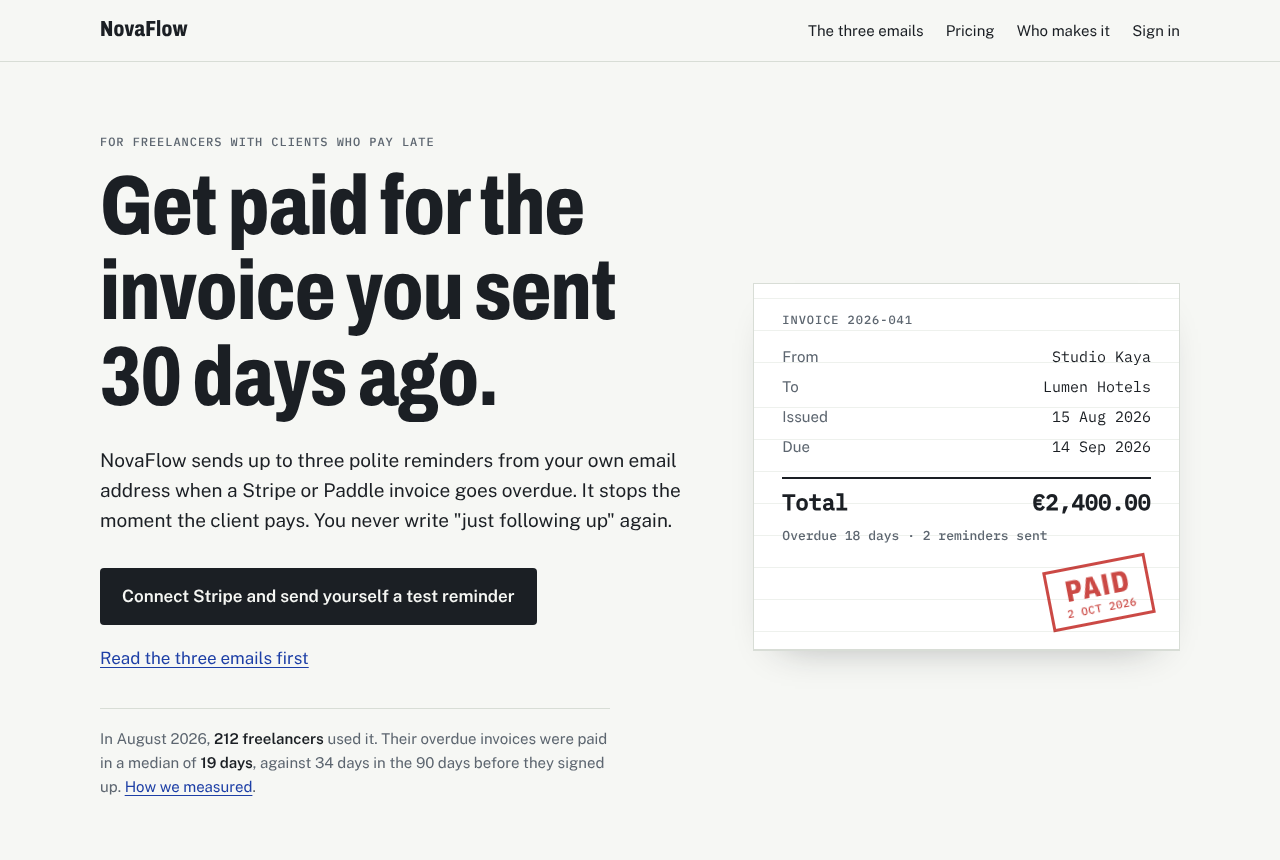 |
Both pages are in examples/novaflow. The "after" page was rewritten using the owner's answers to the rescue plan's questions (FACTS.md). The product and its numbers are fictional.
What it does
- Scans a whole website, a
localhostapp, a project folder (Next.js, Vite/React, Astro, Vue, Svelte, plain HTML, Markdown content…) or a single.htmlfile. For a website it finds the pages throughsitemap.xmland internal links (respectingrobots.txt), scans up to 30 by default (--pages allfor up to 200) and gives every page its own score and to-do list. A problem that repeats across pages is shown once, with the list of pages it is on. - Reads what the page really looks like. It reads the site's own stylesheets and scripts, and when Chrome or Edge is installed it opens the page and measures it: computed colours and real contrast, the fonts actually rendered, how much is centred, whether cards are truly identical, line length and text size, content that spills out or hides under other elements, errors while the page loads. Without a browser it still works from the HTML and CSS.
- Scores five areas with more than 80 research-based checks (criteria and sources):
- Substance: concrete facts, claims you can check, real proof, a portfolio with actual work in it
- Language patterns: clichés, headline formulas, "not just X, but Y", stock microcopy
- Template design: purple gradients, glow, emoji and stock icons, the standard landing-page and portfolio templates, Tailwind's default colours, grid backgrounds, small caps labels above every heading, bouncing and pulsing motion, cards inside cards, and drift from your own
DESIGN.md - Unfinished details: lorem ipsum,
href="#", "Vite + React + TS", chatbot leftovers, pages that are empty without JavaScript, broken images, load errors, text that is too small, too long a line or under another element - Builder traces: Lovable, Bolt, v0, Replit, Base44 (information only)
- Plus a separate AI search readiness score: can ChatGPT, Claude, Perplexity and Gemini read the page, tell who is behind it and quote it (JSON-LD, robots.txt for AI crawlers,
llms.txt, sitemap, readable without JavaScript, quotable paragraphs)
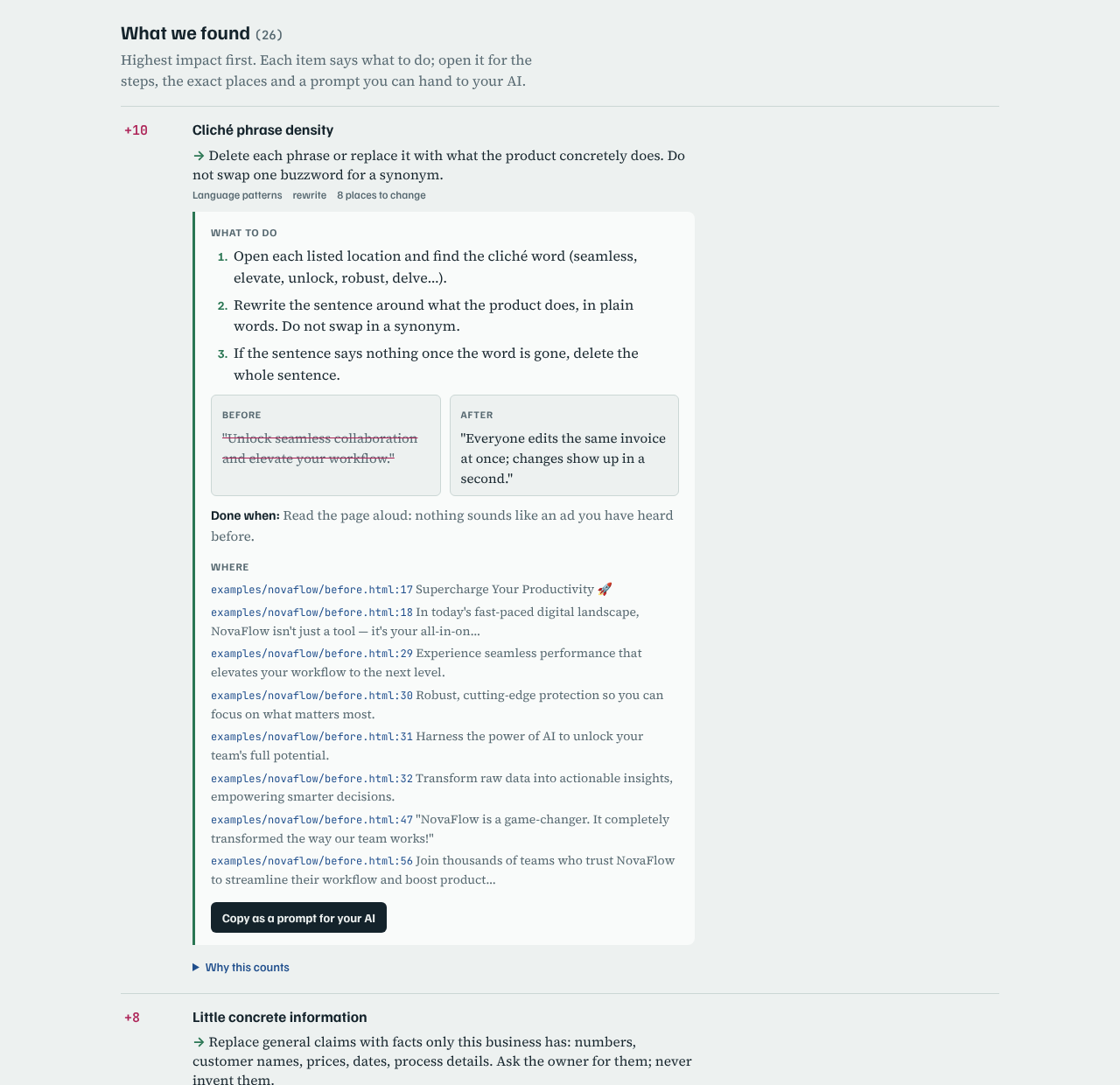
- Tells you what to do about every finding: a one-line fix, numbered steps, the exact
file:lineplaces and this site's own sentences, a before/after example, a "done when" check, and a Copy as a prompt for your AI button. - Plans the rescue around your site: questions for the owner that fit the kind of site (so the AI never invents facts), then clean-up, copy, design and trust, each with an estimated score.
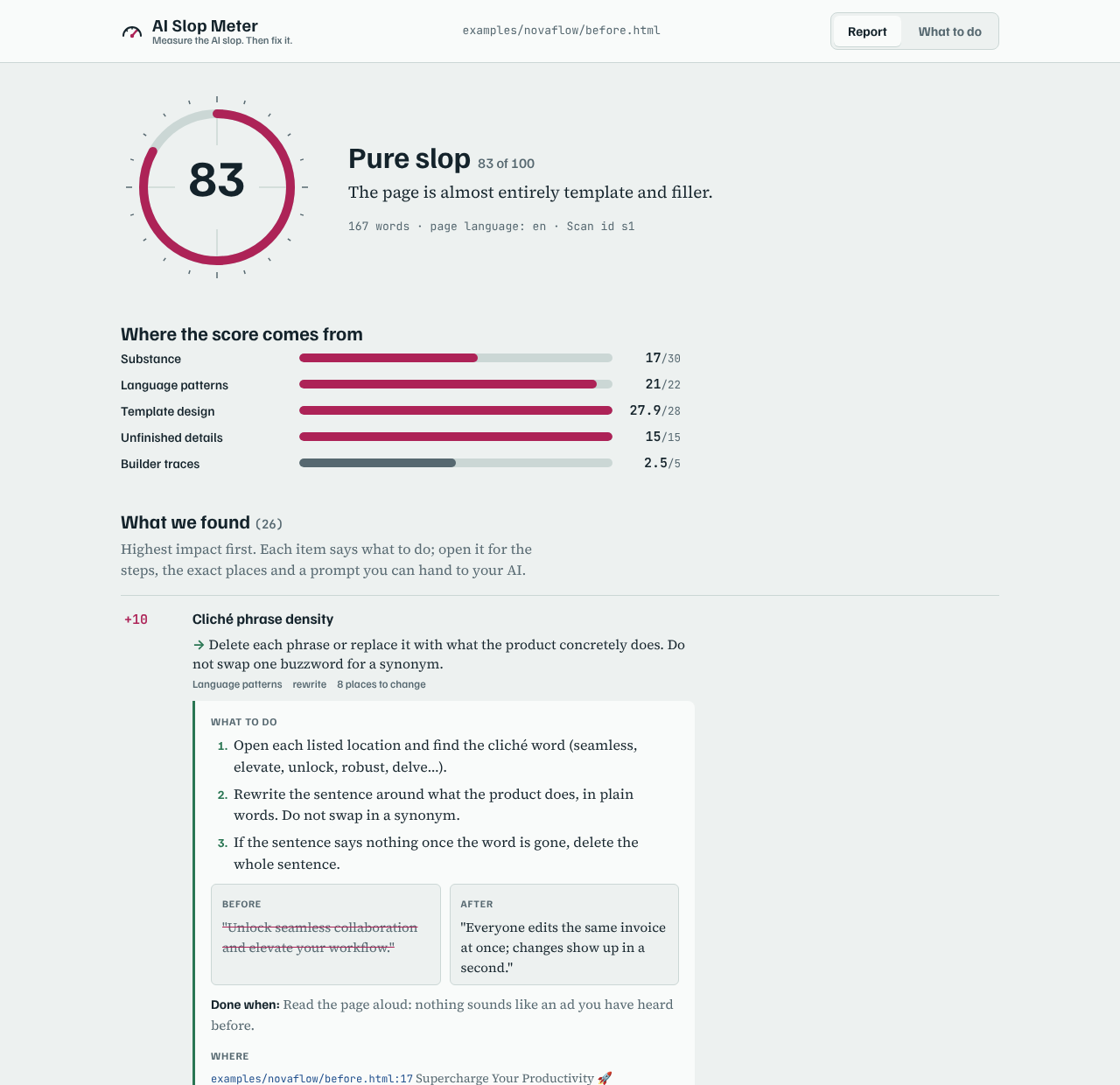
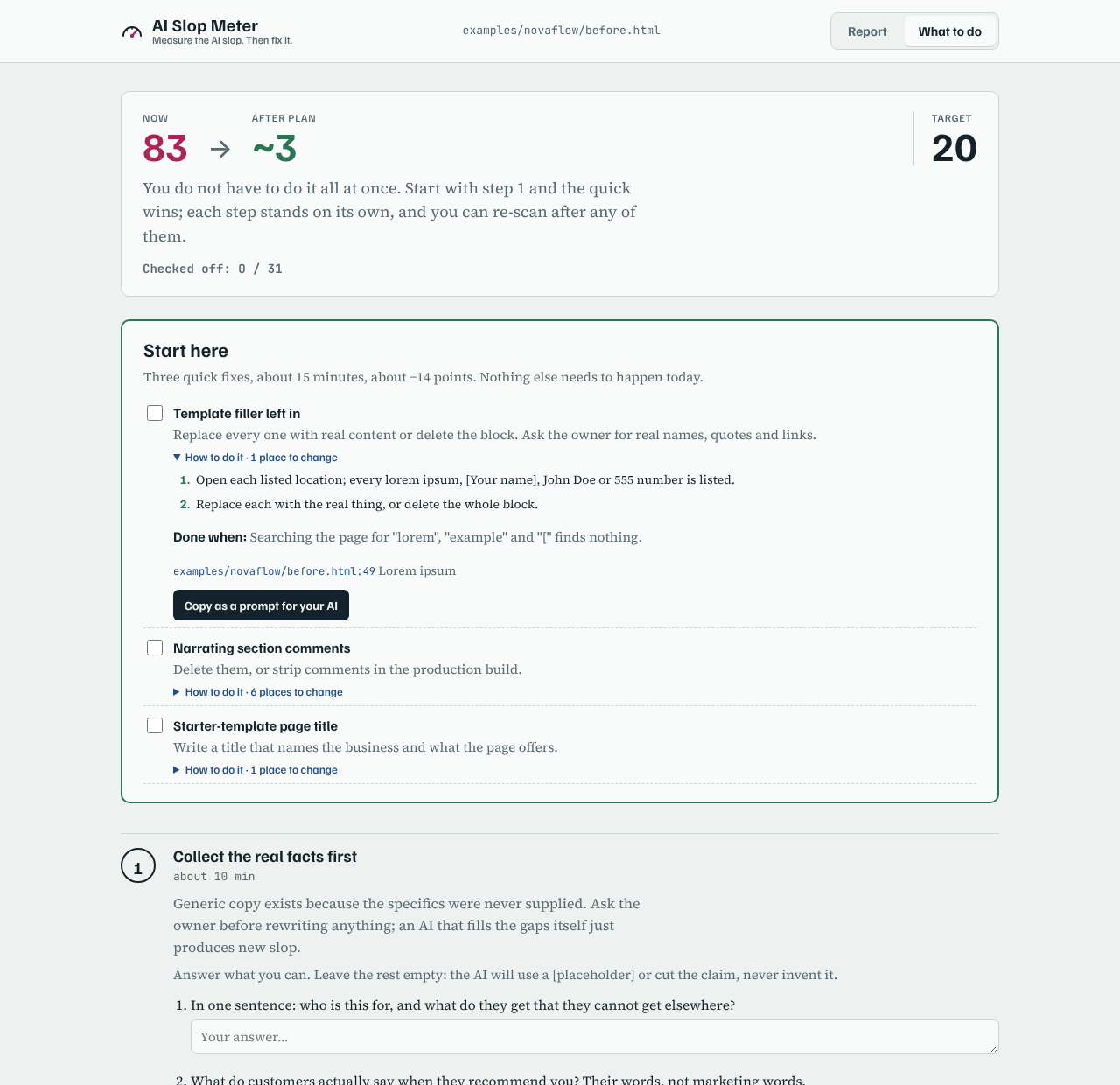
- Shows it in a visual report with Report, What to do and, for sites, Pages screens, and re-measures after each change with a before/after table.
| Report | What to do |
|---|---|
 |
 |
Every finding opens to the same "what to do" box:
Use it with your AI
Scan my project for AI slop and show me what to fix.
Rescue https://my-site.com from slop. Open the report when you're done.
Sitemi slop'tan kurtar, bitince raporu tarayıcımda aç.
The rescue prompt runs the whole loop. In Claude Code it is /mcp__aislopmeter__rescue. The AI will:
- ask once whether to open the report in your browser when it finishes, so you can walk away;
- scan the target and summarise the three findings (and, for a site, the three pages) that matter most;
- build the plan and ask you the owner questions in one message;
- apply the plan phase by phase, editing the exact
file:lineplaces in a project, or handing you rewritten copy and a design spec for a live URL; - re-scan after each phase until the target score (default 20);
- write the visual report, open it if you agreed, and summarise before/after.
Prefer small steps? The fix prompt (/mcp__aislopmeter__fix) fixes only the most important problem, re-scans, shows what changed and offers the next one.
| Tool | What it does |
|---|---|
slop_scan |
Scan a website (crawls up to pages, default 30, max 200), a localhost app, a folder or an .html file. Writes the visual report; open_report opens it. Re-scans compare automatically. |
slop_scan_html |
Scan pasted or generated HTML. |
slop_rescue_plan |
Turn a scan into a phased, site-specific plan, with keep and target_score. |
slop_page |
The full report for one page of a site scan. |
slop_fix |
Step-by-step instructions for one finding, optionally on one page. |
slop_report |
Write or open the visual report. |
slop_compare |
Before/after for two scan ids. |
slop_guide |
The guides: criteria, playbook, copy, design, interview (also MCP resources at aislopmeter://guide/...). |
Local apps (localhost, project folders)
AI Slop Meter runs on your computer, so it can check an app that is not online yet. There are three ways, and they work well together.
1. The running dev server. Start your app (npm run dev), then scan its address. localhost is opened over http and crawled like a live site.
npx -y aislopmeter localhost:3000 --open            # whole app, up to 30 pages
npx -y aislopmeter localhost:5173/pricing --pages 1  # one page
Vite, Create React App and other single-page apps send an empty <div id="root"> first; AI Slop Meter renders them with your Chrome or Edge, so the score is about what you actually see. They also get the client-shell finding: search engines see the same empty page unless you prerender.
2. The project folder. Findings come with file:line in your source code. This is what your AI edits.
cd my-app
npx -y aislopmeter . --plan
3. The built site. For static sites, scan the files you will actually deploy.
npm run build
npx -y aislopmeter ./dist --open
With your AI:
My app is running at localhost:3000 and the code is in this folder. Scan both for AI slop, fix it in the code, and re-scan localhost after each step.
Online checkers cannot reach localhost; this one can, because it runs on your machine. Nothing is uploaded.
In the browser (bookmarklet)
Scan the page you are looking at, with nothing installed. Create a bookmark and paste this as its address:
javascript:(()=>{const s=document.createElement('script');s.src='https://cdn.jsdelivr.net/npm/aislopmeter@0/dist/aislopmeter.browser.js';s.onload=()=>AISlopMeter.overlay();document.head.appendChild(s)})()
Click it on any page: a panel shows the score, the top findings and a copy-for-your-AI button for each. It checks one page at a time; for a whole site and file:line, use the CLI or MCP. Some sites block outside scripts (Content-Security-Policy); there the bookmarklet cannot run.
Command line
npx -y aislopmeter https://example.com                # whole site, up to 30 pages
npx -y aislopmeter https://example.com --pages all    # up to 200 pages
npx -y aislopmeter https://example.com --pages 1      # only this page
npx -y aislopmeter ./my-app --plan --lang tr          # project folder, plus the rescue plan in Turkish
npx -y aislopmeter ./my-app --open                    # write the visual report and open it
npx -y aislopmeter ./my-app --render never            # HTML and CSS only, no browser
npx -y aislopmeter ./my-app --json                    # raw result
Reports are written to ~/.aislopmeter/reports/ (AISLOPMETER_REPORT_DIR changes that).
Browser use. With --render auto (the default) and Chrome, Edge or Chromium installed, pages are also measured in the browser through playwright-core, which downloads nothing. Set AISLOPMETER_CHROME to a browser path if it is not found, or AISLOPMETER_BROWSER=off to never start one.
Folder scans skip node_modules, hidden folders and the primitives in components/ui. At the top of the scanned folder they also skip dist, build, out, test, docs, examples and repo documents such as README and CHANGELOG. Point AI Slop Meter at one of these directly to scan it, or use --ignore path1,path2 to leave out more.
Badge and GitHub Action
Show your score in your README:
npx -y aislopmeter . --badge aislopmeter.svg

Check every pull request, with the report in the job summary:
- uses: actions/checkout@v4
- uses: omergocmen/aislopmeter@v0
  with:
    target: .            # or a preview URL
    fail-above: 40       # optional
    lang: en
The action also returns score and band as outputs. On the command line, --fail-above 40 exits with code 1 above the limit.
Configuration
Put a .aislopmeter.json in your project (or the folder you run it from) to switch off a check that is wrong for you, or to set defaults:
{
  "disable": ["purple-gradient"],
  "keep": "The purple of our logo and the hero photo",
  "ignore": ["legacy"],
  "lang": "en",
  "pages": 30,
  "failAbove": 40
}
disable takes check ids from the report. keep is passed to the rescue plan as "do not touch". The report says which checks were turned off. --no-config ignores the file.
How the score works
Each finding adds points, and each category has a cap:
| Category | Max |
|---|---|
| Substance | 30 |
| Language | 22 |
| Design | 28 |
| Unfinished details | 15 |
| Builder traces | 5 |
Signs that a real business or person stands behind the page lower the score: a real address, named people, prices, legal details, links to independent reviews.
A high score needs problems in several areas: with only one area the score is capped at 35, with two at 60. A purple brand colour alone is never heavy slop. For sites, the score is half the average page (home page counted twice, legal and sign-in pages left out) and half the worst page.
| Score | Band |
|---|---|
| 0–19 | clean |
| 20–39 | trace amounts |
| 40–59 | noticeable |
| 60–79 | heavy |
| 80–100 | pure slop |
Why rules and not an AI judge? In the largest study so far, LLMs asked "is this slop?" agreed with human editors at κ ≈ 0. Density and relevance predicted the human verdict best. So AI Slop Meter measures with explainable rules and uses your AI only to fix things (details).
What it is not
- Not an AI-authorship detector. A page made entirely with AI can score clean, and a hand-written page can score high.
- Not a ranking oracle. The checks follow Google's helpful-content and spam guidance, but the score is not a search ranking.
- The Turkish lists are young. They come from Turkish sources and known English tells; calibration help is welcome.
- Calibrated on 34 real sites so far. Pages built with AI tools scored a median of 25, hand-made pages about 12, and no hand-made page reached 20 (how and which sites).
Privacy
Everything runs locally.
- URL scans: only pages of the site you point it at, following
robots.txt, up to the page limit. - Folder scans: files are only read, never changed.
- Reports: written only to your own computer, in
~/.aislopmeter/reports/. - No telemetry. Your AI client sees the report text, as it does with any tool output.
Contributing
See CONTRIBUTING.md: how to add a check, how calibration works, and how to report a wrong score. False alarms on real hand-made sites and Turkish word lists help the most.
License
MIT
Yorumlar (0)
Yorum birakmak icin giris yap.
Yorum birakSonuc bulunamadi