software-factory
Health Uyari
- License — License: MIT
- Description — Repository has a description
- Active repo — Last push 0 days ago
- Low visibility — Only 5 GitHub stars
Code Gecti
- Code scan — Scanned 12 files during light audit, no dangerous patterns found
Permissions Gecti
- Permissions — No dangerous permissions requested
Bu listing icin henuz AI raporu yok.
Local CLI for shipping GitHub issues with multi-agent planning, building, checking, and PR creation.
On PAR Dev's Software Factory
On PAR Dev's Software Factory is a local CLI that takes a GitHub issue through plan, build and check with AI agents, then opens a ready-for-review PR. You decide what merges.
Built in TypeScript. Routes work across Claude and Codex, with experimental local models through Ollama, and logs cost per task.
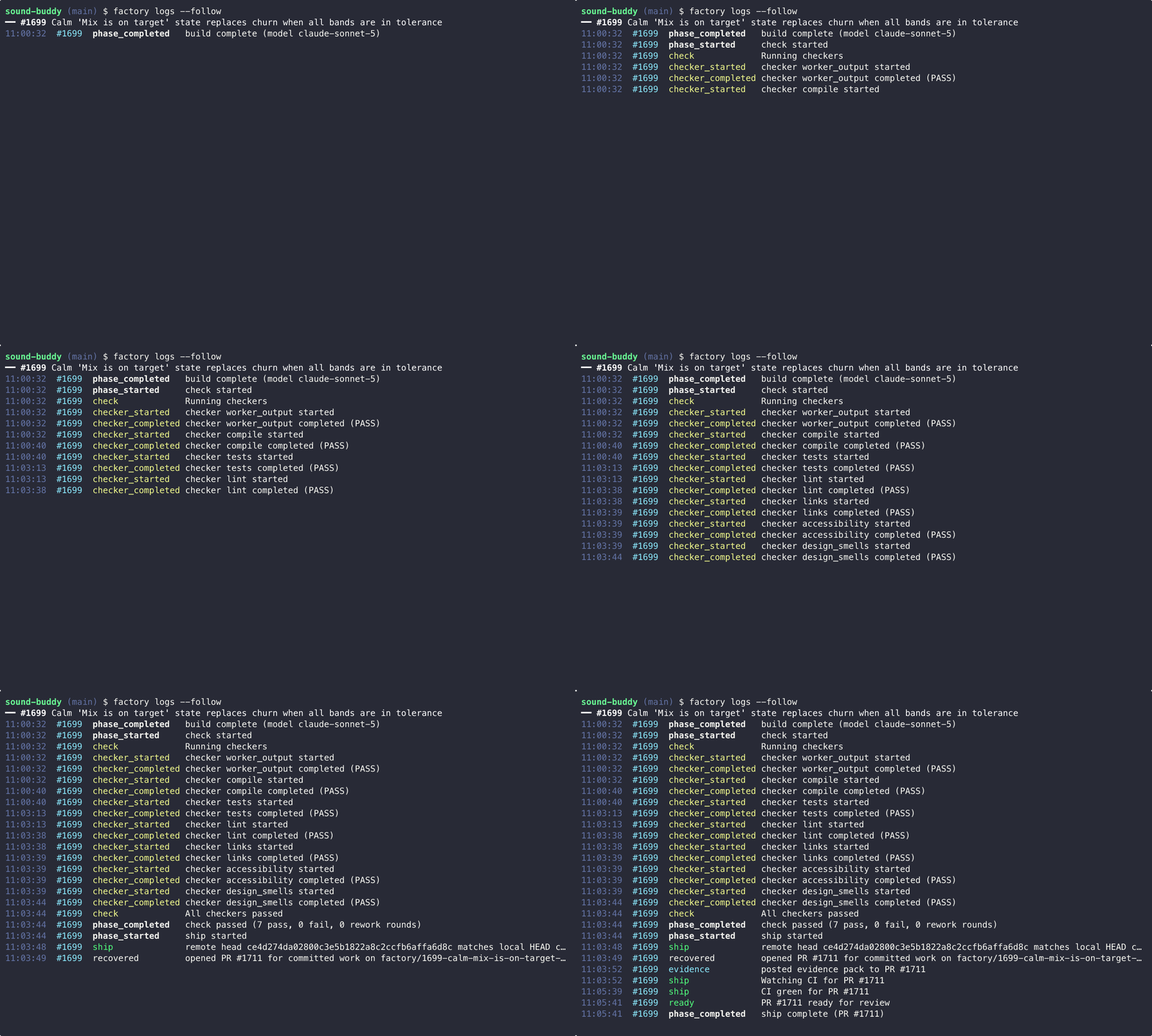
For an example of its output, see #2288: the factory planned and built issue #2269 (factory cost --json), ran its checkers (7 pass, 1 rework round), opened the PR with an evidence pack comment, and CI passed. Merging was a separate step.
Status
What works today (this table matches the code on main):
| Feature | Status | Notes |
|---|---|---|
factory ship pipeline (PLAN → BUILD → CHECK → SHIP) |
✅ Working | Covered by an end-to-end pipeline integration test |
factory triage (queue from open issues) |
✅ Working | |
factory run (parallel lanes) |
✅ Working | Merges are serialized per lane via a merge-wait step |
factory land / auto-merge |
✅ Working | Off by default. Turn on with FACTORY_MERGE=1, run.merge.auto: true or --auto-merge; see Safety. |
factory supervise (multi-window unattended runs) |
✅ Working | Waits for usage headroom, runs the queue, repeats until drained |
Cost tracking (factory cost) |
✅ Working | Per-task tokens and cost logged to .factory/state/costs.jsonl |
The full matrix, including model harnesses, prompt evals, the server, and experimental local (Ollama) models, is in docs/status.md.
Monorepo structure
An npm-workspaces monorepo:
packages/
├── adr-kit/          @on-par/adr-kit            pure ADR kernel (zero deps)
├── cli/              @on-par/factory-cli        the `factory` command
├── config/           @on-par/factory-config     typed defaults + constitutions in TypeScript (zero deps)
├── contracts/        @on-par/contracts          shared zod schemas (Issue/Epic/Story/Design)
├── core/             @on-par/factory-core       engine: router, phases, checkers
├── dashboard/        @on-par/factory-dashboard  (private) web dashboard, Vite + React
├── grade/            @on-par/factory-grade      (private) read-only grader for recorded runs
├── product/          @on-par/product            (private) proposer: brain-dump to engineering-ready issues
├── repo-context/     @on-par/repo-context       read-only repo reader port (zero deps)
├── scbench-adapter/  @on-par/scbench-adapter    (private) SlopCodeBench adapter
├── server/           @on-par/factory-server     (private) loopback SSE events + lane pause endpoint
└── tui/              @on-par/factory-tui        read-only Ink TUI for a live run
Packages marked (private) are not published to npm. For the dependency graph and per-package detail, see docs/architecture.md. To contribute, see CONTRIBUTING.md and the rules in AGENTS.md.
Quick start
Prerequisites
- Node.js ≥ 24 and
git. On older Node versions, the CLI stops and tells you which version it needs. Commits need a git identity: set it globally or with repo-localgit config. - One supported coding agent CLI (see docs/agents.md) on your PATH and signed in. That guide covers install and sign-in for each agent.
gh, signed in withgh auth login. It also supplies the GitHub token (GITHUB_TOKENorGH_TOKENoverride it).factory doctorchecks all of this and prints a fix for anything missing.- Optional:
ollamafor experimental local models.
Before you start, read Safety: the factory runs agents with permission prompts off.
Step 1: Install
npm install -g @on-par/factory-cli   # Requires Node.js 24 or newer
factory --version
factory doctor                       # run this before you continue
Step 2: Point it at your repo
cd /path/to/your/repo        # any git repo with a GitHub remote and open issues
factory init                 # creates .factory/ with the default-code constitution
.factory/ is excluded via .git/info/exclude. That keeps .factory/ local to this clone. It isn't committed, so copy it yourself if you work from another machine or clone. For other constitutions, see Constitutions.
Step 3: Triage, then ship
factory triage               # a model proposes an ordered queue from your open issues
factory triage accept        # promotes the proposal to the queue
factory ship 42              # PLAN → BUILD → CHECK → SHIP one issue
While SHIP waits for CI, a PR with no checks reported yet counts as pending. factory ship ends at a green, ready-for-review PR. Merging stays with you: merge it, or run factory land <N>. factory run processes the whole queue in parallel lanes.
Safety
To run unattended, the factory starts agent CLIs with their permission prompts turned off:
- Claude Code runs as
claude -p ... --permission-mode bypassPermissions(the same mode as--dangerously-skip-permissions). - Codex runs as
codex exec ... -c approval_policy=neverwith--sandbox workspace-writeby default. Tasks listed insandbox.codexFullAccessTasksuse--sandbox danger-full-accessand are logged.
Each build runs in a separate git worktree (under ~/.factory/worktrees/<owner>/<repo>/ on a factory/ branch; set worktree.parent to move it and --branch-prefix to change the prefix), never in your main checkout. Where available, agent runs are wrapped in an OS sandbox (sandbox-exec on macOS, firejail on Linux). factory doctor warns when no sandbox runtime is found. The agents still run as you, with your file permissions and your GitHub token, and builds run the target repo's tests and install its dependencies. Only point the factory at repos and issues you trust. Which hosts agents may reach, the registry hosts pre-allowed per ecosystem, and telemetry handling are in docs/egress.md.
The factory never merges by default. factory ship and factory run-issue never merge; they stop at the PR, which is marked ready for review once CI passes. factory run and factory supervise merge only if you turn auto-merge on (FACTORY_MERGE=1, run.merge.auto: true, or --auto-merge). FACTORY_MERGE_ADMIN=1 lets the token merge through unmet branch protection; set it only when you mean to. Full rules: docs/config.example.yaml.
To report a vulnerability, see SECURITY.md.
Configuration
factory init writes a minimal .factory/config.yaml:
version: 2
Every other key is optional. docs/config.example.yaml lists each key the factory reads, with its default and what it does. It is generated from the config schemas (npm run config-example) and a test fails when it drifts, so it matches the code. Copy only the keys you want to change (comments included) into .factory/config.yaml; .factory/config.json is still read for existing repos, and factory migrate --to-yaml converts it. factory status --kpis prints the effective config.
Updating
npm install -g @on-par/factory-cli@latest
factory self-update --check reports whether a newer release is on npm. It works in 0.9.3 and later. Automatic updates are planned: the installer (#2355) and the daemon update loop (#1939). The planned design is in docs/ops/updating.md.
CLI commands
The most-used commands, by the group factory --help lists them under. Run factory --help for the full, current list.
# Run work
factory ship <N>                    Plan → build → check one issue and open a ready-for-review PR; never merges
factory run-issue <N>               Like ship, but loads the issue first and exits 2 if it cannot be found
factory run-issue <N> --run-children Also run the child issues the size gate files when it splits <N>
factory run                         Claim queued issues and ship them, lanes in parallel; merges only when auto-merge is on
factory supervise [--now]           Unattended loop: wait for usage headroom, run the queue, repeat until it is empty
factory land <N>                    Squash-merge the issue's open PR once CI is green, then remove its worktree
factory stop / factory resume       Halt lanes after their current issue / clear the stop
factory stop|resume --json         One JSON object: action, repo, stopFlag {before, after}; idempotent

# Setup
factory init                        Set up .factory/ in this repo and check model reachability
factory doctor                      Check your environment (git, coding agent CLI, gh auth, GitHub token, npm, sandbox)
factory constitution --product <p>  Seed .factory/constitution.md from a bundled example constitution
factory constitution --checkers     List every built-in checker
factory models [--doctor]           List models with tiers, cost, and availability; --doctor probes provider CLIs

# Queue
factory triage [--product <p>]      Have a model propose a queue into .factory/state/queue.proposed
factory queue add <lane> <N...>     Queue GitHub issues into a lane (factory:queued labels)
factory check <N> [--json]          Read-only pre-flight: missing fields, and whether the size gate runs it as-is or would split it (alias: ready)

# Observe
factory status                      Show active runs, the GitHub queue, provider health, and recent events
factory status --json               One JSON object: STOP flag, provider breaker, active claims (--kpis ignored)
factory logs [--follow] [--json] [--issue <n>] [--limit <n>] [--since <cursor>]
                                    Print pipeline events (--limit/--since read only part of the log)
factory cost                        Show recorded model spend by model
factory usage                       Report 5-hour subscription usage
factory check exits 0 when the issue is ready and runs as-is, 1 when fields are missing, and 3 when it would split.
factory run-issue --run-children
When the size gate decides an issue is too big, it files child issues and stops the run. Without the flag, run-issue exits 1, names the children, and suggests re-running with --run-children. With the flag, it runs those children itself:
- Order. Children run one at a time, in the build order the size gate filed them, under the same run lock as the parent.
- Nested splits. If a child is decomposed again, its new children replace it and run before the remaining siblings. No issue runs twice.
- Closed children are skipped.
- Failures don't stop the run. A child that fails or escalates is recorded, and the next child still runs.
.factory/state/STOPis checked before each child starts. Once it is present, no further child starts, and the file is left in place (ADR-0111). A child already running finishes.- Summary. At the end,
run-issueprints one line per child: its PR, or why it failed, was skipped, or did not run. - No labels, no merge. Like
ship, it never touches the queue'sfactory:*labels and never merges. Each successful child ends at its own ready-for-review PR.
Exit codes: 0 when every child reached ready-for-review, was skipped as closed, or was replaced by its own children. 1 when any child failed or was not started because of STOP, or when the issue was decomposed and --run-children was not passed. 2 when the parent issue cannot be resolved, before any worktree or PR exists. If the issue is not decomposed, the flag changes nothing.
Root npm scripts
| Script | What it does | Runs in |
|---|---|---|
npm run test |
Vitest with coverage thresholds (the full-suite gate). | verify.sh (full path), CI |
npm run test:integration |
Pipeline integration suites. | Nightly workflow, on demand |
npm run sim-monte-carlo -- [options] |
Headless simulator Monte Carlo runs: synthetic issues through fake PLAN→BUILD→CHECK→SHIP, no model or GitHub calls. Prints shipped/parked/escalated rates and exits 1 on a breached --max-*-rate threshold. -- --help lists the options. |
On demand |
npm run sandbox-ab-report -- [--costs <file>] [--events <file>] |
Docker-sandbox vs baseline A/B comparison over .factory/state/costs.jsonl and .factory/state/events.ndjson (defaults from getFactoryPaths), with a go/no-go recommendation (#656). |
On demand |
npm run mutation |
Stryker mutation testing (stryker.conf.json). |
On demand only. Not part of scripts/verify.sh and not run by CI (#805). |
The commit gate is bash scripts/verify.sh (see .claude/skills/verify/SKILL.md).
Model routing
Each task type maps to a tier of models in packages/config/src/defaults.ts. The router tries free local models first (experimental; see docs/status.md), then cloud models, and fails over to the next model on rate limits, usage caps, timeouts, or errors. Effort levels can be set per model and task in .factory/config.yaml. Run factory models --doctor to see which models and provider CLIs are reachable. Tier order, effort settings, harnesses, and failover triggers are documented in docs/models.md. The adapter contract every harness implements (inputs, return value, failure reasons, per-phase expectations) is in docs/harness-contract.md.
Constitutions
A constitution is a written standard that defines "done right" for a product. Every build round is tested against it. The source of truth for a real product is .factory/constitution.md in the target repo. factory init seeds the bundled default-code constitution. factory init, factory constitution --init, and factory constitution --product <name> all read from and write to that path, never to a file bundled with the factory itself.
The bundled files below are only templates and worked examples used to seed a new .factory/constitution.md (via factory constitution --product <name>). factory constitution --checkers lists the built-in checkers:
packages/config/src/constitutions/example-marketing-site.md: Static site generation (brand, WCAG 2.2 AA, SEO, links)packages/config/src/constitutions/example-data-app.md: Data analysis (data integrity, report validation)packages/config/src/constitutions/example-client-delivery.md: Client delivery (client brand adherence, tech spec)packages/config/src/constitutions/_template.md: Template for new products
Lane environment (parallel e2e)
Each lane leases a port from .factory/state/ports.json and every build/check command it runs (workers, npm test, lint, custom checkers) inherits:
| Variable | Example |
|---|---|
PORT |
3142 |
FACTORY_APP_PORT |
3142 |
FACTORY_BASE_URL |
http://127.0.0.1:3142 |
FACTORY_HEADLESS |
1 |
PLAYWRIGHT_HEADLESS |
1 |
Product e2e suites should boot their app on PORT (strict-port) and point their test runner's base URL at FACTORY_BASE_URL. The constitution template scaffolds the full Playwright reference contract. When port leasing is disabled, checks still run but an environment_warning event flags the collision risk for app-testing worktrees. Factory-managed runs are headless by default, so e2e configs must honor FACTORY_HEADLESS. To run headed, set FACTORY_HEADLESS=0 or run outside the factory. Unlike the port variables, FACTORY_HEADLESS and PLAYWRIGHT_HEADLESS are set even when no port lease is configured.
Open-core boundary
What's OSS (this repo): packages/cli, packages/core, and packages/config are the open-source core. The full local pipeline (router, constitutions, checkers, phases) runs from this repo alone, MIT-licensed.
What isn't published: packages/dashboard (web dashboard, Vite + React walking skeleton), packages/product (the proposer: brain-dump to engineering-ready issues), packages/server and packages/scbench-adapter (SlopCodeBench adapter) live in this monorepo as private workspaces and are not published to npm. A hosted multi-tenant control plane is not part of this codebase. packages/server is a small local server. It serves GET /events, an SSE relay of the lane lifecycle bus, and POST /repos/:owner/:repo/lanes/:laneId/pause, which pauses a lane. Both are unauthenticated and loopback-only.
For the safety note (agent permissions, worktrees, and when the factory merges), see Safety under Quick start.
Contributing
See CONTRIBUTING.md for the verify gate, how to try one issue against a throwaway repo, and the factory-task issue template.
Security issues: see SECURITY.md. Please report privately, not as a public issue.
License
MIT, On PAR Dev
Yorumlar (0)
Yorum birakmak icin giris yap.
Yorum birakSonuc bulunamadi