aegis
Health Uyari
- License — License: MIT
- Description — Repository has a description
- Active repo — Last push 0 days ago
- Low visibility — Only 5 GitHub stars
Code Basarisiz
- rm -rf — Recursive force deletion command in .claude/settings.json
Permissions Gecti
- Permissions — No dangerous permissions requested
Bu listing icin henuz AI raporu yok.
🛡️ Orchestrate Claude Code sessions via API. Create, brief, monitor, refine, ship. The bridge between your orchestrator and your coding agent.




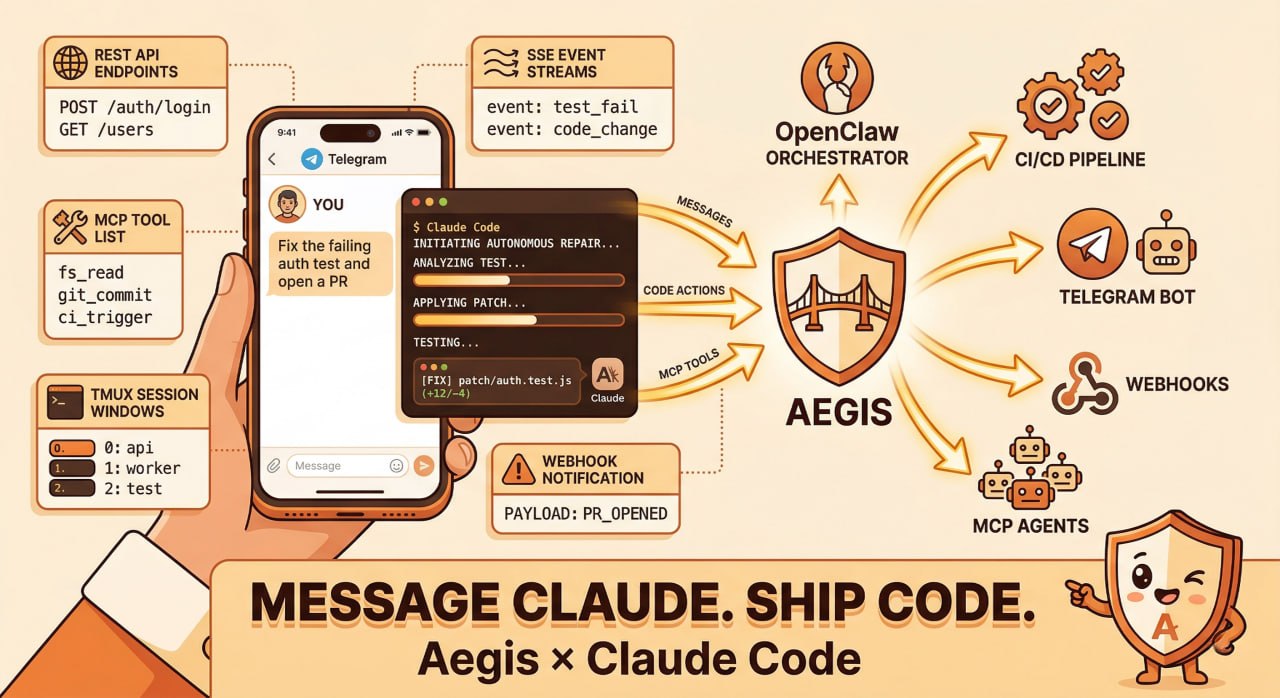
Orchestrate Claude Code sessions via REST API, MCP, CLI, webhooks, or Telegram.
Quick Start
# Install and start
npx aegis-bridge

# Create a session
curl -X POST http://localhost:9100/v1/sessions \
  -H "Content-Type: application/json" \
  -d '{"name": "feature-auth", "workDir": "/home/user/my-project", "prompt": "Build a login page with email/password fields."}'

# Send a follow-up
curl -X POST http://localhost:9100/v1/sessions/abc123/send \
  -H "Content-Type: application/json" \
  -d '{"text": "Add form validation: email must contain @, password min 8 chars."}'
Prerequisites: tmux and Claude Code CLI.
How It Works
Aegis wraps Claude Code in tmux sessions and exposes everything through a unified API. No SDK dependency, no browser automation — just tmux + JSONL transcript parsing.
- Creates a tmux window → launches Claude Code inside it
- Sends messages via
tmux send-keyswith delivery verification (up to 3 retries) - Parses output from both terminal capture and JSONL transcripts
- Detects state changes: working, idle, permission prompts, stalls
- Fans out events to Telegram, webhooks, and SSE streams
graph LR
    OC["OpenClaw"] --> API["Aegis :9100"]
    CI["CI/CD"]     --> API
    TG["Telegram"]  --> API
    WH["Webhooks"]  --> API
    MCP["MCP"]      --> API
    API --> CC["Claude Code<br/>(tmux)"]
    API --> SSE["SSE Events"]
MCP Server
Connect any MCP-compatible agent to Claude Code — the fastest way to build multi-agent workflows.
# Start standalone
aegis-bridge mcp

# Add to Claude Code
claude mcp add --scope user aegis -- npx aegis-bridge mcp
Or via .mcp.json:
{
  "mcpServers": {
    "aegis": {
      "command": "npx",
      "args": ["aegis-bridge", "mcp"]
    }
  }
}
21 tools — create_session, send_message, get_transcript, approve_permission, batch_create_sessions, create_pipeline, and more.
4 resources — aegis://sessions, aegis://sessions/{id}/transcript, aegis://sessions/{id}/pane, aegis://health
3 prompts — implement_issue, review_pr, debug_session
REST API
All endpoints under /v1/.
| Method | Endpoint | Description |
|---|---|---|
GET |
/v1/health |
Server health & uptime |
POST |
/v1/sessions |
Create (or reuse) a session |
GET |
/v1/sessions |
List sessions |
GET |
/v1/sessions/:id |
Session details |
GET |
/v1/sessions/:id/read |
Parsed transcript |
GET |
/v1/sessions/:id/events |
SSE event stream |
POST |
/v1/sessions/:id/send |
Send a message |
POST |
/v1/sessions/:id/approve |
Approve permission |
POST |
/v1/sessions/:id/reject |
Reject permission |
POST |
/v1/sessions/:id/interrupt |
Ctrl+C |
DELETE |
/v1/sessions/:id |
Kill session |
POST |
/v1/sessions/batch |
Batch create |
POST |
/v1/pipelines |
Create pipeline |
| Method | Endpoint | Description |
|---|---|---|
GET |
/v1/sessions/:id/pane |
Raw terminal capture |
GET |
/v1/sessions/:id/health |
Health check with actionable hints |
GET |
/v1/sessions/:id/summary |
Condensed transcript summary |
POST |
/v1/sessions/:id/screenshot |
Screenshot a URL (Playwright) |
POST |
/v1/sessions/:id/escape |
Send Escape |
GET |
/v1/pipelines |
List all pipelines |
GET |
/v1/pipelines/:id |
Get pipeline status |
| State | Meaning | Action |
|---|---|---|
working |
Actively generating | Wait or poll /read |
idle |
Waiting for input | Send via /send |
permission_prompt |
Awaiting approval | /approve or /reject |
asking |
Claude asked a question | Read /read, respond /send |
stalled |
No output for >5 min | Nudge /send or DELETE |
When you POST /v1/sessions (or POST /sessions) with a workDir that already has an idle session, Aegis reuses that session instead of creating a duplicate. The existing session's prompt is delivered and you get the same session object back.
Response differences:
| New Session | Reused Session | |
|---|---|---|
| Status | 201 Created |
200 OK |
reused |
false |
true |
promptDelivery |
{ delivered, attempts } |
{ delivered, attempts } |
# First call → creates session (201)
curl -s -o /dev/null -w "%{http_code}" -X POST http://localhost:9100/v1/sessions \
  -H "Content-Type: application/json" \
  -d '{"workDir": "/home/user/project", "prompt": "Fix the tests"}'
# → 201

# Same workDir while idle → reuses session (200)
curl -s -o /dev/null -w "%{http_code}" -X POST http://localhost:9100/v1/sessions \
  -H "Content-Type: application/json" \
  -d '{"workDir": "/home/user/project", "prompt": "Now add error handling"}'
# → 200, body includes "reused": true
Only idle sessions are reused. Working, stalled, or permission-prompt sessions are ignored — a new one is created.
Telegram
Bidirectional chat with topic-per-session threading. Send prompts from your phone, get completions pushed back.
export AEGIS_TG_TOKEN="your-bot-token"
export AEGIS_TG_GROUP="-100xxxxxxxxx"
Webhooks
Push events to any endpoint with exponential backoff retry.
export AEGIS_WEBHOOKS="https://your-app.com/api/aegis-events"
Multi-Agent Orchestration
AI orchestrators delegate coding tasks through Aegis — monitor progress, send refinements, handle errors, all without a human in the loop.
Works with OpenClaw, custom orchestrators, or any agent that can make HTTP calls.
Configuration
Priority: CLI --config > ./aegis.config.json > ~/.aegis/config.json > defaults
| Variable | Default | Description |
|---|---|---|
AEGIS_PORT |
9100 | Server port |
AEGIS_HOST |
127.0.0.1 | Server host |
AEGIS_AUTH_TOKEN |
— | Bearer token for API auth |
AEGIS_TMUX_SESSION |
aegis | tmux session name |
AEGIS_TG_TOKEN |
— | Telegram bot token |
AEGIS_TG_GROUP |
— | Telegram group chat ID |
AEGIS_WEBHOOKS |
— | Webhook URLs (comma-separated) |
Contributing
git clone https://github.com/OneStepAt4time/aegis.git
cd aegis
npm install
npm run dev          # build + start
npm test             # vitest suite
npx tsc --noEmit     # type-check
src/
├── cli.ts                # CLI entry (npx aegis-bridge)
├── server.ts             # Fastify HTTP server + routes
├── session.ts            # Session lifecycle
├── tmux.ts               # tmux operations
├── monitor.ts            # State monitoring + events
├── terminal-parser.ts    # Terminal state detection
├── transcript.ts         # JSONL parsing
├── mcp-server.ts         # MCP server (stdio)
├── events.ts             # SSE streaming
├── pipeline.ts           # Batch + pipeline orchestration
├── channels/
│   ├── manager.ts        # Event fan-out
│   ├── telegram.ts       # Telegram channel
│   └── webhook.ts        # Webhook channel
└── __tests__/            # Vitest tests
Support the Project


License
MIT — Emanuele Santonastaso
Yorumlar (0)
Yorum birakmak icin giris yap.
Yorum birakSonuc bulunamadi