claude-profile-switcher
Health Warn
- License — License: NOASSERTION
- Description — Repository has a description
- Active repo — Last push 0 days ago
- Low visibility — Only 6 GitHub stars
Code Fail
- rm -rf — Recursive force deletion command in scripts/build-app.sh
- rm -rf — Recursive force deletion command in scripts/package-release.sh
Permissions Pass
- Permissions — No dangerous permissions requested
No AI report is available for this listing yet.
Run several Claude desktop accounts side by side from the macOS menu bar.

Claude Profile Switcher
Several Claude desktop accounts side by side on one Mac, one click away in the menu bar.
No signing out, no second user account, no patched app.



[!IMPORTANT]
Unofficial community tool. Not affiliated with or endorsed by Anthropic. It starts the Claude
app you already have with Electron's documented--user-data-dirswitch and never modifies it.
Using several accounts is subject to Anthropic's terms.
Contents
- Why
- How it works
- Features
- Install
- Quick start
- The panel
- Usage limits
- Signing in from the browser
- Moving Claude Code chats between accounts
- Shared chats
- Launchers
- Command line
- Configuration
- Where things live
- Safety and privacy
- Limitations
- Troubleshooting
- Uninstall
- Development
- Credits
Why
The Claude desktop app holds one account at a time. If you use a personal account and a Team or
Enterprise one, or work for several organisations, switching means signing out, signing in, and
losing the other account's open windows, Code tab and Cowork state every time.
Claude Profile Switcher keeps each account in its own Claude window, all signed in at once, and puts
them in a panel next to the clock. Your existing Claude keeps working exactly as before; the others
appear beside it.
How it works
Claude is an Electron app, and Electron keeps everything that makes up a login (cookies, local
storage, config.json) in one data folder, which --user-data-dir can point elsewhere. Each extra
account is simply its own folder, and Claude started on it is a separate, fully independent copy.
flowchart LR
    S["Claude Profile Switcher<br/>menu bar panel"]
    S -- "pid-addressed<br/>focus and links" --> D["Claude<br/>Default"]
    S -- "--user-data-dir" --> W["Claude<br/>Work"]
    S -- "--user-data-dir" --> P["Claude<br/>Personal"]
    D --- DD[("Application Support/Claude<br/>Claude's own folder")]
    W --- WD[("Application Support/ClaudeProfile-Work")]
    P --- PD[("Application Support/ClaudeProfile-Personal")]
    T[("~/.claude/projects<br/>Claude Code transcripts,<br/>shared by all")]
    W -.-> T
    P -.-> T
    D -.-> T
Three things about Claude on macOS shape the design (as observed with Claude Desktop 3.6556):
- Claude takes no single instance lock on macOS. It relies on Launch Services, which does not know
about data folders. Two copies on one folder would both start and corrupt it, so before every launch
the switcher reads each Claude process's real arguments (sysctl KERN_PROCARGS2) and brings an
already open account forward instead of starting it again. - Every copy has the same bundle id. Anything addressed to "Claude" by name could reach any of
them, so the switcher talks to one copy at a time by its process id. - Links arrive as Apple Events. Claude reads
claude://links fromopen-url, not from its
arguments, so a link for an open account is sent to that copy's pid as aGURLevent.
Features
| One click per account | Open an account, or bring it forward if it is already open. Never a second copy on one profile. |
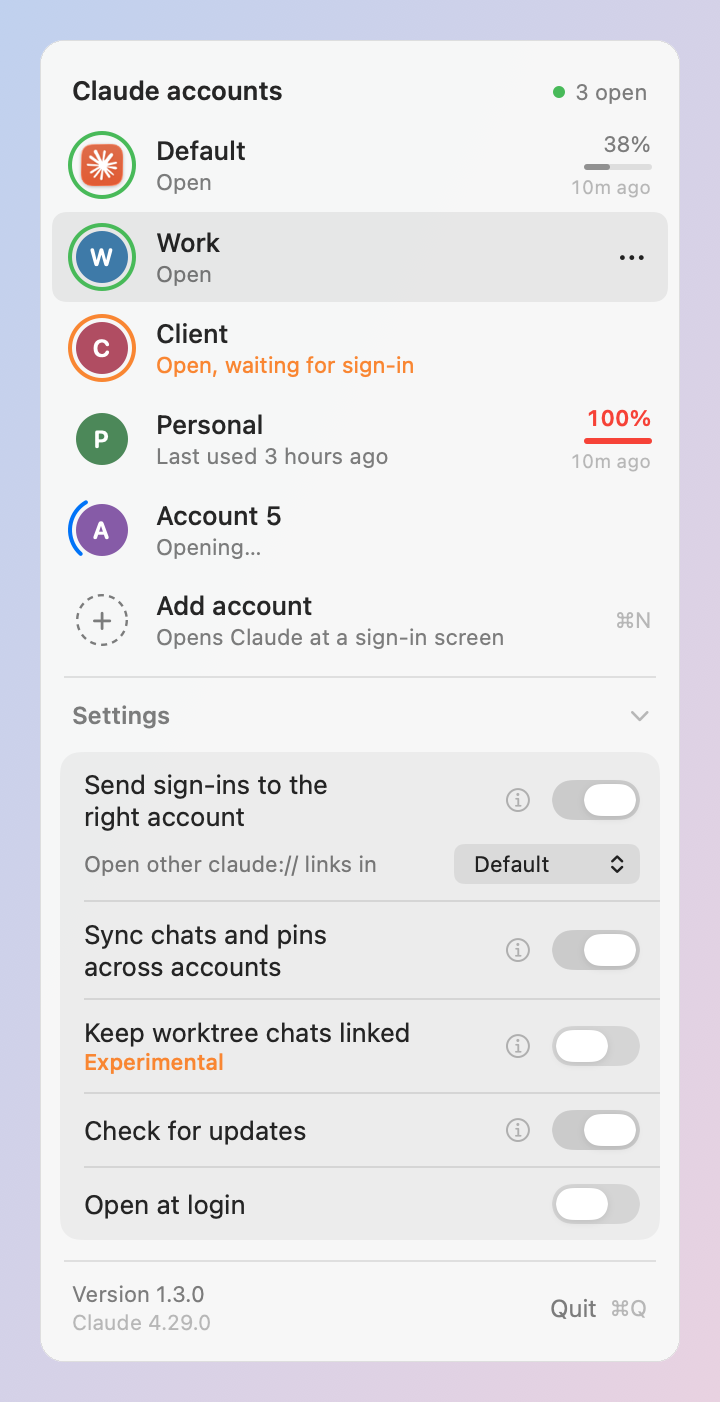
| Status at a glance | A ring around each badge: green open, orange open and waiting for a sign-in, spinning while it starts. |
| Usage limits | Each account's 5-hour limit as Claude last measured it, the weekly limit in its tooltip. Read from Claude's own files, no credentials. |
| Add an account in one click | A fresh profile opens Claude at its sign-in screen. Sign in and you are done. |
| Sign-ins land in the right account | Optional: browser sign-ins (Google, email links) go to the account that asked, not to whichever Claude macOS picks. |
| Move Claude Code chats | Copy chats to another account and carry on there, with the rules of claude-migrate. Pins come along, in order. |
| Shared chats | Chats that exist in several accounts follow the account you used last when you switch: the latest history, archived state, title, deletions and pins. See which chats differ and why. Optional and experimental: keep worktree chats linked so both accounts continue one history. |
| Launchers | Claude - Work.app in ~/Applications with a coloured badge, for Spotlight, Launchpad and the Dock. |
| Per-account environment | Environment variables and launch flags for one account's Claude, for example for an MCP server. |
| Your original stays put | The account you already have keeps its folder, auto update and settings. The switcher writes there only while that account is closed and after a backup: when you transfer chats into it, when chat and pin sync bring the shared chats over as it opens it (their records and Claude's own pin list, see Keeping shared chats the same and Pins), or, with linking on, when a chat is linked. |
| Native and small | Swift and AppKit, one universal binary, no dependencies, English and Turkish. Its only network request is a once-a-day update check you can turn off. |
Install
Requires macOS 13 Ventura or later and the Claude desktop app.
Homebrew
brew install --cask onlyilkr/tap/claude-profile-switcher
This installs the app to /Applications and the command line as claude-profiles. The app is not
notarized yet, so the cask clears its quarantine flag on install; without that, Gatekeeper would
refuse to open it. If you would rather not have a cask do that, build it yourself (below).
Release download
Download Claude-Profile-Switcher-<version>.zip from the
releases page, check it against the
published checksums, unzip, and move the app to /Applications:
shasum -a 256 -c checksums.txt   # run next to the downloaded zip
xattr -dr com.apple.quarantine "/Applications/Claude Profile Switcher.app"
The second line tells Gatekeeper you trust this download; do it only for a zip whose checksum matched.
Updating
Once a day the switcher asks GitHub for its latest release, and when one is newer the panel says so
(Version 1.x.y is available). Update runs brew update and brew upgrade --cask claude-profile-switcher
in Terminal for a Homebrew install, which quits the app, upgrades it and opens it again; for any other
install it opens the release page. The cross hides the note until the next release. The switcher never
downloads or replaces itself. Turn the check off with Check for updates under Settings in the panel (CheckForUpdates
in settings.json); with it off, the switcher makes no network requests at all.
Build from source
Needs Xcode (or a Swift 5.9+ toolchain). Nothing to download besides the repository, and a build you
made yourself needs no Gatekeeper workaround.
git clone https://github.com/onlyilkr/claude-profile-switcher.git
cd claude-profile-switcher
make install    # builds, copies to ~/Applications, opens it
Quick start
- Open Claude Profile Switcher. Its icon, two circles with a ring around the front one, appears
next to the clock; click it. - Your existing Claude is listed as Default. Click Add account: a new Claude window opens at
the sign-in screen. - Sign in with your other account. Both stay signed in from now on.
- Hover the new row, click ⋯, then Rename to call it something like
Work. - The first time there are two accounts, the panel offers to send browser sign-ins to the right
account. Turn it on if you sign in with Google or email links (see
below). - Optional: turn on Open at login, and add launchers for the accounts you use most.
[!TIP]
The first time the switcher brings an open account forward or hands it a link, macOS asks whether
it may control Claude. Click OK: that is how it reaches one specific Claude window among several.
The panel
| Element | Meaning |
|---|---|
| Green ring | The account's Claude is open and signed in. Click to bring it forward. |
| Orange ring, "waiting for sign-in" | Open, but not signed in yet. |
| Spinning ring, "Opening…" | Started from the switcher, not up yet. Clicking again does not start a second copy. |
| No ring, "Last used …" | Closed. Click to open it. |
38%, a thin bar and 12m ago |
The 5-hour limit as Claude last measured it, and how long ago. Orange from 75 %, red from 90 %. Hover for the weekly limit. |
| ⋯ (on hover) or right-click | Open, Open usage in Claude, Rename, Transfer Code chats, Add launcher to Applications, Show in Finder, Move to Trash. |
| Add account | A new profile, opened at the sign-in screen. |
| Notes under the accounts | What the switcher left for you: accounts whose chats or pins could not be synced, chats that went separate ways, and chats still to link (with Link all). Always in view, also while Settings is closed. |
| Settings | Shows or hides the switches below. The panel opens as a short list of accounts; Settings stays the way you left it. |
| ⓘ next to a switch | What that switch does, in a few lines. One explanation is open at a time. |
| Send sign-ins to the right account | Sign-in routing on or off. Hidden until there is a second account. |
| Open other claude:// links in | Where links that are not sign-ins go while routing is on. |
| Sync chats and pins across accounts | Chat and pin sync on or off (on by default). Hidden until there is a second account. See Keeping shared chats the same and Pins. |
| Keep worktree chats linked, Experimental | Worktree chat linking on or off (off by default). Hidden until there is a second account. See Linking worktree chats. |
| Check for updates | The once-a-day update check on or off (on by default). See Updating. |
| Open at login | Starts the switcher when you log in. |
| Version 1.x.y is available | At the top, when a newer release is out: Update, or the cross to hide it until the next one. |
| Version 1.x.y, at the bottom | The switcher's own version, over the version of Claude it found. Click it for that release's notes. |
Renaming and deleting happen in the row itself: type the new name and press Return, or confirm the move
to the Trash. An account whose Claude is open cannot be deleted.
| Key | Does |
|---|---|
| ↑ ↓ | Move the highlight |
| Return | Open the highlighted account, or add one |
| ⌘N | Add account |
| Esc | Cancel a rename or delete, or close the panel |
| ⌘Q | Quit the switcher (your Claude windows stay open) |
Usage limits
Claude measures its own plan usage while it runs and keeps a 30-day history in each profile,plan-usage-history.json. The switcher reads the newest measurement of every account and shows the
5-hour limit in the row and the weekly limit in the row's tooltip.
- No credentials. Nothing is fetched from Anthropic and no token or cookie is read; the numbers
are the ones Claude itself saved. - As fresh as that account's Claude. Claude measures every few minutes while it is running and you
are at the computer, but it pauses when its own menu bar icon has not been opened for a while
(a day, at the time of writing; Anthropic sets the limit). Right-clicking Claude's icon in the menu
bar measures at once and starts it again; each open account has its own Claude icon there. A
measurement older than 5 hours says nothing about the current window, so an open account then shows
–% with the age of its last measurement, and a note at the top of the panel says what to do. A
closed account's meter disappears instead. - No reset times. Claude does not save when a window resets, so neither can the switcher. Claude's
own Settings > Usage has them. - Live numbers on demand. There is no refresh button, because the panel already re-reads every
second and a half; only Claude can take a new measurement. ⋯ > Open usage in Claude opens that
account's Settings > Usage in its own Claude window, with live numbers and reset times.
Showing live numbers for closed accounts would mean reading each account's sign-in cookies and calling
claude.ai on its behalf. The switcher deliberately does not do that.
Signing in from the browser
Claude usually signs in inside its own window, which works with any number of accounts. Some sign-ins
finish in your browser instead, with a claude:// link: Google sign-in when Claude owns those links,
and links from sign-in emails. macOS hands every such link to one Claude, often not the account that
asked.
With Send sign-ins to the right account on, the switcher becomes the app that opens claude://
links and passes each sign-in to the first of these that applies:
- the account you opened while it was signed out (for 15 minutes),
- the only open account that is signed out,
- the open account whose window you used last,
- otherwise Default.
Links that are not sign-ins (for example a link to a Code session) go to Default, or to the account
picked under Open other claude:// links in. Claude claims claude:// back every time a copy starts;
while the switcher runs it takes the links back within seconds, so keep it running when routing is on.
Turning routing off gives the links back to Claude. claude-profiles --status shows the current state
and --revert turns it off from Terminal. The router never logs a link, because a sign-in link carries
a one-time code; its log only says where each sign-in went, and errors are logged as codes, never as
messages that could quote a link. Only links you open from the panel or the command line can mark an
account as waiting for a sign-in; a claudeprofileswitcher:// link from a web page cannot.
Moving Claude Code chats between accounts
Claude keeps one small record per Code chat in each account's store, and the conversation itself in~/.claude/projects, shared by every account. A chat started in one account can be continued in
another by copying its record. Choose ⋯ > Transfer Code chats… on the source account, tick chats,
pick the target account.
| Field | In the copy |
|---|---|
sessionId and file name |
Kept, so the chat stays the same chat |
bridgeSessionIds |
Emptied: these are the old account's cloud session ids |
scheduledTaskId |
Removed: it points at a task of the old account |
| Everything else | Kept, including fields the switcher does not know |
| Pin | When the pin list can be written (see Pins): if the chat is pinned in the source, it is pinned in the target too, on top of the target's own pins and in the source's order; it shows in Claude's sidebar there (see Pins for how and when). With Sync chats and pins across accounts on (the default), opening the target afterwards also makes every chat both accounts share, and its pin, follow the account you used last, usually the source (see Pins). |
Safety rules, the same as claude-migrate:
- Never overwrites. A copy is written to a temp file and linked into place, which fails if the name
exists. - Never while the target is open. Claude keeps its chat list and pins in memory and writes them back
when it quits, which would drop the copies. The switcher offers to quit the target, copy, and open it
again. While chats are being copied in, opening that account (from the panel, a launcher or the command line)
is refused until the copy finishes. An account the switcher has just started counts as open until its window is up, and is checked
again right before anything is written. - Never brings back a chat you deleted in the target account.
- Skips chats that are already there, also when they were resumed under a new id.
- Marks chats with no transcript on this Mac; they would open empty.
- Uses the account the target is signed in to now. If that account has not opened the Code tab
yet, the transfer waits rather than fill a store Claude would never show. An account in several
organisations gets the chats in the organisation it used most recently, and the summary says so. - Pins go into Claude's own pin list, which Claude keeps in the target's local web storage, only
while the target is closed and after a backup (see Pins). The chats are copied even when the
pins cannot be written; the summary then says so and why. The copies of the pin list in the target'sclaude_desktop_config.json(next to your MCP servers) and in the chat records' starred flag are updated
too, but Claude rewrites those, so they do not decide what the sidebar shows. A dated copy of the config
is kept beside it first (claude_desktop_config.json.switcher-backup-<time>, the newest five), and a
symlinked file is written through the link, so a shared config stays shared. - Missing parent chats. A sub-session shows under its parent chat only when every chat between them
exists in the target too. When some are missing there, the window offers Also copy N parent chat(s)
(on by default) and copies them first, farthest parent first. It stops at the first parent the target
already has, at one the source account does not have, and at one you deleted in the target (never brought
back). A sub-session whose lineage Claude marked as detached is not followed upwards. Parents pinned in the source are pinned in the target like the chats you picked.
The chat stays in the source account too. A chat that does not use a git worktree has one history
file under ~/.claude/projects, so both accounts continue the same history: finish in one account
before picking it up in the other. A chat that runs in a worktree is different. Claude moves it to a
new worktree when you continue it in the other account, and from then on the two accounts keep two
separate histories, unless you link the chat. See Shared chats. Commit work in a
chat's worktree before moving it: uncommitted files are not carried to the new one.
If the target account already has the chat, the summary says so, and when that copy is behind it
says how far ("already in 'Work', but 635 messages behind - don't continue it there") instead of just
"already there". When that copy only lags behind a newer history Claude started on resume, chat sync
points it at the newer one the next time the switcher opens that account (see
Keeping shared chats the same). With linking off, it also asks you to confirm before you copy a worktree chat.
With linking on, the transfer links a worktree chat instead: chats copied now are linked, and so are
chats that were already there with the same history (the summary notes that they would have split).
Chats that were already there but are behind or forked are not linked; use Sync for those. If
another link operation is running, the transfer still copies and reports the chats as "not linked".
Shared chats
Once a chat exists in two accounts, the two copies can drift apart. As you switch, the switcher keeps
them the same where it safely can (the latest history, archived state, title, deletions and pins). It
also finds the chats that still differ, shows how each copy compares, and, if you turn it on, can keep
worktree chats on one history.
What you see
A note at the top of the panel when some chats differ between accounts: "N chats
differ between accounts" with Show. The cross (x) hides it until the set of differing chats
changes.The Shared chats window, from Show or from the transfer summary. It lists every chat that
exists in more than one account, most recent first, with the title, its folder and one status per
account:- up to date
- N messages behind
- forked, N messages of its own: both copies have messages the other lacks
- no history: the record is there but the history file is not on this Mac
- same history, but will split when resumed here: a worktree chat both accounts still share one
file for. Continuing it in that account will make Claude start a separate copy. - linked, up to date, linked, but Claude moved it again, and linked, archived only here
Open where it's up to date opens the account that has the newest copy.
claude-profiles --shared-chatsprints the same list.
Only local Code chats are covered. The switcher counts messages by reading the history files; without
linking turned on it never changes history files, and nothing it reads leaves your Mac.
Keeping shared chats the same
When the switcher opens an account, just before its pins (below), the chats it shares with the account
you used last follow that account. It is the same account pin sync takes, and the same switch turns both
on and off (Sync chats and pins across accounts, on by default). For each shared chat:
- History. When you resume a chat, Claude may start a new history file and remember the old one in
the chat's record. If the other account's copy still points at the old file, and that file only lags
behind (no messages of its own written after the new one started), the copy is pointed at the new one:
its record takes the other account's, keeping what belongs to the account (bridge sessions, scheduled
task, MCP settings) and its pin flag. A copy that went its own way (messages on both sides) is left
alone, and the panel says how many there are, so you can pick one in the Shared chats window. A copy in
another folder (a worktree) is left to linking. - Archived state and title. For every account, the switcher remembers what each shared chat had when
that account last synced, and when, inchat-sync-state.jsonin its folder (account and chat ids, and
titles only as a hash). An account changed a chat if it differs from what was remembered for it. A change
made in one account follows to the other; if both changed it, the account you used last wins; if neither
did, the account that synced more recently has the newer value, so an account you haven't opened for a
while never undoes a change made elsewhere. So archiving, unarchiving and renaming follow, with any number
of accounts. When nothing is remembered yet (the first sync of a chat): an archived copy wins over an
unarchived one, unless the unarchived one was used after it, and a title you gave wins over one Claude
made. (The records' modification times can't decide this: Claude rewrites records while it runs.) - Deletions. Claude deletes a chat by removing its record and leaving a
deleted_<id>marker with the
time. A chat deleted in the other account is deleted the same way here, and its record goes to the Trash,
but only if both accounts had it at an earlier sync, and it was not used here after it was deleted there
(then it is kept, and the panel says so). A chat you copied here with the transfer and then deleted at its
origin, with no sync in between, is a move and stays. Once both accounts have had a chat at a sync,
deleting it in one deletes it in the other: to keep a chat in one account only, delete it before you
switch, or turn the sync off. - History files are never changed or moved: they live in
~/.claude/projects, shared by every
account. Chats only one account has are not copied (use the transfer for that).
It happens only when the switcher opens an account (the panel, a launcher, or --launch); opening
Claude.app directly skips it. It runs whether or not linking is on and never blocks opening the account.
What it leaves to you is a note under the accounts in the panel, with counts
only: chats whose histories went separate ways (open the Shared chats window to see them, and with linking
on, Sync keeps the copy you pick), and chats kept here although they were deleted in the other account.
It writes only while the account is closed. Every record it changes is backed up next to it first (the
newest 5 per record are kept), and a record that changed since the switcher read it is left for the next
time. The log gets counts only, never chat titles, ids or file paths. Reading two large history files
takes a moment, so how they compare is remembered in chat-sync-cache.json in the switcher's folder,
by path, size and modification time.
Linking worktree chats (experimental, off by default)
Claude moves a worktree chat to a new worktree when you continue it in a second account, and copies
the history there. Linking prevents that: the switcher makes both accounts point at the same worktree
and the same history file, so there is one chat instead of two.
Turn it on with Keep worktree chats linked (marked Experimental) under Settings in the panel (it shows
when you have more than one account). It was tried with Claude 4.29; with another version the panel
says so. Nothing is linked until you ask:
| Button | Does |
|---|---|
| Sync | For a chat that is behind or forked: keep the newer copy (for a fork you pick which), and make the other account use it. The out-of-date history is moved to the switcher's backups, never deleted (see below for when it stays; an older history the kept copy continues always stays, since Claude may read the start of the chat from it). The other account's own record of the chat is replaced (after a backup), keeping its archived and starred state; the pin list is not touched. That account's own worktree for the chat is released to Claude, which may reuse it. |
| Link | For a chat that is still on one history but would split: tell the other account about the worktree so Claude keeps using it. It uses the same operation as Sync: the other account's chat record is replaced after a backup, and if that account had its own history file for the chat, it is moved to the backups (see below for when it stays). Its own worktree for the chat, if any, is released to Claude. |
| Link all | Link every such chat, after asking once. The same button sits in a note under the accounts in the panel while there are chats to link. |
| Unlink | Remove the link for one chat. The replaced record and the moved history are not put back; they stay in the backups (see Undoing it). |
With linking on, a transfer of a worktree chat links it right away. If it cannot (for example the
target account has no worktree list yet, because Claude has not made one there), the chat is still
copied and the window says why.
The account that gets the other copy's history must be closed, and no account may be running that
chat. An account that is still starting counts as open: the switcher asks you to wait until its window
is up. If an account is open, it asks Quit and sync, then opens it again afterwards.
Sync and Link check the chat again right before they write, because the window may show a scan from a
minute ago. If the chat moved on in the meantime, the account is left alone and the switcher says "This
chat changed since it was checked; refresh and try again." A copy you picked to replace in a fork is
refused the same way if it changed since the scan.
If another account's copy still uses the same history file as the one being replaced, that file is not
moved: it stays in place and the result carries a warning. The accounts that were linked still use the
winner's history; the leftover file goes to the backups when you link the remaining copy.
Limits you should know
- Experimental. It relies on how Claude 4.29 behaved when tried. A later Claude may behave
differently. If the switcher sees a linked chat that Claude moved again, it turns linking off and
says so; it does not unlink anything. - Never open a linked chat in two accounts at once. Both would write to one history file and it
would branch. In testing, Claude kept an idle chat's process for about 30 minutes, so closing the
window is not enough: wait, or quit that account. While linking is on, the panel checks every 15
seconds and warns when it sees a linked chat running in two accounts. The warning relies on chat
processes started with--resume, so a chat started fresh in the last minutes may not be detected. - Deleting a linked chat in one account deletes its history in both. There is only one file.
- Archive in every account together. If a linked chat is archived in only one account, that
account's Claude may give the worktree to another chat. The window marks such a chat. - It only handles chats it can understand. If an account's worktree list is missing, unreadable or
in an unfamiliar format, the switcher leaves it alone and says why. It never creates that file.
Undoing it
Unlink (one chat), Remove links when you turn the setting off, orclaude-profiles --unlink-chats (all chats) remove what the switcher added. --unlink-chats exits 0
even when it skips accounts, and 1 only if its ledger cannot be read. The switcher keeps a list of what
it wrote in links.json in its settings folder and removes an entry only if it is still as the
switcher left it; changed ones are skipped and reported. Open and starting accounts are skipped too.
After unlinking, a chat goes back to the behaviour described above. Unlinking only removes the
worktree-list entry the switcher added. It does not restore the other account's replaced chat record,
and it does not move history back from the backups. It does not restore a worktree that an account
had before linking either: Claude may have reused it in the meantime.
Backups
- Before it changes a file of Claude's, the switcher saves a dated copy next to it
(<file>.switcher-backup-<time>, the newest five). - A history that Sync or Link replaces is moved to
~/Library/Application Support/Claude Profile Switcher/backups/transcripts/<time>/<account>/, but
only if every other copy that used that file was linked too, and no copy's record names it as an earlier
history of the chat (priorCliSessionIds); otherwise it stays where it is. History files are never
deleted by the switcher. - Each link run also keeps a copy of every changed account's
git-worktrees.jsonin that folder
(backups/transcripts/<time>/<account>/). Unlike the dated copies beside Claude's files, these are
never rotated.
Pins
Claude keeps its pinned chats and their sidebar order in its own pin list, in each account's local web
storage (the account folder's IndexedDB and Local Storage). The ordered list inclaude_desktop_config.json and the starred flag on each chat's record are copies that Claude rewrites
from its own list when it starts, so changing only those has no visible effect (1.1.0 did that). The
switcher writes Claude's own list. When it opens an account, the pins of the chats it shares with the
account you used last follow that account:
- The account you used last wins. Among your other accounts that share at least one chat with the
one being opened, the switcher takes the one that was used most recently, and only if it was used
after the account being opened. It may still be open: its pins are read as you left them, without
locking or changing anything. (Claude also writes its pins back when it quits, which is why the
account being opened must be closed.) - Only chats that exist in both accounts are touched. A pin of a chat deleted in the account being
opened is dropped. - Order. The opened account's pins become: first every chat pinned in the other account that both
have, in the other account's sidebar order (its saved order, then its remaining pins sorted by id, the
way Claude shows them); then the opened account's own pins of chats the other account does not have, in
their own order. - Unpinning follows the account used last. A shared chat that is not pinned there is unpinned in the
opened account too. If the other account has no pin list at all, or it cannot be read, nothing is
changed (nothing is unpinned from missing data). - The copies follow: the config list and the records' starred flag are updated to match.
- Nothing is written when nothing would change: the same pinned chats in the same sidebar order,
however Claude happens to order its internal list. A run that stopped halfway (list written, some
records not) is repaired the next time pins sync into this account.
The switcher writes only while the account is closed, and holds the storage's own lock for the whole
write; an account that is open or still starting is left alone. Before it writes, it copies the account's
two storage folders and claude_desktop_config.json to backups/pinstore/<time>/<account>/ in the
switcher's folder (the newest 5 per account are kept), and it restores them if the write fails or does
not read back as written. If that restore itself fails, Claude is not started on the account, and the message names the backup folder. The switcher remembers this in restore-failed.json in its folder (private to you, shared by the app and the command line), so every later attempt to open that account, from either, is refused with the same message until both of its storage folders read cleanly again (for example after you put the backup back); the panel keeps a line for it until then. Claude is never started on data in that state, so it cannot reset it. Every other field of Claude's stored values is kept (the values are re-encoded as JSON, so spacing, key order and the spelling of numbers can change, not their content). A crash between the two writes (Local Storage, then IndexedDB) leaves the backup intact, and the next sync repairs it. The backup folders are private to you (0700) and hold no copy of the storage's lock file. The chat records it changes are backed up beside them first, as before.
When the storage is not in the format the switcher has seen, nothing is written. The same goes for an
account where Claude has not saved any pins yet (pin one chat there once). The same goes for storage that cannot be read safely. The panel says which in a note under the accounts, one line per account, until that account's storage reads fine again (a sync started from the command line is only logged), and the log gets one line with a fixed reason,
never chat names or file paths. Opening is not blocked by any of this, except when a failed restore leaves the account's data in doubt (above). It happens only when the
switcher opens an account (the panel, a launcher, or --launch); opening Claude.app directly skips it, and
if that happens while the switcher is writing that account's pins, Claude can fail to open its storage, so
open accounts through the switcher.
It is on by default; turn it off with Sync chats and pins across accounts under Settings in the panel (SyncPins insettings.json, kept under its old name).
The chat transfer uses the same write: the copied chats that are pinned in the source are pinned at the
top of the target, above its existing pins, in the source's order.
Launchers
⋯ > Add launcher to Applications creates ~/Applications/Claude - <name>.app with the account's
badge on Claude's icon. Spotlight and Launchpad find it, and it can be kept in the Dock. A launcher asks
the switcher to open its account, so clicking it for an account that is already open brings that
window forward. Renaming an account renames its launcher; deleting the account removes it.
A launcher for Default is useful too: when another account is open, opening Claude from Finder or
Spotlight brings that account forward instead of starting your original one.
Command line
The app's binary is also a command line tool. With Homebrew it is on your path as claude-profiles;
otherwise use the binary inside the app:
alias claude-profiles="/Applications/Claude\ Profile\ Switcher.app/Contents/MacOS/ClaudeProfileSwitcher"
| Command | Does |
|---|---|
claude-profiles --list |
Profiles, which are open (with pid), and their folders |
claude-profiles --launch Work |
Open a profile (after chat and pin sync, when on), or bring it forward if it is open |
claude-profiles --add-account |
Add an account and open Claude at its sign-in screen |
claude-profiles --shortcut Work |
Make the Claude - Work.app launcher |
claude-profiles --status |
Sign-in routing state, who opens claude:// now, and which open accounts are signed in |
claude-profiles --route-sign-ins |
Turn sign-in routing on |
claude-profiles --revert |
Turn it off and give claude:// back to Claude (exits 1 if something could not be undone) |
claude-profiles --shared-chats |
Chats that exist in several accounts and how each copy compares |
claude-profiles --unlink-chats |
Remove every link the switcher made between accounts' worktree chats (open accounts are skipped) |
claude-profiles --open-link <url> --account Work |
Open a claude:// link in a chosen account |
claude-profiles --open-links-in Work |
Where links that are not sign-ins go while routing is on; Default undoes it |
claude-profiles --claude-path <Claude.app> |
Use a Claude installed somewhere unusual (remembered; only Claude is accepted) |
claude-profiles --version, --help |
Profiles are found by folder name or display name, ignoring case. A name that matches nothing is an
error, never a new empty profile.
| Exit code | Meaning |
|---|---|
| 0 | OK |
| 1 | Error: Claude not found, no such profile, an invalid link, a launch that failed |
| 2 | Usage error: unknown argument or a missing value |
Configuration
Settings live in ~/Library/Application Support/Claude Profile Switcher/settings.json. The panel
writes most of them; two are for hand editing:
{
  "ProfileEnv":  { "Work": { "MY_MCP_TOKEN_FILE": "/Users/me/.work-token" } },
  "ProfileArgs": { "Work": "--enable-logging --v=1", "Personal": ["--lang", "fr-FR"] }
}
| Key | Meaning |
|---|---|
ProfileEnv |
Environment variables for one account's Claude, keyed by the profile's folder name (--list shows it in brackets when the display name differs). Names must be letters, digits and _, not starting with a digit. Variables are passed to Claude as they are, including DYLD_* and NODE_OPTIONS; only put there what you would set in your own shell. |
ProfileArgs |
Extra launch flags for one account, as one string or a list. They apply from every place that opens the account. |
Labels, Colors |
Display names and badge colours, set from the panel. |
SignInRouting, OpenLinksIn, RouterBackup |
Sign-in routing state. |
ClaudePath |
Set by --claude-path. |
SyncPins |
false turns off chat and pin sync when the switcher opens an account (it does not affect the pins a chat transfer carries); absent or true means on. Set from the panel. |
LinkWorktreeChats |
true when worktree chat linking is on; absent means off. Set from the panel. |
CheckForUpdates |
false turns off the update check, and with it every network request the switcher makes; absent or true means on. Set from the panel. |
ShowSettings |
true while the panel's Settings group is open; absent means closed. Set by opening or closing it. |
If settings.json stops being valid JSON after a hand edit, the switcher stops saving anything and
says so in the panel, instead of replacing the file and losing your other settings.
Environment and flags apply when that account's Claude starts; a copy that is already open keeps what
it started with, so quit it first. A new profile starts without MCP servers, becauseclaude_desktop_config.json belongs to each profile; copy the mcpServers you want from~/Library/Application Support/Claude/claude_desktop_config.json into the new profile's file while its
Claude is closed.
Where things live
| What | Where |
|---|---|
| Your original account | ~/Library/Application Support/Claude, written only while it is closed and after a backup: by a chat transfer into it, by chat and pin sync, and with linking turned on |
| Extra accounts | ~/Library/Application Support/ClaudeProfile-<name> |
| Switcher settings and logs | ~/Library/Application Support/Claude Profile Switcher/ |
| Launchers | ~/Applications/Claude - <name>.app |
| Claude Code transcripts | ~/.claude/projects, shared by all accounts |
| Link list and backups of replaced transcripts | ~/Library/Application Support/Claude Profile Switcher/links.json and backups/transcripts/ |
| Who is starting or writing which account, and accounts whose pin restore failed | ~/Library/Application Support/Claude Profile Switcher/claims.json and restore-failed.json |
| Backups taken before pins are written | ~/Library/Application Support/Claude Profile Switcher/backups/pinstore/<time>/<account>/, the newest 5 per account |
| What each account had for its shared chats at its last sync, and how their history files compare | ~/Library/Application Support/Claude Profile Switcher/chat-sync-state.json (account and chat ids, title hashes) and chat-sync-cache.json (history file paths, sizes and dates) |
| What the update check last found, and the script Update opens for a Homebrew install | ~/Library/Application Support/Claude Profile Switcher/update-check.json (version numbers and a date) and Update Claude Profile Switcher.command |
| Backups of chat records the chat sync changes | Next to each record, local_<id>.json.switcher-backup-<time>, the newest 5 per record |
A profile's folder name is its permanent id: Claude stores absolute paths inside its data, so
renaming changes only the label.
Safety and privacy
- Your original account's folder is left alone. It is read for signed-in state, last use and usage, and
written only when you transfer chats into it (new chat records and the pins), when chat and pin sync bring shared chats over as the
switcher opens it (the records of shared chats, and Claude's pin list and its copies: the config list and the starred flag; turn Sync chats and pins across accounts off to stop it),
or, with linking turned on, when a chat is linked (Sync, Link, Link all, or a transfer). - One copy per profile. Every launch checks which data folders are open first.
- Deleting moves to the Trash, only for folders named
ClaudeProfile-<id>directly under Application
Support, and never while that account's Claude is open. - Chat transfer is additive and never runs while the target is open; see above.
- Chat sync deletes only what Claude deleted. A chat's record is removed only when Claude deleted
that chat in the account used last, both accounts had it at an earlier sync, and it was not used here
since; the record goes to the Trash. History files are never deleted, moved or edited by it. - No tokens or cookies are used. Signed-in state comes from
config.json: the signed-in flag, the id
of the account last signed in, and the length of the token cache, which is never stored, logged or
sent. Chat records are read to list and copy them. Transcripts are read only to compare the copies of a shared chat (message ids and times); their text is never stored, logged or sent. - Links are validated: only
claude://followed by ordinary URL characters, up to 2048 of them.
The switcher's ownclaudeprofileswitcher://links can only open an existing profile. - One network request, and only while Check for updates is on: at most once a day (a failed one is
tried again an hour later), a GET ofhttps://api.github.com/repos/onlyilkr/claude-profile-switcher/releases/latest,
without cookies or credentials. It carries what any HTTPS request does (your IP address) and a
User-Agent naming the switcher's version; nothing about your accounts, profiles, chats or usage. Only the
release's version number is read from the answer, and the release page orbrew upgradethe switcher
opens is built from that number, never from a link in the answer. There are no analytics and the
switcher never downloads or installs anything itself. Everything else that leaves your Mac is what Claude
itself sends.
See SECURITY.md for the full list of what the app touches and how to report a problem.
Limitations
- The Dock shows every account with the same Claude icon. macOS gives each copy its own Dock icon
and ⌘Tab entry but no way to change another app's icon. Tell them apart in the
panel, or with launchers. - Opening Claude from Finder or Spotlight while another account is open brings that account forward
instead of starting your original one. Use the panel or aClaude - Defaultlauncher. - Each open account runs a full copy of Claude: budget about one Claude's worth of memory per account.
An account that runs Cowork tasks locally starts its own virtual machine (about 4 GB of memory while
it runs, over 10 GB of disk in that profile). - Shared between copies: Claude's logs in
~/Library/Logs/Claude, its app preferences, and global
shortcuts such as quick entry, which only the first copy to start receives. Each copy adds its own
Claude icon to the menu bar. - Usage numbers are only as fresh as each account's last measurement, and have no reset times.
- Only the desktop app changes account. The
claudecommand line in Terminal keeps its own login; give
it per-account settings with theCLAUDE_CONFIG_DIRenvironment variable. - Linked worktree chats are experimental and must not be open in two accounts at once; see Shared chats.
- Chat sync follows only what changed between switches made through the switcher, and only for chats both
accounts have. A chat continued in both accounts in the meantime has two histories, and which one to keep
is up to you. - Everything here relies on undocumented Claude behaviour that an update can change. Features stop
rather than damage data when something looks unfamiliar.
Troubleshooting
The icon does not appear in the menu barOn a MacBook with a notch, icons that do not fit are hidden behind it. Quit a few other menu bar apps,
or hold ⌘ and drag the icon further right. Check that the app is running withpgrep -fl ClaudeProfileSwitcher.
The release app is not notarized. Install with Homebrew, or clear the quarantine flag of a download
whose checksum matched: xattr -dr com.apple.quarantine "/Applications/Claude Profile Switcher.app".
Or build it yourself.
The switcher needs permission to control Claude. Open System Settings > Privacy & Security >
Automation, find Claude Profile Switcher and turn on Claude. After building it yourself again,
macOS may ask once more; that is expected for ad-hoc signed builds.
Turn on Send sign-ins to the right account and keep the switcher running. claude-profiles --status
should say on: sign-ins go to the account that asked. If it says Claude has the handler back, wait a
few seconds or open the panel once. To be sure, open the account you want to sign in to from the panel
just before signing in: an account opened while signed out has priority for 15 minutes.
The target account must have opened the Code tab at least once, so it has a place for chats. If the
target was open during the transfer, the switcher should have offered to quit it; if you copied with
another tool, quit the target with ⌘Q and open it again. A chat marked "no
transcript on this Mac" opens empty.
Claude runs Code chats in git worktrees and reclaims idle ones. Resuming the chat put it in a new
worktree on the same branch: committed work is there, uncommitted files from the old worktree are not.
Files ignored by git (.env, installed dependencies) also need setting up again in the new worktree.
Commit before moving a chat between accounts to avoid this.
Claude has paused measuring that account because its menu bar icon has not been opened for a while.
Right-click Claude's icon in the menu bar (each open account has its own) and the number returns within
seconds. A closed account shows no meter once its last measurement is more than 5 hours old; open it
to measure again.
Install Claude from claude.ai/download, or point the switcher at it once:claude-profiles --claude-path "/path/to/Claude.app".
The two accounts have separate copies of the chat's history. Do not continue from the older copy.
- Claude resumed it under a new history file in the other account (the usual case in one folder): with
Sync chats and pins across accounts on, the copy is brought up to date the next time you open this
account from the switcher. Quit it and open it again from the panel. If it is still behind, it also got
messages of its own after the other account moved on: it has forked. - Claude moved it to a new worktree when it was continued in the second account, or it forked:
open Show in the panel note (or runclaude-profiles --shared-chats) to see which copy is newest,
and open the chat there. To make both accounts use one copy, turn on the experimental linking and
press Sync; read Shared chats first.
Uninstall
- In the panel, turn off Send sign-ins to the right account (or run
claude-profiles --revert), soclaude://links go back to Claude.brew uninstalldoes this for you. - Optionally move extra accounts to the Trash from the panel, which also removes their launchers.
- Quit the switcher and remove the app:
brew uninstall --cask claude-profile-switcher, or drag it to
the Trash.brew uninstall --cask --zap claude-profile-switcheralso removes the switcher's settings,
logs, its pin backups (backups/pinstore, which hold copies of an account's web storage) and its backups ofclaude_desktop_config.json.
Launchers you kept in ~/Applications (Claude - <name>.app, including one for Default) stop working
once the app is gone; drag them to the Trash too. Uninstalling never removes your extra accounts' folders (~/Library/Application Support/ClaudeProfile-*),
because they hold signed-in accounts and chats. Delete them yourself if you no longer need them.
The switcher's backups of Claude files stay in each account's folder (*.switcher-backup-*, including
chat records under claude-code-sessions); --zap removes only the backups of claude_desktop_config.json.find ~/Library/Application\ Support/Claude ~/Library/Application\ Support/ClaudeProfile-* -name '*.switcher-backup-*'
lists all of them.
Development
make check      # unit tests, release build of the app, command line smoke test
make install    # build and install into ~/Applications
make preview    # re-render the panel screenshots in docs/images
See CONTRIBUTING.md for the code layout, how to test against a real Claude without
touching your accounts, and the macOS and Claude quirks that shaped the code.
Credits
- Claude-Code-Desktop-Switcher by
Priyanshu, the Windows original this is a port of, including the profile layout, the sign-in routing
rules and the badge design (with ideas by Sukarth). - claude-migrate, whose rules the chat transfer follows.
Contributing and security
Contributions are welcome; read CONTRIBUTING.md first. Report vulnerabilities
privately as described in SECURITY.md, not in a public issue. Release notes are in
CHANGELOG.md.
License
Reviews (0)
Sign in to leave a review.
Leave a reviewNo results found