EditsMaker
Health Uyari
- License — License: MIT
- Description — Repository has a description
- Active repo — Last push 0 days ago
- Low visibility — Only 5 GitHub stars
Code Basarisiz
- rm -rf — Recursive force deletion command in install.sh
Permissions Gecti
- Permissions — No dangerous permissions requested
Bu listing icin henuz AI raporu yok.
Turn any YouTube link, channel or topic into viral TikTok, Reels and Shorts edits. Alight Motion and Premiere presets, trending TikTok songs, beat-synced cuts, captions, colour looks. One Rust binary, MCP server for AI agents.




⭐ Star it and the next update shows up in your feed. Every star puts EditsMaker in front of another editor.
Made with it
Velocity preset |
Alight Motion preset |
Sad edit |
Sad edit, own voice |
Character edit |
Emotional edit |
Meme edit |
Anime edit |
Every one is a single edits command. 🔊 for sound.
How it works

edits https://www.youtube.com/@channel --preset spin-slide-shake --music trend:3 --look tealorange
Why it wins
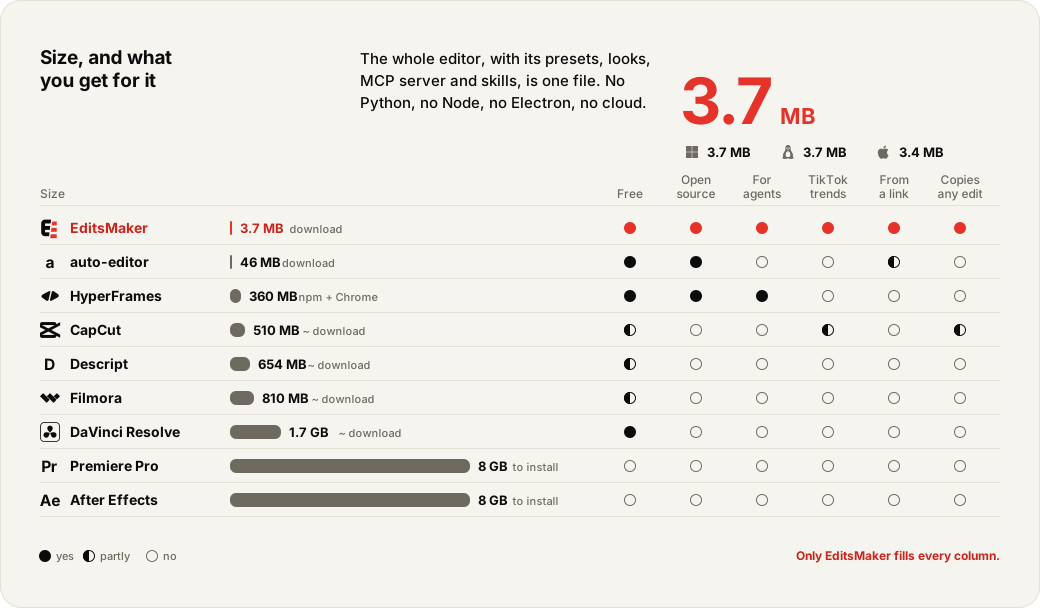
Saw an edit you love? Hand edits its link. It reverse-engineers every cut, flash, zoom, slide and shake into a preset, then puts your footage into the same shape. No other editor does that.
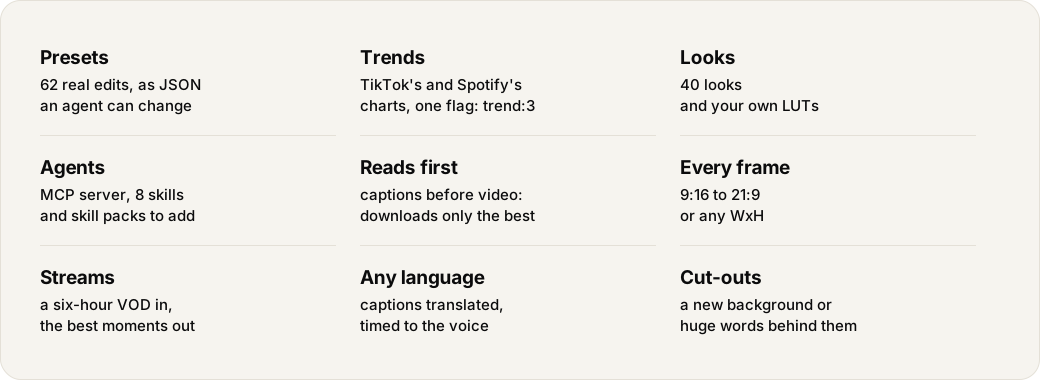
Streamed for six hours? Give edits the VOD. It hears where you got loud, where you said "no way", where chat lost it, leaves out the spoilers, and hands back the moments worth posting with a caption written for each. Then it cuts them with your facecam over the game, and --translate puts the captions in any language.
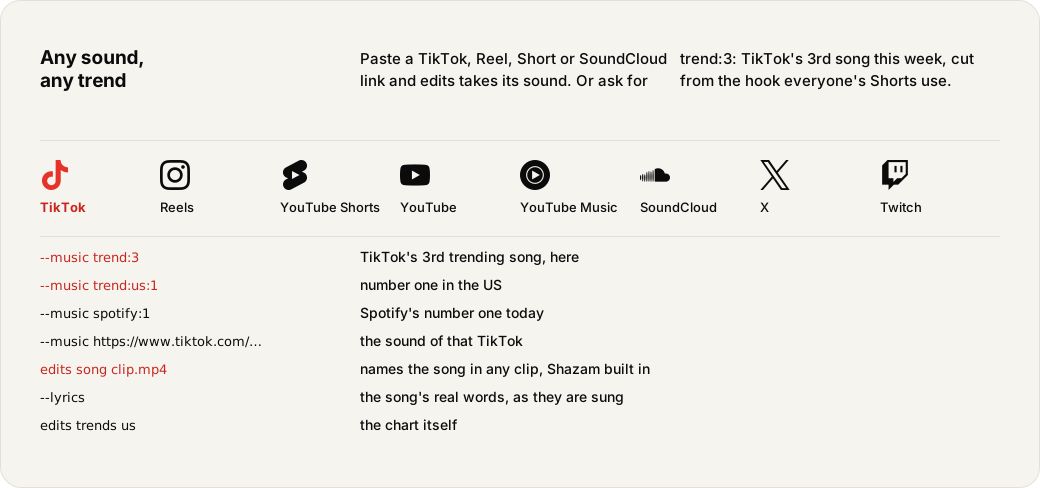
Trending songs come in from the part everyone knows: edits asks Shazam where the Shorts using a song start and cuts from that hook, not just the loudest bar. --loop makes the end run into the start so it plays round seamlessly, --long passes the minute TikTok's Creator Rewards pays for, --lyrics writes the song's real words as they are sung, and --bg, --behind and --outline cut the person out to put a new background, huge words or a glowing edge around them. edits review opens a render in its own window so you can click a moment and say what to change, and edits stats @channel tells you which presets, songs and looks your viewers actually watched.
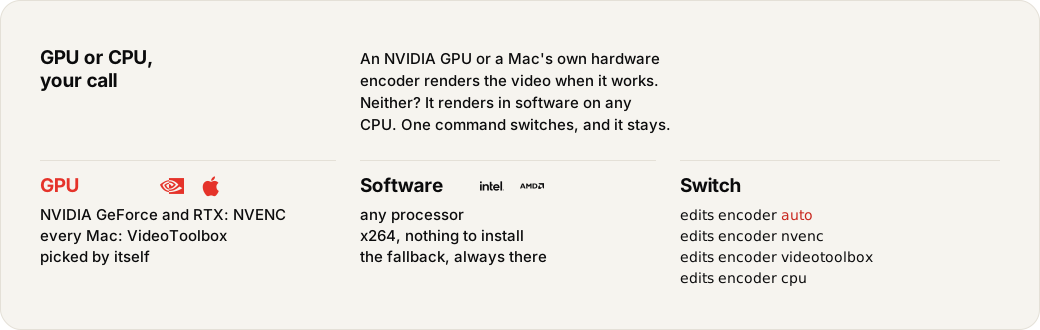
Heard a song in it? edits song names it, Shazam built in, and --music brings the clean original. Cuts land on the kick itself, come faster where the song gets loud and hold where it breathes. --denoise takes the score and room noise out from under a spoken line and leaves the song alone. On a Mac it renders on Apple's own hardware encoder, on a PC on your NVIDIA GPU.

Everything it does
Install

 macOS and Linux
Terminal
curl -fsSL https://raw.githubusercontent.com/OnurByte/EditsMaker/main/install.sh | sh
 Windows
PowerShell
irm https://raw.githubusercontent.com/OnurByte/EditsMaker/main/install.ps1 | iex
Prompt Install
No terminal needed. Paste this into Claude Code, Codex, Cursor or any agent and it installs EditsMaker, connects it and learns its skills.
Install EditsMaker from github.com/OnurByte/EditsMaker, then run "edits mcp install" and "edits skills install".

Command line
Replay a preset over a channel's videos:
edits https://www.youtube.com/@channel --preset spin-slide-shake
Cut it to TikTok's 3rd trending song:
edits https://www.youtube.com/@channel --preset spin-slide-shake --music trend:3
Colour and frame:
edits https://www.youtube.com/@channel --preset spin-slide-shake --look tealorange --aspect 4:5
Read 12 videos' captions, download only the best 4:
edits https://www.youtube.com/@channel --preset spin-slide-shake --videos 12 --use 4
Calmer moves (2 is wilder):
edits https://www.youtube.com/@channel --preset spin-slide-shake --intensity 0.6
A sad music montage without a preset:
edits https://www.youtube.com/@channel --music song.mp3 --sad
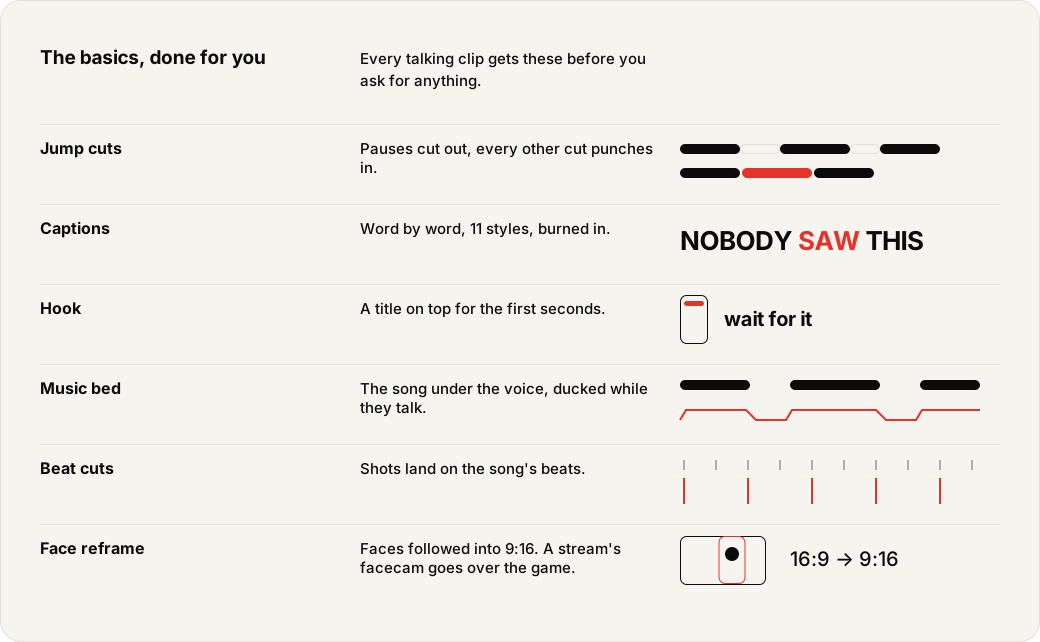
Talking clips: pauses cut, word-by-word captions, a hook on top, music under the voice:
edits https://www.youtube.com/@channel -n 3 --captions hormozi --bed trend:7
Caption styles: hormozi, mrbeast, karaoke, box, minimal, neon:
edits https://www.youtube.com/watch?v=VIDEO_ID --captions mrbeast
Hits on the hardest beats, speed ramps and words on screen:
edits https://www.youtube.com/@channel --preset spin-slide-shake --velocity --fx shake,rgb,freeze --line "Nobody saw this coming."
Slow, faster, hidden faces, a cleaner finish:
edits https://www.youtube.com/watch?v=VIDEO_ID --speed 1.2 --blur-faces --stabilize --denoise --codec h265
Premiere's finishing moves as flags: a picture in picture, a transition on every soft cut, a tone curve, a colour
pop, phonk bass, the song a step lower and a room behind it:
edits <link> --music trend:2 --pip reaction.mp4@2-8:0.75,0.2,0.35 --transition circleopen --curves vintage \
  --pop red --bass 6 --pitch -2 --reverb
Words that land: the caption and the spoken line slam in on the punchline, dark footage brought up first:
edits <link> --preset karakter-buyuk --say [email protected] --say-text --caption "bu adam 🗿@0-2.5" --anim slam --fix
Draw on it to point things out: an arrow, a ring, a cross, a burst, or your own .svg (edits looks lists them):
edits draw clip.mp4 "[email protected]:0.62,0.3,0.3~pop" "circle@3-5:0.5,0.4,0.6#ffffff" "question@8-10:0.75,0.2,0.2~slam"
What is trending on TikTok (or Spotify), and which song plays in an edit you like:
edits trends
edits trends spotify
edits song https://www.tiktok.com/@someone/video/123
Colour looks, caption styles, hits and stickers, including 24 looks from Alight Motion colour packs:
edits looks
Reverse-engineer an edit you like into a preset (its cuts, flashes and every shot's zoom, slide, turn and shake),
then replay it over your own footage:
edits learn liked-edit.mp4
Or make a preset from scratch for your footage: the video sets the rhythm, other presets lend the moves.
edits preset create footage.mp4 --name mine --like spin-slide-shake,flash-velocity-square
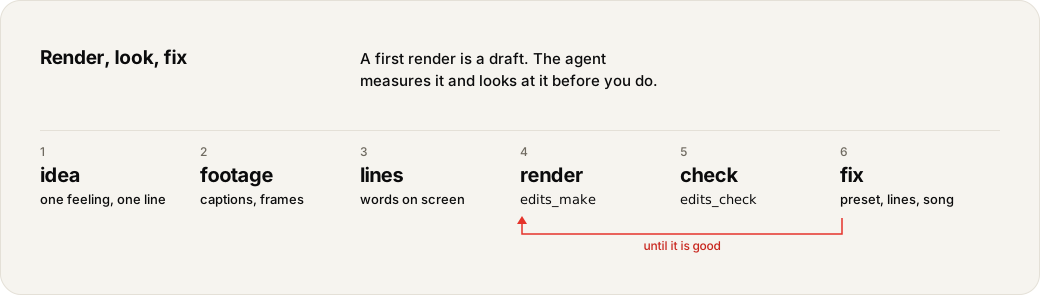
Measure a finished clip: length, loudness, cut rhythm and a contact sheet to look at (the same as the edits_check tool):
edits check ~/Videos/edits/2026-11-16/"21.04 Video title"/01-VIDEO_ID.mp4
Look at moments of the footage before picking shots by hand (edits_frames): one row of frames per time, in one jpg:
edits frames VIDEO_ID 5:36 390+4 414
Find where a line is said, ready for --say (edits_words), and change a preset without a script (edits_preset_set):
edits words VIDEO_ID --find "say my name"
edits preset set sert-bw total=12 shots.*.speed=2 --as sert-fast
Timelines for other editors beside each clip (fcpxml, edl, captions as srt or vtt):
edits https://www.youtube.com/watch?v=VIDEO_ID --export fcpxml,srt,vtt
A look as a .cube LUT for Premiere, DaVinci Resolve or CapCut:
edits cube rajjcc-4
Speaking another language? Set it once (it also picks the country for trend:N); the words for each language live
in presets/lang.json, the model prompts in presets/prompts.json:
export EDITS_LANG=tr
Presets:
edits preset list
One preset in full:
edits preset show spin-slide-shake
Save a changed preset:
edits preset save my-preset.json
Import Alight Motion projects, CapCut drafts (the draft folder or its zip) or Premiere presets:
edits preset import presets.zip
Take a whole editing pack in (sound effects, music, overlays, transitions, green screens, memes, images, fonts and
presets) and use it by name:
edits library add pack.zip
edits library sfx whoosh
edits <link> --music "montagem rave" --overlay "vhs texture:0.5" --overlay "burn [email protected]"
edits <link> --whoosh "main swoosh" --boom "bass drop"
Meme edits in one command: words with emoji, the spoken line on screen, math flashing in on the cuts, subliminal
frames, an intro from another video and the EditsMaker card at the end:
edits <link> --preset karakter-buyuk --say [email protected] --say-text --math --caption "sayın barış özbay 🗿@0-3.5" \
  --flash-text "5.2:dışarısı bir simülasyon" --intro "[email protected]" --intro-bed "fluffing a duck" \
  --intro-caption "avenox 🤡" --outro edits
The files stay on your machine in ~/.config/edits/library. Textures run screened under the whole edit, a
transition or meme plays once where you put it, green screens are keyed.
Check the tools:
edits doctor
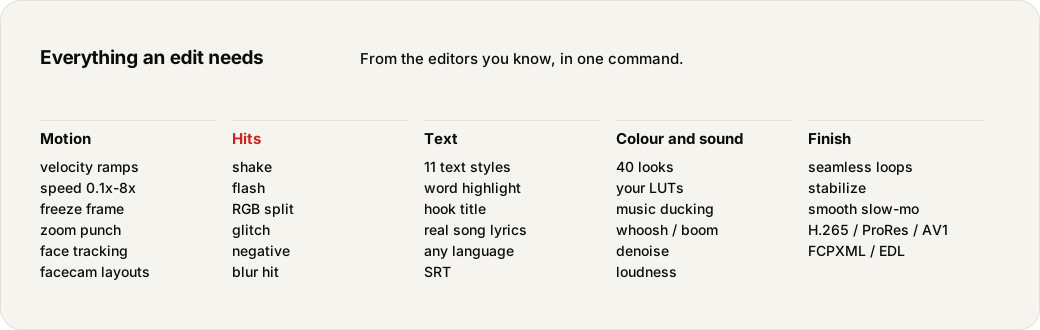
What a Premiere Pro editor reaches for, and where it is in edits. Every row runs from the command line, the MCP
server and preset JSON; no timeline to drag.
| Premiere | edits |
|---|---|
| Razor and ripple delete, jump cuts | automatic; --no-jumpcuts keeps the pauses |
| Text-based editing (cut by the transcript) | --say ID@A-B picks whole words; +G+ joins lines with a gap |
| Speed / Duration, Time Remapping | --speed, --velocity, a preset shot's speed and ramp curve |
| Reverse speed | a preset shot's "reverse": true |
| Frame hold | --fx freeze on the hardest beats |
| Optical flow | --smooth (motion-interpolated frames), --fps |
| Motion: scale, position, rotation keyframes | a preset shot's zoom, x, y, rot curves with easing; 178 Premiere cut moves built in |
| Video transitions | --transition with every ffmpeg xfade: dissolve, wipes, slides, push, iris, pixelize, squeeze |
| Picture in picture, nested video track | --pip FILE[@FROM-TO][:X,Y,SIZE] |
| Blend modes, overlays, light leaks | --overlay NAME[@FROM-TO][:OPACITY], screened; alpha clips laid on top |
| Ultra Key (green screen) | green screens from the library are keyed automatically |
| Auto Reframe | faces followed into any --aspect or --size; --fit keeps the whole frame |
| Warp Stabilizer | --stabilize |
| Lumetri: basic correction | a preset shot's exposure, contrast, saturation, kelvin |
| Lumetri: curves | --curves vintage or your own points "0/0 0.4/0.3 1/1"; per shot "curves" |
| Lumetri: HSL secondary | --pop red keeps one colour, the rest grey; per shot "pop" |
| Lumetri: creative look, LUTs | --look (40 looks), --lut FILE.cube, edits cube writes one out |
| Gaussian blur, mosaic | --blur-faces, --blur-box, per shot blur, pixelate |
| CapCut: split screen, mirror | per shot split (2x2, 3x3 tiles), mirror (kaleidoscope) |
| CapCut: cinema bars, fade in/out | per shot letterbox, fade_in, fade_out |
| CapCut: strobe, comic, VHS, light leak | per shot strobe, comic, scanlines, leak; --fx strobe,bw,pulse on the beats |
| Essential Graphics, captions | --captions (6 styles), --caption TEXT@FROM-TO, --text, --line, --svg shapes |
| Animated titles (text presets) | --anim pop, slam, slide, drop, blur, type; one drawing its own with ~pop |
| Title safe margins | words stay above TikTok's and Reels' caption and buttons |
| Lumetri: Auto | --fix brings dark, flat or dull footage up before the look |
| Essential Sound: dialogue | --denoise (a voice line through DeepFilterNet: noise and score gone, song untouched) |
| Auto-ducking | music ducks under the voice in every voice edit |
| Parametric EQ, bass boost | --bass DB |
| Pitch shifter | --pitch N semitones, tempo kept so cuts stay on the beat |
| Reverb | --reverb |
| Loudness normalisation | every edit lands at -14 LUFS; edits study learns yours |
| Scene edit detection | edits learn edit.mp4 finds every cut and flash and makes a preset of them |
| Beat detection | cuts snap onto the kick itself, and come faster where the song gets loud |
| Identify music (Shazam) | edits song clip.mp4 names the song in any clip or link |
| Trim without re-encoding | edits cut video.mp4 1:05-1:12 (lossless, like LosslessCut) |
| Export: H.264, HEVC, ProRes, AV1 | --codec, --quality, --encoder (NVIDIA NVENC, Apple VideoToolbox, or CPU) |
| Export to other editors | --export fcpxml,edl,srt,vtt |
Not there yet: free masks and rotoscoping, tracking a point other than a face, multicam sync, proxies, and
opening a .prproj.
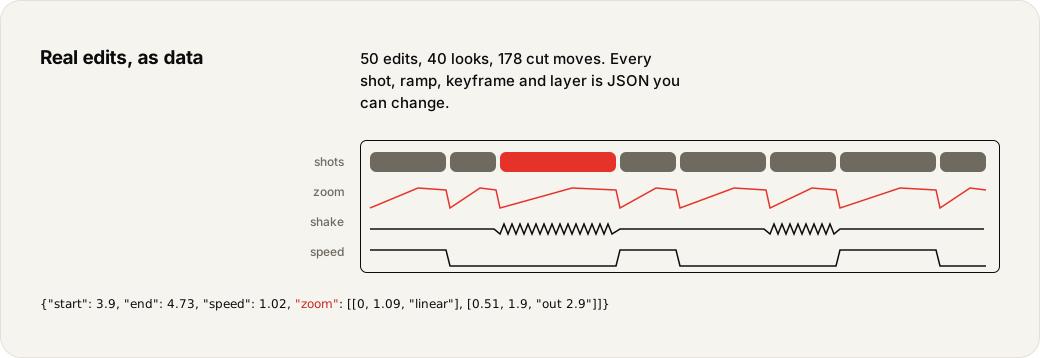
50 edits (anime and 9:16 community edits made in Alight Motion and CapCut, and ones learned from real edits) and 178
cut moves (Premiere transitions), kept as JSON in presets/ and built into the binary. Nothing is fixed: print one whole, change shots, speed, zooms, shakes, flashes,
look or song, then use the file for one edit or save it. With another song, cuts move onto its beats.
Each is named for what it does (shake-zoom-rush, punch-zoom-60s, slow-reveal-anime), and edits preset list
tags it by pace, frame and moves; the name of the project it came from still works with --preset.
edits preset show spin-slide-shake > my-preset.json
edits https://www.youtube.com/@channel --preset my-preset.json
edits preset save my-preset.json
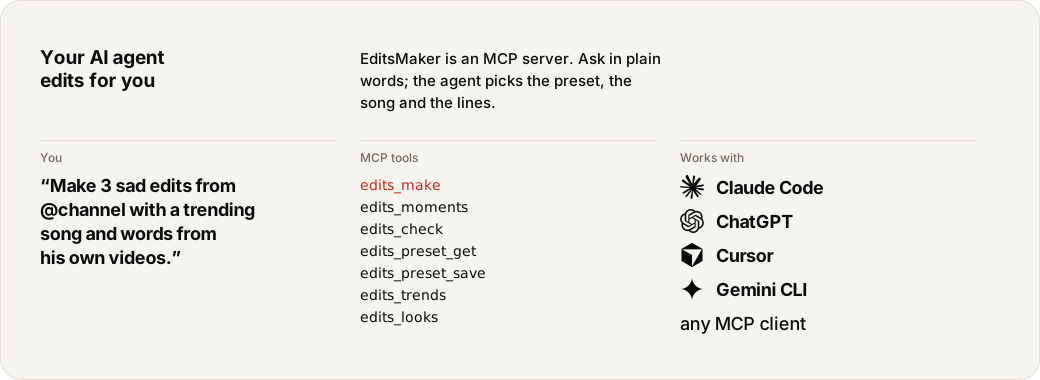
The installer adds it to every agent it finds: Claude Code, Codex, OpenCode, Cursor, Windsurf, Gemini CLI, Claude
Desktop and VS Code, with the skills in each one's skill folder; every update brings the new skills. Again after installing a new agent:
edits mcp install
edits skills install
More skills from other projects, fetched when you want them: Remotion (videos in React) and YouTube research
(niches, titles, thumbnails, comments):
edits skills catalog
edits skills add youtube-research
Any other client: command edits, args ["mcp"].
Tools: edits_make, edits_presets, edits_preset_get, edits_preset_save, edits_preset_set, edits_preset_create, edits_learn,edits_check, edits_frames, edits_words, edits_moments, edits_song, edits_cut, edits_looks, edits_library, edits_trends, edits_doctor. An agent reads a preset, changes it for
the footage, renders with it and measures the result; the output folder is always edits' own choice.
No ffmpeg or yt-dlp? The installer downloads them. Nothing else to install.
It keeps itself up to date: once a day it installs a newer release from GitHub (checksum checked).edits update updates now, edits update off turns it off, edits info shows the version and where to find me
(GitHub, X).
November 2026. EditsMaker and auto-editor 31.9: GitHub releases, Windows x64. HyperFrames 0.9.58: npm install plus the Chrome it downloads, measured. CapCut 8.9, Descript 114 and Filmora 15.7: as listed by download sites. DaVinci Resolve: Mac App Store. Premiere Pro and After Effects: the disk space Adobe asks for; their MCP is a preview. auto-editor takes links only with yt-dlp beside it; CapCut copies an edit only as a creator's template. CapCut's TikTok sounds are partly there: its desktop app does not link TikTok. Pictures drawn by design/readme.py.
The mark, colours, type, layout and words, and the research behind each rule: BRAND.md.
Colours and sizes as code: design/tokens.css. Every README picture is drawn bypython3 design/readme.py.
cargo install --git https://github.com/OnurByte/EditsMaker
The release profile is tuned for size (opt-level = "s", LTO, one codegen unit, stripped): the rendering is
ffmpeg's, so a small binary costs almost nothing in speed.
Only cut what you have the rights to: songs, footage and presets belong to their makers.
ContributingFixes, presets and looks are welcome: see CONTRIBUTING.md.
Yorumlar (0)
Yorum birakmak icin giris yap.
Yorum birakSonuc bulunamadi