family-os
Health Warn
- License — License: AGPL-3.0
- Description — Repository has a description
- Active repo — Last push 0 days ago
- Low visibility — Only 7 GitHub stars
Code Warn
- process.env — Environment variable access in apps/e2e/playwright.config.ts
Permissions Pass
- Permissions — No dangerous permissions requested
No AI report is available for this listing yet.
A self-hosted, open-source family organizer: shared calendar, lists, chores, meals, a kitchen-wall display, and AI that suggests while people approve.
 FamilyOS
A self-hosted, privacy-first organizer for families. FamilyOS brings a household's calendar,
tasks, shopping, chores, recipes and paperwork into one web app that runs on your own hardware (a
Raspberry Pi is enough), with your data in one SQLite file. Share a school notice, a photo of a
letter or a voice note, and an AI model of your choice turns it into suggestions: an event, a
task, things to buy. Nothing changes until someone in the family approves it.
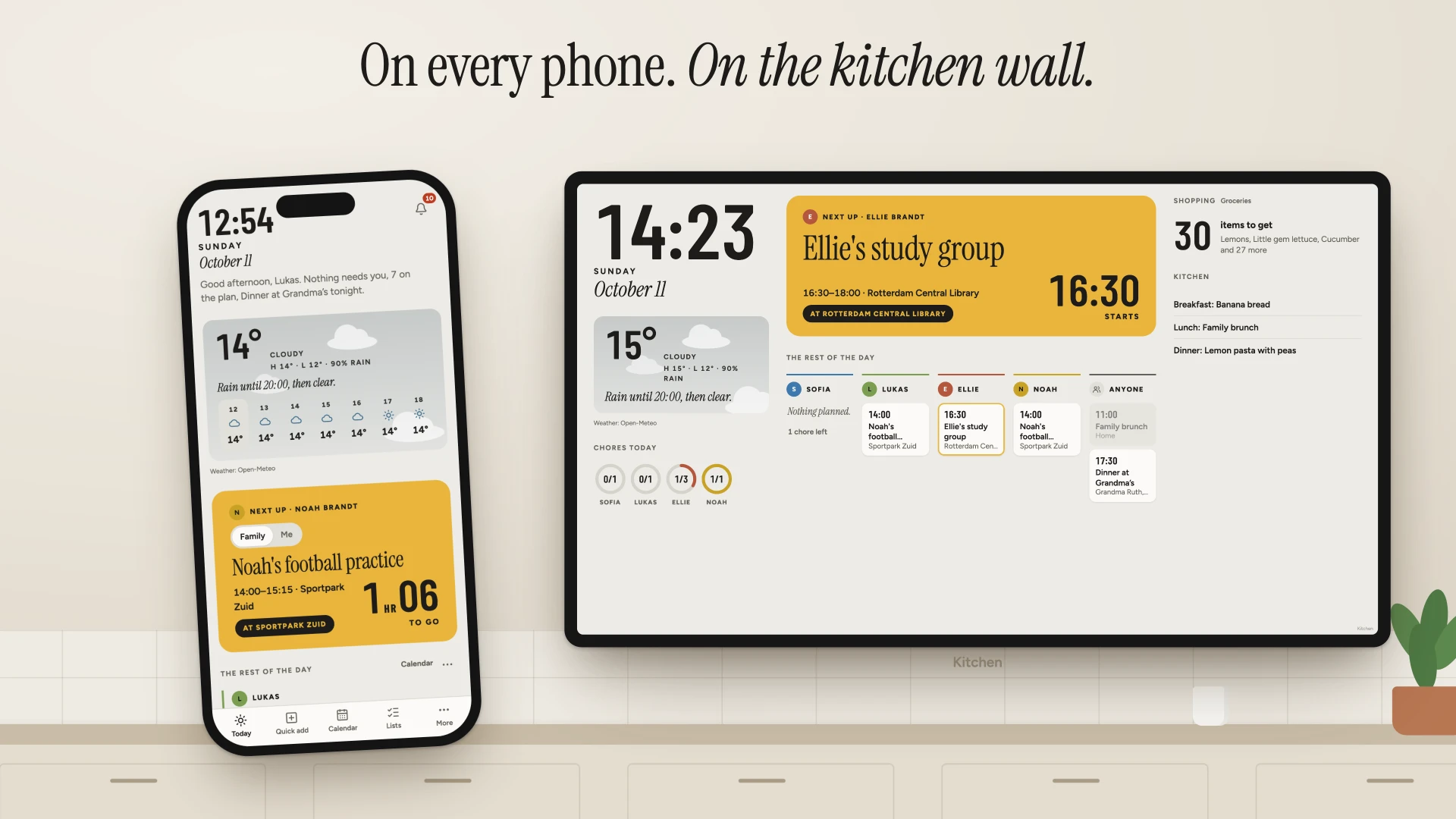
https://github.com/user-attachments/assets/25be65a8-3f14-42ee-a2e2-a92d369a6ce8
[!WARNING]
Beta. FamilyOS works, but it is beta software. Until 1.0 there is no
backward-compatibility guarantee: the data format, the API, the MCP tools and the pack formats
may change between 0.x versions. Upgrades migrate your data automatically, and any change that
needs a manual step is listed under "Breaking changes" in the release notes. Back up before
every upgrade. FamilyOS has not had an independent security audit; keep it off the open
internet unless it is behind HTTPS (a VPN such as Tailscale or WireGuard is better). Read the
disclaimer and the security policy before you put your family's
data in it.
Features
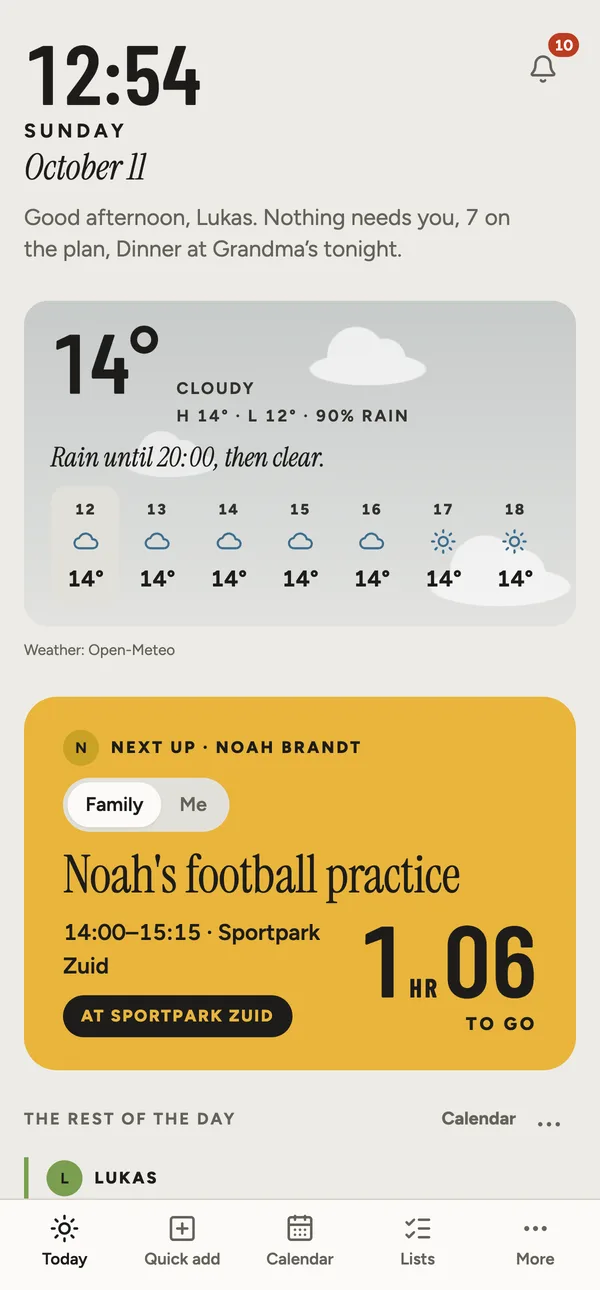
- Today. One page you can read from the door: the next thing with a countdown, each person's
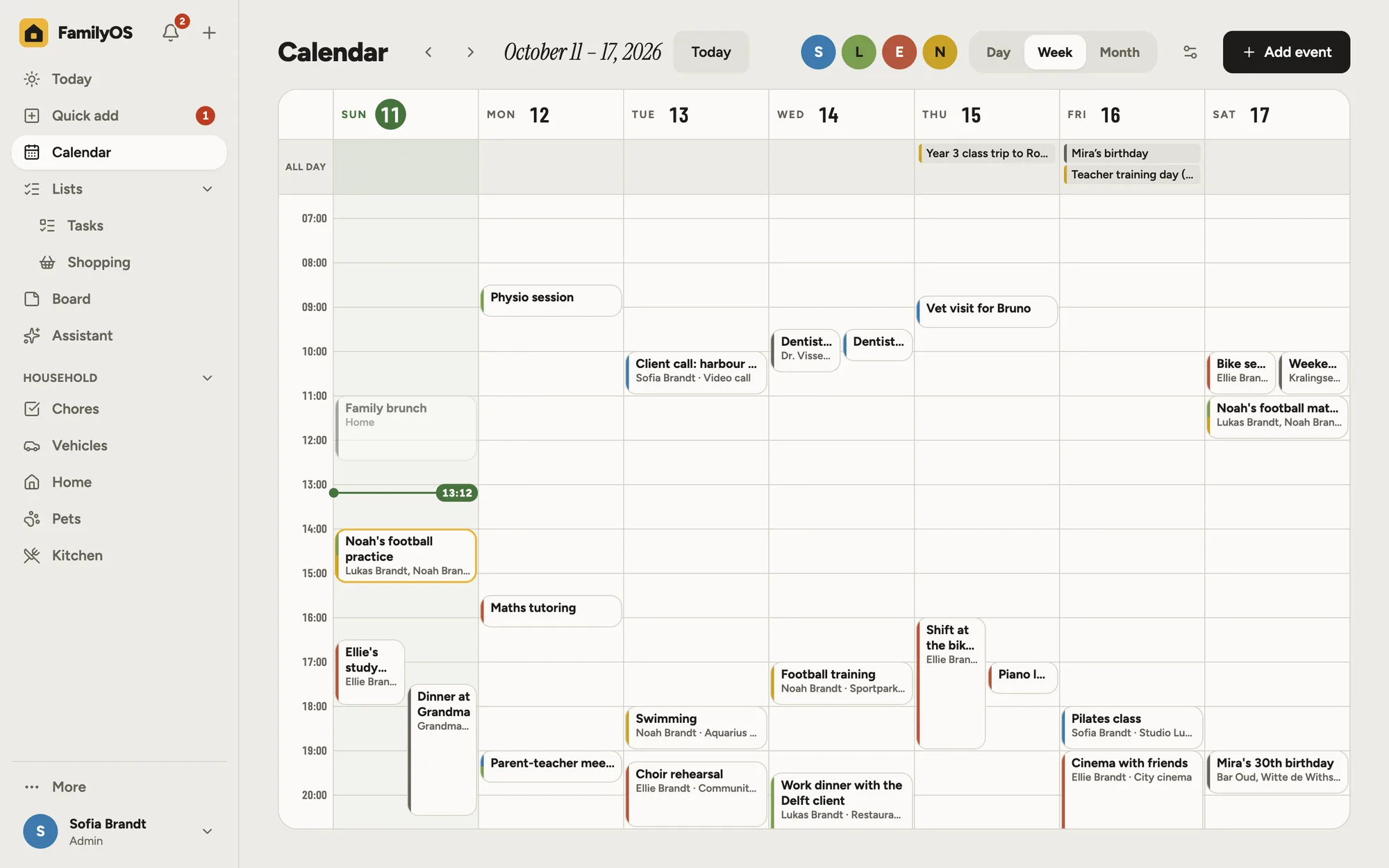
day, chores as rings, the weather in a sentence, and what needs you. - Calendar. A shared family calendar with per-person colours, repeating events and
reminders. Subscribe to school, holiday or Google and iCloud calendars, and see the family
calendar on your phone's own calendar app. - Lists. Tasks and shopping lists for everyone, updated live on every device, and usable
offline in the shop. - Quick add. Give it a message, a photo, a document or a voice note, from the app, your
phone's share sheet, Telegram or a mailbox. It lists what it found; you tick and add.
Everything it suggests can be undone. - Chores and kitchen. Rotating chores with one-tap done; recipes, a weekly meal plan and
ingredients onto the shopping list. - Household records. Vehicles, pets and the home, with the duties that come back
(insurance, inspections, vaccinations, warranties), reminders before they are due, and the
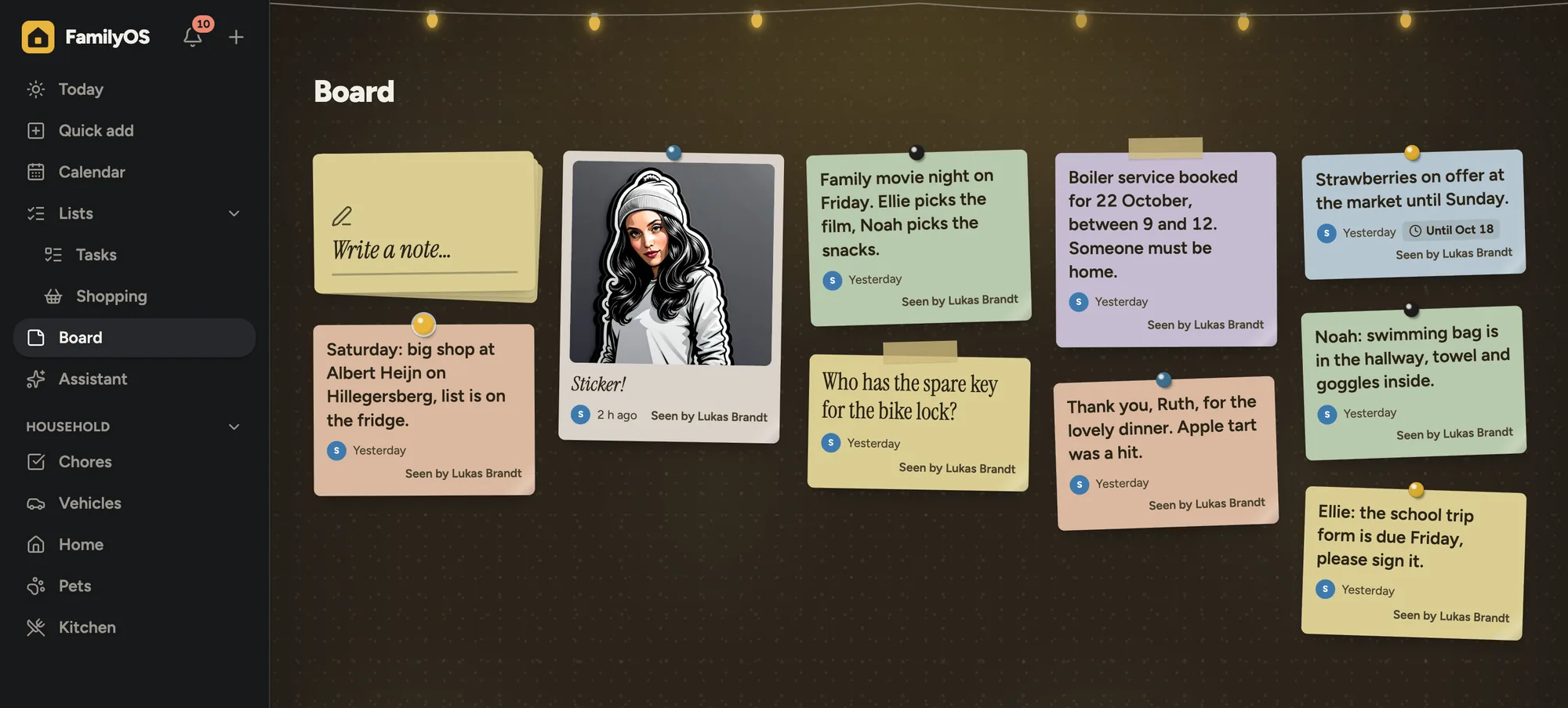
papers that go with them. - Family board. Short notes for everyone, with a photo, an end day and a pin.
- Assistant. Ask in plain language ("what's on this week?", "put milk on the list") and
search by meaning. Every change it proposes waits for your approval. - Bring your own AI agent. Connect Claude Desktop, Claude Code or any other MCP client with
a personal app key. It sees only what you may see, and its changes are suggestions too. - Family displays. Turn a wall tablet or an old TV into a view-only screen with the day,
photos and the weather. It is paired with a code and can never change anything. - For any household. Admin, Member, Supervised and Guest roles and your own roles on top;
PIN sign-in only on devices you trust at home; notifications in the app, on phones and on
Telegram, with quiet hours. - Yours to run. Nightly backups, optionally encrypted and copied to S3 or WebDAV; any
language as a pack; any look as a style and a palette.
Screenshots
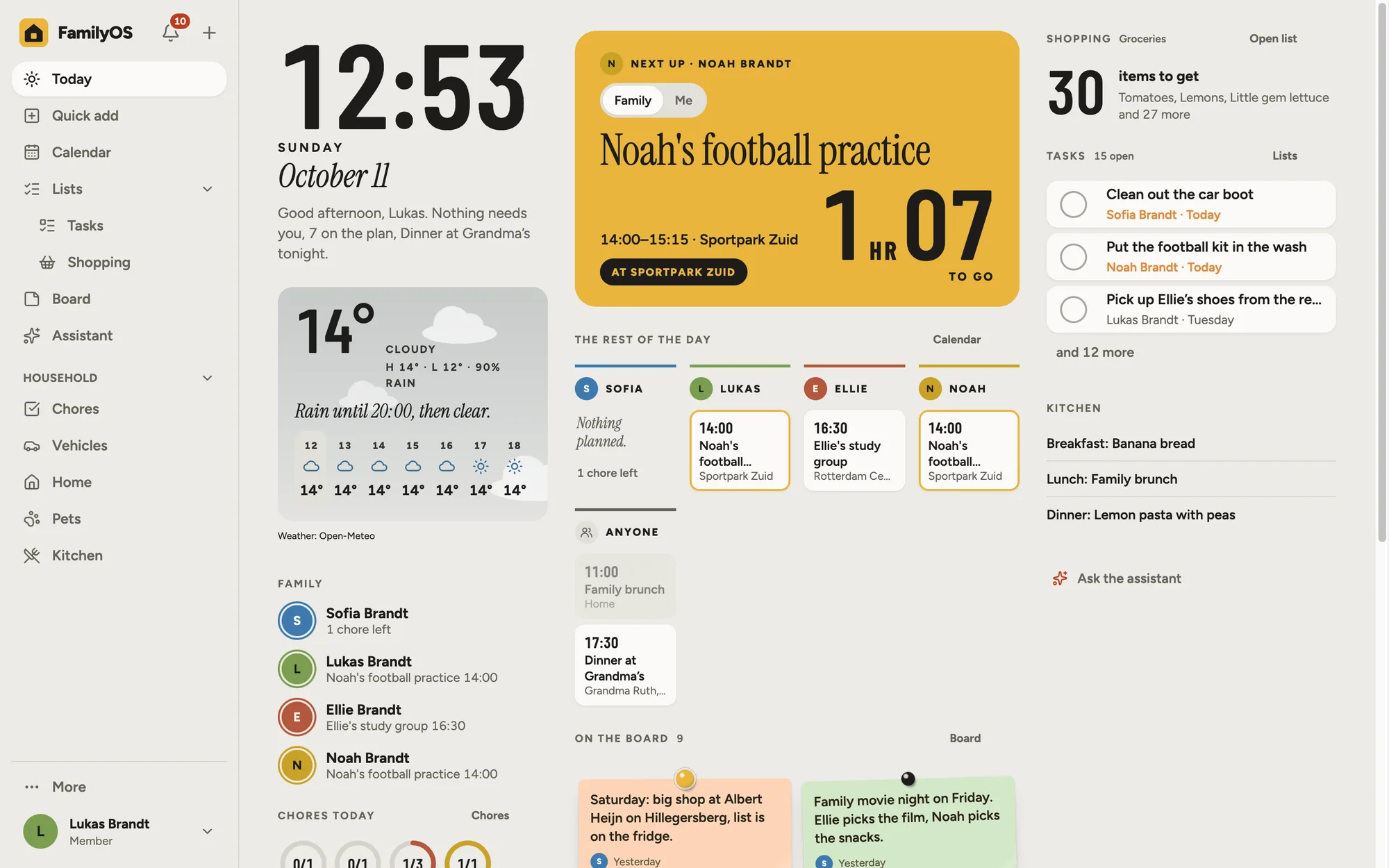
Today arranges itself in one of three styles, with any colour palette, by day and by night:
| Lanes | Wall, at night |
|---|---|
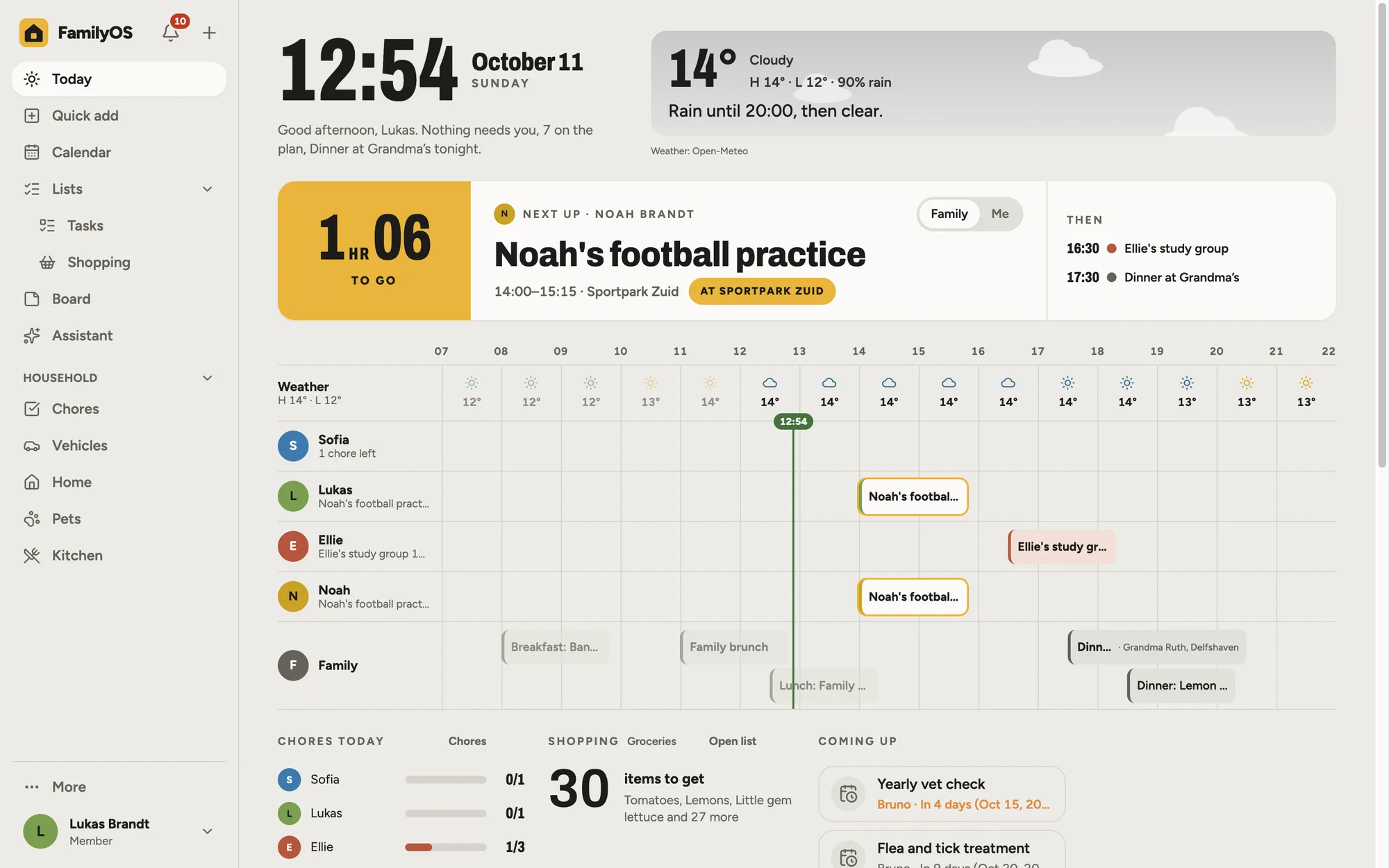 |
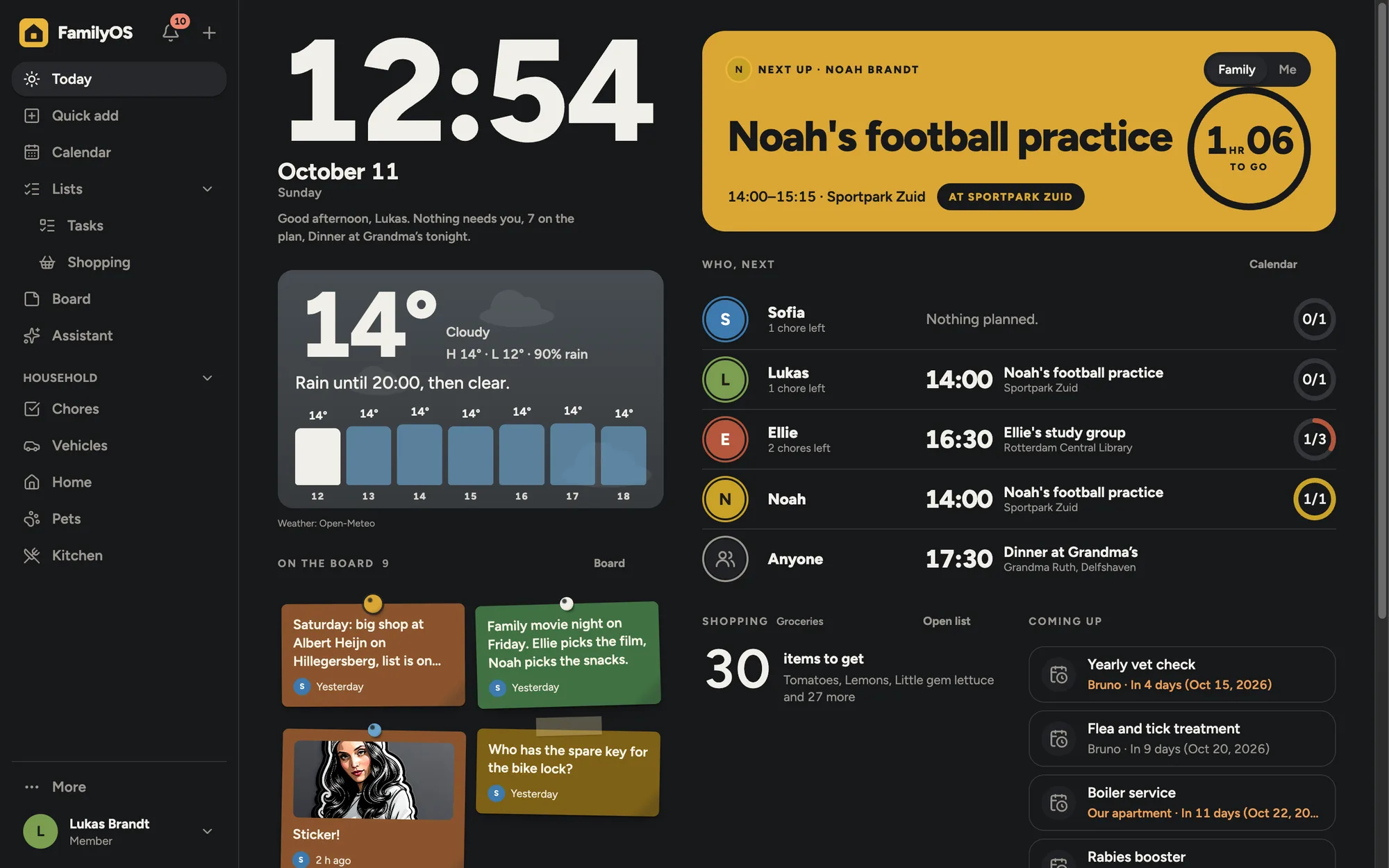 |
| The family calendar | The board, at night |
|---|---|
 |
 |
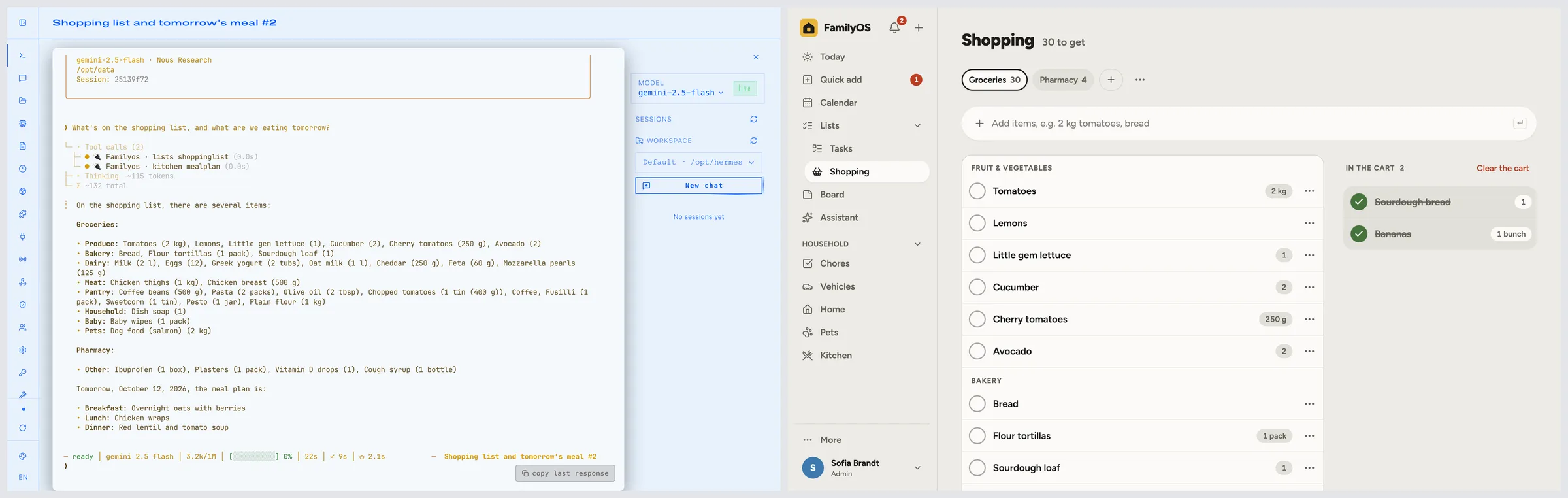
Bring your own AI agent. Connect the agent you already use, such as
Hermes Agent, over MCP with an app key, and ask it
about your family's day. Here it answers from the family's shopping list and meal plan (left),
which FamilyOS shows on the right:
Quick start (Docker Compose)
git clone https://github.com/onurceri/family-os && cd family-os
docker compose up -d
docker compose logs famos
Open the address the log prints (it ends in /setup?code=…), choose a language and create the
first admin account. The one-time setup code is also stored in the data volume as setup-code,
so nobody else can claim a fresh instance that is reachable before you are. Then add the family
under Settings → Family → Members.
Everything lives in the famos-data volume (/data in the container): the database, shared
files, nightly backups, installed packs and a generated secret.
To install FamilyOS as an app on phones and share to it, it must be served over HTTPS (for
example through Tailscale or behind Caddy) with FAMOS_BASE_URL set to that address. The
user guide walks through installation, HTTPS, backups and everything else.
Configuration
Most settings live in the app. The server reads these environment variables:
| Variable | Default | Purpose |
|---|---|---|
FAMOS_BASE_URL |
http://localhost:<PORT> |
The public address of this instance (cookies, origin checks, links). Must be HTTPS for phones |
FAMOS_SECRET |
generated into /data/secret |
At least 32 characters. Signs sessions and encrypts saved keys and passwords. It is never inside a backup: keep a copy to restore on new hardware. Changing it signs everyone out and saved keys must be entered again |
FAMOS_SETUP_CODE |
generated into /data/setup-code |
The one-time code first-run setup asks for (8 to 100 characters) |
FAMOS_TRUSTED_ORIGINS |
– | Extra allowed origins, comma-separated |
FAMOS_TRUSTED_PROXIES |
– | Reverse proxies (IPs or CIDRs, comma-separated) whose X-Forwarded-For is believed, for sign-in rate limits. Set it behind Caddy, Traefik or nginx |
FAMOS_ROLES |
api,worker |
Run the API (api), the background worker (worker), or both |
FAMOS_DATA_DIR |
./data (/data in Docker) |
Where the database, files, backups, packs and the generated secret live |
FAMOS_BACKUP_HOUR / FAMOS_BACKUP_KEEP |
3 / 7 |
Hour of the nightly backup and how many to keep |
FAMOS_BACKUP_PASSPHRASE |
– | Only for restore of an encrypted .age backup (otherwise it asks, or use --identity <file>) |
FAMOS_AI_PROVIDER |
– | openrouter, ollama or openai-compatible: one AI provider kept in line with these variables on every start (shown read-only in the app). Providers added in the app are separate |
FAMOS_AI_BASE_URL / FAMOS_AI_API_KEY |
the kind's default / – | That provider's address and key (stored encrypted) |
FAMOS_AI_MODEL (and _FAST, _VISION, _SMART) |
– | Its model for every role, or per role. Speech-to-text and search models are chosen in the app |
PORT / HOST |
3000 / 0.0.0.0 |
Where the server listens |
LOG_LEVEL |
info |
trace, debug, info, warn, error or fatal |
TZ |
UTC (compose) |
Time zone of the container. The family's own time zone is set in the app |
FAMOS_TELEGRAM_API_ROOT, FAMOS_EMAIL_FAKE_DIR and FAMOS_NOTIFY_DELAY_MS exist for tests
only; leave them unset.
Backups
A backup is written every night and before every upgrade that changes the database. By hand:
docker compose exec famos node /app/server/main.mjs backup
docker compose stop famos
docker compose run --rm famos restore /data/backups/<file>.tar
docker compose start famos
Restoring never deletes the current data; it is kept next to it as *.pre-restore-<timestamp>.
Encrypted off-site copies are set up under Settings → System → Backups; see the
backup guide.
AI providers
FamilyOS works without AI: the calendar, lists and everything else are fully usable, and Quick
add keeps what you share. To turn shared things into suggestions, bring your own model:
- OpenRouter: cloud models, pay per use. Requests ask for zero data retention by default.
- Any OpenAI-compatible API: OpenAI, a hosted API, LM Studio, vLLM and others.
- Local models with Ollama: nothing leaves your home. Run it on a capable machine, or start
the bundled profile withdocker compose --profile ollama up -dand usehttp://ollama:11434/v1as the address.
Add a provider under Settings → AI and choose a model per task (reading text, reading
photos, quick steps, speech to text, search). The family decides per area what the AI may read
(Off, Local only or Any provider), whether photos, voice notes and names are sent,
and sets monthly limits. Every model call is listed for admins without its content. The AI
never changes anything by itself: what it proposes is a suggestion a person approves. See
AI and privacy.
Connect your own AI agent (MCP)
FamilyOS is a Model Context Protocol server at /mcp. An admin
allows AI apps under Settings → You → Connected apps; each person then creates an app key
for their agent (Claude Desktop, Claude Code or any MCP client that sends a bearer token). The
agent reads only what that person may see, in the areas open to the AI, and every change it
proposes is a suggestion the person approves. Keys expire, can be read-only, and can be revoked
at any time. See Bring your own agent.
Languages and themes
- Languages are packs. The code is English; every other language is a folder of JSON in
languages/(Turkish is bundled) or installed from the app. Each person can use their own
language, and date, time and number formats follow the family's region, separately from the
language. Make a pack withpnpm lang:template <code>and check it withpnpm lang:check <dir>; see Languages. - Looks are a style and a palette. A style (Broadsheet, Lanes or Wall) arranges Today and
the family display and sets the type; a palette is a theme pack of colour values inthemes/
(Ev Işığı, Coast, Forest, Plum, Paper, High contrast) or installed from the app. Any style
works with any palette, for the family, each person and each display. Packs are data only and
are contrast-checked; see Appearance.
Development
Requirements: Node.js 24 or later and pnpm 12 (corepack enable, or npx [email protected]).
pnpm install
pnpm dev          # API on :3000 (tsx watch) and web on :5173 (Vite, proxies /api)
pnpm test         # unit and integration tests (Vitest)
pnpm lint         # Biome, Prettier (.svelte), dependency-cruiser
pnpm typecheck    # TypeScript and svelte-check
pnpm e2e          # essential flows in Playwright against the production build
pnpm gen          # regenerate openapi.json and the typed API client
pnpm build        # web app and bundled server
TypeScript end to end: Hono, Kysely on SQLite and better-auth on Node.js; a SvelteKit SPA with
Tailwind and shadcn-svelte; i18next; the Vercel AI SDK.
Before contributing, read CONTRIBUTING.md and AGENTS.md (the
rules CI enforces). How it is built, and why, is in docs/architecture.md;
the look and the page rules are in docs/design/design-system.md.
Documentation
- User guide: installation, HTTPS and phones, everyday use, members and
devices, backups, AI and privacy, notifications, Telegram, email, calendars, displays,
records, the assistant, MCP, languages, appearance and more - Architecture: how FamilyOS is built and why
- Design system: page templates, components and tokens
- Releasing
- Security policy · Disclaimer · Changelog
License
GNU AGPL v3.0 or later. You may self-host, modify and share FamilyOS; if you run a
modified version for others over a network, you must offer them its source code.
Reviews (0)
Sign in to leave a review.
Leave a reviewNo results found