fleo-by-flyweel
Health Gecti
- License — License: Apache-2.0
- Description — Repository has a description
- Active repo — Last push 0 days ago
- Community trust — 24 GitHub stars
Code Basarisiz
- spawnSync — Synchronous process spawning in bin/fleo.js
- process.env — Environment variable access in bin/fleo.js
Permissions Gecti
- Permissions — No dangerous permissions requested
Bu listing icin henuz AI raporu yok.
Open-source, multi-model AI SEO + AEO content engine & TUI. Live SERP & community research, verified citations, BYOK routing, and drop-in publishing for any web stack. Built with love by Flyweel,.

The open-source AI SEO + AEO (Answer-Engine Optimization) content engine for any startup, founder, or marketing team.





60-Second Quickstart · How to Publish · Architecture · CLI Reference · Security
[!NOTE]
Early public release (v0.1.0): Fleo is live for early adopters and actively evolving. If you hit a bug, a framework quirk, or an edge case with your site stack, please open an issue or send a PR.
Fleo researches live search results, real Reddit and Quora discussions, and your own website to write fact-checked, citation-verified articles designed to rank on Google and get cited by ChatGPT, Perplexity, Claude, and Google AI Overviews, then exports ready-to-publish files for any website stack.
👋 A note from Reuben, CEO & Founder of Flyweel:
I'm a performance marketer by trade, not a software engineer. I built this for our own organic growth and it took us from almost zero to 9,000 search impressions a day in just 60-90 days and continues to power our growth so I wanted to share it in the hope it helps just one founder, marketer or developer. It is not Flyweel's product and I have nothing to sell you. As I am non-technical by trade, our engineering team has done a security review of this codebase, it might not be perfect. If you spot any issues, please feel free to let us know, open a PR to contribute, or start a Discussion!.
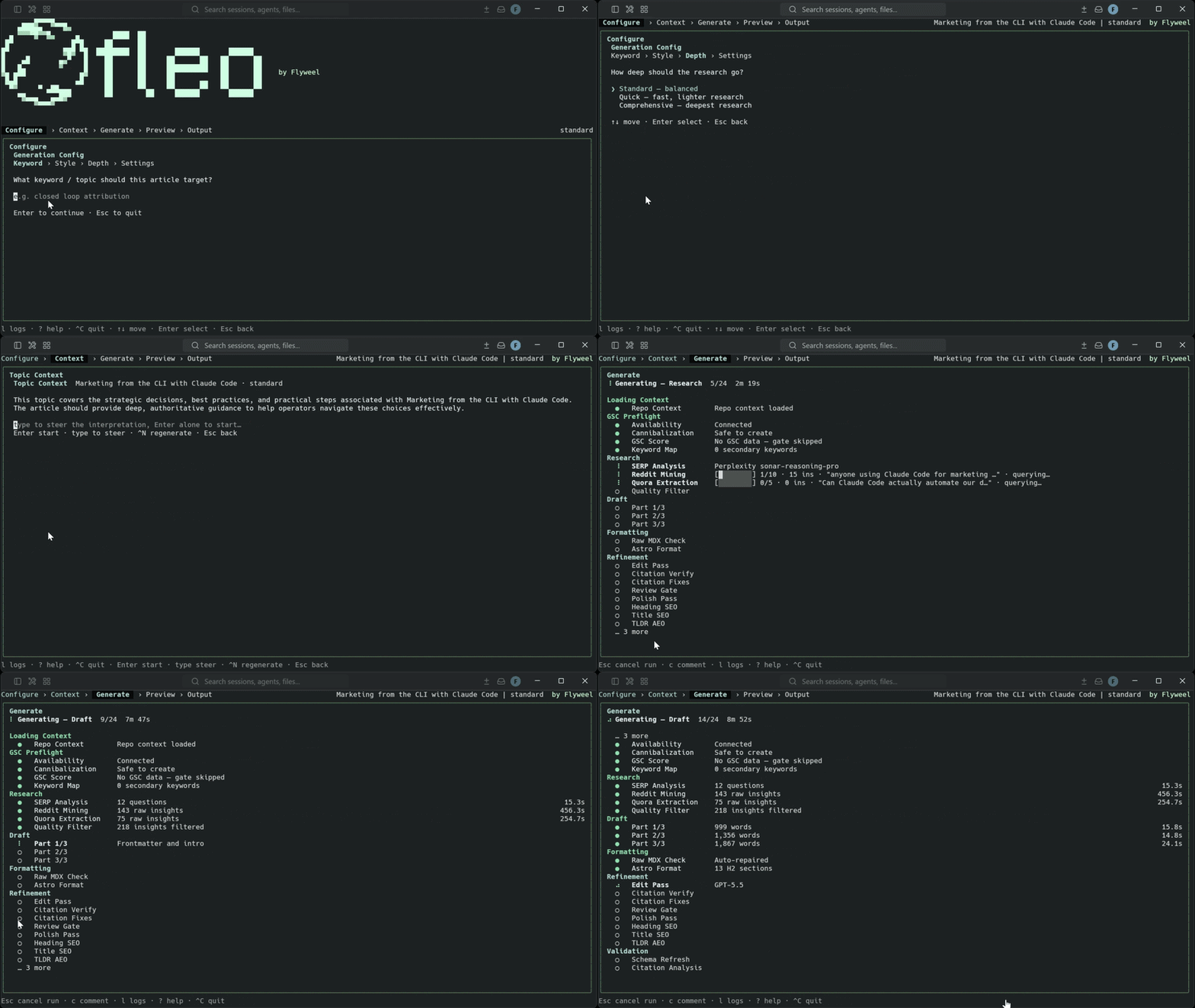
Table of ContentsSequel to
openairlabs/flyweel-agentic-seo-aeo-engine· Built and open-sourced by Flyweel
For Founders, Marketers & Non-Technical Builders
- 60-Second Quickstart (No Coding Required)
- What Fleo Does (In Plain English)
- Why Teams Use Fleo
- How to Publish to Your Website (Even Without Touching Code)
- Choosing the Right Article Style
- Interactive App Keyboard Shortcuts
- Companion Skills for Cursor, Claude Code, Lovable & OpenCode
For Developers, DevOps & Contributors
- System Architecture Overview
- The 7-Stage Generation Pipeline
- Repository Map
- Model Routing, BYOK & Per-Agent API Keys
- Multi-Framework Site Learner & Output Adapters
- Frozen JSONL Bridge Protocol (
tui_bridge.py) - CLI & Headless Automation Reference
- Security & Trust Boundaries
- Workspace Files & Environment Reference
- Local Development, Testing & Quality Gates
- Troubleshooting & FAQ
- Roadmap & Known Limitations
60-Second Quickstart (No Coding Required)
Before You Start (2 Things)
Install Node.js 22 or newer: Download the standard installer for Mac, Windows, or Linux at nodejs.org.
(You do not need to install Python or run terminal setup scripts; Fleo sets up its own private Python engine automatically on first launch.)Grab one API key from OpenRouter: Create an account, add $5 of credit (enough for ~20 full articles), and copy your
sk-or-v1-...key.
Launch Fleo
Open Terminal (Mac/Linux) or Windows Terminal / WSL (Windows), navigate to any folder where you'd like your articles saved, and run:
npx flyweel-fleo
What Happens Next: The 5-Step Guided Setup Wizard
On your first run, Fleo opens a full-screen, arrow-key guided wizard:
Step 1 · Engine Check: Automatically creates an isolated Python runtime inside
~/.fleo/venvso nothing conflicts with the rest of your computer.Step 2 · API Key & AI Models: Paste your single
OPENROUTER_API_KEY. Every pipeline step comes pre-configured with a[Default · Recommended]model, or you can open Choose Models per Step to switch models with the arrow keys (no model IDs to memorize).Step 3 · Your Company & Brand: Paste your website URL (e.g.
https://yourstartup.com) and Fleo scans your pages to learn your products, pricing, audience pain points, competitors, and tone. (No live site yet? Pick the 5-question interview instead.)Step 4 · How You Publish: Pick Agent Handoff Packet (
agent-handoff.md) (Recommended; works safely withNext.js,Astro,Webflow,Framer,Nuxt,SvelteKit,Remix, orMarkdown), or connect a local website repo for direct file publishing (Experimental, best-effort for standard blogs; see Option C).Step 5 · Write Your First Article: Type a topic (or press
Ctrl+Gto have Fleo brainstorm high-intent article ideas for your audience), pressEnter, and watch each research and writing stage complete live.
Tip: Need to change your API key, switch AI models, or re-scan your website later? Press
Ctrl+Sanytime from the home Configure screen (or runnpx flyweel-fleo setup).
What Fleo Does (In Plain English)
If you ask a standard AI chatbot to "write a blog post for my startup," three things usually go wrong:
It sounds like generic AI filler because it never read what real buyers are asking on Google, Reddit, or Quora today.
It makes things up, inventing fake statistics, broken links, or product features and pricing tiers your company doesn't actually offer.
It hands you a wall of text instead of a properly formatted webpage with search metadata, FAQs, citations, and structured data that search engines and AI assistants can read.
Think of Fleo as a 4-person editorial team inside one terminal app:
| Role Inside Fleo | What It Does For You |
|---|---|
| 1. Brand Researcher | Reads your website (e.g. https://yourcompany.com) once to learn what you actually sell, what it costs, who your buyers are, who you compete with, and what words you never use. |
| 2. Live Web & Community Miner | Searches live Google results ("People Also Ask" questions and competitor gaps) plus real Reddit and Quora threads to find the exact problems and phrasing real people use. |
| 3. Long-Form Writer & Line Editor | Writes the article in three structured parts so it never cuts off mid-thought, pauses to let you review and leave notes, and runs a separate humanizing pass to strip robotic phrasing. |
| 4. Fact-Checker & Web Publisher | Checks every cited link against the live sources gathered during research (deleting any invented URL), builds Google/AI Schema.org metadata and FAQs, and packages the post for your exact website builder. |
What are SEO and AEO?
SEO (Search Engine Optimization) helps your page show up when buyers type a question into Google or Bing.
AEO (Answer-Engine Optimization), also called GEO, structures your page with clear answer blocks, verified citations, comparison tables, and machine-readable
Schema.orgdata so ChatGPT, Perplexity, Claude, and Google AI Overviews quote and link to your company when answering buyer questions.
Fleo optimizes every article for both at the same time.
Why Teams Use Fleo
Zero Hallucinated Links or Fake Features: Every external citation is checked against a live research ledger before saving; invented URLs are automatically stripped. Product mentions are locked to your verified Brand Profile.
Pennies Per Article, Zero SaaS Lock-In: Fleo is 100% free and Apache-2.0 licensed. Bring your own OpenRouter key and pay raw model cost: roughly $0.23 per 2,500-word article on the default Balanced preset (or ~$0.76 on Max flagship models), instead of $200–$500/month content subscriptions.
Works With Any Website Stack: Native exports for Next.js, Astro, Webflow, Framer, Nuxt, SvelteKit, Remix, and Universal Markdown.
"Drop Into Any AI Builder" Mode (
agent-handoff.md): Don't want to connect Fleo to your codebase? Every run generates a singleagent-handoff.mdfile you can paste or drag into Lovable, Bolt, v0, Cursor, Claude Code, Windsurf, or OpenCode. It tells your builder exactly how to publish the post with full SEO/AEO intact.Optional Google Search Console Guardrails: Connect Search Console to automatically spot keyword cannibalization (so two of your own posts don't fight each other) and score real traffic opportunity before you spend a cent generating.
You Stay in the Driver's Seat: Ask Fleo to pitch article angles (
Ctrl+G), steer the angle in plain English, drop editorial notes while it runs (c), review the draft before final polish, and inspect a 0–100 Quality Scorecard before publishing.
How to Publish to Your Website (Even Without Touching Code)
Every time you save an article, Fleo creates a clean folder inside output/generations/YYYY-MM-DD_<slug>/:
output/generations/2026-11-15_your-article-slug/
├── agent-handoff.md          # Drop-in file for Cursor, Claude Code, Lovable, Bolt, Windsurf, or OpenCode
├── final.mdx (or .md)        # Ready-to-use article formatted for your chosen framework
├── schema.json               # Complete Google & AI Schema.org @graph structured data
├── <slug>.webflow.html       # (Webflow / Framer mode) Clean CMS Rich Text HTML
├── <slug>.cms.csv            # (Webflow / Framer mode) 1-click CMS collection CSV import
├── <slug>.head-schema.html   # (Webflow / Framer mode) Copy-paste <script type="application/ld+json"> snippet
└── metadata.json             # 0–100 Quality Scorecard, word count, models used, and exact USD cost
Pick whichever publishing workflow fits how you manage your site:
Option A: Using an AI Builder or Coding Assistant (Lovable, Cursor, Claude Code, Bolt, Windsurf)
- Open your website project in Lovable, Cursor, Claude Code, Windsurf, or OpenCode.
- Drag
agent-handoff.mdinto the chat and say: "Publish this article to our blog following the instructions in the file." agent-handoff.mdhas built-in instructions at the top that guide your AI assistant to match your existing blog layout, wire real internal links, attach theSchema.orgJSON-LD without duplicates, checkrobots.txtfor AI crawlers (GPTBot,ClaudeBot,PerplexityBot), and keep every word and citation intact.
Option B: Using Webflow or Framer CMS (No Code)
- Select Webflow or Framer in Step 4 of Setup.
- Import
<slug>.cms.csvdirectly into your Webflow or Framer Blog CMS Collection (or paste<slug>.webflow.html/<slug>.framer.htmlinto your Rich Text field). - Paste
<slug>.head-schema.htmlinto the post's custom<head>code slot so Google and AI search engines see your FAQ and article schema.
Option C: Direct Publish to a Local Website Repo (Experimental)
[!WARNING]
Experimental feature: Direct repo publishing (P) is best-effort and only auto-detects standard blog directories (such ascontent/blogorsrc/content/blog) and basic frontmatter keys. It does not automatically parse strict Zod / Content Collection / Contentlayer schemas, custom required frontmatter fields, bespoke MDX components, or repo formatting/linting rules (Prettier/ESLint).Not confident configuring or customizing this? Use Option A (
agent-handoff.md) instead. It requires zero code changes and lets your coding agent inspect your site's exact conventions before writing and building.
For standard blog setups:
Point Fleo at your local website repository during Setup Step 4, or pass a specific target content folder directly:
- In the TUI Setup Step 4: paste your repo root (and optionally enter a custom content folder path like
src/content/guideson the next prompt), or paste the exact content subfolder path directly (Fleo walks up to detect your framework/git root while keeping your exact folder as the publish destination). - Via CLI: run
npx flyweel-fleo detect-site-target --repo-path ./your-site --content-dir src/content/guides(or omit--repo-pathand pass an absolute--content-dir /abs/path/to/posts). - Via
.envoverride: setFLEO_BLOG_CONTENT_PATH=/abs/path/to/poststo override.fleo/site-contract.jsonfor a workspace.
- In the TUI Setup Step 4: paste your repo root (and optionally enter a custom content folder path like
When your article finishes, press
P(capitalP) on the Preview or Output screen to write the adapted file directly into your target folder. (Fleo never runsgit commitorgit pushbehind your back; always review the diff and run your site's build/typecheck before committing.)
Aligning a Cloned Copy of Fleo to Your Local Website Repo (Advanced)
If your site uses custom content collections, strict schemas, custom MDX components, or strict formatting rules and you want direct repo publishing (P) to match your repo out of the box, clone Fleo locally and paste the alignment prompt below into your AI coding agent (Claude Code, Cursor, OpenCode, Codex, or Windsurf):
Align my local clone of Fleo (<PATH_TO_CLONED_FLEO>) so its experimental direct-repo publishing mode matches my local website repository (<PATH_TO_MY_SITE_REPO>).

1. Inspect my website repository first:
   - Identify the framework config, content collection directory, and schema definitions (e.g., Astro src/content/config.ts, Contentlayer/Velite/Zod schemas, or CMS types).
   - Read 2–3 existing published posts to capture exact frontmatter keys, value types (dates, author format, tags/categories, image fields, required custom fields), and file extensions.
   - Check the blog layout/route for existing JSON-LD and FAQ rendering, any custom MDX components/templates, and formatting/lint rules (Prettier/ESLint).

2. Inspect my local Fleo clone:
   - Read core/site_adapters.py, core/publisher.py, core/repo_extractor.py, and core/mdx_security.py.

3. Update ONLY my local Fleo clone's adapter/contract/publisher logic so direct publishing (`P`) writes posts that conform to my website repo's exact folder, frontmatter schema, conventions, and formatting:
   - Keep all fail-closed security boundaries in core/mdx_security.py intact (do not weaken URL, tag, ESM, or expression checks).
   - Do not auto-commit or auto-push in either repository.
   - Keep `agent-handoff.md` generation working as a fallback.

4. Verify before finishing:
   - Run Fleo's unit tests (`./venv/bin/pytest tests/ -m unit -q`) and fix any regressions.
   - Test a sample publish to a throwaway slug in my website repo (or temp copy) and run my website repo's typecheck/build (e.g., `astro check`, `next build`) to confirm zero schema or build errors, then remove the throwaway test file.
Choosing the Right Article Style
Fleo includes 8 specialized article blueprints (plus 3 depth levels: quick ~1,500 words, standard ~2,500 words, comprehensive 4,000+ words):
| Style | Best Used When… | What Fleo Builds |
|---|---|---|
standard |
Covering a core topic buyers search to understand | Answer-first explainer with real community examples, data tables, and FAQs |
guide |
Teaching readers how to do something step-by-step | Actionable implementation guide with prerequisites, numbered steps, and troubleshooting |
comparison |
Comparing two approaches or Head-to-Head (X vs Y) |
Side-by-side evaluation matrix, trade-offs, pricing facts, and buyer fit |
top-compare |
Writing "Best [Category] Tools" buyer guides (5, 8, 10, or 15 tools) | Scored multi-vendor roundup with consistent evaluation criteria and summary table |
research |
Publishing data-heavy benchmark or state-of-the-industry reports | Statistics-dense analysis prioritizing primary studies, benchmarks, and methodology |
news |
Reacting to an industry shift, launch, or point-of-view trend | Sharp editorial analysis explaining what changed, why it matters, and what to do next |
category |
Defining a product category (What Is [Category]?) |
Definitive pillar page built to win top-of-funnel Google snippets and AI definitions |
feature |
Explaining a specific capability and the problem it solves | Problem-to-workflow breakdown connecting buyer pain points to concrete product capabilities |
You can also choose Brand Mention Mode per article:
full(Default): Naturally weaves your verified product and CTA where relevant.limited: Keeps the article 95% educational with only 2–3 light mentions.none: Purely educational thought leadership with zero product pitch.
Interactive App Keyboard Shortcuts
The bottom bar of the app always shows the shortcuts available on your current screen, and pressing ? opens the full shortcut guide anytime.
| Key | Where | Action |
|---|---|---|
↑ / ↓ & Enter |
Everywhere | Move through options and confirm |
Esc |
Everywhere | Go back one screen, close an overlay, or cancel an active run (with confirmation) |
Ctrl+G |
Configure | Open AI Keyword & Angle Ideas tailored to your brand and Search Console data |
Ctrl+S |
Configure | Open Setup & Brand Hub (update API keys, pick models per step, re-scan brand) |
Tab |
Configure / Setup | Toggle Keyword vs. Editorial Angle framing (Configure) or 1-Key vs. Per-Agent Keys (Setup) |
Ctrl+T |
Configure / Ideas | Toggle fast vs. fresh live trend lookups |
Ctrl+N |
Ideas / Context | Regenerate topic suggestions or refresh pre-run angle context |
c |
Running | Queue an editorial note mid-run (applied before final polish) |
Ctrl+O |
Review / Preview | Expand the draft or final article to full-screen reading view (PgUp/PgDn to scroll) |
i |
Preview | Toggle article metadata & Quality Scorecard summary |
s |
Preview / Output | Save all adapted files + agent-handoff.md to output/generations/ |
P (Shift+p) |
Preview / Output | Publish directly into your connected local website repo (Experimental; prefer s + agent-handoff.md for custom schemas) |
n |
Output | Start a new article |
l |
Any screen | Toggle live diagnostic & event log drawer |
? |
Any screen | Open keyboard shortcut help overlay |
Ctrl+C twice |
Any screen | Quit Fleo cleanly |
Companion Skills for Cursor, Claude Code, Lovable & OpenCode
Fleo ships with two ready-made agent skills (fleo-setup-brand and fleo-publish-post) so your favorite AI coding agent knows how to configure your Brand Profile and integrate Fleo articles into your codebase:
# Install into Claude Code, OpenCode, Cursor, and Windsurf (skips existing files by default)
npx flyweel-fleo install-skill

# Install for a single agent only, or pass --force to update existing skill files
npx flyweel-fleo install-skill --agent claude-code --force
The Open-Source AI Marketing Stack
Fleo is built to interoperate cleanly with open marketing skills:
Audit your live site first with
openairlabs/seo-aeo-audit: runs a deterministic technical SEO + AEO audit across Next.js, Astro, Nuxt, SvelteKit, Remix, or WordPress to uncover the highest-ROI pages and content gaps to feed into Fleo.Shared
.agents/product-marketing.mdcontext: whenever Fleo saves your Brand Profile, it syncs.agents/product-marketing.mdin the format used bycoreyhaines31/marketingskills(product-marketing,ai-seo,page-cro,programmatic-seo). Configure your company once and 70+ marketing skills share the same source of truth.
Technical Reference & Architecture
The sections below cover Fleo's internal architecture, protocol contracts, model routing, security boundaries, headless CLI flags, and contributor test suites.
System Architecture Overview
Fleo is split into two strictly isolated processes connected over a frozen JSON Lines (JSONL) stdio protocol:
Interactive Terminal Frontend (
bin/fleo.js+tui/): TypeScript, React 19, and Ink 7 running on Node.js ≥ 22. Owns alternate-screen rendering, responsive terminal layout (tui/lib/useTerminalSize.ts), keymap dispatch (tui/keymap.ts), cold-start Python runtime provisioning (tui/lib/pythonBootstrap.ts), and pure state transitions (tui/state.ts). It never imports Python or makes LLM calls directly.Async Content & Research Engine (
tui_bridge.py,generate.py,core/): Plain async Python (aiohttp+AsyncOpenAI) running inside an isolated~/.fleo/venv(or repo./venv). Owns SSRF-safe brand crawling, live SERP/Reddit/Quora/GSC research, multi-model routing, 3-part generation, deterministic citation verification, fail-closed MDX/HTML security validation, quality scoring, and multi-framework adaptation.
┌──────────────────────────────────────────────────────────────────────────────┐
│  Node.js >= 22  ·  React 19 + Ink 7 Full-Screen TUI  (bin/fleo.js, tui/*)    │
│  Configure  ›  Context  ›  Generate  ›  Review  ›  Preview  ›  Output        │
│  + 5-Step Setup Wizard & Per-Step Model Picker (Ctrl+S)                      │
└───────────────────┬──────────────────────────────────────▲───────────────────┘
                    │ stdin: JSONL commands                │ stdout: JSONL events
                    │ (review_decision, gsc_decision,      │ (run_plan, task_progress,
                    │  queue_comment, cancel)              │  artifact_ready, saved...)
┌───────────────────▼──────────────────────────────────────┴───────────────────┐
│  Python >= 3.10  ·  Async Engine & Bridge  (tui_bridge.py, generate.py)      │
│                                                                              │
│  ┌─────────────────────┐  ┌──────────────────────┐  ┌─────────────────────┐  │
│  │ Research & Context  │  │ SmartAIRouter        │  │ Quality & Security  │  │
│  │ • Perplexity Sonar  │  │ • Role Credentials   │  │ • Citation Ledger   │  │
│  │ • Reddit & Quora    │─▶│ • 3-Part Drafting    │─▶│ • Schema.org @graph │  │
│  │ • GSC Preflight     │  │ • Section Polish     │  │ • Fail-Closed MDX   │  │
│  │ • SSRF-Safe Crawler │  │ • BYOK / 402 Shrink  │  │ • GEO / AEO Scorer  │  │
│  └─────────────────────┘  └──────────────────────┘  └─────────────────────┘  │
└───────────────────────────────────────┬──────────────────────────────────────┘
                                        │ Atomic symlink-safe writes
┌───────────────────────────────────────▼──────────────────────────────────────┐
│  Workspace State & Outputs                                                   │
│  • .env (0600 API keys)           • .agents/product-marketing.md (synced)    │
│  • .fleo/brand/profile.json       • .fleo/site-contract.json                 │
│  • output/generations/<date>_<slug>/{agent-handoff.md, final.*, schema.json} │
└──────────────────────────────────────────────────────────────────────────────┘
The 7-Stage Generation Pipeline
Every article run executes a deterministic sequence orchestrated by ContentGenerator (core/generator.py) and reported through PipelineReporter (core/progress_reporter.py):
Stage 0 · GSC Preflight & Traffic Opportunity Gate (
core/gsc_analyzer.py,core/keyword_ideas.py)- Queries Google Search Console (when configured) to check whether an existing URL already ranks for the target query (cannibalization check) and computes a log-scaled 0–100% Opportunity Score (
normalize_traffic_potential_score) across semantically clustered queries. - If the score falls below the threshold (default
25) and an interactive TUI session is attached, opens a human-in-the-loopgsc_gate_openedconfirmation before spending tokens. Headless runs log a warning and proceed without blocking.
- Queries Google Search Console (when configured) to check whether an existing URL already ranks for the target query (cannibalization check) and computes a log-scaled 0–100% Opportunity Score (
Stage 1 · Parallel Multi-Source Research (
core/research.py,core/site_markdown.py,core/repo_extractor.py)- SERP Intelligence: Queries Perplexity Sonar (
sonar-reasoning-proby default) to extract top-ranking structural patterns, People Also Ask (PAA) questions, cited statistics, and content gaps. - Community Mining: Searches Reddit and Quora discussions, scores thread relevance via the fast classifier model, and extracts authentic practitioner pain points and objections.
- Authoritative Enrichment: Optionally queries Interfaze (
INTERFAZE_API_KEY) for academic and primary-source benchmarks on--style researchruns. - Brand Grounding: Loads verified product facts, pricing, and internal routes from
.fleo/brand/profile.json, live site markdown (llms.txt→sitemap.xml→ clean HTML-to-Markdown), and/or connected repo blog posts (excluding drafts).
- SERP Intelligence: Queries Perplexity Sonar (
Stage 2 · Angle Framing & Prompt Fencing (
core/context_intelligence.py,core/insight_formatter.py)- Synthesizes a sharp editorial angle, maps verified source URLs into an indexed citation directory, and wraps all external web, SERP, community, and crawled company text inside sanitized
<untrusted_external_data>XML blocks with system-level anti-injection rules.
- Synthesizes a sharp editorial angle, maps verified source URLs into an indexed citation directory, and wraps all external web, SERP, community, and crawled company text inside sanitized
Stage 3 · Segmented 3-Part Long-Form Drafting (
core/generator.py,core/ai_router.py)- Generates long-form articles in 3 sequential completions rather than one monolithic prompt so models never hit output-token ceilings or compress middle sections:
- Part 1: YAML frontmatter, answer-first opening TL;DR, core definitions, and foundational mechanics.
- Part 2: Deep-dive workflows, comparison matrices, benchmark tables, and community-grounded examples.
- Part 3: Edge cases, troubleshooting, actionable takeaways, and inline source attributions.
- Generates long-form articles in 3 sequential completions rather than one monolithic prompt so models never hit output-token ceilings or compress middle sections:
Stage 4 · Formatting, Schema
@graph& Citation Ledger Verification (core/formatter.py,core/faq_builder.py,core/schema_generator.py,core/citation_verifier.py)- Normalizes heading hierarchy, builds visible body FAQs matching PAA intent, and compiles a linked
Schema.org@graph(Organization,Person,WebPage,BlogPosting,BreadcrumbList, andFAQPage). - Converts inline
[Source](url)attributions into numbered<span id="cite-N">footnotes and runsverify_citations_against_ledger: any external URL not present in the run's verified research ledger (orBrandProfileallowlist) is stripped back to plain text so hallucinated URLs never ship.
- Normalizes heading hierarchy, builds visible body FAQs matching PAA intent, and compiles a linked
Stage 5 · Pre-Polish HITL Review Gate & Segmented Refinement (
core/ai_router.py,core/content_scrubber.py)- In interactive mode, opens
review_gate_openedso the user can inspect the assembled draft, queue inline revision comments, approve polish, or skip polish. - Runs proportional
max_tokenssection-by-section editorial polishing (humanizing sentence cadence, removing AI clichés/banned words, applying user notes) followed by surgical H2, title, meta description, and TL;DR optimization passes. - Long-output editing/polishing passes explicitly disable hidden reasoning tokens on Nebius/OpenRouter models (
OR_PROVIDER_NEBIUS_FAST) so thinking budgets never starve output generation.
- In interactive mode, opens
Stage 6 · Fail-Closed Security Validation, Quality Scorecard & Stack Adaptation (
core/mdx_security.py,core/content_validator.py,core/quality_judge.py,core/site_adapters.py,core/artifacts.py)- Runs
assert_safe_mdxon both canonical and framework-adapted outputs before touching disk. - Computes the deterministic 0–100 Quality Scorecard (AEO directness, citation density, heading structure, readability, keyword stuffing checks) plus optional
--judgeLLM-as-judge Princeton GEO dimensions (clarity,fluency,authoritative_tone). - Adapts components, frontmatter keys, and file formats to the target website framework and writes
agent-handoff.md,schema.json, andmetadata.json.
- Runs
Repository Map
Expand full repository directory treefleo-by-flyweel/
├── bin/fleo.js # Node CLI entrypoint invoked by `npx flyweel-fleo` / `fleo`
├── tui/ # TypeScript + React 19 + Ink 7 full-screen terminal application
│ ├── cli.tsx # Commander subcommands (`setup`, `generate`, `install-skill`, etc.)
│ ├── App.tsx # Top-level journey router, overlays, and lifecycle orchestration
│ ├── state.ts # Pure reducer for journey state & JSONL bridge events
│ ├── bridge.ts # Async child-process client, JSONL parser & ANSI/OSC sanitizer
│ ├── keymap.ts # Single source of truth for keyboard shortcuts, footer & `?` help
│ ├── modelCatalog.ts # Curated per-step model presets (`[Default · Recommended]`, BYOK, Budget)
│ ├── components/ # Responsive TUI views (`setupView`, `config`, `review`, `previewView`, …)
│ └── lib/ # `pythonBootstrap.ts` (`uv`/venv), `altScreen.ts`, terminal themes
├── tui_bridge.py # Stdout-pure JSONL bridge runner connecting Ink TUI <-> Python engine
├── generate.py # Standalone Rich interactive & headless (`--no-int --json`) Python CLI
├── reddit_scraper.py # Repo-only standalone Reddit/community pain-point miner (not in npm tarball)
├── core/ # Flat async Python engine modules (intentionally NO `__init__.py`)
│ ├── generator.py # End-to-end 7-stage pipeline orchestrator
│ ├── ai_router.py # Multi-provider OpenAI/OpenRouter/Gemini routing & 402/BYOK resilience
│ ├── agent_credentials.py # Per-role API key, base URL & model resolver + live key connectivity probe
│ ├── brand_profile.py # Pydantic `BrandProfile` model & `.agents/product-marketing.md` sync
│ ├── research.py # Perplexity Sonar SERP, Reddit, Quora, GSC & Interfaze clients
│ ├── site_markdown.py # SSRF-pinned `llms.txt` + `sitemap.xml` + HTML->Markdown brand crawler
│ ├── site_extractor.py # AI structured brand capability & pricing extractor
│ ├── site_adapters.py # Multi-framework learner, MDX/HTML/CSV adapters & `agent-handoff.md`
│ ├── citation_verifier.py # Deterministic research-ledger URL verifier & stripper
│ ├── schema_generator.py # Linked Schema.org `@graph` builder
│ ├── mdx_security.py # Unmasked fail-closed MDX/JSX/HTML/Svelte security validator
│ ├── url_safety.py # Public-IP DNS pinning, redirect validation & `<untrusted_external_data>`
│ ├── content_validator.py # Deterministic SEO/AEO/readability rubric scorer
│ ├── quality_judge.py # Optional LLM-as-judge scorer for GEO clarity, fluency & tone
│ ├── gsc_analyzer.py # Search Console cannibalization & opportunity analyzer
│ ├── keyword_ideas.py # Brand- & GSC-grounded topic ideation engine
│ ├── tui_bridge.py # JSONL emitter, `.env` atomic merger & HITL gate primitives
│ ├── paths.py # Workspace path resolver, `.env` key allowlist & symlink-safe atomic writes
│ └── cli/ # Rich CLI prompts, live progress panels & output helpers for `generate.py`
├── config/ # Runtime JSON rules (SEO thresholds, quality rubric, research config)
├── prompts/ # Brand context extraction prompt templates
├── skills/ # Bundled coding-agent skills (`fleo-setup-brand`, `fleo-publish-post`)
├── examples/profiles/ # Reference `BrandProfile` configs (`acme-cloud-saas`, `pulse-ai-startup`)
├── eval/ # Offline deterministic SEO/AEO regression harness & golden baselines
└── tests/ # 700 Python unit tests (`pytest`) + 187 TypeScript TUI tests (`vitest`)
Contributor invariant:
core/intentionally has no__init__.py. Top-level entrypoints (tui_bridge.py,generate.py,eval/run_quality_eval.py, andtests/) insert the package root ontosys.path. Do not addcore/__init__.py.
Model Routing, BYOK & Per-Agent API Keys
Fleo supports two credential modes out of the box (configurable in Setup Wizard Step 2, Ctrl+S, or .env):
1-Key Quickstart (Recommended): Set
OPENROUTER_API_KEYalone. Every agent role (including Perplexity Sonar web search viaperplexity/sonar-reasoning-proon OpenRouter) routes automatically through OpenRouter.Granular Per-Agent Keys & Model Overrides: Assign separate API keys, models, or custom HTTPS gateways (
FLEO_<ROLE>_BASE_URLexported in your shell environment and paired withFLEO_<ROLE>_API_KEY) to individual pipeline roles to split team billing, isolate rate limits, or call native vendor APIs directly (PERPLEXITY_API_KEYpreserves native Sonarsearch_domain_filterand raw citation arrays;GOOGLE_API_KEYcalls Google AI Studio directly).
| Pipeline Role | Dedicated API Key Env | Model Override Env | balanced Default (~$0.23/post) |
max Default (~$0.76/post) |
|---|---|---|---|---|
| 1 · Web & Community Research | FLEO_RESEARCH_API_KEY (or PERPLEXITY_API_KEY) |
FLEO_RESEARCH_MODEL |
sonar-reasoning-pro |
sonar-reasoning-pro |
| 2 · Article Writer (Draft) | FLEO_DRAFT_API_KEY |
FLEO_DRAFT_MODEL |
openai/gpt-6-sol |
anthropic/claude-opus-5.5 |
| 3 · Humanizer & Polish | FLEO_POLISH_API_KEY |
FLEO_POLISH_MODEL |
anthropic/claude-sonnet-5.5 |
anthropic/claude-opus-5.5 |
| 4 · SEO, Headings & Edits | FLEO_SEO_API_KEY (or GOOGLE_API_KEY) |
FLEO_SEO_MODEL |
google/gemini-3.8-flash |
google/gemini-3.8-flash |
| 5 · Fast Classifier & Judge | FLEO_LIGHT_API_KEY |
FLEO_LIGHT_MODEL |
openai/gpt-6-luna |
openai/gpt-6-luna |
| 6 · Semantic Embeddings | FLEO_EMBED_API_KEY |
FLEO_EMBED_MODEL |
qwen/qwen3-embedding-8b |
qwen/qwen3-embedding-8b |
| 7 · Brand Website Extractor | FLEO_EXTRACTOR_API_KEY (inherits Step 5) |
FLEO_EXTRACTOR_MODEL |
openai/gpt-6-luna |
openai/gpt-6-luna |
| 8 · Typed Audit Decisions | FLEO_DECISIONS_API_KEY |
FLEO_JEV_ENABLED=1|0 |
typesafe/jev-1.13 |
typesafe/jev-1.13 |
Built-In BYOK & OpenRouter 402 Resilience
Many teams use OpenRouter with BYOK (Bring Your Own Key) for a single provider (e.g., an OpenAI key linked to OpenRouter with low platform credits). If a secondary model (such as Anthropic Polish) returns HTTP 402 (insufficient OpenRouter credits or missing provider key):
SmartAIRouterparses the affordable token ceiling from the402response and shrinksmax_tokensproportionally when possible; or- Automatically falls back to your working
DRAFTmodel (model_generation) and pins that fallback for the remainder of the run so multi-section polishing completes cleanly without repeated errors.
Multi-Framework Site Learner & Output Adapters
core/site_adapters.py decouples canonical article generation from framework-specific syntax:
Automatic Repo Inspection (
learn_site_contract_from_repo, Experimental): Best-effort inspection of framework config files (next.config.*,astro.config.*,nuxt.config.*,svelte.config.*,remix.config.*), standard blog content directories (content/blog,src/content/blog,app/content/blog, etc.) or an explicit--content-dir/ content subfolder path, and up to 5 existing Markdown/MDX posts to learn common frontmatter keys (title,descriptionvs.summaryvs.excerpt,publishDatevs.datevs.publishedAt,tags, and image shape) into.fleo/site-contract.json. Does not parse custom Zod/Contentlayer schemas, bespoke MDX components, or repo formatters. Useagent-handoff.mdby default, or follow the local clone alignment prompt for custom repos.Target Outputs by Framework:
| Target ID | Primary File | How Components, Schema & Prose Are Adapted |
|---|---|---|
nextjs |
final.mdx |
Portable Markdown tables/callouts, JSX-safe prose brace escaping, schema.json + agent-handoff.md |
astro |
final.mdx |
Content-collection-compatible frontmatter & portable MDX body, schema.json + agent-handoff.md |
nuxt |
final.md |
@nuxt/content-clean Markdown with MDC-safe syntax, schema.json + agent-handoff.md |
sveltekit |
final.md |
mdsvex-safe Markdown (prose braces escaped so Svelte never treats {x} as expressions), schema.json |
remix |
final.mdx |
Remix MDX route/collection frontmatter + clean portable body, schema.json + agent-handoff.md |
webflow |
final.md + extras |
Generates <slug>.webflow.html (Rich Text), <slug>.cms.csv (formula-sanitized CSV), and <slug>.head-schema.html |
framer |
final.md + extras |
Generates <slug>.framer.html (Rich Text), <slug>.cms.csv (formula-sanitized CSV), and <slug>.head-schema.html |
markdown |
final.md |
Pure portable CommonMark + GFM tables, visible FAQs, schema.json, and agent-handoff.md |
Frozen JSONL Bridge Protocol (tui_bridge.py)
External tools, CI jobs, or custom UIs can drive the Python engine directly via tui_bridge.py. stdout is strictly reserved for newline-delimited JSON (JSONL); all logging is routed to stderr.
Events emitted on
stdout:setup_status,run_plan,phase_started,task_progress,tool_call,artifact_ready,review_gate_opened,review_gate_closed,gsc_gate_opened,gsc_gate_closed,generation_complete,saved,published,warning,error.Commands accepted on
stdinduringgenerate:{"type": "queue_comment", "runId": "...", "comment": "Emphasize SOC2 trade-offs"}{"type": "review_decision", "runId": "...", "decision": "approve", "comment": "..."}(approve|skip_polish|abort){"type": "gsc_decision", "runId": "...", "decision": "proceed"}(proceed|abort){"type": "cancel", "runId": "..."}
CLI & Headless Automation Reference
Node / npx CLI (flyweel-fleo)
# Launch interactive TUI (opens Setup Wizard automatically on unconfigured workspaces)
npx flyweel-fleo
npx flyweel-fleo --theme theme-flyweel   # Themes: theme-flyweel | theme-opencode | theme-high-contrast | theme-neutral-dark

# Open the Setup & Brand Onboarding Wizard directly
npx flyweel-fleo setup

# Launch TUI with generation parameters pre-filled
npx flyweel-fleo generate \
  -k "postgres branching for preview environments" \
  --style guide \
  --depth standard \
  --community-mode full \
  --brand-mode full

# Non-interactive CI / environment health check (exits cleanly without opening alternate screen)
npx flyweel-fleo --no-tui

# Non-interactive workspace setup helpers (emit JSONL progress on stdout)
npx flyweel-fleo scan-brand-url --url https://yourstartup.com
npx flyweel-fleo detect-site-target --repo-path ./your-website-repo
npx flyweel-fleo detect-site-target --repo-path ./your-website-repo --content-dir src/content/guides

# Install companion skills into Claude Code, OpenCode, Cursor, and/or Windsurf
npx flyweel-fleo install-skill --agent all
npx flyweel-fleo install-skill --agent cursor --force
Headless Python CLI (generate.py)
For cron jobs, batch scripts, or CI pipelines where you want pure headless execution with structured JSON output:
# Use ~/.fleo/venv/bin/python (auto-provisioned by `npx flyweel-fleo`) or local ./venv/bin/python
./venv/bin/python generate.py --no-int \
  -k "postgres branching for preview environments" \
  --style guide \
  --depth standard \
  --local \
  --json
generate.py flags
-k, --keyword <text>: Target keyword or topic (required with--no-int).--style <style>:standard|guide|comparison|top-compare|research|news|category|feature.--depth <depth>:quick(~1,500w) |standard(~2,500w) |comprehensive(4,000w+).--solutions <5|8|10|15>: Number of ranked vendors for--style top-compare(default8).--comp "Vendor A, Vendor B"/--nc: Pin specific competitors or disable competitor mentions completely.--lfw/--nfw: Limited brand mentions (2–3) or zero brand mentions (educational-only).--nr/--nrl: Skip Reddit/Quora mining (--nr) or cap to top 3 Reddit + 1 Quora thread (--nrl).--note "editorial direction": Steer angle, examples, or tone.--judge: Include LLM-as-judge GEO subjective dimensions (clarity,fluency,authoritative_tone) inmetadata.json.--save-research: Persist raw SERP and community research payloads alongside metadata.--no-gsc-check/--no-gsc-keywords: Skip Google Search Console preflight checks.--local/--publish/--no-draft: Save locally tooutput/generations/or publish into the connected blog path.--json: Emit machine-readable JSON result summary on stdout.
(Working from a source clone? reddit_scraper.py is also available as a standalone community research CLI via ./venv/bin/python reddit_scraper.py --t "database schema migrations".)
Security & Trust Boundaries
Fleo treats all LLM outputs, crawled web pages, community threads, and repository inputs as untrusted data. See SECURITY.md for vulnerability reporting and full boundary details:
Unmasked Fail-Closed Markup Validation (
core/mdx_security.py): Scans the full article body without regex code-fence masking so Markdown/MDX parser differentials cannot smuggle live{expr}JS/Svelte expressions. Rejects<script>,<iframe>,<object>,<base>,on*=event handlers,dangerouslySetInnerHTML, Svelte{@html}, unapproved ESMimport/exportstatements (including non-ASCII and spaceless specifiers), nested tag starts, control characters, and non-http(s)/mailtolink destinations before any file is written.DNS-Pinned SSRF Protection (
core/url_safety.py,core/site_markdown.py): Resolves DNS and blocks loopback (127.0.0.0/8,::1), RFC1918 private networks, link-local/cloud metadata (169.254.169.254), and CGNAT ranges on every redirect hop with socket-level IP verification, same-origin sitemap-index caps, and wall-clock HTTP deadlines.Indirect Prompt-Injection Fencing: Crawled pages (excluding external
llms.txtlinks), SERP summaries, Reddit/Quora snippets, and compliance rules are sanitized against zero-width/full-width tag breakouts and wrapped in<untrusted_external_data>XML fences.agent-handoff.mdand.agents/product-marketing.mdsanitize crawled fields and declare explicit untrusted-data boundaries for downstream coding agents.Secret &
.envIsolation (core/paths.py,core/agent_credentials.py,core/tui_bridge.py):- API keys are written atomically to
.envwith0600permissions (refusing symlinks and warning viagit check-ignoreif.envis unignored). load_repo_envenforces a strict Fleo variable allowlist and blocks proxy/TLS/runtime hijack variables (HTTPS_PROXY,SSL_CERT_FILE,GOOGLE_APPLICATION_CREDENTIALS,FLEO_PYTHON,FLEO_WORKDIR, and all*_BASE_URLoverrides).- Provider-native keys (
OPENROUTER_API_KEY,PERPLEXITY_API_KEY,GOOGLE_API_KEY,GEMINI_API_KEY) are pinned to their official HTTPS endpoints, and unknown/ambiguous key prefixes (such as baresk-keys) are refused unless paired with an explicit shell-exported HTTPSFLEO_<ROLE>_BASE_URL.
- API keys are written atomically to
Terminal Escape & CSV Formula Neutralization (
tui/bridge.ts,core/site_adapters.py): Strips OSC (52clipboard,8hyperlink, window title), CSI/SGR, and C0/C1 control sequences from bridge events and stderr, and neutralizes spreadsheet formula prefixes (=,+,-,@) in Webflow/Framer.cms.csvexports.Isolated Runtime Bootstrap (
tui/lib/pythonBootstrap.ts): Spawns Python anduvbootstrap commands from Fleo's owninstallationRootwithPYTHONSAFEPATH=1andUV_NO_CONFIG=1so untrusted modules oruv.tomlfiles in the current working directory are never executed.
Workspace safety note: As with any developer CLI, inspect
.envand.fleo/before running Fleo inside an untrusted third-party repository.
Workspace Files & Environment Reference
Fleo scopes all user configuration and generated artifacts to your active workspace directory (defaults to process.cwd(), overridable via FLEO_WORKDIR=/path/to/workspace):
| Path | Tracked in Git? | Purpose |
|---|---|---|
.env |
Never (0600) |
API keys, model overrides, optional GSC / IndexNow / Interfaze credentials |
.fleo/brand/profile.json |
Optional | Validated BrandProfile JSON (products, pricing, ICP pains, voice, competitors) |
.fleo/brand/site_snapshot.md |
Optional (cache) | Cached clean Markdown from your scanned website pages |
.fleo/site-contract.json |
Optional | Target framework (nextjs, astro, webflow, etc.) & learned frontmatter keys |
.agents/product-marketing.md |
Optional | Human- & agent-readable marketing context synced automatically from BrandProfile |
output/generations/ |
Optional | Timestamped article output folders (agent-handoff.md, final.*, schema.json, metadata.json) |
See .env.example for a complete, commented template of all supported environment variables.
Local Development, Testing & Quality Gates
Prerequisites for contributors: Node.js ≥ 22, pnpm 10+, and Python 3.10–3.13.
# 1. Create local Python virtualenv with runtime + test dependencies
python3 -m venv venv
./venv/bin/pip install --upgrade pip
./venv/bin/pip install -r requirements-dev.txt

# 2. Install Node dependencies & compile TypeScript TUI
pnpm install
pnpm build

# 3. Run the 4 required CI verification gates (all run 100% offline, no API keys needed)
./venv/bin/pytest tests/ -m unit -q               # 700 Python unit & security tests
./venv/bin/python eval/run_quality_eval.py --ci   # Deterministic SEO/AEO/readability regression gate
pnpm typecheck                                    # TypeScript strict check (`tsc --noEmit`)
pnpm test                                         # 187 Vitest + ink-testing-library TUI tests
Additional developer workflows:
- Run TUI in watch/dev mode (no build step):
pnpm dev - Run live paid-API integration suite (requires
.envkeys):./venv/bin/pytest -m integration - Run quality eval with live LLM-as-judge:
./venv/bin/python eval/run_quality_eval.py --judge - Inspect packed npm tarball:
npm pack --dry-run
Troubleshooting & FAQ
"command not found: npx" or Node version warningInk 7 requires Node.js 22 or newer. Check node -v in your terminal. If it prints v20 or older (or command not found), install the current LTS release from nodejs.org (or run nvm install 22 && nvm use 22).
Usually no. On first launch, Fleo checks for uv or Python ≥ 3.10 and automatically creates an isolated virtual environment at ~/.fleo/venv with all pinned engine packages from requirements.txt. If you want to point Fleo at a custom interpreter, set FLEO_PYTHON=/path/to/python.
Create one folder per brand (for example ~/brands/acme and ~/brands/globex) and run npx flyweel-fleo inside each folder, or pass FLEO_WORKDIR=~/brands/acme npx flyweel-fleo. Each workspace keeps its own .fleo/brand/profile.json, .agents/product-marketing.md, .fleo/site-contract.json, and output/ history while sharing the cached ~/.fleo/venv Python runtime.
If you use an OpenAI-only BYOK setup on OpenRouter with minimal OpenRouter wallet credits, calling Anthropic Claude for Step 3 (Polish) may return HTTP 402. Fleo automatically recovers mid-run by falling back to your Draft model. To avoid the retry altogether, press Ctrl+S → Choose Models per Step → Step 3 · Humanizer & Polish and select OpenAI GPT-6 Sol [OpenAI / BYOK].
Roadmap & Known Limitations
Fleo v0.1.0 ships the full end-to-end research, writing, citation verification, and multi-framework export pipeline. Current focus areas and known limitations:
Direct Local Repo Publishing (
[Experimental]): Works best on standard Markdown/MDX blog folders (Next.js,Astro,Nuxt,SvelteKit,Remix) and supports custom folder paths via Step 4 or--content-dir. Sites with custom MDX components, strict content schemas, or headless CMS pipelines should use the recommendedagent-handoff.mdworkflow or align a local clone with your coding agent.CMS Connectors: Webflow and Framer currently export Rich Text HTML, sanitized CMS CSVs, and head schema snippets (
agent-handoff.mdincluded). Direct API publishing for Webflow, Framer, Ghost, and Sanity is on the roadmap.Image & Diagram Generation: Hero and section image prompts are emitted in
metadata.jsonandagent-handoff.md; automated asset generation and upload adapters are planned.Windows Terminal Support: Native macOS, Linux, and WSL2 terminals are the primary tested targets; native Windows PowerShell and cmd rendering edge cases are still being hardened.
Model Presets: Model defaults in
config/evolve as newer models land on OpenRouter, Perplexity, and Google AI Studio. Bug reports, adapter improvements, and PRs are welcome in Issues.
Contributing, Security & License
- Contributing Guide:
CONTRIBUTING.md - Security Policy & Vulnerability Reporting:
SECURITY.md(GitHub Private Vulnerability Reporting) - Code of Conduct:
CODE_OF_CONDUCT.md - Changelog:
CHANGELOG.md - License: Apache-2.0 (see
NOTICE). Built by Flyweel as an open-source contribution for marketers, founders, and builders.
Yorumlar (0)
Yorum birakmak icin giris yap.
Yorum birakSonuc bulunamadi