coven-cave
Health Gecti
- License — License: NOASSERTION
- Description — Repository has a description
- Active repo — Last push 0 days ago
- Community trust — 22 GitHub stars
Code Gecti
- Code scan — Scanned 12 files during light audit, no dangerous patterns found
Permissions Gecti
- Permissions — No dangerous permissions requested
Bu listing icin henuz AI raporu yok.
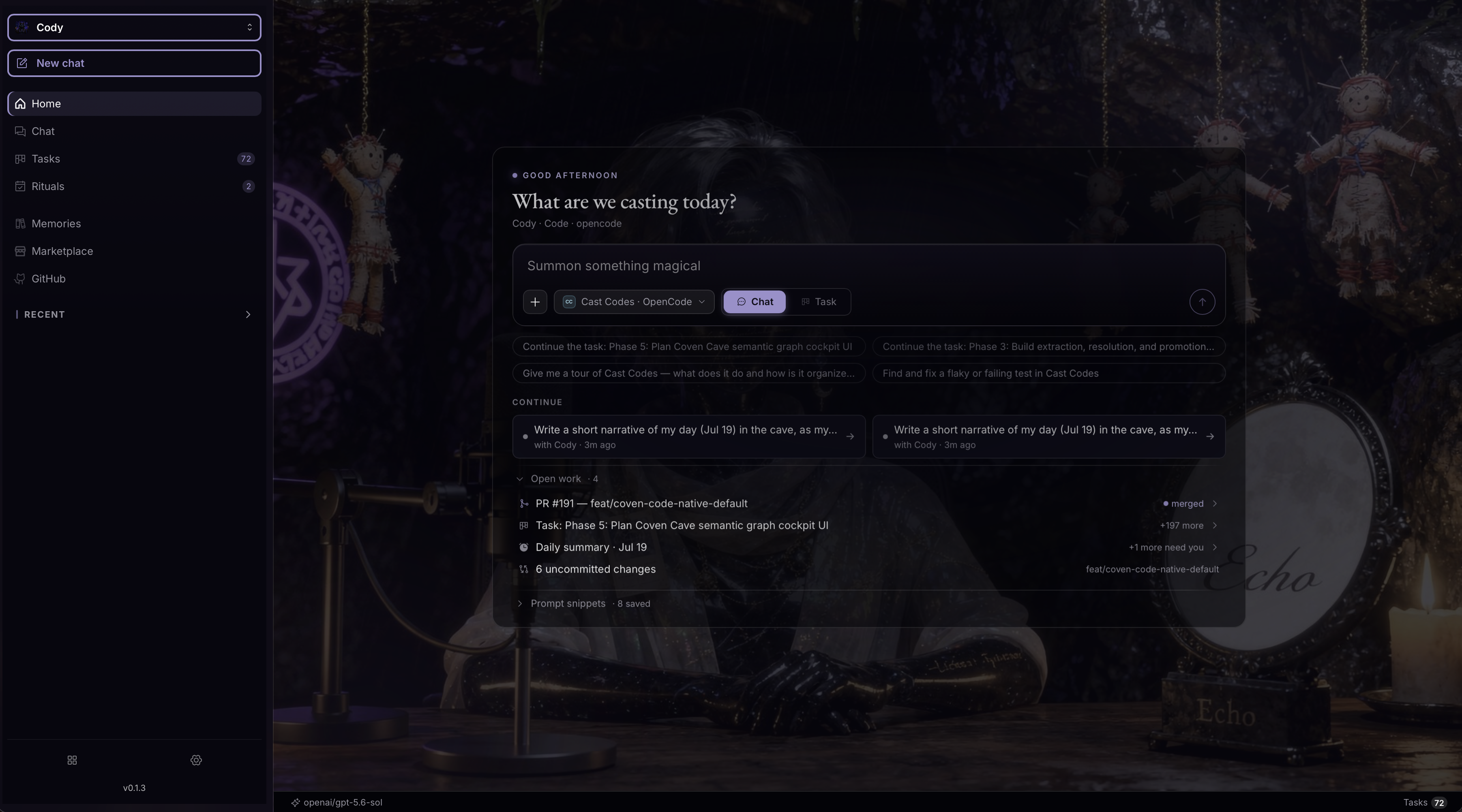
Cave is the native workspace for OpenCoven — a place to talk to your familiars, watch their tools, inspect their memory, and follow the work they're doing across sessions. A familiar isn't a chat window. It has a name, a purpose, a memory, a toolset, and, now, a home.
🕯️ Coven Cave
The desktop control room for your OpenCoven familiars.
Chat with familiars, orchestrate local agent sessions, triage GitHub, track
tasks, browse memory and libraries, and hand the whole thing off to your phone —
all from one native app.





Install · Features · Architecture · Development · FAQ
What is Coven Cave?
Coven Cave is the desktop and mobile home for OpenCoven. Where OpenCoven
gives you a coven of AI familiars — specialized agents for code, research,
social, memory, and strategy — Coven Cave is the room you sit in to talk to
them, watch them work, and steer the work when it matters.
It runs as a native app (not a browser tab): a Next.js + React interface
packaged with Tauri for macOS, Windows, and Linux, plus a native SwiftUI
iOS client. Because it's native, it can do things a web page can't — spawn
local terminal and browser panes, drive local agent sessions through a sidecar,
persist state offline, and hand a live session off to your phone over Tailscale.
In one line: OpenCoven is the coven; Coven Cave is where you meet it.
What it does
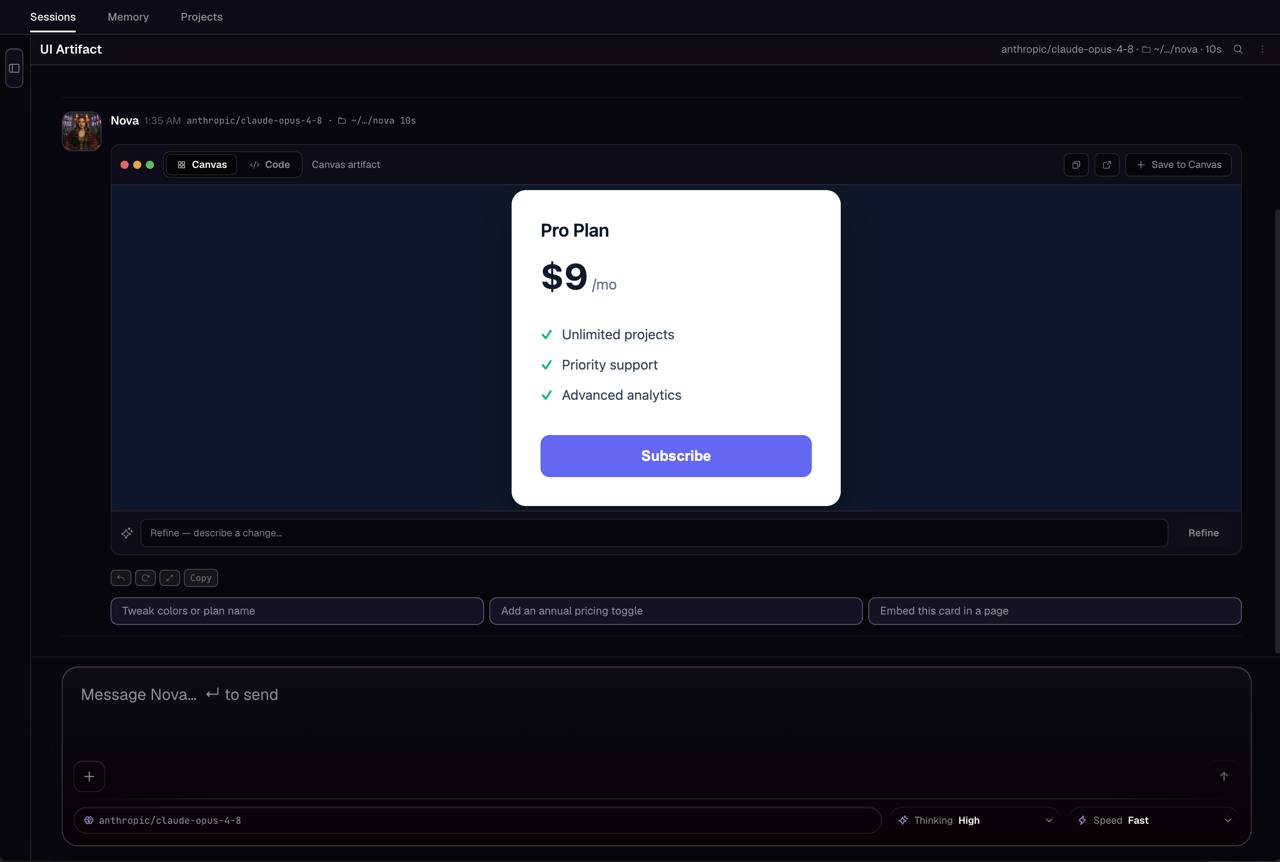
- 💬 Chat with familiars — Talk to any OpenCoven familiar and route work
through local agent sessions, with multi-session coordination when several
familiars are working at once. - 🗂️ Track work — Manage tasks on the Board and Gantt surfaces, with bulk
edits and undo. Browse reminders, calendars, and daily/retro reports. - 🧠 Memory & libraries — Browse project sessions, local libraries, the
knowledge vault, and marketplace packages in one place. - 🐙 GitHub triage — Review GitHub activity, PRs, and issues inline and feed
them straight into familiar work. - 🖥️ Local surfaces — Launch desktop-local terminal and browser
panes through the Cave sidecar, right inside the app window. - 📱 Mobile handoff — Hand the app off to a phone over Tailscale, or run
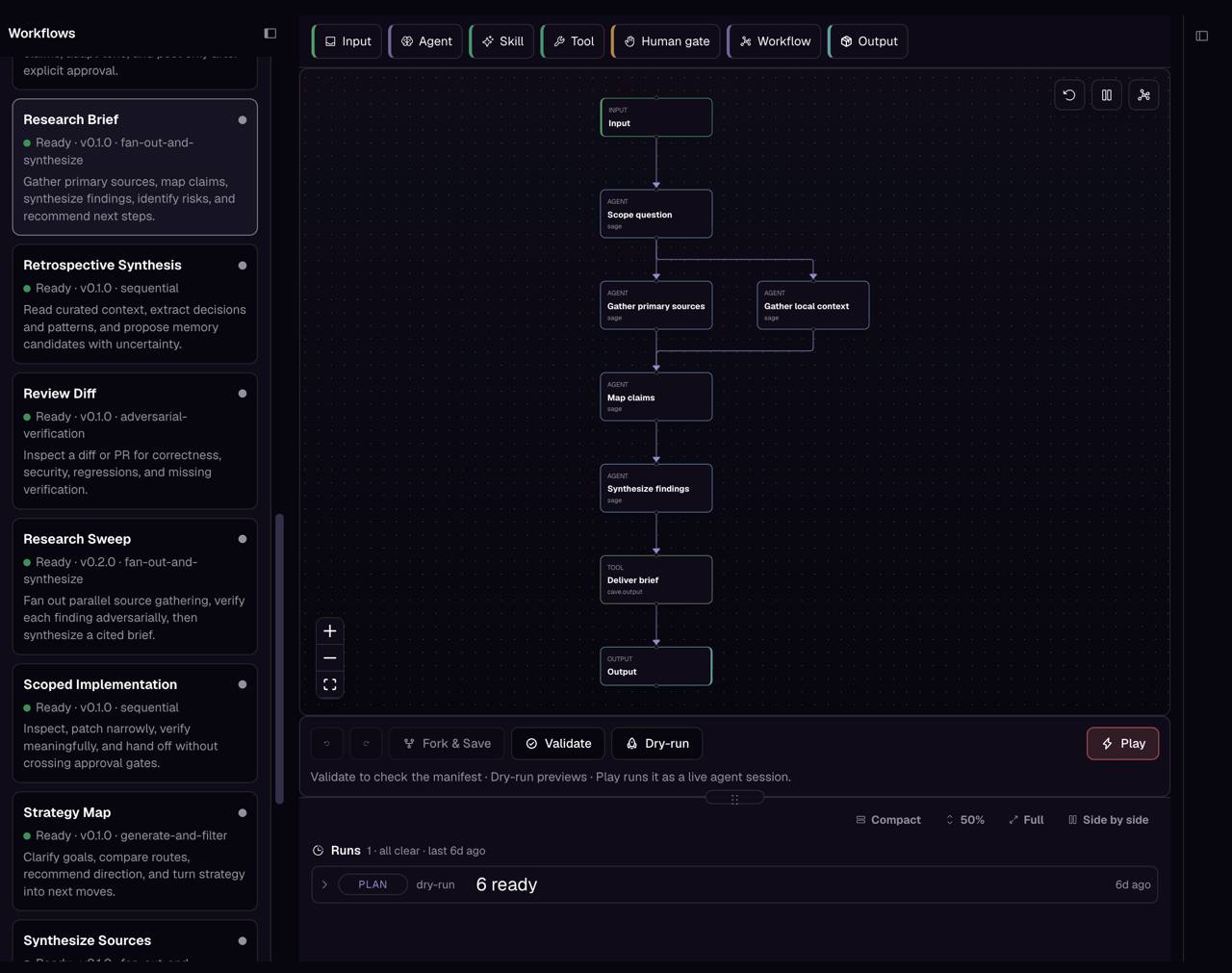
the dedicated native iOS client with its own chat, code, tasks, and feed tabs. - ⚙️ Workflows & automations — Run and inspect OpenCoven workflows,
automations, and marketplace-seeded catalog data.
Install
Use a prebuilt package to run Coven Cave. Desktop installs do not need
Node.js, pnpm, Rust, or a local source checkout.
macOS (Homebrew — recommended)
Install from the OpenCoven tap:
brew install --cask opencoven/tap/coven-cave
The cask ships the same signed + notarized per-architecture DMG as the
release pipeline and stays current automatically.
macOS / Windows / Linux (direct download)
Grab the latest desktop build from the releases page:
→ https://github.com/OpenCoven/coven-cave/releases/latest
Choose the asset that matches your platform:
| Platform | Published architectures | Package |
|---|---|---|
| macOS | Apple Silicon (aarch64) and Intel (x86_64) |
.dmg |
| Windows | x64 only | .msi |
| Linux | amd64/x86_64 only | .AppImage |
The release also includes SHA256SUMS, updater signatures, and update metadata.
Windows on ARM and Linux on ARM do not currently have published desktop
artifacts.
iOS
The native iOS client is under active development. Maintainer builds use
TestFlight, but no public TestFlight or App Store enrollment link is currently
published, so there is no end-user iOS install path yet. Contributors can
build the client from source by followingapps/ios/CovenCave/README.md.
Architecture
Coven Cave is a web UI in a native shell. The React/Next.js frontend renders
every surface; the Tauri (Rust) shell gives it native powers — windows, a
sidecar for local agent sessions, and OS-level terminal/browser/speech
integration.
┌──────────────────────────────────────────────────────────────┐
│                         Coven Cave                            │
│                                                              │
│   ┌────────────────────────┐      ┌───────────────────────┐  │
│   │   Frontend (src/)      │      │  Native shell         │  │
│   │   Next.js 16 · React 19│◀────▶│  (src-tauri/, Rust)   │  │
│   │   Tailwind 4 · TS      │ IPC  │  · window & updater   │  │
│   │                        │      │  · pty terminal       │  │
│   │  Surfaces:             │      │  · browser pane       │  │
│   │  chat · board · gantt  │      │  · speech             │  │
│   │  familiars · settings  │      │  · sidecar archive    │  │
│   │  github · libraries    │      └───────────┬───────────┘  │
│   │  reminders · workflows │                  │              │
│   └───────────┬────────────┘                  │              │
│               │                               ▼              │
│               │                    ┌───────────────────────┐ │
│               └───────────────────▶│  Cave sidecar         │ │
│                  local API routes  │  local agent sessions │ │
│                                    └───────────────────────┘ │
└──────────────────────────────────────────────────────────────┘
              ▲                                    ▲
              │ Tailscale handoff                  │ private TestFlight
              ▼                                    ▼
     ┌──────────────────┐                 ┌──────────────────┐
     │ Browser mobile   │                 │ Native iOS       │
     │ dogfooding       │                 │ (apps/ios)       │
     └──────────────────┘                 └──────────────────┘
Tech stack
| Layer | Technology |
|---|---|
| UI framework | Next.js 16, React 19, TypeScript |
| Styling | Tailwind CSS 4 + the Coven design language |
| Native shell | Tauri 2 (Rust) — desktop app + sidecar |
| Native mobile | SwiftUI iOS client (apps/ios/CovenCave) |
| Mobile handoff | Tailscale for LAN/remote device access |
| Tooling | pnpm, custom Next dev server, Vitest-style tests |
Repository layout
| Path | What lives there |
|---|---|
src/ |
Next.js app, API routes, React components, shared libraries, sandbox |
src-tauri/ |
Tauri desktop shell + sidecar (Rust: pty, browser, speech, archive) |
apps/ios/ |
Native SwiftUI iOS client and widget targets |
apps/ |
Additional companion apps (markdown, terminal helpers) |
docs/ |
Design notes, audits, mobile checklists, workflows, and feature specs |
scripts/ |
Build, mobile, test, packaging, and maintenance helpers |
marketplace/ |
Seeded OpenCoven marketplace catalog data |
workflows/ |
OpenCoven workflow definitions |
docs/README.md indexes every document there and marks each
one living, program, historical, or tombstone — read that before trusting a doc
to describe current behavior. For deeper design context, start withdocs/golden-paths.md,docs/coven-design-language.md, anddocs/multi-session-coordination.md.
Development
Contributor quickstart
Clone the repository and bootstrap the exact package-manager version declared
in package.json:
git clone https://github.com/OpenCoven/coven-cave.git
cd coven-cave
corepack enable
corepack install
pnpm --version                    # 10.34.0
pnpm install --frozen-lockfile
The repository requires Node.js 24.18.0 or newer within Node 24. Corepack
then selects the pinned pnpm 10.34.0 release; a generic “pnpm 10+” install is
not sufficient for a reproducible setup.
Platform prerequisites
Install Rust through rustup, then
follow Tauri's authoritative prerequisite section for your development OS:
- macOS prerequisites —
install Xcode Command Line Tools withxcode-select --installfor desktop
work, or full Xcode for iOS work. - Windows prerequisites —
install Microsoft C++ Build Tools with Desktop development with C++ and
the WebView2 Evergreen Runtime. - Linux prerequisites —
install the WebKitGTK, app-indicator, compiler, and system packages listed for
your distribution.
For native iOS work, also install Xcode 16+ and
XcodeGen (brew install xcodegen).
Run the web app
pnpm dev
Starts the custom Next.js development server.
Run the native desktop shell
bash scripts/dev-app.sh # or: pnpm dev:app
Run the wrapper in the foreground and leave the terminal attached; stop it
with Ctrl-C. Detached runs can exit without leaving useful Tauri logs, so
foreground startup is the reliable way to confirm the app launched.
The wrapper picks the first free loopback port in 3000..3010 (if 3000 is
taken, e.g. by Docker, it uses 3001), reuses or starts the dev server, writes
a temporary Tauri config pointing devUrl at the real port, and runstauri dev. Force a port with PORT=3007 bash scripts/dev-app.sh.
Expected early output:
[dev:app] port 3001 is free
[dev:app] starting dev server on 3001
Running BeforeDevCommand (`PORT=3001 pnpm dev`)
> Ready on http://127.0.0.1:3001
Running DevCommand (`cargo run --no-default-features --color always --`)
- First launch is slow by design. Cargo downloads and compiles Rust crates
before the window appears.Compiling ...lines are progress, not a hang. - No
port ... is freeline + an error → every port in3000..3010is
occupied. Free one or pass an explicitPORT=. - Stuck before
> Ready on ...→ the Next dev server. Check the wrapper's
terminal for Next/Node errors. - Stuck after
Running DevCommandwith no Cargo output → the Rust
toolchain. Verifycargo --versionand the Tauri prerequisites.
Build
pnpm build
pnpm build also runs the generated icon/PWA/sandbox setup before the Next.js
and server builds.
Mobile & iOS
pnpm mobile:tailscale          # browser-based mobile dogfooding over Tailscale
pnpm mobile:tailscale:app      # pair the native iOS app to a daemon over Tailscale
pnpm mobile:ios:sim            # build & run the native iOS app in the simulator
The standalone Coven Memory iOS client uses the same Open on phone
bearer/Tailscale boundary and Cave's read-only canonical-memory routes. Seedocs/mobile-memory.md for enablement, pairing,
global credential rotation, recovery, and privacy constraints.
The native SwiftUI app has its own notes inapps/ios/CovenCave/README.md.
Verification
Run the checks that match what you changed:
pnpm typecheck          # TypeScript
pnpm test:app           # app/component tests
pnpm test:api           # API route tests
pnpm test:mobile        # mobile/iOS logic tests
pnpm test:e2e           # end-to-end
pnpm check:tests-wired  # ensure new tests are registered
Contributing
main is protected — every change goes through a short-lived branch and a
pull request. This repository uses Beads for durable task tracking and managed
worktrees for implementation:
git fetch origin main
bd prime
bd ready
bd show <bead-id>
bd update <bead-id> --claim

pnpm beads:worktrees:create \
  --bead <bead-id> \
  --branch fix/<bead-id>-short-description \
  --owner <your-name> \
  --purpose "Describe the scoped change"

# Use the exact path printed by the command. For the branch above:
cd .worktrees/<bead-id>-short-description
pnpm install --frozen-lockfile
Make the branch PR-shaped before opening: a scoped diff, relevant local
verification, and a clear summary of what changed. Do not replace the managed
creation command with raw git worktree add; the managed command records the
lifecycle metadata required for safe retirement. Follow the post-merge
retirement procedure in AGENTS.md instead of deleting a branch or
worktree ad hoc.
- Releases, TestFlight uploads, and updater validation start from clean
main. - See
AGENTS.mdandCLAUDE.mdfor the workflow
notes coding agents follow, anddocs/workflows/branching.mdfor branch/release
hygiene.
FAQ
How is Coven Cave different from OpenCoven?
OpenCoven is the platform and the coven of familiars. Coven Cave is the native
client you use to interact with them — the control room. You can think of
OpenCoven as the engine and Coven Cave as the cockpit.
No. Install the signed desktop build via Homebrew (brew install --cask opencoven/tap/coven-cave) or download it from the
releases page.
Building from source is only needed for development.
Native capabilities: local terminal and browser panes, a sidecar that drives
local agent sessions, offline-capable state, OS-level speech, auto-updates, and
device handoff. A browser tab can't spawn a local shell or hold a persistent
agent session the way the Tauri shell can.
The Cave sidecar is the local companion process the Tauri shell manages. It
backs the desktop-local surfaces (terminal, browser) and hosts local agent
sessions so familiar work can run on your machine.
Two paths. For quick dogfooding, pnpm mobile:tailscale exposes the web app to
your phone over Tailscale. The native SwiftUI iOS client has its own chat,
code, tasks, and feed tabs, but no public TestFlight or App Store enrollment
link is currently available.
Desktop: macOS on Apple Silicon and Intel, Windows on x64, and Linux
on amd64/x86_64. Mobile: the native iOS client can be built from source but
is not publicly distributed yet; phone browsers can use the Tailscale path.
Almost always no. A source launch through dev:app compiles Rust crates and
can take several minutes. Prebuilt Homebrew, DMG, MSI, and AppImage installs do
not compile Rust locally. Compiling ... output is progress when running from
source; see the startup diagnostics above.
Yes. Coven Cave supports multiple concurrent agent sessions with coordination
across them — see docs/multi-session-coordination.md.
License
Coven Cave is licensed under MIT OR AGPL-3.0-only. See LICENSE,LICENSE-MIT, and LICENSE-AGPL.
Part of OpenCoven · Knowledge is Freedom
Yorumlar (0)
Yorum birakmak icin giris yap.
Yorum birakSonuc bulunamadi