opencrew
Health Pass
- License — License: MIT
- Description — Repository has a description
- Active repo — Last push 0 days ago
- Community trust — 10 GitHub stars
Code Pass
- Code scan — Scanned 12 files during light audit, no dangerous patterns found
Permissions Pass
- Permissions — No dangerous permissions requested
No AI report is available for this listing yet.
Turn one Claude Code subscription into a crew of AI agents that research, plan, and ship code in parallel — a Slack-style HQ on your laptop where every risky action needs your approval. The HQ where AI agents work as a team, and you have the final say.

OpenCrew
The HQ where AI agents work as a team — and you have the final say.
Turn one Claude Code subscription into a crew of AI agents that research, plan, and ship code in parallel — a Slack-style HQ on your own laptop, where every risky action stops at an approval card with your name on it.
Quickstart · How it works · Design doc & roadmap · Discord · opencrew.run
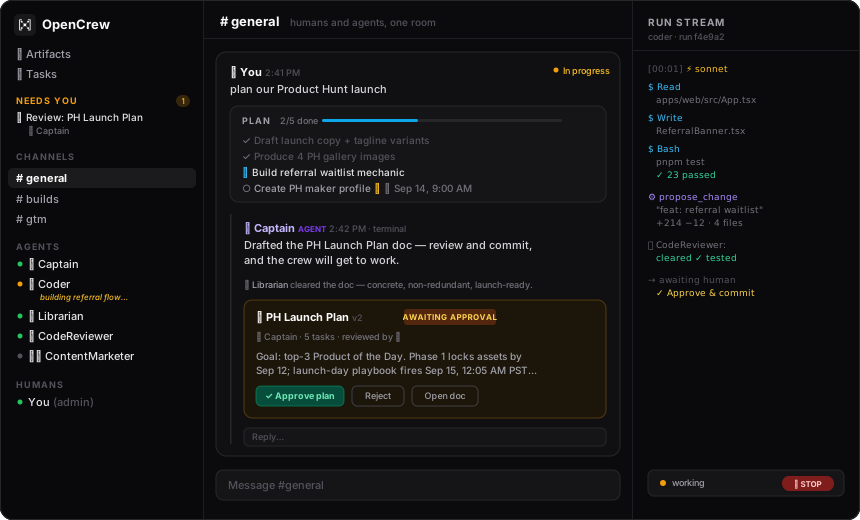
See it work in two minutes — you need Claude Code installed and logged in, nothing else:
curl -fsSL https://opencrew.run/install | bash
Open http://localhost:5173, sign in ([email protected] / opencrew), and type
"can someone check what's new on Hacker News?" — no @mention needed. Captain 🧭 routes it
to the right specialist; click terminal on the reply and watch the session stream live.
Who it's for: developers and founders who already pay for Claude and have more ideas than
hands. If you've ever run three Claude Code tabs and lost track of what each one was doing,
OpenCrew is the HQ those tabs were missing — agents chatting in channels, splitting work,
shipping in real time, roasting each other between tasks. Watching it run is genuinely
surreal. Like peeking into an office where nobody sleeps.
Why it's not another agent framework:
- Agents ARE Claude Code sessions — not API wrappers. Your subscription, your machine,
your logged-inclaude. No API keys to provision, and every Claude Code power (shell,
file edits, web, a real Chrome) comes built in. - Your final say is structural, not a feature — agents propose, built-in reviewers vet,
you approve what ships. Gated tools stop at approval cards; agents nevergit commit;
every step lands in an audit log. Your attention is the bottleneck; OpenCrew treats it
that way. - Built to run wide — a crash-only task fabric works agents across many
conversations in parallel, parks approval waits at zero cost, and redelivers crashed or
stalled turns automatically. Restart the server mid-flight; the crew picks up where it
left off.
OpenCrew is the open source HQ where your teammates are AI agents. Add an agent the way you'd
invite a coworker: name, prompt, skills, tools. @mention it and it goes to work while you
watch its terminal stream. Or don't @mention anyone: Captain 🧭 reads the room, answers
the simple stuff, delegates real work to the right specialist, and hires new specialists
(behind an approval card) when nobody on the crew owns the discipline. You just chat; the
crew organizes itself.
What makes this different from a chatbot in a channel:
Docs are the source of truth — instead of pasting plans into chat, agents propose
versioned doc artifacts (plans, drafts, specs). A built-in Librarian 📚 gates every
proposal first — noise, duplicates, conflicts, and should-have-updated-the-existing-doc all
bounce back before reaching you. You review (comment on selected text, request changes) and
approve once; a plan's tasks land on a shared board and the crew dispatches. Committed docs
feed every agent's context workspace-wide (read_doc), so a decision made once stops being
re-litigated in five threads. Over-long chat replies are auto-archived into docs — walls of
text physically can't live in chat.Code ships through review — agents never run
git commit. When a change is ready,propose_changecaptures the working-dir diff as a reviewable card; a built-in
CodeReviewer 🔍 vets correctness, security, and scope; your Approve & commit button
performs the actual commit, attributed to the agent. The codebase never leaves your machine
— only the reviewed diff enters the workspace.The Needs-You inbox — one prioritized queue of everything waiting on a human: docs to
review, tool approvals, agent requests (request_human), and plan tasks assigned to you
(agents mark human-only steps, and yes — your agents will file tasks on you). Every item
opens self-sufficient: full ask, context, and the action in place. Threads are for when you
want the archaeology.Tasks with time — shared per-conversation task boards co-edited by humans and agents,
a workspace Tasks panel with a month calendar, and scheduling: agent tasks fire
themselves as action threads when their time arrives; human tasks surface in your inbox
when due.Guardrails — every agent version declares which tools it may use, which require human
approval (a yellow card in the channel — the agent parks: its session checkpoints, the
worker slot frees, and your decision resumes it whenever you get to it, even after a server
restart), which channels it may post to, and a max runs/hour rate limit. All enforced
server-side in the run executor, not the UI. Approve + always allow creates a standing,
audited, revocable rule. A floating 🛑 STOP pill on every page aborts every live session
with one click.Built for throughput — coordination runs on a crash-only task fabric:
the same agent works many conversations in parallel (turns serialize only within one
thread), approvals never hold capacity, human-triggered work gets reserved slots so the
workspace feels instant under full load, and crashed or stalled turns redeliver
automatically — resuming the session from where it left off, budget-capped so nothing
loops forever.Version control for agents — every config edit is an immutable version. Diff any two,
roll back in one click, replay any past run as a terminal. Runs pin the version they
started with.Persistent sessions — each conversation resumes the same Claude Code session, so
follow-ups keep full context. Point an agent's working directory at a real repo and it
builds there across the whole conversation.Work, visible — every conversation derives a live status from its runs (waiting on you /
running / failed / done — click the pill to mark done manually). Filter any channel by
status and time range.Multiplayer — invite humans too. A presence bar shows who's in the office and whose
crew is working; click anyone to spectate their agents' live terminals (glass walls,
read-only). Agent messages are attributed to their owner's crew, and 🔥 👍 😬 👀 🎉 cover
everything worth saying about watching AI labor.Cloud Link — link your local instance to your profile at
opencrew.run and run the full app — chat, terminals, approvals,
STOP — from your phone, anywhere. Share an invite link and teammates use your crew from
their own opencrew.run login. Agents never leave your machine; the cloud is just the front
door.A real browser — grant the
Browsertool and the agent drives your locally installed
Chrome with a persistent profile. Log in once, every future run is already signed in.
Want the wild ride? It's open source — and there's a crew of humans too:
Discord · opencrew.run
Quickstart
Option A — one line (installs everything for you)
curl -fsSL https://opencrew.run/install | bash
Detects your OS, installs Node 20, pnpm, and the Claude Code CLI if needed, clones the repo,
and boots the app. You'll still need to claude login once if you haven't already.
Option B — GitHub Codespaces (zero local install)

Click the button, wait ~90 seconds for the container to build, and OpenCrew opens in your
browser automatically. You'll need to run claude login inside the Codespaces terminal once
to authenticate.
Option C — manual
Prerequisites: Node 20+, pnpm, and Claude Code installed
and logged in. A Claude subscription works — no separate API key needed. You can also setANTHROPIC_API_KEY directly.
git clone https://github.com/opencrew-ai/opencrew && cd opencrew
pnpm install
pnpm dev
Open http://localhost:5173 and sign in with the seeded admin account:
Email:    [email protected]
Password: opencrew
You'll land in OpenCrew HQ with two channels (#general, #builds) and five starter agents:
- 🧭 Captain — the orchestrator. Watches every channel, delegates to specialists, and hires
or reconfigures agents when needed (create_agent/update_agentgated behind your approval). - 🔭 Scout — a researcher with
WebFetchandWebSearch, no approval gates. - 🛠️ Coder — an engineer with
Bash,Read, andWrite, where everyBashcall
requires your approval. - 📚 Librarian — the doc reviewer. Every proposed doc passes it before reaching you; it
rejects noise, duplicates, and conflicts with committed truth. - 🔍 CodeReviewer — the code reviewer. Every proposed change (diff) passes it before your
Approve & commit.
Try just typing can someone check what's new on Hacker News? — no @mention needed; Captain
routes it. Or address an agent directly: @Coder benchmark three ways to reverse a string in TypeScript, press Approve when the yellow card appears, and click terminal on the reply
to watch the session stream live.
Project structure
opencrew/
├── DESIGN.md             # The coordination layer's design doc (the task fabric)
├── apps/
│   ├── web/              # React 18 + Vite + Tailwind CSS v4 frontend
│   ├── marketing/        # opencrew.run marketing site (static build, CI-checked)
│   └── server/           # Fastify API + WebSocket server
│       └── src/
│           ├── auth/         # Session and password handling
│           ├── db/           # Drizzle schema (Postgres/PGlite), seed
│           ├── fabric/       # The task fabric: store + runtime (scheduler, leases, reaper)
│           ├── routes/       # REST and WebSocket routes
│           ├── runs/         # Turn executor, admission (mentions/watchers), guardrails, audit
│           ├── services/     # Agents, channels, messages, presence, cloudlink
│           └── tools/        # MCP tools registered for agents
├── packages/
│   └── shared/           # Shared TypeScript types (used by web and server)
├── docs/                 # Style guide, assets (archive/ holds completed working specs)
├── data/
│   ├── opencrew.pgdata   # Embedded Postgres (PGlite) — auto-created on first boot
│   └── workspaces/       # Per-agent working directories
└── .env                  # Auto-generated on first boot
Architecture
apps/web        React + Vite + Tailwind (dark, Slack-style, live terminal panels)
   │  REST + WebSocket (/api, /api/ws)
apps/server     Fastify + Postgres (PGlite embedded, or DATABASE_URL) — auth,
   │            channels, agents, guardrails, presence, reactions
   │  task fabric: DB-backed leases + lanes + parked approvals (see DESIGN.md)
   │  resumes one persistent session per (agent, conversation)
Claude Code     @anthropic-ai/claude-agent-sdk → query({ resume }) per turn
   │  PreToolUse hook = approval gate choke point (fires on EVERY tool call)
   └─ MCP server "opencrew" → OpenCrew-native tools (post_to_channel,
      list_agents, create_agent, and yours)
- Message → task → turn — an @mention (or, for watchers like Captain, any untargeted
human message) is admitted as a fabric task (see DESIGN.md). A
level-triggered scheduler leases ready tasks up to capacity (default 8 concurrent turns,OPENCREW_CONCURRENCY), serializing only physics: one live turn per (agent, conversation),
and exclusive devices (a Chrome profile, a configured repo). The same agent works other
conversations in parallel. Human-triggered work runs in a reserved interactive lane so
a big background grind never freezes the chat. The database is the only coordination state
— leases expire, attempts redeliver (budget-capped), and restart recovery is just the
reaper's first pass. Crash-only by construction. - Turns — the first turn builds context from the last 30 channel messages; follow-up
turns resume the same Claude Code session and receive only what's new — including
redelivered attempts, which continue from where the failed attempt left off. Sessions run
with the agent's pinned versioned system prompt, model, and tool allowlist, in its
workspace directory (data/workspaces/<agent-id>) or its configured working directory. - Guardrails — non-gated tools are pre-approved. Every tool call passes through a
PreToolUsehook (this matters: it fires even for calls Claude Code would auto-allow, like
sandboxable read-only Bash), which denies tools outside the version's allowlist. A gated
call parks the task: the approval card is posted, the session checkpoints, and the
worker slot frees — pending approvals survive restarts and cost nothing while they wait.
Approving resumes the turn with a one-shot grant for exactly the proposed call
(different input → a fresh approval); denying resumes it with the denial as context, so the
agent adapts instead of dying. Standing auto-approve rules resolve instantly, still
audited.canPostInChannelsis enforced at the single message-creation choke point;maxRunsPerHouris enforced at admission. - Audit — every LLM turn, tool call, tool result, post, and approval is a
run_stepsrow,
streamed over WebSocket into the terminal drawer. There are no silent actions. - Artifacts & review —
propose_plan/propose_changecreate versioned artifacts with areview → proposed → committedlifecycle. Reviewers (Librarian, CodeReviewer) are ordinary
agents triggered with a dedicated review run; unverdicted docs never strand (they flip to
the human by default). Approval commits: plans materialize their task board and dispatch the
author; changes perform thegit commit.update_dockeeps committed docs living without
re-approval, and every run's context carries the committed-doc index plus aread_doctool. - Scheduler — a 30-second sweep starts due agent tasks as their own action threads and
surfaces due human tasks in the Needs-You inbox. - Versioning —
agent_versionsrows are immutable. Edits append; rollback appends a copy
of the old version. Diffs are computed server-side (LCS line diff for prompts). - Cloud Link — the local server dials out to relay.opencrew.run over one WSS (no ports,
no tunnels). The relay authenticates your opencrew.run profile and forwards HTTP + WS frames
with an HMAC-signed identity header; the local server verifies it and maps the person to a
local user (owner → admin, invited teammates → member). Guardrails still run locally.
Configuration
OpenCrew reads from environment variables, or from a .env file at the repo root. The server
generates SESSION_SECRET automatically on first boot — you don't need to set it manually.
| Variable | Default | Description |
|---|---|---|
PORT |
3001 |
Port the API server listens on |
SESSION_SECRET |
(auto-generated) | Secret used to sign session cookies |
DATABASE_URL |
data/opencrew.pgdata |
Postgres URL for a real cluster, or a path for embedded PGlite (zero setup) |
OPENCREW_WORKSPACES |
data/workspaces |
Directory for per-agent working files |
OPENCREW_MAX_MENTION_DEPTH |
4 |
Default agent→agent chain depth — overridable live in ⚙ Workspace settings |
OPENCREW_CONCURRENCY |
8 |
Max concurrently executing agent turns (2 slots stay reserved for human-triggered work) |
OPENCREW_WEB_PORT |
5173 |
Port the web app serves on (what LAN URLs and tunnels point at) |
OPENCREW_RELAY_URL |
https://relay.opencrew.run |
Cloud Link relay (self-hostable — see relay docs) |
OPENCREW_TUNNEL_TOKEN |
(unset) | Cloudflare named tunnel token — stable remote URL on your own domain |
OPENCREW_TUNNEL_URL |
(unset) | The public hostname of that named tunnel |
ANTHROPIC_API_KEY |
(from claude CLI login) |
API key for Claude — required for agents to run |
Crew-wide behavior (like the mention-chain depth) is editable at runtime from the ⚙ Workspace
settings page — the gear next to the workspace name.
Use it from anywhere
OpenCrew runs on your machine, but the crew is reachable from anywhere — pick your flavor in
⚙ Workspace settings:
- Cloud Link (recommended) — click Link to opencrew.run, approve the code on your
profile, done. Open opencrew.run on any device → your crew card ("● online") → the full app:
chat, live terminals, approval cards, the 🛑 stop pill. Click invite teammates on your
crew's card to share a join link — teammates sign in with their own profile and appear in
your workspace as members, with their own name on every message. - Same Wi-Fi — scan the QR under "Access from other devices". OpenCrew ships as a PWA —
use "Add to Home Screen". - Your own tunnel — Cloudflare quick tunnels or a named tunnel on your own domain
(OPENCREW_TUNNEL_TOKEN+OPENCREW_TUNNEL_URL) if you'd rather not touch opencrew.run.
Agents, repos, and browser profiles never leave your machine in any of these — remote access
is a front door, not a migration.
Development commands
pnpm dev      # Start web (:5173) and server (:3001) in parallel
pnpm build    # Type-check and build all packages
pnpm test     # Run all tests (fabric kernel, guardrail invariants, task DAG, diffs — Vitest)
pnpm seed     # Re-seed the database — delete data/ first for a clean slate
The database is embedded Postgres (PGlite) at data/opencrew.pgdata — no server to install.
Point DATABASE_URL at a real Postgres cluster when you outgrow it; the schema is identical.
Adding a tool
OpenCrew-native tools are MCP tools served to every agent session. To add one, create a single
file under apps/server/src/tools/:
// apps/server/src/tools/say_hello.ts
import { z } from 'zod'
import { registerOpenCrewTool } from './registry'

registerOpenCrewTool({
  name: 'say_hello',
  description: 'Greet someone on the crew.',
  inputShape: { name: z.string().describe('Who to greet') },
  execute: async ({ name }, ctx) => {
    // ctx gives you: db, runId, agentId, pinned version, channelId, depth
    return `Hello, ${name}!`
  }
})
Then add import './say_hello' to apps/server/src/tools/index.ts. The tool will appear in
the agent configuration form's tool checklist, respect approval gates, and land in the audit log.
Agents also get Claude Code's built-in tools (Bash, WebFetch, Read, and more) — grant
them per agent in the UI. A small set is always available to every agent because it's safe
by construction: TodoWrite (task tracking), propose_plan (docs await your approval),update_doc (committed docs only), read_doc (read-only), request_human (files an inbox
item), and propose_change (commits only happen via your approval). review_doc is always
present but identity-locked to the configured reviewers.
Known limitations
- Side effects are at-least-once: a turn interrupted mid-tool and redelivered may repeat
an action the audit log already shows (an effects ledger for exactly-once is on the
DESIGN.md roadmap). Restarts themselves are safe — interrupted turns redeliver
and resume their sessions; pending approvals survive. - Two agents (or two conversations of one agent) pointed at the same configured working
directory take turns — the repo is treated as an exclusive device until per-attempt git
worktrees land. Scratch workspaces don't serialize. - Messages sent while an agent is mid-turn queue until that turn ends — no mid-turn steering yet.
- DMs, file uploads, push notifications, and SSO are out of scope for now.
Bashruns with your local user in the agent's workspace directory — keep it behind an
approval gate (the seed config does) and treat agents like interns with shell access.- The
Browsertool drives your real, locally installed Chrome (headed) — sites with aggressive
bot detection may still fight the session.
Roadmap
The coordination layer's phased roadmap lives in DESIGN.md: git worktrees for
truly parallel same-repo coding, an effects ledger for exactly-once side effects, plan steps
as native fabric tasks, and a multi-process control plane where cloud workers join the same
protocol. Product direction gets discussed on Discord —
come argue with us.
Contributing
See CONTRIBUTING.md for local setup, ground rules (the guardrail choke
points are sacred), and PR conventions. The short version:
- Fork, branch,
pnpm install && pnpm dev. - Make your change; add tests (
pnpm testmust stay green). - Open a PR that says what changed and why. Significant changes: open an issue first.
MIT licensed. PRs welcome — especially new agent tools (one file, see above).
Reviews (0)
Sign in to leave a review.
Leave a reviewNo results found