OpenDQV
Health Gecti
- License — License: MIT
- Description — Repository has a description
- Active repo — Last push 0 days ago
- Community trust — 10 GitHub stars
Code Gecti
- Code scan — Scanned 12 files during light audit, no dangerous patterns found
Permissions Gecti
- Permissions — No dangerous permissions requested
Bu listing icin henuz AI raporu yok.
Open-source, contract-driven data quality validation. Shift-left enforcement at the point of write — before data enters your pipeline.






| Docs | Quickstart | Benchmark | Rules Reference | Salesforce | Postgres | Databricks | Snowflake | Ethos | FAQ |
|---|
Alpha software. OpenDQV Core is in early Alpha (v1.x). It is under active development with frequent breaking changes. Not recommended for production or regulated environments without thorough testing and your own validation. We are seeking real-world feedback to move toward a stable Beta. See Contributing and Feedback below. Expect breaking changes in the v1.x series. We will stabilise and move to Beta once we have external user feedback and real deployment stories.
OpenDQV — the validation bouncer that stops bad data at the door.
Legacy check factories, scattered scripts, and post-load reports only tell you how bad it already got.
Our ethos: Trust is cheaper to build than to repair.
Get started in 15 minutes → Building with LLMs or AI agents? Read
llms.txtfirst →
Who is this for?
- Data governance teams tired of finding bad records in dashboards three weeks after they were written
- Salesforce / SAP / Kafka / Postgres engineers who need records rejected before they're stored
- LLM and AI agent builders who need reliable, contract-driven validation with full governance
- Compliance and audit teams who need every rule change tracked, approved, and hash-chained before it affects production
The enforcement layer survives re-orgs. Every contract change goes through a maker-checker workflow, is hash-chained into an immutable audit trail, and requires explicit approval before going active. RBAC (6 roles), rejection-rate Prometheus metrics, and sensitive-field redaction are built in. A one-off script has none of this.
A mature data governance programme operates across three layers, each with a distinct job:
| Layer | Purpose | Tools |
|---|---|---|
| 1. Write-time enforcement | Prevent bad data from entering any system | OpenDQV |
| 2. Catalog / governance / stewardship | Ownership, glossary, lineage, policy, stewardship workflows | Alation, Atlan, Collibra, Purview, DataHub, Marmot |
| 3. Pipeline testing / observability | Detect drift, freshness issues, residual quality after ingestion | Great Expectations, Soda Core, dbt tests, Monte Carlo |
OpenDQV Core owns layer one. Your catalog handles layer two, your pipeline tools handle layer three. OpenDQV Core is the bouncer — nothing else. The Layer 3 teams tell you how bad it got; OpenDQV stops it before it lands.
Whether you're maintaining 400 outsourced stored procedures, 1,200 Great Expectations checks, or a folder of ad-hoc validation scripts — OpenDQV replaces custom-check spaghetti with a single governed contract layer. One YAML file, one API, enforced everywhere, owned by your governance team.
Still running hundreds of outsourced stored procedures? OpenDQV Core is the shift-left solution. Replace scattered validation logic with one version-controlled contract per entity. Generate Snowflake UDFs, Salesforce Apex, or JavaScript from the same YAML — and get maker-checker governance, a hash-chained audit trail, and Prometheus rejection metrics that your proc factory never had. See docs/faq.md.
Compute cost reality
Modern data warehouses charge almost entirely for compute — Snowflake credits, Databricks DBUs, Redshift slots, BigQuery slots. Storage is cheap; running anything is expensive.
Traditional data quality approaches all consume that compute inside the warehouse:
- Stored procedures run on every load or trigger
- dbt tests scan tables during CI/CD or scheduled jobs
- Great Expectations / Soda / Monte Carlo profile and validate data after it lands
- Even "light" monitoring keeps warehouses awake or spins up new clusters for checks
DQ/observability/testing is routinely one of the top consumers of warehouse compute in mature data environments — right alongside ETL and BI workloads.
OpenDQV flips this dynamic. Because enforcement happens at write time via API or generated UDF/trigger:
- Bad records are rejected before they ever reach the warehouse
- You pay only for tiny, sub-second validation calls
- Clean data lands — no downstream scans, no reprocessing loops, no "run the full DQ suite again" jobs
No full-table scans. No re-runs. Just clean data and dramatically lower DQ-related compute spend.
Stop paying warehouse compute to discover problems that never should have landed.
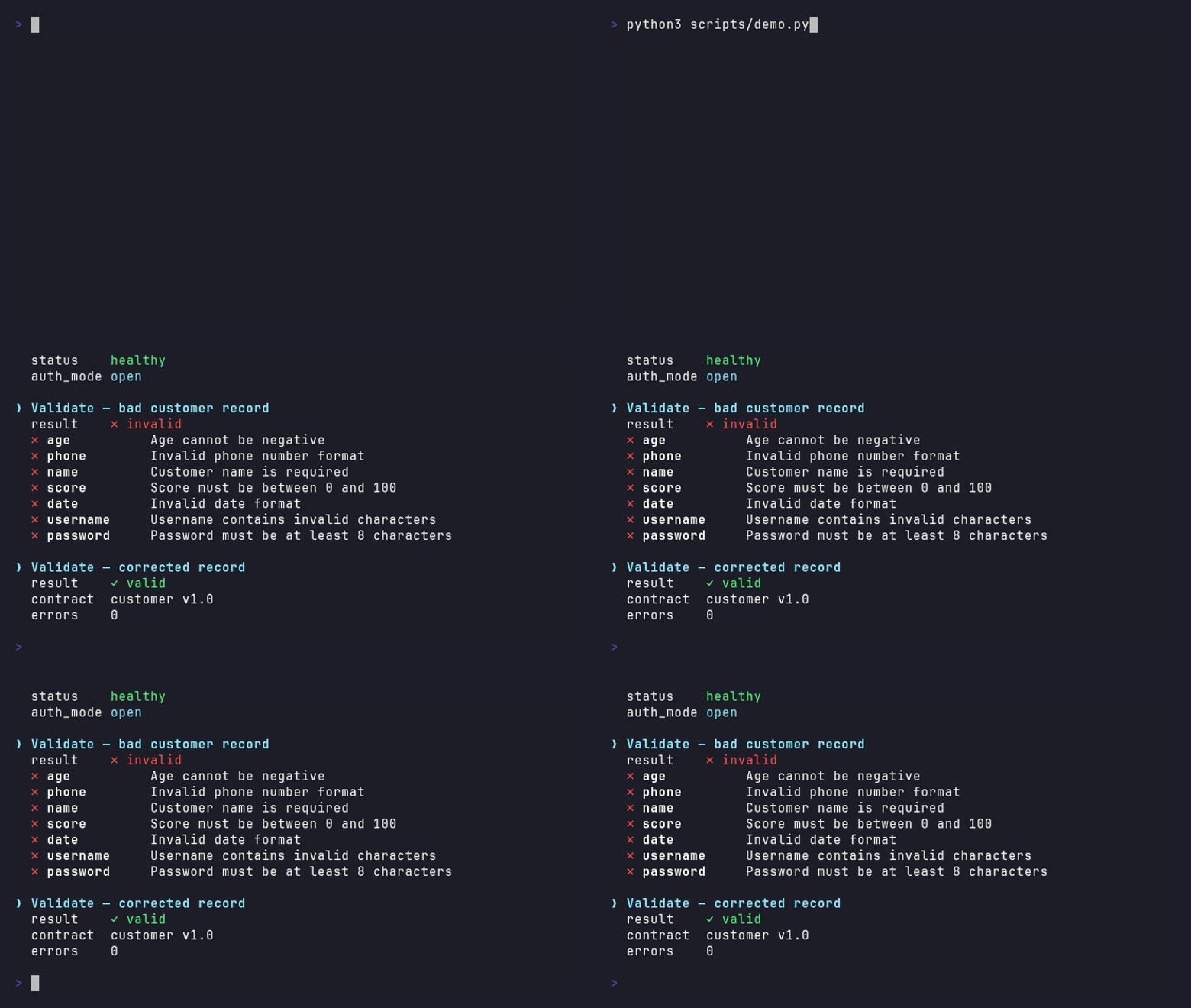
The core loop: bad record → 422 with per-field errors → producer fixes it at source. Rejection rates drop over time because the tool changes behaviour, not just outcomes.
Onboarding wizard — zero to first validation in under 90 seconds
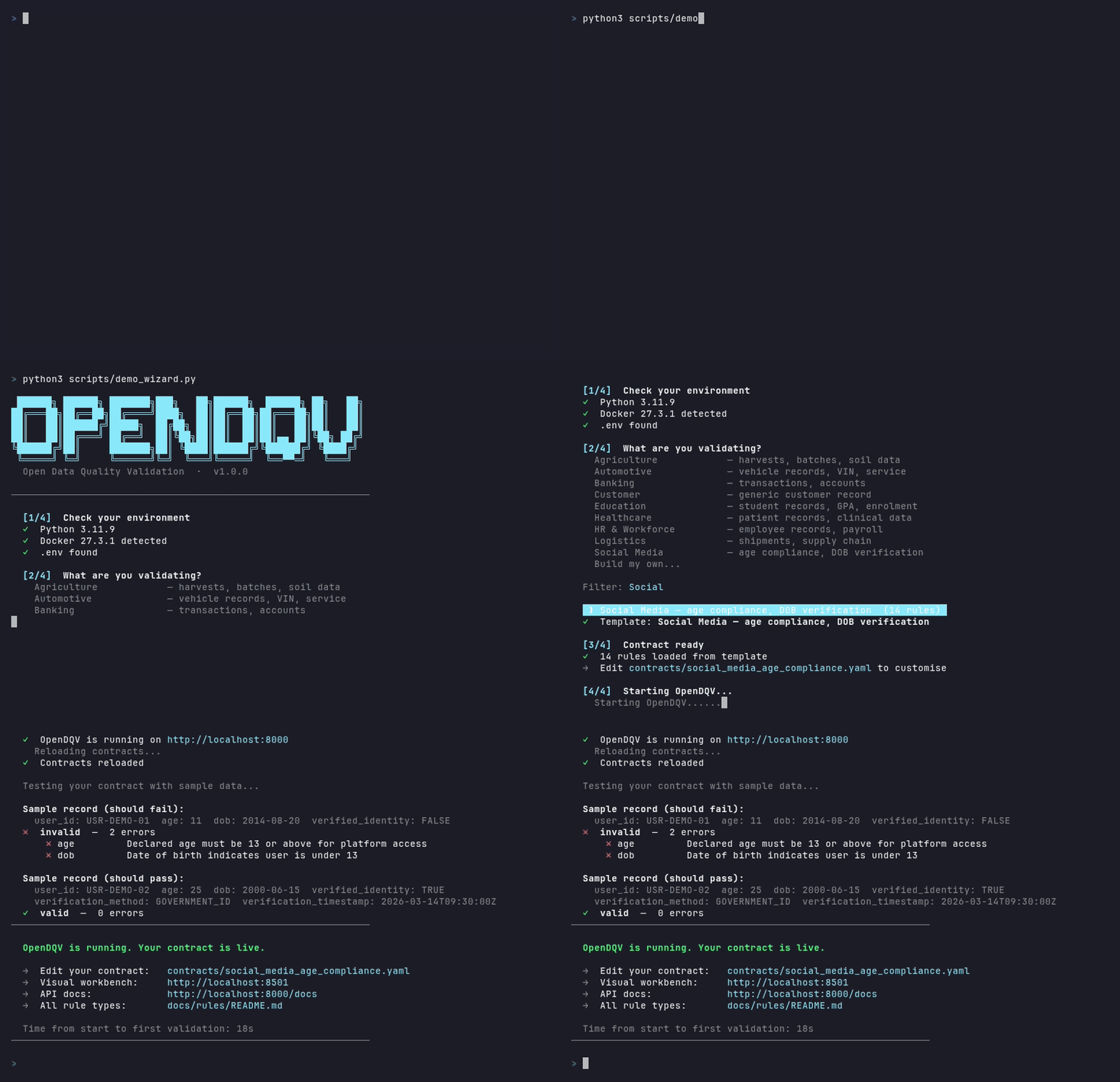
Drop-in setup: the wizard detects Docker, infers rules from your field names, writes a contract, starts the service, and runs your first validation — all before your coffee brews.
Visual workbench — browse contracts, filter by industry, monitor live validation metrics
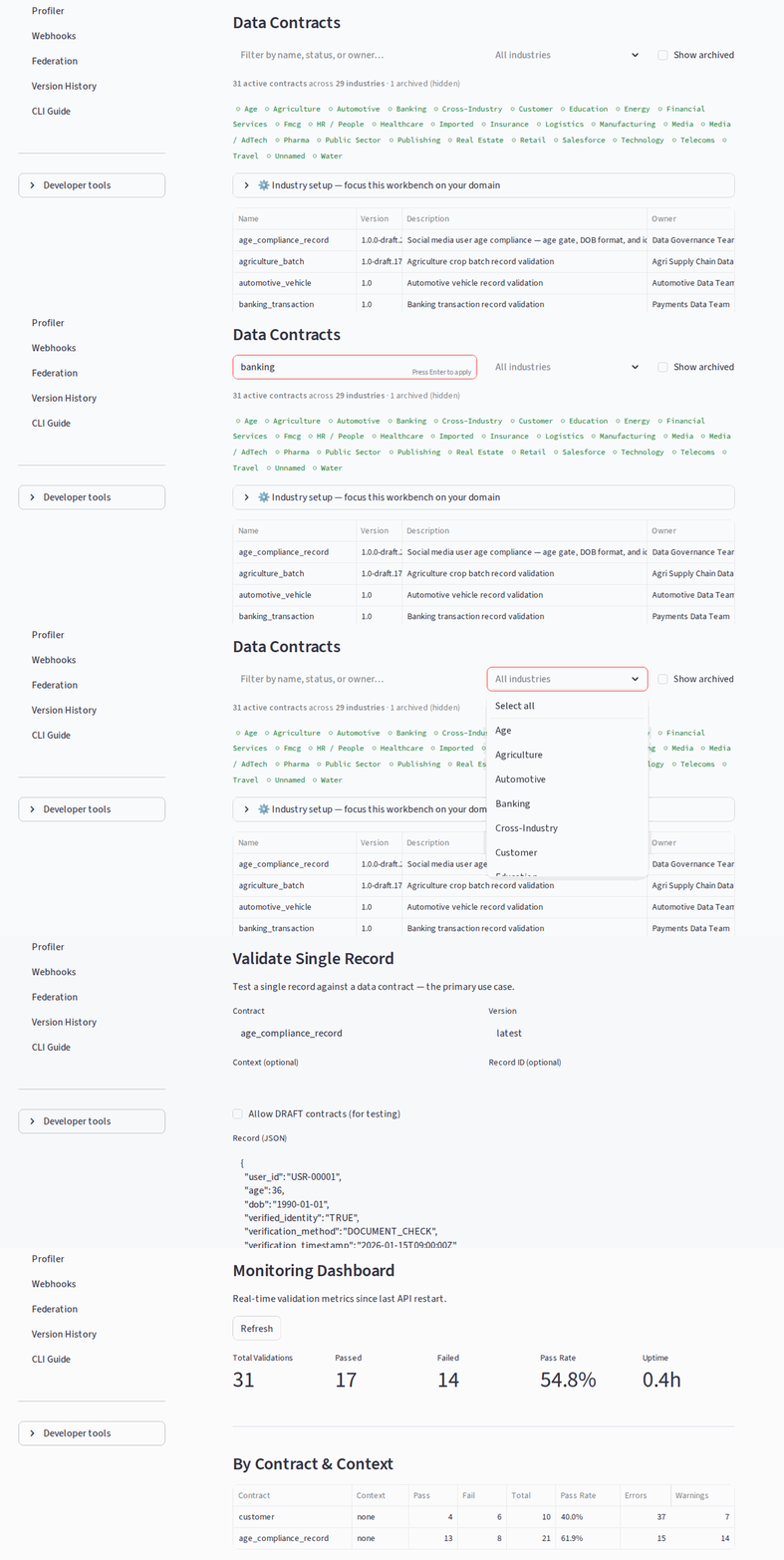
No-code governance: browse 30+ industry contracts, filter by domain, run live validation, inspect pass/fail metrics — all from the browser.
UK Ofcom / Online Safety Act — real-world age verification for social media
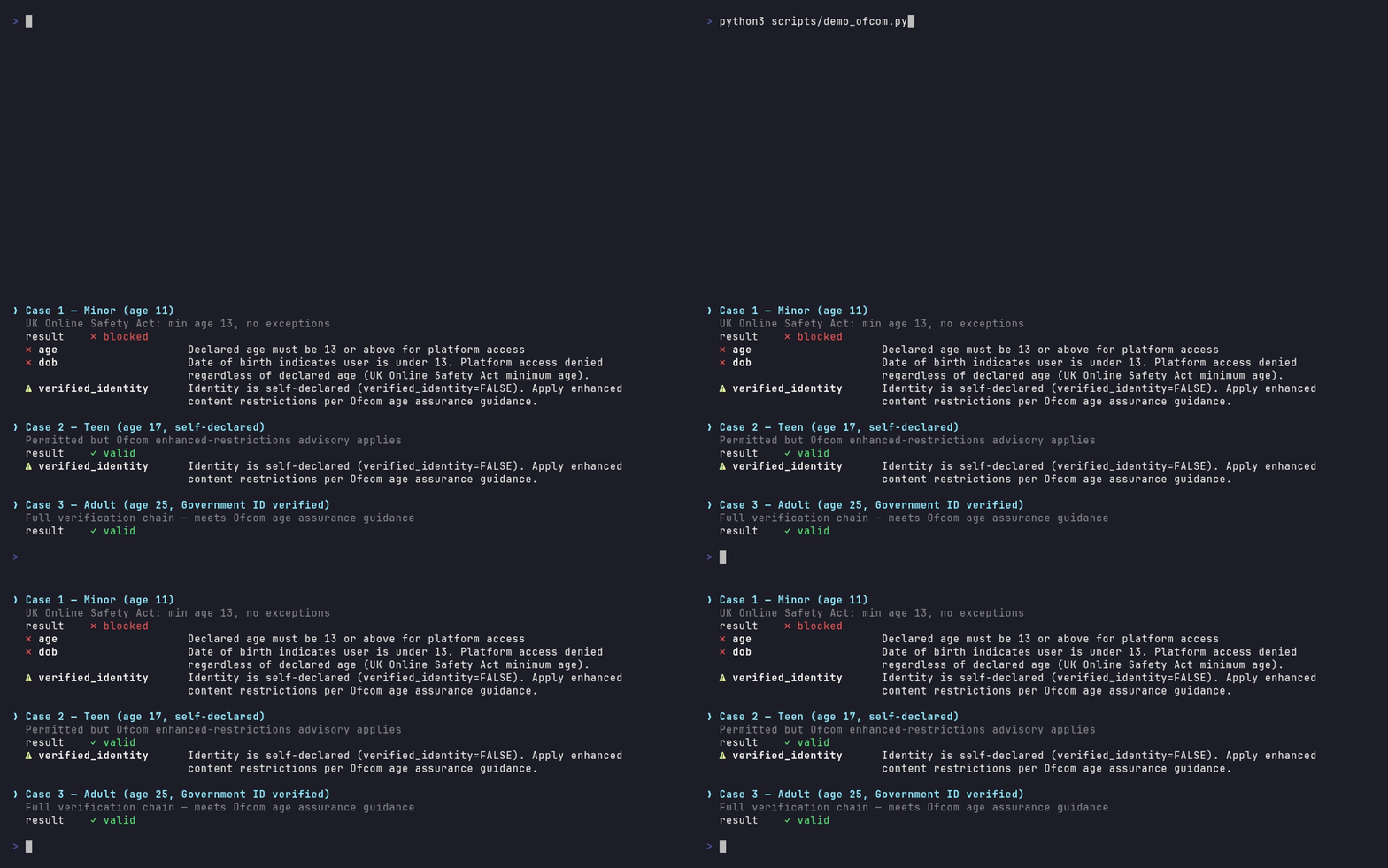
Compliance in a contract: one YAML file enforces the Online Safety Act age-verification requirements — minors blocked, teens flagged with an advisory, adults verified.
Observation mode — run validation without blocking to quantify what would be rejected before enforcing. Full audit trail, zero disruption. See docs/observation_mode.md.
90 seconds to a working contract. Drop a YAML file in contracts/, call /api/v1/contracts/reload, start validating. No GUI. No SDK to install in every system. One API, every caller.
⚠️ Before any regulated or production deployment, review the Security Policy and complete the mandatory deployment checklist.
OpenDQV Core is the bouncer at the door for your enterprise data. Source systems (Salesforce, SAP, Dynamics, Oracle, Postgres, etc.) call the OpenDQV API before writing data. Bad data returns a 422 with per-field errors. Good data passes through. No payload is stored — OpenDQV is a pure validation service.
The core insight: A 422 at the point of write changes behaviour. A data quality report three weeks later does not. Every system that calls OpenDQV before writing data creates a real-time feedback loop — developers and data producers see failures immediately and fix them upstream. This is why rejection rates drop over time: the tool changes the incentive, not just the outcome.
  Callers                     OpenDQV                      Results
  ================      ======================      ====================

  Salesforce ----+
  SAP -----------+      +------------------+
  Dynamics ------+----->|  Validation API  |----> valid: true/false
  Oracle --------+      |  (REST / batch)  |      per-field errors
  Web forms -----+      +--------+---------+      severity levels
  ETL pipelines -+               |                webhooks on events

  Django clean()-+      +--------+---------+
  Python scripts +----->|  LocalValidator  |
  Pandas / ETL --+      |  (in-process SDK)|
                        +--------+---------+
                                 |
  Claude Desktop +      +--------+---------+
  Cursor --------+----->|   MCP Server     |
  LLM agents ----+      |  (AI-native)     |
                        +--------+---------+
                                 |
               +-----------------+-----------------+
               |                                   |
  Importers -> +-------------+         +-----------+-------+
  dbt schema   |  Contracts  |         | Code Generator    |
  GX suites    |   (YAML)    |         | dbt / GX / ODCS   |
  Soda checks  |             |         | Snowflake SQL      |
  ODCS / CSV   | Governance: |         +-------------------+
  CSVW / NDC   | lifecycle   |
               | RBAC        |
               | audit trail |
               | contexts    |
               +-------------+
Why OpenDQV?
The shift-left distinction that actually matters
The phrase "shift-left data quality" has been used for years — but it has almost universally meant validating earlier in the pipeline, not validating before data enters any system at all.
| What the industry calls "shift-left" | What OpenDQV actually does |
|---|---|
| Validate at the first pipeline step (post-ingestion) | Validate before any write occurs |
| Scan data at rest in the warehouse | Block data in flight at the source |
| Data engineer runs the check | Source system calls the check |
| Find problems minutes or hours later | Return a per-field error in milliseconds |
| Fix it in the pipeline | Fix it at source, before it is ever stored |
Every tool in the open-source data contract ecosystem — datacontract-cli, Soda Core, Great Expectations, dbt tests — tests data after it lands. OpenDQV Core is the only open-source tool built as a live validation service that blocks data before it is written.
vs. No Centralised Validation
| Without OpenDQV | With OpenDQV |
|---|---|
| Validation logic duplicated across Salesforce, SAP, Postgres, etc. | One set of validation contracts, one API |
| Contract changes require updates in every system | Update validation contracts centrally — all systems benefit |
| Each team maintains their own validation logic | Governance team owns the validation contracts |
| Bad data discovered after the fact (in dashboards, reports) | Bad data blocked at point of entry |
| No audit trail of what was validated | Prometheus metrics + per-request logging |
vs. Great Expectations / Soda / dbt Tests
These are excellent tools -- but they solve a different problem:
| Great Expectations / Soda / dbt | OpenDQV | |
|---|---|---|
| When | After data lands (in warehouse/lake) | Before data is written (at the door) |
| Where | Data pipelines, batch jobs | Source system integration points |
| Model | Scan data at rest | Validate data in flight |
| Latency | Minutes to hours (batch) | Milliseconds (API call) |
| Who calls it | Data engineers | Application developers, CRM admins |
They're complementary. Use Great Expectations to monitor your warehouse. Use OpenDQV to stop bad data from getting there in the first place.
vs. the rest of the data-contract ecosystem
The data-contract ecosystem is excellent — but every tool in it is built around testing data after it lands. OpenDQV Core is the only one built as a live validation service that blocks data before it's written.
| datacontract-cli | DataPact | Soda Core | OpenDQV | |
|---|---|---|---|---|
| Model | CLI + optional API (tests data at rest in DBs/files) | CLI only | CLI + Python | Live HTTP API service |
| Pre-write blocking | ❌ post-ingestion only | ❌ | ❌ | ✅ 422 rejection before data is stored |
| Real-time per-record API | ❌ | ❌ | ❌ | ✅ sub-50ms |
| Context-aware rules | ❌ | ❌ | ❌ | ✅ per-system/tenant/region overrides |
| Governance lifecycle | ❌ | ❌ | ❌ | ✅ draft → review → active + maker-checker |
| Hash-chained audit log | ❌ | ❌ | ❌ | ✅ HMAC-signed, tamper-evident |
| Code generation | ❌ | ❌ | ❌ | ✅ Salesforce Apex, JavaScript, Snowflake UDF |
| LLM / MCP agent tools | ❌ | ❌ | ❌ | ✅ 6 tools for Claude, Cursor, LangChain |
| Streamlit workbench | ❌ | ❌ | ❌ | ✅ |
| Kafka fail-open/closed | ❌ | ❌ | ❌ | ✅ |
| Salesforce integration | ❌ | ❌ | ❌ | ✅ Before trigger + Apex generation |
OpenDQV Core is the only open-source pre-write data validation service. The tools above are pipeline validators — they tell you what went wrong after the fact. OpenDQV stops it from going wrong in the first place.
vs. JSON Schema / Pydantic / Cerberus
These are validation libraries. OpenDQV Core is a validation service:
- One API, many callers. Salesforce Apex, JavaScript, Python, Power Automate -- they all call the same endpoint. No library to install in each system.
- Context-aware. Same contract, different validation criteria per system: stricter for production, relaxed for sandbox, region-specific for EMEA.
- Governance built in. Contract lifecycle (draft/review/active/rejected/archived), ownership, versioning, audit metrics.
- Code generation. Can't make HTTP calls? Generate Apex/JS/Snowflake code from the same contracts.
- GraphQL API — query contracts, validation history, and audit log with complex filters at
/graphql
What OpenDQV Core is NOT
OpenDQV Core does one thing: it rejects records that violate quality rules, at the moment
of write, before the data reaches your pipeline.
Not a data catalog — it does not store or manage metadata about your datasets
Not a data observability platform — it does not monitor freshness, drift, or volume over time
Not a semantic layer — it does not define business meaning or ontology mappings
Not an SLA monitor — it does not track or alert on service level obligations
Not a lineage tracker — it does not model upstream data dependencies
Not a format normaliser or ETL preprocessor — OpenDQV validates business rules on well-formed, structured data. It does not parse malformed Excel files, normalise inconsistent column names across agency feeds, or fix upstream format chaos. If your data arrives in structurally inconsistent formats, that is a data submission standards problem. OpenDQV enforces the rules once data arrives in structured form.
Not an ETL pipeline observer — OpenDQV validates at the write boundary, before data is stored. It does not sit inside an ETL pipeline after ingestion to observe data at rest. If you need post-ingestion monitoring, use Great Expectations, Soda, or dbt tests alongside OpenDQV — they are complementary.
Not a replacement for Collibra, DataHub, Atlan, Purview, or Marmot — it complements them. A governance team running Atlan, Collibra, or Marmot for stewardship should think of OpenDQV as the enforcement layer that sits upstream of everything their catalog manages — it ensures the data being governed was clean before it arrived.
Not a data profiler or drift monitor — it does not monitor data distributions over time or detect schema drift. For that, use Great Expectations, Soda, or Evidently. The built-in
profile_records()function generates suggested validation rules from a sample of records — a one-time bootstrapping aid, not a monitoring system.
Quick Start — pick your path
| I want to... | Use this |
|---|---|
| Kick the tyres — zero setup | cp .env.example .env && docker compose -f docker-compose.demo.yml up -d → pre-seeded at http://localhost:8080 · demo guide |
| Explore every endpoint in Postman | Import postman/OpenDQV.postman_collection.json + postman/OpenDQV.postman_environment.json → Postman guide |
| I have... | Use this path |
|---|---|
| Neither / not sure where to start | → Option 1: Complete Beginner |
| Python 3.11+ installed | → Option 2: Python (no Docker) |
| Docker Desktop installed | → Option 3: Docker |
| Just want the SDK / CLI (Python devs) | → pip install opendqv |
Option 1: Complete Beginner
No git, no Docker, no problem.
First: you will need Python 3.11+. Check before you download anything:
- Windows: open the Start menu, search for "cmd", open it, and type
python --version. If it says 3.11 or higher you're good. If not, download from python.org/downloads — make sure to check "Add Python to PATH" during installation.- Mac: open Spotlight (⌘ Space), search for "Terminal", open it, and type
python3 --version. If you need to install: python.org/downloads.- Linux: type
python3 --versionin a terminal. To install:sudo apt install python3.11(Ubuntu/Debian).
Download the ZIP:
👉 Latest release — scroll down to Assets and click Source code (zip)Unzip it somewhere you can find it (your Desktop is fine). You should see a folder called
OpenDQV-X.Y.Zwhere X.Y.Z is the version number.Install and run:
Windows — open the unzipped folder, then double-click
install.bat. A command window will open and text will scroll — this is normal. First run takes 2–3 minutes.Mac — open Spotlight (⌘ Space), search for "Terminal", and open it. Then type:
cd ~/Desktop/OpenDQV-X.Y.Z
bash install.sh
(replace
Desktop/OpenDQV-X.Y.Zwith the actual folder name and wherever you unzipped it)Linux — open a terminal, navigate to the unzipped folder, and run:
bash install.sh
When the install finishes the onboarding wizard launches automatically — you'll see a welcome message and a series of prompts. The wizard creates a starter contract and validates your first record in under 90 seconds.
Option 2: Python (no Docker)
Recommended — use the install script. It checks your Python version, creates a virtual environment, installs dependencies, and launches the onboarding wizard automatically:
git clone https://github.com/OpenDQV/OpenDQV.git
cd OpenDQV
bash install.sh       # Mac/Linux
git clone https://github.com/OpenDQV/OpenDQV.git
cd OpenDQV
install.bat           # Windows
The wizard will start automatically after setup and have you validating your first record in under 90 seconds.
Manual setup (advanced users)Mac/Linux:
cp .env.example .env
python3 -m venv .venv
source .venv/bin/activate
pip install -r requirements.txt
uvicorn main:app --reload
Windows (cmd.exe):
copy .env.example .env
python -m venv .venv
call .venv\Scripts\activate
pip install -r requirements.txt
uvicorn main:app --reload
When the server starts you will see Uvicorn running on http://localhost:8000 in your terminal. Swagger docs at /docs, ReDoc at /redoc, GraphQL at /graphql.
Streamlit UI: run streamlit run ui/app.py in a second terminal to start the governance workbench at http://localhost:8501.
Option 3: Docker
A pre-built multi-arch image (linux/amd64 + linux/arm64) is published to the GitHub Container Registry on every release. This covers Intel/AMD machines and Raspberry Pi (ARM64, validated). Apple Silicon Macs use the linux/arm64 image natively — the ARM64 architecture has been validated on Raspberry Pi 400; direct Apple Silicon testing has not been performed.
git clone https://github.com/OpenDQV/OpenDQV.git
cd OpenDQV

# Required before any docker compose command:
cp .env.example .env

# Simplest start — pulls the pre-built image from ghcr.io (fast):
docker compose up -d

# API:     http://localhost:8000
# Docs:    http://localhost:8000/docs   (Swagger UI)
# Redoc:   http://localhost:8000/redoc
# GraphQL: http://localhost:8000/graphql
# UI:      http://localhost:8501  (localhost only — see UI_ACCESS_TOKEN in .env.example)
docker compose up -d uses ghcr.io/opendqv/opendqv:latest automatically. No build step required — the image is ready to run.
Other modes:
# Demo environment (pre-seeded data, AUTH_MODE=open, ports 8080/8502):
# See docs/demo.md for a guided walkthrough.
docker compose -f docker-compose.demo.yml up -d

# Development overlay (live source reload — mounts your local code into the container):
docker compose -f docker-compose.yml -f docker-compose.dev.yml up -d

# Production (no source mounts, AUTH_MODE=token enforced, resource limits):
# Requires SECRET_KEY to be set in .env — deployment will refuse to start without it.
docker compose -f docker-compose.yml -f docker-compose.prod.yml up -d

# Pull the latest version:
docker pull ghcr.io/opendqv/opendqv:latest

# Build from source instead (if you've modified the code):
docker compose up -d --build
⚠️ Default state is open.
AUTH_MODE=openhas no authentication — anyone who can reach port 8000 can validate records and read contracts. Never use open mode with sensitive data.
Before connecting any real data, setAUTH_MODE=tokenand a strongSECRET_KEYin.env.
Usedocker-compose.prod.ymlfor any non-local deployment.
Regulated deployments: complete the Mandatory Deployment Checklist and review docs/security/hardening.md before going live.
Authentication
In AUTH_MODE=open (the default), no token is needed — omit the Authorization header.
In AUTH_MODE=token (production), every request must include:
Authorization: Bearer <your-token>
For token creation, roles, and production setup see Administration.
Validate your first record
# Validate a good record — expect valid: true
curl -s -X POST http://localhost:8000/api/v1/validate \
  -H "Content-Type: application/json" \
  -d '{
    "contract": "customer",
    "record_id": "demo-001",
    "record": {
      "name": "Alice Smith",
      "email": "[email protected]",
      "phone": "+447911123456",
      "age": 25,
      "score": 85,
      "date": "1999-06-15",
      "username": "alice_smith",
      "password": "securepass123"
    }
  }'
Response:
{
  "valid": true,
  "record_id": "demo-001",
  "errors": [],
  "warnings": [
    {
      "field": "balance",
      "rule": "positive_balance",
      "message": "Negative balance detected",
      "severity": "warning"
    }
  ],
  "contract": "customer",
  "version": "1.0",
  "owner": "Data Governance Team"
}
valid: true — warnings don't block. The record passes all error-level rules.
# Validate a bad record — expect valid: false
curl -s -X POST http://localhost:8000/api/v1/validate \
  -H "Content-Type: application/json" \
  -d '{
    "contract": "customer",
    "record": {
      "name": "",
      "email": "not-an-email",
      "phone": "07911",
      "age": 25,
      "score": 85,
      "date": "1999-06-15",
      "username": "alice_smith",
      "password": "securepass123"
    }
  }'
Response:
{
  "valid": false,
  "record_id": null,
  "errors": [
    {"field": "email",  "rule": "valid_email",    "message": "Invalid email format",             "severity": "error"},
    {"field": "phone",  "rule": "valid_phone",    "message": "Invalid phone number format",      "severity": "error"},
    {"field": "name",   "rule": "name_required",  "message": "Customer name is required",        "severity": "error"}
  ],
  "warnings": [
    {"field": "balance", "rule": "positive_balance", "message": "Negative balance detected", "severity": "warning"}
  ],
  "contract": "customer",
  "version": "1.0",
  "owner": "Data Governance Team"
}
⚠️ Production auth: The default
AUTH_MODE=openhas no authentication. SetAUTH_MODE=tokenin.envfor any deployment reachable from outside your local network. See Security Policy for details.
Your First Contract in 90 Seconds
Write a YAML file. Reload. Validate. That's it.
This walkthrough creates a realistic contract for an order record and validates it end-to-end.
Step 1: Write the contract
Save the following to contracts/order.yaml:
contract:
  name: order
  version: "1.0"
  description: "Order record validation — e-commerce platform"
  owner: "Data Platform Team"
  status: active

  rules:
    - name: order_id_required
      field: order_id
      type: not_empty
      severity: error
      error_message: "order_id is required"

    - name: status_valid
      field: status
      type: lookup
      lookup_file: ref/order_statuses.txt
      severity: error
      error_message: "status must be a recognised order status"

    - name: carrier_code_valid
      field: carrier_code
      type: lookup
      lookup_file: ref/carriers.txt
      severity: error
      error_message: "carrier_code must be an active carrier"

    - name: amount_range
      field: amount
      type: range
      min: 0.01
      max: 999999
      severity: error
      error_message: "amount must be between 0.01 and 999999"
Lookup files —
ref/order_statuses.txtandref/carriers.txtare included in the repo undercontracts/ref/. Edit them to match your valid values. For dynamic lookups,lookup_filealso accepts HTTP endpoints (e.g.https://api.example.com/statuses) with optionalcache_ttl(seconds).
Step 2: Reload contracts
curl -s -X POST http://localhost:8000/api/v1/contracts/reload
Step 3: Validate a good record
curl -s -X POST http://localhost:8000/api/v1/validate \
  -H "Content-Type: application/json" \
  -d '{
    "contract": "order",
    "record_id": "ord-20260309-001",
    "record": {
      "order_id": "ORD-20260309-001",
      "status": "confirmed",
      "carrier_code": "UPS",
      "amount": 149.99
    }
  }' | python3 -m json.tool
Expected: "valid": true with empty errors list.
Step 4: Validate a bad record (invalid status)
curl -s -X POST http://localhost:8000/api/v1/validate \
  -H "Content-Type: application/json" \
  -d '{
    "contract": "order",
    "record_id": "ord-20260309-002",
    "record": {
      "order_id": "ORD-20260309-002",
      "status": "UNKNOWN_STATUS",
      "carrier_code": "UPS",
      "amount": 149.99
    }
  }' | python3 -m json.tool
Expected: "valid": false, errors contains status_valid rule failure.
Salesforce Integration
OpenDQV ships two production-grade Salesforce contracts (sf_contact, sf_lead) and supports two integration patterns: Approach 1 push-down Apex (zero infrastructure, snapshot) and Approach 2 live HTTP callout via Named Credential (always in sync, never drifts).
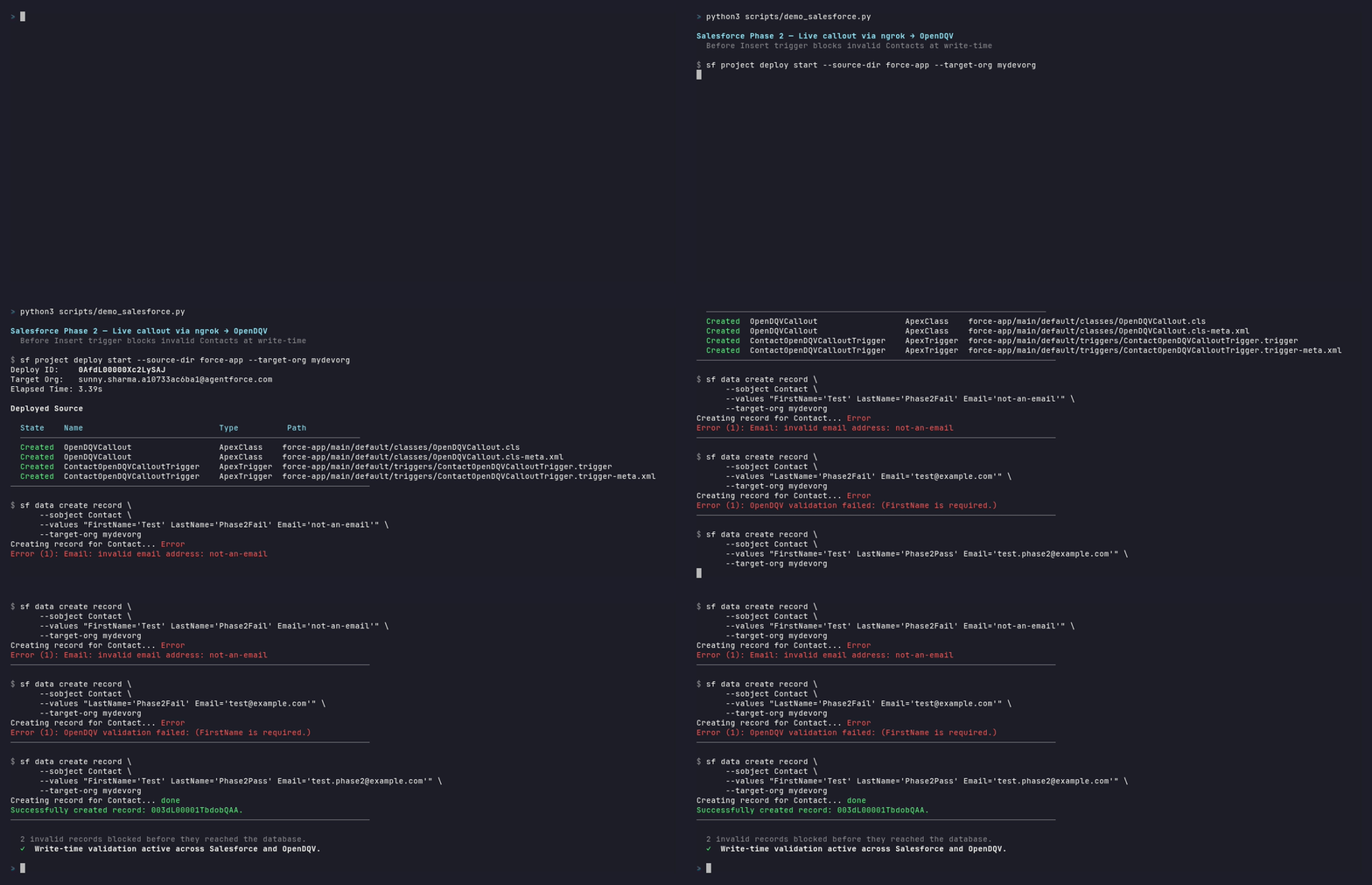
Full integration guide → — contract setup, push-down Apex generation, live callout wiring, Named Credentials, governor limits, hybrid migration path, and teardown.
Data Contracts
Data contracts are versioned YAML files in the contracts/ directory. Each contract defines the validation criteria for a business entity. In OpenDQV, a data contract encodes quality validation rules — not SLA commitments, semantic annotations, or lineage. Those are managed by your data catalog.
contract:
  name: customer
  version: "1.0"
  description: "Standard customer data quality validation"
  owner: "Data Governance Team"
  status: active

  rules:
    - name: valid_email
      type: regex
      field: email
      pattern: "^[a-zA-Z0-9_.+-]+@[a-zA-Z0-9-]+\\.[a-zA-Z0-9-.]+$"
      severity: error          # error = block, warning = allow but flag
      error_message: "Invalid email format"

    - name: age_reasonable
      type: max
      field: age
      max: 150
      severity: warning        # doesn't block -- just flags
      error_message: "Age seems unreasonably high"
Included Contracts
| Contract | Description | Contexts | Highlights |
|---|---|---|---|
customer |
General customer validation (email, age, name, phone, etc.) | kids_app, financial |
— |
sf_contact |
Salesforce Contact — 18 validation criteria, production-grade | salesforce_prod, salesforce_sandbox, emea_region |
Sentinel date rejection |
sf_lead |
Salesforce Lead — 16 validation criteria with lead-specific checks | web_form, trade_show, partner_referral |
— |
proof_of_play |
Reference contract: OOH advertising impression validation | billing, operations |
Cross-field rules, conditional constraints, context-aware billing thresholds |
social_media_age_compliance |
UK Online Safety Act / Ofcom age assurance — 13+ age gate, DOB consistency, identity verification audit trail | — | age_match rule, identity verification lookup, verification timestamp |
ppds_menu_item |
Natasha's Law (PPDS) allergen compliance — all 14 major allergens must be explicitly declared before a QSR menu item is saved or labelled | — | 14 mandatory boolean fields, required_if for gluten/tree-nut type, sulphite threshold, audit trail |
martyns_law_venue |
Martyn's Law (Terrorism (Protection of Premises) Act 2025) — venue terrorism preparedness compliance, two-tier (standard/enhanced), mandatory SRP and SIA registration for 800+ capacity venues | — | Two-tier required_if enforcement, capacity minimum, enhanced-duty field gate, audit trail |
martyns_law_event |
Martyn's Law — qualifying events (temporary/one-off, 200+ expected attendance). Organiser-centric; SIA notification not registration; staff briefing not training; time-bounded with start/end dates | — | Distinct from venue contract: sia_notification_reference not sia_registration_number; event dates required |
pretix_event |
Martyn's Law — Pretix event ticketing platform integration. Enforces expected_attendance, duty tier, evacuation/invacuation/lockdown procedures, staff briefing, and compliance audit trail at the point of write | — | Pretix-specific: expected_attendance field (Pretix has no native capacity field); pre_save signal via LocalValidator; see docs/integrations/pretix.md |
building_safety_golden_thread |
Building Safety Act 2022 — Golden Thread compliance for higher-risk buildings (18m+ / 7+ storeys). Enforces accountable person, BSR registration, safety case, and golden thread audit trail at point of write | — | Named accountable person + BSM mandatory, BSR registration gate, required_if safety_case_documented = true |
companies_house_filing |
Economic Crime and Corporate Transparency Act 2023 — identity verification for Companies House director and PSC filings. A missing verification field blocks the record before submission | — | required_if id_verification_completed = true gates method, date, and verifier; role and method lookups |
gdpr_processing_record |
UK GDPR Article 30 — Record of Processing Activities (ROPA). Enforces lawful basis declaration, consent-specific fields, legitimate interests assessment, special category data basis, and international transfer safeguard at the point of write | — | All 6 Article 6 lawful bases via lookup; consent/LIA/special-category/transfer fields via required_if; DPO audit trail |
gdpr_dsar_request |
UK GDPR Article 15 — Data Subject Access Request handling. Enforces 30-day deadline recording, identity verification gate, extension logic, and outcome tracking before a request enters the case management workflow | — | 30-day deadline field required at intake; required_if for verification method, extension reason, and refusal reason |
eu_gdpr_processing_record |
EU GDPR Article 30 — Record of Processing Activities (ROPA). EU variant of the UK GDPR contract with EU Standard Contractual Clauses, 27-DPA supervisory authority lookup, and EU adequacy decision list | — | EU transfer safeguards and supervisory authority lookup; otherwise identical pattern to UK GDPR |
eu_gdpr_dsar_request |
EU GDPR Article 15 — Data Subject Access Request handling. EU variant with €20M / 4% turnover penalty references and EU supervisory authority | — | Same enforcement pattern as UK GDPR DSAR; fines referenced in EUR |
dora_ict_incident |
EU DORA (Digital Operational Resilience Act) Articles 17-19 — ICT incident report for financial entities. In force 17 January 2025. Enforces incident classification, statutory reporting timelines (24h / 72h / 30 days), and root cause documentation | — | date_diff enforces 24h early warning and 72h notification windows; required_if for root_cause when major/significant |
hipaa_disclosure_accounting |
US HIPAA 45 CFR 164.528 — Accounting of Disclosures. Enforces complete disclosure records before they enter covered entity systems. OCR penalties up to $2.1M/year | — | required_if for authorization_reference when patient_authorization; minimum_necessary_applied boolean gated on non-treatment purposes |
sox_control_test |
US Sarbanes-Oxley Act 2002, Sections 302/404 — Internal control test record. CEO/CFO personal certification liability. Enforces deficiency classification and remediation plan completeness before control test records are saved | — | Three-level required_if cascade: test_result → deficiency_classification → remediation plan + audit committee escalation |
mifid_transaction_report |
MiFID II / MiFIR Article 26 — Transaction reporting for investment firms and trading venues. Enforces LEI, ISIN, and venue MIC format at point of write before submission to an Approved Reporting Mechanism | — | LEI regex (^[A-Z0-9]{18}[0-9]{2}$), ISIN regex, MIC regex; buyer/seller ID type lookups |
OpenDQV ships 44 production-ready industry contracts in contracts/ covering agriculture, automotive, banking, building safety, corporate compliance, data protection, education, energy, financial controls, FMCG, food safety, healthcare, HR, insurance, logistics, manufacturing, media, pharma, public safety, public sector, real estate, retail, telecoms, travel, water utility, and more — across UK, EU, and US regulatory frameworks — plus 17 starter templates in examples/starter_contracts/. See docs/community_use_cases.md for real-world examples by industry.
UK Online Safety Act (Ofcom enforcement from January 2026): The
social_media_age_compliancecontract demonstrates age assurance patterns required by the UK Online Safety Act 2023: 13-year age gate, age/DOB consistency check (age_matchrule), identity verification method tracking, and verification timestamp audit trail.
Natasha's Law (in force 1 October 2021): The
ppds_menu_itemcontract enforces explicit allergen declaration for Pre-Packed for Direct Sale (PPDS) food at the point of write. All 14 major allergens are mandatory fields — omission is structurally impossible and triggers a 422 before the record enters the system. Theallereasy_dishcontract extends this for AllerEasy (open-source Django allergen management), adding a timestamped review audit trail enforced inDish.clean()via theLocalValidatorSDK. See docs/integrations/natasha-law-compliance.md and docs/integrations/allereasy.md.
Martyn's Law (Royal Assent 3 April 2025): The
martyns_law_venueandmartyns_law_eventcontracts enforce terrorism preparedness compliance for venues and events with a capacity of 200 or more. Enhanced-duty premises (800+) must declare a named Senior Responsible Person, SIA registration/notification reference, and Terrorism Protection Plan — omission triggers a 422 before the record enters the system. Thepretix_eventcontract extends this for Pretix (open-source event ticketing), adding a compliance audit trail enforced via apre_savesignal and theLocalValidatorSDK. Named after Martyn Hett (1987–2017), killed in the Manchester Arena attack. See docs/integrations/martyns-law-compliance.md and docs/integrations/pretix.md.
Building Safety Act 2022 — Golden Thread: The
building_safety_golden_threadcontract enforces the Act's own obligation — "accurate and up-to-date information throughout the building lifecycle" — for higher-risk buildings (18m+ or 7+ storeys). Accountable person, BSR registration number, and safety case documentation are mandatory fields; omission triggers a 422 before the record enters the system. See docs/integrations/building-safety-golden-thread.md.
Economic Crime and Corporate Transparency Act 2023: The
companies_house_filingcontract enforces identity verification for Companies House director and PSC filings. A record withid_verification_completedundeclared, or with verification details missing, is rejected before it enters the filing system. See docs/integrations/companies-house-filing.md.
UK GDPR / Data Protection Act 2018: Two contracts enforce the UK's most universally applicable data regulation.
gdpr_processing_recordenforces Article 30 Records of Processing Activities — lawful basis, data categories, consent fields, and retention period are mandatory before a ROPA entry is saved.gdpr_dsar_requestenforces Article 15 Subject Access Request handling — receipt date, response deadline (30 days), and identity verification must be recorded before a request enters any workflow. See docs/integrations/gdpr-compliance.md.
EU GDPR (Regulation (EU) 2016/679):
eu_gdpr_processing_recordandeu_gdpr_dsar_requestmirror the UK GDPR contracts with EU-specific transfer safeguards (Standard Contractual Clauses), all 27 national supervisory authority codes, and EUR penalty references. Applies to any organisation processing personal data of EU residents.
EU DORA — Digital Operational Resilience Act (in force 17 January 2025):
dora_ict_incidentenforces ICT incident reporting completeness for EU financial entities. Incident classification, affected services, and root cause are mandatory before an incident record enters a case management system. Thedate_diffrule enforces DORA's statutory reporting windows: 24-hour early warning and 72-hour initial notification from the moment of becoming aware.
US HIPAA — 45 CFR 164.528:
hipaa_disclosure_accountingenforces complete accounting of PHI disclosures before records enter covered entity systems. Authorization reference is required when purpose is patient_authorization; minimum necessary determination is required for all non-treatment disclosures under 45 CFR 164.502(b). OCR civil penalties up to $2.1M per violation category per year.
US Sarbanes-Oxley Act 2002 — Sections 302/404:
sox_control_testenforces SOX internal control test record completeness. A three-levelrequired_ifcascade ensures that ineffective test results require deficiency classification, and material weaknesses require remediation plans and audit committee escalation — before the record enters the GRC system. Applies to all US public companies (~4,200 NYSE/NASDAQ listed companies).
MiFID II / MiFIR Article 26:
mifid_transaction_reportenforces transaction reporting completeness for investment firms and trading venues. LEI, ISIN, and venue MIC codes are format-validated at point of write before submission to an Approved Reporting Mechanism. Applies across EU and UK markets.
proof_of_play is the recommended reference for cross-field rules and condition blocks. It demonstrates:
comparerule:impression_endmust be strictly afterimpression_start(catches phantom billing from inverted timestamps)required_ifrule:refresh_rate_hzrequired only whenpanel_type == DIGITALconditionblock: revenue floor applied only toCHARGErecords, notCREDITnotes- Two contexts:
billing(all warnings become errors) andoperations(relaxed thresholds for dashboards)
Context-Aware Validation
Different source systems can apply different validation criteria from the same contract:
# Default validation
curl -X POST .../validate -d '{"record": {...}, "contract": "sf_contact"}'

# Production -- enforces 18+ age, mandatory AccountName
curl -X POST .../validate -d '{"record": {...}, "contract": "sf_contact", "context": "salesforce_prod"}'

# Sandbox -- requires test email domains
curl -X POST .../validate -d '{"record": {...}, "contract": "sf_contact", "context": "salesforce_sandbox"}'

# EMEA -- requires country code on phone, mandatory postal code
curl -X POST .../validate -d '{"record": {...}, "contract": "sf_contact", "context": "emea_region"}'
Rule Types
| Type | Parameters | Description |
|---|---|---|
regex |
pattern, negate? |
Match field against regex. Set negate: true to require the field does NOT match. |
min |
min |
Field >= minimum value |
max |
max |
Field <= maximum value |
range |
min, max |
Field between min and max |
not_empty |
— | Field not null/empty string |
min_length |
min_length |
String length >= minimum |
max_length |
max_length |
String length <= maximum |
date_format |
format? |
Field must be a parseable date/datetime. If format is specified (Python strftime syntax, e.g. '%Y-%m-%d %H:%M:%S'), that format is tried first. Falls back to common formats: YYYY-MM-DD, YYYY-MM-DDTHH:MM:SS, DD/MM/YYYY, MM/DD/YYYY. |
unique |
group_by? |
No duplicates within batch (batch mode only). Set group_by to scope uniqueness within groups. |
compare |
compare_to, compare_op |
Cross-field: field op compare_to. ops: gt lt gte lte eq neq (or symbols > < etc.). Works with numbers, ISO dates, strings. compare_to also accepts today or now as sentinel values resolved at validation time. |
required_if |
required_if: {field, value} |
Conditional: field required when another field equals a value |
forbidden_if |
forbidden_if: {field, value} |
Conditional: field must be absent when another field equals a value. Complement of required_if. |
conditional_value |
must_equal, condition: {field, value} |
Field must equal a specific value when a condition is met |
lookup |
lookup_file, lookup_field?, cache_ttl?, all_of? |
Reference: value must appear in a file (one per line, or CSV column) or HTTP endpoint |
checksum |
checksum_algorithm |
Identifier integrity: validates check digit(s) for IBAN, GTIN/GS1, NHS, ISIN, LEI, VIN, ISRC, CPF. Algorithms: mod10_gs1, iban_mod97, isin_mod11, lei_mod97, nhs_mod11, cpf_mod11, vin_mod11, isrc_luhn. |
cross_field_range |
cross_min_field?, cross_max_field? |
Field value must be between two other fields in the same record (e.g. trade price within bid/ask spread) |
field_sum |
sum_fields, sum_equals, sum_tolerance? |
Sum of named fields must equal a target value within optional tolerance (e.g. portfolio allocations sum to 100%) |
min_age |
min_age, dob_field? |
Date field implies a minimum age (e.g. must be 18+) |
max_age |
max_age, dob_field? |
Date field implies a maximum age |
age_match |
dob_field, age_tolerance? |
Declared age field must be consistent with a date-of-birth field |
date_diff |
date_diff_field, min_days?, max_days? |
Difference between two date fields must be within a range |
ratio_check |
ratio_numerator, ratio_denominator, min_ratio?, max_ratio? |
Ratio of two numeric fields within a range |
conditional_lookup |
lookup_file, condition: {field, value} |
Lookup list applied only when a condition field equals a value |
geospatial_bounds |
geo_lat_field, geo_lon_field?, geo_min_lat?, geo_max_lat?, geo_min_lon?, geo_max_lon? |
Lat/lon pair within a geographic bounding box |
Any rule can include a condition block to apply it only in certain circumstances:
# Apply only when transaction_type != CREDIT (skip for credit notes)
- name: revenue_floor_for_charges
  type: min
  field: revenue_gbp
  min: 0
  condition:
    field: transaction_type
    not_value: CREDIT
  error_message: "revenue_gbp must be >= 0 for charge records"

# Apply only when region == EU
- name: eu_gdpr_consent
  type: not_empty
  field: gdpr_consent
  condition:
    field: region
    value: EU
condition supports value (apply when field equals) and not_value (apply when field does not equal). Works on every rule type in both single-record and batch modes.
Severity Levels
error-- blocks the record (valid: false)warning-- flags but allows the record (valid: true, appears inwarnings)
Contract Lifecycle
| Status | Description |
|---|---|
draft |
Being authored/tested. Blocked from production validation unless ?allow_draft=true. |
review |
Submitted for approval — frozen until approved or rejected. |
active |
Live. Source systems can validate against it. (Default) |
archived |
Still works but hidden from default listings. Callers should migrate. |
rejected |
Returned from REVIEW; revise and re-submit as a new DRAFT. |
Contracts follow a maker-checker REVIEW workflow for regulated deployments:
DRAFT ──► submit-review ──► REVIEW ──► approve ──► ACTIVE
                                  └──► reject ──► DRAFT
Every lifecycle transition is recorded in an append-only, hash-chained ContractHistory audit log (including approved_by identity), satisfying FCA SYSC, Ofwat, NHS DSP Toolkit, and SOX-adjacent data governance requirements. At startup, OpenDQV checks NTP clock synchronisation and records the result in the audit log — run opendqv audit-verify to see chain integrity and clock sync status together.
Governance workflow:
- Author a contract YAML with
status: draft - Test it in the Workbench UI (uses
?allow_draft=trueautomatically) - Submit for review:
POST /api/v1/contracts/{name}/{version}/submit-review - Approver reads the plain-English
/explainoutput, then approves:POST /api/v1/contracts/{name}/{version}/approve - Share integration snippets with source system admins (Integration Guide tab)
- When replacing with a new version, deprecate the old one
See docs/rules/review_lifecycle.md for the full API reference.
sensitive_fields — Privacy-Safe Validation
Contracts that handle PII can declare a sensitive_fields list:
contract:
  name: hr_employee_records
  version: "1.0"
  sensitive_fields:
    - salary
    - national_id
    - date_of_birth
Fields listed here are suppressed from TRACE_LOG output, error response values, the /explain endpoint, and ContractHistory diffs. The field name is retained for error routing; only the value is redacted. Designed for GDPR Article 5(1)(c) data minimisation — PII flows through validation but never rests in logs.
See docs/rules/sensitive_fields.md for full details.
/explain — Plain-English Contract Inspection
GET /api/v1/contracts/{name}/explain?version=latest
Returns a plain-English description of all validation rules, suitable for compliance officers and auditors who cannot read YAML. Used in the REVIEW workflow so approvers can read what they are approving. Respects sensitive_fields suppression.
See docs/rules/explain_endpoint.md for full details.
Python SDK
Install the SDK via PyPI:
pip install opendqv
Two client classes — synchronous for standard use, async for event-driven pipelines:
from sdk import OpenDQVClient, AsyncOpenDQVClient
Synchronous client
from sdk import OpenDQVClient

client = OpenDQVClient("http://opendqv.internal:8000", token="<YOUR_TOKEN>")

# Single record
result = client.validate(
    {"email": "[email protected]", "age": 25, "name": "Alice"},
    contract="customer",
    context="salesforce",
)
if result["valid"]:
    print("Record passed")
else:
    for err in result["errors"]:
        print(f"  {err['field']}: {err['message']}")

# Batch
result = client.validate_batch(records, contract="customer")
print(f"{result['summary']['passed']}/{result['summary']['total']} passed")

# List contracts
for c in client.contracts():
    print(f"  {c['name']} v{c['version']} ({c['rule_count']} rules)")
Async client (Kafka consumers, FastAPI, async ETL)
AsyncOpenDQVClient uses httpx.AsyncClient — it does not block the event loop.
Safe for use inside async Kafka consumers, FastAPI route handlers, and asyncio pipelines.
from sdk import AsyncOpenDQVClient

# Kafka consumer (aiokafka)
async def consume_impressions():
    async with AsyncOpenDQVClient("http://opendqv.internal:8000", token="<TOKEN>") as client:
        async for msg in consumer:
            result = await client.validate(msg.value, contract="proof_of_play", context="billing")
            if result["valid"]:
                await warehouse.insert(msg.value)
            else:
                await dead_letter_queue.send({
                    "record": msg.value,
                    "errors": result["errors"],
                    "contract_owner": result["owner"],  # for routing alerts
                })

# FastAPI decorator (async-native guard)
@app.post("/impressions")
@async_client.guard(contract="proof_of_play")
async def ingest_impression(data: dict):
    await db.insert(data)
    return {"status": "accepted"}
Guard Decorator
Automatically validate incoming data before your endpoint runs:
from sdk import OpenDQVClient, ValidationError

client = OpenDQVClient("http://opendqv.internal:8000", token="<TOKEN>")

@app.post("/customers")
@client.guard(contract="customer")
async def create_customer(data: dict):
    # Only runs if data passes validation
    db.insert(data)
    return {"status": "created"}
LocalValidator — no server required
For scripts, ETL jobs, and CI pipelines that don't need an API server, LocalValidator runs the full validation engine in-process against a local directory of YAML contracts. No Docker, no network, no token.
from sdk.local import LocalValidator

validator = LocalValidator()  # reads from OPENDQV_CONTRACTS_DIR (or ./contracts/)

# Single record
result = validator.validate({"name": "Alice", "email": "[email protected]"}, contract="customer")
if not result["valid"]:
    raise ValueError(result["errors"])

# Batch — works directly with DataFrames
import pandas as pd
df = pd.read_csv("customers.csv")
result = validator.validate_batch(df.to_dict("records"), contract="customer")
print(f"{result['summary']['passed']}/{result['summary']['total']} passed")

# Annotate DataFrame with validation results
validity = {r["index"]: r["valid"] for r in result["results"]}
df["_opendqv_valid"] = df.index.map(validity)
clean_df = df[df["_opendqv_valid"]]
LocalValidator uses the same rule engine as the API — results are identical. Useful for: CI tests that validate sample records, ETL scripts that validate before writing to Postgres or Snowflake, and edge/IoT deployments without network access.
See docs/pandas_integration.md for the full DataFrame pattern and docs/postgres_integration.md for validate-before-INSERT.
Kafka Consumer Integration
API last verified:
aiokafka v0.13.0— 2026-03-13. Check for updates
Use AsyncOpenDQVClient inside an aiokafka consumer loop to validate records in real time before committing offsets. Invalid records are routed to a dead-letter topic; OpenDQV service failures use a fail-open pattern to avoid blocking ingestion.
import asyncio
import logging
from aiokafka import AIOKafkaConsumer, AIOKafkaProducer
from sdk import AsyncOpenDQVClient

logger = logging.getLogger(__name__)

TOPIC = "orders.inbound"
DEAD_LETTER_TOPIC = "orders.dead_letter"
BOOTSTRAP = "kafka.internal:9092"
OPENDQV_URL = "http://opendqv.internal:8000"
OPENDQV_TOKEN = "..."
BATCH_SIZE = 100

async def consume_orders():
    consumer = AIOKafkaConsumer(TOPIC, bootstrap_servers=BOOTSTRAP, enable_auto_commit=False)
    producer = AIOKafkaProducer(bootstrap_servers=BOOTSTRAP)
    await consumer.start()
    await producer.start()
    try:
        async with AsyncOpenDQVClient(OPENDQV_URL, token=OPENDQV_TOKEN, timeout=0.5) as client:
            batch = []
            async for msg in consumer:
                batch.append(msg.value)
                if len(batch) < BATCH_SIZE:
                    continue
                try:
                    result = await client.validate_batch(batch, contract="order")
                    for i, row in enumerate(result["results"]):
                        if not row["valid"]:
                            # Route invalid records to dead-letter topic
                            await producer.send(DEAD_LETTER_TOPIC, value=batch[i])
                    await consumer.commit()          # commit only after processing
                except Exception as exc:
                    # Fail-open: OpenDQV unreachable — log warning and commit anyway.
                    # See docs/runbook.md "Fail-Open vs Fail-Closed" for trade-offs.
                    logger.warning("OpenDQV unreachable, committing without validation: %s", exc)
                    await consumer.commit()
                finally:
                    batch = []
    finally:
        await consumer.stop()
        await producer.stop()

asyncio.run(consume_orders())
See docs/runbook.md for guidance on choosing between fail-open and fail-closed patterns for your pipeline.
LLM Integration & MCP Server
OpenDQV includes a built-in Model Context Protocol (MCP) server, making it a first-class data quality tool for Claude Desktop, Cursor, and any other MCP-compatible AI agent. LLM clients can discover contracts, validate records, and explain errors in natural language — without writing API calls. See docs/llm_integration.md for Claude Tool Use, LangChain, and LlamaIndex patterns; see docs/mcp.md for the full MCP server write guardrails and tool schema.
| Tool | What it does |
|---|---|
validate_record |
Validate a single record against a named contract |
validate_batch |
Validate up to 10,000 records in one call |
list_contracts |
Discover available contracts and their status |
get_contract |
Fetch a contract's full rule set |
explain_error |
Get plain-English remediation for a failed rule |
create_contract_draft |
Propose a new DRAFT contract (requires MCP_ name prefix) |
get_quality_metrics |
Return pass rate, top failing rules, and a catalog_hint for chaining to Marmot or any catalog MCP server |
Write guardrails: Agent-created contracts are always saved as DRAFT and cannot enter production without human approval via the REVIEW workflow (submit-review → approve). This ensures AI-generated contracts never bypass the maker-checker process.
Set OPENDQV_AGENT_IDENTITY=<agent-name> to attribute MCP-originated contract changes in the audit log (e.g. OPENDQV_AGENT_IDENTITY=claude-desktop).
pip install mcp   # mcp v1.26.0 — verified 2026-03-13
python mcp_server.py
# Then add to claude_desktop_config.json — see docs/mcp.md
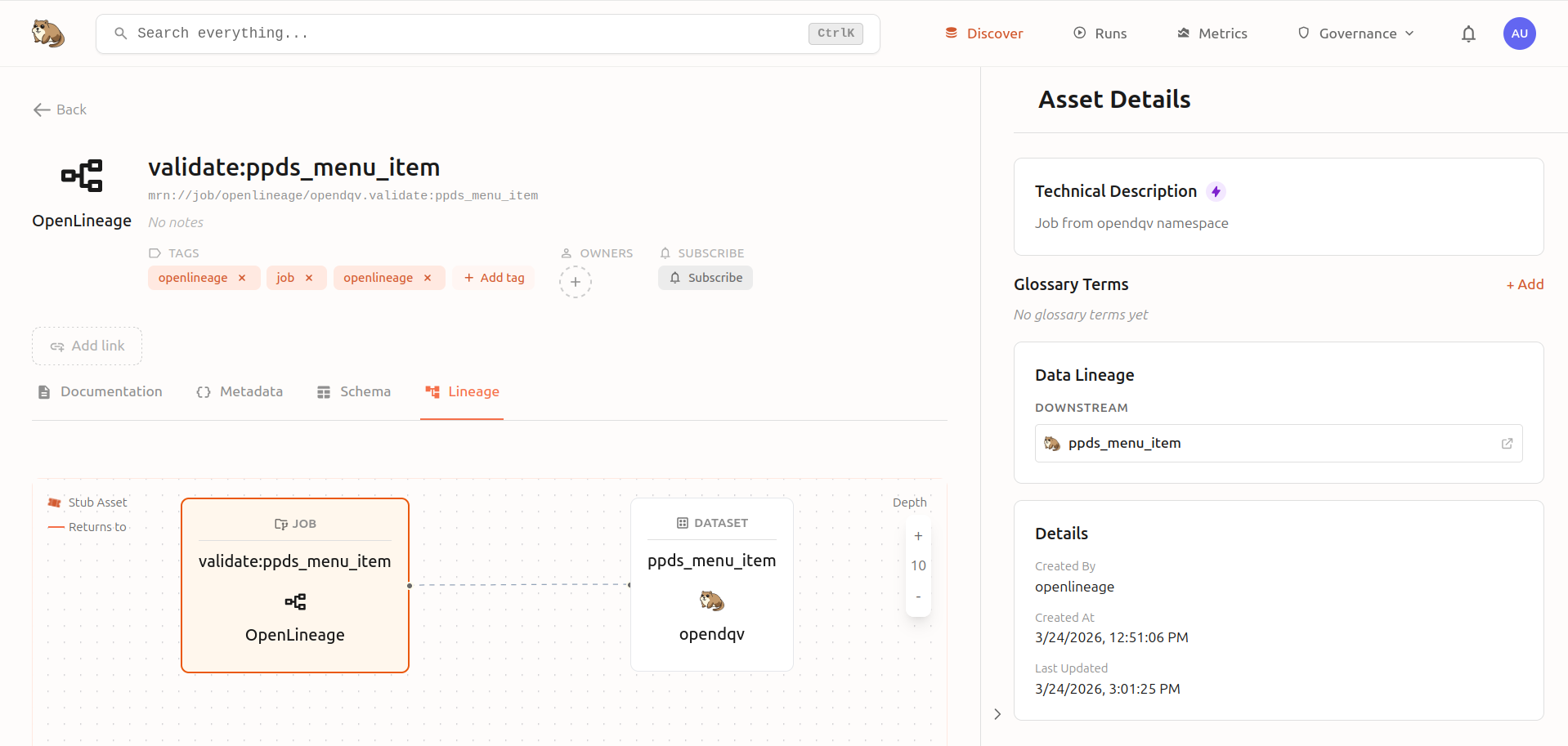
OpenDQV pushes quality metrics to Marmot as OpenLineage events, giving you live lineage diagrams showing validation jobs, pass rates, and top failing rules directly in your data catalog:
API Reference
| Method | Endpoint | Auth | Description |
|---|---|---|---|
POST |
/api/v1/validate |
Yes | Validate a single record |
POST |
/api/v1/validate/batch |
Yes | Validate a batch of records (DuckDB-powered) |
POST |
/api/v1/validate/batch/file |
Yes | Validate a CSV or Parquet file (multipart upload — DuckDB-powered) |
GET |
/api/v1/contracts |
No | List available contracts |
GET |
/api/v1/contracts/{name} |
No | Get contract detail + rules |
POST |
/api/v1/contracts/{name}/status |
Yes | Change contract lifecycle status |
POST |
/api/v1/contracts/{name}/{version}/submit-review |
Yes | Submit contract for approval (DRAFT → REVIEW) |
POST |
/api/v1/contracts/{name}/{version}/approve |
Yes | Approve contract (REVIEW → ACTIVE); role: approver/admin |
POST |
/api/v1/contracts/{name}/{version}/reject |
Yes | Reject contract back to DRAFT; role: approver/admin |
GET |
/api/v1/contracts/{name}/history |
No | Append-only hash-chained audit log of all contract changes |
GET |
/api/v1/contracts/{name}/explain |
No | Plain-English description of all rules (suppresses sensitive fields) |
POST |
/api/v1/contracts/reload |
Yes | Reload contracts from disk |
POST |
/api/v1/generate |
Yes | Generate platform-specific validation code |
GET |
/api/v1/stats |
Yes | Validation statistics (for monitoring dashboard) |
POST |
/api/v1/tokens/generate |
Yes | Generate a PAT |
POST |
/api/v1/tokens/revoke |
Yes | Revoke a PAT |
POST |
/api/v1/tokens/revoke/{username} |
Yes | Revoke all tokens for a system |
GET |
/api/v1/tokens |
Yes | List all tokens |
GET |
/health |
No | Health check |
GET |
/metrics |
No | Prometheus metrics |
POST |
/api/v1/import/gx |
Yes | Import Great Expectations suite JSON as a contract |
POST |
/api/v1/import/dbt |
Yes | Import dbt schema.yml as contract(s) |
POST |
/api/v1/import/soda |
Yes | Import Soda Core checks YAML as contract(s) |
POST |
/api/v1/import/csv |
Yes | Import CSV rule definitions as a contract |
POST |
/api/v1/import/odcs |
Yes | Import ODCS 3.1 contract |
POST |
/api/v1/import/csvw |
Yes | Import CSV on the Web metadata |
POST |
/api/v1/import/otel |
Yes | Import OpenTelemetry semantic conventions |
POST |
/api/v1/import/ndc |
Yes | Import NDC format |
GET |
/api/v1/contracts/{name}/quality-trend |
No | Quality trend data for a contract |
GET |
/api/v1/trace/verify |
Yes | Verify trace log hash-chain integrity |
GET |
/api/v1/registry |
No | Schema registry — list all contracts as versioned schemas |
GET |
/api/v1/registry/{name} |
No | Schema registry — get specific schema |
GET |
/api/v1/federation/events |
No | SSE stream of federation sync events |
* |
/graphql |
No | GraphQL endpoint (queries + mutations) |
Full interactive docs at /docs (Swagger) and /redoc (ReDoc).
Batch validation — what is a "record array"?
POST /api/v1/validate/batch expects a JSON body with a records key containing a list of objects — one object per row you want to validate:
curl -s -X POST http://localhost:8000/api/v1/validate/batch \
  -H "Content-Type: application/json" \
  -H "Authorization: Bearer <your-token>" \
  -d '{
    "contract": "customer",
    "records": [
      {"name": "Alice", "email": "[email protected]", "age": 30},
      {"name": "",      "email": "not-an-email",      "age": -1}
    ]
  }'
Each object in records is one row. The response contains per-record results and a summary.
Batch response: rule_failure_counts
The /validate/batch response summary includes a rule_failure_counts map — the number of records that failed each rule, sorted descending. Use this for triage: the rule with the highest count is the most impactful to fix upstream.
{
  "summary": {
    "total": 50000,
    "passed": 48912,
    "failed": 1088,
    "error_count": 1341,
    "warning_count": 0,
    "rule_failure_counts": {
      "impression_end_after_start": 847,
      "market_allowed": 193,
      "panel_id_format": 48
    }
  }
}
Both /validate and /validate/batch include an owner field echoing the contract's owner — route alerts and disputes to the right team without a separate contract lookup.
Importers
Migrate existing rules from external tools into OpenDQV contracts using the REST API or CLI.
| Importer | Source Format | API Endpoint | CLI Command |
|---|---|---|---|
| Great Expectations | GX expectation suite JSON (v0.x or v1.x) | POST /api/v1/import/gx |
import-gx <file.json> |
| dbt | schema.yml model tests |
POST /api/v1/import/dbt |
import-dbt <schema.yml> |
| Soda Core | checks for <dataset>: YAML |
POST /api/v1/import/soda |
import-soda <checks.yml> |
| CSV | Spreadsheet-style rules (field, rule_type, value, severity, error_message) | POST /api/v1/import/csv |
import-csv <rules.csv> |
| ODCS | Open Data Contract Standard (JSON/YAML) | POST /api/v1/import/odcs |
import-odcs <file> |
| CSVW | W3C CSV on the Web metadata | POST /api/v1/import/csvw |
— |
| OTel | OpenTelemetry semantic convention schema | POST /api/v1/import/otel |
— |
| NDC | FDA National Drug Code (pharma) | POST /api/v1/import/ndc |
— |
Export: GET /api/v1/export/odcs/{contract} — export a contract as ODCS 3.1 YAML. CLI: export-odcs <contract>.
All importers return stats (total, imported, skipped) and a list of skipped items with reasons. Pass ?save=true to the API to persist contracts to disk and trigger a reload. CLI import commands always save by default.
Streamlit Workbench
A developer/governance UI with 12 sections:
| Section | Purpose |
|---|---|
| Contracts | Browse contracts, view rules, manage lifecycle (draft/review/active/archived) |
| Validate | Test single records or batches interactively with any contract + context |
| Monitoring | Live validation pass/fail rates, top failing fields, recent activity |
| Audit Trail | Contract version history, hash-chain integrity, governance approvals |
| Catalogs & AI | External catalog deep-links (Marmot, DataHub, Atlan) + MCP agent prompts |
| Integration Guide | Generate ready-to-paste code snippets for every platform |
| Code Export | Generate embedded validation code (push-down mode) |
| Import Rules | Import contracts from GX, dbt, Soda, Monte Carlo, or Data Contract CLI |
| Profiler | Analyze a sample dataset and auto-generate a suggested contract |
| Webhooks | Register and manage HTTP webhooks for validation events |
| Federation | Node health, federation status, and event log for the OpenDQV network layer |
| CLI Guide | Command-line reference and usage examples |
# Standalone
streamlit run ui/app.py

# Via Docker Compose (auto-started)
# http://localhost:8501
Code Generation (Push-Down Mode)
For systems that can't make HTTP calls, generate validation logic to embed directly:
# Salesforce Apex
curl -X POST ".../api/v1/generate?contract_name=sf_contact&target=salesforce&context=salesforce_prod"

# JavaScript (Node.js, browser, etc.)
curl -X POST ".../api/v1/generate?contract_name=sf_contact&target=js"

# Snowflake (JavaScript UDF)
curl -X POST ".../api/v1/generate?contract_name=customer&target=snowflake"
Targets: salesforce (Apex class OpenDQVValidator), js (function opendqvValidate), snowflake (JS UDF opendqv_validate)
CLI
A standalone command-line tool for contract management without the API running.
python -m cli <command> [options]
| Command | Description |
|---|---|
list |
List all contracts with version, status, rule count |
show <contract> |
Show contract details and all rules |
validate <contract> <json> |
Validate a JSON record; exits 0 on pass, 1 on fail |
export-gx <contract> |
Export as GX expectation suite JSON (--output, --context) |
import-gx <file> |
Import GX suite JSON and save as YAML contract |
import-dbt <file> |
Import dbt schema.yml and save as YAML contract(s) |
import-soda <file> |
Import Soda Core checks YAML and save as YAML contract(s) |
import-csv <file> |
Import CSV rule definitions and save as YAML contract (--name) |
generate <contract> <target> |
Generate push-down validation code (--context) |
import-odcs <file> |
Import ODCS 3.1 contract (YAML/JSON) |
export-odcs <contract> |
Export contract as ODCS 3.1 YAML |
export-dbt <contract> |
Export contract as dbt schema.yml (--output) |
onboard |
Interactive setup wizard — first validation in 90 seconds |
submit-review <contract> --version <v> |
Submit DRAFT contract for review (DRAFT → REVIEW) |
approve <contract> --version <v> |
Approve a REVIEW contract (REVIEW → ACTIVE) |
reject <contract> --version <v> |
Reject a REVIEW contract back to DRAFT |
token-generate <name> |
Generate a Personal Access Token |
audit-verify |
Verify contract_history hash-chain integrity and NTP clock sync status (--db) |
contracts-import-dir <dir> |
Import all YAML contracts from a directory (--dry-run) |
# Examples
python -m cli list
python -m cli validate sf_contact '{"FirstName": "Alice", "Email": "[email protected]"}'
python -m cli import-soda checks/my_checks.yml
python -m cli import-csv rules/my_rules.csv --name product_rules
python -m cli generate sf_contact salesforce --context salesforce_prod
Monitoring
Prometheus Metrics
Exposed at /metrics:
request_latency_seconds-- HTTP request timing (by method, endpoint)request_count_total-- Total requests (by method, endpoint, status)validation_total-- Validation calls (by contract, context, result)validation_errors_total-- Field-level errors (by contract, field, rule)validation_latency_seconds-- Validation latency (by contract, mode)
Dashboard
The Streamlit Monitoring tab shows:
- Total validations, pass/fail counts, pass rate
- Per-contract/context breakdown
- Top failing fields and rules
- Latency over time
Stats API
GET /api/v1/stats returns a JSON summary of all validation metrics since last restart.
Federation
OpenDQV supports multi-node federation — contracts published to a parent node for centralised governance, enabling consistent quality standards across distributed deployments. See docs/patterns/multi_parent_federation.md for architecture details.
Performance
Benchmarked on a Dell XPS 13 (single Docker container, 4 Gunicorn workers, WEB_CONCURRENCY=4), all security features active (ReDoS protection on, rate limiting disabled at app layer as recommended for reverse-proxy deployments):
| Run | Throughput | p50 | p99 | Total requests | Errors |
|---|---|---|---|---|---|
| 1 min | 193.0 req/s | 24.4 ms | 207.6 ms | 11,595 | 0 |
| 5 min | 208.5 req/s | 19.1 ms | 205.1 ms | 62,575 | 0 |
| 10 min | 240.8 req/s | 13.7 ms | 202.9 ms | 144,510 | 0 |
Sustained throughput ~208 req/s (5-minute stabilised figure). Zero errors across all runs. Throughput ramps as the CPU reaches boost state — the 5-minute figure is the most representative for capacity planning.
ARM64 validated: Raspberry Pi 400 (Cortex-A72 @ 1.8GHz) sustains 79.1 req/s over 10 minutes with zero errors across 47,454 requests in the 10-minute run (72,443 combined across all three runs). OpenDQV runs correctly on ARM64 — AWS Graviton deployments will significantly exceed the Pi figure.
Windows 10 validated: Dell XPS 13 (i7, Docker Desktop) sustains 185.1 req/s with zero errors across 11,108 requests. Enterprise developers on Windows — common in banking, insurance, and large corporates — can run OpenDQV without a Linux server.
See docs/benchmark_throughput.md for a full 4-platform comparison (Linux, Windows, ARM64, and cloud).
Scaling up: For higher throughput, increase Uvicorn workers (--workers 4), run multiple containers behind a load balancer, or split single-record and batch workloads.
Configuration
| Variable | Description | Default |
|---|---|---|
AUTH_MODE |
open (no auth) or token (PAT required) |
open |
SECRET_KEY |
JWT signing key (change for production!) | change-me-... |
TOKEN_EXPIRY_DAYS |
Default token lifetime in days | 30 |
API_URL |
API URL for Streamlit UI | http://localhost:8000 |
RATE_LIMIT_VALIDATE |
Rate limit for validation endpoints | 300/minute |
RATE_LIMIT_DEFAULT |
Rate limit for other endpoints | 120/minute |
RATE_LIMIT_TOKENS |
Rate limit for token management | 10/minute |
OPENDQV_CONTRACTS_DIR |
Contracts directory path | ./contracts |
OPENDQV_DB_PATH |
SQLite DB path (tokens, webhooks, contract history) | ./opendqv.db |
TRUST_PROXY_HEADERS |
Trust X-Forwarded-For from a reverse proxy | false |
OPENDQV_MAX_BATCH_ROWS |
Max records per batch validation request | 10000 |
OPENDQV_MAX_SSE_CONNECTIONS |
Max concurrent SSE connections per worker | 50 |
MARMOT_URL |
Marmot data catalog base URL — enables one-click deep-links in the Catalogs & AI workbench tab | (unset) |
⚠️ Rate limiting warning:
RATE_LIMIT_VALIDATEandRATE_LIMIT_DEFAULTuse an in-memory counter per Gunicorn worker. The effective per-IP ceiling isWEB_CONCURRENCY × configured value. With the default of 1 worker this equals the configured value exactly. If you increaseWEB_CONCURRENCY, multiply accordingly — or use a Redis-backed limiter (RATE_LIMIT_BACKEND=redis) or enforce limits at your reverse proxy for strict per-IP enforcement.
Administration
Authentication modes
| Mode | Setting | When to use |
|---|---|---|
| Open | AUTH_MODE=open |
Local development, Docker quick-start. No token required. |
| Token | AUTH_MODE=token |
Production. Every request must include Authorization: Bearer <token>. |
Set in .env or as an environment variable. Default is open.
Roles
OpenDQV uses six roles. Assign the least-privileged role that covers the use case.
| Role | Intended for | Can validate | Can read contracts | Can edit contracts | Can approve | Can see audit chain | Can manage tokens |
|---|---|---|---|---|---|---|---|
validator |
Source systems (Salesforce, SAP, your app) | ✓ | ✓ | — | — | — | — |
reader |
Dashboards, human consumers | ✓ | ✓ | — | — | — | — |
auditor |
Compliance reviewers | ✓ | ✓ | — | — | ✓ | — |
editor |
Data engineers authoring rules | ✓ | ✓ | ✓ (DRAFT only) | — | — | — |
approver |
Governance leads | ✓ | ✓ | ✓ | ✓ | ✓ | — |
admin |
Operators | ✓ | ✓ | ✓ | ✓ | ✓ | ✓ |
The maker-checker principle is enforced: the editor who submits a contract for review cannot be the approver who promotes it to ACTIVE. Use separate tokens with separate roles.
Creating tokens
Via CLI (recommended for initial setup):
# Writer token for a source system
opendqv token-generate salesforce-prod --role validator

# Editor token for a data engineer
opendqv token-generate alice-data-eng --role editor

# Approver token for a governance lead
opendqv token-generate bob-governance --role approver

# Admin token for the operator (create this first, then use it for everything else)
opendqv token-generate ops-admin --role admin
Via API (requires an existing admin token):
curl -s -X POST http://localhost:8000/api/v1/tokens/generate \
  -H "Authorization: Bearer <admin-token>" \
  -H "Content-Type: application/json" \
  -d '{"username": "salesforce-prod", "role": "validator"}'
The response includes the token value. It is shown once — save it immediately.
Listing tokens
curl -s http://localhost:8000/api/v1/tokens \
  -H "Authorization: Bearer <admin-token>"
Returns all tokens with username, role, expiry, and days remaining. Token values are not shown.
Revoking tokens
# Revoke a specific token by value
curl -s -X POST http://localhost:8000/api/v1/tokens/revoke \
  -H "Authorization: Bearer <admin-token>" \
  -H "Content-Type: text/plain" \
  --data "opendqv_the_token_to_revoke"

# Revoke all tokens for a system account (requires admin role)
curl -s -X POST http://localhost:8000/api/v1/tokens/revoke/salesforce-prod \
  -H "Authorization: Bearer <admin-token>"
Recommended setup for production
- Bootstrap: Start in
AUTH_MODE=open, create your first admin token via CLI. - Switch to token mode: Set
AUTH_MODE=tokenin.envand restart. - Create role-specific tokens: One
validatortoken per source system, oneeditorper engineer, oneapproverper governance lead. - Never give source systems admin tokens. A Salesforce integration only needs
validator. - Rotate tokens on a schedule using
revoke/{username}andgenerate— there is no automatic expiry enforcement beyond the configuredTOKEN_EXPIRY_DAYS.
Maker-checker workflow example
# 1. Alice (editor) creates a new rule on a DRAFT contract
curl -s -X POST http://localhost:8000/api/v1/contracts/customer/rules \
  -H "Authorization: Bearer <alice-editor-token>" \
  -d '{"name": "postcode_format", "type": "regex", ...}'

# 2. Alice submits for review
curl -s -X POST http://localhost:8000/api/v1/contracts/customer/1.1/submit-review \
  -H "Authorization: Bearer <alice-editor-token>" \
  -d '{"proposed_by": "[email protected]"}'

# 3. Bob (approver) reviews and approves — Alice cannot approve her own submission
curl -s -X POST http://localhost:8000/api/v1/contracts/customer/1.1/approve \
  -H "Authorization: Bearer <bob-approver-token>" \
  -d '{"approved_by": "[email protected]"}'
Every transition is recorded in the immutable hash-chained contract history.
Running Behind a Reverse Proxy
If OpenDQV runs behind nginx, Caddy, Traefik, or a cloud load balancer (AWS ALB, GCP GCLB), set TRUST_PROXY_HEADERS=true in .env to enable correct per-IP rate limiting and logging using X-Forwarded-For.
⚠️ Do not set
TRUST_PROXY_HEADERS=truewithout a proxy. If the API is directly internet-facing, this setting allows clients to inject arbitraryX-Forwarded-Forheaders, completely defeating per-IP rate limiting.
Supported topologies:
| Deployment | Setting |
|---|---|
| Direct (no proxy) | TRUST_PROXY_HEADERS=false (default) |
| nginx / Caddy / Traefik in front | TRUST_PROXY_HEADERS=true |
| AWS ALB / GCP GCLB | TRUST_PROXY_HEADERS=true |
| Kubernetes ingress controller | TRUST_PROXY_HEADERS=true |
Minimal nginx config for reference:
location / {
    proxy_pass http://opendqv:8000;
    proxy_set_header X-Forwarded-For $proxy_add_x_forwarded_for;
    proxy_set_header X-Forwarded-Proto $scheme;
    proxy_set_header Host $host;
}
Project Structure
OpenDQV/
  api/
    routes.py          # 50 REST endpoints (~2,400 lines)
    models.py          # Pydantic request/response models
    graphql_schema.py  # Strawberry GraphQL schema
  core/
    validator.py       # Validation engine (single-record + DuckDB batch)
    rule_parser.py     # Rule model and YAML parsing
    contracts.py       # Contract registry, YAML load/save, versioning
    code_generator.py  # Push-down code generation (Apex/JS/Snowflake/SQL)
    profiler.py        # Field-level data profiling
    webhooks.py        # Lifecycle webhook dispatch
    federation.py      # Multi-node contract federation
    trace_log.py       # Per-record validation trace log
    node_health.py     # Node health state machine
    isolation_log.py   # Federation isolation audit log
    quality_stats.py   # Validation quality statistics
    worker_heartbeat.py# Gunicorn worker liveness tracking
    onboarding.py      # Interactive setup wizard
    importers/         # 8 format importers (GX, dbt, Soda, CSV, ODCS, CSVW, OTel, NDC)
  security/
    auth.py            # JWT PAT auth, RBAC (6 roles)
  sdk/
    client.py          # Sync Python SDK (httpx-based)
    async_client.py    # Async Python SDK
    local_validator.py # Zero-network local validation
  ui/
    app.py             # Streamlit governance workbench (~2,500 lines)
  contracts/           # 42 YAML data contracts (22+ industry domains)
  contracts/ref/       # Lookup reference files
  postman/             # Postman collection + environment (all 50 endpoints)
  tests/               # pytest suite (2,387+ tests, 39 test files)
  docs/                # 76 markdown integration and operations guides
  scripts/             # Demo seeder, smoke tests, perf tests, diagnostics
  monitoring.py        # Prometheus metrics + in-memory stats
  config.py            # All configuration via environment variables
  main.py              # FastAPI app entry point
  mcp_server.py        # MCP server (Claude Desktop / Cursor integration)
  docker-compose.yml         # Production stack
  docker-compose.dev.yml     # Development stack (hot-reload API)
  docker-compose.demo.yml    # Demo stack (ports 8080/8502, pre-seeded)
Testing
# Run all 2,387+ tests
pytest tests/ -v

# Via Docker
docker compose exec api python -m pytest tests/ -v

# Full pre-release smoke test (43 checks — unit, HTTP, pip install)
bash scripts/run_smoke_tests.sh

# Load test (requires Node.js)
node tests/load-test.js 60 10    # 60 seconds, 10 concurrent workers
Testing the MCP server interactively
# Launch the MCP Inspector (requires Node.js)
npx @modelcontextprotocol/inspector python mcp_server.py
# Opens a browser UI at http://localhost:6274 — call any tool with live JSON arguments
Roadmap
Potential areas for contribution and future development:
- More SDK languages -- npm package, NuGet, Go client
- Custom rule types -- Plugin system for user-defined validation functions
- Distribution check rule -- Validate that a field's value distribution matches an expected profile
- Validation result persistence -- Pluggable sinks (Postgres, S3) for long-term audit trails
- Multi-parent federation -- A node publishing to more than one parent simultaneously
Have an idea? Open a discussion — we'd love to hear what you're building.
Documentation Index
Only a subset of docs appear in the sections above. Full index:
Getting Started
- docs/quickstart.md — Zero to first validation in 15 minutes
- docs/troubleshooting.md — Common errors and fixes
Deployment & Operations
- docs/production_deployment.md — Token auth, TLS, Docker Compose prod config
- docs/runbook.md — Operational runbook for common tasks
- docs/disaster-recovery.md — Backup and recovery procedures
- docs/deployment_registry.md — DORA/FCA concentration risk registry
LLM & Agent Integration
- docs/llm_integration.md — Claude Tool Use, LangChain, LlamaIndex, MCP setup
- docs/mcp.md — MCP server write guardrails and tool schema
- docs/connector_sdk_spec.md — Wire protocol and trace log spec for connector builders
Data Contracts & Rules
- docs/rules/README.md — Full rule type index
- docs/naming_conventions.md — Contract and field naming standards
- docs/contract_versioning.md — Version semantics and in-flight behaviour
- docs/asset_id_uri_convention.md — URN scheme for contract asset IDs
- Individual rule docs: age_match, checksum, cross_field_range, date_diff, field_sum, forbidden_if, ratio_check, geospatial_bounds, builtin_patterns, compare_to_today, sensitive_fields, trace_log, explain_endpoint, review_lifecycle
Import & Export
- docs/importers.md — All 8 import formats (GX, dbt, Soda, CSV, ODCS, CSVW, OTel, NDC)
*Integrations
Food safety & hospitality
- docs/integrations/natasha-law-compliance.md — Natasha's Law PPDS enforcement: 14 mandatory allergen fields,
ppds_menu_itemcontract - docs/integrations/allereasy.md — AllerEasy (Django): allergen review audit trail via
LocalValidatorinDish.clean()
Data quality tools
- docs/dbt_integration.md — Bidirectional import/export with dbt schema.yml
- docs/gx_integration.md — Great Expectations: import suites; export contracts; two-layer enforcement
- docs/soda_integration.md — Soda Core: import checks.yml; pre-pipeline gate; webhook correlation
Orchestration
- docs/orchestrator_integration.md — Airflow, Prefect, Dagster: pre-load validation gate
Streaming
- docs/kafka_integration.md — Validate before committing offset; dead-letter topic; async batch
Warehouses & lakehouses
- docs/snowflake_integration.md — Python connector; Snowpipe; External Function (
opendqv_validate); Streams & Tasks; local simulation with DuckDB - docs/spark_integration.md — Delta Lake batch; Structured Streaming foreachBatch; EMR, Dataproc, HDInsight
- docs/databricks_integration.md — Delta Lake; DLT quarantine; Jobs/Asset Bundles gate; Unity Catalog; local simulation with PySpark
- docs/postgres_integration.md — Validate-before-INSERT; Docker local dev; quarantine table pattern; psycopg2
DataFrames & files
- docs/pandas_integration.md —
df.to_dict('records')pattern; annotate with_opendqv_valid; chunked validation for large DataFrames
Observability
- docs/montecarlo_integration.md — Trace log shipping; webhook correlation; asset_id bridge
Data catalogs
- docs/catalog_integration.md — Catalog integration index (DataHub, Atlan, Collibra, Purview, OpenMetadata, Marmot)
- docs/collibra_integration.md — Contract sync; DQ scores; workflow triggers; rule-level mapping
- docs/purview_integration.md — Azure Purview: custom attributes; quality scores; Event Hub webhook
- docs/datahub_integration.md — Sync contracts to DataHub via Python SDK
- docs/atlan_integration.md — Sync contracts to Atlan
- docs/openmetadata_integration.md — Sync contracts to OpenMetadata
- docs/marmot_integration.md — Sync contracts to Marmot; webhook quality tagging; MCP bridge
Other
- docs/webhooks.md — Webhook events, payload schema, retry behaviour
- docs/profiler.md — Auto-generate contracts from sample records
- docs/roadmap.md — Planned integrations and features based on community demand
Security
- docs/security/SECURITY.md — Security overview: auth, RBAC, controls, supply chain
- docs/security/hardening.md — Production hardening checklist
- docs/security/threat_model.md — STRIDE analysis, attack surfaces
- docs/security/vulnerability_response_playbook.md — Incident response
Performance & Architecture
- docs/benchmark_throughput.md — ~199 req/s (x86) / 79 req/s (ARM64) benchmark results across 4 platforms
- docs/patterns/multi_parent_federation.md — Multi-node federation architecture
- docs/patterns/distribution_check.md — Distribution validation patterns
- docs/patterns/federation_deprecation.md — Deprecation workflow for federated contracts
Community & Business Value
- docs/community_use_cases.md — Real-world use cases by industry
- docs/roi_calculator.md — ROI calculation methodology
- docs/ecosystem_reference_stack.md — Reference architecture with OpenDQV
- docs/iq_dimension_mapping.md — IQ dimension to rule type mapping
- docs/ethos.md — Project values and design philosophy
Internationalisation
- docs/i18n/README.md — i18n overview
- docs/i18n/ar/quickstart.md — Arabic quickstart
⭐ Star us if you hate bad data
Every star helps more teams block bad data at the door instead of discovering it three weeks later.
If OpenDQV saves you from a late-night data incident, a compliance headache, or a week of downstream fixes — give it a star. It keeps the project visible and signals to others that shift-left data quality is worth taking seriously.
Contributing
See CONTRIBUTING.md for setup instructions, coding guidelines, and how to submit changes.
License
MIT -- see LICENSE.
Acknowledgements
Built with ❤️ by Sunny Sharma, BGMS Consultants Ltd, with the help of an AI team led by Claude Code by Anthropic.
Yorumlar (0)
Yorum birakmak icin giris yap.
Yorum birakSonuc bulunamadi