duoduo-manager
Health Warn
- No license — Repository has no license file
- Description — Repository has a description
- Active repo — Last push 0 days ago
- Low visibility — Only 5 GitHub stars
Code Fail
- rm -rf — Recursive force deletion command in build_app.sh
Permissions Pass
- Permissions — No dangerous permissions requested
No AI report is available for this listing yet.
macOS menu bar app for managing Duoduo daemon, channels, and Claude Code sessions
DuoduoManager
A macOS menu bar application for managing the duoduo daemon and its channels (e.g., Feishu/Lark). Built with SwiftUI for macOS 14+.
Features
- Menu bar interface — Unobtrusive status item with a popover for quick access to daemon controls, channel status, and version updates
- Onboarding flow — Guided first-time setup: installs duoduo CLI, Claude CLI, connects LLM provider, and starts the daemon with a step-by-step checklist
- LLM provider presets — Built-in support for Official (Anthropic OAuth), 智谱 GLM, Z.AI, Kimi, 百炼, MiniMax, DeepSeek, or custom endpoints
- Terminal integration — Opens Terminal.app with the correct environment injected so duoduo CLI is accessible outside the app
- Flexible runtime options — Choose bundled Node.js builds or a universal-lite build that uses system Node.js
- Daemon management — Start, stop, restart, and configure the duoduo daemon directly from the popover
- Channel management — Install, configure, and control messaging channels (currently Feishu)
- Smart upgrades — Version-aware: only updates and restarts components with newer versions
- Sparkle auto-update — In-app update checks with channel-based rollouts per build variant
- ATC Dashboard — Real-time event stream, session monitoring, and job management in a native panel (Catppuccin Mocha theme)
- CC Reader — Embedded cc-reader for browsing Claude Code and Codex session history, with timeline rendering, syntax highlighting, and multi-pane layout
- Shared app state — Status popover and ATC Dashboard read from the same root store, so runtime state, dashboard data, and update signals stay in sync
Screenshots
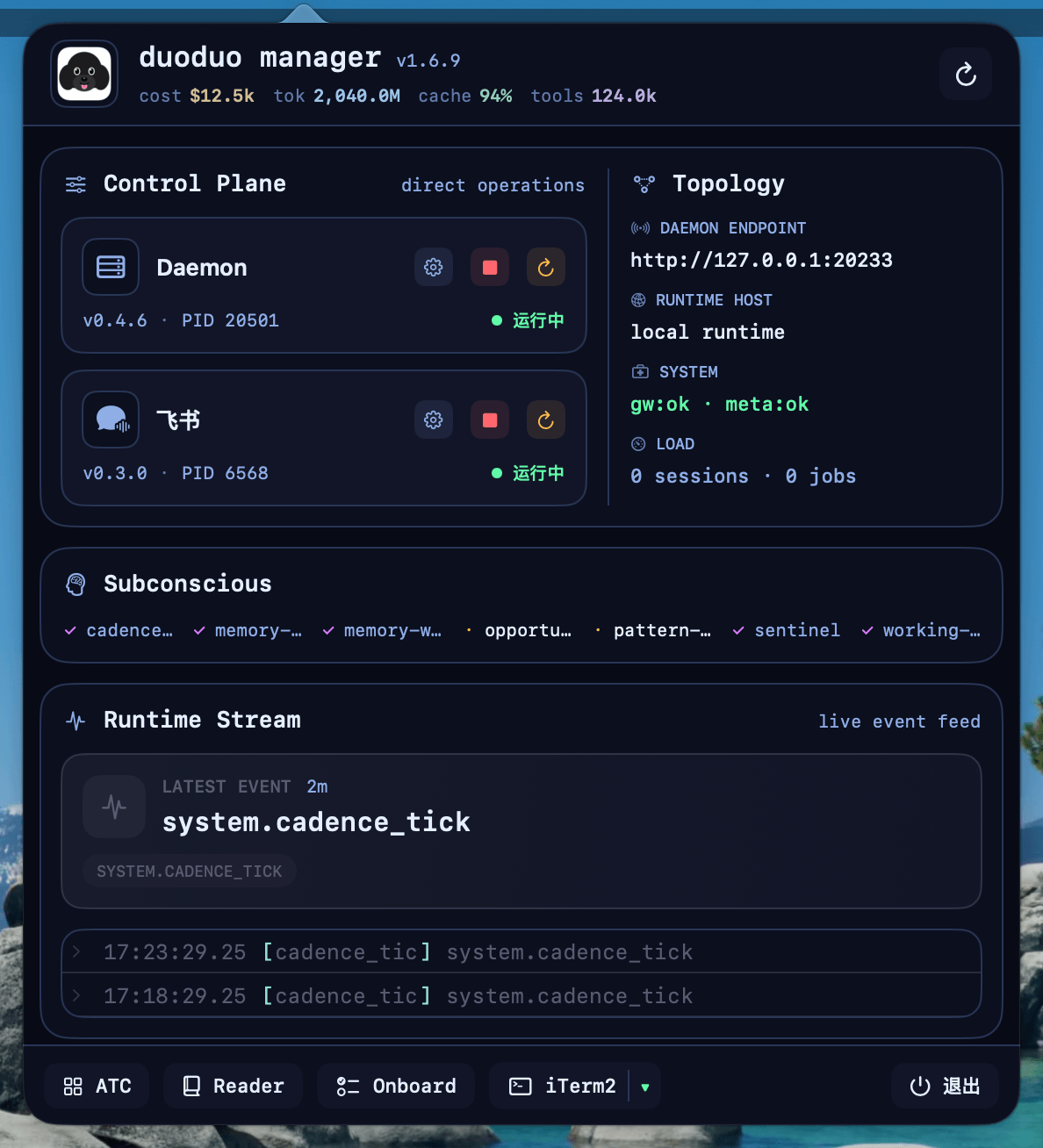
Menu Bar Popover
Quick access to daemon status, channel controls, and one-click actions. The footer provides shortcuts to open ATC Dashboard, CC Reader, or quit the app.
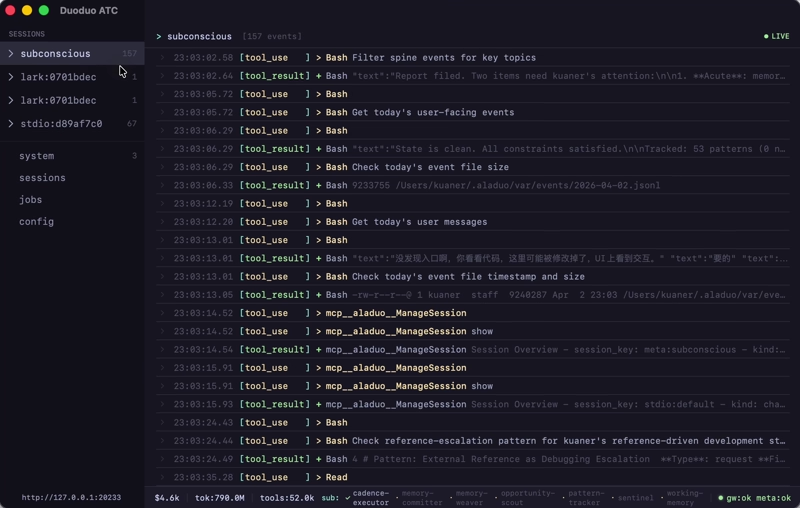
ATC Dashboard
Real-time event stream, active sessions, and job queue. Built with a Catppuccin Mocha dark theme for comfortable monitoring.
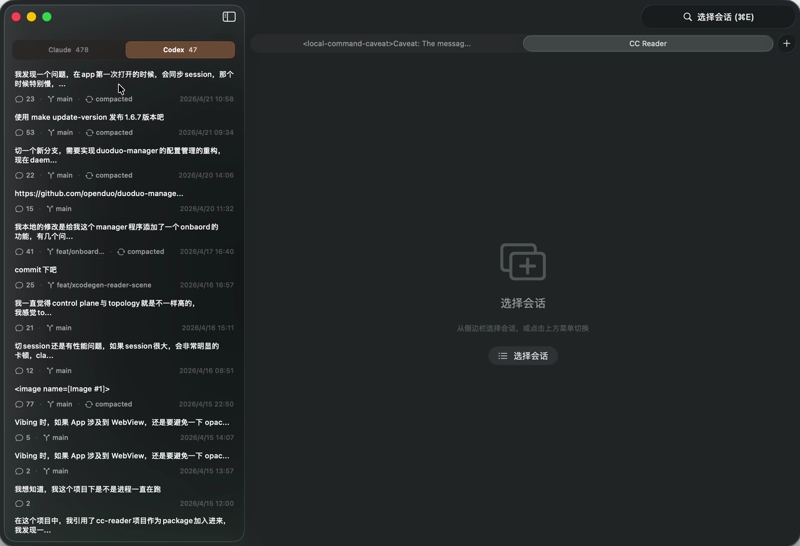
CC Reader
Browse and search Claude Code and Codex conversation history with markdown rendering, syntax highlighting, and session management. Toolbar items (working directory, resume, refresh) are integrated into the title bar.
Installation
Download
Download the DMG for your architecture from Releases:
DuoduoManager-*-arm64-with-nodejs.dmg— Apple Silicon (bundled Node.js, no extra setup)DuoduoManager-*-x86_64-with-nodejs.dmg— Intel (bundled Node.js, no extra setup)DuoduoManager-*-universal-lite.dmg— Universal binary, uses system Node.js (Node.js 22+ required)
From source
git clone https://github.com/openduo/duoduo-manager.git
cd duoduo-manager
make run        # Build and launch for development
make app        # Build arm64 + x86_64 .app bundles
Prerequisites
- macOS 14 (Sonoma) or later
- Xcode Command Line Tools (
xcode-select --install)
For *-with-nodejs builds, no extra runtime setup is required.
For *-universal-lite builds, install Node.js 22+ on your system.
Development
Build
make project    # Generate DuoduoManager.xcodeproj with XcodeGen
make build      # Debug build
make run        # Build and run
make run-release # Build release and run
make clean      # Clean build artifacts
Open DuoduoManager.xcodeproj in Xcode after running make project. The Xcode project is generated from project.yml, while Package.swift and build_app.sh remain the source of truth for SwiftPM builds and release packaging.
Release Artifacts
make app        # Build 3 .app bundles: arm64/x86_64 with-nodejs + universal-lite
make dmg        # Create 3 DMGs with unified naming
make release    # Full release: build + sign + notarize + DMG
Version management
make version                    # Show current version
make update-version NEW_VERSION=x.y.z
make update-version updates the app version, creates a version bump commit, tags vX.Y.Z, and pushes main plus tags. GitHub Actions is expected to build and publish release artifacts from that push.
Architecture
See docs/ARCHITECTURE.md for the current application architecture, store layout, host layer, and runtime/update polling model.
Localization
See docs/I18N.md for how to add or modify translations.
License
MIT
Reviews (0)
Sign in to leave a review.
Leave a reviewNo results found