openmachine
Health Warn
- License — License: MIT
- Description — Repository has a description
- Active repo — Last push 0 days ago
- Low visibility — Only 6 GitHub stars
Code Pass
- Code scan — Scanned 12 files during light audit, no dangerous patterns found
Permissions Pass
- Permissions — No dangerous permissions requested
No AI report is available for this listing yet.
An open-source runtime that lets your existing AI agent operate your machines.
Open Machine
One MCP. Every machine. Real execution.
An open-source runtime that lets your existing AI agent operate your machines.






https://github.com/user-attachments/assets/f22519e6-e3ad-405c-a725-9ce53a642bcc
Open Machine (OM Core) connects your existing AI Agents to your machines through a local-first MCP runtime. Your AI plans the work; OM provides permission-controlled tools to carry it out and return results.
Documentation · Getting started · GitHub Issues · Contributing · Code of Conduct
What you can do
| Capability | Guide |
|---|---|
| Local machines and context | Inspect the intended project and environment before acting. |
| Workspace files and worktrees | Read, search and apply guarded edits in the intended tree. |
| Native commands and terminals | Run commands, retrieve original results and verify cleanup. |
| Remote Linux over SSH | Prepare workers, pin identity and operate remote projects. |
| Persistent tasks | Keep goals, stages and evidence; continue original work explicitly. |
| GitHub | Use scoped repositories, Issues, PRs, reviews, Projects and Releases. |
| Browser subtasks | Delegate a bounded web task through a compatible, authorized native Codex installation. |
| Skills | Discover packaged operating guides and reviewed external Skill roots. |
| Service and runtime | Manage the macOS service, retained updates and compatible rollback. |
Tasks preserve progress and observe admitted work; they do not automatically wake ChatGPT or execute the next stage after a chat disconnects. Optional integrations have separate prerequisites. See current limitations.
Quick start
macOS Apple Silicon (macOS 13+, Node.js 20+)
npm install -g openmachine@latest
openmachine
On first run, choose an existing project folder containing a readable file (such as README.md). Open Machine sets up Core and starts a managed macOS user service. Check it with openmachine status.
For other macOS and Linux setups, build Core from source (Python 3.12+, compatible SQLite, and Git). Windows is not supported.
To use ChatGPT, connect it separately and verify the connection. The npm installer does not set up an MCP tunnel or approve client tools. Command execution and workspace writes are disabled by default.
The npm openmachine command manages setup and service status; openmachine core ... runs the underlying Python CLI. See the npm setup guide.
This is an early-development release, not a stable 1.x release.
Updating? Updating the npm package does not automatically update the running Core service. See Updates.
 Join the Open Machine Community Discord · Q&A · Show and Tell |
How it works
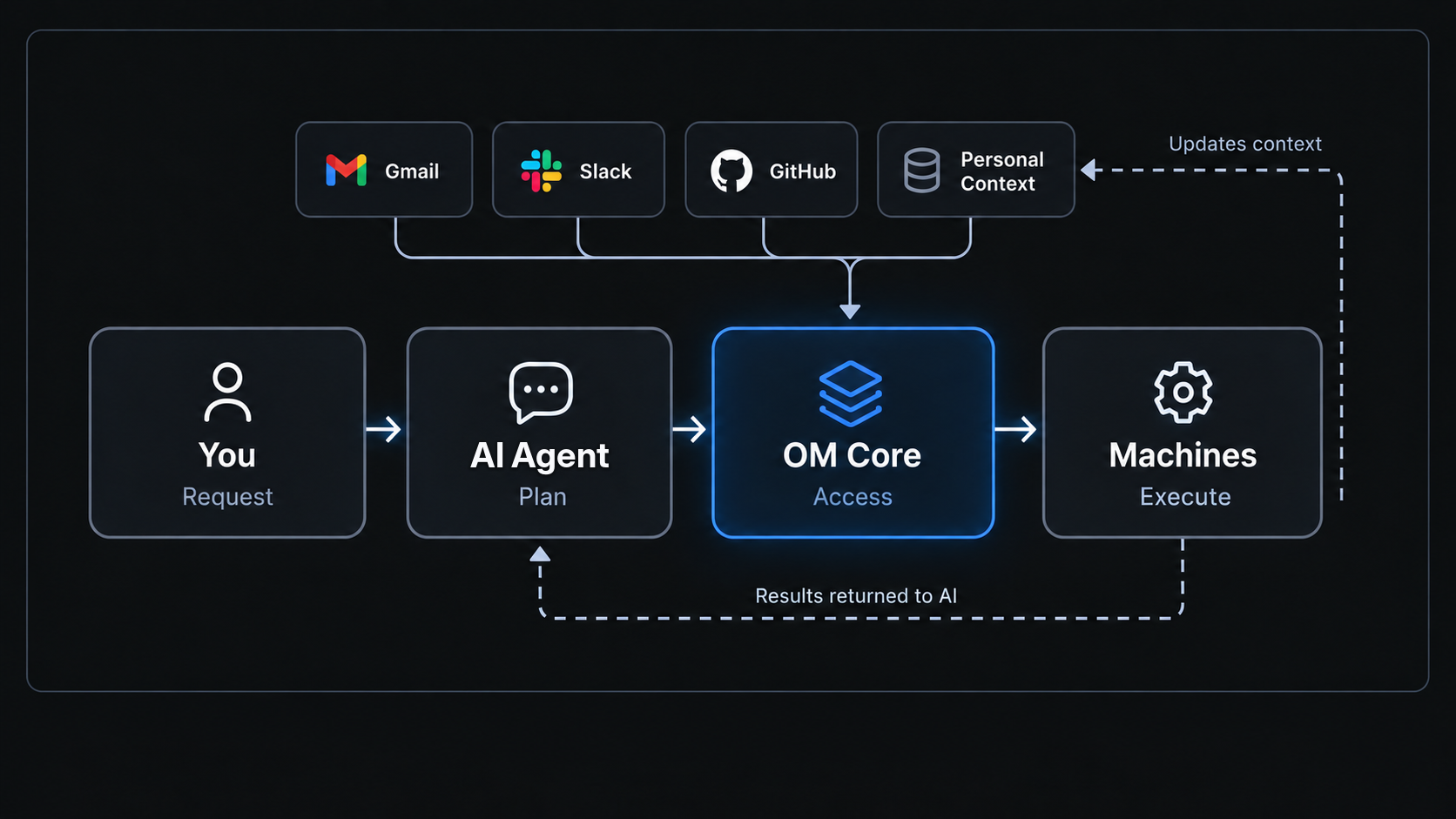
Your request flows from AI Agent → OM Core → your machines, and execution results return to your AI. OM exposes the approved tools; it does not replace your AI agent.
The Personal Context layer and automatic context updates in the diagram illustrate planned functionality for bringing data from sources such as Gmail and Slack into OM and keeping it up to date as tasks are completed.
Documentation
The user documentation covers every important released Core capability. Start with requirements, installation, configuration and layer-by-layer verification.
For existing installations, use updates, the configuration reference and troubleshooting. The CLI and MCP tools references link to detailed operating contracts without duplicating them.
The operating Skill and Skills directory remain the technical starting points for AI agents. A source checkout, published release, running runtime and approved client catalog can differ; read the running version's guide before acting.
Security
Open Machine is a trusted, single-operator native runtime, not an OS sandbox or multi-tenant executor. Native commands can access resources beyond read-only tool scopes. Keep the listener private, grant access deliberately, and remember that files and logs returned to an AI client may leave your machine. Cancellation and software rollback do not undo completed effects. Read Security and data before enabling execution or remote access; never put secrets in prompts, command arguments or committed configuration. Report vulnerabilities privately via the Security Policy.
Contributors
Thanks to everyone who contributes to Open Machine.
View GitHub contributors · Contribute to Open Machine · Maintainer guide
License
MIT © 2026 OpenMachineLabs.
Reviews (0)
Sign in to leave a review.
Leave a reviewNo results found