openteams
Health Gecti
- License — License: Apache-2.0
- Description — Repository has a description
- Active repo — Last push 0 days ago
- Community trust — 371 GitHub stars
Code Basarisiz
- rm -rf — Recursive force deletion command in .github/workflows/pre-release.yml
- process.env — Environment variable access in .github/workflows/pre-release.yml
- fs module — File system access in .github/workflows/pre-release.yml
- process.env — Environment variable access in .github/workflows/publish.yml
- fs module — File system access in .github/workflows/publish.yml
- rm -rf — Recursive force deletion command in assets/skills/artifacts-builder/scripts/bundle-artifact.sh
- fs module — File system access in assets/skills/artifacts-builder/scripts/init-artifact.sh
Permissions Gecti
- Permissions — No dangerous permissions requested
Bu listing icin henuz AI raporu yok.
Build everything with your AI team


Build everything with your AI team
openteams is an open-source workspace for multi-agent collaboration — build AI teams, run local coding agents, and coordinate work through chat or structured workflows, all in one context.





What is openteam
openteams is an open-source multi-agent collaboration workspace. It brings multiple AI coding agents — such as Claude Code, Codex, Gemini CLI, and others — into one shared session where they can communicate, share context, and work together as a team. You can collaborate with agents through lightweight free-chat mode, or orchestrate complex tasks through structured workflows with visible plans, step-level control, and traceable review. Everything runs locally in your own workspace.
Why openteams
AI agents are getting stronger at planning, coding, reviewing, and testing. But more agent output does not automatically become shipped work.
Managing multiple agents is exhausting. You switch between terminals, re-explain context to every new agent, copy outputs from one prompt into the next, and reconcile conflicting diffs — your attention is drained by the chaos of juggling multiple agents.
Agent execution is invisible and uncontrollable. You command claude code to "build the feature." It runs for 15 minutes. You have no idea which subtasks it attempted, which passed, and which it silently gave up on. Most coding agents today treat a complex task as one monolithic run — there is no visible plan before execution, no way to approve or reject individual steps mid-flight, no way to retry just the step that failed. When something goes wrong, you start over.
openteams solves both problems. All agents share a single context within the same session—no more juggling between agents or repeating yourself. Complex tasks become visible, controllable workflows — you refine the plan before it runs, watch each step execute, and intervene at any node: approve, reject, retry, or redirect.
The real productivity leverage is not more agents. It is orchestrating them — with a complex plan you can see and steps you can control.
Quick Start
Install
npx
npx openteams-web
Desktop App
Download the latest release for your platform from GitHub Releases.


Configure Providers
openteams includes a built-in openteams CLI agent. Configure your model providers in the app under menu->setting->provider config->add provider.
You can also connect supported coding agents such as:
| Agent | Example install |
|---|---|
| Claude Code | npm i -g @anthropic-ai/claude-code |
| Gemini CLI | npm i -g @google/gemini-cli |
| Codex | npm i -g @openai/codex |
| Qwen Code | npm i -g @qwen-code/qwen-code |
| OpenCode | npm i -g opencode-ai |
📚 More agent installation guides
Get Started in 30 Seconds
Prerequisites: Configure an API service provider or install any supported Code Agent.
step 1. Create a group chat session. Add one or more members and assign each a model and a role.
step 2. In Free Chat mode, @ any member to send a message or assign a task.
step 3. Switch to Workflow mode. Discuss requirements with the lead agent, refine the solution, and generate an execution plan.
step 4. Start the execution and review the result of each task node as it completes.
Work mode
openteams supports two collaboration modes, because not every task demands the same level of structure. Think of it like Claude Code's Plan and Build modes — but for multi-agent teams: choose free collaboration when you want agents to explore and discuss openly, and structured workflows when you need reliable, predictable execution.
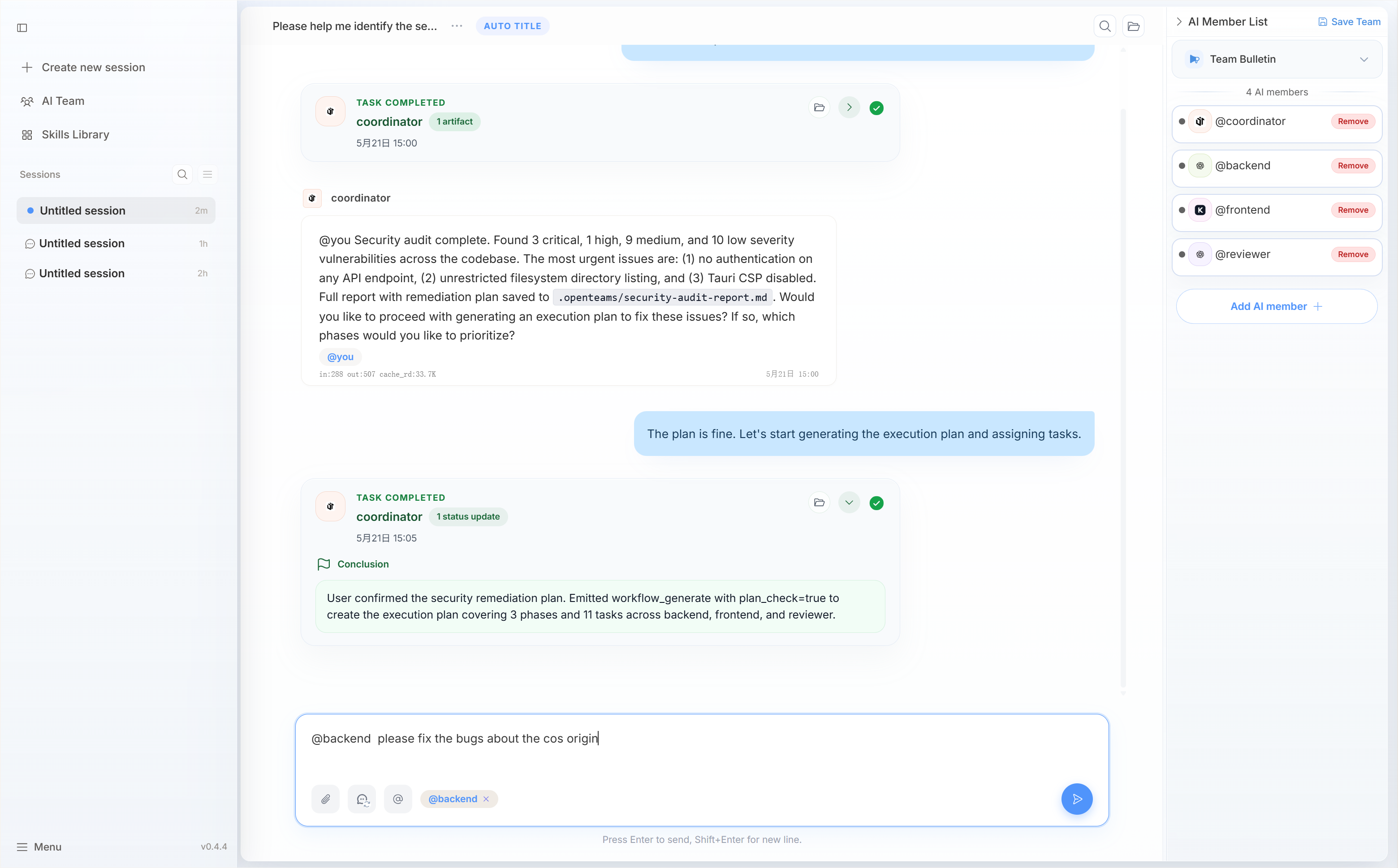
Free Chat
In free chat mode, you @ any agent to send it a task, and agents can freely pass messages to each other. Collaboration is governed by a team protocol you define — who does what, how they hand off, and what standards to follow.
free chat mode is best for small fixes, quick reviews, and exploratory discussions where a full workflow would be overkill.
Workflow
Workflow mode is designed for complex tasks that need to be broken down into subtasks with observable progress and controllable execution at every step.
A lead agent drives the planning phase — clarifying requirements, designing the approach, defining the execution plan, and assigning tasks to the right agents. The result is a visible workflow with steps, dependencies, reviews, retries, and acceptance points.
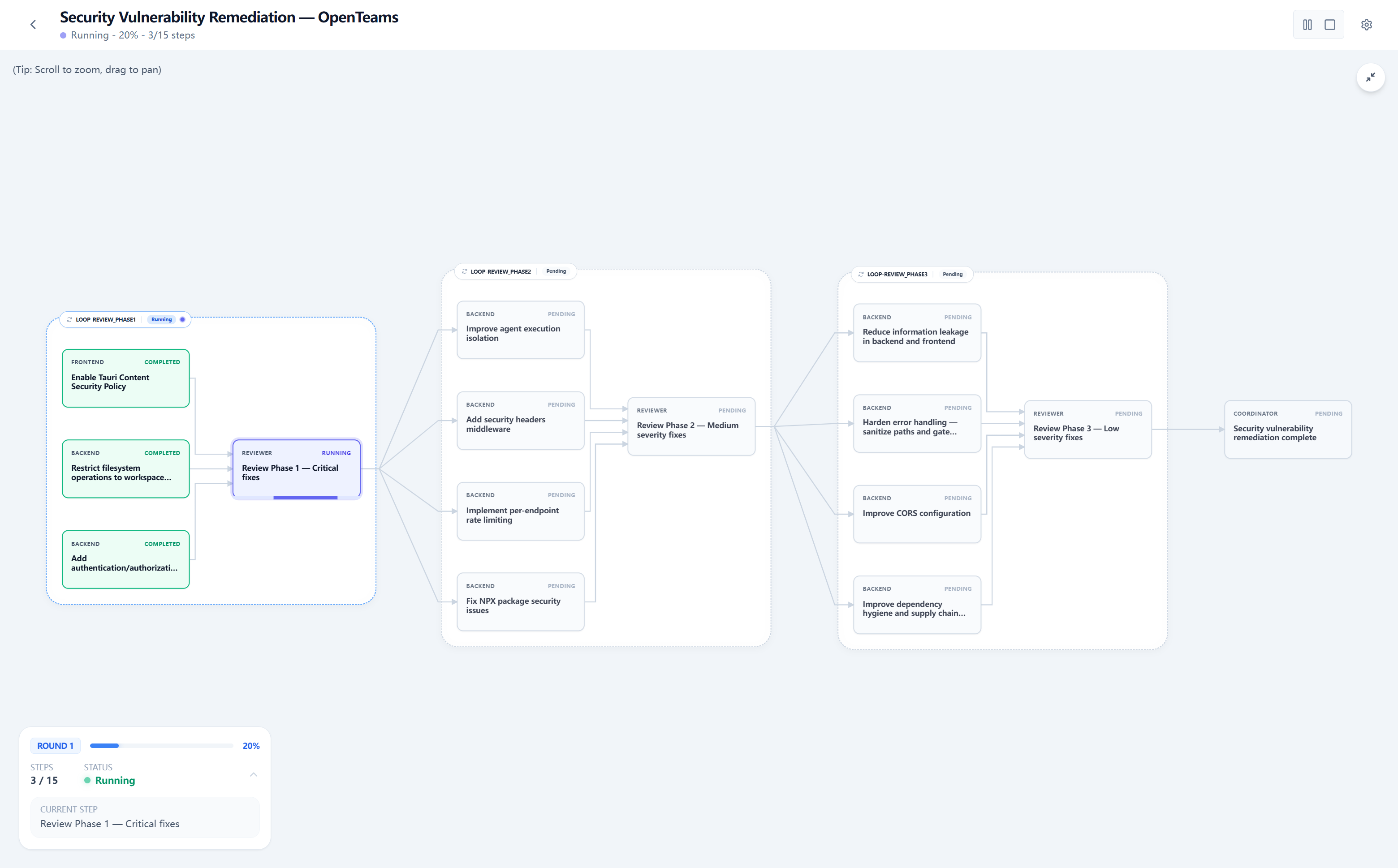
Instead of asking agents to run in a loose chain, openteams turns the work into a stateful execution graph.
Note: Workflow mode uses more tokens. Please make sure your token balance is sufficient.
Major updates
- 2026.05.20 (v0.4.4)
- Workflow mode beta version
- 2026.05.07 (v0.3.22)
- Supports saving members from a group chat session as a preset team with a single click
- 2026.04.14 (v0.3.15)
- Workspace File Change Viewer
- 2026.04.06 (v0.3.12)
- Enable dark ui mode
- fix openteams-cli concurrency issues
- 2026.04.02 (v0.3.10)
- Implement in-app version update
- The documentation website is now live.
Roadmap
openteams is under active development. Here is where we are heading:
- Expert AI workers — Launch more AI workers with deep domain knowledge that can solve specialized problems.
- High-output AI teams — Compose efficient expert AI workers into teams that can customize production workflows for specific business needs and turn requirements into deliverables end to end.
- Integrate more agents — Add support for more commonly used agents, such as Kilo code, hermes-agent, openclaw, and others.
Vision: Transform token consumption into real productivity.
Have a feature request or want to help shape the direction? Open a discussion.
Core Features
| Feature | What it means |
|---|---|
| AI employees and AI teams | Turn tokens into real productivity. Each AI employee or team carries domain-specific expertise that elevates general-purpose models into specialists — ready to ship work, not just generate text. |
| Multi-agent workspace | Bring multiple AI agents into one shared session instead of juggling separate windows. |
| Shared context | Agents work from the same conversation and project context. |
| Free Chat | Use @ for direct, lightweight agent collaboration. |
| Workflow mode | Convert complex tasks into structured steps, dependencies, reviews, retries, and acceptance. |
| Visible execution | See what each agent is doing and where the work is blocked. |
| Review and retry | Review a step, retry the right task, and avoid restarting the whole project. |
| Artifacts and traces | Keep logs, diffs, transcripts, and generated artifacts attached to the work. |
| Local workspace execution | Agents work against your configured workspace, with runtime records kept under .openteams/. |
Who It Is For
openteams is for:
- developers already using multiple coding agents
- independent builders who want more leverage without more manual coordination
- small engineering teams adopting AI-first workflows
- technical leads who need reviewable, repeatable agent execution
- teams that want both lightweight chat and structured workflow orchestration
It is not just a place to collect more agents. It is a way to turn agents into a working team.
Common Use Cases
You type: "Add GitHub issue sync to the workspace."
- Lead agent clarifies requirements: It asks about sync direction (one-way or two-way?), conflict handling (skip, overwrite, or log?), and which issue fields to map. You confirm: one-way pull, log conflicts, map title/body/labels/status.
- Lead agent designs the approach and builds the execution plan: The plan shows 5 steps —
Backend: OAuth + GitHub API→Backend: Sync Engine→Frontend: Sync Status UI→Integration Tests→Final Review. Each step has a clear scope, assigned agent, and acceptance criteria. - You review and approve the plan: You can adjust steps, reorder dependencies, or reassign agents before any code runs.
- Agents execute — you observe progress in real time:
Backend: OAuthruns first. Once complete,Sync EngineandFrontend: Sync Status UIstart in parallel. Every step shows its status, diff, and logs on the workflow graph. - You review and approve each completed step:
Backend: OAuthfinishes. You inspect the diff, see the token refresh logic, and approve. The next steps proceed. - A step fails — you retry just that step:
Integration Testsfails because the sync engine returns raw timestamps instead of ISO format. You review the error log, and retry onlyIntegration Testsstep. The rest of the workflow stays intact. - Final review and acceptance: All steps pass. You review the full diff, artifacts, and test results, then accept.
- Follow-up via Free Chat: Two days later, a user reports the sync status badge flickers. You open Free Chat:
@Frontend Agent the sync status badge flickers when polling — debounce the state update. Fixed in one turn, no workflow needed.
Tech Stack
| Layer | Technology |
|---|---|
| Frontend | React, TypeScript, Vite, Tailwind CSS |
| Backend | Rust |
| Desktop | Tauri |
| Database | SQLx-managed relational schema |
| Workflow UI | React Flow |
Local Development
Prerequisites
- Rust >= 1.75
- Node.js >= 18
- pnpm >= 8
Mac/Linux
# Clone the repository
git clone https://github.com/openteams-lab/openteams.git
cd openteams
pnpm i
pnpm run dev
# build
pnpm --filter frontend build
pnpm desktop:build
Windows (PowerShell): Start backend and frontend separately
pnpm run dev cannot run in Windows PowerShell. Use the following commands to run backend and frontend separately.
git clone https://github.com/openteams-lab/openteams.git
cd openteams
pnpm i
pnpm run generate-types
pnpm run prepare-db
Terminal A (backend)
$env:FRONTEND_PORT = node scripts/setup-dev-environment.js frontend
$env:BACKEND_PORT = node scripts/setup-dev-environment.js backend
$env:RUST_LOG = "debug"
cargo run --bin server
Terminal B (frontend)
$env:FRONTEND_PORT = <frontend port generated from terminal A>
$env:BACKEND_PORT = <backend port generated from terminal A>
cd frontend
pnpm dev -- --port $env:FRONTEND_PORT --host
Open the frontend page at http://localhost:<FRONTEND_PORT> (example: http://localhost:3001).
Build openteams-cli locally
Use the following commands if you need to compile the local openteams-cli binary instead of using the bundled or published build.
the build artifacts will be placed in the binaries directory.
# From the repository root
bun run ./scripts/build-openteams-cli.ts
Contributing
Contributions are welcome. Here is how to get started:
- Find an issue — Check Good First Issues for beginner-friendly tasks, or browse open issues.
- Discuss before building — Before opening a large pull request, please open an issue or discussion so the direction can be aligned.
- Follow the code style — Run the following before submitting:
pnpm run format
pnpm run check
pnpm run lint
- Submit a PR — Describe what you changed and why. Link the related issue if applicable.
See CONTRIBUTING.md for the full guide.
Community
- GitHub Issues: bug reports and feature requests
- GitHub Discussions: product ideas and questions
- Discord: community chat
- QQ:
License
Apache-2.0
Yorumlar (0)
Yorum birakmak icin giris yap.
Yorum birakSonuc bulunamadi