OpenYabby
Health Uyari
- License — License: MIT
- Description — Repository has a description
- Active repo — Last push 0 days ago
- Low visibility — Only 5 GitHub stars
Code Gecti
- Code scan — Scanned 12 files during light audit, no dangerous patterns found
Permissions Gecti
- Permissions — No dangerous permissions requested
Bu listing icin henuz AI raporu yok.
Voice-driven multi-agent assistant — Realtime API + CLI runners + multi-channel orchestration.

OpenYabby
Open-source voice-driven agent system for building real projects on your Mac.
Start a conversation, describe what you want, and OpenYabby plans, delegates, builds, reviews, and ships work through coordinated AI agents — across voice, web chat, and messaging channels like WhatsApp.
Demo • Why OpenYabby • Quick Start • What It Can Do • WhatsApp • Security • Architecture • Connectors • Troubleshooting • FAQ • Development • Contributing • Discord • Roadmap • License





Demo
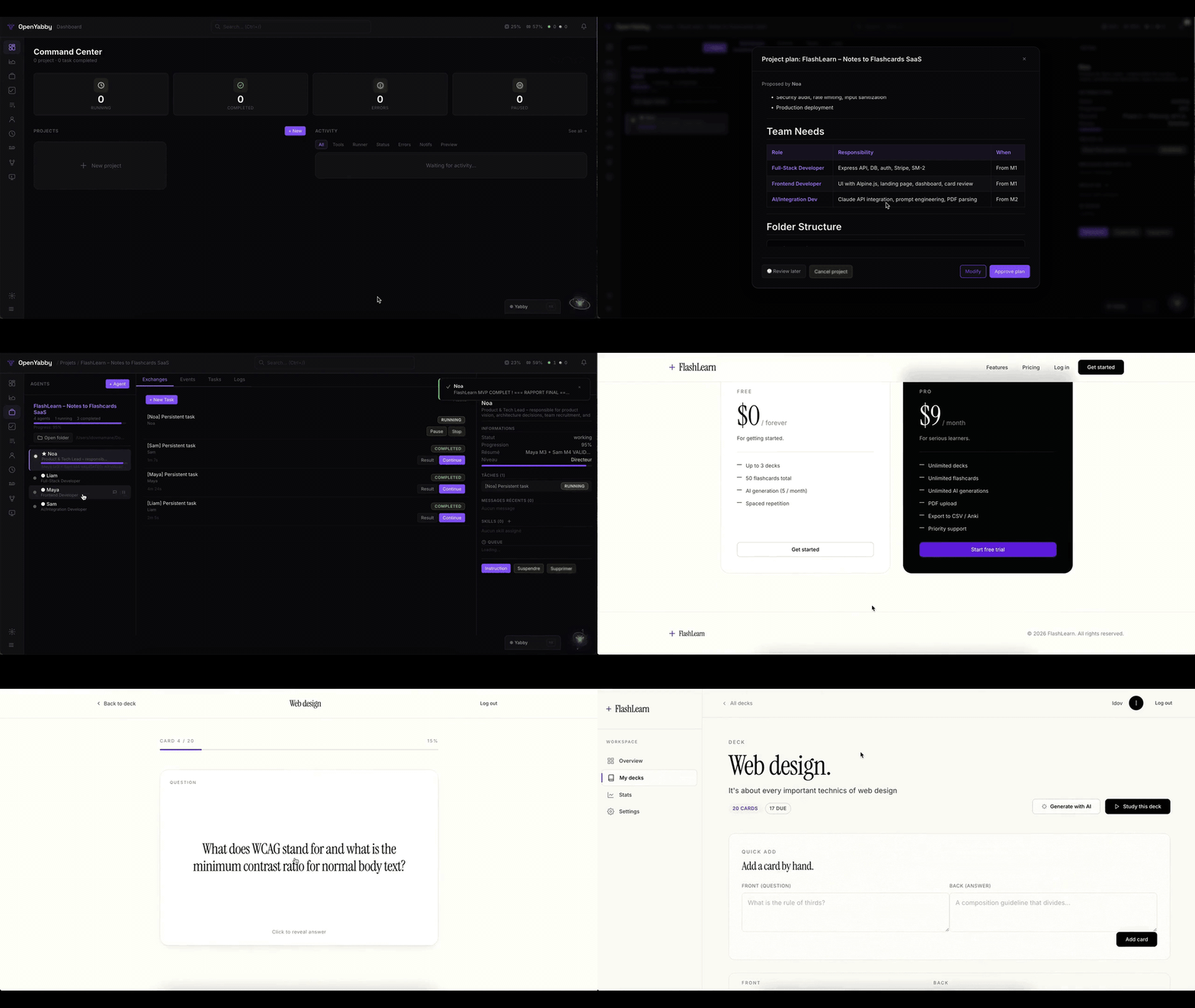
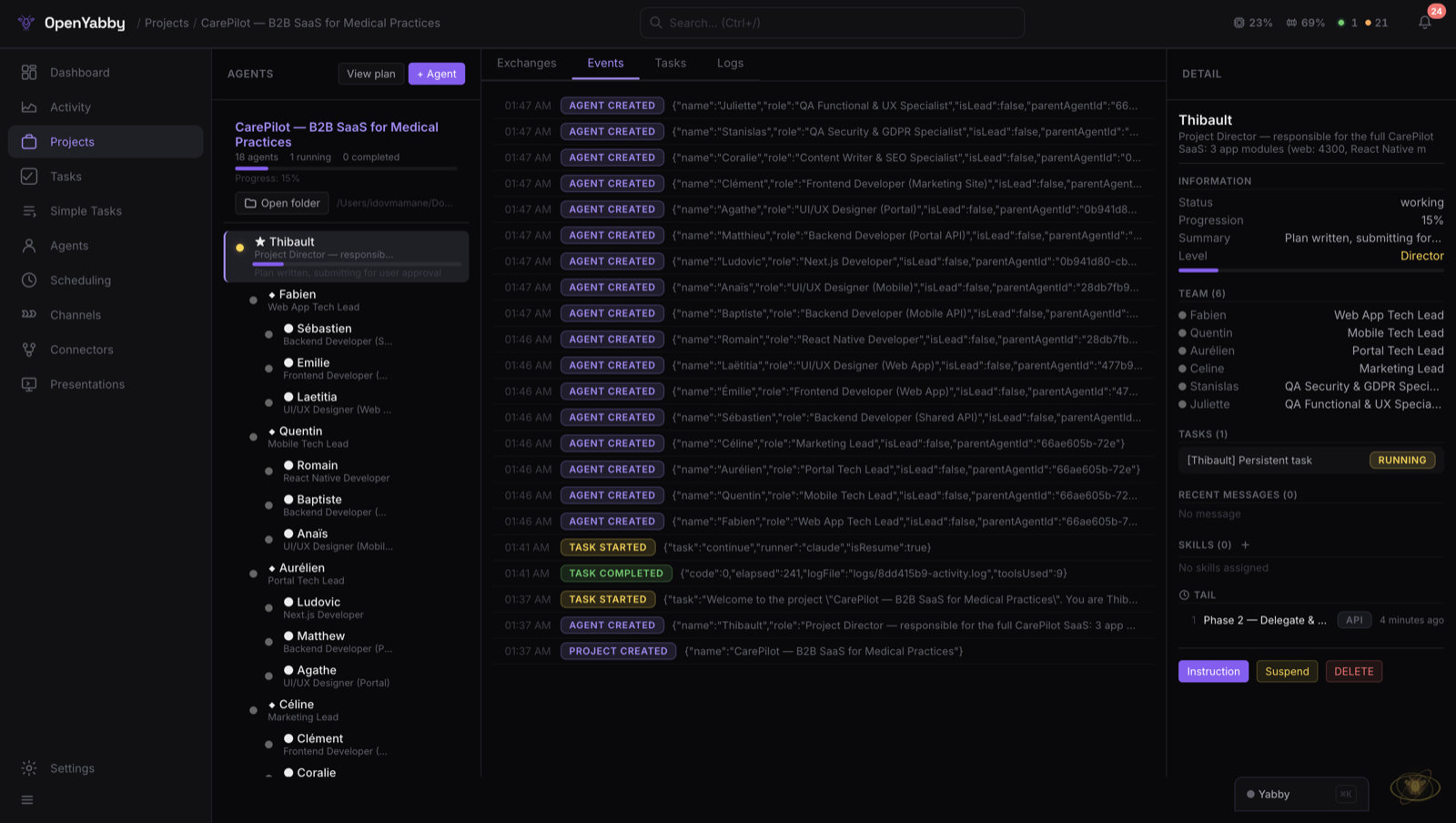
Speak once, get a coordinated team. Plan → delegate → execute → review → report.
How It Works
OpenYabby is designed around one loop:
- You say "Yabby" once to start
- You describe the project or task
- OpenYabby plans the work, spins up the right agents, executes, reviews, and reports back live
Why OpenYabby
Most AI tools stop at one layer: chat, voice, coding, automation, or agents.
OpenYabby combines them into a single open-source system that can handle larger, multi-step work.
What makes it different:
- Voice-driven: start with conversation, not forms or prompts
- Project-scale orchestration: break work into planning, execution, review, and QA phases
- Multi-agent teamwork: create lead, manager, and sub-agent workflows
- Mac-native execution: run real local tasks — bash, Python, Node, AppleScript, GUI automation — not just text generation
- WhatsApp-native agent threads: spawn standalone agents and talk to them directly in dedicated threads
- Open-source and hackable: inspect, modify, self-host, and extend everything
- Persistent memory: carries context across sessions — remembers your name, preferences, and project history
What Is OpenYabby?
OpenYabby is an open-source AI assistant and agent orchestration system.
It starts as a voice or chat interface, but the real value is what happens next: it can turn a request into a structured workflow, assign work across coordinated agents, use tools, execute tasks on your machine, and keep track of context across the lifecycle of a project.
It can also move those workflows into messaging surfaces. On WhatsApp, OpenYabby can create standalone agents, open a dedicated thread for each one, and let you talk to that agent directly.
Under the hood, it combines:
- OpenAI Realtime API (WebRTC) for bidirectional voice
- CLI task runners: Claude Code (default), Codex, Aider, Goose, Cline, or Continue
- Hierarchical multi-agent orchestration for complex project workflows
- Persistent memory with Mem0 + Qdrant
- 37 connectors (30 active today) and MCP server support for external tools
- A local web app plus messaging channels for interaction from multiple surfaces
Who It's For
- Developers who want a voice-first system that can build and coordinate real projects
- Builders who want an open-source alternative to closed AI assistants
- Power users who want one assistant across coding, research, planning, and execution
- Tinkerers who want to customize agents, prompts, runners, tools, and workflows
If you want a minimal consumer voice app, this is probably too much. If you want a serious, hackable assistant system that can take on bigger jobs, this is what it's built for.
Quick Start
Prerequisites
| Requirement | Version |
|---|---|
| Node.js | 20+ |
| PostgreSQL | 14+ (database: yabby) |
| Redis | 6+ (localhost:6379) |
| Claude CLI | npm i -g @anthropic-ai/claude-code |
| OpenAI API key | Realtime API access |
One-Command Setup
git clone https://github.com/OpenYabby/OpenYabby.git
cd OpenYabby
./setup.sh              # checks prereqs, installs deps, starts PG+Redis, launches server
# -> http://localhost:3000
The setup script handles everything: prerequisites check, npm install, .env creation (prompts for your OpenAI API key), infrastructure startup (Docker or local), and server launch. Run ./setup.sh docker to use Docker Compose for PostgreSQL + Redis, or ./setup.sh local if they're already running.
Manual Setup
npm install
cp .env.example .env    # fill in your API keys
npm run dev             # starts Node (port 3000) + Speaker service (port 3001)
Migrations run automatically. Open http://localhost:3000, say "Yabby", and start giving it work.
Try These Prompts
Once it's running, try one of these:
- "Introduce yourself and explain how you work."
- "Create a project plan for a startup landing page."
- "Build a simple HTML landing page for a bakery."
- "Research the latest news about OpenAI and summarize it."
- "Remember that I prefer TypeScript and short commit messages."
- "Split this into frontend and backend workstreams."
- "Create a standalone research agent in WhatsApp and let me talk to it directly."
Environment Variables
Required| Variable | Description |
|---|---|
OPENAI_API_KEY |
OpenAI (Realtime API, Whisper, Mem0) |
PG_HOST / PG_PORT / PG_DATABASE / PG_USER / PG_PASSWORD |
PostgreSQL |
REDIS_URL |
Redis connection string |
| Variable | Description | Default |
|---|---|---|
CLAUDE_CMD |
Path to Claude CLI | claude |
PORT |
Server port | 3000 |
SPEAKER_SERVICE_URL |
Speaker verification service | http://localhost:3001 |
SPEAKER_THRESHOLD |
Voice similarity threshold (0.0-1.0) | 0.25 |
YABBY_SECRET |
Encryption key for credentials | derived from OPENAI_API_KEY |
SANDBOX_ROOT |
Project sandbox location | ~/Desktop/Yabby Projects |
TASKS_FORWARD_URL |
Forward tasks to remote agent (Docker) | - |
Security & Safety
OpenYabby is powerful because it can execute real commands and access real tools. That also means it should be used carefully.
- It can execute local system commands with broad machine access.
- Authentication is optional and disabled by default. Enable auth before exposing any remote access.
- Do not expose
localhost:3000directly to the public internet. - Use least-privilege credentials for connectors and rotate tokens regularly.
- Review sensitive actions, especially when using autonomy features.
This project should be treated more like a local automation framework than a harmless toy app.
What It Can Do
1. Turn a request into a real project workflow
OpenYabby is built for more than one-shot prompts. It can take a bigger goal, break it into stages, and run a structured lifecycle:
Discovery -> Planning -> Execution -> Review -> QA
     ^                                      |
     +-- User approves/revises plan --------+
The lead agent submits a plan for your approval. You approve, revise with feedback, or cancel. Approved plans trigger execution across the agent team.
2. Coordinate multiple agents
For larger jobs, OpenYabby creates role-based agent teams:
Lead Agent
+-- Frontend Manager
|   +-- UI Developer
|   +-- QA Tester
+-- Backend Manager
    +-- API Developer
    +-- Database Designer
A lead agent delegates work, managers coordinate their sub-teams, sub-agents execute and report back. When a sub-agent finishes, the orchestrator automatically triggers the parent for review. Tasks at the same level run in parallel; the next level waits until all current tasks complete.
3. Execute real tasks on your Mac
Each task spawns a real CLI process with full system access through supported runners:
| Runner | CLI | Status |
|---|---|---|
| Claude Code | claude -p ... |
Default |
| OpenAI Codex | codex ... |
Supported |
| Aider | aider ... |
Supported |
| Goose | goose ... |
Supported |
| Cline | cline ... |
Supported |
| Continue | continue ... |
Supported |
Tasks can use bash, Python, Node, file system access, web browsing, AppleScript, and GUI automation. This is not just a talking assistant — it is an execution system.
4. Talk and respond by voice
Say the wake word "Yabby" and speak naturally. The voice stack uses WebRTC with the OpenAI Realtime API for low-latency, bidirectional audio. Wake word detection runs locally with Silero VAD + ONNX, with server-side Whisper confirmation.
Optional speaker verification (SpeechBrain ECAPA-TDNN) helps reduce false activations in shared environments. Enroll in 30 seconds via Settings.
5. Keep memory across sessions
Facts are extracted from conversation every 6 turns, stored in Qdrant (vector DB), and injected into every session. OpenYabby remembers your name, coding preferences, project context, recurring tasks, and tool usage patterns.
6. Use connectors and external tools
30 active connectors across GitHub, Notion, Gmail, Google Calendar, PostgreSQL, MongoDB, Puppeteer, Playwright, Brave Search, and more. Connectors use two backends: built-in (native JS) and MCP (Model Context Protocol servers).
7. Work across multiple channels
All channels share the same conversation context, tools, and memory:
| Channel | Adapter | Notes |
|---|---|---|
| Web | Built-in | Voice + chat UI at localhost:3000 |
| Baileys | Standalone agents with dedicated threads | |
| Discord | discord.js | Text + voice messages |
| Slack | Bolt | Socket mode, text + voice |
| Telegram | grammY | Text + voice notes |
| Signal | signal-cli | Text + voice messages |
WhatsApp, but Agent-Native
On WhatsApp, OpenYabby can do more than reply in chat.
It can spawn standalone agents automatically, create a dedicated thread for each one, and let you talk to that agent directly.
That means you can:
- Create specialist agents from a conversation
- Keep agent work separated by thread
- Talk directly to a frontend, backend, research, or QA agent
- Coordinate larger projects from an app you already use
- Keep the same broader context across web, voice, and messaging
This is one of the clearest ways OpenYabby feels different from a standard chatbot or generic agent framework.
What Works Today
Current core capabilities:
- Wake word + voice interaction (WebRTC bidirectional audio)
- Web chat UI with real-time activity feed
- Task execution with 6 CLI runners (Claude Code default)
- Multi-agent project orchestration with plan approval flow
- Persistent memory across sessions (Mem0 + Qdrant)
- 30 active connectors + MCP server support
- Multi-channel messaging (WhatsApp, Discord, Slack, Telegram, Signal)
- Scheduling and automation (cron, interval, manual triggers)
- Speaker verification for wake word filtering
- Configuration hot-reload (no restart needed)
- 9-step onboarding wizard for first run
Architecture
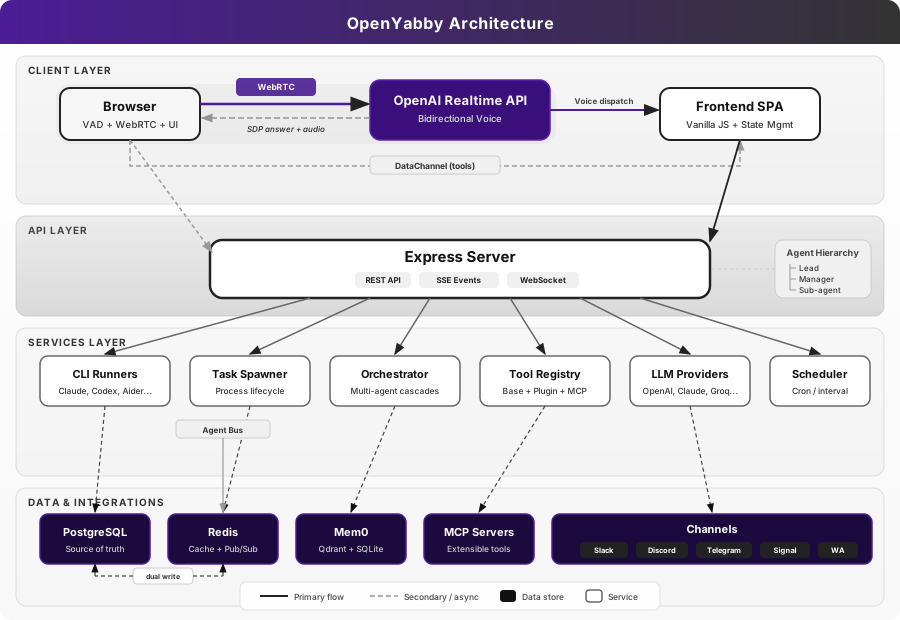
Key Patterns
| Pattern | How |
|---|---|
| Dual-write | PG (source of truth) + Redis cache (24h TTL). Read: Redis -> PG fallback -> re-cache |
| Soft delete | status = 'archived', never hard DELETE |
| Real-time events | SSE + WebSocket with identical payloads |
| Wake word pipeline | Client VAD -> Whisper confirmation -> activation |
| GUI lock | Redis hash with TTL for serialized GUI tasks |
| Name resolution | ID -> exact name -> ILIKE -> fuzzy match -> word match -> role match |
Connectors
Full connector catalog (37 total, 30 active)Development: GitHub, Linear, Sentry, Git, Jira, Confluence, Trello, Todoist
Communication: Slack, Slack MCP, Discord (via channel adapter)
Productivity: Notion, Figma, Google Calendar, Google Maps, Gmail, Outlook, YouTube Transcript
Data: PostgreSQL, MongoDB, MySQL, Supabase, Filesystem
Web & Search: Brave Search, Web Fetch, Puppeteer, Chrome DevTools, Playwright
AI & Reasoning: Sequential Thinking, Memory, EverArt
Adding a Connector
Settings -> Connectors -> Add Connector -> pick from catalog -> enter credentials -> connect
For MCP servers:
Settings -> Connectors -> Custom MCP -> name + command + args -> connect
Connected tools automatically appear in voice and chat sessions.
Speaker Verification (Optional)
A Python FastAPI microservice using SpeechBrain's ECAPA-TDNN model to verify that only your voice triggers the wake word. Helps reduce false activations in shared environments.
# Starts automatically with:
npm run dev

# Or manually:
cd speaker && pip install -r requirements.txt && uvicorn app:app --port 3001
Enrollment: Settings -> Speaker Verification -> record 3 samples saying "Yabby" -> done.
The service is fail-open: if it's down, voice detection continues without speaker filtering.
Docker
docker-compose up   # starts PostgreSQL + Redis
npm start           # start OpenYabby locally
Note: Claude CLI requires host access for task execution, so Docker is best used for infrastructure services while OpenYabby runs on the host. Alternatively, set
TASKS_FORWARD_URLto forward task spawns to a local agent.
Mobile Access (Relay Tunnel)
The relay tunnel proxies HTTP + WebSocket traffic to your localhost via relay.openyabby.com so a remote client can reach your machine. It's off by default. To enable, set a RELAY_SECRET in your .env (request one from the project maintainers, or run your own relay):
RELAY_SECRET=your-relay-secret-here
A native mobile companion is on the roadmap — sign up at openyabby.com to get notified.
Troubleshooting
Common issues and quick fixes. For deeper coverage see docs/troubleshooting.md.
| Symptom | Likely cause | Fix |
|---|---|---|
EADDRINUSE: port 3000 on startup |
A previous Node instance is still bound | lsof -ti :3000 | xargs kill then npm start |
Claude CLI not found in spawner logs |
CLI not on PATH, or installed under a different name |
npm i -g @anthropic-ai/claude-code, or set CLAUDE_CMD=/full/path/to/claude in .env |
ECONNREFUSED 127.0.0.1:5432 |
PostgreSQL is not running | ./setup.sh docker or start your local Postgres; verify PG_* in .env match |
ECONNREFUSED 127.0.0.1:6379 |
Redis is not running | ./setup.sh docker, or brew services start redis if installed locally |
| Wake word never triggers | Speaker service is off, or you haven't enrolled | Service is fail-open (still works without it). Run npm run speaker and enroll via the UI for biometric filtering |
Tunnel won't connect to relay.openyabby.com |
No RELAY_SECRET, or you don't want a tunnel |
Set DISABLE_TUNNEL=true in .env to silence; the app runs fine locally without it |
Tasks pause with status paused_llm_limit |
Claude CLI hit its daily quota | Yabby auto-resumes after the reset window. See migration 024 for the persisted resume metadata |
| Server crashes with V8 heap warnings | Heap monitor needs --expose-gc to free memory |
Always launch via npm start (which already passes --max-old-space-size=8192 --expose-gc); never run node server.js directly |
| Voice cuts out or feels laggy | WebRTC NAT/firewall, or browser mic permission | Test in Chrome on the same network as the server; check browser site-permissions for microphone |
When opening a bug report, include the relevant lines from logs/{taskId}-activity.log and logs/{taskId}-raw.log if it's a task issue, or the browser console + network tab if it's a voice issue.
FAQ
Why is OpenYabby Mac-only today?
The CLI runners drive real local automation — bash, AppleScript, GUI control — and the prompt set assumes macOS conventions. Cross-platform is on the roadmap; contributions to the Linux/Windows story are welcome.
Can I use Ollama or a local model instead of OpenAI?
Yes — for the LLM provider layer (channel handlers, hallucination detection, memory extraction). Configure llm.provider to ollama in your config. The voice pipeline still requires OpenAI's Realtime API for now; voice-on-local-models is on the roadmap and PRs are welcome.
Do I need the Claude CLI?
Claude is the default runner, but OpenYabby is runner-agnostic. You can switch to Codex, Aider, Goose, Cline, or Continue in lib/runner-profiles.js — see docs/runners.md for the trade-offs.
Is my voice data stored?
Audio frames stream through WebRTC and are not persisted. Whisper transcripts and Mem0-extracted facts (name, preferences, project history) are stored locally in Postgres + the file-based Qdrant index (memory.db). Nothing leaves your machine except the live calls to OpenAI/Claude/your configured providers.
How do I add a new channel, connector, or runner?
See CONTRIBUTING.md — there's a recipe for each. Channels subclass ChannelAdapter; connectors extend the catalog in lib/connectors/catalog.js; runners register in lib/runner-profiles.js.
Can I run it in Docker?
Postgres + Redis run great in Docker (./setup.sh docker). The Node server can run in Docker, but the Claude CLI cannot — use TASKS_FORWARD_URL to forward task spawns back to a host agent if you want a containerized web/channel layer.
Limitations
- macOS-first execution model (AppleScript/GUI automation assumptions)
- Setup is heavier than a single-binary app — requires PostgreSQL, Redis, and API keys
- Some channels and connectors require third-party credentials
- Speaker verification depends on the optional Python service
- Autonomous execution still requires human judgment for sensitive tasks
Development
Project Structure
server.js                 Express app, WebRTC session, startup
lib/
  spawner.js              CLI process lifecycle + log parsing
  prompts.js              System prompts (voice, lead, manager, sub-agent)
  memory.js               Mem0 integration
  orchestrator.js         Auto-trigger parent review
  config.js               Zod-validated config + hot-reload
  scheduler.js            Cron/interval task scheduling
  channels/               Channel adapters
  connectors/             Connector catalog + lifecycle manager
  mcp/                    MCP server bridge
  plugins/                Plugin loader + tool registry
  providers/              LLM providers
  tts/                    TTS engines
routes/                   Express routers
db/
  migrations/             Auto-run migrations (idempotent)
  queries/                PG + Redis data access
public/                   Vanilla JS SPA (no build step)
speaker/                  Python speaker verification service
tests/                    Vitest + Playwright
Running Tests
# Unit tests (mocks PG/Redis, no DB needed)
npx vitest

# E2E tests (requires server running on port 3000)
npm run test:e2e            # headless
npm run test:e2e:headed     # with browser
npm run test:e2e:ui         # Playwright UI mode
Adding a Migration
- Create
db/migrations/0XX_name.jsexportingMIGRATIONSQL +run()async function - Add the filename to the explicit array in
server.jsstartup() - Migrations are idempotent (
IF NOT EXISTS/ON CONFLICT)
Adding a Plugin
- Create
plugins/my-plugin/plugin.json(manifest) - Create
plugins/my-plugin/index.jsexportinginit(context) - Context provides:
config,logger,registerTool(),eventBus,registerRoutes() - Tools auto-prefixed with plugin name
Contributing
Contributions are very welcome — bugs, features, docs, new connectors, new runners, new channels.
- Read CONTRIBUTING.md for the full setup, test, and recipe guides (how to add a migration / connector / runner / channel / plugin).
- Read CODE_OF_CONDUCT.md — Contributor Covenant 2.1.
- For security issues, follow SECURITY.md (private disclosure via GitHub Security Advisories).
- Conventional commits (
feat(scope): ...,fix(scope): ...,docs: ...,chore: ...) — match the existinggit log.
Conventions
- ES modules throughout (
import/export,.jsextensions) - Locale support for
fr,en,es,de - Soft-delete (
status = 'archived') — never hardDELETE - Redis keys follow
yabby:{entity}:{id}:{field} - No build step for frontend — vanilla JS from
public/
End-to-End Example: Building a Quantum Computing + AI SaaS
This walkthrough shows how OpenYabby handled a full SaaS build -- from a voice request to a working platform with auth, dashboards, billing, and a quantum circuit simulator.
Full project timelineThe Request
"build me a full SaaS for quantum computing and AI where users can design quantum circuits visually run simulations train hybrid quantum ML models and manage everything from a dashboard with team collaboration and billing"
Phase 1: Discovery (8 min)
The lead agent Margaux submitted 9 discovery questions mixing voice prompts and structured forms:
- Target users? Researchers, quantum engineers, and AI teams at startups and universities
- Core modules? Circuit designer (drag-and-drop), simulator (up to 20 qubits), hybrid ML pipeline builder, experiment tracker, team workspaces
- Tech stack preference? Next.js 14 + TypeScript, Supabase (auth + DB + storage), Stripe billing, Vercel deploy
- Quantum simulation backend? Browser-based for small circuits (< 8 qubits via WebAssembly), server-side for larger (Python Qiskit via API)
- Pricing model? Free tier (5 qubits, 100 sim/month), Pro ($49/mo, 15 qubits, unlimited), Enterprise (custom)
- Collaboration features? Shared workspaces, circuit versioning, experiment comments, role-based access (owner/editor/viewer)
- Design direction? Dark mode default, tech-forward -- deep navy/purple gradients, cyan accents, monospace code fonts. Inspirations: IBM Quantum, Pennylane, Weights & Biases
- Auth requirements? Email + Google OAuth, magic links, 2FA for Enterprise
- Compliance? SOC 2 awareness, data residency labels, audit log
Phase 2: Planning (5 min)
Margaux wrote a PLAN.md (18,000+ characters) covering:
- Architecture: Next.js 14 App Router, TypeScript strict mode, Supabase (Auth + Postgres + Realtime + Storage), Stripe Connect, WebAssembly quantum simulator, Python Qiskit microservice
- Data model: 14 tables -- users, workspaces, workspace_members, circuits, circuit_versions, simulations, simulation_results, experiments, experiment_runs, models, datasets, billing_subscriptions, usage_log, audit_log
- Design system: Dark navy palette (
#0a0e27base,#1e3a5fsurface,#00d4ffaccent cyan,#7c3aedaccent purple), JetBrains Mono for code, Inter for UI - 12 milestones (M1-M12), team of 7 agents
Plan submitted for review. User approved with one note: "Add a public landing page with interactive demo."
Phase 3: Team Creation & Execution
Margaux created 7 sub-agents and delegated the first wave of tasks in parallel:
| Agent | Role | First Assignment |
|---|---|---|
| Raphael | Architect & Infrastructure | Next.js scaffolding, Supabase schema (14 tables + RLS), CI config |
| Camille | Frontend Lead | Design system (Tailwind tokens, 22 UI components), layout system |
| Antoine | Quantum Engine Dev | WebAssembly simulator (state vector, gates library, measurement) |
| Lena | Full-Stack Dev | Auth flow (email + Google + magic links), workspace CRUD, role-based middleware |
| Nathan | Backend / API Dev | Simulation API, job queue, Qiskit bridge, results caching |
| Elise | Dashboard & Visualization | Circuit designer (drag-and-drop canvas), Bloch sphere, histogram charts |
| Victor | QA & Security | Playwright test framework, OWASP checklist, penetration test plan |
Phase 4: Review Cycles (multiple rounds)
Margaux reviewed every deliverable with code inspection and live browser testing via Playwright:
- Raphael's schema: 14 tables with RLS tested via cross-workspace queries -- 0 leaks. One fix: missing cascade delete on circuit_versions
- Camille's design system: 22 components screenshotted at 4 viewports. "The dark theme with cyan accents feels like a real quantum computing product"
- Antoine's quantum engine: Bell state circuit tested -- verified 50/50 measurement. 8-qubit GHZ state in 12ms
- Lena's auth: Full flow tested live (signup, OAuth, magic link, session, roles). Editors correctly blocked from workspace deletion
- Nathan's simulation API: 12-qubit Grover search submitted, WebSocket progress verified, results matched expected probability amplification
- Elise's circuit designer: 5-qubit QFT built visually, QASM export/import round-trip confirmed. Wire routing handles crossing correctly
Subsequent milestones delegated after reviews: hybrid ML pipeline builder, experiment tracker, Stripe billing, landing page with interactive demo, real-time collaboration, and final integration.
Phase 5: QA & Security Review
Victor delivered a security audit (OWASP Top 10 + 12 penetration test scenarios), 127 Playwright E2E specs across auth, circuits, simulator, billing, collaboration, API, accessibility, and performance. Camille produced a design review with 48 screenshots (12 pages x 4 viewports) surfacing 3 blocking mobile issues -- all fixed and re-verified. Final build: 47 pages, 0 errors, 0 type errors, npm audit clean. Lighthouse weighted average: Performance 94, Accessibility 98, Best Practices 100, SEO 96.
Outcome
| Metric | Value |
|---|---|
| Total tasks | 61 (58 succeeded, 3 required follow-up fixes) |
| Agents | 8 (1 lead + 7 sub-agents) |
| Development time | ~4 hours |
| Pages | 47 |
| Database tables | 14 with full RLS |
| Quantum gates | 12 |
| E2E tests | 127 Playwright specs |
| Security findings | 0 critical, 0 high |
| Lighthouse Performance | 94 |
All 5 phases exercised: Discovery, Planning, Execution, Review, and QA.
Roadmap
Active focus areas. Open an issue to suggest a new item or vote up an existing one.
- Multi-voice system — distinct voices per agent, simultaneous sessions
- Full-time job agent — always-on continuous research / long-horizon work
- Native mobile companion — iOS / Android over the relay tunnel (sign up)
- Starter templates — SaaS, landing page, API service scaffolds
- Safe execution mode — restricted runner permissions for cautious / shared environments
- Cross-platform — reduce macOS-specific assumptions; first-class Linux and Windows story
License
MIT © 2026 Idov Mamane
WhatsApp exception: The optional WhatsApp adapter depends on
@whiskeysockets/baileyswhich transitively includes@whiskeysockets/libsignal-node(GPL-3.0). This component is optional and not required for core functionality. If you redistribute with WhatsApp support, comply with GPL-3.0 for that component. See THIRD_PARTY_LICENSES.md for the full dependency license audit.
Built with unreasonable amounts of coffee and WebRTC debugging.
If OpenYabby starts talking to your cat, that is probably still a feature.
Yorumlar (0)
Yorum birakmak icin giris yap.
Yorum birakSonuc bulunamadi