optim-agent
Health Pass
- License — License: MIT
- Description — Repository has a description
- Active repo — Last push 0 days ago
- Community trust — 24 GitHub stars
Code Pass
- Code scan — Scanned 12 files during light audit, no dangerous patterns found
Permissions Pass
- Permissions — No dangerous permissions requested
No AI report is available for this listing yet.
LLM agents as your hyperparameter optimizer.
optim-agent
Agentic system optimization with coding agents.
Automate the iterative parameter-tuning work of an algorithm engineer.



English | 简体中文 | 日本語 | 한국어 | Français | Deutsch | Español | Português | Русский
optim-agent uses Claude Code, Codex, or OpenCode to optimize any system that
exposes configurable parameters and a measurable objective. It combines
what each parameter means with what the trial history shows, then proposes
the next configuration to evaluate. Objective evaluations remain authoritative:
optim-agent proposes values, validates them against the declared space, records
outcomes, and falls back to safe sampling when an agent reply is invalid.
| Models | Systems | Research |
|---|---|---|
| Training, architecture, and RL experiments | Inference, latency, cost, control, and decision rules | Quant signals, simulations, and scientific workflows |
Why optim-agent
- Semantic proposals - coding agents reason over parameter meanings, study
context, and observed outcomes instead of treating every dimension as an
anonymous coordinate. - Small-budget leverage - useful when evaluations are expensive and classical
surrogates are still data-starved. - Auditable decisions - JSON/SQLite studies retain configurations,
outcomes, states, context, and optional agent rationale. - Bounded execution - the agent only proposes values; optim-agent validates
them against the declared space, and invalid output falls back to safe
sampling.
Install
Install from PyPI or GitHub:
# Stable release from PyPI
python -m pip install optim-agent

# Latest source from GitHub
python -m pip install "optim-agent @ git+https://github.com/Optim-Agent/optim-agent.git"
Requires one authenticated agent CLI on PATH:
claude,
codex, or
opencode.
Quickstart
import optim_agent as oa

def objective(trial):
    threshold = trial.suggest_float(
        "threshold", 0.05, 0.95,
        context="decision threshold; higher values trade recall for precision",
    )
    budget = trial.suggest_int(
        "budget", 10, 200, log=True,
        context="compute or operating budget; larger values may improve quality",
    )
    return evaluate_system(threshold=threshold, budget=budget)  # domain code

study = oa.create_study(
    direction="maximize",
    sampler=oa.AgentSampler(
        backend="claude",  # or "codex" / "opencode"
        effort="high",
        context="maximize system quality under a strict operating-cost budget",
        history=5,
        explicit_reasoning=True,
        qualitative_notes=True,
    ),
    storage="study.json",  # optional: persist and resume
)
study.optimize(objective, n_trials=20)
print(study.best_value, study.best_params)
Optional context gives domain meaning to the study and parameters. Provide it
study-wide on AgentSampler(context=...), per parameter onsuggest_*(..., context=...), or both.
Where It Applies
| Area | Parameters optim-agent can tune | Example objective |
|---|---|---|
| Model training | learning rates, architectures, augmentation, regularization | validation quality, compute, robustness |
| Inference and serving | quantization, batching, decoding, caching, routing | quality, latency, throughput, cost |
| Quantitative research | signal windows, thresholds, rebalance rules, risk controls | walk-forward return, drawdown, turnover |
| Reinforcement learning and decisions | objective weights, exploration schedules, environment settings, policy thresholds | return, safety, sample efficiency |
| Scientific workflows | simulation inputs, solver settings, experimental controls | fit, error, runtime, resource use |
| Black-box systems | any bounded categorical, integer, or continuous configuration | scalar objective score |
For reinforcement learning, optim-agent tunes the system around the learning
loop; it does not replace the policy-learning algorithm.
Optimization Trajectory
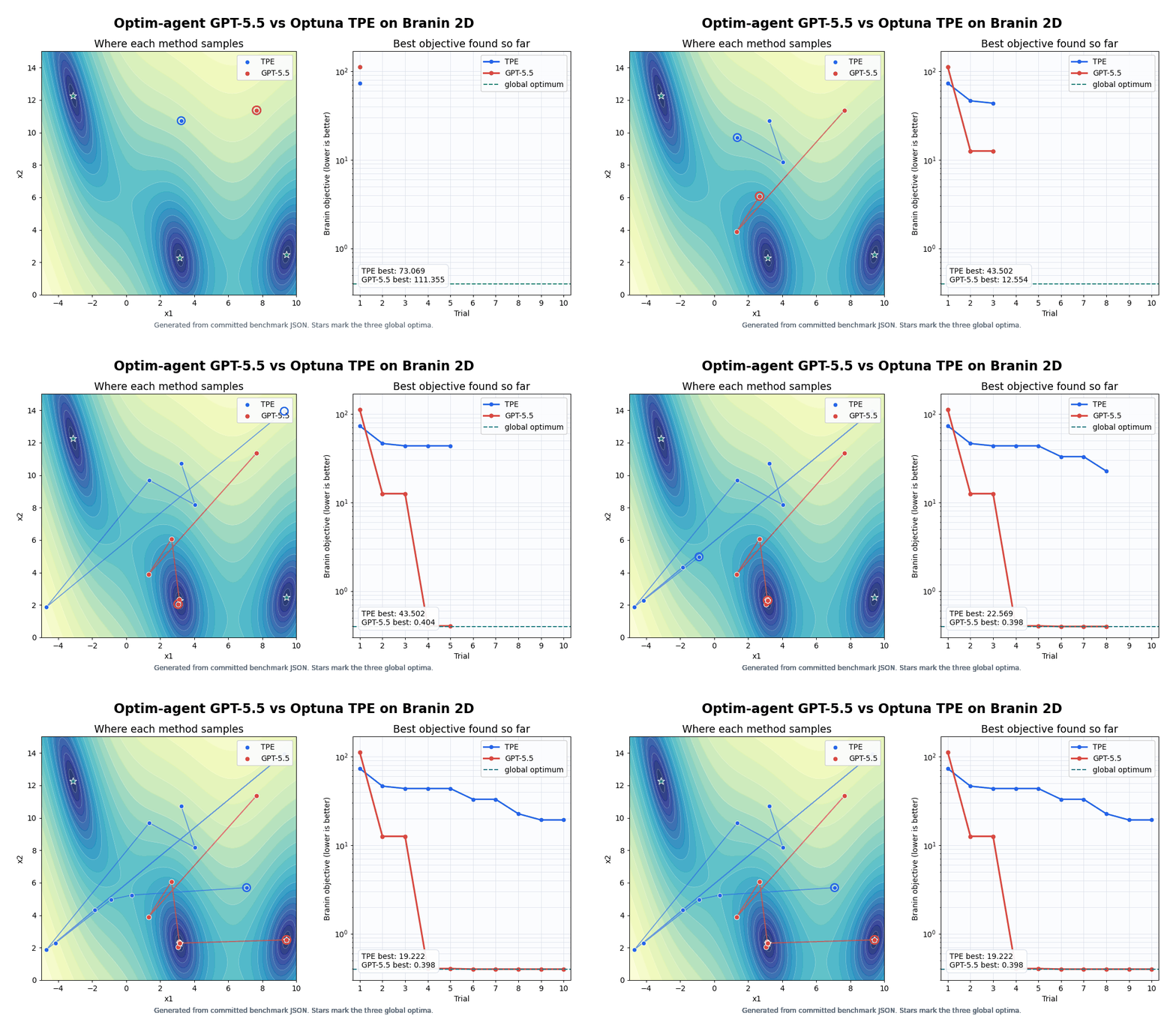
This seed-0 Branin trace compares TPE and GPT-5.5 under the same 10-trial
budget, with incumbent objective values after each trial. It is a trajectory
illustration; aggregate benchmark results and reproduction commands follow.
Optimizing Math Functions without Context: Branin-2D and Ackley-5D
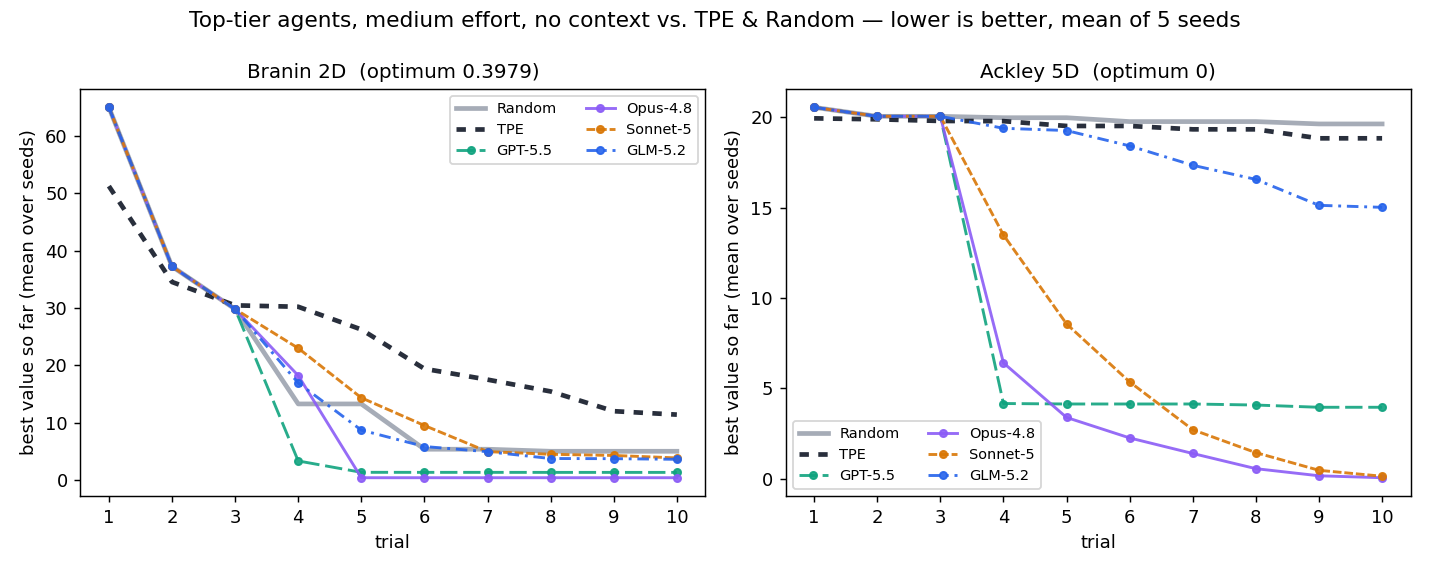
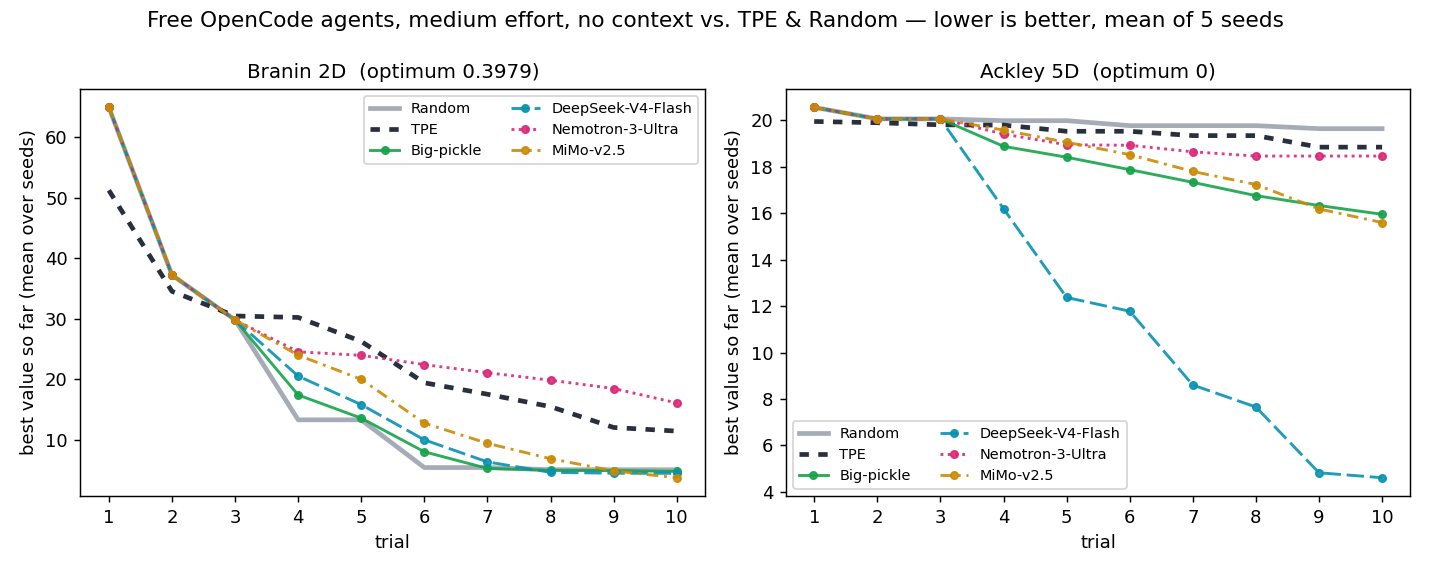
Hard-function agents receive no supplied task context: only genericx1...x5 parameter names, numeric bounds, and trial history. Runs use 10 trials
over five seeds; Random and TPE are unchanged baselines.
Top-tier Agents
| method | mean best Branin ↓ | mean best Ackley-5D ↓ |
|---|---|---|
| Random | 5.008 | 19.639 |
| TPE | 11.395 | 18.843 |
| GPT-5.5 | 1.326 | 3.960 |
| Opus-4.8 | 0.398 | 0.061 |
| Sonnet-5 | 3.850 | 0.143 |
| GLM-5.2 | 3.609 | 15.023 |
The pinned models are gpt-5.5, claude-opus-4-8, claude-sonnet-5, andglm-5.2.
Opus-4.8 reaches the Branin optimum on average and has the strongest five-seed
Ackley mean.
OpenCode Agents (Free)
| method | mean best Branin ↓ | mean best Ackley-5D ↓ |
|---|---|---|
| Random | 5.008 | 19.639 |
| TPE | 11.395 | 18.843 |
| Big-pickle | 4.734 | 15.951 |
| DeepSeek-V4-Flash | 4.410 | 4.608 |
| Nemotron-3-Ultra | 16.051 | 18.459 |
| MiMo-v2.5 | 3.682 | 15.597 |
OpenCode-hosted models require no paid model API. The free pool rotates; this
refresh pins opencode/big-pickle, opencode/deepseek-v4-flash-free,opencode/nemotron-3-ultra-free, and opencode/mimo-v2.5-free. DeepSeek V4
Flash has the strongest free-model Ackley mean, while MiMo-v2.5 has the
strongest free-model Branin mean.
Tuning ResNet-based Image Classifier: MNIST and CIFAR-10
The classification benchmark compares Random, Optuna TPE,
GPT-5.5 w/ context, and GPT-5.5 w/o context over five seeds (0..4) and
10 trials. The context condition receives natural-language study and parameter
descriptions; the no-context condition receives only bounds and trial history.
For classification, the primary metric emphasizes fast improvement:
cumulative_best_so_far_error = sum(best_test_error_so_far_at_i for i in 1..10)
Lower is better.
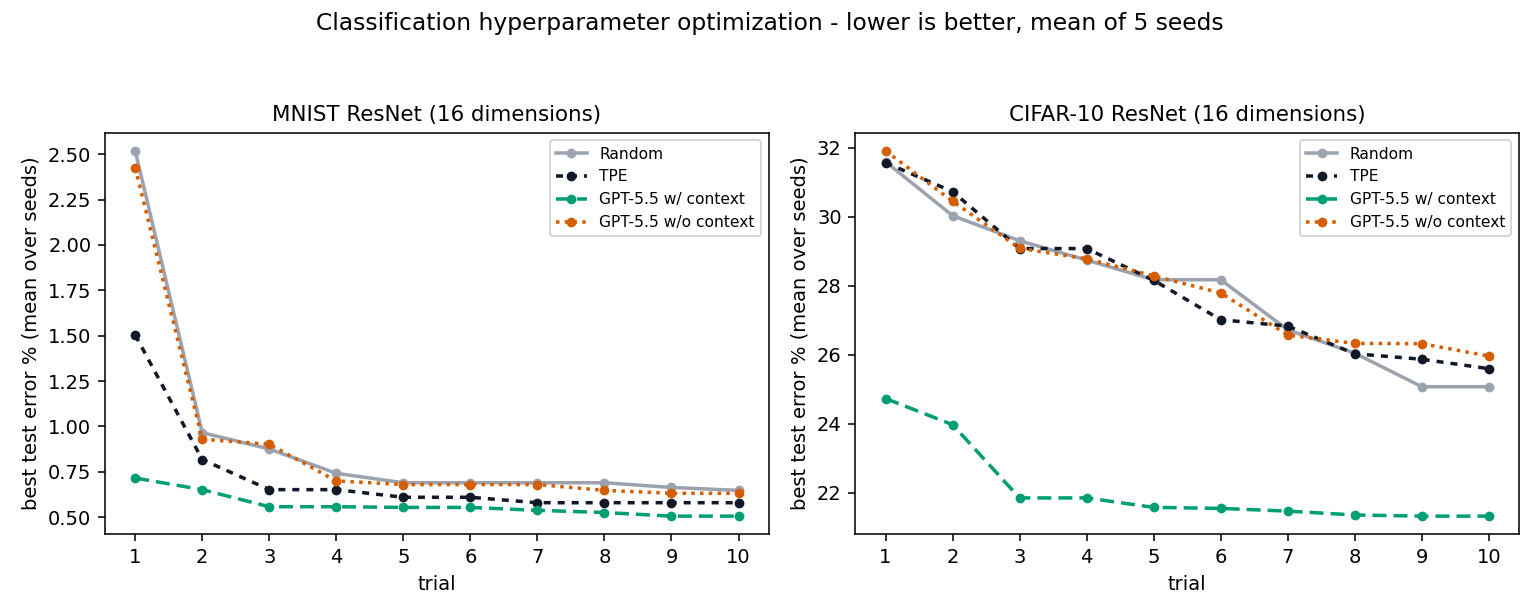
| method | MNIST cumulative error ↓ | MNIST final error ↓ | CIFAR-10 cumulative error ↓ | CIFAR-10 final error ↓ |
|---|---|---|---|---|
| Random | 9.174 | 0.648% | 278.920 | 25.072% |
| TPE | 7.166 | 0.580% | 279.936 | 25.596% |
| GPT-5.5 w/ context | 5.668 | 0.506% | 220.994 | 21.322% |
| GPT-5.5 w/o context | 8.910 | 0.632% | 281.466 | 25.960% |
GPT-5.5 w/ context reduces cumulative best-so-far error by 20.9% relative to
TPE on MNIST and by 20.8% relative to Random on CIFAR-10. Without context,
it is 24.3% worse than TPE on MNIST and 0.9% worse than Random on CIFAR-10. The
gap includes both semantic parameter information and earlier access to
agent-guided proposals.
Both examples/mnist.py andexamples/cifar10.py tune learning rate, batch size,
weight decay, label smoothing, three stage widths, three stage depths, and four
dropout controls. MNIST adds translation and rotation; CIFAR-10 uses crop
padding and flip probability.
Tuning Q-learning Controllers: Acrobot-v1 and LunarLander-v3
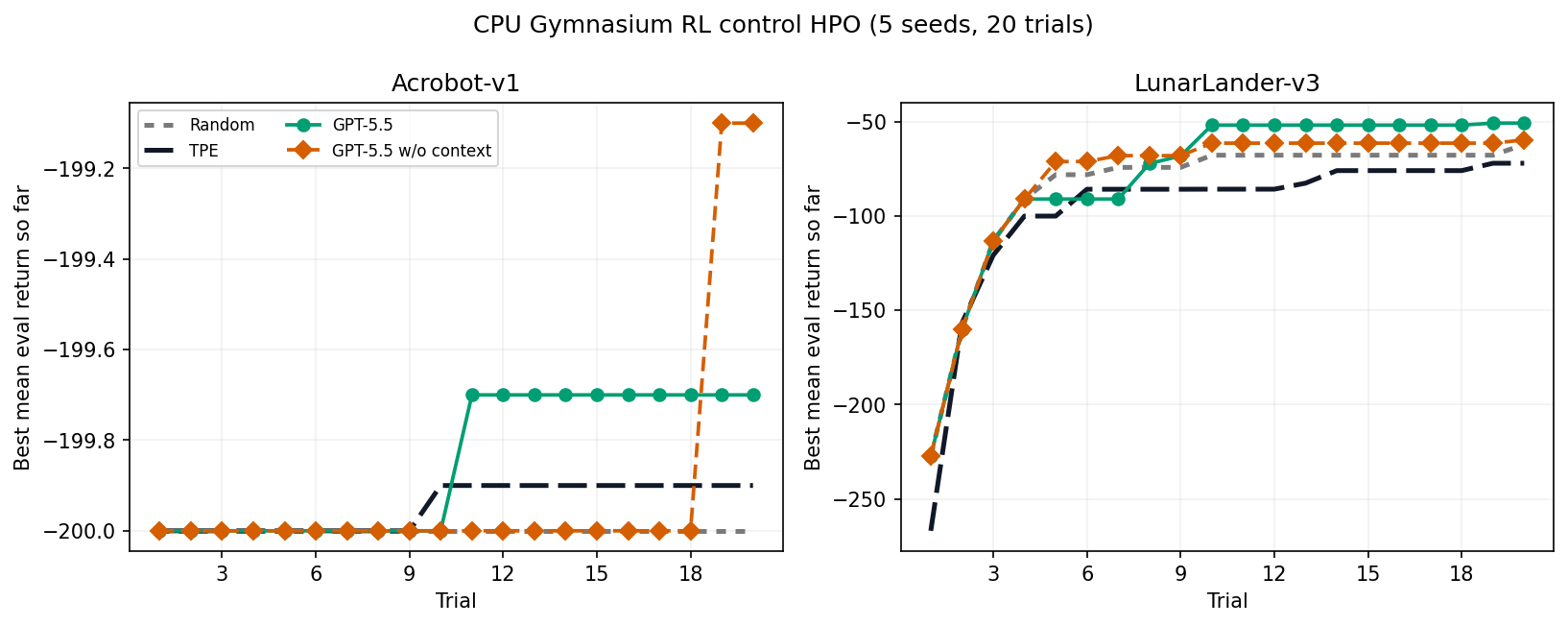
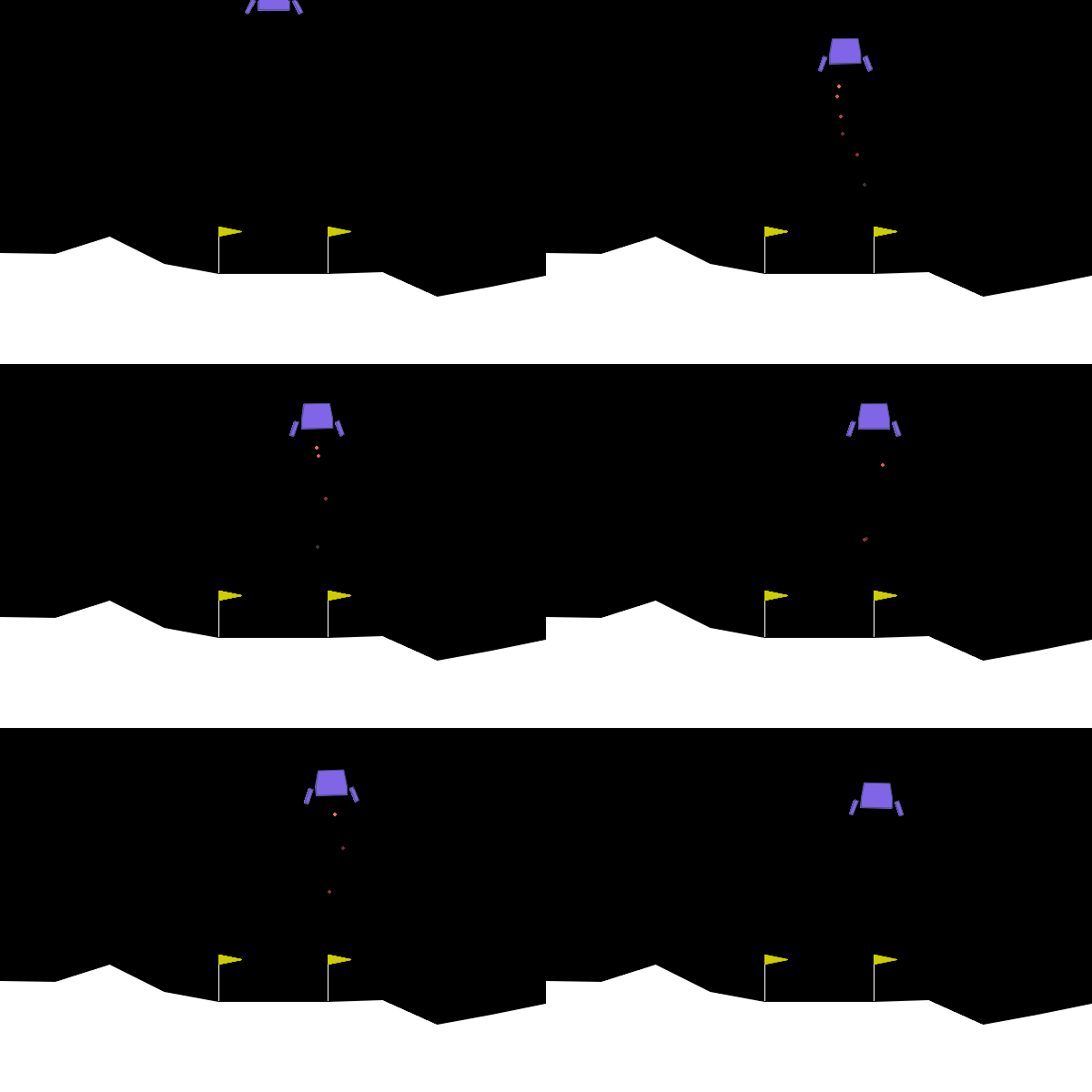
This CPU-only Gymnasium benchmark tunes a discretized Q-learning controller for
Acrobot-v1 and LunarLander-v3. Each method runs 20 trials over five seeds
(0..4); the objective is mean evaluation return, so higher is better. The
runner parallelizes across seeds and within each HPO study via --workers.
The GPT-5.5 arms use high modeling effort and the last 5 trials of history. The
winning contextual arm disables the optional explicit-reasoning and qualitative-note fields.
| method | Acrobot-v1 return ↑ | LunarLander-v3 return ↑ |
|---|---|---|
| Random | -200.000 | -62.139 |
| TPE | -199.900 | -72.088 |
| GPT-5.5 w/ context | -199.700 | -50.825 |
| GPT-5.5 w/o context | -199.100 | -59.751 |
With 20 trials and a five-trial prompt history, GPT-5.5 w/ context has the
strongest mean return on both environments: 0.2 above TPE on Acrobot-v1 and
11.3 above Random on LunarLander-v3. Treat this as a CPU HPO stress test rather
than a universal ranking.
Tuning Gradient Boosting Classifier: Credit-default Probabilities
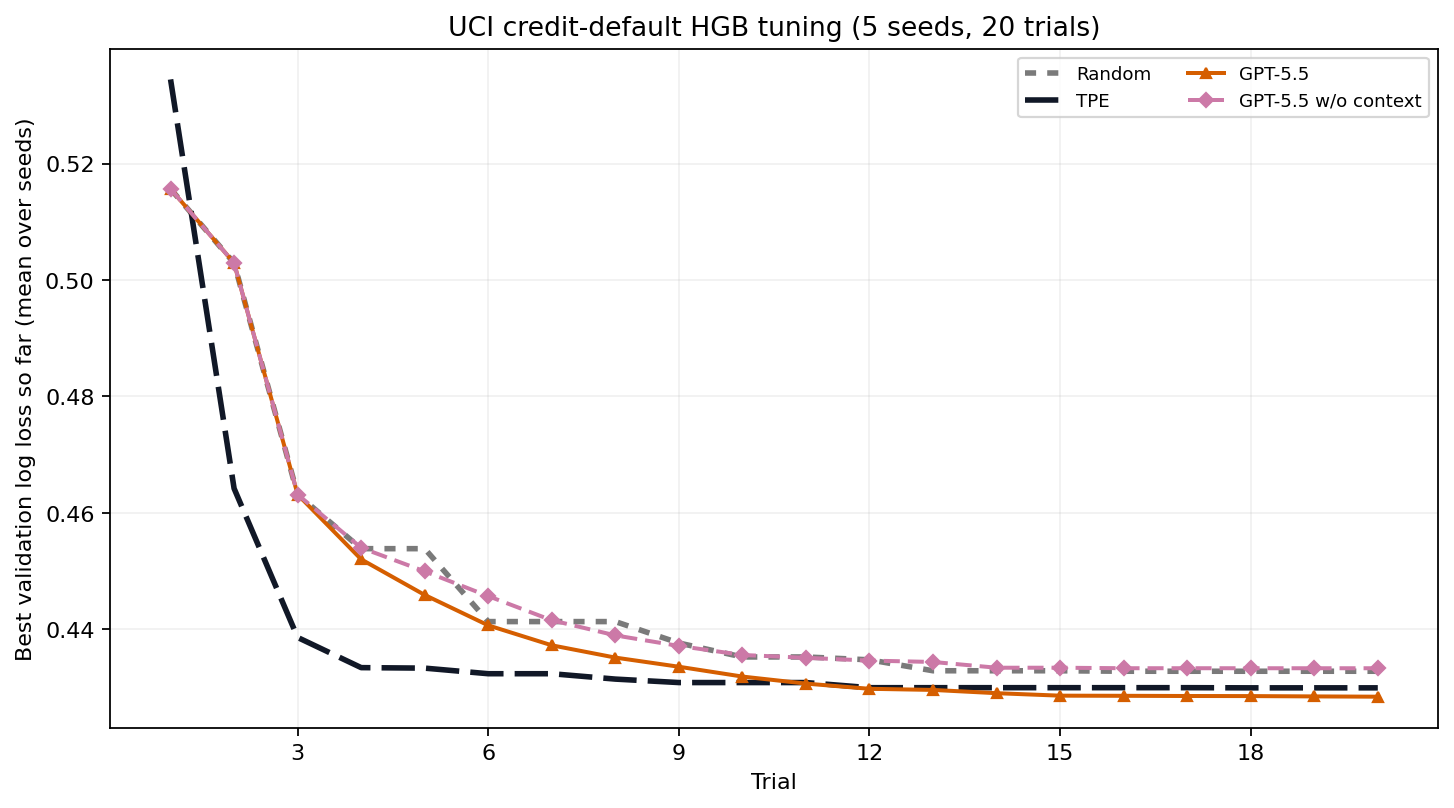
This CPU-only benchmark tunes eight training parameters of aHistGradientBoostingClassifier on UCI's
Default of Credit Card Clients
dataset: 30,000 rows, 23 features, and a next-month default target. The official
archive is pinned by SHA-256, licensed CC BY 4.0, and split once into 60% train,
20% validation, and 20% untouched test data. All methods use the same split, 20
trials, and seeds 0..4. Both GPT-5.5 arms use high modeling effort, 20 trials
of prompt history, explicit reasoning, and qualitative notes.
| method | final validation log loss ↓ | held-out test log loss ↓ |
|---|---|---|
| Random | 0.433 | 0.425 |
| TPE | 0.430 | 0.422 |
| GPT-5.5 w/ context | 0.428 | 0.422 |
| GPT-5.5 w/o context | 0.433 | 0.427 |
Context lowers final validation log loss by 1.13% and test log loss by 1.23%
relative to the matched no-context control. GPT-5.5 also beats Random and TPE
on both reported metrics. Because the retained configuration was selected using
both validation and test loss, the test result is a benchmark comparison rather
than an untouched estimate of generalization.
This is a methodological benchmark, not a production credit-decision system.
Deployment would require fairness, calibration, drift, governance, and legal
review beyond this experiment.
Reproduce the benchmark artifacts:
pip install -e ".[examples]"

# Classification
python scripts/verify_classification_cumulative_error.py run-no-context
python scripts/verify_classification_cumulative_error.py

# Hard functions
python examples/hard_functions.py preflight
python examples/hard_functions.py distributed --trials 10 --seeds 0 1 2 3 4
python examples/hard_functions.py plot

# Credit-card HGB
pip install -e ".[ml,examples]"
python examples/credit_card.py download
python examples/credit_card.py preflight
python examples/credit_card.py run
python examples/credit_card.py selfcheck
python examples/credit_card.py summary
python examples/credit_card.py plot

# RL control
pip install -e ".[rl,examples]"
python examples/rl_control.py preflight
python examples/rl_control.py run --seeds 0 1 2 3 4 --workers 10
python examples/rl_control.py selfcheck
python examples/rl_control.py summary
python examples/rl_control.py plot
python examples/rl_control.py gif
Usage Guide
Sampler Prompt Controls
effort is forwarded to the backend CLI's reasoning-effort flag. The harness
prompt is controlled separately:
oa.AgentSampler(
    backend="codex",
    effort="medium",
    history=5,
    explicit_reasoning=True,
    qualitative_notes=True,
)
Set history=None to show all completed/pruned trials. Useexplicit_reasoning=False or qualitative_notes=False for shorter agent
replies.
Pruning
study = oa.create_study(
    sampler=oa.AgentSampler(backend="codex"),
    pruner=oa.AgentPruner(
        backend="codex", level="medium", effort="medium",
    ),  # level: loose | medium | tight
)

def objective(trial):
    lr = trial.suggest_float("lr", 1e-5, 1e-1, log=True,
                             context="learning rate for training an image classifier")
    for epoch in range(20):
        loss = train_one_epoch(lr)
        trial.report(loss, epoch)
        if trial.should_prune():
            raise oa.TrialPruned()
    return loss
The pruner agent compares the current learning curve against completed trials
and answers prune/keep; loose prunes only clearly underperforming runs,
while tight prunes aggressively. Agent errors never prune a trial.
Concurrency & Distributed Studies
Set max_concurrency (default 1) to evaluate several trials at once, and use
a SQLite storage file (.db / .sqlite) as the concurrency-safe shared
history:
study = oa.create_study(
    sampler=oa.AgentSampler(backend="claude"),
    storage="study.db",        # SQLite → safe for many workers; .json stays single-writer
    max_concurrency=8,         # up to 8 objectives run at once
)
study.optimize(objective, n_trials=100)
- Within a process,
max_concurrencyruns objectives in a thread pool. The
agent sampling queries are queued (serialized) so each proposal sees the
in-process history; only objective calls run in parallel. This works best for
I/O- or subprocess-bound evaluations such as model training or API calls. - Across processes / machines, point them all at the same SQLite
storage.
The database is the communication channel: WAL mode lets every worker append
results and read history without write conflicts, and trial numbers stay
unique.
Limitations: threads share the GIL, so pure-Python CPU-bound objectives run
best in separate processes with shared SQLite storage. Concurrent workers do
not see each other's in-flight points, so they may occasionally probe nearby
regions.
Skill Mode (Agent Reads Project Code)
The pip package treats the objective as a black box. The
optim-agent skill goes further: loaded in a
coding-agent session, the agent first reads the project to understand each
parameter's role, then drives the same study loop itself viastudy.ask(params) / study.tell(trial, value) — with the study JSON keeping
history across sessions.
$skill-installer install https://github.com/Optim-Agent/optim-agent
Claude Code plugin:
claude plugin marketplace add Optim-Agent/optim-agent
claude plugin install optim-agent@optim-agent
Codex plugin:
codex plugin marketplace add Optim-Agent/optim-agent
codex plugin add optim-agent@optim-agent
trial = study.ask({"threshold": 0.72, "budget": 80})
study.tell(trial, evaluate_system(**trial.params))
Offline Testing
AgentSampler(backend="mock") is a token-free stand-in (hill climbing around
the best point) for testing integrations before agent calls.
Troubleshooting
claudereturns 401 inside an agent session — nested sessions inheritANTHROPIC_API_KEY; run withenv -u ANTHROPIC_API_KEYor from a clean shell.- A backend call times out or emits invalid output — the sampler warns and
falls back to a random point for that trial; the study keeps going. - OpenCode with distributed studies — OpenCode currently does not support distributed computing
in optim-agent; use the single-process workflow or a
different backend for distributed runs.
Contributing
Contributions are welcome. To develop locally:
pip install -e ".[examples]"
pytest                     # runs tests/test_optim_agent.py
Please open an issue to discuss larger changes before sending a PR. Adding a new
agent backend usually means one small function in optim_agent/agent.py.
Acknowledgements
- Optuna for popularizing the Study/Trial
interface, providing the TPE baseline used throughout the examples and
benchmarks, and setting a high standard for practical optimization tooling. - OpenCode for providing access to the free
models evaluated in the hard-function benchmarks.
License
Reviews (0)
Sign in to leave a review.
Leave a reviewNo results found