ordewell
Health Uyari
- License — License: NOASSERTION
- Description — Repository has a description
- Active repo — Last push 0 days ago
- Low visibility — Only 8 GitHub stars
Code Basarisiz
- exec() — Shell command execution in bench/live/drive-conversation.mjs
- rm -rf — Recursive force deletion command in bench/live/drive-conversation.mjs
- process.env — Environment variable access in bench/live/drive-conversation.mjs
- process.env — Environment variable access in bench/live/drive-taskops.mjs
- rm -rf — Recursive force deletion command in bench/live/mock-provider.mjs
- eval() — Dynamic code execution via eval() in bench/live/screenshot-header-tmp.mjs
Permissions Gecti
- Permissions — No dangerous permissions requested
Bu listing icin henuz AI raporu yok.
Multi-agent task orchestration for coding agents. Turn one goal into an ordered plan of tasks — each with its own runner, model and mode — then execute and verify the results.

Turn one goal into an ordered plan of coding-agent tasks — each with its own runner, model and mode — then execute and verify it.



What this is
- A plan you can rewrite before a token is spent. The plan is a typed artifact, not an agent's internal state: every task carries a runner, model, thinking effort and mode, and you can change any of them, add and remove tasks, and rewire dependencies — without losing completed work or round-tripping the AI.
- The right model per task, chosen in the open. The planner makes one portfolio decision across the whole plan — a security refactor and a README update do not deserve the same model — and shows you every assignment before anything runs (why a separate planner?).
- Verdicts from evidence, not opinion. A task completes only when its unique completion marker appears in the runner's output; exit code is retained as diagnostic evidence. The model is never the tie-breaker. Stuck tasks can be advanced with Mark complete, and a task marked done by mistake goes back with Mark not done.
- A planner that talks back. Planning is one continuous chat: it researches your repo read-only, asks when your goal is vague, and its final message is the plan (ADR-0002). Reads run in parallel; anything reaching outside the workspace asks once; commands that would write are refused outright (ADR-0008).
- No extra API key required. Claude Code, Codex, or OpenCode can be the planner, strictly read-only, on the subscription you already hold for the runners (ADR-0009).
- Multi-runner by design. Enable several and the planner assigns one per task. Claude Code, Codex and OpenCode ship built-in; anything else — Aider, your own CLI — is a plugin manifest, not a code change.
Quick Start
Node.js ≥ 20 on macOS, Linux or Windows. The TUI also needs tmux — see
Platform support below.
npm install -g ordewell
ordewell                                       # the TUI — chat on the left, plan on the right
That's it. First run asks for a planner and a runner, set from inside
(/planner, /runners, /key) — no restart, no API key required up front.
npx ordewell works the same without a global install; the package also
ships scoped as @ordewell/cli.
For VS Code instead, install the extension — it carries its own core, so
there is nothing to install from npm:
code --install-extension ordewell.ordewell
Or search Ordewell in the Extensions view.
Building from source:git clone https://github.com/ordewell/ordewell.git && cd ordewell && npm install && npm run build && npm link -w packages/cli
— see CONTRIBUTING.md.
Scriptable / headless
Every slash command is also a subcommand — set the planner and runner by env
var to skip the TUI entirely.
Already run Claude Code, Codex, or OpenCode? No separate API key — it
runs on the subscription you already hold:
export AI_PROVIDER="claude-code"        # or codex, opencode
ordewell plan --goal "Add rate limiting to the public API" && ordewell run
Mutation always stays with the runners; the planner agent only explores and
reasons. Same toggles apply from a UI: /planner, /model,/planner-effort, or the planner bar in VS Code.
Prefer an API key? Twenty-five providers are recognised via their own*_API_KEY — OpenRouter, Anthropic, OpenAI, Gemini, xAI, Groq, DeepSeek,
Mistral, Together, Fireworks, Perplexity, Cerebras, DeepInfra, Cohere,
Novita, Kimi, Zhipu, Qwen, Doubao, Hunyuan, Baichuan, MiniMax, Yi, StepFun
and SiliconFlow. Run ordewell key for variable names, or pointOPENAI_COMPATIBLE_BASE_URL at anything else, including a local model
server.
export OPENROUTER_API_KEY="sk-or-..."
ordewell plan --goal "Add rate limiting to the public API" && ordewell run
Three surfaces, one core
VS Code
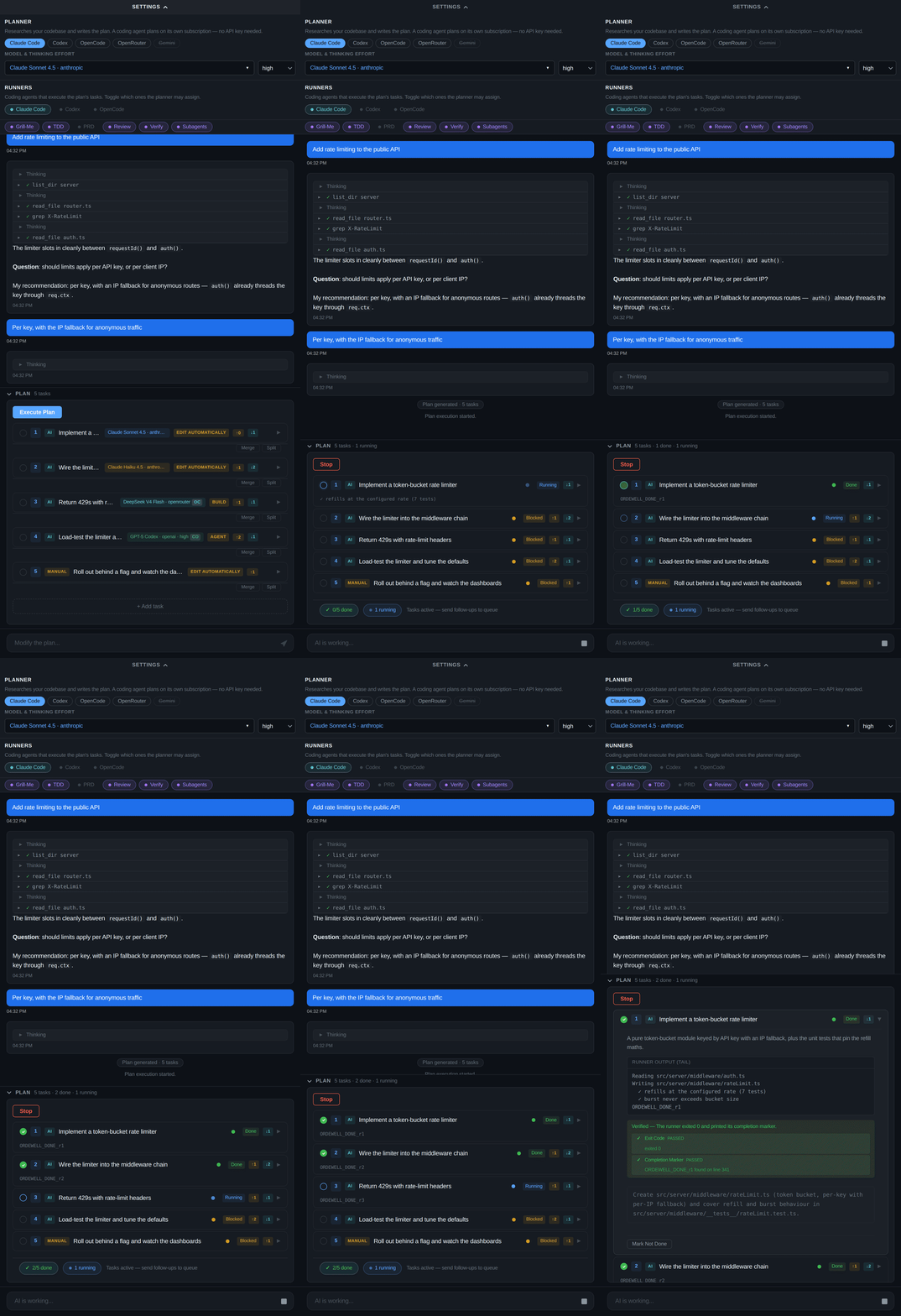
A streaming timeline: live thinking, each research step with its outcome, and task cards you expand for the runner's own output. Retarget a task's runner and its model and mode re-derive in place. The whole loop is below, under The VS Code loop, end to end.
Terminal UI

Everything the extension does, over SSH. tab swaps chat and plan pane; single keys drive the plan (f start, E run all, m toggle done, R runner, o model). /help lists the rest.
CLI
$ ordewell plan --goal "Add rate limiting to the public API"

Generating plan for: "Add rate limiting to the public API"...
✓ list_dir src → D middleware F router.ts F auth.ts
✓ grep X-RateLimit → no matches in 6 files

Question: should limits apply per API key, or per client IP?
My recommendation: per key — auth() already threads the key through req.ctx.
> per key, with an IP fallback for anonymous routes

Plan: 4 tasks (3 AI, 1 Manual) — claude-code, opencode
Session: session-1751600000000

   1. [ AI] Add a token-bucket limiter in src/middleware/rateLimit.ts (Claude Sonnet 4.5 · Claude Code)
   2. [ AI] Wire the limiter into route registration (Claude Haiku 4.5 · Claude Code)
   3. [ AI] Return RFC 6585 429s with Retry-After (DeepSeek V4 Flash · Opencode)
   4. [MAN] Document the limit headers in the OpenAPI spec

  [MAN] = manual step — run `ordewell tui` to work through it

  Run 'ordewell run' to execute, 'ordewell status' to inspect, or 'ordewell tui' for the full UI.

$ ordewell run
Executing plan...
  ✓ #a1b2 completed — PASS: Verified: completion marker detected in agent output. Task c
  ⟳ #c3d4 in_progress
[2/Wire the limiter into route registration] Started: claude-code / claude-haiku-4-5

Done. 4 completed, 0 failed, 0 blocked.
Every slash command is also an ordewell subcommand, so nothing is UI-only and headless automation reaches everything a human can.
How it works
- Describe a goal in plain prose.
- The planner researches your workspace read-only and interleaves questions with research in one persistent conversation (ADR-0008).
- A plan appears — ordered tasks, each with a runner, model, thinking effort and mode. Edit anything inline, or reprompt to reshape the whole plan without losing completed work.
- Execution spawns a real coding-agent session per AI task, respecting the dependency graph and handing each task its predecessors' results. Manual tasks become checklists.
- The VerdictEngine completes a task only once its marker appears; an exit without one fails visibly. Sessions auto-save to
.ordewell/sessions/.
Usage examples — planning, editing, multi-runner, plugins
Plan, edit, execute
# The planner researches the repo and converses if the goal is underspecified
ordewell plan --goal "Migrate the config loader from JSON to TOML"

# Reassign before running — runner first, since it re-derives model, effort and mode
ordewell task-runner 2 opencode
ordewell task-deps 3 1,2

# Execute; independent tasks run in parallel (default: 3 concurrent sessions)
ordewell run

# Inspect any session later
ordewell status --session-id session-1751600000000
The surfaces differ only in how you name a target: the TUI opens a picker, the CLI takes an argument — and omitting the argument prints the same options the picker would have shown.
ordewell task-model 3            # lists the models that task's runner can spawn
ordewell task-model 3 sonnet     # picks one
Configure without an editor
ordewell planner claude-code     # plan on a coding agent's subscription — no API key
ordewell model set sonnet        # scoped to that agent's own catalog
ordewell planner-effort high     # a variant of the selected model
ordewell key set openrouter sk-… # stored in .env, never echoed back
ordewell runners codex off
Each pushes to the running server before writing .env, so the change lands on the next plan with no restart — and a refused connection cannot leave the file holding a setting the daemon never saw.
Deep-interview planning with a PRD
ordewell grill-me on   # planner interrogates your goal before outlining (min. 3 probing questions)
ordewell prd on        # planner previews, then writes a full PRD to .scratch/<slug>/PRD.md
ordewell tdd on        # tasks are augmented with red-green-refactor instructions

ordewell plan --goal "Real-time collaborative editing"
# → the planner grills you in chat, drafts the PRD, waits for your OK,
#   then commits the plan as its final message
Multi-runner plans and custom runners
# Pass --runner repeatedly to build a runner set; the planner assigns one per task
ordewell plan --goal "Refactor auth module" --runner claude-code --runner opencode

# Bring your own CLI agent via a plugin manifest
ordewell plugins create my-runner        # scaffolds manifest.json
ordewell plugins install github:user/repo
ordewell plugins list
The other two front ends
ordewell               # full-screen terminal UI — same as `ordewell tui`
ordewell web --daemon  # the local API server, in the background
ordewell web starts the HTTP + WebSocket API on 127.0.0.1:3742 that the CLI and TUI are clients of — every other command starts it for you on demand. It serves JSON, not a web page; there is no browser dashboard yet.
For VS Code, install the extension and open the Ordewell panel — see Quick Start.
| Area | Commands |
|---|---|
| Planning | type a goal, /approve, /run, /stop |
| Tasks | /add-task, /remove-task, /complete, /uncomplete, /skip, /retry, /cancel, /force-start |
| Skills | /grill-me, /tdd, /prd, /review, /verify, /research-subagents |
| Models | /model, /key, /allowlist, /runners, /auto, /refresh |
| Sessions | /sessions, /new, /save, /load, /delete — a loaded session is adopted by the server, so its plan stays executable |
| System | /help, /mouse, /quit |
API keys typed into /key are masked on screen and written to your .env.
Text is selectable and copyable with the mouse, as in any other program: Ordewell
does not capture the terminal's mouse. Scroll with pgup/pgdn. If you would
rather have wheel scrolling and can live without drag-to-select, /mouse on
swaps the trade (and remembers it via ORDEWELL_TUI_MOUSE in your .env).
A task's own terminal is a tmux window, where tmux does hold the mouse so the
wheel scrolls its scrollback. Selecting there still copies to your system
clipboard: drag to select and release to copy, or double/triple-click for a word
or a line. Install wl-copy, xclip or xsel on Linux if you have none of them
— without one, copying falls back to an OSC 52 escape that some terminals ignore.
 Platform support — including the Windows notes
| Surface | Linux | macOS | Windows |
|---|---|---|---|
| VS Code extension | ✅ | ✅ | ✅ |
| API server | ✅ | ✅ | ✅ |
| CLI | ✅ | ✅ | ✅ |
| TUI | ✅ needs tmux | ✅ needs tmux | needs tmux — run it under WSL |
The TUI requires tmux on every platform, not only Windows — it is what backs
each task's live terminal. Install it from your package manager (apt install tmux, brew install tmux) before running ordewell. Everything else runs
natively on Windows: the planner (including harness planners), task execution,
model discovery, and the read-only exploration envelope all work there.
Two notes for Windows. Install the agent CLIs with their native installers where one exists — an npm-installed claude/codex/opencode is a .cmd shim, which has to start through cmd.exe and inherits its 8191-character command-line limit; that is fine for task prompts but not for the harness planner's larger system prompt, and Ordewell will tell you so by name rather than silently truncating it. And keep Git for Windows installed: its POSIX shell is what the planner runs research commands in, so ls, cat, grep and friends behave the same as they do everywhere else. See ADR-0010.
Any install route is found, on PATH or not: the PowerShell one-liner installers (irm https://claude.ai/install.ps1 | iex, OpenCode's equivalent), npm, pnpm, Yarn, bun, Scoop, Chocolatey, WinGet, and Volta. If a runner is greyed out in the picker right after you installed it, restart the VS Code window — a GUI-launched extension host holds the PATH it started with.
| Option | Default | What it does |
|---|---|---|
One provider key (OPENROUTER_API_KEY, ANTHROPIC_API_KEY, GEMINI_API_KEY, …) |
— | The one required setting. Twenty-five providers are recognised, each from its own variable — ordewell key lists them — plus any OpenAI-compatible endpoint via OPENAI_COMPATIBLE_BASE_URL. The provider is auto-detected from whichever key is set (force with AI_PROVIDER). Not needed when AI_PROVIDER is claude-code, codex, or opencode — those plan with the CLI's own subscription. |
ORCHESTRATOR_MODEL |
deepseek/deepseek-v4-flash |
The planner model — a budget model by default; it plans and researches but never writes code. Change via ordewell model set <id> or /model, which scope the choice to the planner backend's own catalog. With a coding-agent planner, it must be one of that agent's own model ids. |
ORDEWELL_PLANNER_EFFORT |
— | Thinking effort for a coding-agent planner, from the selected model's own variants (low, high, adaptive, …). Ignored by vendor planners, whose effort is baked into the model id. Change via ordewell planner-effort <level> or /planner-effort. |
ORDEWELL_MAX_PARALLEL |
3 |
Max concurrent AI task sessions (1–5). Independent tasks run in parallel; the dependency graph is always respected. |
Run ordewell --help for the full list of environment variables, or ordewell setup for the interactive wizard. VS Code users: everything is mirrored under ordewell.* settings.
packages/
├── core/    Pure TypeScript, zero UI deps — Session, PlanStore, Planner,
│            TaskOrchestrator, VerdictEngine, ModelResolver, ModeResolver,
│            RunnerRegistry + manifest template engine
├── cli/     ordewell: tui, plan, run, status, stop, web, models, setup,
│            plugins, grill-me, prd, tdd — plus tui/, a pure state +
│            renderer core behind a thin raw-mode terminal driver
├── vscode/  Extension + webview: streaming planner timeline, task cards,
│            TTY capture via script(1)
└── web/     Hono HTTP + WebSocket server — the local daemon the CLI and
             TUI drive over 127.0.0.1 (session pool, headless execution)
The TUI's core is pure — a reducer returning { state, effects } and a renderer returning one string per terminal row (ADR-0006).
Tasks default to each runner's autonomous mode (toggle with /auto), and the plan is the source of truth for what runs — modes are never silently rewritten at spawn (ADR-0001).
Every surface consumes one event union (SessionMessage) over one broadcast seam — the domain vocabulary lives in CONTEXT.md and design decisions in docs/adr/.
The deep-interview planning workflows — grill-me, PRD drafting, TDD task augmentation, and review mode — are adapted from Matt Pocock's skills (MIT), rebuilt as prompt blocks inside Ordewell's planner and runner prompts. If you want those workflows in a plain coding-agent session rather than an orchestrated plan, his repo is the place to start.
Contributing
Bug reports, feature requests and pull requests are welcome — start with CONTRIBUTING.md for the build order and the layout of the tree. Security issues go to SECURITY.md, not the public tracker.
New to the codebase? CONTEXT.md is the domain glossary and docs/adr/ records why things are the way they are.
License
Licensed under the Apache License 2.0. The Ordewell name and logos are not covered by that licence — see NOTICE.
Yorumlar (0)
Yorum birakmak icin giris yap.
Yorum birakSonuc bulunamadi