dsh-deepcanary
Health Gecti
- License — License: MIT
- Description — Repository has a description
- Active repo — Last push 0 days ago
- Community trust — 92 GitHub stars
Code Gecti
- Code scan — Scanned 12 files during light audit, no dangerous patterns found
Permissions Gecti
- Permissions — No dangerous permissions requested
Bu listing icin henuz AI raporu yok.
Know when your DeepSeek Harness tasks need you. Local alerts, quiet notifications, and a task inbox.
DeepCanary
A task inbox and local notifications for DeepSeek Harness.




简体中文 · Documentation · Changelog · Releases
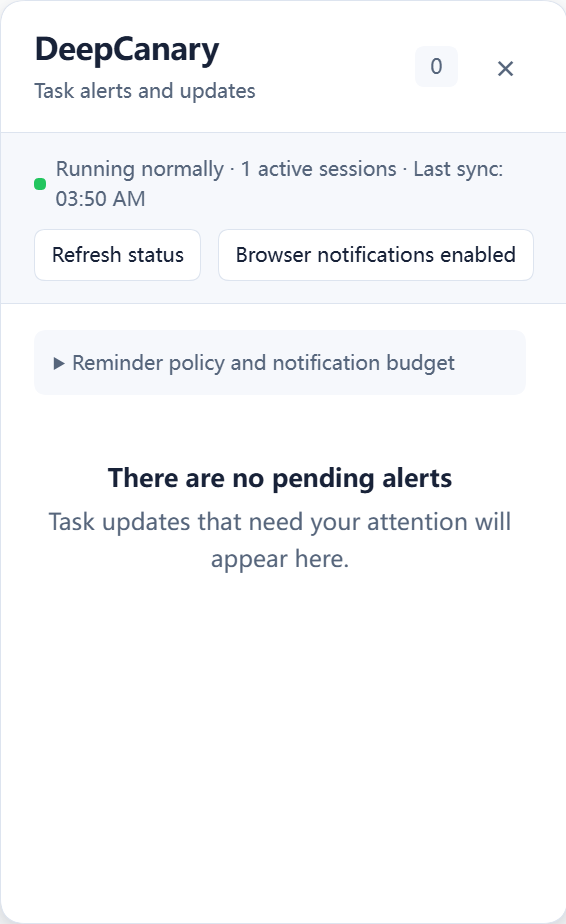
DeepCanary groups task updates in Pending, Snoozed, and Activity. It reminds you when DSH needs an answer or approval, keeps routine completions in Activity, and returns you to the corresponding session.
Install · Use · Notifications · Update or remove · Compatibility · Troubleshooting
Install
0.1.8-rc.4 is available as a GitHub prerelease. Install the release package below to use this version. The npm badge shows the version currently available from npm.
Use DSH 0.2.1-rc.5 or >=0.2.2-alpha.3. Desktop includes its runtime. For WebUI, DeepCanary accepts Node ^22.19.0 || >=24.0.0; DSH alpha.3 requires Node 24.9 or later. Follow the DSH installation guide if you need to install the host.
Windows Desktop
Open Plugins → Add plugin in DSH.
Paste this package URL and install it.
https://github.com/Oscar-Williams/dsh-deepcanary/releases/download/v0.1.8-rc.4/dsh-deepcanary-0.1.8-rc.4.tgzFollow the manager's activation or restart prompt.
Open DeepCanary from the sidebar.
WebUI
Stop the WebUI server, then install into the profile you normally use.
Run installation, updates, and removal with the same DSH_HOME as that host. Set a custom home first; in PowerShell:
$env:DSH_HOME = "<existing DSH home>"
Use the directory your host already uses.
dsh plugin --profile web add https://github.com/Oscar-Williams/dsh-deepcanary/releases/download/v0.1.8-rc.4/dsh-deepcanary-0.1.8-rc.4.tgz --registry=https://registry.npmjs.org/
dsh web
Replace web in both commands if you use another profile.
Download dsh-deepcanary-0.1.8-rc.4.tgz and SHA256SUMS from the release. In PowerShell, calculate the hash and compare it with the matching line in SHA256SUMS.
Get-FileHash ./dsh-deepcanary-0.1.8-rc.4.tgz -Algorithm SHA256
For WebUI, stop its server and run the following from the download directory.
dsh plugin --profile web add ./dsh-deepcanary-0.1.8-rc.4.tgz --registry=https://registry.npmjs.org/
dsh web
For Desktop CLI installation, exit through Application → Quit. Open PowerShell in resources/runtime/cli/bin inside the DSH application directory. If Desktop uses a custom home, set it first in that session:
$env:DSH_HOME = "<existing DSH home>"
Then install using the downloaded package's full path:
.\dsh.cmd plugin --profile desktop add "<full-path-to-dsh-deepcanary-0.1.8-rc.4.tgz>" --registry=https://registry.npmjs.org/
Reopen DSH. The application's plugin manager already selects its own home and profile.
Use
| View | Contents |
|---|---|
| Pending | Questions, approvals, and task updates that need attention |
| Snoozed | Reminders you have scheduled for later |
| Activity | Routine completions, context compaction, and tasks you explicitly stopped |
Select a reminder to read its details. Open in DSH opens its session. Answer questions and handle approvals through DSH's native controls. Acknowledge clears the reminder; Snooze schedules it for later.
Drag the title bar to move the panel. Resize any edge or corner, drag the divider between list and detail, or use Layout to dock, expand, restore, or reset it. The default size is 880×640 and adapts to the visible area. Layout is saved on the current device.
For keyboard movement or resizing, choose the action from Layout. Arrow keys adjust the panel, Shift increases the step, Enter confirms, and Escape cancels. Narrow layouts preserve your selection and draft when switching between list and detail.
Notifications
Open the inbox and select Alert settings. Allow the DSH site's notifications in your browser, and allow Edge or DeepSeek Harness notifications in Windows.
Keep a DSH page or the Desktop application running. Background pages and hidden Desktop windows can receive notifications. Fully quitting DSH stops the plugin. Windows Do Not Disturb, quiet hours, and browser permissions affect whether a system banner appears.
| Level | Meaning |
|---|---|
| C3 | A task is currently waiting for an answer or approval |
| C2 | An abnormal state needs checking |
| C1 | An update is available for review in Activity |
Click a notification to return to its reminder and session. A reminder's delivery or acknowledgment does not finish the DSH task.
Update or remove
For Desktop, use Plugins to replace DeepCanary with the package URL above or uninstall it, then follow any restart prompt.
For WebUI, stop the server before updating.
dsh plugin --profile web add https://github.com/Oscar-Williams/dsh-deepcanary/releases/download/v0.1.8-rc.4/dsh-deepcanary-0.1.8-rc.4.tgz --registry=https://registry.npmjs.org/
dsh web
To uninstall from that profile, stop the server and run dsh plugin --profile web remove dsh-deepcanary.
Keep the host's existing home and profile when updating. Reminders and settings are stored there. If the manager requires removal before replacement, remove the plugin and then add the new package.
Compatibility
The same package has been exercised on RC5 and alpha.3, each on WebUI and Windows Desktop. The alpha.3 Desktop test uses an unsigned build from fixed source; RC5 uses the official application. The declared range accepts later DSH releases. Compatibility lists actual coverage.
Troubleshooting
| Problem | What to check |
|---|---|
| DeepCanary is missing | Confirm it appears in the current host's Plugins page and that installation used its home and profile. Restart if requested. |
| Installation is rejected | Check your DSH version and compatibility requirements. |
| npm installs an older version | Use the GitHub package URL above for this prerelease. npm releases can follow a different schedule. |
| Package download fails | Check the GitHub release URL, network, and proxy settings. Dependencies use the selected npm registry. |
| No system banner appears | Check notification permissions, Windows Do Not Disturb, reminder settings, and whether DSH is running. |
| A session cannot be opened | The session may have been removed or may be unavailable to this host. Inspect the reminder in the inbox. |
| The panel is awkwardly sized | Choose Layout → Reset layout. |
| A save fails | Use the retry control in the inbox status area and retain the existing state files. |
Report ordinary bugs through GitHub Issues. Include versions, platform, and steps to reproduce, with private content removed.
Security and privacy
DeepCanary stores reminder metadata in your DSH profile and uses local rules to decide when to notify you. Conversation text, prompts, answers, tool arguments, and raw failure text stay outside its reminder ledger. See data and privacy.
Report vulnerabilities through the private channel described in Security.
Contributing
See Contributing for setup, focused tests, documentation, and pull requests. The documentation index links to architecture, host integration, and release guidance.
Acknowledgments
Thanks to DeepSeek Harness for the host and plugin APIs, and to the dsh.works plugin directory and Awesome DeepSeek Harness Plugins for listing DeepCanary.
License
MIT, copyright © 2026 Oscar Williams. You may use, modify, and distribute the software under the license, including its copyright and permission notice.
Yorumlar (0)
Yorum birakmak icin giris yap.
Yorum birakSonuc bulunamadi