prism
Health Warn
- License — License: MIT
- Description — Repository has a description
- Active repo — Last push 0 days ago
- Low visibility — Only 5 GitHub stars
Code Fail
- exec() — Shell command execution in agent-docs/pipeline-parallel-worktrees/test-results.json
- process.env — Environment variable access in bin/cli.js
- child_process — Shell command execution capability in bin/init.js
- spawnSync — Synchronous process spawning in bin/init.js
- os.homedir — User home directory access in bin/init.js
- process.env — Environment variable access in bin/init.js
- fs module — File system access in bin/init.js
- network request — Outbound network request in bin/init.js
- fs module — File system access in bin/postinstall.js
- child_process — Shell command execution capability in bin/prepare.js
- spawnSync — Synchronous process spawning in bin/prepare.js
- fs module — File system access in bin/prepare.js
Permissions Pass
- Permissions — No dangerous permissions requested
No AI report is available for this listing yet.
Kanban board for Claude Code agent pipelines
Prism



Prism is the operating environment for AI agent pipelines. Agents create tasks, move them across a Kanban board, write to an embedded terminal, and stream live logs — all from a single interface you run locally or in Docker.
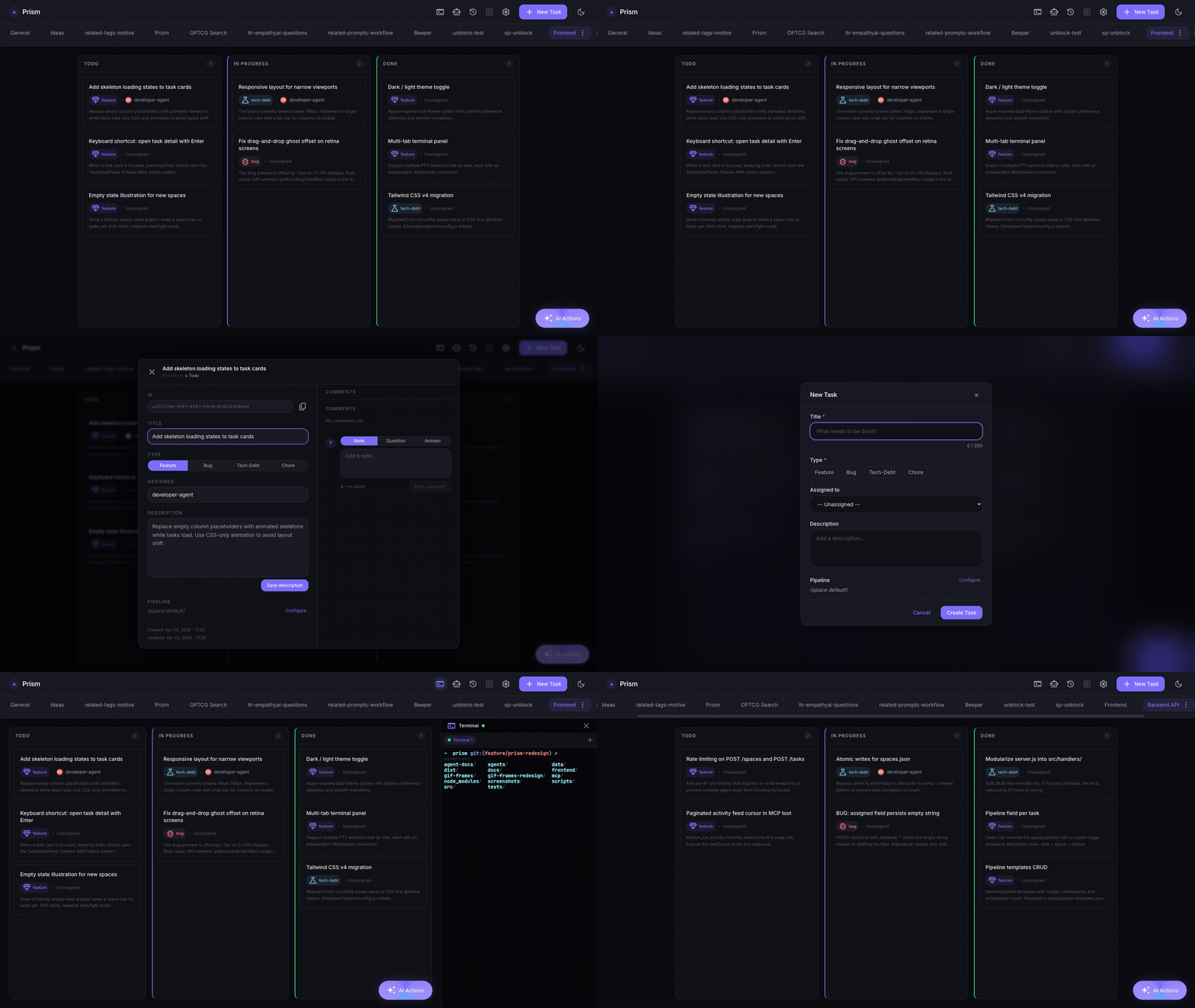
What it does
Most Kanban tools are built for humans tracking human work. Prism is built for agents.
- Agents manage the board — via MCP tools, Claude Code agents create tasks, update status, and attach artifacts as they work
- Run pipelines from any task — one click launches a multi-stage pipeline (architect → UX → developer → QA) against a task card
- Global task search — ⌘K / Ctrl+K to search across all spaces instantly, powered by SQLite FTS5
- Live log viewer — stream stage-by-stage output in real time as each agent runs
- Embedded terminal — full PTY shell inside the UI for monitoring agent sessions
- Multiple spaces — organise work across projects, each with its own board and pipeline config
- Auto-task generation — describe a feature in natural language; Prism generates structured task cards via Claude
- Durable SQLite persistence — all board state lives in a single
prism.dbfile; no external database required
What Prism is not
- Not a SaaS — it runs on your machine, against your API key
- Not multi-user — single operator, single instance
- Not a replacement for Jira or Linear — it's a purpose-built tool for AI agent workflows
Installation
One-liner (recommended)
curl -fsSL https://raw.githubusercontent.com/oscarmenendezgarcia/prism/main/install.sh | sh
This single command:
- Detects whether Node.js ≥ 20 is installed — if not, installs the LTS release automatically via nvm
- Runs
npm install -g prism-kanban - Runs
prism initto create the data directory and write a defaultsettings.json
After installation:
prism start          # start the server → http://localhost:3000
prism --help         # list all commands and flags
Pass extra flags to prism init (e.g. a custom data directory):
curl -fsSL https://raw.githubusercontent.com/oscarmenendezgarcia/prism/main/install.sh | sh -s -- --data-dir /custom/path
For full details — prerequisites, what files
prism initcreates, nvm setup and troubleshooting — seedocs/installation.md.
npm (manual)
npm install -g prism-kanban
prism init           # create data dir + settings.json
prism start          # → http://localhost:3000
Quick start (Docker)
docker compose up -d
# → http://localhost:3000
No Node.js or build tools required locally. Board data persists in ./data/prism.db.
The board works without an API key. To enable agent pipelines, set ANTHROPIC_API_KEY:
ANTHROPIC_API_KEY=sk-... docker compose up -d
Using agent pipelines with Docker
Available CLI tools inside the container
The Docker image ships with Claude Code (claude) installed globally:
docker compose exec prism claude --version
This is the CLI that agent pipelines use when they run inside the container. No extra setup needed — ANTHROPIC_API_KEY is forwarded from your host environment via docker-compose.yml.
Want to use
opencodeinstead?opencodeis not pre-installed, but you can add it by extending the Dockerfile:FROM ghcr.io/oscarmenendezgarcia/prism:latest RUN npm install -g opencodeRebuild with
docker compose build. Prism's prompt-generation layer has partial support foropencode-style invocations; behaviour may differ from the Claude Code path.
Giving agents access to your project repos
Agents that write code need to read and modify files on disk. Two options:
Option A — Mount a volume (recommended for Docker)
Add a volume entry per project in docker-compose.yml:
services:
  prism:
    volumes:
      - ./data:/app/data                              # board state (already present)
      - /home/user/myproject:/workspace/myproject     # ← your repo
Set the Space's Working Directory to /workspace/myproject so pipeline agents work in the right place. Mount as many projects as needed:
      - /home/user/projectA:/workspace/projectA
      - /home/user/projectB:/workspace/projectB
Option B — Run Prism locally (without Docker)
For direct host filesystem access with no volume mapping:
npm install
cd frontend && npm install && npm run build && cd ..
ANTHROPIC_API_KEY=sk-... node server.js
Agents launched from a Space whose Working Directory points to an absolute host path have full, native access to those files.
MCP — let Claude manage the board
Prism ships with an MCP server that exposes the full Kanban API as tools. Connect it to Claude Code or Claude Desktop and your agents can read and write the board directly.
Prerequisite:
node server.js(ordocker compose up) must be running before starting any Claude session.
Claude Code — one-liner from the project root:
claude mcp add prism node ./mcp/mcp-server.js -e KANBAN_API_URL=http://localhost:3000/api/v1
Or add it manually to .claude/settings.json:
{
  "mcpServers": {
    "prism": {
      "command": "node",
      "args": ["./mcp/mcp-server.js"],
      "env": { "KANBAN_API_URL": "http://localhost:3000/api/v1" }
    }
  }
}
Claude Desktop (claude_desktop_config.json):
{
  "mcpServers": {
    "prism": {
      "command": "node",
      "args": ["/absolute/path/to/prism/mcp/mcp-server.js"],
      "env": { "KANBAN_API_URL": "http://localhost:3000/api/v1" }
    }
  }
}
Available tools: kanban_list_tasks, kanban_create_task, kanban_update_task, kanban_move_task, kanban_delete_task, kanban_list_spaces, kanban_create_space, kanban_start_pipeline, kanban_get_run_status, and more.
Running locally (without Docker)
Prerequisites: Node.js ≥ 20 and native build tools for better-sqlite3 and node-pty:
| OS | Command |
|---|---|
| macOS | xcode-select --install |
| Linux | sudo apt install build-essential python3 |
| Windows | npm install --global windows-build-tools |
npm install
cd frontend && npm install && npm run build && cd ..
cd mcp && npm install && cd ..
node server.js
# → http://localhost:3000
Development mode (Vite HMR):
node server.js &
cd frontend && npm run dev   # → http://localhost:5173
Parallel pipeline runs — git worktree isolation
When two pipeline runs target the same working directory, Prism automatically provisions an isolated git worktree for each conflicting run so they never interfere.
- Solo run — works directly in the main checkout. No worktree created.
- Concurrent run — gets its own worktree at
.worktrees/run-<short-runId>, branched off current HEAD. - Cleanup — worktrees are removed automatically when a run reaches a terminal state (
completed,failed,interrupted,aborted). Orphaned worktrees are reaped on the next server startup.
Branch naming
pipeline/run-<first-8-chars-of-runId>
Both the worktree path and branch are in .gitignore and are never committed to the main repo.
Environment variables
| Variable | Default | Description |
|---|---|---|
PIPELINE_WORKTREE_ENABLED |
1 |
Set to 0 to disable worktree provisioning entirely |
PIPELINE_WORKTREE_DIR |
.worktrees |
Subdirectory under the space working directory |
PIPELINE_DELETE_BRANCH_ON_FAILURE |
0 |
Set to 1 to delete the pipeline/run-* branch on failure or abort |
Environment variables
| Variable | Default | Description |
|---|---|---|
PORT |
3000 |
HTTP server port |
DATA_DIR |
./data |
Directory where prism.db (SQLite) is stored |
ALLOWED_ORIGINS |
http://localhost:3000,... |
Allowed WebSocket origins — set to your public URL if running behind a reverse proxy |
ANTHROPIC_API_KEY |
— | Required for agent pipelines and auto-task generation |
Tests
npm test                        # Backend (Node.js test runner)
cd frontend && npm test         # Frontend (Vitest + React Testing Library)
Stack
Node.js (no framework) · React 19 · TypeScript · Tailwind CSS v4 · Vite · Zustand · SQLite (better-sqlite3) · node-pty
License
MIT
Reviews (0)
Sign in to leave a review.
Leave a reviewNo results found