ai_multi_tool
Health Warn
- License — License: MIT
- Description — Repository has a description
- Active repo — Last push 0 days ago
- Low visibility — Only 6 GitHub stars
Code Fail
- rm -rf — Recursive force deletion command in install.sh
- exec() — Shell command execution in token-accounting-statement/bin/agents.mjs
- os.homedir — User home directory access in token-accounting-statement/bin/agents.mjs
- process.env — Environment variable access in token-accounting-statement/bin/agents.mjs
- network request — Outbound network request in token-accounting-statement/bin/render.mjs
- exec() — Shell command execution in token-accounting-statement/bin/statement.mjs
- fs.rmSync — Destructive file system operation in token-accounting-statement/bin/statement.mjs
- os.homedir — User home directory access in token-accounting-statement/bin/statement.mjs
- process.env — Environment variable access in token-accounting-statement/bin/statement.mjs
- network request — Outbound network request in token-accounting-statement/bin/statement.mjs
Permissions Pass
- Permissions — No dangerous permissions requested
No AI report is available for this listing yet.
A multi-tool repo of my open-source tools for Claude Code and other AI coding agents: plugins, skills, hooks and utilities, each installable on its own.
ai_multi_tool
My open-source tools for Claude Code and other AI coding agents, in one repo. Each tool lives
in its own folder and installs on its own. The repo is also a Claude Code plugin marketplace:
/plugin marketplace add oshricohenme/ai_multi_tool
| Tool | What it does |
|---|---|
| Token Accounting Statement | What every coding agent session spends (Claude Code, Codex, opencode, Gemini CLI), itemized like a bank statement. |
More tools will be added here as they're released.
Token Accounting Statement
What every coding agent session spends, itemized like a bank statement. Claude Code, Codex,
opencode and Gemini CLI: one line per model request, the context balance after it, the reason it
changed, and what it cost. It stays live while the session runs, in Claude Code and in your browser.
Install it for every agent on your machine and open the last 7 days, in one command:
curl -fsSL https://raw.githubusercontent.com/oshricohenme/ai_multi_tool/main/install.sh | sh


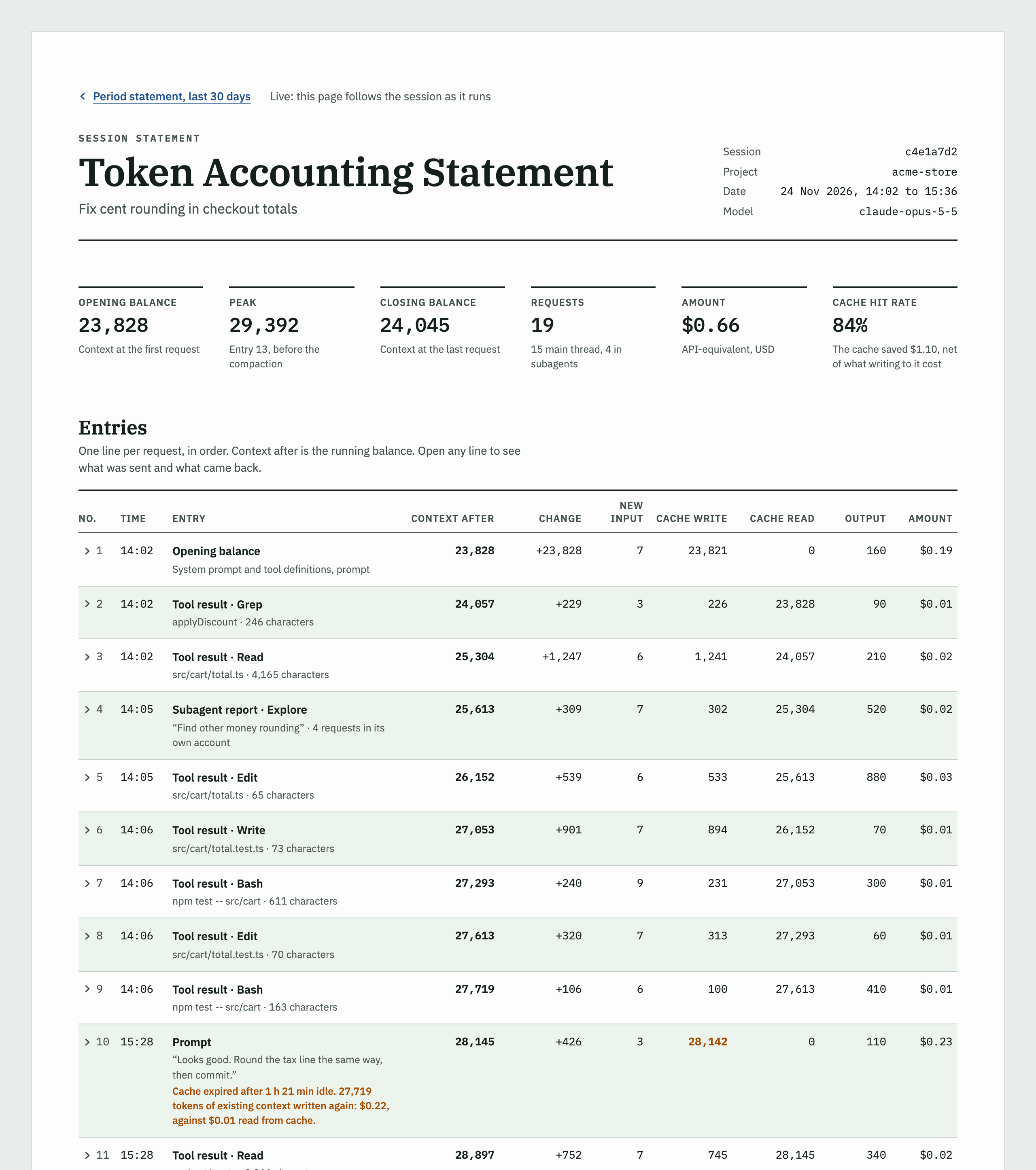
All screenshots show made-up demo sessions. Every figure in them is the plugin's own output for those sessions.
Why
Coding agents log every model request on your machine, with the exact number of tokens it used.
Nothing turns those logs into an account of where the tokens went, and on a subscription no
invoice itemizes them either. Tokens translate directly into cost, so this plugin keeps the
books:
- What was spent. Tokens per request, session, project, model, agent, tool, day and
five-hour window, priced at API rates. On a subscription, read the amounts as what the same
work would cost through the API. - How the context moved. The context size after each request is the running balance.
Every rise and fall gets its own line. - Why. Each line names its cause: a prompt, a tool result (which tool, which file), a hook,
a subagent's report, a compaction, or a cache that expired while you were away. - What it was. Open any line to see what that request sent and what came back.
- Whether it adds up. Each Claude Code session closes with a reconciliation against the
totals Claude Code recorded itself. Anything the logs don't break down goes on one "Not itemized" line.
Nothing is dropped.
It only reads logs. It sends nothing off your machine, never calls a model (so it spends no
tokens) and never changes a session.
Contents
- What you get
- Requirements
- Install
- Use
- Reading a statement
- Privacy and security
- Configuration
- Uninstall
- Limitations
- Development
- License
What you get
In Claude Code: a status line and a live pane
From the first response on, the status line under the prompt keeps a running total:
Token statement $0.66 · context 24,045 · 19 requests
/token-statement opens a pane beside the chat that follows the session, newest request
first. A line that wrote the cache again says why and what that cost:
$0.66 API-equivalent · 19 requests
Context now 24,045 · peak 29,392 · cache hit 84%
Subagents: 4 requests in 1 subagent, $0.06
Every request in full, live, in the browser: /token-statement

 No. Time  Entry, newest first                             Change   Amount
  16 15:36 Tool result · Bash                                +152    $0.01
  15 15:36 Prompt                                              +9    $0.01
  14 15:35 Compaction, manual                              −5,658
  13 15:29 Tool result · Bash                                +137    $0.01
  12 15:28 Tool result · Edit                                +358    $0.01
  11 15:28 Tool result · Read                                +752    $0.02
  10 15:28 Prompt                                            +426    $0.23
           Cache expired after 1 h 21 min idle. 27,719 tokens of existing…
   9 14:06 Tool result · Bash                                +106    $0.01
   8 14:06 Tool result · Edit                                +320    $0.01
   …
The status line and the pane update after every response, a subagent's included, and after
each compaction.
In the browser: the full statement, live
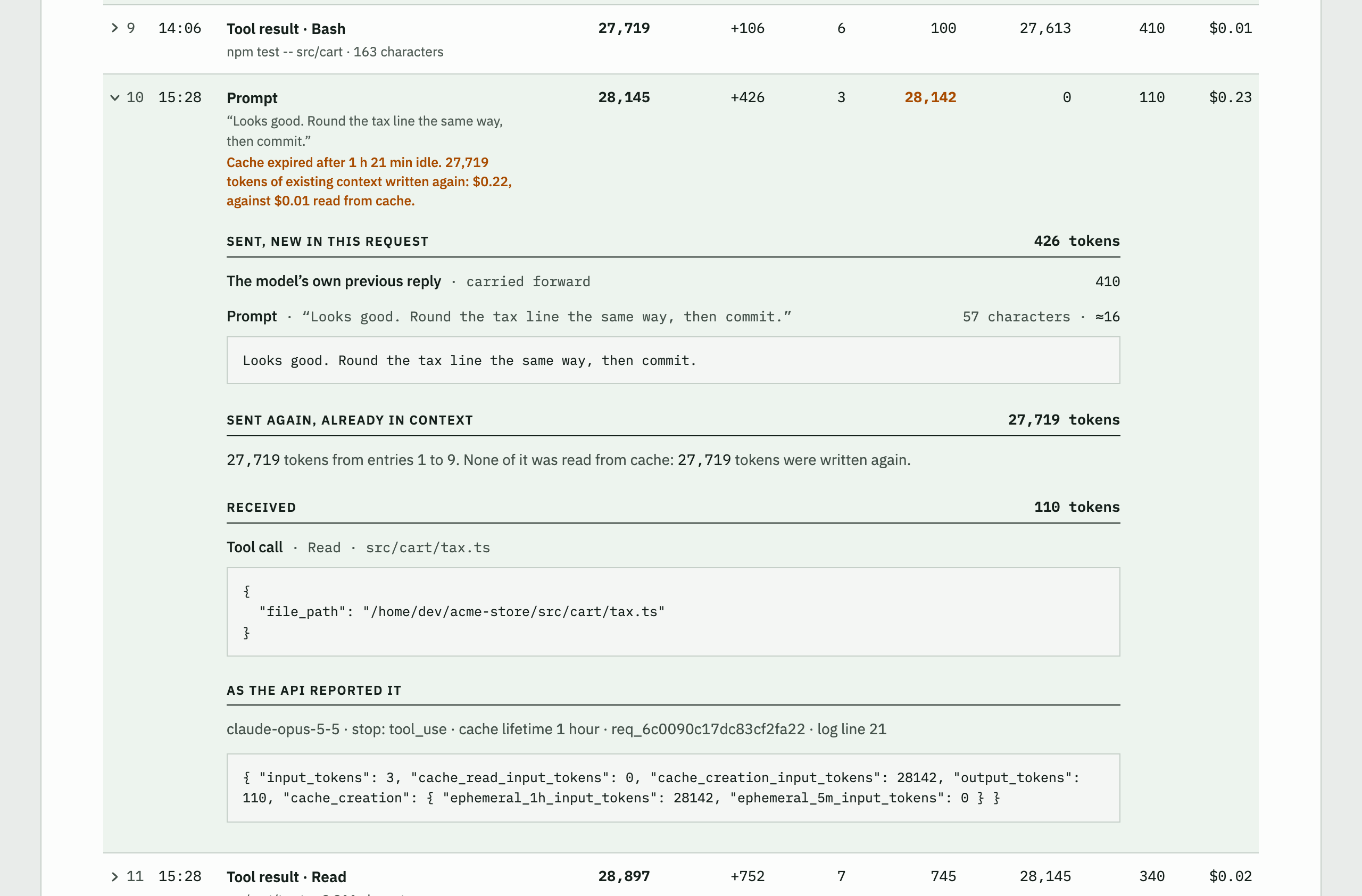
The same command opens the session's full statement in your browser. The page follows the
session as it runs: new lines appear within about two seconds, and any line you opened stays
open.
Open a line to see what the request sent, what was already in context, what came back, and the
usage exactly as the API reported it:
For a week or a month: the period statement
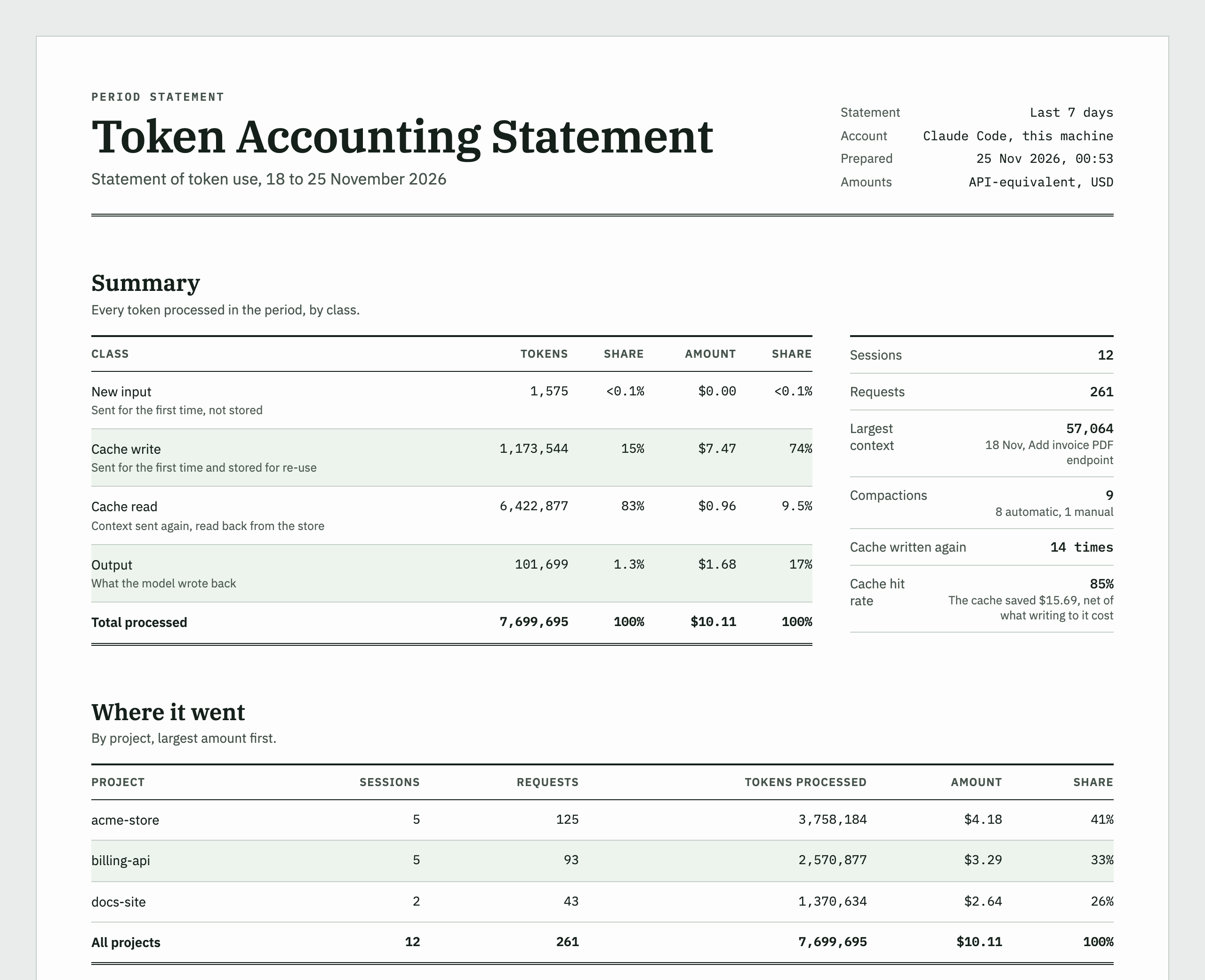
/token-statement week and /token-statement month cover every session in the period. You
get a summary by token class with the cache hit rate and what the cache saved, spend by project,
a breakdown by model, agent, skill, plugin, MCP server, tool, day and five-hour window, and one
row per session that opens that session's statement.
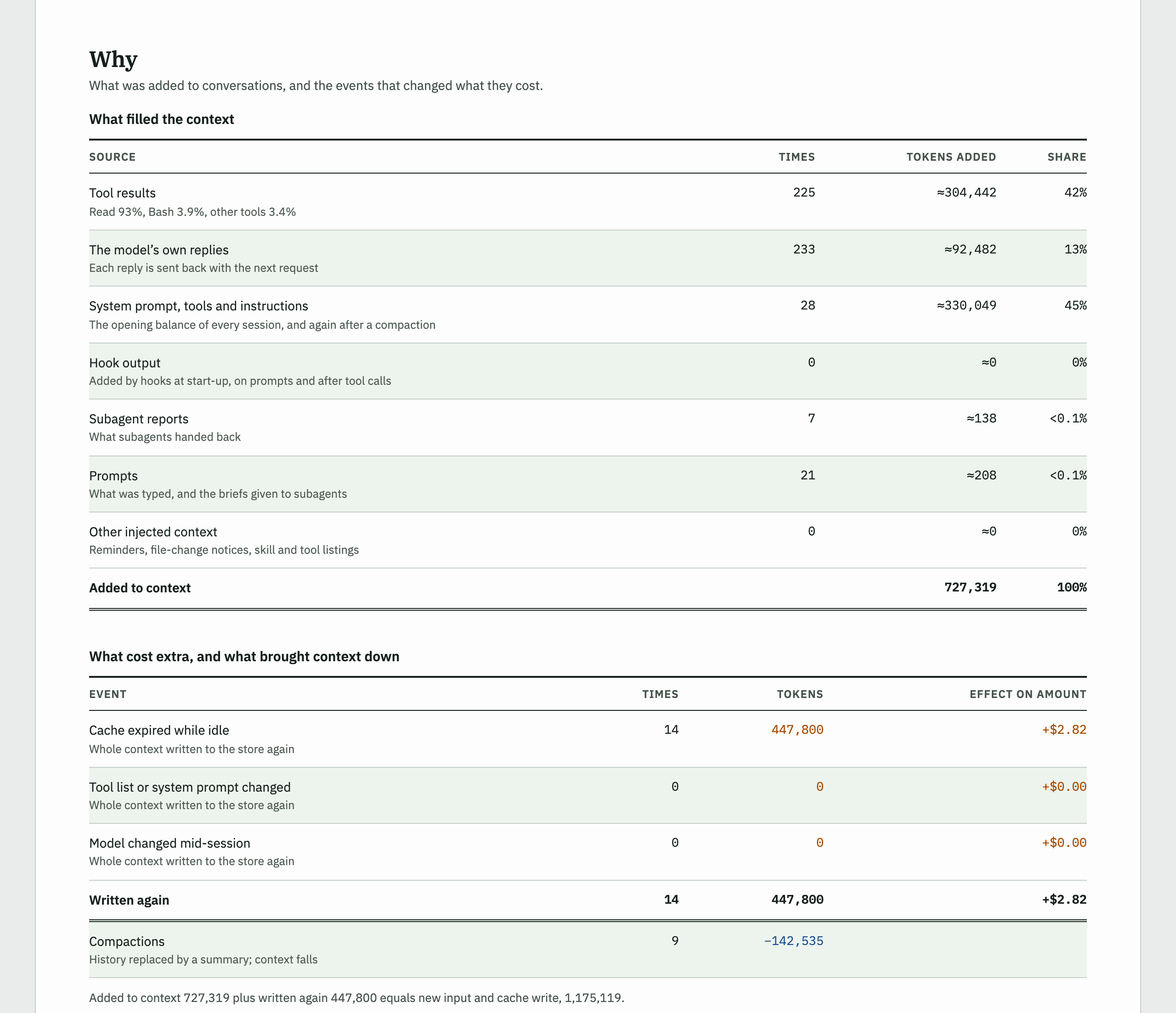
Its Why section shows what filled the context and what cost extra:
From a shell, or from any other agent
The install script puts a token-statement command on your PATH. It's a plain Node script with
no dependencies, and it needs no agent open. It reads every agent's sessions at once:
token-statement                                  # the last 30 days, as text
token-statement open --since 7d                  # the last 7 days, in the browser
token-statement open --session latest            # the session written to last, live in the browser
token-statement --month 2026-11 --html november.html
token-statement --session <id> --csv             # one line per request
token-statement --help
From a clone of this repo, node token-accounting-statement/bin/statement.mjs is the same command.
A period statement covering more than one agent adds a By coding agent table, and each session
statement names its agent.
In Codex, opencode, Gemini CLI and other agents
| Agent | What the install script adds | How to use it |
|---|---|---|
Codex, and agents that read ~/.agents/skills |
A token-statement skill |
Ask for the token statement, or $token-statement in Codex |
| opencode | /token-statement (~/.config/opencode/command/) |
Opens this session in the browser and shows the summary |
| Gemini CLI | /token-statement (~/.gemini/commands/) |
The same |
| Anything with a shell | token-statement on your PATH |
Run it yourself, or ask the agent to |
Unlike /token-statement in Claude Code, these hand the summary to the agent's model, so showing
it costs a few hundred tokens.
--json gives the same figures as JSON.
Requirements
- A coding agent: Claude Code (tested on 2.1.331; the one-line plugin install needs 2.1.275 or
later), Codex (tested on 0.167), opencode or Gemini CLI. - Node.js 20 or later on your
PATH. Reading opencode's sessions needs Node 22.13 or later,
for its built-in SQLite. Tested on Node 22. - A web browser for the full statement. The pane and status line need nothing else.
Install
For every agent, in one command (the install script):
curl -fsSL https://raw.githubusercontent.com/oshricohenme/ai_multi_tool/main/install.sh | sh
Only the Claude Code plugin, in Claude Code, run:
/plugin install token-accounting-statement --marketplace oshricohenme/ai_multi_tool
Then start a new session, or run /reload-plugins. On Claude Code older than 2.1.275, add the
marketplace first:
/plugin marketplace add oshricohenme/ai_multi_tool
/plugin install token-accounting-statement@ai-multi-tool
From a shell, the same two steps:
claude plugin marketplace add oshricohenme/ai_multi_tool
claude plugin install token-accounting-statement@ai-multi-tool
By default the plugin is installed for you in every repo (user scope). Add -s project to
install it for the current repo and share it with your team through .claude/settings.json,
or -s local for the current repo only for you.
The install script
curl -fsSL https://raw.githubusercontent.com/oshricohenme/ai_multi_tool/main/install.sh | sh
It sets up what it finds, then opens the last 7 days in your browser:
token-statement, a copy of the plugin in~/.local/share/token-accounting-statementand a
command in~/.local/bin. Run the script again to update it.- Claude Code, when
claudeis installed: the plugin from this marketplace, with auto-update
turned on. - Other agents: the
token-statementskill in~/.agents/skills, and/token-statementfor
opencode and Gemini CLI when they're installed.
| Flag | Effect |
|---|---|
| (none) | Claude Code plugin for you in every repo (user scope). Removes per-repo installs, which would make it load twice. |
--repo |
Claude Code: this repo only, for you (.claude/settings.local.json) |
--project |
Claude Code: this repo, shared with your team (.claude/settings.json) |
--keep-repo-installs |
With user scope, keep the per-repo installs |
--no-claude |
Skip the Claude Code plugin |
--no-start |
Don't open the statement at the end |
Pass flags after sh -s --, for example curl -fsSL … | sh -s -- --project. PREFIX andBIN_DIR move the command. The script needs node, plus curl and tar when it's piped fromcurl, and python3 for the Claude Code step. Read it first if you like: it's
install.sh.
To try it without installing, load it from a clone for one session:
git clone https://github.com/oshricohenme/ai_multi_tool.git
claude --plugin-dir ai_multi_tool/token-accounting-statement
To check the install, run claude plugin list, or type /token-statement in a session.
Use
| Command | Shows |
|---|---|
/token-statement |
This session: the live pane in Claude Code, and the full statement in your browser |
/token-statement week |
The last 7 days, in your browser |
/token-statement month |
This calendar month, in your browser |
/token-statement text |
This session as plain text |
The status line needs no command. At the start of each session the plugin also brings its own
record up to date in the background (see Privacy and security).
Reading a statement
| Column | What it means |
|---|---|
| Context after | The running balance: how many tokens the conversation holds after this request |
| Change | How far the context rose or fell since the previous request |
| New input | Tokens sent for the first time and not stored |
| Cache write | Tokens sent for the first time and stored for re-use. A write costs 1.25× input (5-minute cache) or 2× (1-hour cache). |
| Cache read | Context sent again and read back from the cache, at about a tenth of the input price |
| Output | What the model wrote back, thinking included |
| Amount | What the request would cost at API list prices |
Lines to look out for:
- Opening balance. The system prompt, tool definitions, CLAUDE.md files and the first
prompt, written to the cache by the first request. - Cache expired. After an idle gap longer than the cache's lifetime, the whole context is
written to the cache again. The line says how long the gap was and what the rewrite cost
compared with reading from the cache. Changing the model or the tool list mid-session does
the same, and the line says so. - Compaction. The history is replaced by a summary, and the context falls.
- Subagent report. What a subagent handed back. Its own requests are in its own account,
under "Subagent accounts", with their total. - Reconciliation. Itemized figures against the totals Claude Code recorded. "Not itemized"
covers the requests Claude Code makes for itself (session titles, summaries, safety checks).
The logs record those as a total only.
Amounts are in USD at the list prices in rates.json
(as of 2026-11-20). They're a yardstick, not a bill.
Privacy and security
- What it reads. Claude Code's logs in
~/.claude/projects, and in$CLAUDE_CONFIG_DIR/projectswhen that is set. Codex's in~/.codex/sessionsandarchived_sessions(or$CODEX_HOME). opencode's database in~/.local/share/opencode(or$XDG_DATA_HOME/opencode), opened read-only. Gemini CLI's chats in~/.gemini/tmp. It never
writes to any of them. - What it writes. Only to its own folder,
~/.claude/token-accounting/, with folders
readable by you only (0700) and files likewise (0600). It keeps each session's figures
there so statements outlive Claude Code's cleanup of old logs: numbers and short labels of up
to 80 characters, never message text. - The network. It makes no outside connections, sends no telemetry and never calls a model.
- The browser view comes from a local server bound to
127.0.0.1. Its address carries a
random token that changes each time the server starts. Requests without the token, or with
anotherHostheader, are refused. Pages run under a strict Content Security Policy, and
everything taken from a log is escaped. The server stops itself after 30 minutes without a
request. - Statements can contain anything the logs hold: prompts, file contents and command
output, which can include secrets. Treat a saved statement like the logs themselves.--htmlfiles are readable by you only. Add--no-detailto make a copy for sharing. It
leaves out the content behind each line, though a label can still quote the start of a prompt
or a command.
Configuration
| Setting | Default | Use |
|---|---|---|
rates.json |
API list prices | Change prices, add a model, or apply negotiated prices. Requests on a model with no rate are counted but carry no amount, and the statement says how many. Changes to the installed copy are overwritten when the plugin updates. |
TOKEN_ACCOUNTING_HOME |
~/.claude/token-accounting |
Where the statement keeps its own record |
CLAUDE_CONFIG_DIR |
unset | Also read logs from this Claude Code config folder |
--tz <zone> |
your local zone | Time zone for times and days, for example --tz UTC |
--project <name> |
all | Limit a period statement to one project |
CODEX_HOME, XDG_DATA_HOME |
unset | Where Codex and opencode keep their logs, when not the default |
--root <dir> |
Read Claude Code logs from this projects folder only, and no other agent's |
|
--port <n>, --idle <minutes> |
any free port, 30 | The local server's port and idle timeout |
Uninstall
In Claude Code:
/plugin uninstall token-accounting-statement@ai-multi-tool
/plugin marketplace remove ai-multi-tool
Or from a shell:
claude plugin uninstall token-accounting-statement@ai-multi-tool
claude plugin marketplace remove ai-multi-tool
If you installed it for one repo (-s project, -s local, --project or --repo), run
the uninstall in that repo with the same scope, for example claude plugin uninstall token-accounting-statement@ai-multi-tool -s project.
Removing the marketplace also removes the auto-update entry the install script wrote to your
user settings. After a --project or --repo install, deleteextraKnownMarketplaces.ai-multi-tool from that repo's .claude/settings.json or.claude/settings.local.json.
Then remove what the install script added for the other agents, and the statement's own record:
rm -rf ~/.local/share/token-accounting-statement ~/.local/bin/token-statement ~/.agents/skills/token-statement
rm -f ~/.config/opencode/command/token-statement.md ~/.gemini/commands/token-statement.toml
rm -rf ~/.claude/token-accounting
If the local server is running, it stops by itself within 30 minutes. The plugin leaves
nothing else behind.
Limitations
- No agent's log format is a public contract, and they change between versions. Missing
records reduce the detail but don't break the run. - Prices.
rates.jsonlists Anthropic's models. Requests on other models (GPT, Gemini, GLM
and so on) are counted in full but carry no amount until you add their rates. - Codex, opencode and Gemini CLI record no control total, so their sessions have no
reconciliation. Codex subagents and opencode subsessions show as sessions of their own. Older
Codex logs record usage after the tool results, so a line's cause can name the result of its
own request. Codex's zstd-compressed archives aren't read. - Gemini CLI's chats don't record the project folder, unless a
.project_rootfile is there. - Amounts are API-equivalent, not your bill. Subscription usage limits aren't in the logs,
so they aren't shown or predicted. - Claude Code's own requests (titles, summaries, safety checks) aren't logged one by one.
They appear as a single "Not itemized" line. - An opened line shows the content as the log recorded it, not a byte-for-byte copy of the
request. Thinking text isn't recorded, only its token count. - This machine only. Merge the CSV or JSON exports from several machines to combine them.
- A resumed session that continues in a new log file shows up as a second statement.
Development
.claude-plugin/marketplace.json      the marketplace: one plugin
token-accounting-statement/
  .claude-plugin/plugin.json         plugin manifest
  hooks/hooks.json, register.tsx     the mod: /token-statement, the pane, the status line
  bin/statement.mjs                  command line, the statement's own record, the local server
  bin/account.mjs                    the accounting rules: log records in, entries out (pure)
  bin/agents.mjs                     Codex, opencode and Gemini CLI logs, read as Claude Code-shaped records
  bin/render.mjs                     the HTML pages and the text statement
  rates.json                         prices
  fonts/                             IBM Plex, embedded in each page
  types/index.d.ts                   the mod's state contract
  test/                              statement.test.mjs (node --test), pane.test.tsx (claude plugin test)
docs/TOKEN-ACCOUNTING-STATEMENT.md   the design: accounting rules, what the logs hold, decisions
There's no build step and there are no dependencies. To work on it, load it from your clone withclaude --plugin-dir token-accounting-statement. Before sending a change, run the checks CI
runs:
node --test token-accounting-statement/test/statement.test.mjs
shellcheck -s sh install.sh
claude plugin test token-accounting-statement
claude plugin validate . && claude plugin validate token-accounting-statement
Issues and pull requests are welcome. CHANGELOG.md lists the changes in each
release.
License
MIT. The IBM Plex fonts in token-accounting-statement/fonts/ are under the SIL
Open Font License 1.1 (OFL.txt).
This project isn't affiliated with Anthropic. Claude and Claude Code are trademarks of
Anthropic.
Reviews (0)
Sign in to leave a review.
Leave a reviewNo results found