Plonk
Health Uyari
- License — License: MIT
- Description — Repository has a description
- Active repo — Last push 0 days ago
- Low visibility — Only 5 GitHub stars
Code Gecti
- Code scan — Scanned 12 files during light audit, no dangerous patterns found
Permissions Gecti
- Permissions — No dangerous permissions requested
Bu listing icin henuz AI raporu yok.
A macOS window manager with snap zones you draw yourself and workspaces that reopen your apps on the right monitor — plus on-device OCR, keep-awake, screenshot annotation, pointer tools, a shortcut guide and voice, in one menu bar app. Everything runs on your Mac. No cloud, no telemetry.
Plonk
A window manager with zones you draw yourself, and nine
more menu bar utilities behind the same icon.
Workspaces that put the desk back, text lifted off the screen, keep-awake,
screenshots you can draw on, pointer tools, a shortcut guide, voice. On a Mac
each of those is its own download. To plonk is to set a thing down exactly where
it belongs: you drag it there, you press a key, or you say where.





ostapondo.github.io/Plonk
The same thing on one page, if you would rather look than read.

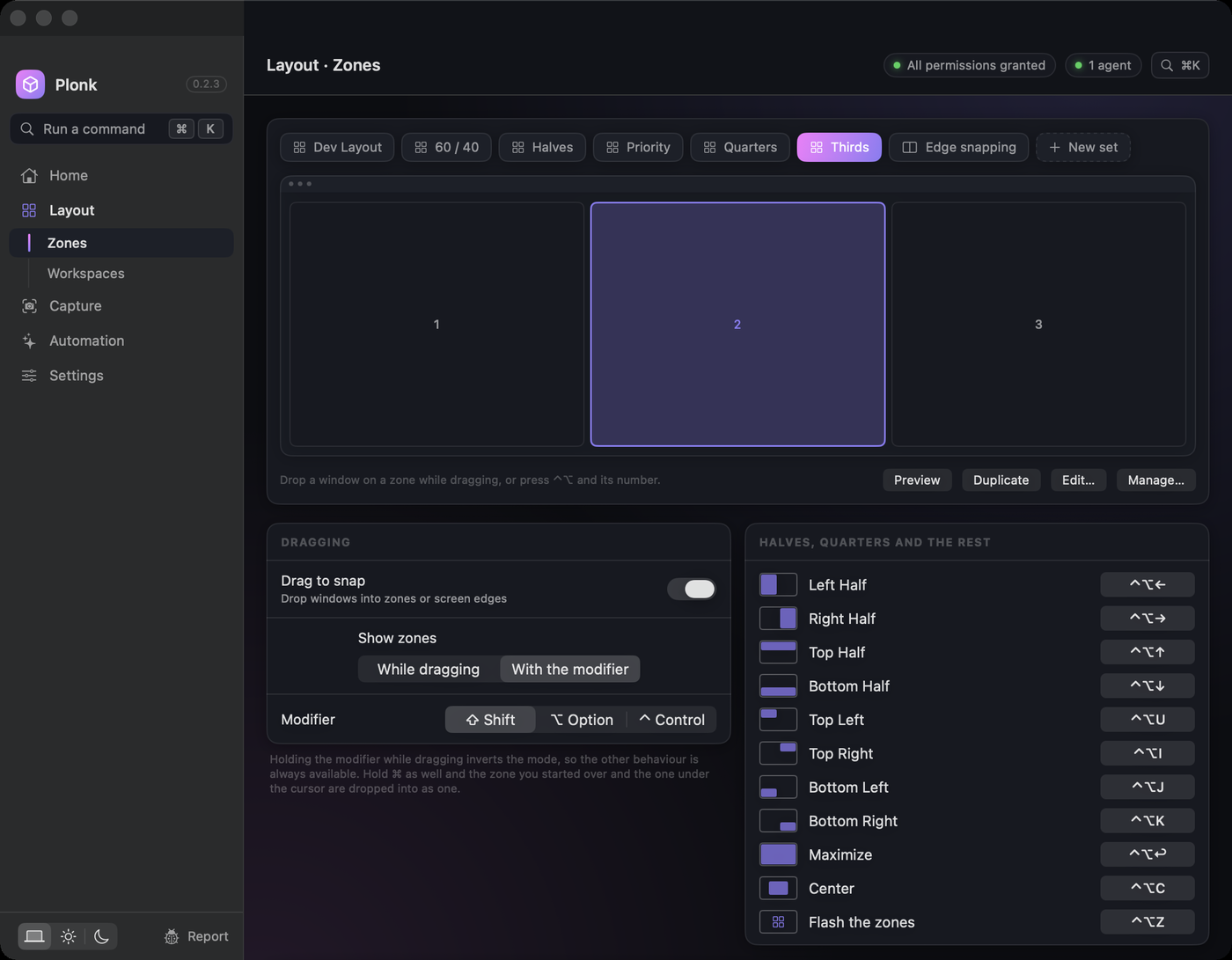
Three ways to put a window somewhere
Drag it. Zones light up as you move a window, and it drops into one. Hold⌘ as well and it takes two of them at once. Turn on grab-and-move and you can
pull a window from anywhere inside it, instead of aiming for the title bar.
Press a key. ⌃⌥← for the left half, ⌃⌥1–⌃⌥9 for the numbered zones on
that screen, ⌃⌥0 to put a window back exactly where it was before Plonk ever
touched it.
Say it. Hold ⌃⌥V and name where it goes — "snap this left", "zone three".
That runs inside the app, offline, with on-device recognition. Plonk also speaks
MCP, so a whole desk at once can go to an agent you already have open:
browser on the left 60%, terminal top right, notes bottom right
save that as a workspace called "review"
keep the Mac awake until this build finishes
read the error out of that dialog and tell me what it says
Everything runs on your Mac. No account, no cloud, no telemetry — and
none of that is a promise you have to take, it is all
checkable from a terminal.
Install
macOS 13+.
brew install --cask ostapondo/plonk/plonk
Grant Accessibility when it asks, then relaunch. Screen Recording is asked for
separately, the first time you capture. Nothing else — no Full Disk Access, no
Automation, no Keychain.
Optional, and only if you want the plonk CLI or an agent driving it (Node 18+):
claude mcp add plonk -- npx -y plonk-mcp   # Claude Code
codex mcp add plonk -- npx -y plonk-mcp    # Codex CLI
In Claude Code it can also come as a plugin — the same server, pinned to the
release it shipped with rather than to whatever npm serves as latest:
/plugin marketplace add ostapondo/plonk
/plugin install plonk@plonk
Any MCP client works the same way, over stdio or HTTP.
For agents has the rest, plus one-pagers for
Cursor, Zed and
Cline.
For Claude Desktop there is nothing to type: download plonk-<version>.mcpb
from the latest release
and open it. The bundle carries the server and its dependencies, so no config
file gets edited and nothing is fetched at launch.
Plonk is signed, but not notarized. The certificate is self-signed rather
than an Apple Developer ID, because notarizing one requires a paid Apple
account and this project does not have one. So macOS cannot vouch for who built
this, and says so: a hand-downloaded copy is held on first launch, and the cask
above skips that by clearing the quarantine flag for you.
Worth stating plainly, since it is a check being skipped on your behalf. Here is
the one that replaces it, and it is stronger — run it before you open anything:
gh attestation verify $(brew --cache)/downloads/*--Plonk-0.2.2.zip \
  -R ostapondo/plonk
That prints the commit and the GitHub Actions run this exact archive was built
by. Apple's stamp would tell you a build passed a malware scan; this tells you
the binary on your Mac came from the source in this repository, and nothing
went through a laptop on the way. It is the first of
several such checks — none of what this README claims about
privacy has to be taken on trust.
Without Homebrew: download the latest release,
unzip, and drop Plonk.app into Applications. Then either do the Gatekeeper
detour once — open Plonk, dismiss the warning, then System Settings → Privacy &
Security, scroll to Security, Open Anyway — or clear the flag yourself,
which is all the cask does:
xattr -dr com.apple.quarantine /Applications/Plonk.app
If you later move or rename Plonk.app (or its folder), macOS quietly ties the
old grant to the old path: windows of newly launched apps stop being seen.
Remove Plonk from Privacy & Security → Accessibility and grant it again.
What you get
Ten of them. The first three are the window manager, and the rest are the ones
that would otherwise each be another icon in the menu bar.
| Zones | Draw any layout you like, per monitor. Snap by dragging, by number, or by asking. Windows come back to their zone when a display is unplugged and plugged in again |
| Workspaces | A desk you can put away: the apps, every window's frame, the monitor each belongs on, and what each app opens on the way up. Launch it onto an empty desktop and it rebuilds itself |
| Focus that follows the layout | ⌃⌥⇧← goes to the window that is actually on the left, not the one you used last. ⌃⌥` cycles the windows stacked in one zone |
| Text off the screen | ⌃⌥T selects an area and copies the words in it — from a screenshot, a paused video, a dialog that will not let you select. On-device, nothing uploaded |
| Pin part of the screen | Float a live crop of anything above everything else: a build log, a chart, a call, visible in a corner while you work over it |
| Keep awake | Real power assertions, not a jiggler — and a session that ends by itself: after N minutes, at a wall-clock time, or the moment a process exits |
| Screenshots | Region, window or screen, then pen, arrow, rectangle, ellipse and highlighter. Saved at native resolution |
| A shortcut guide | Every shortcut the app in front actually has, read from its own menus, so it is never out of date |
| Pointer tools | Find the cursor, ring every click for a screen recording, crosshairs, jump to the next display |
| Voice | Hold ⌃⌥V and say it. The common ones — "snap this left", "zone three", "keep awake for an hour", "launch my review workspace" — run in the app itself, offline and instantly; anything bigger goes to your agent. Recognition is on-device |
The long version: Zones · Workspaces ·
Hotkeys · Everything else
For agents
This is the part no other Mac window manager has. Plonk exposes its whole
surface over MCP, so an agent can read the desk, rearrange it, save the result
and read the screen back — without a screenshot round trip for anything that is
really just words. Frames are fractions of a monitor's visible area, origin
top-left, which is why "left 60%" is just {x: 0, y: 0, w: 0.6, h: 1}.
Nineteen tools, across state, layouts, workspaces, zones, keep-awake,
screenshots and on-device OCR. Several agents can be connected at once, each
registering itself, with an optional mode that locks changes to the active one.
The same package carries a plonk command, for the things that are neither an
agent nor a settings window — a Makefile, a Raycast script, a shell alias:
plonk state                      # screens, zone sets, workspaces, windows
plonk launch review              # a saved workspace
plonk awake while npm run build  # awake for exactly as long as the build
plonk text | pbcopy              # OCR a region straight into the clipboard
For agents has every tool, the multi-agent rules, the HTTP
transport and the rest of the CLI.
Privacy
Everything runs on your Mac, and none of it is a promise you have to take. The
API binds to 127.0.0.1, refuses anything carrying headers a browser cannot
suppress, and is gated on a token only you can read. The one outbound connection
is the update check, which carries no identifier and can be switched off.
Releases are built and signed on GitHub's runners and ship with an attestation,
so the binary on your Mac can be tied to the commit it came from:
gh attestation verify Plonk-<version>.zip -R ostapondo/plonk
Check it yourself is every one of those claims with the
command that tests it, and SECURITY.md is where each of them
stops.
Under the hood
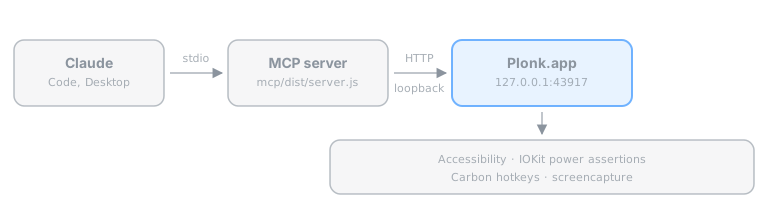
- The app is the single source of truth; the MCP server is a stateless bridge.
App/is the Swift menu bar app,mcp/the TypeScript MCP server.- Config is plain JSON at
~/Library/Application Support/Plonk/config.json.
Build
Five commands, and they are exactly what CI runs on every pull request. Each
line is a subshell, so paste the block from the repository root and it works:
(cd App && swift build)                    # the app compiles
./scripts/test.sh                          # the unit suite
./scripts/lint.sh                          # style rules, no dependencies
(cd mcp && npm ci && npm test)             # the MCP server
node scripts/check-zone-sets.mjs           # the layouts in zone-sets/
None of that needs a signing certificate. Zone geometry, config decoding, HTTP
routing, MCP tools, voice command parsing, the CLI and every document here are
reachable from that loop, and most changes never need more.
Producing a launchable Plonk.app is the one step that does need one. Make your
own once with ./scripts/make-signing-cert.sh, then ./scripts/build.sh. macOS
ties Accessibility and Screen Recording to the code signature, and an ad-hoc one
changes every build, so a stable certificate is what stops rebuilds from
resetting permissions. CONTRIBUTING.md has the details;
AGENTS.md has the release process, which runs on GitHub's runners
and never from a laptop.
Contributing
Bug reports, zone sets, client one-pagers and code are all welcome, and none of
them need a signing certificate — the loop above is the whole requirement.
CONTRIBUTING.md opens with a first change you can send in
about fifteen minutes, and says how long a review takes.
The smallest useful change here is one JSON file. zone-sets/ is
a gallery of layouts worth copying — an ultrawide split, a rotated monitor, the
one built around a recurring meeting. Draw it in the app, read the numbers out
of plonk state --json, open a pull request; that folder has its own CI job and
answers in about twenty seconds. Nothing to build, nothing to sign, no Swift.
The issues tagged good first issue are written to be picked up cold —
each one says where the code is and how to tell it worked, and carries a prompt
you can hand straight to an agent, since AGENTS.md already tells
one how this repo is put together. The ones tagged needs-hardware need
neither Swift nor a certificate, and are the most useful thing anyone can send:
a window manager breaks on arrangements the author cannot see, and a report
from three monitors or an ultrawide is worth more than a patch.
Questions, half-formed ideas and layouts worth showing off go to
Discussions; a security
problem goes through SECURITY.md instead of a public issue.
Everyone taking part is expected to follow the
Code of Conduct.
License
MIT © ostapondo
Yorumlar (0)
Yorum birakmak icin giris yap.
Yorum birakSonuc bulunamadi