FreeComputerUse
Health Uyari
- License — License: MIT
- Description — Repository has a description
- Active repo — Last push 0 days ago
- Low visibility — Only 5 GitHub stars
Code Gecti
- Code scan — Scanned 12 files during light audit, no dangerous patterns found
Permissions Gecti
- Permissions — No dangerous permissions requested
Bu listing icin henuz AI raporu yok.
Local-first AI browser automation with Playwright. Use OpenAI, Grok, DeepSeek, Anthropic and compatible APIs—or ChatGPT/Claude Code subscriptions. Approve site access, watch each action, and replay proven workflows with zero model calls.
FreeComputerUse



Quick start · Project site · Try the task lab · Security
Tell your browser what done looks like. FreeComputerUse handles the steps, while you keep control.
FreeComputerUse is a local-first AI browser automation agent. A model plans small action batches; TypeScript and Playwright execute and verify them in your browser. Compatible workflows can be learned once and replayed later with zero model calls.
Watch a real run
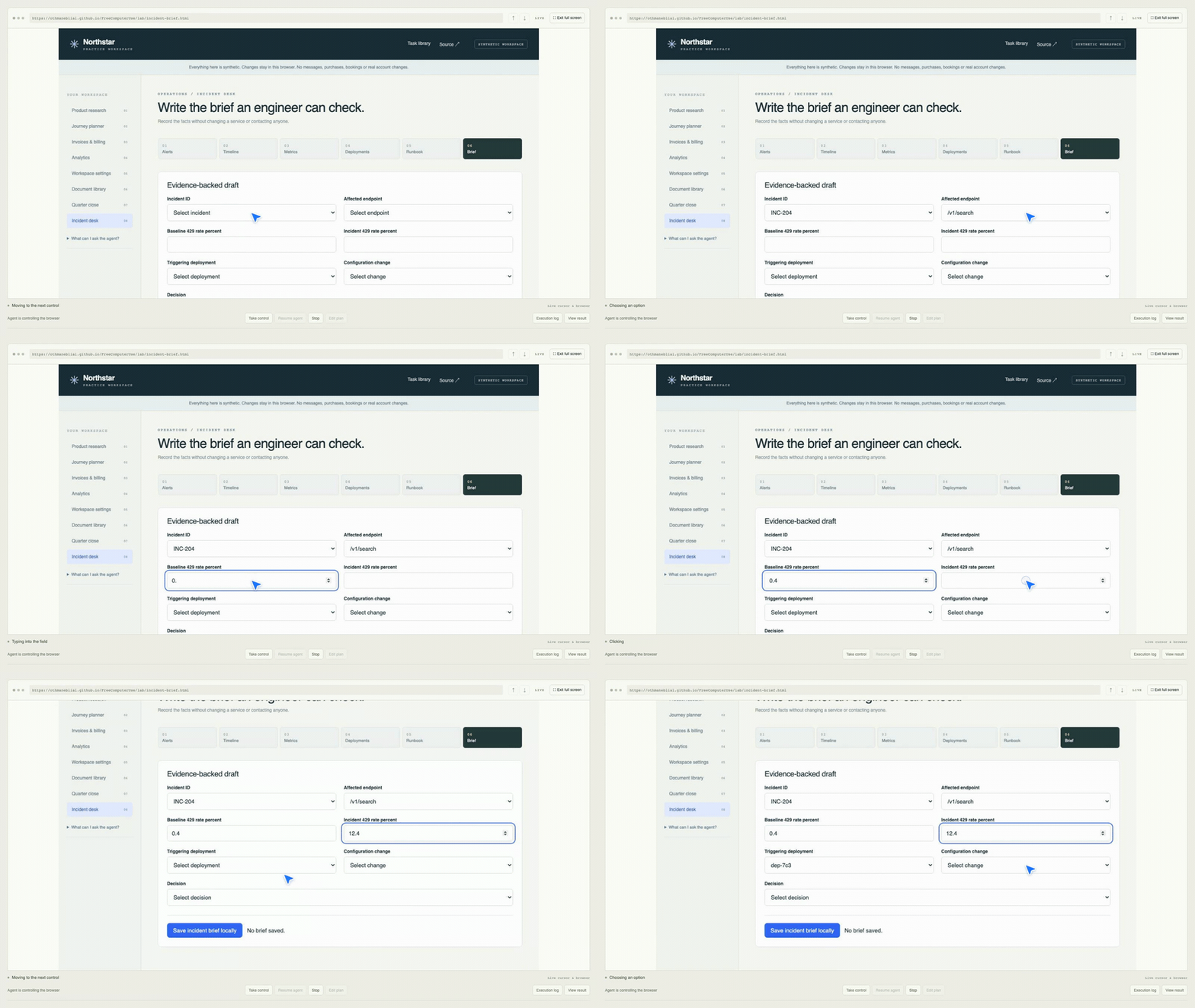
One goal led through six pages to a verified incident brief: 21 successful actions, 10 model calls, one repaired failure. The configured cost estimate was $0.00650. This is one recorded synthetic task, not a general success-rate claim. Watch the full recording · Inspect the evidence.
How it works
- Observe the page’s DOM and accessible controls.
- Plan a bounded batch with the model you choose.
- Execute browser actions locally with Playwright; approve each new website origin first.
- Verify results, repair only what failed, then reuse compatible learned workflows.
The model does not run shell commands or arbitrary JavaScript. Browser previews stay local; the goal and selected page context are sent to your configured model provider.
Quick start
Requires Node.js 22.13+, npm and Playwright Chromium.
git clone https://github.com/OthmaneBlial/FreeComputerUse.git
cd FreeComputerUse
npm ci
npx playwright install chromium
cp .env.example .env
chmod 600 .env
Set a model API key in .env, then run the local workspace:
LLM_PROVIDER=openai-compatible
LLM_API_KEY=your-key
LLM_BASE_URL=https://api.deepseek.com
LLM_MODEL=deepseek-flash
npm run dev
Open http://127.0.0.1:4318, enter a starting URL and goal, then approve site access.
Try it without an API key: open the practice revenue table and run the goal Extract the table. This narrow workflow has a deterministic local strategy; general tasks need a model provider.
Pick your model
Use a provider API key, or sign in through the official CLI for a supported subscription. API usage and consumer subscriptions are separate billing products.
| Provider | Configuration |
|---|---|
| OpenAI, xAI Grok, DeepSeek, Mistral or another OpenAI-compatible API | LLM_PROVIDER=openai-compatible; set LLM_API_KEY, LLM_MODEL and LLM_BASE_URL |
| Google Gemini API | OpenAI-compatible mode with LLM_BASE_URL=https://generativelanguage.googleapis.com/v1beta/openai/ and your Gemini API key |
| OpenRouter | OpenAI-compatible mode with LLM_BASE_URL=https://openrouter.ai/api/v1 and the chosen provider/model slug |
| Anthropic API | LLM_PROVIDER=anthropic; set LLM_API_KEY and LLM_MODEL |
| ChatGPT plan | Install Codex CLI, sign in with codex login, set LLM_PROVIDER=codex-subscription |
| Claude Pro/Max plan | Install Claude Code 2.1.248+, sign in with claude auth login (not Console), set LLM_PROVIDER=claude-subscription |
The provider API routes have not all been live-tested here; DeepSeek Flash is the measured default. Subscription modes use the local CLI sign-in, need no API key and respect plan limits. Their local agent tools and MCP servers are disabled while planning. See .env.example for optional model, CLI path and task-budget settings.
Control and privacy
- Website access is approved per origin; sensitive actions have a separate confirmation gate. Ultra mode is explicit and off by default.
- Browser execution, profiles, history and downloads stay on your machine. Page context needed for a plan goes to the chosen model provider; screenshots are not sent.
- The planner receives aliases for local profile and file values, not their contents. Local storage is not encrypted.
- Runs record actions, checks, repairs, token estimates and workflow reuse so you can inspect what happened.
Read the security boundaries before using personal or sensitive data.
Evidence
In a focused public suite recorded 18 September 2026, 14/14 first-run results and 14/14 compatible learned repeats passed independent checks. First runs used 18 model calls; repeats used zero. These single-trial sandbox results do not predict success on arbitrary websites. Report · Method and limitations.
Explore and contribute
- Project site and task library
- Useful browser-task examples
- Implementation notes
- Local validation commands
Useful contributions: reproducible browser tasks, safer permission scopes and checks that make results easier to trust. Keep shared examples synthetic or read-only; remove credentials and personal data from traces.
MIT License · Built with TypeScript and Playwright.
Yorumlar (0)
Yorum birakmak icin giris yap.
Yorum birakSonuc bulunamadi