rigswig
Health Warn
- License — License: Apache-2.0
- Description — Repository has a description
- Active repo — Last push 0 days ago
- Low visibility — Only 5 GitHub stars
Code Fail
- rm -rf — Recursive force deletion command in docs/demo/make-demo.sh
- process.env — Environment variable access in docs/demo/shoot.mjs
- spawnSync — Synchronous process spawning in homebrew/test.mjs
- exec() — Shell command execution in npm/build.mjs
Permissions Pass
- Permissions — No dangerous permissions requested
No AI report is available for this listing yet.
See everything your coding agent loads before you type, and where each piece came from. Harness-agnostic, local, read-only. Rust.
rigswig
See everything your coding agent loads before you type, and where each piece came from.
Start here: getting started — install it, three commands, and what each one tells
you.
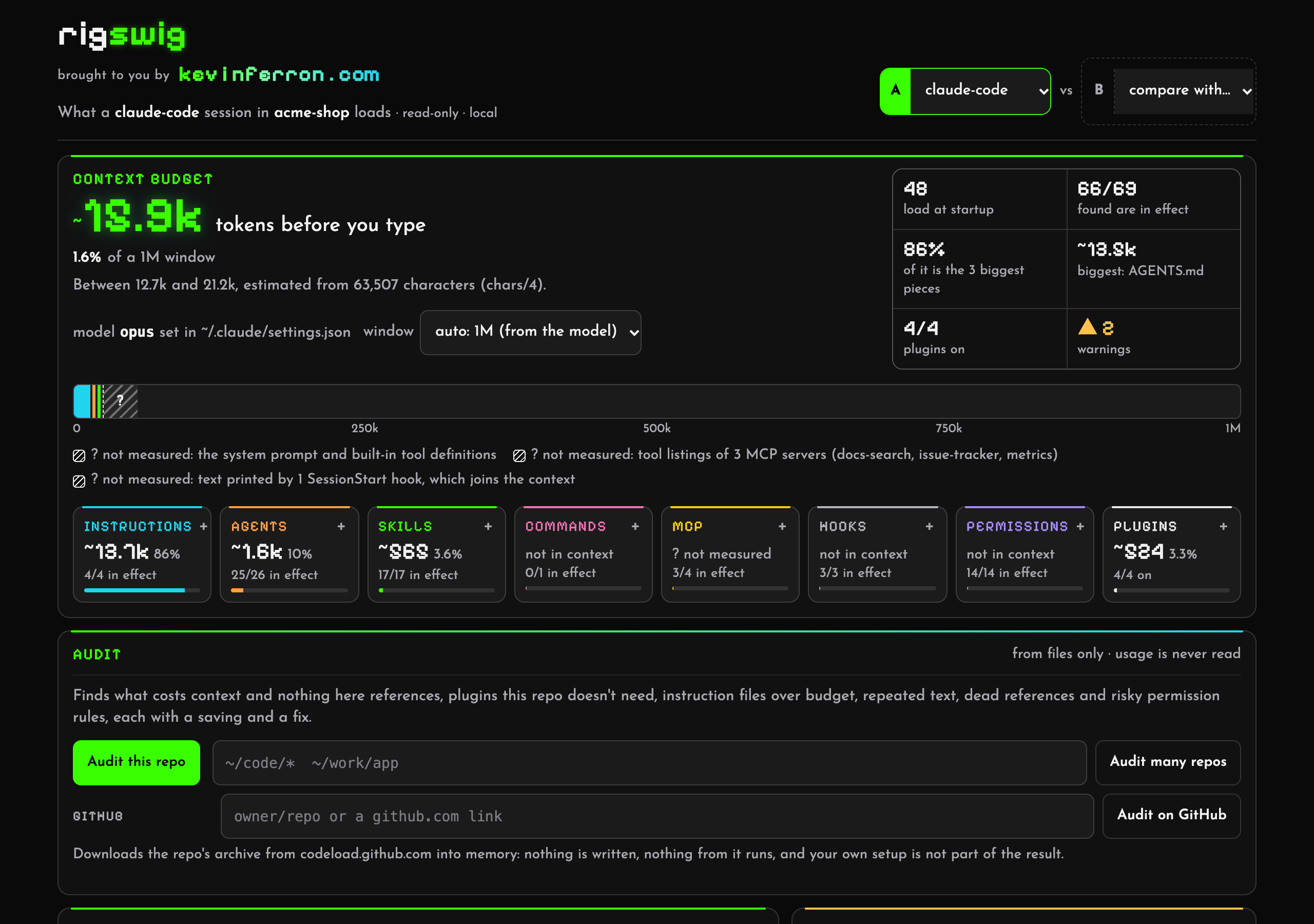
 |
 |
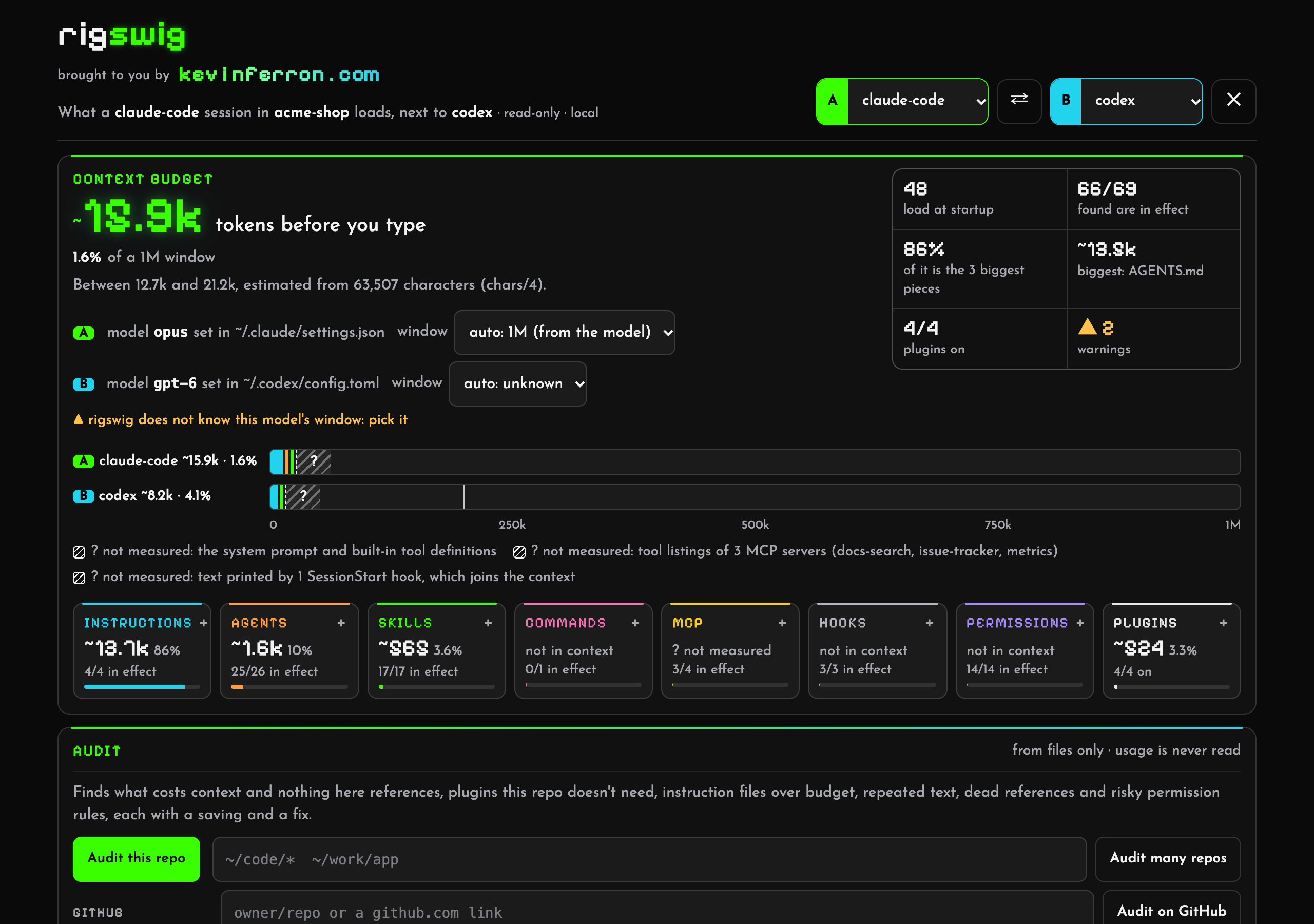
Compare two harnesses on one repo (or two repos): Codex cuts this AGENTS.md at its 32 KiB budget. |
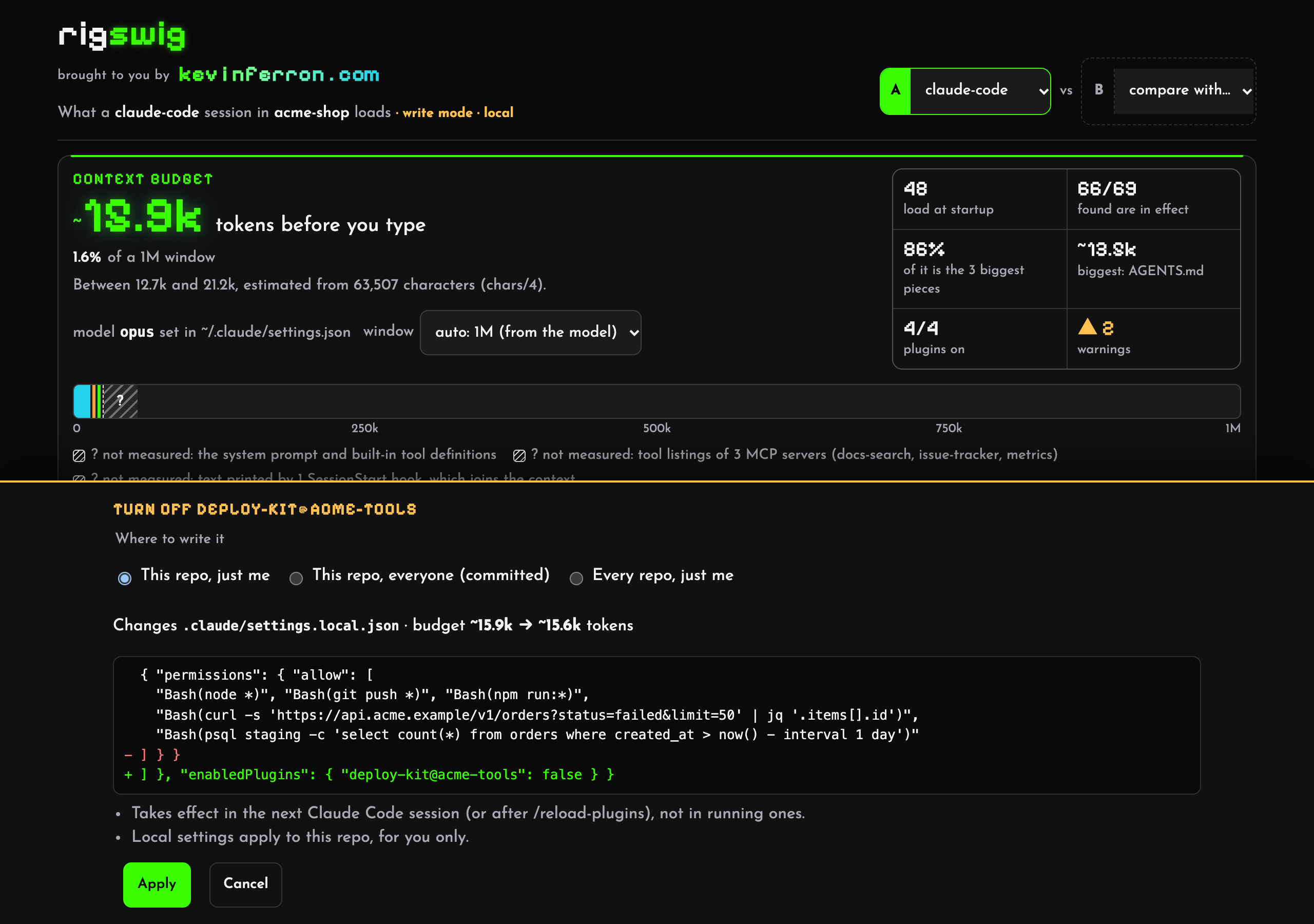
Write mode (opt-in): every change shows the file, the diff and the new budget first, with a backup and undo. |
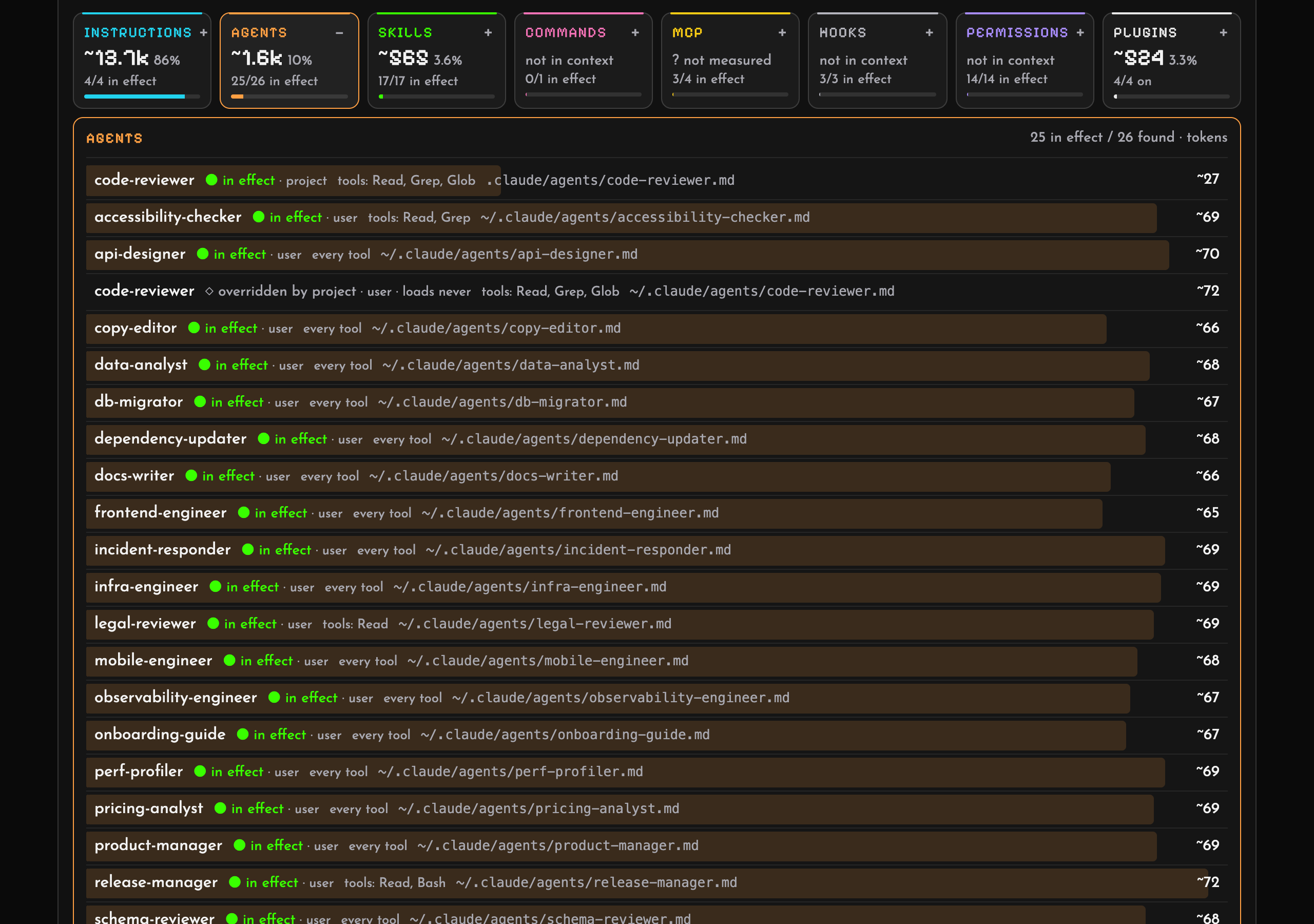
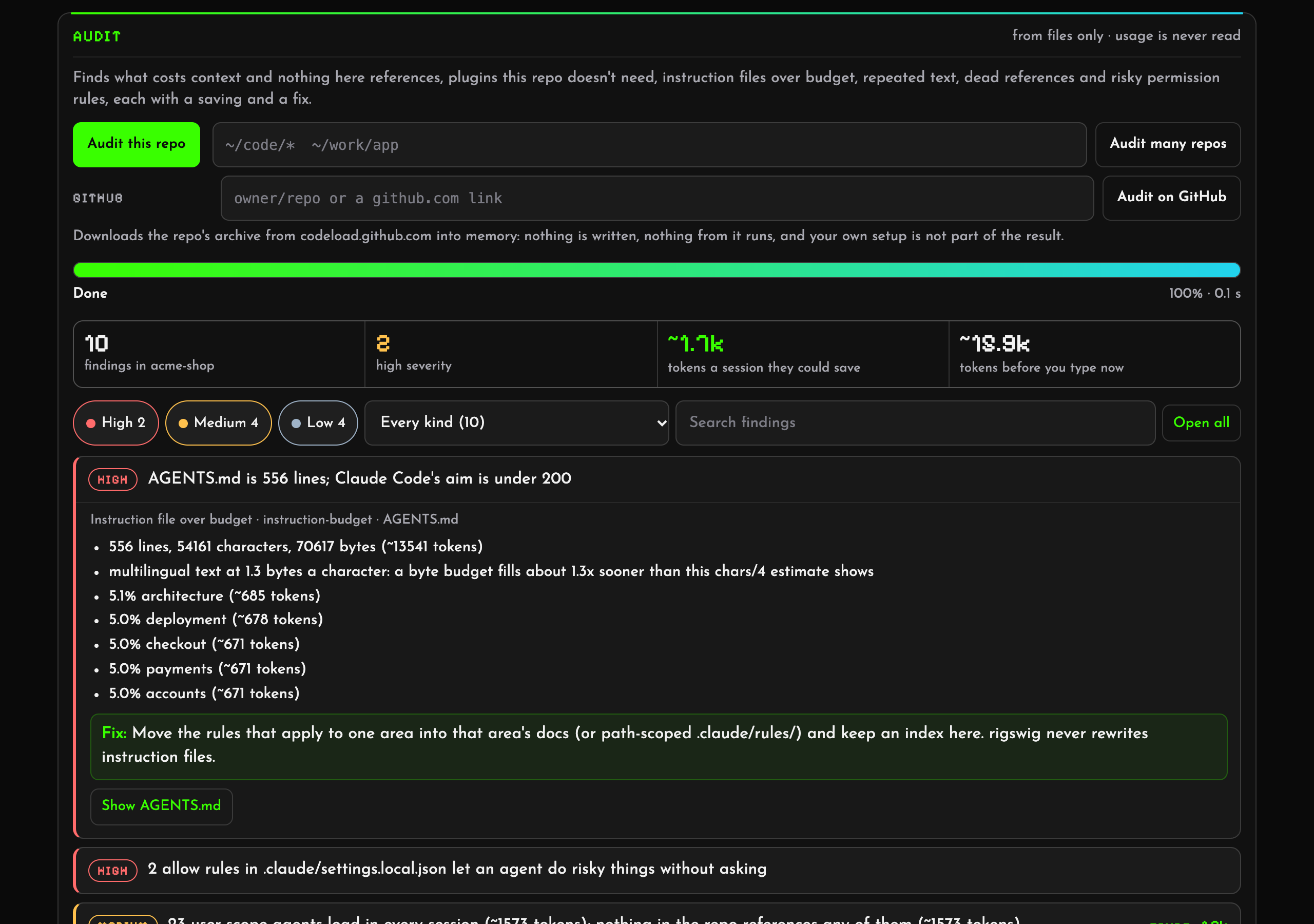 |
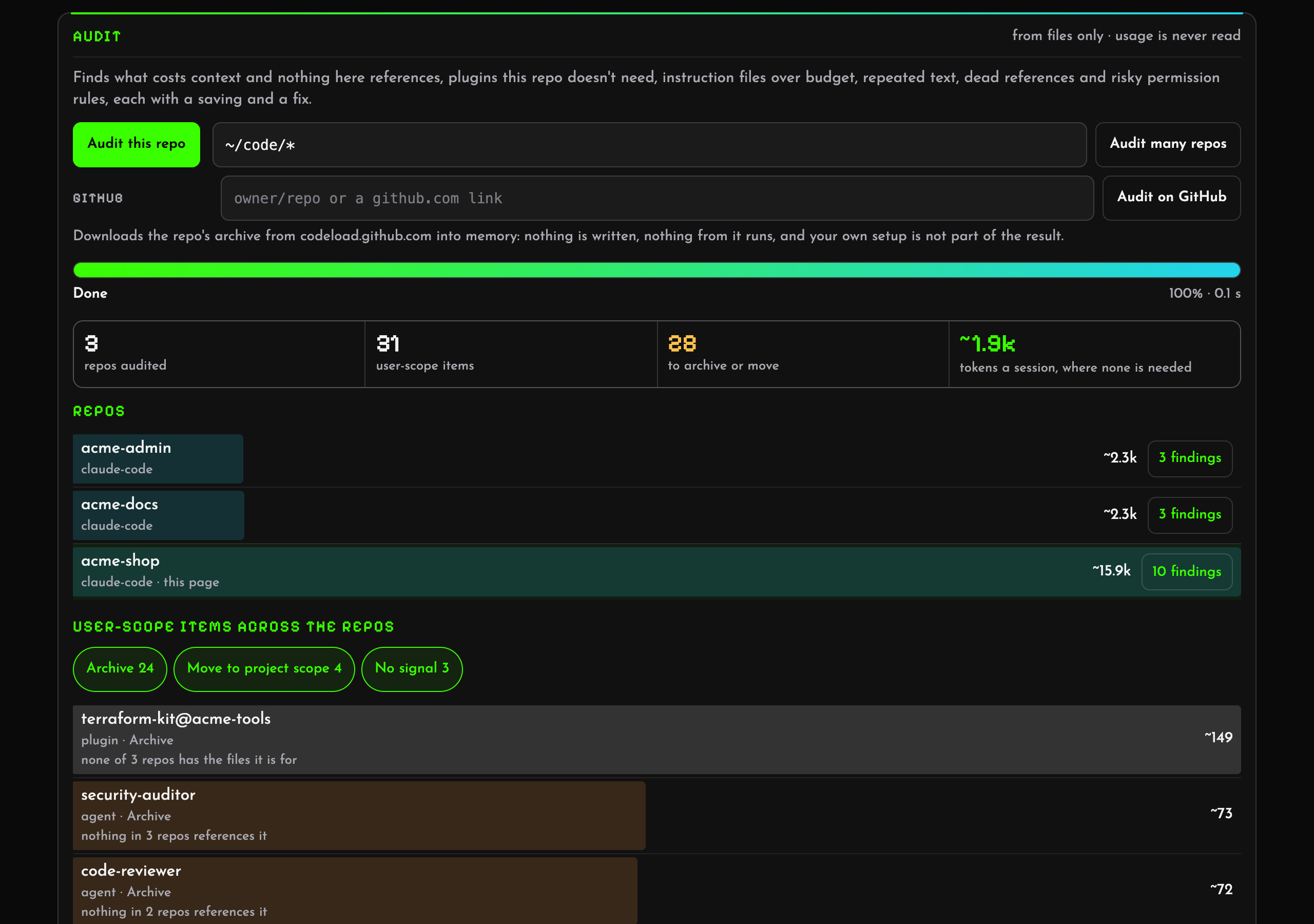 |
| Audit a repo: ranked findings, each with its evidence, the tokens it would save and a fix. Filter them, and open the items they name. | Fleet mode across many repos: which user-scope agents, skills and plugins any repo needs, and what to archive or move to project scope. |
Screenshots of an invented setup, rebuilt with docs/demo/make-demo.sh and taken with docs/demo/shoot.mjs.
A coding agent's harness is everything around the model: instruction files (CLAUDE.md, AGENTS.md,GEMINI.md, rules), subagents, skills, commands, hooks, MCP servers, plugins, permissions and the model setting,
spread across user, project, local and managed scopes. rigswig reads all of it for a repo and shows what a session
there actually gets, which scope decided each setting, what is overridden, and roughly how much context it costs
before you type a word.
Status: 0.2, pre-1.0. rigswig status, rigswig audit and the local page, rigswig ui, work for every
harness in the table below. rigswig usage reads Claude Code's session logs only, for now; the other harnesses are
next. See docs/ROADMAP.md.
rigswig is a single binary written in Rust. Install it with cargo install rigswig
(crates.io; add --no-default-features for a build with no network code), withnpx rigswig or npm install -g rigswig (npm: the package installs the
right prebuilt binary for your platform), or download it for macOS, Linux or Windows from
the releases, each with a SHA256SUMS line to check it against.
On macOS or Linux, brew install overfocus/tap/rigswig installs the same release binaries through Homebrew
(the tap). From a checkout:
cargo run -- status --repo path/to/repo          # a summary
cargo run -- status --repo path/to/repo --json   # everything, as schema/harness.schema.json describes
cargo run -- ui --repo path/to/repo              # the same as a page on 127.0.0.1, behind a random token
cargo run -- compare repo-a repo-b               # what differs between two repos, one harness
cargo run -- compare path/to/repo --tools claude-code,codex   # or between two harnesses on one repo
cargo run -- check --repo path/to/repo --max-tokens 40k        # for CI: exit 1 when the budget is passed
cargo run -- status --repo path/to/repo --without layer:user   # what-if: the totals without some items
cargo run -- audit --repo path/to/repo                          # ranked findings, each with a saving and a fix
cargo run -- audit --repos '~/code/*'                           # fleet: each user-scope item against every repo
cargo run -- audit --github owner/repo                          # a public GitHub repo, in memory, without your setup
cargo run -- audit --archive repo.tar.gz                        # the same for an archive you downloaded, offline
cargo run -- usage --repo path/to/repo                          # what past sessions here invoked, metadata only
cargo run -- audit --repo path/to/repo --usage                  # findings that know what the sessions called
rigswig audit turns the numbers into a to-do list: user-scope agents and skills that nothing in the repo references,
plugins switched on everywhere that the repo's files don't call for, instruction files over budget, sentences repeated
across layers, paths and scripts the instructions name that don't exist, and permission rules that have piled up or
allow too much. Each finding carries its evidence, the tokens it would save (computed like --without) and a proposed
change. Fleet mode answers the question a single repo can't: which repos need each user-scope item, so it can move to
those repos' project scope. The page runs both too, with a progress bar, and lets you filter the findings and jump
from one to the items it names. See docs/AUDIT.md.
The page is local: it listens on 127.0.0.1 only, answers only requests that carry its token and the right Host,
loads nothing from anywhere else, and stops after 30 minutes without a request. It is read-only unless started with--allow-writes, which lets it turn plugins and project MCP servers on and off, each with a preview (the file, the
diff, the budget before and after), a backup and undo: see docs/WRITE-MODE.md.
Guarantees
These are the point of the tool, and they will be enforced by tests:
- No network unless you ask. rigswig sends no telemetry and makes no request, except one:
--github owner/repo
downloads that public repo's archive fromcodeload.github.com, only in the run you give it to, or for each
GitHub audit you start on a page launched withui --allow-github(GitHub repos). Build with--no-default-featuresfor a rigswig with no network code at all. - No model calls. Everything it shows is read from files on your machine.
- Read-only by default. Nothing is ever written unless you start the page with
rigswig ui --allow-writes
(write mode). - An MCP server.
rigswig mcpserves the five read-only surfaces as MCP tools over stdio, so a harness
can ask rigswig about a checkout from inside its own session — Claude Code, Cursor, Gemini CLI, DeepSeek-CLI,
VS Code and anything else that launches stdio servers (the server and its registration). - In your editor. A thin VS Code / Cursor extension: the bill and the audit's findings in the status bar, a
refresh/open toolbar on the page panel, and the read-only page itself. It spawns the CLI you already have; it
starts nothing in write mode and never opts a run into session logs (the extension and
its logic tests). - No secrets. MCP server
env,headersandargs, URL paths and inline hook code are never printed or served. - Session logs only when you ask, and only their metadata. No command opens a session log unless the run asks
for it:rigswig usageorrigswig audit --usage, never the page or the MCP server. Even then, rigswig reads
only ids, times, the working folder, models, token counts, and the names of the agents, skills and MCP servers
that were called. It never keeps, prints or serves message text, thinking, tool inputs or tool results
(what is read, field by field). This replaces the earlier "No transcripts" promise
(what changed). (Claude Code's
auto-memory index,MEMORY.md, is read and counted in every run because it loads into every session.) The one
look a run makes without asking is the default picker's is-a-session-live check: file names, kinds and
modification times of a session folder and the harness home, never a file's contents (--no-sessionkeeps every
pick evidence-only, and a remote reading carries none of it — it has nothing from this machine). - Private folders stay private. List them in
~/.rigswig/private.json({"private": ["~/notes"]}): rigswig
refuses them as a repo, andaudit --reposskips them.
Harnesses
Harness-agnostic: each harness is an adapter that reads its own files into one shared data model.
| Harness | Status |
|---|---|
| Claude Code | rigswig status (the rules it models) |
| OpenAI Codex CLI | rigswig status --tool codex (the rules it models) |
| Hermes Agent | rigswig status --tool hermes (the rules it models) |
| Ollama | rigswig status --tool ollama (the rules it models) |
| Devin CLI | rigswig status --tool devin (the rules it models) |
| Cursor | rigswig status --tool cursor (the rules it models) |
| Gemini CLI | rigswig status --tool gemini (the rules it models) |
| DeepSeek Harness | rigswig status --tool dsh (the rules it models) |
| DeepSeek-CLI (community) | rigswig status --tool deepseek (the rules it models) |
| GitHub Copilot CLI | rigswig status --tool copilot (the rules it models) |
| Hugging Face CLI | rigswig status --tool hf (the rules it models) |
| Pi | rigswig status --tool pi (the rules it models) |
| oh-my-pi (OMP) | rigswig status --tool omp (the rules it models) |
| OpenCode, others | adapters welcome |
Related tools
Other tools work on the same question, and are worth a look:
harness-map (Codex and Claude Code, with a what-if mode),
whatloads (Claude Code's context bill),
claude-config-auditor (lint and CI), and Claude Code's own/context.
Licence
Reviews (0)
Sign in to leave a review.
Leave a reviewNo results found