oya-browser
Health Gecti
- License — License: NOASSERTION
- Description — Repository has a description
- Active repo — Last push 0 days ago
- Community trust — 202 GitHub stars
Code Uyari
- fs module — File system access in .github/workflows/deploy-prod.yaml
- fs module — File system access in browser/anonymity/profile-store.js
Permissions Gecti
- Permissions — No dangerous permissions requested
Bu listing icin henuz AI raporu yok.
The browser control plane for AI agents. One API over Oya Cloud, Browserbase, Steel, Anchor, Browser Use and your own Chrome, with persistent personas, CAPTCHA and MFA handling, and live human takeover.
Everyone else drives Chrome from the outside. We built the browser.
The automation lives inside it, not attached over the debugging protocol — so your agents stop
looking like a harness. Sign in once and every browser you start is already signed in.
Do the task once and Oya replays it forever, with no model in the loop.



Start
npm i @oya-ai/browser
import { Oya } from "@oya-ai/browser";

const browser = await new Oya().browser.start();     // real Chrome, yours for the session
await browser.goto("https://news.ycombinator.com");
console.log(await browser.ask("What are the top 3 stories?"));
await browser.stop();
DONE: The top 3 stories on Hacker News are:
1. Google's Open Agentic Orchestrator
2. Samsung is expected to more than double output of its HBM4 and HBM4E DRAM
3. What happened to the Snowden archive
Set OYA_API_KEY from browser.getoya.ai. Node 20+.
Record it once, replay it forever
ask() costs a model call every time. Save the run and it never costs one again.
await browser.ask("Log in with {{user}} and {{pass}}. Open New Request for {{name}}.",
  { data: { name: "Alex Example" }, secrets: { user, pass } });
await browser.toPlaybook("new-request");             // the steps it just took

await replay.play("new-request", { name: "Sam Example", user, pass });   // no model, new inputs
Nine of ten public sites replay every recorded step with no model and no repair —
the tenth is named, with its error. When a page really has changed,
the agent fixes it and leaves you a draft to approve. Every playbook is also a Playwright module
you can read and keep.
Sign in once
Scripted logins break on Google SSO, Okta, passkeys and Cloudflare. Don't script them. Sign in
by hand once in the desktop app, and every browser you start on that
persona is already signed in — the session travels as cookies and localStorage, sealed at
rest, because half the portals worth automating keep you signed in with neither one alone.
For the portals that end the session server-side anyway, store the login and Oya signs in itself
— and stops rather than retrying a password the site has already refused, because that is how a
real account gets locked out.
Why it isn't flagged as a bot
Everyone else ships an SDK that drives headless Chrome over the debugging protocol. That is the
easy way, and it is the shape anti-bot vendors have learned to look for. Oya is a real headful
browser a person can sit in front of, and the automation runs inside the process:
- The persona's platform, timezone, locale, cores and screen are set through Chrome's own
emulation before the first document, and again in workers and cross-site iframes. A value
Chrome reports about itself cannot be caught lying. - Reading a page uses an isolated world, so it needs no
Runtime.enable— a known detection
vector. Replay never turns it on. - Console and network come from browser-process APIs, not the
LogandNetworkdomains, so
watching a run adds nothing a page can see.
Measured, not asserted: 0% CreepJS headless score (bare headless Chrome: 100%), 0 lies,
31 of 31 Bot.Sannysoft. Nobody can promise you are never detected — our own numbers page
says so — but you can run the harness yourself and see what it says.
Self-host
npx @oya-ai/cli install
Six questions, then it clones, writes the config, builds and waits for /readyz.
SQLite, Postgres or Supabase; browsers on Docker, Kubernetes or your own machines.
Give it to your agent
claude mcp add --transport http oya https://browser.getoya.ai/mcp/pool \
  --header "Authorization: Bearer $OYA_API_KEY"
Then just ask: "Start a browser, open Hacker News and summarise the top 3 stories."
Also Cursor, Claude Desktop and any agent that reads skills.
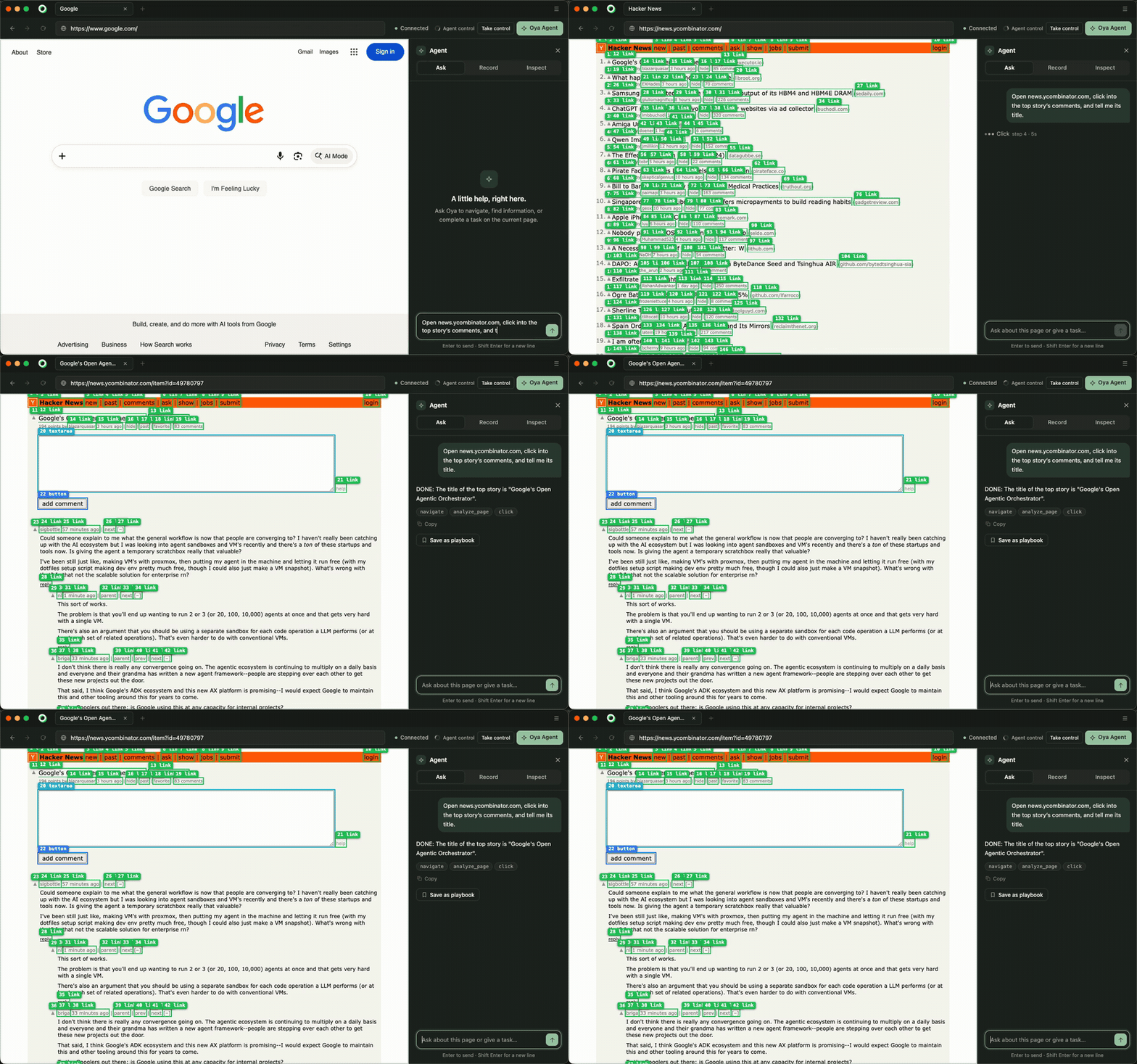
The browser itself, filmed in real time: a task asked in the Ask pane, the answer, and the run kept as a playbook. The green boxes are the page as the agent reads it — every element it can act on, numbered. The four-minute version goes on to LinkedIn already signed in, Amazon, and a login it completes by itself (subtitles included).
The rest
| CAPTCHA and 2FA | Solved where they can be, handed to a person where they can't |
| It proves what it did | A hash-chained audit trail the database won't let you rewrite, host allow-listing, regenerable evidence |
| It isn't one vendor | Oya Cloud, Browserbase, Steel, Anchor, Browser Use or your own Chrome — why |
| It keeps your tools | Every browser has a cdpUrl, so Playwright and Puppeteer connect unchanged |
| Full docs | SDK · CLI · self-hosting · examples · browser.getoya.ai/docs |
Packages
| Package | |
|---|---|
@oya-ai/browser |
TypeScript SDK. ESM and CJS, typed, zero runtime dependencies. |
@oya-ai/cli |
The fleet, the live view, the installer. |
server · ui · browser |
Control plane, console, and the browser itself. |
npm test                 # the whole suite
cd server && npm run stealth -- --live   # the stealth numbers, on your machine
License
The SDK and CLI are MIT — embed them in commercial agents.
Everything else is source-available under the Sustainable Use License: free for
internal business use, research and non-commercial use.
Yorumlar (0)
Yorum birakmak icin giris yap.
Yorum birakSonuc bulunamadi