screenshot-to-qml
Health Uyari
- License — License: NOASSERTION
- Description — Repository has a description
- Active repo — Last push 0 days ago
- Low visibility — Only 7 GitHub stars
Code Basarisiz
- exec() — Shell command execution in docs/tools/controls_image.py
Permissions Gecti
- Permissions — No dangerous permissions requested
Bu listing icin henuz AI raporu yok.
Screenshot or HTML → native Qt Quick/QML app, verified pixel by pixel. An agent skill for Claude Code, Codex and others.
screenshot-to-qml
An agent skill that turns a UI screenshot or HTML page into a production Qt Quick app,
then renders the result and proves it matches.





Install · Usage · How it works · Results · Evals · Changelog
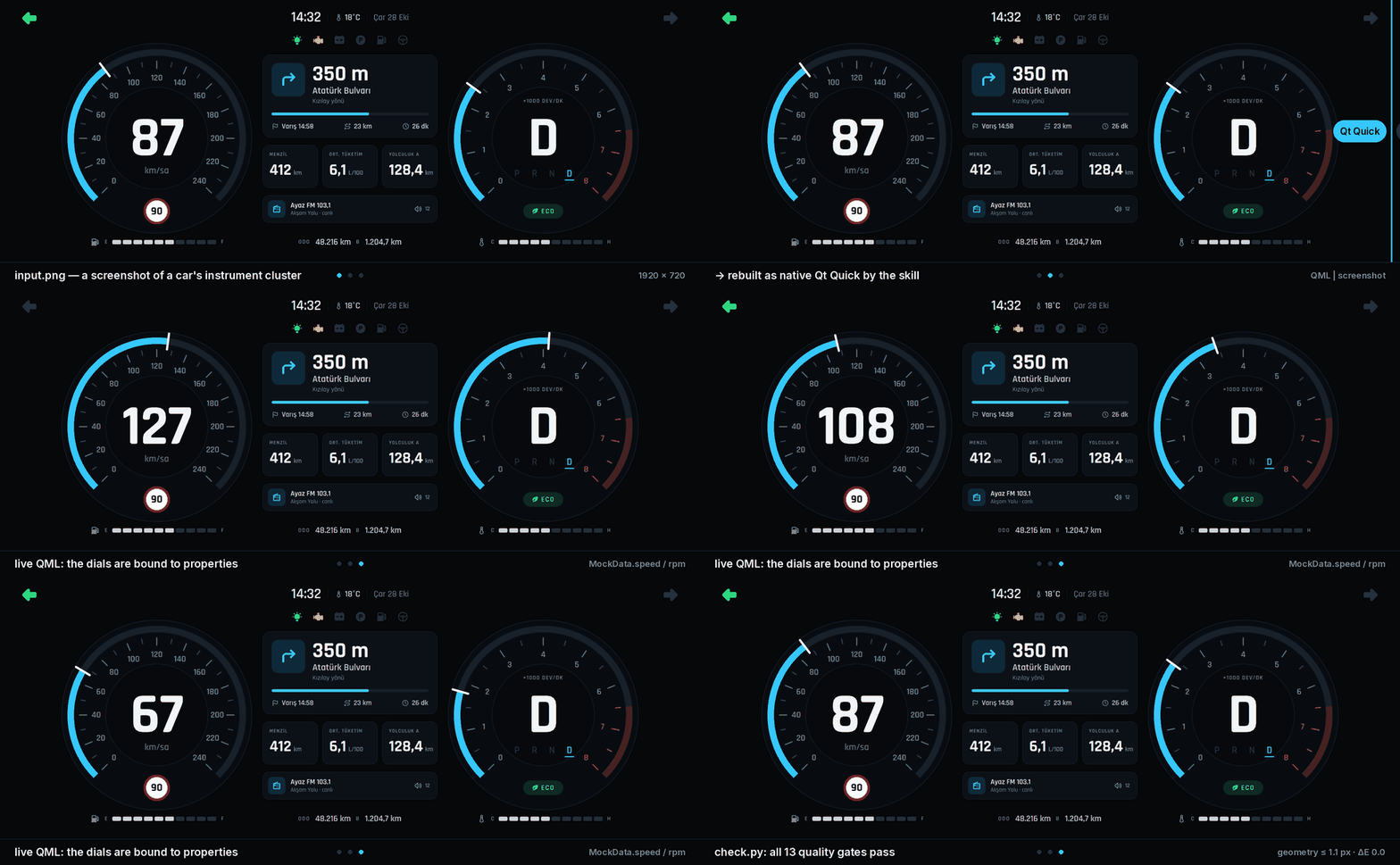
A screenshot of a 12.3" instrument cluster, rebuilt as a Qt 5.15 C++ app by the skill. Every frame after the wipe is grabbed from the running QML (example).
Most "image to UI" prompts stop at looks about right. screenshot-to-qml gives a coding
agent (Claude Code, Codex CLI and others) a measured workflow instead: it reads exact colors,
spacing, fonts and icons off the screenshot, builds a tokenized QML project, renders it
headlessly at the screenshot's size and DPR, and scores it against the source until it passes.
The result is native Qt: no browser, no WebView, from desktops down to a Raspberry Pi panel or
a car's instrument cluster on Qt 5.15.
Features
- Measured, not guessed. Colors, edges, borders and padding are probed from the pixels and
stored in adesign-spec.json, each value with its source and confidence. Given HTML (plain
CSS or Tailwind), the page is rendered in Chromium and the exact values, text runs, icon SVGs
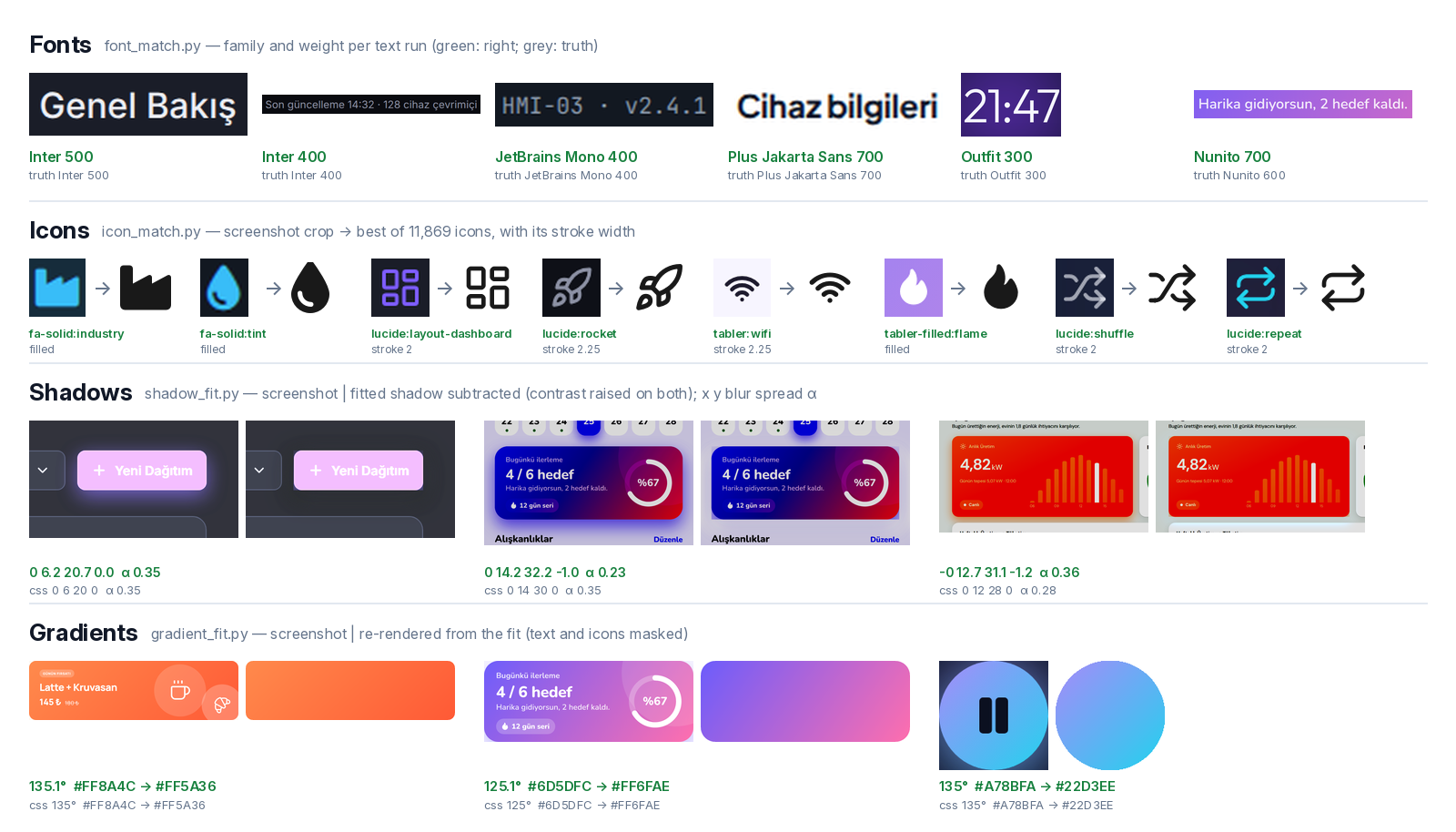
and font files come from the DOM. - Matched, not eyeballed. The font family and weight of every text run (63 open UI
families), the icon set and name of every icon (11,869 icons from Lucide, Tabler, Font
Awesome and Heroicons), CSS shadows and linear gradients are fitted from the image. A font
that is not in the catalog is flagged instead of silently swapped. - Production QML. One
Themesingleton holds every token. 14QtQuick.Templatescontrols
cover hover, pressed, focus, checked, error and disabled states. Repeats come from models,
every string isqsTr()-ready, and the code passesqmllintandqmlformat. - Verified.
check.pyreports global and per-region SSIM, CIEDE2000 color error, geometry
offsets and the position of every string, and runs 13 quality gates, including keyboard
reachability and visible focus driven by real input to the running window. - One QML tree, two hosts. The same
qml/runs from PySide6 or compiles into a C++ binary
with CMake (Qt 6.8+, QML compiled ahead of time). Both renders are compared. - Qt 5.15 for automotive and industrial boards.
--min-qt 5.15writes the Qt 5.15 dialect
(versioned imports, QtGraphicalEffects, no Qt 6-only types) and a Qt 5 C++ host. The check
builds it against Qt 5.15, runs it and compares its frame with the reference render. - Down to the board. Profiles for desktop, GPU boards (Raspberry Pi, Jetson) and GPU-less
panels (software renderer), with kiosk packaging: eglfs/linuxfb, systemd unit, installer.
Install
The skill is a plain Agent Skills folder:skills/screenshot-to-qml.
Any agent: npx skills
npx skills add ozaysahin/screenshot-to-qml                                # pick agents interactively
npx skills add ozaysahin/screenshot-to-qml -g -a claude-code -a codex      # user-level, Claude Code + Codex
The skills CLI installs into the folder each agent reads (Claude Code,
Codex, Cursor, Gemini CLI, GitHub Copilot and many more). Without -g it installs into the
current project.
Claude Code plugin
/plugin marketplace add ozaysahin/screenshot-to-qml
/plugin install screenshot-to-qml@screenshot-to-qml
On Claude Code 2.1.275 or later, one line does both:/plugin install screenshot-to-qml --marketplace ozaysahin/screenshot-to-qml.
Manual
git clone https://github.com/ozaysahin/screenshot-to-qml
cp -r screenshot-to-qml/skills/screenshot-to-qml ~/.claude/skills/       # Claude Code, all projects
cp -r screenshot-to-qml/skills/screenshot-to-qml ~/.agents/skills/       # Codex CLI
Any agent that can read files and run Python can also be pointed at the folder: "Read
skills/screenshot-to-qml/SKILL.md and follow it."
Dependencies
The agent installs these when it first runs the skill (SKILL.md has a Setup section). To do it
yourself:
pip install -r skills/screenshot-to-qml/scripts/requirements.txt   # PySide6 6.8+, numpy, opencv, scikit-image …
python skills/screenshot-to-qml/scripts/font_match.py fetch         # font catalog, ~40 MB from google/fonts
python skills/screenshot-to-qml/scripts/icon_match.py fetch         # icon index, ~170 MB (needs npm)
| Also needed | For | Install |
|---|---|---|
Tesseract with tur + eng |
OCR in the screenshot analysis | apt install tesseract-ocr tesseract-ocr-tur · brew install tesseract tesseract-lang · UB Mannheim installer on Windows |
| Xvfb | headless rendering on Linux servers | apt install xvfb libxcb-cursor0 |
| Playwright + Chromium | HTML input only | pip install playwright && python -m playwright install chromium |
| Qt 6.8+ with CMake files | the C++ host only | Qt online installer, aqt, or a distro with Qt 6.8 (Debian 13) |
| Qt 5.15 with CMake files | Qt 5.15 targets only | apt install qtdeclarative5-dev qml-module-qtquick-shapes qml-module-qtgraphicaleffects, aqt install-qt … 5.15.2, or the board's SDK |
On Windows, set PYTHONUTF8=1 before running the scripts.
Usage
Give the agent a screenshot (or an HTML file) and say what you need:
Rebuild this screen as a PySide6 Qt Quick app for a 1920×1080 kiosk.
Turn dashboard.html into a C++ Qt app for a 7" Raspberry Pi 5 panel.
Rebuild settings.png (exported at 2×) as a desktop app with English and Turkish translations.
Rebuild cluster.png as a Qt 5.15 instrument cluster in C++ for our i.MX 8 board.
The agent analyzes the image, asks only what it cannot measure (for example a font that is not
in the catalog), builds the project, and iterates on the worst regions until the check passes.
It works to a budget: a simple screen takes about 60 tool calls and up to three checks, and the
checks hand it one contact sheet of the worst spots instead of letting it crop and probe pixels
by hand (v1.0.1 cut the tokens a settings screen costs by about two thirds).
You get:
project/
├── main.py                  PySide6 host (fonts, translations, frame grab)
├── CMakeLists.txt, src/     optional C++ host for the same QML
├── qml/App/
│   ├── Main.qml             Window root, screen composition
│   ├── *.qml                components (cards, charts, panels …)
│   ├── Style/Theme.qml      every color, font, radius and spacing token
│   └── Controls/            Template-based controls with all their states
├── assets/fonts, icons      bundled fonts and SVG icons with their licenses
├── i18n/                    translations
└── README.md                assumptions, run instructions, fidelity report
To check a project yourself:
python skills/screenshot-to-qml/scripts/check.py project --source input.png --spec design-spec.json
How it works
flowchart LR
  A[Screenshot or HTML] --> B[Analyze + match<br/>palette · surfaces · OCR<br/>fonts · icons · shadows · gradients]
  B --> C[design-spec.json]
  C --> D[Scaffold + Theme]
  D --> E[QML components]
  E --> F[check.py<br/>render · diff · gates]
  F -->|fail: fix the worst regions| E
  F -->|pass| G[Project + fidelity report]
  G --> H[deploy.py<br/>desktop bundle · board service]
--help and JSON output)
| Script | Does |
|---|---|
analyze.py |
draft spec: palette, surfaces, gradient candidates and OCR, with a numbered overlay |
html_to_spec.py |
HTML input: renders the page in Chromium → reference PNG and a spec of exact values, icon SVGs, font files |
match.py |
fonts, icons, shadows and gradients measured into the spec, with a report of what to confirm |
font_match.py · icon_match.py · shadow_fit.py · gradient_fit.py |
the four matchers on their own (fetch builds the font and icon caches) |
validate_spec.py · gen_theme.py |
spec checks; spec tokens → Theme.qml / Icons.qml |
probe.py |
colors at points, dominant colors of a box, edge/border/padding runs, zoomed crops |
scaffold.py |
new project with the control kit, a PySide6 host, a C++ host or both; --min-qt 5.15 for a Qt 5 C++ host |
qt5.py |
Qt 5.15: lists what 5.15 cannot load, ports a Qt 6 tree's imports, pragmas and qmldirs |
render.py |
headless render at size × DPR and a scene dump; --interact drives Tab, hover and press |
diff.py |
SSIM (global and per region), ΔE2000, template-matched geometry, text matching |
quality_gate.py |
lint, format, runtime warnings, literals, screenshot embedding, fonts, web engine, a11y, states, i18n, effects, perf, cpp |
build_cpp.py |
builds the C++ host (Qt 6 or Qt 5.15), grabs a frame and compares it with the PySide6 render |
check.py |
all of the above in one command |
deploy.py |
pyside6-deploy or cmake --install bundles for desktops; env file, systemd unit and installer for boards |
Quality gates. A build fails on hard-coded colors, QML warnings, web engines, screenshots
pasted in as backgrounds, controls that Tab cannot reach or that show no focus or pressed
state, missing accessible names, untranslatable strings, effects the target cannot draw,
images or animations an embedded board cannot afford, and a C++ build that fails or draws a
different frame.
Reference results
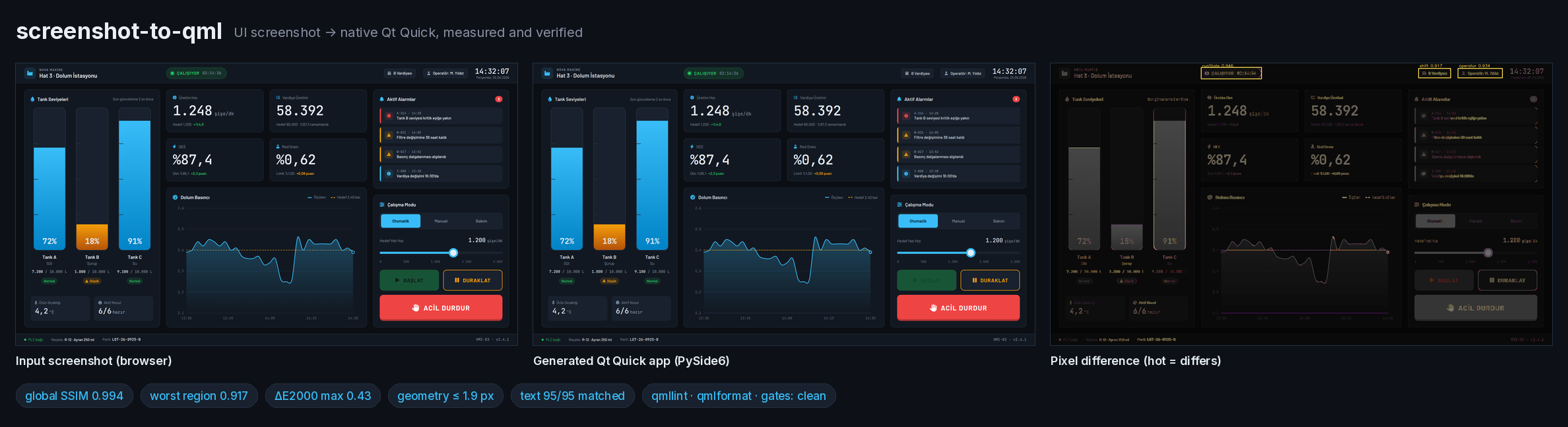
An industrial HMI (examples/hmi-dolum), a
1920×1080 screenshot rebuilt in production mode:
| Metric | Result | Gate |
|---|---|---|
| Global SSIM (text masked) | 0.994 | ≥ 0.98 |
| Worst region SSIM | 0.943 | ≥ 0.90 |
| Color ΔE2000 (max over surfaces) | 0.43 | ≤ 2.0 |
| Geometry offset (max) | 1.9 px | ≤ 2 px |
| Text strings found / max offset | 95 of 95 / 1.8 px | 100 % / ≤ 2 px |
| 13 quality gates | clean | 0 errors |
| C++ host's frame vs the PySide6 render | SSIM 1.000 | ≥ 0.98 |
The instrument cluster in the GIF (examples/auto-cluster),
1920×720, Qt 5.15 with the C++ host: global SSIM 0.999, worst region 0.983, ΔE 0.0, geometry
≤ 1.1 px, 61 of 61 strings, all 13 gates clean. The binary built against Qt 5.15.13 runs with no
QML warnings and draws the same frame as the reference render (max 32-px tile difference 14.7 of
24 allowed). Its Dial component (one Shape, generated ticks and labels, a needle bound tovalue) drives both the speedometer and the tachometer.
Control kit
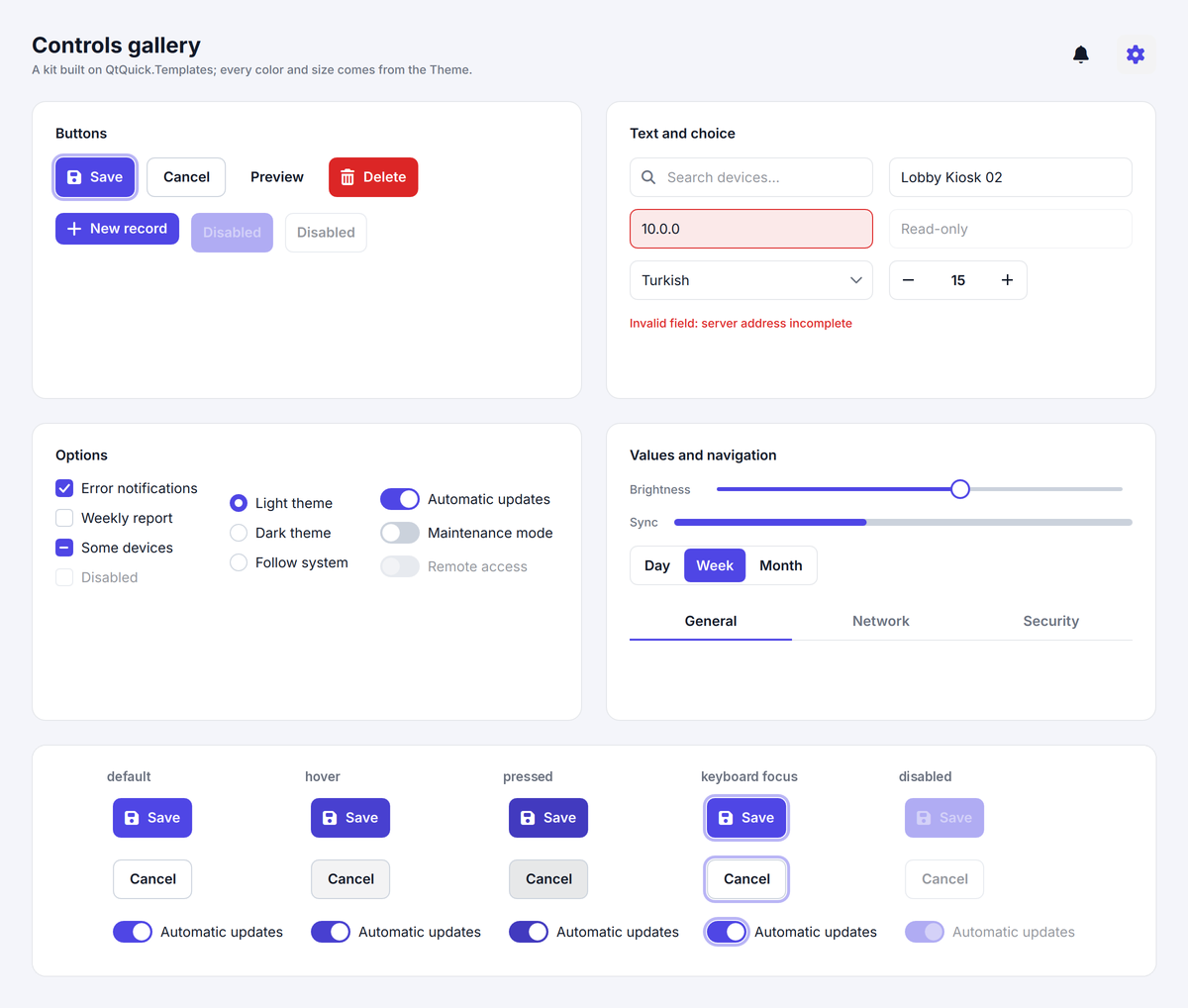
Every new project gets 14 Template-based controls styled only through Theme roles. When the
design does not show hover, pressed, focus or danger colors, they are derived from its own
tokens. The gallery ships in English with
a Turkish translation and passes all 13 gates.
Results
Twenty original eval screens (dashboards, HMIs, a kiosk, forms, phone screens, dense tables,
two HTML pages and two hard cases), each built once by an agent that sees only its input and
the skill, scored against ground truth extracted from the live DOM. (Case 21, the Qt 5.15
instrument cluster, was added in v1.1; agent runs on it come next.)
Full results.
Skill v1.0 with Claude Opus, all 20 cases:
| Criterion | Result |
|---|---|
| Global SSIM ≥ 0.95 (text masked) | 20 / 20 (min 0.987, mean 0.995) |
| Region SSIM ≥ 0.90 (each region aligned within 1 px) | 18 / 20 |
| Color error ΔE2000 ≤ 2 on solid fills | 19 / 19 measured (max 1.1) |
| Position and size error ≤ 2 px | 18 / 20 |
| Zero runtime QML warnings · lint clean | 20 / 20 · 19 / 20 |
| Controls reachable with Tab, focus visible | 337 / 337 |
16 of 20 builds meet every criterion at once. Under the stricter calibrated thresholds (global
SSIM ≥ 0.98, every string within 2 px, all 13 gates) 12 of 20 pass outright, and each miss is
one to three items: a dashed chip, a 28 px badge, a dash typed as a hyphen, a value 3–4 px off.
Against the same model without the skill (cases 01–08):
| Without skill | Skill v1.0 | |
|---|---|---|
| Full pass (visual checks + all gates) | 0 / 8 | 4 / 8 |
| Visual checks only | 6 / 8 | 4 / 8 |
| Controls reachable with Tab, focus visible | 9 / 19 | 153 / 153 |
MouseAreas posing as buttons |
46 | 0 |
| Runtime warnings · hard-coded values · untranslatable strings | 48 · 239 · 142 | 0 · 0 · 0 |
A strong model already copies the pixels well, and on these eight it passed the visual checks
more often without the skill (one build per case, so ±1 case is noise). What the skill adds is
everything a real codebase needs around the pixels: design tokens, keyboard and screen-reader
support, clean lint, translatable text and a verified fidelity report.
Other models and agents (shared cases):
| Cases | All gates pass | Full pass | |
|---|---|---|---|
| Claude Opus | 05, 09, 12, 18 | 4 / 4 | 3 / 4 |
| Claude Sonnet | 05, 09, 12, 18 | 4 / 4 | 2 / 4 |
| Claude Haiku | 05, 12, 18 | 3 / 3 | 0 / 3 |
| Codex CLI (two runs) | 05, 09, 12, 18 | 4 / 4 | 1 / 4 |
The production rules carry over to every model and agent tested. Visual fidelity does not
yet: Haiku leaves more text 2–4 px off, and Codex CLI got the HTML case right but missed the
three screenshot cases on fonts and text position, on a machine whose font catalog was most
likely incomplete (details).
The analyzers and matchers were tuned on cases 01–08; cases 09–20 are unseen screens for them.
Analysis (evals/score_analysis.py) |
Cases 01–08 | Cases 09–20 |
|---|---|---|
| Palette recall (ΔE ≤ 2) | 95.8 % | 95.2 % |
| Surface recall (IoU ≥ 0.85) | 97.3 % | 93 % (70 % with case 10's 168-cell heatmap) |
| OCR exact strings · character error rate | 76 % · 12 % | 71 % · 14 % |
| Font size error | 1.2 px | 1.5 px |
Matcher (evals/score_matching.py, evals/synthetic_matching.py) |
Cases 01–08 | Cases 09–19 | Synthetic images |
|---|---|---|---|
| Font family per run / weight ±100 | 95 % / 96 % | 93 % / 93 % | 95 % / 100 % (17 other families) |
| Font outside the catalog flagged | 0 false flags | 0 false flags | 7 of 12 faces, 0 of 17 false |
| Icons top-1 / top-3 (of 11,869) | 90 % / 94 % | 94 % / 96 % | — |
| Shadows found / false alarms | 31 of 44 / 0 of 78 | 46 of 79 / 10 of 217 | 24 of 24 |
| Gradients accepted / solid fills misread | 7 of 8 / 0 of 49 | 4 of 5 / 0 of 73 | angle error 0.04° |
Case 20's font is outside the catalog by design and is flagged. The weak spot is shadows on busy
or dark backdrops: in the glassmorphism case only 4 of 13 are found. Per-case numbers are inevals/matching-results.md andevals/synthetic-results.md.
Eval set
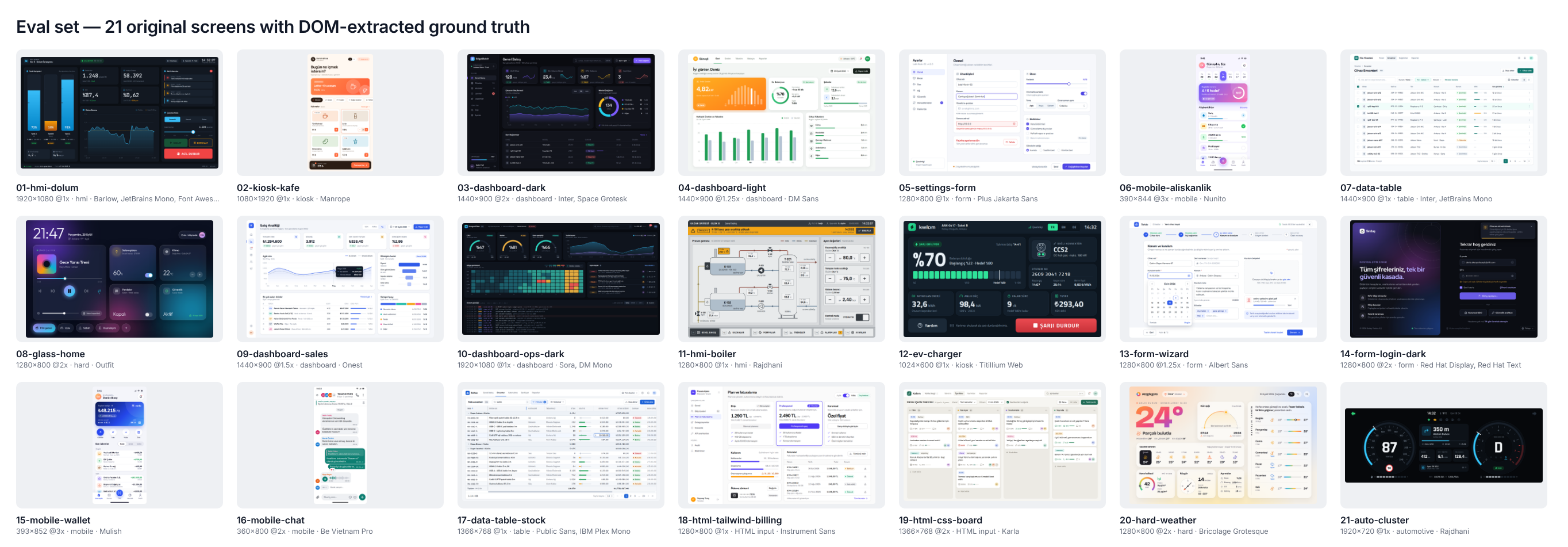
All twenty-one screens are original designs with fictional brands, built from HTML so that every
color, box, string and font is known exactly. evals/ holds the cases, the
builder, the scorer, and a harness that hands any agent the same folders and prompt
(prepare_run.py, run_agent.py), so you can rerun the comparison with your own agent or
model.
Platform support
| Platform | Status |
|---|---|
| Linux (Ubuntu 24.04) | tested: CI, every eval run |
| Windows | used for the Codex runs; set PYTHONUTF8=1, Tesseract must be on PATH |
| macOS | not tested yet |
| Targets | desktop · embedded-gpu (Raspberry Pi, Jetson; eglfs) · embedded-sw (software renderer; linuxfb) |
| Qt | 6.8+ (PySide6 and C++) · 5.15 (C++; tested with Qt 5.15.13 on Ubuntu 24.04) |
Limitations
- Qt Quick's
Rectanglehas no dashed border; dashed outlines are approximated and show in
region scores. - Shadows on busy or dark backdrops (glass, photos) are often missed by the fitter.
- Fonts outside the 63-family catalog are flagged, not identified: the agent asks for the font
or names the closest substitute. - One build per case per arm: differences of about one case between arms are within noise.
Repository layout
skills/screenshot-to-qml/   the installable skill: SKILL.md, references/, scripts/, assets/, examples/
.claude-plugin/             Claude Code plugin marketplace manifest
evals/                      21 cases, case builder, scorers, agent harness, results
tests/                      pytest suite: scripts, schema, control kit, gates, renders, C++ builds
docs/                       README images; docs/tools draws the eval and matcher sheets and the demo GIF
Roadmap
| Version | Scope | Status |
|---|---|---|
| 0.2 – 0.4 | skill structure, render / diff / gates, eval set, automatic analysis | ✅ |
| 0.5 | production control kit; a11y, states and i18n gates | ✅ |
| 0.6 | font, icon, shadow and gradient matching | ✅ |
| 0.7 | C++ host, embedded profiles, deployment | ✅ |
| 1.0 | 20 eval cases, HTML input, multi-model and Codex CLI runs | ✅ |
| 1.1 | Qt 5.15 target (C++ host), automotive instrument cluster example and eval case | ✅ |
| 1.2 | agent runs on the cluster case; Codex CLI on more cases with a verified font catalog | next |
Contributing
Issues and pull requests are welcome. See CONTRIBUTING.md: run ruff check .
and pytest before a PR, and build new eval cases with evals/tools/build_case.py.
License
MIT for the code, docs and eval designs. Bundled fonts are under the SIL Open Font License
1.1; bundled icons come from Lucide (ISC), Tabler Icons (MIT) and Font Awesome Free (icons
CC BY 4.0, fonts OFL 1.1). License texts are in evals/assets/licenses.
The icon matcher also downloads Heroicons (MIT) into its cache; it is not bundled.
Yorumlar (0)
Yorum birakmak icin giris yap.
Yorum birakSonuc bulunamadi