mochi
Health Uyari
- License — License: MIT
- Description — Repository has a description
- Active repo — Last push 0 days ago
- Low visibility — Only 7 GitHub stars
Code Gecti
- Code scan — Scanned 12 files during light audit, no dangerous patterns found
Permissions Gecti
- Permissions — No dangerous permissions requested
Bu listing icin henuz AI raporu yok.
Mochi: a clay mascot for Claude Code that reacts to everything it does

Mochi
A little clay friend that lives above your Claude Code prompt.
It reacts to everything Claude does, stops the commands you would regret,
and keeps your context, session and weekly limits in plain sight.





English · Türkçe · Español · Deutsch · Français · Português · Русский · 中文 · 日本語 · 한국어

One real turn. Every face and line here is Mochi's own drawing and reaction code.
⚡ Install in 10 seconds
/plugin install mochi --marketplace oztrkemree/mochi
Type it in any Claude Code chat, answer y to add the marketplace and pick the user scope. That's it: Mochi appears at once, and in every chat you open after that. Nothing to configure.
[!NOTE]
Mochi is built on Claude Code's hooks modules (function hooks) and needs Claude Code 2.1.293 or later (claude --versiontells you yours). Older builds, such as 2.1.286, do not load the module at all, so Mochi never appears.
| 🎭 30 moods that follow every tool call |
🛡️ A shield for rm -rf, force pushes and leaked keys |
📊 Limit rings with a forecast of when you run out |
👒 136 things to wear earned by real work |
🎭 It feels what Claude is doing
Thinking, reading, searching, typing, running a command, waiting for you, celebrating a green test run, dizzy after three errors in a row, asleep when you are away. Thirty moods, and no jump cuts: every pose eases out of the last, so the band never flickers, it breathes.

Beside the face: what is happening in plain words (editing checkout.tsx, tests passed · 4s), the last tool calls as a row of little squares (a running one breathes, a failed one turns red), your branch and how many files changed.
📊 Your limits, at a glance, with a forecast

Three rings: the context window, the 5‑hour session and the week. No more typing /usage every ten minutes.
- A forecast, not just a number. Burning through a window faster than it resets? The ring says when it will run out (
full 16:40), amber, then red as it gets close. - Good news too. When a limit you had nearly used up resets, Mochi tells you.
- The context ring knows what's in it: system prompt, tools, MCP, memory, skills, messages, each its own color, and a tick where auto‑compact will kick in.
🛡️ The shield: stops what you can't undo

The shield reads every command Claude runs, through Bash or PowerShell, and every edit it makes. Before anything that cannot be undone it stops and asks, saying in plain words what would be destroyed: deleting files and folders for good (rm -rf, Remove-Item -Recurse, del /s), wiping a drive, overwriting a branch's history, throwing away uncommitted changes, dropping a database, tearing down infrastructure or a cloud bucket, npm unpublish, docker system prune -a, a script piped from the internet, sudo.
- Force pushes are judged by branch. Onto
main,master,trunkordevelopit asks and names the branch. Onto your own branch it asks with a nervous look instead of the alarm; a--force-with-leasethere only gets the look. - Secrets stay out of your history. Before Claude writes,
git adds or commits something that looks like a live key or token (AWS, GitHub, Anthropic, OpenAI, Slack, Stripe, a private key, a password) or a file like.envorid_rsa, Mochi asks and shows the value masked:AKIA••••••LE. Placeholders and obvious test values go through. - Always allow here. The question offers Run (or Write), Stop and Always allow here, which remembers that kind of command for this repository. It holds for what stays inside it: a command or an edit that reaches outside (
rm -rf ~, a file in your home folder) asks again./mochi shieldlists what is allowed where;/mochi shield resetforgets it all.
~/.claude/mochi/shield.json
{
  "add": [{ "match": "terraform\\s+apply", "says": "changes the live infrastructure" }],
  "off": ["publish", "sudo"]
}
matchis a regular expression tried on every Bash and PowerShell command, case ignored.saysis what such a command would do, shown in the question; without it the question says it matches one of your rules.offlists built-in kinds to stop asking about: any key ofdangerinhooks/lang/en.ts(rm,forcePush,publish,sudo…),secretor one kind of it (secret:aws,secret:github,secret:apiKey,secret:slack,secret:stripe,secret:privateKey,secret:generic),secretFileandsecretEdit.- Mochi reads the file again whenever it changes, and says so in a toast. Whatever it cannot use is skipped and named; if the file is not valid JSON, none of your rules apply until it is. Before Claude itself changes the file, the shield asks.
🧡 Everything else it notices
🔁 A loop watchThe same command failing three times, the same error coming back, the same call returning the same thing: Mochi notices before your limit does, and tells you to press Esc. |
🔔 Alerts while you're awayA system notification (macOS, Windows or Linux) when a turn longer than two minutes ends, when a long job stops to wait for you, when your limit resets or when CI fails. Go make tea. |
💬 Every chat on one boardEvery Claude Code chat on your machine, this one first and the ones waiting for you next, with its branch (worktrees marked), what it is doing and for how long. A chat that has waited five minutes for you sends one more notification. |
🚦 CI after a pushMochi follows your GitHub Actions runs through your own |
💡 Tips that fit the momentNow and then, while idle, one short Claude Code tip about what just happened: Esc Esc after a stopped turn, |
🏅 Badges for real workEighteen of them, each celebrated once: a first green test run, a comeback in a single turn, a tidy day that removes more than it adds, night owl, early bird, polyglot, a marathon turn, a hundred commits, and hard ones: a 30‑day streak, 500 commits, 5,000 edits, 10,000 lines removed… |
🎉 Special days, small surprisesSakura season, Hacktoberfest, Halloween, New Year and your birthday each dress Mochi, in what it has earned. Say good night to Mochi, or thank it. After two hours without a break, it suggests a stretch. |
🧩 Other plugins can talk through itYour deploy plugin can make Mochi cheer when a release goes out, your linter can make it frown. One call: |
🔍 The details pane
Click the rings and everything opens up: this session at a glance, every chat on your machine, your CI and pull request, and every changed file with the lines added and removed, the ones Claude touched in this chat first, with each file's diff in red and green.
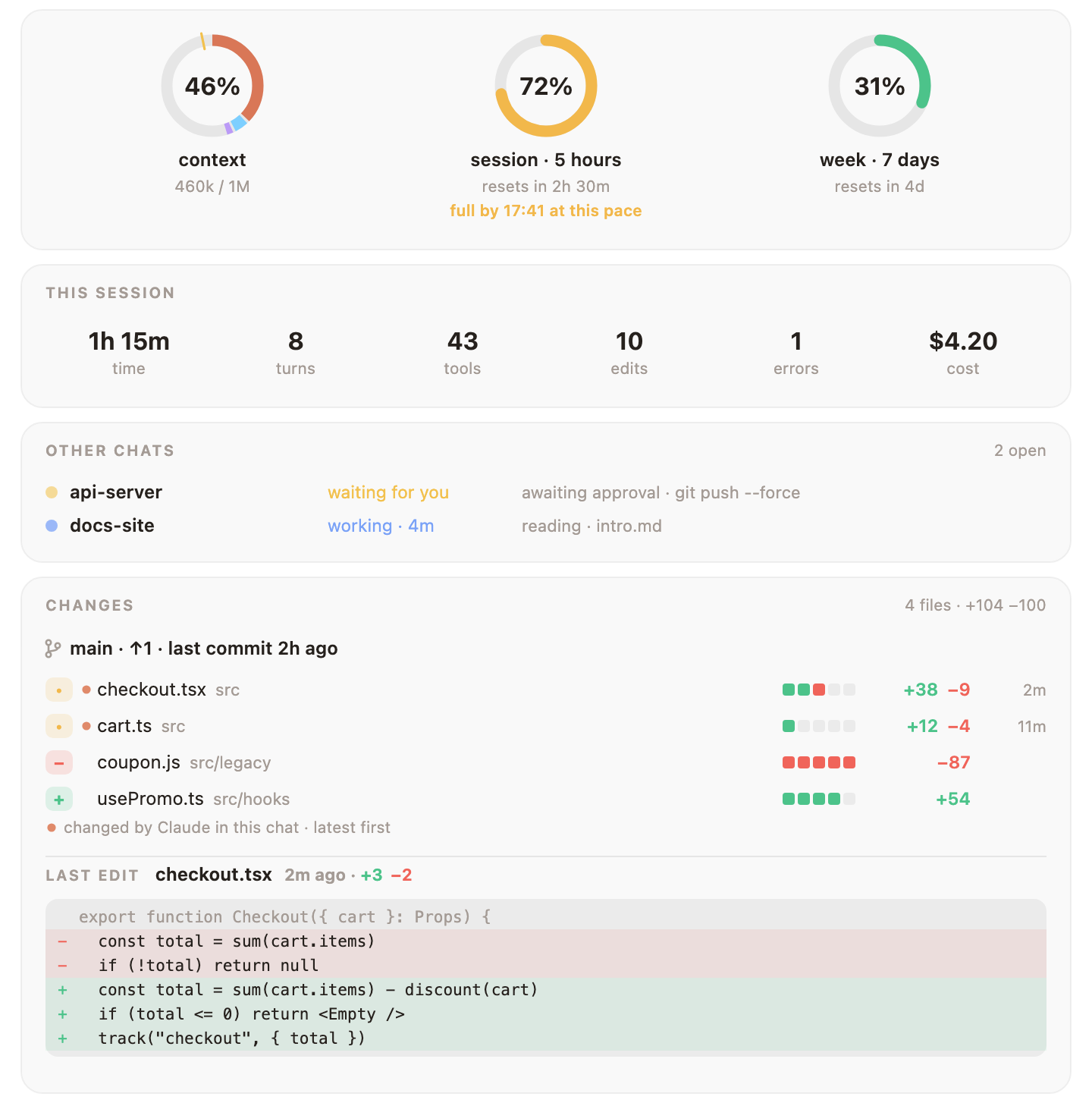
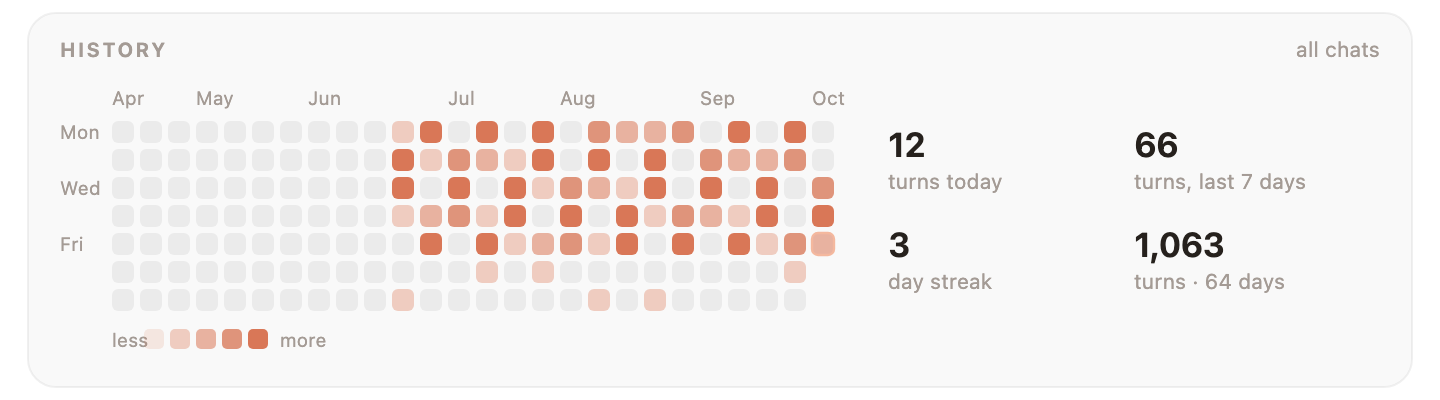
Further down: the context by category, your recent turns, a calendar of every chat's days, your level, wardrobe and badges, and every setting and action, one click away.
👒 A wardrobe that grows with you

Every turn, edit, commit and working day earns experience. Levels unlock things to wear: 136 items across head, face, neck, hand and the spot beside Mochi. Nothing opens by the date: levels open most, habits some, and the hard badges the rest (a witch hat and a pumpkin for a hundred and fifty nights, a cake for five hundred commits). Once earned, a witch hat comes on at Halloween, a cake on your birthday; coffee comes in the morning and a night cap after midnight.


Pick what to wear in the Wardrobe section of the details pane, or with /mochi wear glasses. Tell Mochi your birthday with /mochi birthday 04-23; it stays on your machine. Have an idea for something new to wear? docs/OUTFITS.md shows how to add it.
📸 Show it off
/mochi carddraws a card: Mochi in today's outfit, your level, experience and streaks./mochi wrappedsums up your month across every chat in one picture: hours, turns, commits, your busiest day, your longest streak and the folder you spent most time in./mochi wrapped yeardoes the year. In the first week of a month, Mochi tells you once that last month's is ready./mochi snapsaves the band and the details pane as they are right now. Have a look before you post it: it shows what the band shows, your branch included. Your other chats and the lines of your last edit stay out.
They are SVG files under ~/.claude/mochi/share/, made to read on light and dark pages and needing nothing outside themselves. X and Reddit take only PNG: with rsvg-convert or ImageMagick installed, /mochi snap saves a PNG of each as well.
Clone your profile repository, the one named after your username (
you/you).Run
/mochi card ~/code/youwith the path to that folder; the card lands there asmochi-card.svg.Paste the line Mochi gives you into the repository's
README.md, then commit and push:[](https://github.com/oztrkemree/mochi)
The card is a snapshot: run /mochi card again after a level-up and push the new one.
⌨️ Commands
You never need one: Mochi works the moment it is installed. When you want to steer it, it is all under /mochi.
| Command | What it does |
|---|---|
/mochi |
Hide or show the band (/mochi hide · /mochi show say which) |
/mochi details |
Open the details pane |
/mochi wear [item | auto | none] |
Put something on, let Mochi dress itself, or take everything off |
/mochi shield [on | off] |
See whether the shield is on and what is always allowed where |
/mochi card [path] · /mochi wrapped [year] · /mochi snap |
Save a picture to share |
/mochi small · /mochi big |
One line or full size |
| Command | What it does |
|---|---|
/mochi |
Hide or show the band (/mochi hide · /mochi show say which) |
/mochi details |
Open the details pane |
/mochi level |
Your level, experience and what is still locked |
/mochi wear [item | auto | none] |
Put something on, let Mochi dress itself, or take everything off |
/mochi badges |
The badges you have earned, and how to earn the rest |
/mochi chats |
Every chat on this machine, the ones waiting for you first |
/mochi shield [on | off] |
See whether the shield is on and what is always allowed where; on or off turns it so |
/mochi shield reset |
Forget everything “Always allow here” remembered |
/mochi alerts |
Turn the notifications on or off (and the note that your wrapped is ready) |
/mochi ci |
Turn the CI watch on or off |
/mochi tips |
Turn tips, CLAUDE.md suggestions and the what's-new note on or off |
/mochi breaks |
Turn the stretch suggestion on or off |
/mochi sound |
Turn the sounds on or off |
/mochi plugins |
Turn reactions from other plugins on or off |
/mochi card [path] |
Save a card for your GitHub profile |
/mochi wrapped [year] |
Save your month, or your year, in one picture |
/mochi snap |
Save the band and the details pane as pictures |
/mochi tour |
Watch the first-run tour again |
/mochi news |
What this version brought |
/mochi birthday [MM-DD | none] |
Tell Mochi your birthday, see it, or forget it |
/mochi lang [code | auto] |
Show or change the language |
/mochi small · /mochi big |
One line or full size |
/mochi export |
Save everything Mochi keeps in one JSON file |
/mochi reset [level | history | all] |
Clear the level's memory, the history, or everything, settings included; it asks first, and exports and your shield.json stay |
/mochi feedback |
A link to a bug report, filled in with the versions, your system, the surface and the language |
/mochi status |
What Mochi knows right now |
English command words always work, and each language adds its own (/mochi aksesuar, /mochi idioma, /mochi sprache…). A command that turns something on or off switches it each time; add on or off to set it: /mochi tips off.
🌍 16 languages
English · Türkçe · Español · Deutsch · Français · Português · Русский · 中文 · 日本語 · 한국어 · Italiano · Polski · Українська · हिन्दी · Bahasa Indonesia · العربية
Mochi speaks Claude Code's language setting when it is one of these; otherwise your system's preferred language, then LANG; otherwise English. /mochi lang ja picks one yourself, /mochi lang auto goes back to automatic.
🔒 What it touches
Everything stays on your machine. Mochi itself makes no network requests; the one thing that talks to the internet is your own gh, for the CI watch, and /mochi ci turns that off.
- git, in the chat's folder, only to read:
git status,git log,git diff --numstatandgit rev-parsefor the band and the details pane. When the shield has to look closer, it asks for the branch and the default branch, the files agit addwould add (git ls-files) and what agit commitwould commit (git diff). - gh, only while the CI watch is on, with your own login (Mochi never sees your token):
gh pr viewwhen a chat starts, when you open the details pane and around a push;gh run listonly after a push in this chat, every 30 seconds until the runs end, half an hour at most./mochi citurns both off. - The system's own tools: notifications through
osascripton macOS, PowerShell on Windows andnotify-sendon Linux. For the language,defaults read -g AppleLanguageson macOS andreg queryon Windows;unametells macOS from Linux. For/mochi snap's PNGs,rsvg-convertor ImageMagick'smagick, if you have one. Files of closed chats, and what/mochi resetclears, are deleted by name withrm, orcmd'sdelon Windows, only inside~/.claude/mochi/. - Files under
~/.claude/mochi/: where each open chat stands, daily counts, your level and badges, usage readings for the forecast, how often each tip was shown and the short instructions you repeat (never whole prompts), the markers that tell one chat to announce a limit reset, yourshield.jsonif you write one, and what/mochi card,wrapped,snapandexportsave. Settings, what is always allowed and your birthday live in Claude Code's store for plugins. - Your project: Mochi reads
CLAUDE.mdbefore it suggests an instruction and appends one line only after you pick Add. It writes the card there only if you give/mochi carda path there. To count lines and spot secrets it reads a file Claude is about to overwrite, and for a command that adds and commits at once, the new files it would add (up to 20, under 1 MB each). Nothing it reads is kept. - Other plugins can show a mood and a short line through Mochi, signed with their name, each at most once every 10 seconds;
/mochi pluginsturns that off./mochi feedbackonly prints a link: nothing is sent.
❓ FAQ
I installed it, but Mochi doesn't show up.Check claude --version: Mochi needs 2.1.293 or later. Older builds do not load hooks modules at all. If you are on a new enough build, /mochi status says what Mochi knows, and /mochi feedback gives you a bug report already filled in.
/mochi small puts it on one line. /mochi hides it altogether, and again brings it back.
No. Mochi makes no network requests at all. It keeps short counts under ~/.claude/mochi/, never whole prompts. See what it touches.
It only asks before what cannot be undone, and Always allow here remembers your answer for that repository. /mochi shield off turns it off; shield.json turns single kinds off.
🧩 For plugin authors
Your plugin can make Mochi react: cheer when a deploy finishes, look worried when a check fails. List mochi under dependencies and call $.mochi.react({ mood, line }) or $.mochi.celebrate({ line }). docs/API.md has the calls, the limits and a whole example plugin.
🤝 Contributing
Bug reports, ideas, translations, art and pull requests are all welcome. Open an issue (/mochi feedback gives you a bug report already filled in), or read CONTRIBUTING.md to start on the code: two commands check everything (claude plugin validate . and claude plugin test .), and adding a language takes one dictionary and a few lines. What changed in each version is in CHANGELOG.md.
The moving pictures on this page are drawn by Mochi's own code: node scripts/gifs.mjs and node scripts/demo.mjs make them again.
📄 License
MIT. Use it, change it, share it.
If Mochi made you smile, a ⭐ helps other people find it.
Made with care by Emre Öztürk and Claude.
Yorumlar (0)
Yorum birakmak icin giris yap.
Yorum birakSonuc bulunamadi