plasma-applet-claudemeter
Health Uyari
- License — License: MIT
- Description — Repository has a description
- Active repo — Last push 0 days ago
- Low visibility — Only 7 GitHub stars
Code Gecti
- Code scan — Scanned 4 files during light audit, no dangerous patterns found
Permissions Gecti
- Permissions — No dangerous permissions requested
Bu listing icin henuz AI raporu yok.
A KDE Plasma 6 panel applet that monitors your Claude Code rate limits.
Claude Meter

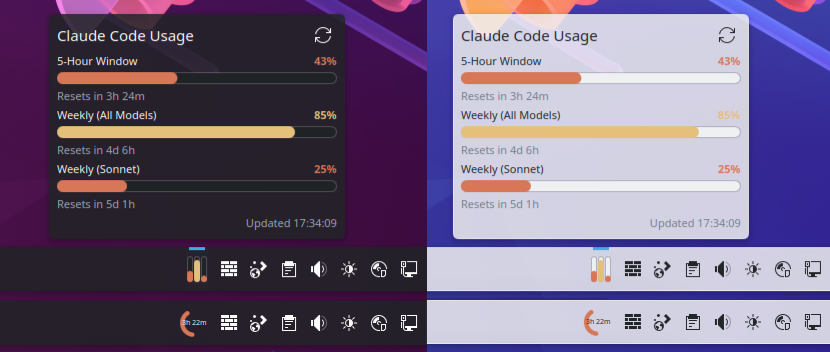
A KDE Plasma 6 panel applet that monitors your Claude Code rate limits.
Features
- Displays the 5-hour and 7-day (all models) rate limit windows
- Adds a separate bar for any active model-specific weekly limit returned by the API (e.g. Opus, Cowork), discovered dynamically so new plan tiers work without an update
- Two compact panel styles: stacked bars or circular gauge
- Configurable warning/critical thresholds with color coding
- Customizable bar colors
- Auto-refreshes on a configurable polling interval
- Warning icon when credentials are missing or the API returns an error
How It Works
- Reads the OAuth token from
~/.claude/.credentials.json(created by the Claude Code CLI when you sign in) - Calls
GET https://api.anthropic.com/api/oauth/usagewith a bearer token - Parses the response for the 5-hour and 7-day windows, plus any
seven_day_*per-model entries that have an active limit or non-zero utilization - The token is passed to
curlvia stdin (not as a command-line argument, which would be visible in/proc)
Note: This widget uses an internal Anthropic API endpoint that is not part of the public API documentation. It may change or stop working without notice.
Requirements
- KDE Plasma 6
- Claude Code CLI with an active subscription (Pro or Max)
python3curl
Install
From the KDE Store
Browse to Claude Meter on the KDE Store and click Install, or use Discover (KDE's software center) to search for "Claude Meter".
From source
git clone https://github.com/p3kj/plasma-applet-claudemeter.git
cd plasma-applet-claudemeter
bash install.sh
Then add the "Claude Meter" widget to your panel.
Uninstall
kpackagetool6 -t Plasma/Applet -r com.github.p3kj.claudemeter
Configuration
Right-click the widget and select "Configure...". Options include:
- Panel style - bars (stacked) or gauge (circular arc)
- Gauge metric - 5-hour window, 7-day (all models), or the most-utilized active per-model weekly
- Poll interval - how often to fetch usage data (default: 900s)
- Warning / Critical thresholds - percentage thresholds for color changes
- Colors - customize the normal and warning bar colors
- Claude folder - path to an alternate Claude config folder (default:
~/.claude). Useful if you run multiple accounts viaCLAUDE_CONFIG_DIR, e.g.~/.claude-personal. Add one widget instance per account to monitor them side by side
Troubleshooting
- Widget shows a warning icon - make sure you are signed into the Claude Code CLI (
claudein a terminal). The widget reads your OAuth token from~/.claude/.credentials.json, which is created on sign-in. - "Unauthorized" or 401 errors - your token may have expired. Run
claudeagain to refresh it. - No data after install - wait for the first poll interval (default 15 minutes), or right-click the widget and reconfigure with a shorter interval for testing.
- 429 "Too Many Requests" errors - the Anthropic API rate-limits usage polling. The default 15-minute interval should be safe, but if you set a very short poll interval you may get throttled. Increase the interval in the widget configuration if this happens.
Development
Tasks are driven by just:
just              # list the recipes
just check        # validate metadata, config schema, shell scripts and QML, then build
just reinstall    # install into the running session and restart plasmashell
just run          # open the widget standalone
just reinstall restarts plasmashell on purpose: after a reinstall the panel keeps
running the previously cached QML, so a plain install.sh can look like your change
did nothing.
Releasing
Record changes as you go, then cut the release:
just note "Add a thing"      # appends a bullet under "## Unreleased" in CHANGELOG.md
just release minor           # patch | minor | major, or an explicit 1.0.0
just release runs the preflight checks (on master, no stray changes, in sync with
the remote, tag unused, gh authenticated), lints, shows what it is about to do and
asks for confirmation. It then writes the version into metadata.json, dates the
changelog section, builds dist/claudemeter-<version>.plasmoid, commits, creates an
annotated tag, pushes, and publishes a GitHub release with the archive attached.
Two deliberate holes in the "clean tree" check: an uncommitted CHANGELOG.md is fine,
because the release commit picks it up, so just note straight into just release
works. And untracked files elsewhere in the repo (design sources, screenshots) are
ignored, since they cannot end up in the archive. An untracked file inside the
packaged set does stop the release, because it would otherwise ship to the store
without ever being committed.
DRY_RUN=1 just release patch does all of that locally but skips the push, the GitHub
release and the browser. Undo it with git tag -d v<version> && git reset --hard HEAD~1.
The KDE Store is the one step that cannot be automated: its OCS API is read-only, so
there is no way to upload a new file or set a version over HTTP. The release recipe
therefore ends by opening the store edit page
and dist/ in a file manager, and putting the release notes on your clipboard, leaving
you the upload, the version field and a save.
License
Yorumlar (0)
Yorum birakmak icin giris yap.
Yorum birakSonuc bulunamadi