Quotum
Health Warn
- License — License: MIT
- Description — Repository has a description
- Active repo — Last push 0 days ago
- Low visibility — Only 5 GitHub stars
Code Fail
- spawnSync — Synchronous process spawning in .github/workflows/ci.yml
- rm -rf — Recursive force deletion command in .github/workflows/ci.yml
- process.env — Environment variable access in .github/workflows/ci.yml
Permissions Pass
- Permissions — No dangerous permissions requested
No AI report is available for this listing yet.
Self-hosted dashboard for Claude Code, Codex and Antigravity usage limits across all your machines and your team: 5-hour and weekly windows, spending plans, forecasts. No provider tokens needed.
Quotum
English · Русский




Quotum shows how much of your coding-agent subscriptions is left — Claude Code, Codex
and Antigravity — on every machine you work on, in one place: for you alone or for a
whole team. It also shows OpenRouter balances and API-key caps, DeepSeek balances, and personal z.ai subscription quotas. You host it yourself;
the agent never reads provider tokens, and the hub encrypts the dedicated provider key you
explicitly connect.
For one machine, download the desktop app for Windows or Linux: no hub
or account to set up. For several machines or a team, run the hub and agent below.
Quick start
# The hub; `docker logs quotum` shows the setup code of the first account
docker run -d --name quotum -p 8080:8080 -v quotum:/data -v quotum-keys:/keys ghcr.io/padurets/quotum-hub

# On every machine: confirm the code in the browser, then keep measuring in the background
npx quotum connect http://<the hub>:8080
npx quotum start
npx quotum alone prints this machine's limits without any hub. More in
Getting started.
Why I made it
I pay for several coding agents at once, and each has its own limits: a five-hour
window, a weekly one, sometimes a separate weekly window for a particular model. To know
where I stood I had to open each tool, type /usage and do the maths in my head: at
this pace, will the weekly limit last until the weekend? On top of that I don't work on
one machine. There is a laptop, a few remote dev environments and some containers, and
the same subscriptions are signed in on several of them.
I wanted one page that answers the questions I actually have:
- how much is left in each window, and when does it reset;
- am I spending faster than I planned for this week;
- what did the last few days look like.
I looked around first. What I found either lives on a single machine (the dashboard
started out reading from CodexBar, a nice macOS
menu-bar app), or wants your provider tokens or browser cookies so it can call the
providers' APIs for you. The first didn't match how I work, and I didn't want to do the
second. So I wrote Quotum.
How it works
There are two parts:
- The agent is a small native program (Rust, a single binary of about 3 MB). It
runs on each machine where you use coding agents and asks their own command-line
clients for the limits, the same numbers you see when you type/usage. It doesn't
read tokens, make model requests or call provider APIs itself: the client does
exactly what it does when you use it. - The hub is a small web service (Node.js and SQLite) with the dashboard. Agents
send it what they measured; it keeps the history and draws it.
 laptop ──┐
 dev VM ──┼── quotum agent ── HTTPS ──►  hub  ──►  dashboard
 box    ──┘   claude · codex · agy       SQLite
If one subscription is signed in on several machines, they don't all measure it. The hub
puts one machine on duty per subscription (preferably the one you're working on), the
others wait, and duty moves on when that machine goes quiet.
The agent also works on its own: npx quotum prints the limits of this machine and the
coding agents running on it, working or idle.
$ npx quotum
                                   left  resets
Codex pro     weekly                 4%  in 3d 16h
              free resets            1   expires in 29d 23h
Claude max    5 hours               98%  in 4h 27m
              weekly                89%  in 5d 9h
              Fable weekly         100%  in 5d 9h
Antigravity   Gemini 5 hours       100%  in 4h 59m
              Gemini weekly         96%  in 1d 3h

running here: 3 · 2 working
Claude        quotum               working  started 3h 39m ago
Claude        quotum · quotum.feat-18 working  started 52m ago
Codex         api                  idle     started 25m ago · editor
What the dashboard shows
The board shares one time range across card measurements, agent sessions, charts and
tables. In a historical range, cards show the last retained measurement before its end,
with freshness checked at that boundary; unavailable history stays unknown. Values
keep their measurement times, and reset times are shown as dates and times. Loading or
failed reads label any retained results with the range they actually cover.
Measurement status, connection errors, refresh actions, forecasts, free-reset
availability and reset announcements remain live. The compact panel and native
notifications also stay live, independently of the board's historical range.
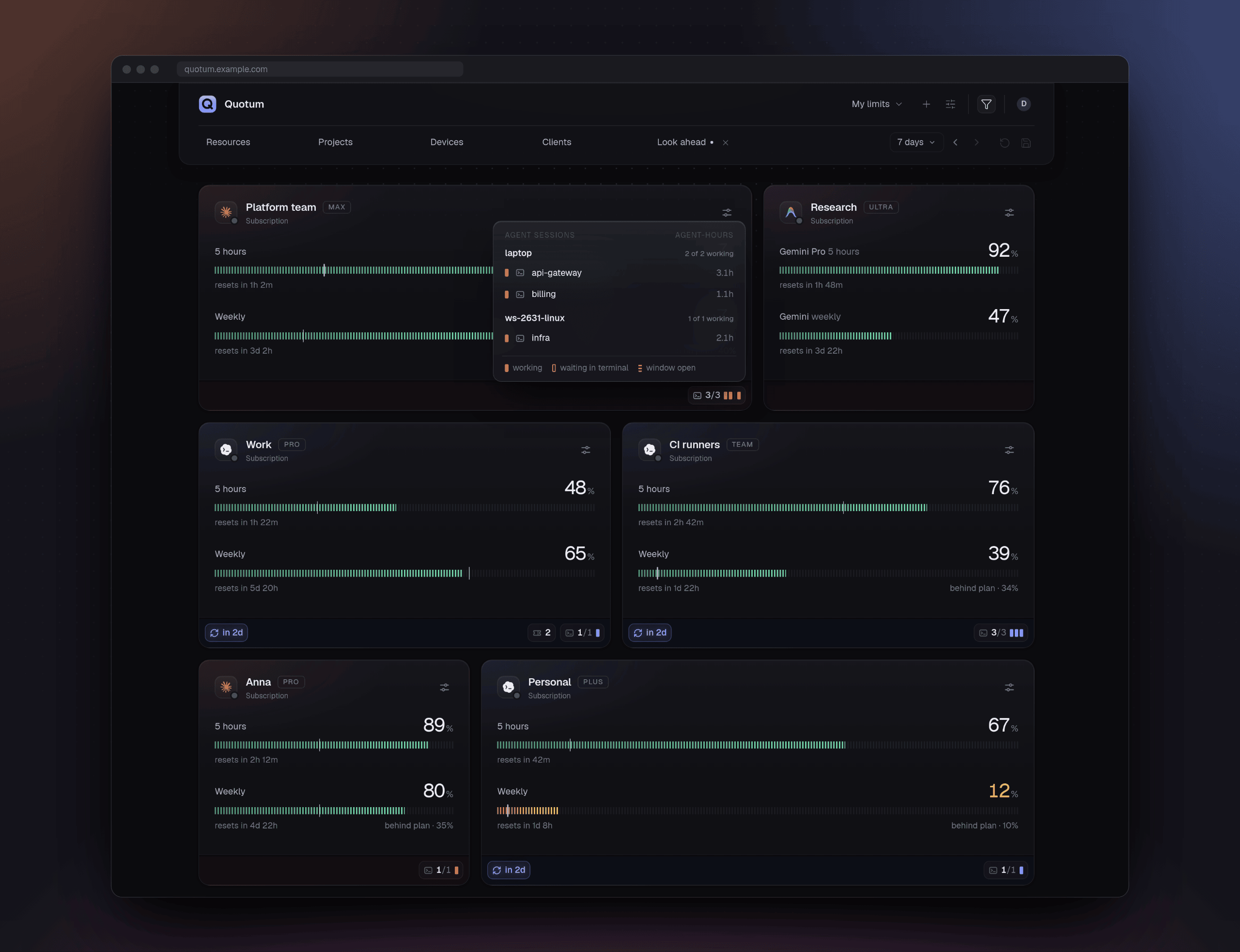
- A card per subscription, one meter per window: green above 30%, amber at 30% and
below, red under 10%. A tick on the meter shows where your spending plan expects you
to be at the displayed time. The dot on the provider's logo tells how measurements
are going now; historical values have their own measurement time and stale state. - Which agents worked on it during the period. Under the limits, a mark per
Claude Code, Codex or Antigravity session with recorded work on the subscription,
grouped by machine, including sessions no longer running. The panel shows each
session's project, folder (a worktree or a folder inside the repository) and work
within the selected period in agent-hours. Marks also show current working state
when known; current presence does not add work to the period. Terminals, editors and
the Codex app alike. - Purchased Codex credits. Additional funds appear in the subscription's footer,
beside free resets, with the same compact amount and disclosure in the compact view.
The initial estimate is 0.04 USD per credit; Currencies lets you set a personal
USD-per-credit rate or restore the default. Hover over the amount for the exact
native balance; open it for the rate and measurement time.
Subscription extra funds trends shows balance history in its own widget, with its own
subscription selection. It also appears in the board's + menu. Wallet budgets
keep their separate chart and table.
Shared boards require separate permission to show funds and subsequent history.
Credit changes do not imply spending or top-ups. - Free resets. When a provider grants resets of the limits (Codex does now and
then), the card shows how many you have and until when. - A weekly spending plan. By default you spend 30 / 25 / 15 / 15 / 10 / 5% on the
six days after the reset and nothing on the seventh. Each subscription can have its
own plan: a day at 0 is a day you don't spend, and it can be any day of the week. - Separate subscription limit and budget charts and metrics, each movable, resizable and
hideable on the same grid as cards and agent sessions. They share the board's time
range. Five-hour limits, weekly limits, budget balances each
have their own chart and table. The common Resources filter selects windows,
balances and key caps across cards, charts and tables. Each chart's
legend independently emphasizes several series; shared filters choose the data,
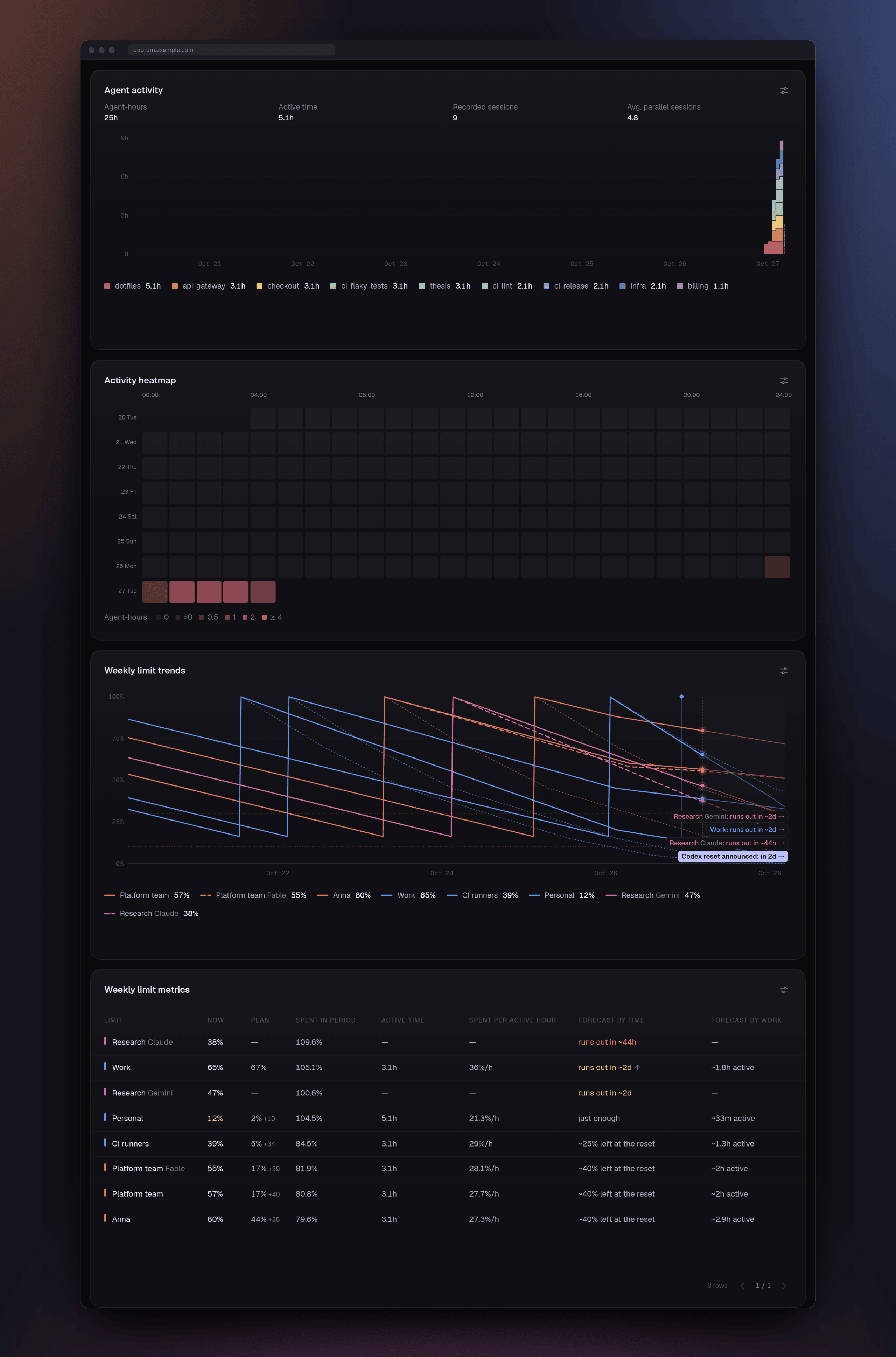
and table columns have their own settings. - Charts of weekly and 5-hour windows over the last hour up to the last 30
days. Ahead of now they show forecasts and the next resets, as far as you choose.
The weekly chart also draws the spending plan, nearly flat over the hours when the
subscription usually spends nothing. Behind now they mark when limits came back early
and when free resets were granted. Drag across a chart to zoom into a burst of work (on a phone, hold a finger
on it first). ‹ and › move it by half its length; a horizontal touchpad swipe,
Shift with the wheel, or Shift-drag moves the activity, limit, budget and subscription-funds
charts together continuously through time.
The open page keeps the history it has read and fetches only missing
or changed parts as measurements and agent work arrive. - A table with two forecasts: what the period spent, each subscription's active time
and what an active hour costs; turned on, agent-hours (each agent counted separately)
and how much of the spending came while they worked (what went elsewhere, claude.ai or a phone, makes an
active hour look dearer). Then where it leads. By time: whether each window runs out
before its reset and around when, or roughly how much will be left, the same whatever
period you look at. A weekly window goes by how the subscription spends: at the hours
and on the days it usually does, through its resets, at the level of its last day; an
arrow marks the last hours going faster than usual. A 5-hour window goes at its pace
since it started. By work: roughly how many active hours are left. Over a range
dragged on the chart it shows what that range cost: what was left at its start and
end, what it spent in all and per hour, and what the agents worked. - Agent activity: agent-hours over the same period, stacked by subscription, project
or machine in bars of up to an hour (two hours over a month). Four agents over an hour
make 4 agent-hours: the legend adds up to the total. Active time (at least one agent
working), recorded sessions and the average at once are in the totals and
tooltips. It zooms and moves through time as the chart does.
Its totals and bar values always describe the data selected by the board's filters.
Point to a legend entry or focus it with the keyboard to temporarily inspect its metrics.
In Manage projects, the board owner can pin project colours for this board;
those colours also follow the project through the activity heatmap and session tables. - Activity heatmap: recorded agent-hours over the board's selected period, as a
day-by-hour matrix or compact calendar. It follows project, device and client filters;
open a cell to inspect that interval. No recorded work and unavailable history stay
distinct. Add it from the board's + menu. - Agent sessions: one table for projects, machines or subscriptions, or a row per
agent. Grouped rows can also show active time and average concurrency; enable those
columns in its settings. Open a group to see its retained sessions over the same
period. Active totals count overlapping work once. Recorded sessions count work
contexts, so a logical session can count more than once after a context change.
Table widgets fit whole rows to their chosen height and share a compact pager at the
bottom right, beside the matching row count. Whole-period totals have their own line
above them, aligned with columns on wide tables and labelled in a two-by-two grid on
narrow lists. None is the first grouping choice; Client is visible by default in
individual rows and group disclosures and can be hidden in column settings. Grouping
uses the shared segmented control. Wide sortable headers cycle ascending, descending, then reset; narrow lists use the
sort menu. There is no inner vertical scrolling. - Reset announcements from the community trackers Codex Resets
and Claude Resets, with a link to the source. You
can turn them off. - Boards made of widgets, like a dashboard in Grafana: resource cards, agent activity,
charts, tables and an optional Agent sessions table share one grid. The table gathers
sessions by project, machine or resource, with work within the selected period,
the date and time of their last recorded work in it and current working counts when
known. Individual agents with their machines and subscriptions are a click away.
The header's filter button reveals the common period, forecast horizon and filters
for resources, projects, devices and clients. Readers explore their own selection;
the owner can explicitly save the board's opening defaults. Hiding the controls
keeps those choices. A dot marks a historical range.
The owner places them on a six-column grid by dragging their heads, and resizes them
to a third, a half, two thirds or the whole width. Each fills only the rows its content
needs, so cards stack beside a tall list, unless the owner drags its bottom edge (or
a bottom corner) to make it taller, or the list of agents shorter: the charts grow
with it, a card never gets shorter than its content, and tables fit whole rows to
their height, with a pager at the bottom right for the remaining rows. Either side
edge changes the width. A
double click on the bottom edge or a bottom corner, or Enter or Space on the bottom
edge, gives a widget back the height of its content. The owner names the cards,
hides the ones they don't need (the data keeps coming) and sets the plans; everyone on
the board sees it arranged the same way. Once it's set, a lock keeps the widgets from
moving under a passing pointer. - Choose measuring frequency. In a subscription card's menu, choose Auto or
every 1, 2, 5 or 15 minutes. The choice is shared across every board showing that
subscription and survives a hub restart. Anyone whose devices measure it may change
it; a board's owner alone cannot. A device's own interval remains its minimum and
can make measurements less frequent. Refresh and error pauses still apply. - Fresh limits on demand. Choose Refresh data in a card's menu, or Refresh all
data in the header's Board controls menu for every visible card on the board. Opening
the menu shows the last measurement and errors; refreshing needs an explicit click.
A circular loader by the
logo shows that the card is waiting for fresh numbers. Refresh respects the device's
interval and error pauses, and accepts one new request per minute per subscription.
Every reader of a shared card can use it. - Your data, shared when you choose. Everything your machines measure is on your
personal board. On a shared board a team sees the limits its members share with it:
each person decides which of their subscriptions it shows. Device sessions are
provided by default, independently of subscriptions. Each member can turn their
devices off or on per board in Board settings → Provided data; turning one on again
starts a new history boundary. A team subscription measured by several people is one card.
The interface is available in English and Russian.
What I paid attention to
It's a pet project, but I wanted a tool I'd be comfortable running on every machine all
day, not a script thrown together over a weekend. In practice that meant:
- It stays out of the way. The agent idles at about 5 MB of memory. The expensive
part is starting an agent's client (around a second of CPU and 100–230 MB of memory
for that second), so Quotum starts as few of them as it can. They run one at a time,
and only one machine measures each subscription, as often as the hub says, since it
sees the subscription on every machine: every two minutes while it is in use anywhere
or its numbers change; when little is left, every minute while it is active, every two
and then every five as it stays quiet for hours; and less often while nothing happens,
down to once every 15 minutes. The machine on duty asks the hub every 15 seconds, which
starts nothing. - Client credentials stay where they are. The agent never reads, stores or sends provider
tokens or cookies. What leaves the machine: percentages and reset times, reported
Codex credit balances and resource availability, plan names,
a one-way hash of each account id (so the hub can tell two machines share one
account), the machine's name and random id, the short message of a client that
failed, and which coding agents run on the machine: working or idle, since when, and
the names of their project (the git repository their folder is in, else the folder)
and folder (sessions = falseandprojects = falseturn that off). With each
question to the hub, whether its client is in use on the machine: a card tells the
members of its boards that the subscription is in use right now, whatever those
settings say. Shared boards admit each member's device sessions independently of
subscriptions, enabled by default and managed per device in Board settings → Provided data.
Members see the client, machine, project and folder names and their credited work.
Shared work begins no earlier than membership and retained capture; re-enabling a
device starts a fresh boundary. Personal boards keep all of their owner's captured work.
Funding is identified only while held and provided; otherwise its identity is redacted.
Quota attribution additionally respects the subscription's separate grant boundary. The hub
keeps when each agent worked, with its machine, project and folder names, for 90 days,
and the names you give your projects until you undo them; you see and correct your
projects through Agent activity → Settings → Manage projects. The full list is in the spec. - The numbers mean what they say. Only a real increase inside one reset window
counts as spending. Resets, corrections and gaps in the data never show up as
consumption. The agent says when its next measurement is due, so a sparse series isn't
mistaken for a gap. - Few moving parts. The agent has nine direct dependencies. The hub is Fastify and
the SQLite built into Node, and the UI is plain React with about 364 KB of gzipped
JavaScript. There is no telemetry. The hub reads the two reset trackers (or the
mirror you name) every ten minutes;QUOTUM_RESETS=offturns that off. When you
connect OpenRouter, DeepSeek or z.ai, it also reads their balances or quotas through
fixed HTTPS requests using the dedicated keys you supplied. Currency conversion uses
public reference rates; your private balances and personal rates are not sent to the rate service. - Written down and tested. The protocol between the agent and the hub is a spec
(spec/ingest-v1.md). Tests cover the spending rules,
resets, duty, scheduling, permissions, sharing, device pairing, the clients' answers and the
translations. The TypeScript is strict and the Rust passesclippy.
Status
It works: I use it every day. The agent installs with one command, or runs through npm
as quotum, with prebuilt binaries for Linux (x64 and arm64, any distribution), macOS
and Windows; the hub is a Docker image (ghcr.io/padurets/quotum-hub, amd64 and arm64).
A desktop app for Windows and Linux brings the agent, hub and board
together on one machine. Automatic desktop updates and agent service registration
are still ahead (roadmap).
- Clients: Claude Code, Codex CLI, Antigravity CLI (
agy1.1.11 or newer). - Platforms: I run it on Linux. The macOS and Windows binaries are cross-compiled and
haven't had much use yet — issues are welcome.
Getting started
1. Start the hub.
docker run -d --name quotum --restart unless-stopped -p 8080:8080 -v quotum:/data -v quotum-keys:/keys ghcr.io/padurets/quotum-hub
docker logs quotum            # shows the setup code for the first account
Open http://<this machine>:8080 and create the first account with that code: until a
hub has an account, only whoever can read its log can claim it. Nothing else needs
setting up. For HTTPS on a domain of your own, deploy/compose.yaml
runs the hub behind Caddy, which gets the certificate by itself:QUOTUM_DOMAIN=quotum.example.com docker compose up -d.
Without Docker: clone the repository, then cd hub && npm ci && npm run build && npm start (Node.js 24 or newer),
which listens on 127.0.0.1:8080 and prints the setup code to the terminal.
2. Install the agent and look at this machine's limits.
curl -fsSL https://github.com/padurets/quotum/releases/latest/download/install.sh | sh    # Linux, macOS
irm https://github.com/padurets/quotum/releases/latest/download/install.ps1 | iex         # Windows (PowerShell)
quotum
The installer puts quotum in ~/.local/bin (on Windows in%LOCALAPPDATA%\Programs\quotum, added to your PATH), checked against the release's
checksums; QUOTUM_INSTALL_DIR and QUOTUM_VERSION change where and what. quotum update
keeps it up to date: with nothing new it is one small request, so a dev environment can
run it on every start. With Node.js 18 or newer, npx quotum works without installing
anything, and npm keeps it up to date.
3. Connect the machine to the hub and keep it measuring.
quotum connect http://127.0.0.1:8080
quotum start
connect shows a code: confirm it in the browser, and the machine is yours; what it
measures shows on your board. start keeps measuring and delivering in the background,
with its log in the state directory; quotum shows whether it runs and quotum stop
stops it. It does not come back by itself after a restart of the machine: for that,
have your system start quotum run, the same in the foreground (a systemd user
service, launchd, Windows autostart). With npx, put npx before every command.
Many machines at once (images, VMs, containers): create a machine token in the
dashboard (My connections → Tokens) and start every machine with it. Each one joins as
yours by itself:
QUOTUM_HUB_URL=https://quotum.example.com QUOTUM_HUB_TOKEN=qt_m_… quotum run
In a dev environment that starts often (Coder, Codespaces, a devcontainer), its start
script can bring the agent up to date and start it in the background:
quotum update || true         # quick when there is nothing new; offline, it gives up in seconds
QUOTUM_HUB_URL=https://quotum.example.com QUOTUM_HUB_TOKEN=qt_m_… quotum start
A machine token is one person's: every teammate creates their own. Machines are named
in My connections → Devices, so an image doesn't need a name per copy.
Sharing with a team. Create a shared board and invite people with a link from
Board controls → Members. Share your resources through the board's Add widget
menu. In Board settings → Provided data, you can take yours off again at any time;
the board's owner can take any shared resource off their board.
By hand: every release has the agent
for Linux, macOS and Windows as an archive (quotum-cli-<version>-<platform>, with the
licences) and as a bare binary (quotum-cli-<platform>, what the installers andquotum update fetch), with checksums (SHA256SUMS) and
build provenance
(gh attestation verify <file> -R padurets/quotum). From source:cd agent && cargo build --release (Rust 1.85 or newer) gives target/release/quotum.
Connecting DeepSeek
In My connections, choose Connect → DeepSeek and enter a dedicated API key
from DeepSeek key settings. Name the account
privately, or explicitly reconnect an existing one. DeepSeek does not return an account
ID: you declare the identity, and replacing a key requires confirmation that it belongs
to the same account. Removing access preserves that identity and retained history.
Another account needs a new connection. An ordinary API key may authorize model calls;
Quotum uses only the fixed balance read.
Key expiry is unknown and saving it requires an explicit acknowledgement. Server and
desktop modes use the same encrypted credential protection described in SECURITY.md.
The card and compact panel use the same budget layout as OpenRouter: one
Available balance in your display currency, followed by any supported limits. DeepSeek has no limit
scales. USD is the initial display currency. Settings → Currencies lets you choose a
standard currency or create a personal unit with your own rates. Your choice applies to
monetary cards, the compact panel, tables and charts on every board, independently of
other readers. Edit names and precision, add dated rate versions, or archive and restore
a currency. Archiving the selected currency requires a replacement. Saved estimates
keep their original rate; unavailable conversion is distinct from zero. Reported reference currency takes precedence. When only CNY is reported,
the shared hub currency service uses
the ECB daily reference rates
to record a separate USD estimate, marked ≈. Click the balance amount for its
granted and topped-up composition; an estimate also gives its original CNY amount
and rate date. Native observations are saved before a rate read; the shared, persisted
rate cache contains no credentials or account information. Historical estimates keep
their original rate. Without a usable rate, CNY is retained and USD stays unknown or stale.
All original balances, estimates, rate provenance, funds status and safe provider
context are retained within the history retention period. Budget history and its table
share the board's grid and time range. The common Resources filter
selects the account's total across its card and both wallet widgets. Balance components remain
in the card's disclosure. Reported USD and converted CNY
are never summed. Spending and top-up events
are unavailable because the endpoint has no spending counter; a balance change
cannot establish spending. An omitted currency keeps its last value as stale and
breaks its history until a valid observation returns. A failed request preserves the
last valid reading. The supplier's insufficient-funds notice is separate from rejected
access. Saved access and private account names remain owner-only on shared boards.
Only holders may refresh the resource.
Connecting OpenRouter
On the chosen board, open Add widget (+) in the header, then Connect → OpenRouter.
Create a dedicated OpenRouter management key in
OpenRouter management-key settings
and paste it into the password field. Connect and add verifies it, saves your access
and shows its balance on that board in one action. Keys without expiry are supported
without a second confirmation. On a shared board, the form explains which data its
members will see before you submit.
The key can create, edit and delete provider API keys; Quotum uses only fixed read
operations. A new server creates its encryption key in separate persistent storage, and its operator
can decrypt saved access. See SECURITY.md for the protection and limits.
The avatar opens full settings pages for your profile, connections, devices, projects
and interface. The Quotum logo returns to the selected board and its time range.
Board settings belong to the selected board. Add lists only absent or
hidden widgets you may add; the lock switches between free arrangement and a locked
layout. Connecting from Settings → My connections keeps access personal until you
explicitly choose a board. Existing access is reused; replacing its key is a separate
action. Recent additions and recovery finds saved results after a lost response or
reload, without duplicating access or restoring a later hidden or removed card.
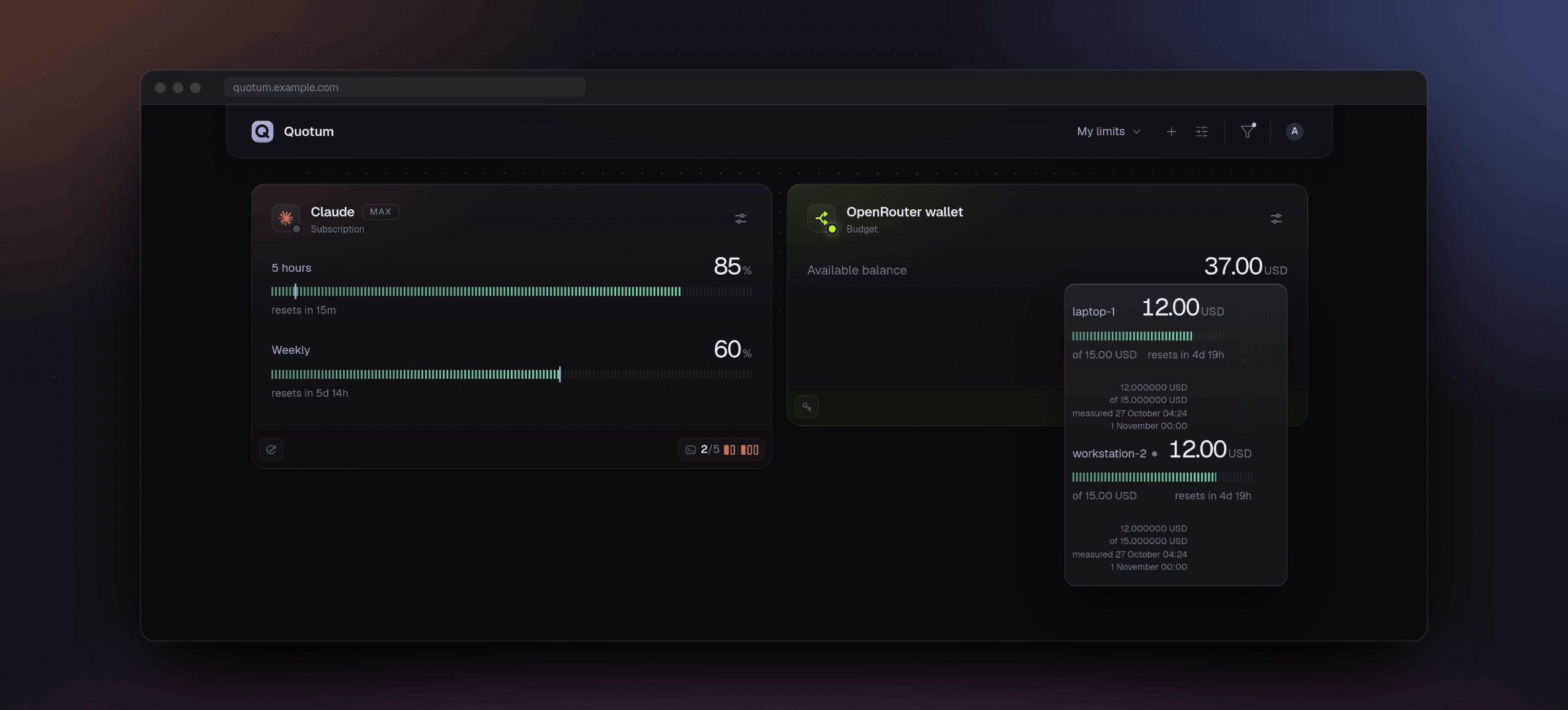
The original plan label stays beside the title; a small second line identifies the
resource as Subscription or Budget. The budget card shows its balance and enabled
key-limit scales with their reset times, using the board's time range. A historical
range uses retained measurements before its end; the compact panel keeps current
values. The common Resources filter switches individual scales, including keys
beyond the initial five-key preview. Scales use the
same segmented meters as subscriptions; keys without a spending limit have no scale.
The inline key list appends batches of ten. Access turns amber seven days before expiry;
expired, revoked or forbidden access is red. Working keys without expiry have no expiry
mark. Temporary read failures are amber.
Five-hour and weekly subscription limits each have their own chart and table.
Budget balances have their own chart and table.
The common Resources filter selects the data for budget cards, charts and tables: an account selects its total,
and a key selects its reported remaining limit. Table columns have their own settings;
each chart's legend independently emphasizes several series.
Account balances are selected by default; at most 32 metrics are selected, with
visible overflow. The chart uses
one unit per axis and keeps the same time range and gestures as subscription history.
Wallet balances have no percentage; only positive key limits do.
A top-up is separate from spending: spending comes from the lifetime usage counter.
Before the first baseline, history is unknown. Partial history and spending observed
after a gap retain their uncertainty and original interval. Key names and monetary
measurements are shared with board members, while saved access details stay private.
Only holders can refresh a hub-measured resource. Replace or remove your saved access in
Settings → My connections; removing it does not revoke the provider key. Revoked or expired access
preserves the last measurements. The compact panel displays money too; tray minimums
and quota notifications continue to use percentage windows only.
Connecting z.ai Personal
Open My connections, choose Connect, then z.ai Personal (Global).
Create a separate key for Quotum in z.ai key settings.
An ordinary API key may also permit model requests; Quotum only reads the personal
Global Coding Plan quota operation published in the
official usage plugin.
The provider does not report the key's expiry, so saving it requires explicit consent.
Server operators can decrypt saved access; desktop protection uses the app's trusted
key storage. Removing access does not revoke the provider key.
The Subscription card and compact panel show independent five-hour and weekly
remaining quotas as percentages, using the same rows and period labels as other
subscriptions. Exact credits and reported allowances are available in the value's
tooltip; supplied reset times appear below the scale.
Unknown resets stay unknown. Current credit-generation plans are supported; legacy
prompt/token/MCP and unknown formats stay unavailable. This provider-published plugin
interface has no versioned quota OpenAPI schema. Invalid or missing readings retain
last valid values without refreshing them. An allowance does not guarantee model
availability or concurrency.
Both quotas also appear in the ordinary subscription chart and measurement table:
choose 5-hour or Weekly, alongside the other subscriptions. The chart's legend,
resource colours, time range and period visibility are shared. Historical percentages
use the allowance reported at each measurement. The quotas overlap and are never
added or converted to money. Forecasts, agent-work attribution and native quota
notifications are unavailable for this provider. Gaps and expired readings stay
unknown in history. Only resource holders may refresh or change frequency.
Every new connection creates a separate resource local to its owner. Replacing a key
requires confirmation that it belongs to the same account and preserves history;
the quota API cannot verify that declaration. For another account, connect separately.
Credential details remain private on shared boards.
Updating
Before replacing the hub, stop it and back up its data directory (the Docker volumequotum in the examples). Start the new image with that same volume; it migrates the
database automatically. A rollback needs the old image and the backup from before the
upgrade: an older hub refuses a newer database layout.
When upgrading from a hub older than 0.4, subscription measurements, boards and settings
remain. The old totals of agent work are replaced by per-session history: work time and
forecasts based on it become available from the upgrade onward. The earlier limit
history remains on the chart.
Upgrading from 0.4 preserves subscription measurements, agent-work history, boards and
settings. Board layouts saved before the widget grid are converted when opened. Reload
open dashboard tabs after upgrading so the page and hub use the same history contract.
Upgrading from 0.5 also preserves subscription measurements, agent-work history, boards
and settings. Subscription measuring needs no new configuration. To connect OpenRouter
on a server hub, configure its separate encryption key as described in
deploy/README.md; back it up separately from the data directory.
The desktop app manages its encryption key as described in SECURITY.md.
Upgrading from 0.6 preserves measurements, agent-work history, boards, settings and
encrypted connections. Existing analytics widgets become separate limit and budget
widgets with their saved choices preserved. The initial display currency is USD;
choose another or define personal rates in Account settings → Currencies.
Purchased Codex credits require an updated agent and appear after its next measurement.
Sharing a subscription does not automatically share its extra funds: enable that
separately on each shared board. Reload open dashboard tabs after the upgrade.
Upgrading from 0.7 preserves measurements, agent-work history, boards, settings and
encrypted connections. Saved layouts move into one grid, and chart and table widgets
share the board’s viewing period. Shared boards initially include sessions from every
member’s saved devices; review Board settings → Provided data to change your
devices’ participation. Existing client-to-subscription associations are preserved;
manage dated assignments in Settings → Clients and resources. Update agents to
use device measurement controls and retain observed work through delayed delivery.
Reload open dashboard tabs after the upgrade.
Upgrading from 0.8 preserves measurements, agent-work history, boards, settings and
encrypted connections. Saved resource selections move out of the layout into the
common data filters; hidden cards remain hidden without excluding their data.
Readers can change their current filters, and the owner can save opening defaults
for the board. The database moves from layout 32 to 33. Reload open dashboard tabs
after the upgrade. Existing 0.8 agents remain compatible.
Upgrading from 0.9 preserves measurements, agent-work history, boards, settings and
encrypted connections. The database moves from layout 33 to 35, retaining existing
device-to-account associations. Project colours are optional board settings; chart
legend choices emphasize series without changing totals or filters. Reload open
dashboard tabs after the upgrade. Existing 0.9 agents remain compatible.
Update the hub before enabling local provider hooks on an
agent: custom collectors require the new hub's account-membership and completion
support. Native collection needs no new configuration.
On each machine, run quotum update, then restart the background agent withquotum stop and quotum start (or restart its service). With npm, use the latestquotum package. Update the hub first: older agents still deliver measurements to the
new hub; the new agents follow its measuring schedule.
Desktop app
For one machine there is an app for Windows and Linux (macOS comes later): the agent of
this machine, a hub of its own and its board in a window, with a tray icon. No account,
no server. Download it from Releases:
| System | Package |
|---|---|
| Windows x64 | quotum-desktop-<version>-windows-x64-setup.exe or …-windows-x64-portable.zip |
| Linux x64 | quotum-desktop-<version>-linux-x64.deb, .rpm or .AppImage |
The release includes SHA256SUMS and build provenance for these packages too.
The Desktop workflow builds and smoke-tests the same
packages on each pull request and on main; its development artifacts also carry the
commit in their names. To build it yourself, see CONTRIBUTING.md.
- Windows 10 and 11: run
quotum-desktop-<version>-windows-x64-setup.exe. It installs for you
alone, into%LOCALAPPDATA%\Quotum, with no administrator rights, and brings WebView2
if Windows lacks it. The installer isn't signed yet, so SmartScreen asks first: More
info → Run anyway.
Or extract the portable ZIP and runQuotum/quotum-desktop.exewithout installing.
Keep the whole extracted folder together. It uses the same data and settings in your
Windows profile as the installed app; nothing is stored beside the executable.
The portable version needs Microsoft Edge WebView2 Runtime
already installed (the setup.exe installs it when needed). - Linux (x64): the packages include Chromium and Node.js. On Debian 12,
Ubuntu 22.04 or newer usesudo apt install ./quotum-desktop-<…>.deb; on Fedora usesudo dnf install ./quotum-desktop-<…>.rpm.
Elsewhere, make the AppImage executable (chmod +x) and run it; GTK3 and NSS must
be available on the system. If FUSE is unavailable,
add--appimage-extract-and-run. The AppImage needs unprivileged user namespaces for
Chromium's sandbox; use a native package when the system restricts them. NVIDIA
systems use X11/XWayland when available. If graphics fail, quit completely and tryquotum-desktop --software-rendering(or add that option to the AppImage command).
It affects that launch only. Closing the window frees Chromium; measuring and the
tray continue in the small Rust controller.
When trying a new build, choose Quit in the old one first: closing its window keeps
it running, and another launch opens that same process. Check the commit in settings;
an AppImage's start-at-login entry also needs to point to the intended file.
The app opens its board, and the first numbers come within a minute. The gear opens its
settings: which providers are measured and how often, running agents, start at login,
the version and Quit. Measuring settings are shared with quotum (Configuration);
notification preferences and language belong to the app.
- Closing the window leaves it measuring. Open Quotum in the tray menu or starting
the app again opens the full window. Quit is in the settings and in the tray's menu. GNOME shows tray
icons only with an extension (AppIndicator); without one, start the app again to open
its window. - Limits in the tray. The icon follows the tightest visible limit: green above 30%,
amber from 10% through 30%, red below 10%. A separate mark means some figures are
stale or unavailable; no figures never means a full quota. Click the icon on Windows,
or choose Limits from its menu on Linux, for a compact panel of the same limits,
reset times and working agents as the board. It closes on Escape or losing focus. - Notifications announce low and critical quota, a reset confirmed by a measurement,
and newly announced scheduled resets from community trackers. Each kind has its own
switch, on by default. Hidden cards and windows are excluded. Thresholds are notified
once per confirmed cycle; jumping straight to critical gives only that alert. Starting,
waking or reconnecting establishes a fresh baseline, without replaying missed events.
Gaps and ambiguous provider corrections may hide a reset; the timer alone is not
evidence. System notification settings and Do Not Disturb can suppress delivery.
The app requests no sound. Windows portable builds use the same native delivery as
installed builds. Missing Linux tray or notification services do not stop measurements. - Start at login turns on by itself the first time the app measures and starts it
without the window. Turn it off in the settings, and do that before uninstalling. The
entry names the AppImage or Windows portable EXE by its path: keep it where it is
(after a move, turn start at login off and on again). - Updates are manual. Download the newer release and quit the app before installing
it over the old one. For the portable
version, replace the whole extracted folder; your data stays in your Windows profile. - With
quotum. One agent measures a machine. Ifquotumalready does, the app
asks once whether to take over. Aquotumof this version then waits and goes on by
itself when the app quits, soquotum runas a service keeps working; an older one
stops (update it). A hub thatquotumdelivered to gets nothing from this machine
while the app runs. - Its data, including the board's history, is in
%LOCALAPPDATA%\com.padurets.quotumor~/.local/share/com.padurets.quotum.
The logs are in%LOCALAPPDATA%\com.padurets.quotum\logson Windows and~/.cache/com.padurets.quotum/logson Linux. - Network access: the app reads reset announcements from Codex Resets and Claude
Resets, as every hub does (QUOTUM_RESETS=offin the app's environment turns that
off). Connected OpenRouter, DeepSeek and z.ai accounts are read through fixed HTTPS
requests with the dedicated keys you supplied. Currency conversion fetches public
reference rates without sending balances or personal rates. The local hub listens on127.0.0.1
alone, behind a key only the app's windows get; it does not send measurements to a
server hub. - Size: Linux packages carry both Chromium for the window and Node.js for the hub.
Windows uses the system WebView2: about 27 MiB for setup.exe or 39 MiB for the ZIP.
In a Windows 11 VM with five subscriptions, idle working set across the app, Node
and WebView2 was about 342 MiB with the window open and 47 MiB after closing it;
CPU was 0.76% and 0.24% of one core over 30 seconds. Memory varies with history,
WebView2 and Windows; virtual graphics do not establish physical display performance.
Configuration
Agent
Everything is optional. On Linux the file is ~/.config/quotum/config.toml;quotum config shows where it is on your system and what is in effect.
# interval = 120        # seconds, 60 to 86400: with a hub, the most often a client is measured
                        # (left out, follows the subscription’s hub frequency); without one, how often
eco = true              # without a hub (or while it does not answer): measure less often while nothing changes
sessions = true         # tell the hub which coding agents run here, working or idle
projects = true         # with the names of their projects and folders

[machine]
name = "work-laptop"    # the name the machine reports (default: host name); renaming it on the hub wins

[hub]
url = "https://quotum.example.com"
token = "qt_m_…"

[clients.opencode]
enabled = true          # track independently of subscription measurement
route = false           # reserved consent for route observations (not collected yet)
# path = "/opt/opencode/bin/opencode"

[providers.antigravity]
interval = 300
account = "work"        # tells two Antigravity subscriptions apart (agy doesn't say which one it is)
# enabled = false
# path = "/opt/agy/bin/agy"
To replace a native measurement collector with your own local executable, including
several accounts on one device, configure [providers.claude.hooks.collect] with an absolutepath and an args array. This is opt-in execution of trusted user code, not a sandbox.
Independent hooks.on_collected and hooks.on_collection_failed commands can also observe native or custom outcomes. The hook contract keeps pseudonyms, per-account scheduling
and delivery on the existing quotum connect connection inside Quotum.
The environment variables QUOTUM_HUB_URL, QUOTUM_HUB_TOKEN,QUOTUM_INTERVAL, QUOTUM_CONFIG and QUOTUM_STATE_DIR override the file. Other
commands: quotum --json (one measurement in the ingest format), quotum --only codex,quotum start / quotum stop, quotum disconnect, quotum update (--check only
says whether there is a newer release; QUOTUM_RELEASES_URL points it at a mirror). An
agent running in the background keeps its version until it is started again.
Coding clients are tracked independently of subscription measurement. OpenCode native
CLI sessions and installed client versions appear in My connections → Devices. Work
is admitted on personal and shared boards independently of subscription cards. Shared
boards default to including every member's device sessions; each member controls their
own devices in Board settings → Provided data. An unknown subscription is Not identified;
a known held subscription absent from the board is Not provided, with its identity hidden.
Add Agent sessions and Agent activity through Add widget on an empty board. [clients.<id>] enabled = false disables one client's tracking;[providers.<id>] enabled = false disables only its measurements. A client's path
overrides its legacy provider path. Native OpenCode local project attribution is
available on Linux; shared or unproven invocations, and macOS/Windows, report presence
without a project. Generic Node/bun hosts are not detected. Version probes are bounded
and never read credentials or make model requests. Working states estimate process CPU
activity; they are not provider reports of model work.
In Settings → Clients and resources, assign a client to a connected resource
(subscription or budget) on one device or all your devices, with an explicit start
and optional end date. Optional conditions
match a reported subscription/API route and known provider. Device rules take priority;
a disconnected winning resource keeps the work unassigned. Correcting a rule changes how
retained work is displayed without rewriting the machine's original observations.
One editor handles both new links and changes. Active links default to applying
changes from saving time, preserving earlier assignments; the period control also
allows a specific date or correction of the entire period. Current and scheduled
links share one list, with completed periods under History. Disconnected targets
keep their name. The editor suggests resources after choosing a client and device;
selecting a recommendation fills its condition and period for review before saving.
In a device’s current sessions, select the resource to see why it was chosen.
API work is never assigned from a host alone. Detailed route evidence and
account differences remain private.
The budget table can show resource spending per active hour and remaining active hours
when a resource reports a spending counter and at least 30 minutes of eligible work.
These are estimates from adjacent observations, not prices of individual requests or
sessions. Balance-only resources have no such estimate.
My connections also shows each device's Quotum version, its installed client observations
and the origins of retained measurements. There you can allow measurements for the whole
device or individual collectors while keeping activity and history. The hub excludes
disabled measurements immediately; an agent stops starting them after receiving the
setting and saves it for restart. Older agents may need an update before affected measurements resume.
For a subscription, choose Auto or one of your eligible devices. That preference applies
to all holders, who can replace or clear it; an unavailable device falls back to Auto.
An issued command finishes or reaches its deadline before a preference switch. The desktop
app's local hub shows diagnostics while its agent settings control its one machine.
Hub
| Variable | Default | Meaning |
|---|---|---|
QUOTUM_BIND |
127.0.0.1 (image: 0.0.0.0) |
Address to listen on |
QUOTUM_PORT |
8080 |
Port to listen on |
QUOTUM_ALLOWED_HOSTS |
127.0.0.1,localhost (image: *) |
Host names the hub answers to, or * for any; other hosts get 403. Setting it replaces the default |
QUOTUM_PUBLIC_URL |
taken from the request | The address shown to agents and used in invite links |
QUOTUM_TRUST_PROXY |
— | Believe a proxy about the client's address and protocol: true, a number of hops, or addresses and CIDR ranges |
QUOTUM_DATA_DIR |
hub/data (image: /data) |
Where the SQLite database lives |
QUOTUM_SECRET_KEY, QUOTUM_SECRET_KEY_FILE |
automatic separate storage | Optional explicit encryption key: 32 random bytes as unpadded base64url, or a protected file outside the data directory. Set one input only; explicit inputs override automatic storage. See server deployment |
QUOTUM_SECRET_DIR |
POSIX: sibling of the real data directory with .keys; image: /keys |
Optional separate persistent key directory, outside data. Not used with an explicit key. Windows standalone uses private HKCU registry storage instead and rejects this option in automatic mode |
QUOTUM_SECRET_KEY_PREVIOUS, QUOTUM_SECRET_KEY_PREVIOUS_FILE |
— | Matching previous encryption key during rotation. Set one previous input only; back up keys separately and retain the old key for its matching backups |
QUOTUM_SETUP_CODE |
random, printed at start | The code the first account needs while the hub has none |
QUOTUM_SIGNUP |
invite |
open lets anyone sign up; otherwise only the first person and people with an invite |
QUOTUM_RESETS |
on | off stops polling the community reset trackers |
QUOTUM_RESETS_CODEX_URL, QUOTUM_RESETS_CLAUDE_URL |
https://codex-resets.com/api/v1/status, https://claude-resets.com/api/resets |
Where to read Codex Resets and Claude Resets instead, such as a mirror where the tracker's bot check stops your server: the full address of an endpoint that answers the same JSON, without a user name or password |
QUOTUM_FRAME_ANCESTORS |
— | Extra origins allowed to embed the dashboard |
Opening the hub to other machines. Put it behind HTTPS (sessions are cookies and
tokens are bearer secrets): deploy/compose.yaml does it with
Caddy. Behind a proxy of your own, tell the hub its address and trust the proxy:QUOTUM_PUBLIC_URL=https://quotum.example.com QUOTUM_TRUST_PROXY=true. An open
dashboard keeps one stream (/api/events) the hub pushes changes on: let the proxy
pass it as it comes (nginx does, as the hub asks it to); where a proxy holds it back,
the page asks with long polls instead. Over HTTP/2, as Caddy serves it, a browser keeps
up to eight boards live at once (a tab hidden for half a minute lets its stream go);
over plain HTTP/1.1, about five.
More
- docs/architecture.md: how the parts fit, how measuring and
scheduling work, people, boards and devices. - spec/ingest-v1.md: what the agent sends to the hub; anything can
implement it. spec/dashboard-v1.md: what the hub tells an open
dashboard. - CONTRIBUTING.md: checking a change and what to keep in mind;
SECURITY.md: reporting a vulnerability privately. npm run demoinhub/(afternpm run build): a live board on throwaway data with
every state the dashboard knows that lasts on a working hub, no network or account
needed; Ctrl+C stops it and leaves nothing behind.npm run demo -- showcaseis the
board of the images above.npm run demo -- money --stillputs subscriptions beside
every monetary case on Ana's personal board.
Project layout:
agent/crates/core     adapters for each client, schedule, settings, delivery to the hub
agent/crates/cli      the `quotum` command
npm/                  the npm packages: a launcher and a prebuilt binary per platform
install/              the installers for `curl … | sh` and PowerShell
deploy/               running the hub with Docker Compose behind Caddy (HTTPS)
desktop/              the desktop app (Rust, Electron on Linux, Tauri on Windows): the agent, its own hub and board in a window
.github/workflows     tests on every push; everything released from a version tag
spec/                 the protocols: the agent to the hub, the hub to its dashboard
hub/server/domain     the rules: windows, spending, resets, the ingest format
hub/server/store      SQLite: layout, measurements, people and devices
hub/server/routes     HTTP routes for people and for agents
hub/server/*.ts       ingest, duty, device pairing, sessions, the reset trackers
hub/ui                the dashboard (React), translations in hub/ui/i18n
hub/demo              the demo board: a catalogue of every state a working hub holds, kept alive
npm test and npm run typecheck in hub/, cargo test and cargo clippy inagent/ and desktop/ check everything (the app's after node desktop/prepare.mjs);
CI runs them on every push. node npm/build.mjs builds the
npm packages (it needs cargo-zigbuild and zig; see the script), docker build hub the
hub's image.
Releasing
Prepare a release branch and a pull request into main. Set the new version inagent/Cargo.toml ([workspace.package]), desktop/Cargo.toml and hub/package.json,
then update their lock files. The npm package template stays at 0.0.0:npm/build.mjs sets the published packages' version from the agent's manifest.
Add the hashes of any new database layout steps to RELEASED inhub/server/test/schema.test.ts; every step shipped by a release is frozen.
Refresh the README screenshots in both languages from the demo board, check the upgrade
instructions and prepare the release notes outside the repository.
For example, to prepare 0.10.2 on that branch:
(cd hub && npm version 0.10.2 --no-git-tag-version)
# agent/Cargo.toml and desktop/Cargo.toml: version = "0.10.2"
(cd agent && cargo metadata --format-version 1 >/dev/null)
(cd desktop && cargo metadata --format-version 1 >/dev/null)
Run the full checks, including the dashboard
benchmark, and wait for CI and Desktop checks. The maintainer approves and squash-merges
the pull request. Wait for the checks on the resulting main commit too: that is the
commit to tag. Only after the maintainer approves that specific release:
git fetch origin
git switch main
git pull --ff-only origin main
git tag -a v0.10.2 -F /path/to/release-notes.md --cleanup=verbatim
git push origin v0.10.2
release.yml refuses a tag that is not annotated or
whose version differs from any of those six files. The tag's message becomes the
release notes. The workflow checks the code again, builds the agent for every platform
and runs the desktop packages through their installation and smoke checks. Only after
all binaries are ready does it publish the hub's image and npm packages, then create
the GitHub release with the CLI and desktop downloads, checksums and provenance.
A tag publishes packages and images; an npm version cannot be reused.
npm accepts the packages from that workflow alone, without a token (trusted publishing).
A new npm package, for a new platform, is published once by hand and then trusted withnode npm/trust.mjs. npm trusts the repository by its name: after renaming it, run that
again, and it replaces the old trusts.
Adding a language
The dashboard's text lives in hub/ui/i18n. Copy ru.ts to a file named after the
language's code (de.ts), translate the strings, rename its export, and add it toLOCALES in index.ts (an import and one line). The type checker and npm test then
make sure every key is translated, the {placeholders} match and every plural form the
language has is there.
Roadmap
- A team view on shared boards: people × providers at a glance.
- Autostart: a systemd user service, launchd, Windows.
- Automatic updates of the desktop app, then the app on macOS.
Credits and license
Thanks to CodexBar for showing the way and for
being the first data source of this dashboard, and to the people behind
Codex Resets and Claude Resets.
Provider icons come from LobeHub Icons. Quotum
is not affiliated with Anthropic, OpenAI or Google.
Reviews (0)
Sign in to leave a review.
Leave a reviewNo results found