pagepin
Health Uyari
- License — License: Apache-2.0
- Description — Repository has a description
- Active repo — Last push 0 days ago
- Low visibility — Only 5 GitHub stars
Code Gecti
- Code scan — Scanned 12 files during light audit, no dangerous patterns found
Permissions Gecti
- Permissions — No dangerous permissions requested
Bu listing icin henuz AI raporu yok.
Self-hosted static page hosting with pin-point review comments your AI agent can fetch as JSON — deploy, review, fix, redeploy
pagepin




Self-hosted static page hosting with pin-point review comments and an AI feedback loop — feedback that agents can actually fetch.

Deploy any HTML report or static site with one curl, share the link, and let reviewers pin comments directly onto page elements. Every comment is stored with a CSS selector, a kind (copy / style / question / bug) and a resolved flag — so your coding agent can pull the open feedback as structured JSON, fix the page, and redeploy. Review loop closed, no screenshots-in-chat required.
Try it without installing — drop an HTML or Markdown file on pagepin.ai for an instant 1-hour trial link (no account), or start free on the managed Beta. Export and self-host anytime.
Features
- One-command deploys — multipart
POST /api/sites/{slug}/deploy; redeploying the same slug publishes a new atomic version. - Versioned releases — full version history per site, one-call rollback.
- Pin-point comments — a lightweight overlay (
comments.js) is injected into served HTML; logged-in viewers drop pins on elements, reply in threads, and mark threads resolved. - Share links & guest review — mint a signed, expiring
?key=link (POST /api/sites/{slug}/share-link); anyone opening it can view the private page and pin comments as a guest, no account needed. Revoke all links (and their guest sessions) in one call; toggle guest commenting per site. - Anonymous trial (opt-in) —
PAGEPIN_TRIAL=trueexposesPOST /api/try: drop a single HTML or Markdown file with no account and get a 1-hour shareable link with guest comments and a key-authenticated comments API — then claim the page into an account to keep it. Off by default; enable only with Turnstile + edge rate limiting. - Built for AI agents —
GET /api/sites/{slug}/commentsreturns each thread with itsselector,kind, page path, deep-link URL and staleness info; the live API guide is served at/skill.mdfor pasting into agent context. - Private by default — viewing requires login; sites can be made public for a bounded time window (default max 7 days) and auto-revert to private.
- Markdown & image viewer shells —
.mdfiles and images get a readable viewer page (append?rawfor the raw file). - SPA fallback — opt-in per site for client-side routed apps.
- Pluggable auth — built-in email/password (with optional signup), Google/GitHub social login, any OIDC provider, or
nonefor local dev. - Pluggable storage — local filesystem or any S3-compatible object store (MinIO, R2, ...).
- Pluggable database — SQLite/libSQL by default (zero-config), or PostgreSQL / MySQL for self-hosted Node.
- Small footprint — one Node process + SQLite; single Docker image with a React console included.
- Single- or dual-domain serving — run everything on one origin, or isolate hosted content on a separate content domain (see Architecture).
- Bilingual (English / 中文) — the console, server-rendered pages (login wall, viewer shells, directory index), the comment overlay, verification email, and API error bodies are all localized. Language is resolved per request (
?lang=→pp_langcookie →Accept-Language→PAGEPIN_DEFAULT_LOCALE); the console has a one-click switcher. API errors now also carry a stable machine-readablecode(see Deploy & API).
Quick start
Docker
docker run -d --name pagepin \
  -p 8000:8000 \
  -v pagepin-data:/data \
  -e [email protected] \
  -e PAGEPIN_ADMIN_PASSWORD=change-me-please \
  ghcr.io/pagepin/pagepin
Open http://localhost:8000, log in as the admin, pick a handle, and create an API token (pp_...) from the console. A docker-compose.yml (with an optional MinIO block) is included in the repo.
From source
pnpm install
pnpm -C console install && pnpm -C console build   # optional: build the web console
pnpm dev                                           # API on http://localhost:8000
Agent skill (for AI coding agents)
Teach your coding agent to deploy and run the review loop. Install the skill once — it works in every project and session, signs in through the browser (device-login), and never pastes a token into chat:
npx skills add pagepin/pagepin -g
Claude Code can alternatively install it as a plugin:
/plugin marketplace add pagepin/pagepin
/plugin install pagepin@pagepin
See install.md for the full options (scripted/CI install, supported agents). Agents with no local skill directory can instead be pointed at the live guide served at /skill.md.
Configuration
All configuration is via environment variables. The most common settings are below; the full list — dual-domain hosting, OIDC, social login, Turnstile, email, S3, and all upload/quota limits — lives in .env.example, grouped by category with defaults and inline comments.
| Variable | Default | Description |
|---|---|---|
PAGEPIN_PORT |
8000 |
HTTP listen port. |
PAGEPIN_DATA_DIR |
./data |
Data root: SQLite DB, generated secret, and fs storage. |
PAGEPIN_DB_URL |
— | DB connection (self-hosted). Unset → local SQLite file. Scheme picks the driver: libsql:///file: (SQLite/Turso, + PAGEPIN_DB_AUTH_TOKEN), postgres://, or mysql:// (8.0+). |
PAGEPIN_BASE_URL |
http://localhost:8000 |
Public URL of the instance (single-domain mode). |
PAGEPIN_ADMIN_EMAIL / …_PASSWORD |
— | Set both to upsert an admin at startup; otherwise the first signup becomes admin. |
PAGEPIN_AUTH_MODE |
password |
password, oidc, or none (dev only: auto-login as an admin). |
PAGEPIN_DEFAULT_LOCALE |
en |
Fallback UI/API language (en or zh). Per request, ?lang= → pp_lang cookie → Accept-Language override it. |
PAGEPIN_STORAGE |
fs |
fs (local disk) or s3 (S3-compatible). |
Copy the template to get started:
cp .env.example .env # then edit; pass with `docker run --env-file .env` or compose `env_file:`
The upload and quota limits in .env.example lean toward a public free tier; raise them via env for a trusted/team instance. Signup and password login are also rate-limited per IP at the app level (best-effort, and per-isolate on Workers). For real edge protection on a public deployment, add a Cloudflare Rate Limiting Rule on /auth/signup and /auth/password — that runs globally before the Worker.
Databases
pagepin needs zero database setup — it ships with SQLite (via libSQL) and keeps data in a single file under PAGEPIN_DATA_DIR. Self-hosted Node deployments can instead point at PostgreSQL or MySQL to keep data in existing infrastructure. The driver is inferred from PAGEPIN_DB_URL's scheme (override with PAGEPIN_DB_DRIVER):
| Scheme | Engine |
|---|---|
(unset) / file: |
local SQLite file (default, zero-config) |
libsql:// |
managed libSQL / Turso (set PAGEPIN_DB_AUTH_TOKEN) |
postgres:// |
PostgreSQL |
mysql:// |
MySQL 8.0+ |
docker run -d --name pagepin -p 8000:8000 \
  -e PAGEPIN_DB_URL=postgres://user:pass@db-host:5432/pagepin \
  -e [email protected] -e PAGEPIN_ADMIN_PASSWORD=change-me \
  ghcr.io/pagepin/pagepin
A single schema definition generates the DDL for all three dialects, and the matching migrations are applied automatically at startup. The postgres / mysql2 drivers are optional dependencies bundled in the image and loaded only when selected, so the default SQLite path stays slim. Cloudflare Workers deployments always use D1 and ignore PAGEPIN_DB_URL.
Deploy & API for AI agents
Deploy a page and fetch its review feedback — two calls:
curl -sf -X POST "http://localhost:8000/api/sites/my-report/deploy" \
  -H "Authorization: Bearer pp_<your-token>" \
  -F "[email protected]" -F "paths=index.html"

curl -sf "http://localhost:8000/api/sites/my-report/comments" \
  -H "Authorization: Bearer pp_<your-token>"
The deploy response contains the shareable url. The comments response lists unresolved threads with selector, kind, page_path and a deep-link url — process them, redeploy, done.
Error responses are { "detail": "<human message>", "code": "<stable.key>" }. The detail is localized (by ?lang= / pp_lang cookie / Accept-Language); the code is a stable, language-independent identifier (e.g. site.quota.exceeded, auth.unauthenticated) — branch on code, show detail.
The agent-facing skill lives in skills/pagepin — install it once with npx skills add pagepin/pagepin -g (see install.md) and the agent can drive the full deploy → review → fix loop on its own. The same guide is served live at /skill.md for agents without a local skill directory.
Architecture

Interactive version (dark/light toggle, PNG/SVG export): docs/architecture.html; regenerate from docs/architecture.json.
One Node process (Hono) + SQLite + pluggable object storage, serving three things: the JSON API, the React console, and the hosted sites (with the comments overlay injected into HTML). The same createApp runs on Cloudflare Workers (D1 + R2) by dependency injection.
- Single-domain mode (default): everything on
PAGEPIN_BASE_URL; hosted sites live under/p/{handle}/{slug}/. Zero-DNS setup, ideal for trusted teams. - Dual-domain mode: set
PAGEPIN_CONSOLE_HOST+PAGEPIN_CONTENT_HOSTand the same process splits byHostheader — console/API on one origin, hosted content onhttps://{content-host}/{handle}/{slug}/with its own viewer session cookie.
Security note on single-domain mode: hosted pages share the browser origin with the console, so a malicious script in an uploaded page could act with a logged-in user's session. Use single-domain only when everyone who can deploy is trusted; use dual-domain mode to put user content on a separate origin otherwise.
Comments & review
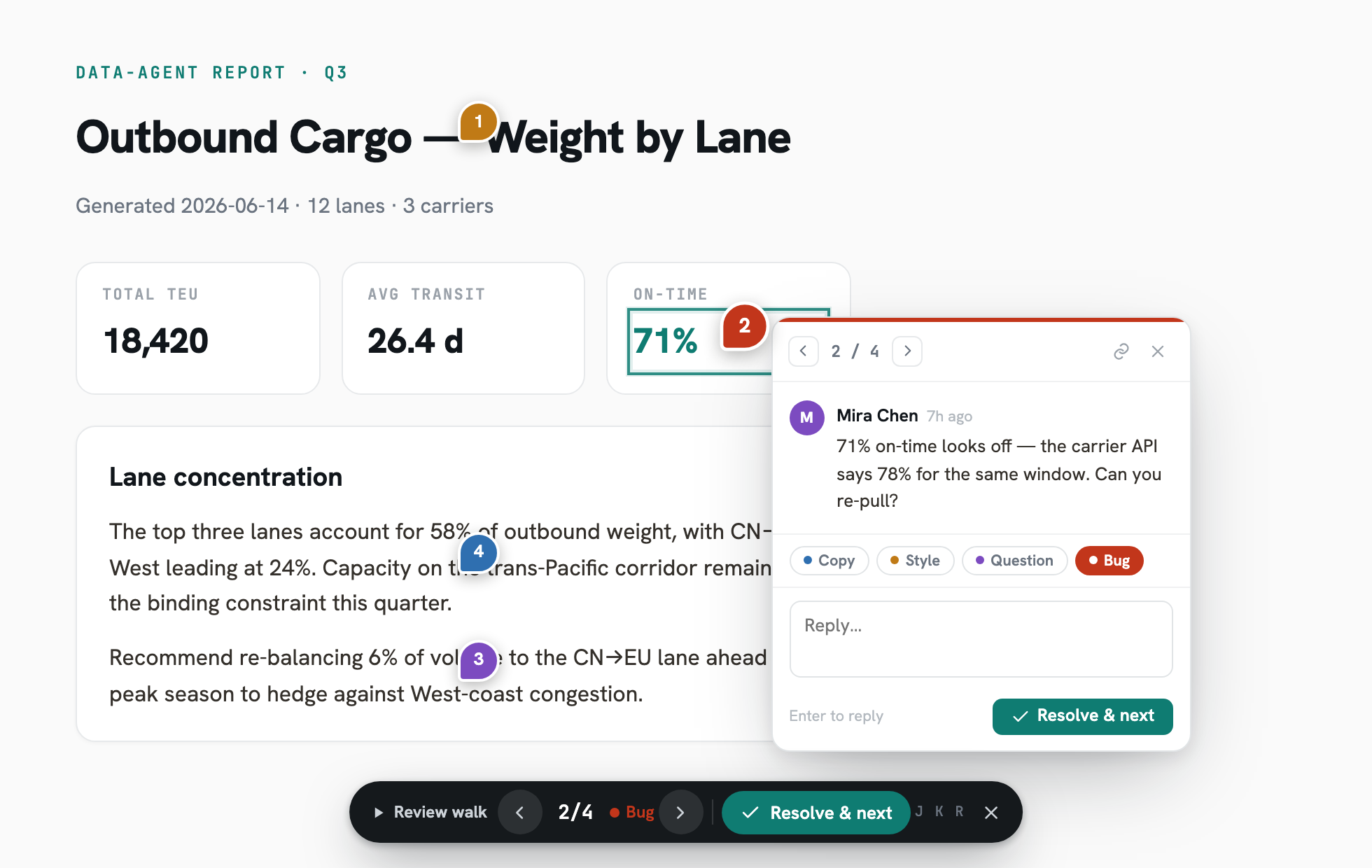
Reviewers open the shared link, click anywhere on the page, and leave a pinned comment thread (kind: copy / style / question / bug). Pins survive redeploys via selector + content-fingerprint anchoring, with graceful degradation to a sidebar list when an anchor is lost.
Development
pnpm install        # server deps
pnpm dev            # tsx watch src/index.ts
pnpm typecheck      # tsc --noEmit
pnpm -C e2e install # Playwright (first time)
pnpm test:e2e       # comments-overlay e2e — self-contained, no backend needed
License
Yorumlar (0)
Yorum birakmak icin giris yap.
Yorum birakSonuc bulunamadi