palmier-pro
Health Warn
- License — License: GPL-3.0
- Description — Repository has a description
- Active repo — Last push 0 days ago
- Low visibility — Only 9 GitHub stars
Code Fail
- rm -rf — Recursive force deletion command in scripts/bundle.sh
Permissions Pass
- Permissions — No dangerous permissions requested
No AI report is available for this listing yet.
macOS video editor built for AI
Palmier Pro
The video editor built for AI.

Requires macOS 26 (Tahoe)


Features
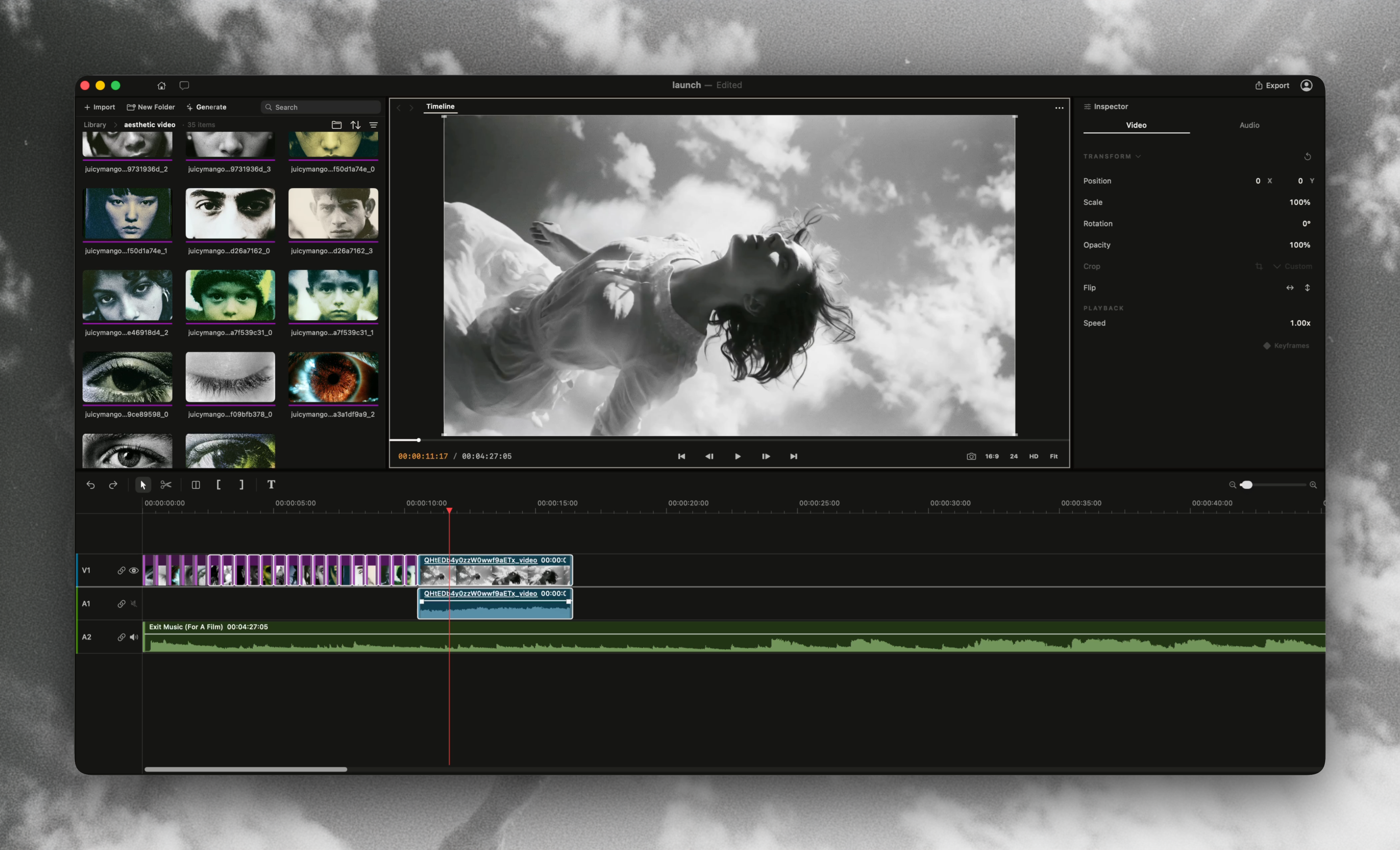
A full professional editor
We built Palmier Pro from scratch. The north star is Premiere Pro, with our take on integrating AI into the workflow. Currently:
- Multi-track compositing
- Trim, split, razor, ripple delete, speed, opacity, transform
- Keyframes
- Frame-accurate playback
Built-in Generative AI
Generate videos and images with SOTA models like Seedance, Kling, Nano Banana Pro inside the timeline editor. We believe this is the easiest way to iterate and edit on production-ready videos.
- All footage lives inside the same project. Regenerate and edit clips without the back-and-forth import/export to your timeline editor.
- In-line replace AI-generated footage without redoing the timeline.
Integrates with your agents
Each opened project comes with a local MCP server. Point Claude Desktop/Claude Code/Codex/Cursor, or any MCP client at it and your agent becomes a generative AI assistant for your timeline. Some capabilities:
- Generating images, videos, and audio
- Editing footage on the timeline
- Organizing and understanding your footage
- Generating transcription
It also includes a side-chat that uses your own Anthropic API key. It shares the same prompts and tools as the MCP server.
And more
- Open source. The video editor and the MCP server are completely open-source. The generative AI processing is not.
- Lightweight and fast. Built as a native macOS app in Swift, with AVFoundation + Metal.
MCP server
When the app is open, it exposes an MCP server at http://127.0.0.1:19789/mcp via HTTP. To connect:
Claude Code
claude mcp add --transport http palmier-pro http://127.0.0.1:19789/mcp
Codex
codex mcp add palmier-pro --url http://127.0.0.1:19789/mcp
Cursor
The easiest way is go inside the app Help -> MCP Instructions -> Install in Cursor, or install manually by adding this to ~/.cursor/mcp.json:
{
  "mcpServers": {
    "palmier-pro": {
      "type": "http",
      "url": "http://127.0.0.1:19789/mcp"
    }
  }
}
Claude Desktop
We bundle a mcpb with the app that allows a one click install Desktop Extension on Claude Desktop. Go to Help -> MCP Instructions -> Install in Claude Desktop
FAQ
Is Palmier Pro open source?
The video editor (without the generative AI features) is fully open source. The MCP server and the agent chat are also open source. The only thing that is closed source is the generative AI processing.
Is it free?
The editor is free. You can download it with no login required, and use it as a video editor like CapCut or Adobe Premiere. You can also use the MCP server for free, and start experimenting using Claude Code/Desktop or Cursor to interact with your timeline editor.
What is not free is the Generative AI features.
What platforms does it support?
macOS 26 (Tahoe) only.
Why was Palmier Pro built?
We are a YC startup that has been making AI launch videos for other companies. We noticed a big gap between generative AI and the video editor, so we built this to solve our biggest pain points. First, let's talk about how we make our AI videos better:
- many iterations
- many editing
With these two requirements, the pain points we've encountered:
- Most generative platforms live on the web. To make a production-grade video, we have to go through the editing process inside the video editor. So each iteration looks like: generate on the web → download to your laptop → import to your timeline editor → replace the clip and redo the editing → repeat.
- Projects get large, and they become extremely hard to maintain. We have files of all the versions of each shot, which require us to manually rename them to stay organized. We have context spread across different AI agents that we talk to: Claude for scripting, AI chat from the generative platform for generation.
So we built Palmier Pro to solve these issues. The video editor is the single source of truth. You can use your own AI agent to do scripting, generating, and editing with all the context you need.
Can I use it without AI?
Yes! You can treat it as a open source video editor. You should try it out if you:
- Just want a video editor (free)
- Want to connect video editor to your Claude (free)
- Want to create generative AI footage
Do you have feature parity with Adobe Premiere Pro or CapCut?
Not yet. This is still a very early product with a small team behind it, but we are pushing it to get better every day. To give you a clear list:
What we don't have yet:
- Effects
- Transitions
- Color grading
- Masking
- Graphics
We launched it because it was enough for us to make professional AI videos. We acknowledge that without AI features, this is quite a bare-bone video editor. That's why we decided to open source it and release the video editor for free, because we want to improve the product with the community.
What's the difference between MCP server and the in-app chat?
They share the same prompt and tools. The MCP server is free to use for your MCP clients, and the in-app chat requires either BYOK or subscription. The differences are mostly the UX.
In-app chat:
- You can @ to reference media, which is particularly useful when iterating on generative media.
- Less context switching. It lives right inside the timeline.
- It has more control on the context window.
External chat with MCP server:
- Centralized spending on tokens. You don't have to worry about paying for another service.
- A more mature chat client. Claude/Cursor/Codex handles context window/memory/web search and they will continue to get better.
- Much more interesting use cases with integrating with other workflows. Since Palmier Pro is just a MCP server, you can connect your video editor with other MCP servers all in one chat, so context is centralized.
Some examples on using Palmier Pro MCP server with Claude:
- Write your idea and script in Claude, then ask it to generate videos inside Palmier Pro
- Pull sound effect from Epidemic Sound MCP server and import to Palmier Pro MCP server
- Pull your team's idea in #marketing Slack channel and create a quick prototype in Palmier Pro
What is the future of Palmier Pro?
We envision Palmier Pro as the future of video editing, a UI for both humans and agents. We strongly believe agents cannot replicate human creativity, but in the process of generating and editing videos, there is a lot of manual work that AI can help with.
License
Copyright (C) 2026 Palmier, Inc.
Palmier Pro is open source under GPLv3.
Reviews (0)
Sign in to leave a review.
Leave a reviewNo results found