learn-mcp
Health Uyari
- License — License: MIT
- Description — Repository has a description
- Active repo — Last push 0 days ago
- Low visibility — Only 7 GitHub stars
Code Uyari
- Code scan incomplete — No supported source files were scanned during light audit
Permissions Gecti
- Permissions — No dangerous permissions requested
Bu listing icin henuz AI raporu yok.
The CCDV-F Bootcamp Part I: build, deploy and sell multi-tenant remote MCP servers and MCP Apps for Claude and ChatGPT, step by step, on Cloudflare Workers, Neon and Better Auth. Hands-on CCDV-F and PCDV-F prep, and the companion to The AI Agent Factory book.
Build and Sell MCP Apps: The CCDV-F Bootcamp Part I
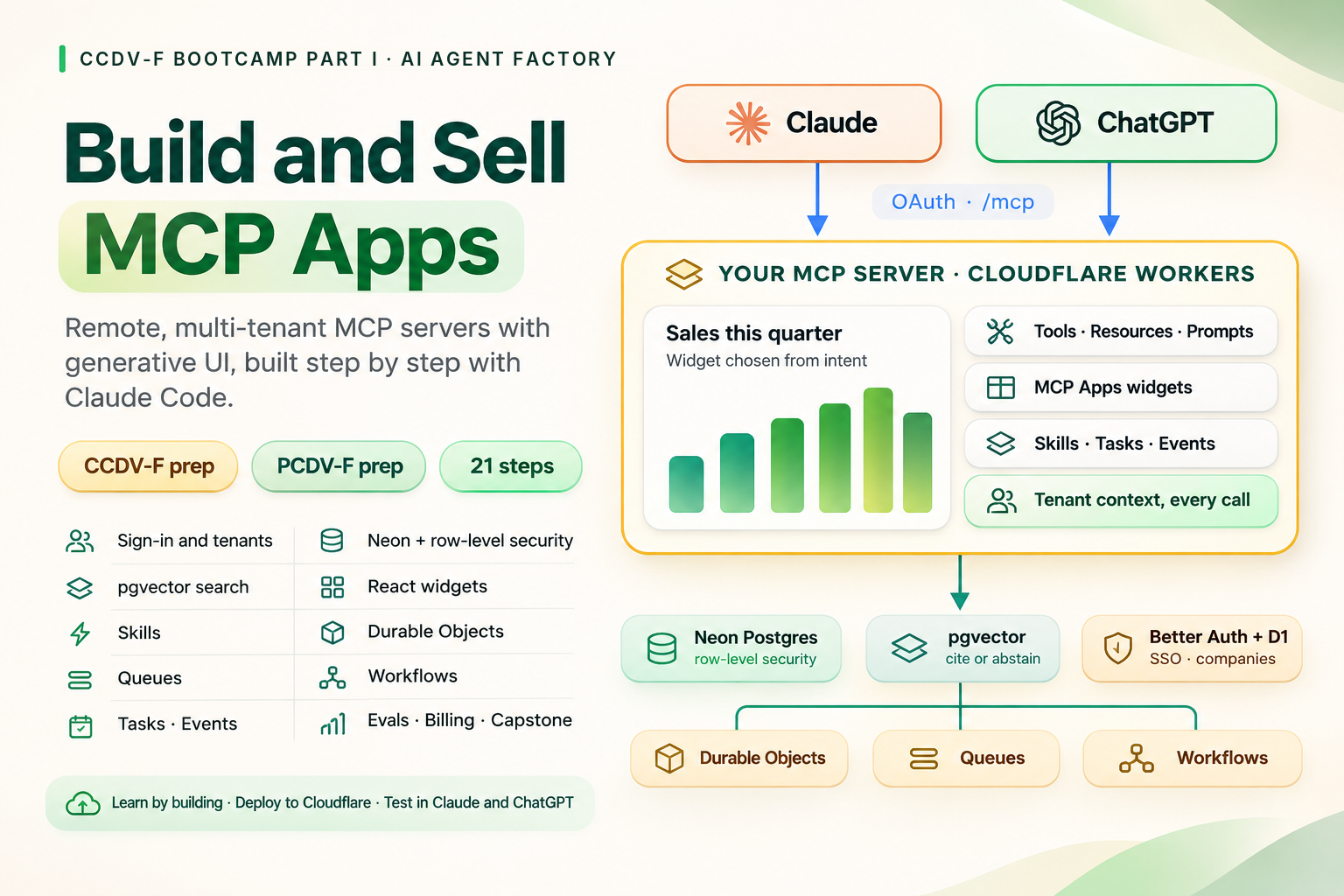
Welcome, readers of The AI Agent Factory! If you have finished your study for PCAO-F (Panaversity Certified Associate: Foundations), congratulations: you already know how to work with AI agents and manage the work they do. Now it's time to build. This bootcamp is your hands-on preparation for CCDV-F (Claude Certified Developer: Foundations), Anthropic's developer exam, and for PCDV-F (Panaversity Certified Developer: Foundations), the Panaversity exam that mirrors it. Just as important, it teaches you to monetize these skills in the international market: building MCP apps for paying clients as a Forward Deployed Engineer (FDE) or for your own startup.
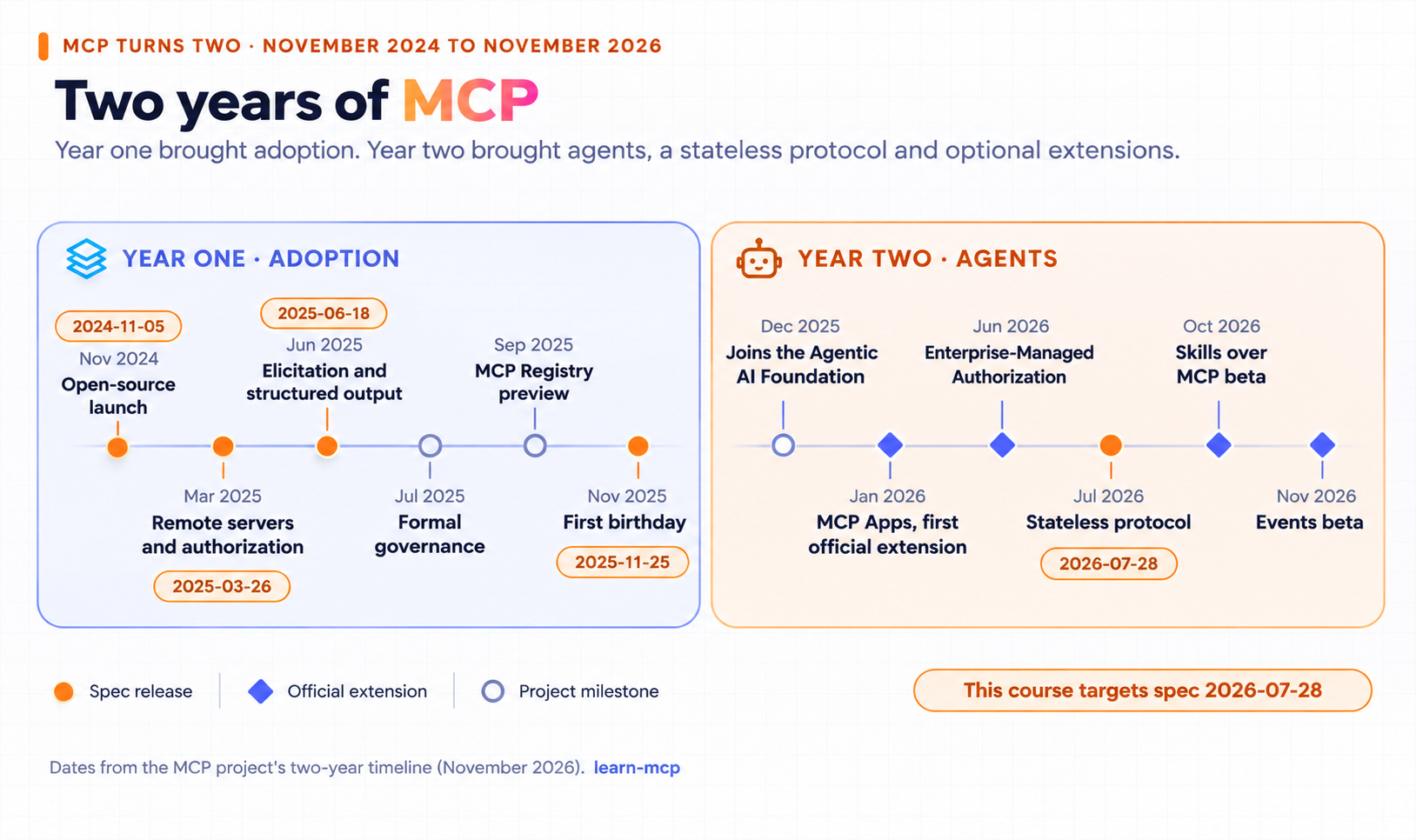
MCP turns two! Anthropic released the Model Context Protocol in November 2024. What started as a way to connect AI apps to tools and data is now becoming the standard for how agents communicate and orchestrate work. MCP also standardizes interactive apps that render inside the chat, through the MCP Apps extension.
MCP's second year was about agents. The 2026-07-28 spec made the protocol stateless, with no sessions, so a server runs behind any load balancer, and new features now arrive as optional extensions that clients adopt one at a time. On MCP's second birthday (November 24, 2026), Anthropic made Tasks and Elicitation generally available in Claude, put Skills over MCP into public beta, and announced file uploads. In this bootcamp we learn to build remote MCP servers that use these capabilities, one small, incremental step at a time.
Our north star is Generative UI + MCP: AI-native apps built around intent rather than navigation. The model decides what interface to show at runtime, and MCP supplies the tools, data and context behind it. MCP Apps is the open standard that carries that UI into the chat, in both Claude and ChatGPT. (Generative UI + MCP: The New Stack for AI-Native Applications, ODSC, 2026)
This bootcamp is the hands-on companion to the book The AI Agent Factory, Second Edition. You learn by building. The book teaches the concepts, and this bootcamp is where you practise them: every step ends with something you build, deploy and test yourself in Claude and ChatGPT. Each step's README starts with a Learn first section that links the book lessons to study before you build that step. Those lessons all come from chapters 12 to 20 of the book. Steps 5 to 8 follow chapter 19 (Postgres, row-level security and pgvector on Neon) closely. Where those chapters don't cover a technology yet (Durable Objects, Queues, Workflows and the Events extension), the step says so and links the official docs instead.
Why this bootcamp
- A hands-on way of learning. You don't learn MCP here by reading or watching. You read the concepts in the book, then build them into a real, deployed MCP server, one small step at a time. By the end, everything you know, you have built yourself.
- Hands-on preparation for CCDV-F. This bootcamp is hands-on preparation for CCDV-F (Claude Certified Developer: Foundations), and for PCDV-F (Panaversity Certified Developer: Foundations), which mirrors it. You don't just read about MCP servers: you build, deploy and test one in Claude, step by step. See Certification and Portfolio Roadmaps.
- Skills you can monetize in the international market. Building MCP servers and MCP Apps is work clients around the world pay for today. Every step builds toward a client-ready product, and the capstone is a portfolio piece you can show to clients and employers, whether you work as an FDE or build your own startup.
- Part of the FDE 2027 Master Plan. It is one piece of The FDE 2027 Master Plan covered in the book, which trains Forward Deployed Engineers (FDEs) and the next generation of AI startup founders.
- MCP Apps, one of the book's two products. The book teaches you to build two kinds of products: MCP Apps and AI Workers that improve themselves. This bootcamp covers MCP Apps. Self-improving AI Workers get their own bootcamp, Build and Sell Self Improving AI Workers: The CCDV-F Bootcamp Part II, which is under development.
Tech stack
| Area | Choice |
|---|---|
| Language | TypeScript |
| Development | Claude Code in Claude Desktop (Code tab) |
| Hosting | Cloudflare (Workers) |
| MCP server | Cloudflare's stateless createMcpHandler with MCP SDK v2 |
| Auth | Better Auth, with companies and roles through its organization plugin and single sign-on (SSO) through its open-source @better-auth/sso plugin |
| Notes store (steps 2 to 4) | Cloudflare Workers KV |
| Auth database | Cloudflare D1 |
| Business database | Neon (Postgres), with forced row-level security |
| Search by meaning | pgvector on Neon, with bge-m3 embeddings on Workers AI |
| Per-user state | Cloudflare Durable Objects |
| Background work | Cloudflare Queues |
| Durable jobs | Cloudflare Workflows |
| Payments | Stripe in test mode (step 20) |
| Target clients | claude.ai and Claude Desktop (primary testing), plus ChatGPT |
Getting started
Prerequisites
- Node.js (current LTS) and npm
- Claude Desktop, signed in with a Claude plan that includes Claude Code. You'll work in its Code tab.
- A Cloudflare account
- A Neon account
- The same Claude account, to connect and test your servers in Claude Desktop and claude.ai
- A ChatGPT account with developer mode on, to check your servers work there too
What it costs
- Claude: Claude Code in Claude Desktop needs a paid Claude plan (Pro or higher).
- ChatGPT: developer mode needs a paid ChatGPT plan that includes it.
- Cloudflare and Neon: most steps fit the free plans. Each step links the product's pricing or limits page; check it before you upgrade, and set a spending alert if you do.
- Workers AI: step 8's embeddings fit the daily free allowance for small documents.
- Anthropic API: from step 17, the automated eval script calls the Claude API, which costs a little per run.
- Stripe: test mode (step 20) is free.
Want to keep your wider AI spending low? Read Affordable Agentic AI Development, a student guide to free and low-cost options (Codex, OpenCode, direct model APIs and local models) and how to compare them before you pay.
Set up: fork, clone and sync
This bootcamp is also an assignment, and you do all your work in your own fork of this repo.
⛔ Do not open pull requests to this repository. Your work stays in your fork, and you submit through the submission form. Pull requests to
panaversity/learn-mcpwill be closed without review.
1. Fork the repo. Sign in to GitHub, open panaversity/learn-mcp, and click Fork (top right). Choose your own account as the owner, keep the name learn-mcp, and click Create fork.
2. Clone your fork (not the original) and add the bootcamp repo as upstream:
git clone https://github.com/<your-username>/learn-mcp.git
cd learn-mcp
git remote add upstream https://github.com/panaversity/learn-mcp.git
git remote -v   # origin = your fork, upstream = the bootcamp repo
3. Open your fork in Claude Desktop. Open Claude Desktop, go to the Code tab, and choose your cloned learn-mcp folder (the repo root) as the folder to work in. Always open the root folder, not a step folder, so the bundled skills load.
Prefer the terminal? Running
claudein the repo root gives you the same Claude Code session, but this bootcamp's instructions assume Claude Desktop.
4. Keep your fork in sync. New steps and fixes are added to the bootcamp over time. Before starting each step, either click Sync fork → Update branch on your fork's GitHub page, or run:
git checkout main
git fetch upstream
git merge upstream/main
git push origin main
To avoid merge conflicts, don't edit the bootcamp's own files (README.md, AGENTS.md, SUBMITTING.md, .claude/skills/, or the README.md in each step folder). Put your own notes in a NOTES.md inside the step folder.
5. Work, tag and submit. Build each step in its folder, deploy it to your own Cloudflare (and Neon) accounts, tag it (git tag step-01-done && git push origin step-01-done), and submit it through the form. SUBMITTING.md has the full details: tagging, keeping secrets out of your public fork, and exactly what to submit for each step.
Built-in skills
Opening this repo in the Code tab of Claude Desktop gives you Anthropic's MCP server development skills automatically, with nothing to install:
build-mcp-server: the starting point. It helps you choose a deployment model and design your tools.build-mcp-app: adds interactive UI (forms, pickers, dashboards) that renders in the chat.build-mcpb: packages a local MCP server as an installable bundle.
They live in .claude/skills/. Type / in the Code tab's prompt box to see them.
Roadmap
Each step lives in its own numbered directory and builds on the one before it. Every step is currently under development: each folder has a README with the planned content, and the code is coming soon.
| Step | Directory | Topic | Status |
|---|---|---|---|
| 1 | step-01-hello-world/ |
Hello world: a minimal remote MCP server on Cloudflare | 🚧 Under development |
| 2 | step-02-tool-design/ |
Designing good tools | 🚧 Under development |
| 3 | step-03-resources-and-prompts/ |
Resources and prompts: the other two MCP primitives, and when to use each instead of a tool | 🚧 Under development |
| 4 | step-04-auth/ |
Adding authorization with Better Auth and D1: sign-in, companies (tenants) and roles | 🚧 Under development |
| 5 | step-05-relational-databases/ |
Relational databases with Neon: the server connects to Neon, and you design its sales schema through the first three normal forms, with read-only tools over it | 🚧 Under development |
| 6 | step-06-neon-production/ |
Production data tools on Neon: Hyperdrive, paginated and transactional tools, and row-level security | 🚧 Under development |
| 7 | step-07-multi-tenancy/ |
Multi-tenant MCP servers and databases: isolation models, tenant context in every call, shared and dedicated databases, and cross-tenant tests | 🚧 Under development |
| 8 | step-08-semantic-search-pgvector/ |
Search by meaning with pgvector: tenant-scoped retrieval on Neon, answers that cite or abstain, and a question set in CI | 🚧 Under development |
| 9 | step-09-generative-ui-mcp-apps/ |
Generative UI with MCP Apps: fixed React widgets that tools return, with the model selecting which one to show | 🚧 Under development |
| 10 | step-10-skills-over-mcp/ |
Skills over MCP: a shared playbook plus skills built for each company, served from your signed-in server | 🚧 Under development |
| 11 | step-11-durable-objects/ |
Per-user state with Durable Objects: draft orders and rate limits that stay consistent | 🚧 Under development |
| 12 | step-12-queues/ |
Background work with Queues: bulk imports processed in batches, with retries | 🚧 Under development |
| 13 | step-13-cloudflare-workflows/ |
Durable jobs with Cloudflare Workflows: multi-step, retryable work that a tool starts and the model checks on | 🚧 Under development |
| 14 | step-14-tasks/ |
Long-running work with Tasks | 🚧 Under development |
| 15 | step-15-events/ |
Events | 🚧 Under development |
| 16 | step-16-security-hardening/ |
Security hardening: threat model, token audience, least-privilege tools, elicitation confirmations, prompt injection, secrets and audit | 🚧 Under development |
| 17 | step-17-testing-and-observability/ |
Testing, evals and observability: tests in the Workers runtime, a tool-selection eval set, logs and traces | 🚧 Under development |
| 18 | step-18-deploy-and-test/ |
Deploying and testing on claude.ai, Claude Desktop and ChatGPT | 🚧 Under development |
| 19 | step-19-generative-ui-dashboard/ |
Generative UI: an intent-driven dashboard, where the model composes a screen from approved widgets and fills it with Neon data | 🚧 Under development |
| 20 | step-20-billing-and-distribution/ |
Billing and distribution: Stripe plans, usage limits on every call, and listing in Claude's and ChatGPT's directories | 🚧 Under development |
| 21 | step-21-capstone-mcp-app/ |
Capstone: a complete, client-ready MCP app (Stockroom, or your own client) built from the bootcamp's core plus the extras the client needs | 🚧 Under development |
Milestones and pacing
The 21 steps fall into six milestones. Times are rough estimates for a learner working with Claude Code, including reading the linked lessons. Steps 10, 14 and 15 are lighter, because they teach extensions that clients are still adopting (Claude now supports Tasks and, in beta, Skills over MCP, while Events is still rolling out); build them anyway, with the plain-tool fallback each step describes.
| Milestone | Steps | Estimated time | What you can do at the end |
|---|---|---|---|
| 1. A remote MCP server | 1 to 4 | 18 to 22 hours | Ship a signed-in MCP server, with companies and roles, to Claude and ChatGPT |
| 2. Multi-tenant business data and retrieval | 5 to 8 | 28 to 36 hours | Design a 3NF schema, force row-level security, serve many companies from shared and dedicated databases, and search their documents by meaning with citations |
| 3. Screens and know-how | 9 and 10 | 10 to 12 hours | Return React widgets in the chat and ship skills with the server |
| 4. State and long work | 11 to 15 | 18 to 24 hours | Handle drafts, rate limits, bulk imports, durable jobs, tasks and events, all tenant-scoped |
| 5. Production | 16 to 18 | 16 to 20 hours | Harden, test, evaluate, observe and release the server safely |
| 6. A product | 19 to 21 | 35 to 50 hours | Build an intent-driven dashboard, charge each company for it, and deliver a complete client app |
The whole bootcamp is about 125 to 164 hours. You don't have to finish it to get value from it, so there are three completion levels:
| Level | Steps | Estimated time | You can show |
|---|---|---|---|
| Foundation | 1 to 4 | 18 to 22 hours | A signed-in remote MCP server with companies and roles, working in Claude and ChatGPT |
| Professional | 1 to 10 | 56 to 70 hours | A multi-tenant server with forced row-level security, cited search and MCP Apps widgets |
| Advanced | 1 to 21 | 125 to 164 hours | A production, billed, client-ready MCP app |
Multi-tenancy runs through the whole bootcamp. Every user belongs to a company from step 4, every business row carries it in its keys from step 5, the database enforces it with forced row-level security from step 6, step 7 makes it the server's architecture, step 8 keeps search by meaning inside it, and from step 8 on every step's checklist includes a tenant-isolation check.
What this bootcamp practises for CCDV-F
The bootcamp is hands-on preparation, not a copy of the exam. Use the official CCDV-F exam guide as the source for the exam's own domains and weights, and use this map to find where you practised each skill. Direct rows are developer skills an exam about building with Claude is likely to cover. Supporting rows build the skills behind them. FDE rows are for client work, not the exam. Finishing the bootcamp does not by itself mean you are ready for the exam: check yourself against the official guide.
| Skill | Kind | Steps |
|---|---|---|
| Building remote MCP servers and connecting them to Claude | Direct | 1, 18 |
| Designing tools, resources and prompts the model uses well | Direct | 2, 3, 19 |
| Securing a server: OAuth, roles, token audience, prompt injection | Direct | 4, 6, 16 |
| Asking the user with elicitation before costly or irreversible actions | Direct | 14, 16, 20 |
| Multi-tenant servers and databases, with row-level security | Supporting | 4 to 7, then every later step |
| Working with business data safely | Supporting | 5, 6, 7 |
| Retrieval: search by meaning, citations, abstaining and measuring | Direct | 8 |
| Interactive UI with MCP Apps | Direct | 9, 19 |
| Skills, Tasks and Events extensions | Supporting | 10, 14, 15 |
| Background and long-running work | Supporting | 11, 12, 13, 14 |
| Testing, evals and observability | Direct | 8, 17, 18 |
| Driving Claude Code to plan, build and review | Direct | every step |
| Turning a server into a product for clients | FDE | 20, 21 |
How each step works
Every step is hands-on: you read the linked book lessons, then build the step yourself, deploy it, and test it in Claude and ChatGPT. A step is done only when it works in a real client, not when you have read about it.
Every step is built with Claude Code in Claude Desktop. Each step's README has a Build it with Claude Code section with numbered instructions and copy-paste prompts:
- Open the repo's root folder in the Code tab of Claude Desktop so the bundled skills load.
- Start in plan mode and let Claude propose a plan before writing code.
- Paste the prompts in order, and review what Claude proposes before approving it.
- Deploy and test in Claude and ChatGPT at the end of each step.
Each step's code lives in its own folder and starts from a copy of the previous step.
Static and generative UI in Claude and ChatGPT
We test everything in claude.ai and Claude Desktop, and we also make it work in ChatGPT. To stay portable, every UI we build ships as a standard MCP App: an HTML/JS app that the host renders in a sandboxed frame in the chat. We use the standard MCP Apps APIs (@modelcontextprotocol/ext-apps) rather than any client-specific API, so one server works in both clients.
We use the three kinds of screen from book lesson 20.10 Screens the AI designs:
| Kind of screen | What it means | Where |
|---|---|---|
| Fixed | We build each React widget ahead of time. The model selects one from the user's request and the tool fills it with data | Step 9 |
| Approved parts | We build a library of small approved widgets. The model composes a screen from them, and the server checks every part and every field before it is shown | Steps 19 and 21 |
| Open | The model writes its own HTML | Not used, because it is hard to keep safe |
Official documentation
The book teaches the ideas, and these official docs are the reference for the exact APIs. Each step's Learn first section also links the specific doc pages it needs.
MCP
- Getting started, the specification (version 2026-07-28) and its key changes
- Extensions overview and client support matrix
- MCP Apps, Authorization extension, Skills over MCP, Tasks and Events
- MCP Inspector
Cloudflare (all docs)
- Workers and Model Context Protocol on Cloudflare
- Workers KV, D1 and Hyperdrive
- Durable Objects, Queues and Workflows
Neon (all docs)
Better Auth (all docs)
License
MIT. See LICENSE.
Yorumlar (0)
Yorum birakmak icin giris yap.
Yorum birakSonuc bulunamadi