pneuma-skills
Health Gecti
- License — License: MIT
- Description — Repository has a description
- Active repo — Last push 0 days ago
- Community trust — 16 GitHub stars
Code Basarisiz
- fs module — File system access in .github/workflows/release.yml
- process.env — Environment variable access in backends/claude-code/cli-launcher.ts
- rm -rf — Recursive force deletion command in backends/codex/__tests__/codex-adapter.test.ts
- process.env — Environment variable access in backends/codex/cli-launcher.ts
- process.env — Environment variable access in bin/pneuma.ts
- network request — Outbound network request in bin/pneuma.ts
Permissions Gecti
- Permissions — No dangerous permissions requested
Bu listing icin henuz AI raporu yok.
Co-creation infrastructure for humans and code agents — visual environment, skills, continuous learning, and distribution.

Pneuma Skills
Co-creation Infrastructure for Humans × Code Agents
Visual environment, skills, continuous learning, and distribution —
everything humans and agents need to build content together.




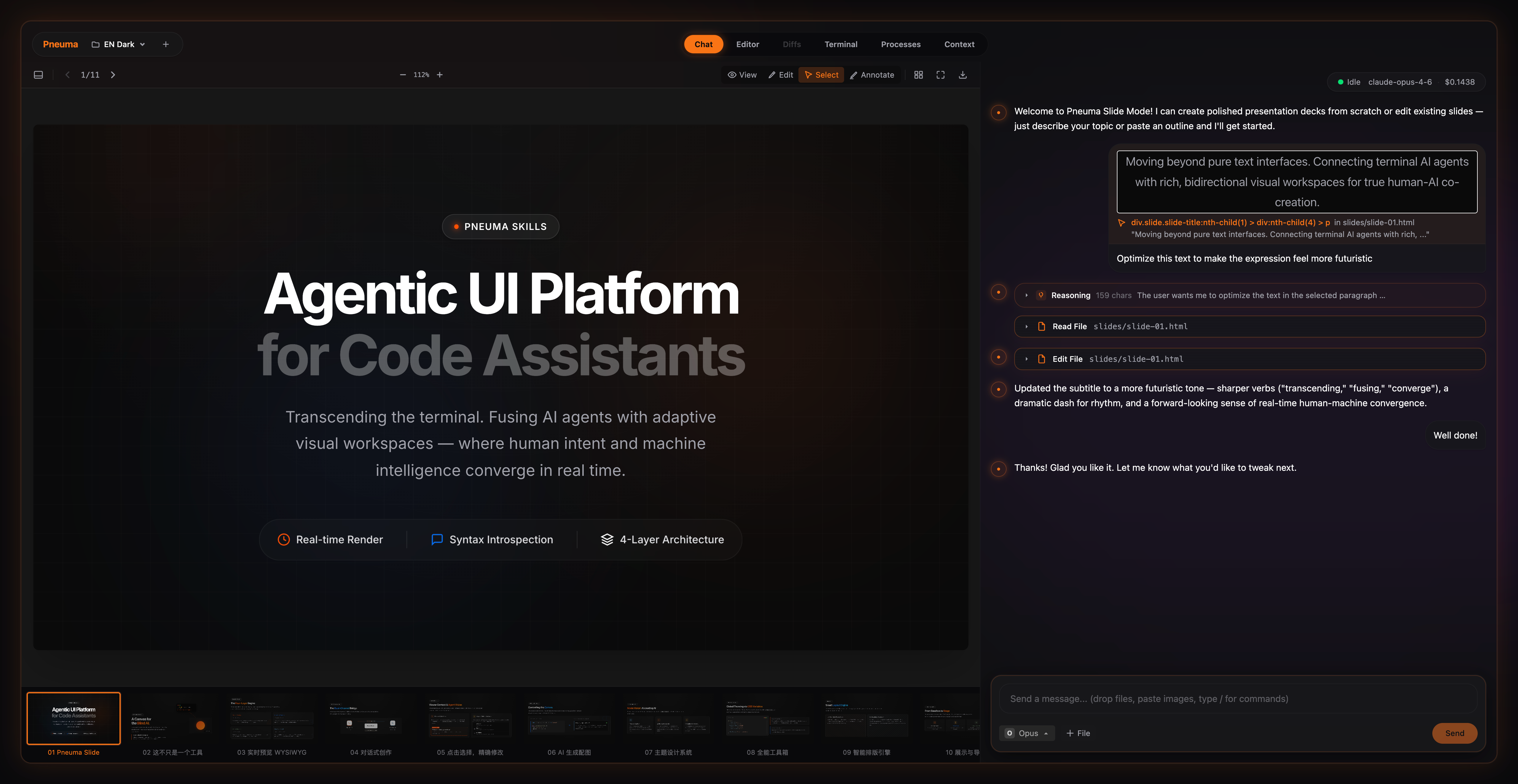
bunx pneuma-skills slide --workspace ./my-first-pneuma-slide
"pneuma" — Greek pneuma, meaning soul, breath, life force.
When humans and code agents co-create content, they need more than a chat window — they need shared infrastructure. Pneuma provides four pillars for isomorphic collaboration, built atop mainstream code agents. Today the production path is Claude Code; the runtime now exposes a startup-selectable backend layer so additional agents can be integrated without rewriting the UI shell.
| Pillar | What it does |
|---|---|
| Visual Environment | Agent edits files on disk; you see, select, and guide the rendered result in a live, bidirectional workspace |
| Skills | Domain-specific knowledge and seed templates injected per mode. Sessions persist across runs — the agent picks up where it left off |
| Continuous Learning | Evolution Agent mines conversation history to extract preferences, then augments skills with learned knowledge |
| Distribution | Build custom modes with AI via Mode Maker, publish to the marketplace, share with pneuma mode add |
Built-in Modes
| Mode | What it does |
|---|---|
| webcraft | Live web development with Impeccable AI design intelligence — 20 design commands, responsive preview, export |
| slide | HTML presentations — content sets, drag-reorder, presenter mode, PDF/image export |
| doc | Markdown documents with live preview — the simplest mode, a minimal example of the mode system |
| draw | Diagrams and visual thinking on an Excalidraw canvas |
| illustrate | AI illustration studio — generate and curate visual assets on a row-based canvas with content sets |
| mode-maker | Create custom modes with AI — fork, play-test, publish |
| evolve | Evolution Agent — analyze history, propose skill improvements, apply/rollback |
Getting Started
Desktop App (recommended)
Download the latest release for your platform:
| Platform | Download |
|---|---|
| macOS (Apple Silicon) | .dmg |
| Windows x64 | .exe installer |
| Windows ARM64 | .exe installer |
| Linux x64 | .AppImage / .deb |
The desktop app bundles Bun — no runtime install needed. Install Claude Code CLI and you're ready to go. The launcher shows available backends — currently Claude Code and Codex are implemented.
CLI
# Prerequisites: Bun >= 1.3.5, Claude Code CLI and/or Codex CLI

# Open the Launcher (marketplace UI)
bunx pneuma-skills

# Start a mode with a fresh workspace
bunx pneuma-skills slide --workspace ./my-first-pneuma-slide

# Explicit backend selection at startup
bunx pneuma-skills doc --backend claude-code

# Or use the current directory
bunx pneuma-skills doc
git clone https://github.com/pandazki/pneuma-skills.git
cd pneuma-skills
bun install
bun run dev doc --workspace ~/my-notes
CLI Usage
pneuma-skills [mode] [options]

Modes:
  (no argument)                Open the Launcher (marketplace UI)
  webcraft                     Web design with Impeccable.style
  slide                        HTML presentations
  doc                          Markdown with live preview
  draw                         Excalidraw canvas
  illustrate                   AI illustration studio
  mode-maker                   Create custom modes with AI
  evolve                       Launch the Evolution Agent
  /path/to/mode                Load from a local directory
  github:user/repo             Load from GitHub
  https://...tar.gz            Load from URL

Options:
  --workspace <path>   Target workspace directory (default: cwd)
  --port <number>      Server port (default: 17996)
  --backend <type>     Agent backend to launch (default: claude-code)
  --no-open            Don't auto-open the browser
  --skip-skill         Skip skill installation
  --debug              Enable debug mode
  --dev                Force dev mode (Vite)

Subcommands:
  evolve <mode>        Analyze history and propose skill improvements
  mode add <url>       Install a remote mode
  mode list            List published modes
  mode publish         Publish current workspace as a mode
  snapshot push/pull   Upload/download workspace snapshot
Architecture
┌─────────────────────────────────────────────────────────┐
│  Desktop / Launcher                                     │
│  Browse → Discover → Launch → Resume                    │
├─────────────────────────────────────────────────────────┤
│  Layer 4: Mode Protocol                                 │
│  ModeManifest — skill + viewer config + agent prefs     │
├─────────────────────────────────────────────────────────┤
│  Layer 3: Content Viewer                                │
│  ViewerContract — render, select, agent-callable actions│
├─────────────────────────────────────────────────────────┤
│  Layer 2: Agent Runtime                                 │
│  Backend registry + protocol bridge + normalized state  │
├─────────────────────────────────────────────────────────┤
│  Layer 1: Runtime Shell                                 │
│  HTTP, WebSocket, PTY, File Watch, Frontend             │
└─────────────────────────────────────────────────────────┘
Three core contracts in core/types/:
| Contract | Responsibility | Extend to... |
|---|---|---|
| ModeManifest | Skill, viewer config, agent preferences, init seeds | New modes (mindmap, canvas, etc.) |
| ViewerContract | Preview component, context extraction, action protocol | Custom renderers, viewport tracking |
| AgentBackend | Launch, resume, kill, capability declaration | Other agents (Aider, etc.) |
The backend contract is intentionally split in two layers:
- Process lifecycle:
AgentBackendowns launch, resume, exit, and capability declaration. - Session/UI contract: the browser consumes normalized session state (
backend_type,agent_capabilities,agent_version) rather than backend-specific wire details.
That means backend-specific protocols stay in backends/<name>/, while the UI and most server code depend on a stable session model.
Tech Stack
| Layer | Technology |
|---|---|
| Runtime | Bun >= 1.3.5 |
| Server | Hono |
| Frontend | React 19 + Vite 7 + Tailwind CSS 4 |
| Desktop | Electron 41 + electron-builder + electron-updater |
| Terminal | xterm.js + Bun native PTY |
| Drawing | Excalidraw |
| Canvas | React Flow (Illustrate mode) |
| Agent | Claude Code via --sdk-url; Codex CLI via app-server |
Backend Model
- Backend is selected once at launch with
--backendor in the launcher modal. - The selected backend is persisted in
<workspace>/.pneuma/session.jsonand~/.pneuma/sessions.json. - Existing workspaces are backend-locked. Pneuma resumes the same backend for the lifetime of that workspace session instead of switching mid-stream.
- Frontend features now read
agent_capabilitiesfrom session state. Claude-only features such as Schedules and cost tracking are hidden for non-Claude backends.
Acknowledgements
This project's Claude transport layer, NDJSON handling, and much of the initial chat bridge were heavily informed by Companion by The Vibe Company.
Companion remains the reference for Claude Code's undocumented --sdk-url transport. Pneuma's newer backend layer keeps that Claude-specific protocol inside backends/claude-code/ so future backends can plug in through their own adapters instead of inheriting Claude wire assumptions everywhere.
License
Yorumlar (0)
Yorum birakmak icin giris yap.
Yorum birakSonuc bulunamadi