MODZ
Health Uyari
- License — License: MIT
- Description — Repository has a description
- Active repo — Last push 0 days ago
- Low visibility — Only 5 GitHub stars
Code Basarisiz
- rm -rf — Recursive force deletion command in .claude-plugin/marketplace.json
- network request — Outbound network request in kit/judge.ts
- exec() — Shell command execution in kit/moving.ts
Permissions Gecti
- Permissions — No dangerous permissions requested
Bu listing icin henuz AI raporu yok.
19 Claude Code plugins in one panel. See every move Claude makes: agents, files, plans, tests and risky commands, live.
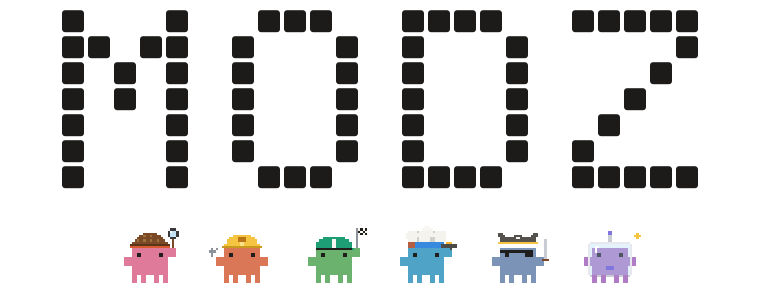
19 mods for Claude Code. One panel.
See every move Claude makes: agents, files, plans, tests and risky commands, live, beside the chat.

Watch the whole film · 54 seconds, with sound · download it
Install
In Claude Code, add the marketplace, then install the panel and the mods you want:
/plugin marketplace add partalemre/MODZ
/plugin install modz@modz
/plugin install savvy-progress@modz
Or install all of them at once from a terminal:
claude plugin marketplace add partalemre/MODZ
for m in modz savvy-progress savvy-flow filetree plan-steps handoff transceiver blast-radius secret-guard checkpoint \
         test-badge replay-theater session-budget cache-tax hud-pro effort-router done-ping reflect-mod skins terminal-browser; do
  claude plugin install "$m@modz"
done
Or ask your coding agent: Install MODZ for me. Follow https://partalemre.github.io/MODZ/llms.txt and ask me which mods I want.
Start a new session. The MODZ panel opens on the right with a line from every mod you installed.
- Where it draws. The Claude desktop app's Code tab draws everything. The terminal draws the same panels as text.
- Requirements. Claude Code 2.1.295 or later, tested on 2.1.295 and 2.1.296.
terminal-browserdraws in the terminal only. Outside the desktop app,done-pingfalls back to a macOS banner. - Updates. Automatic and free. The first session after you install turns on Claude Code's own auto-update for the
modzmarketplace, so every mod you installed,transceiverfrom its own repo included, updates itself in the background a few minutes into a session and loads fresh at the next start. No model call, no command to run. If you already chose under/plugin> Marketplaces, that choice stays; to turn it off, choose Disable auto-update there. - Language. The interface is in English. Set
MODZ_LANG=trfor Turkish. - Transceiver needs a claude.ai login. If Claude Code runs inside another app (an IDE,
claude -p, an SDK host), also setCLAUDE_CODE_ARTIFACT=1.
Both variables go in the env block of ~/.claude/settings.json:
{ "env": { "MODZ_LANG": "tr", "CLAUDE_CODE_ARTIFACT": "1" } }
One panel. Every mod, live.
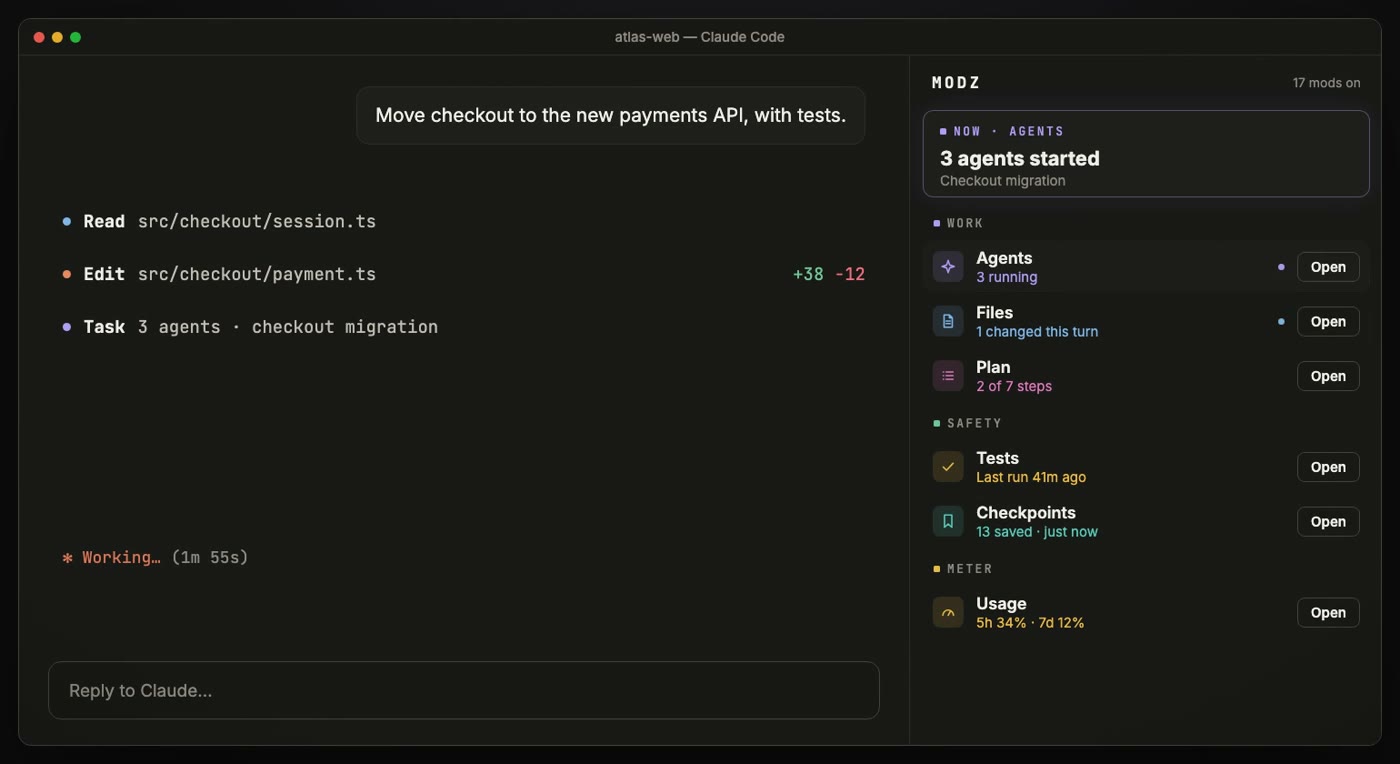
The panel opens beside the chat when a session starts. Each mod reports one honest line: what it measured, never a guess. One click opens that mod's own pane next to the panel.
Every agent gets a face.
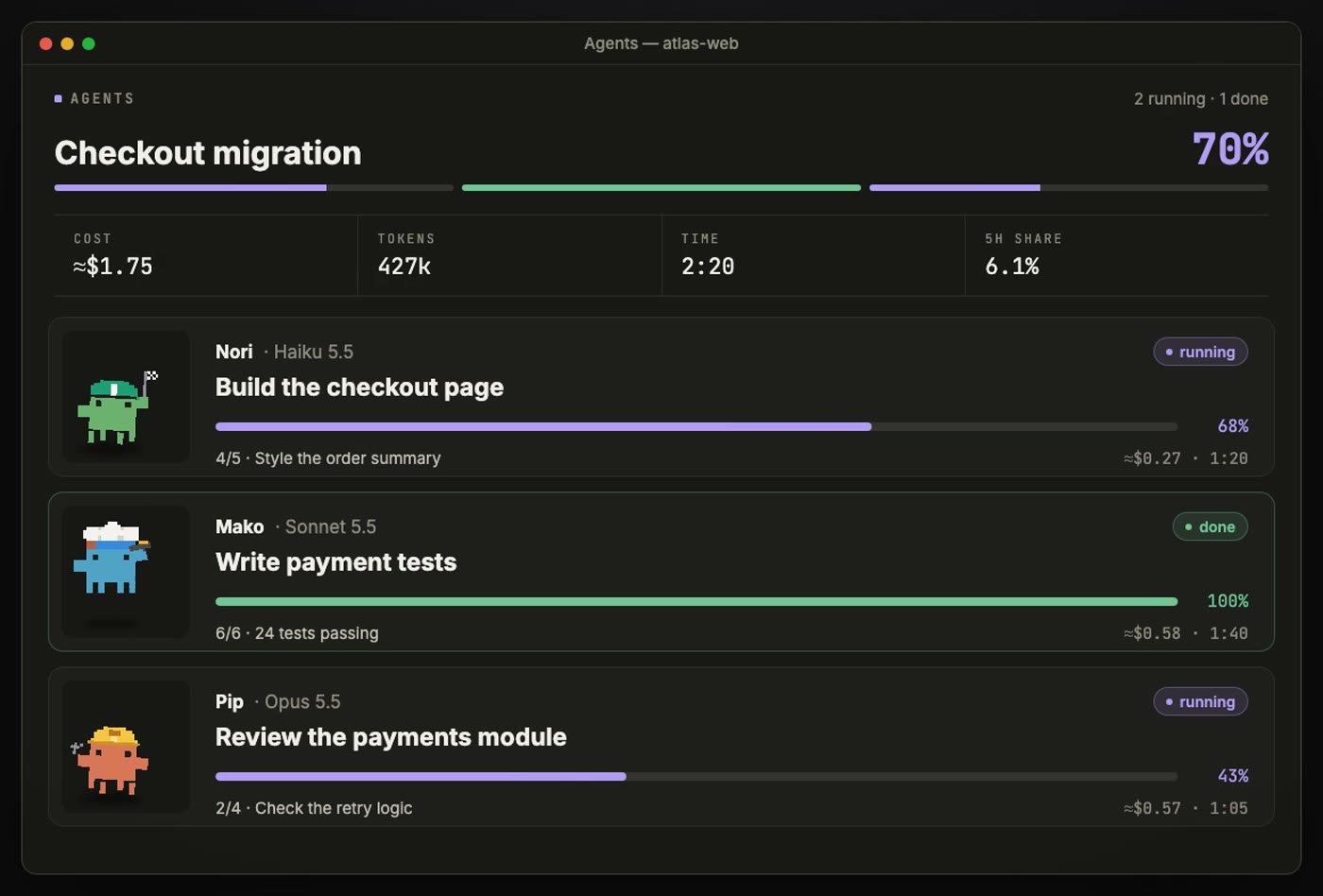
Each subagent gets a crab, a name and a card with its task, step, progress, cost and time, updated as it works. A band above the prompt shows the whole crew while a turn runs.
Risky commands wait for your OK.
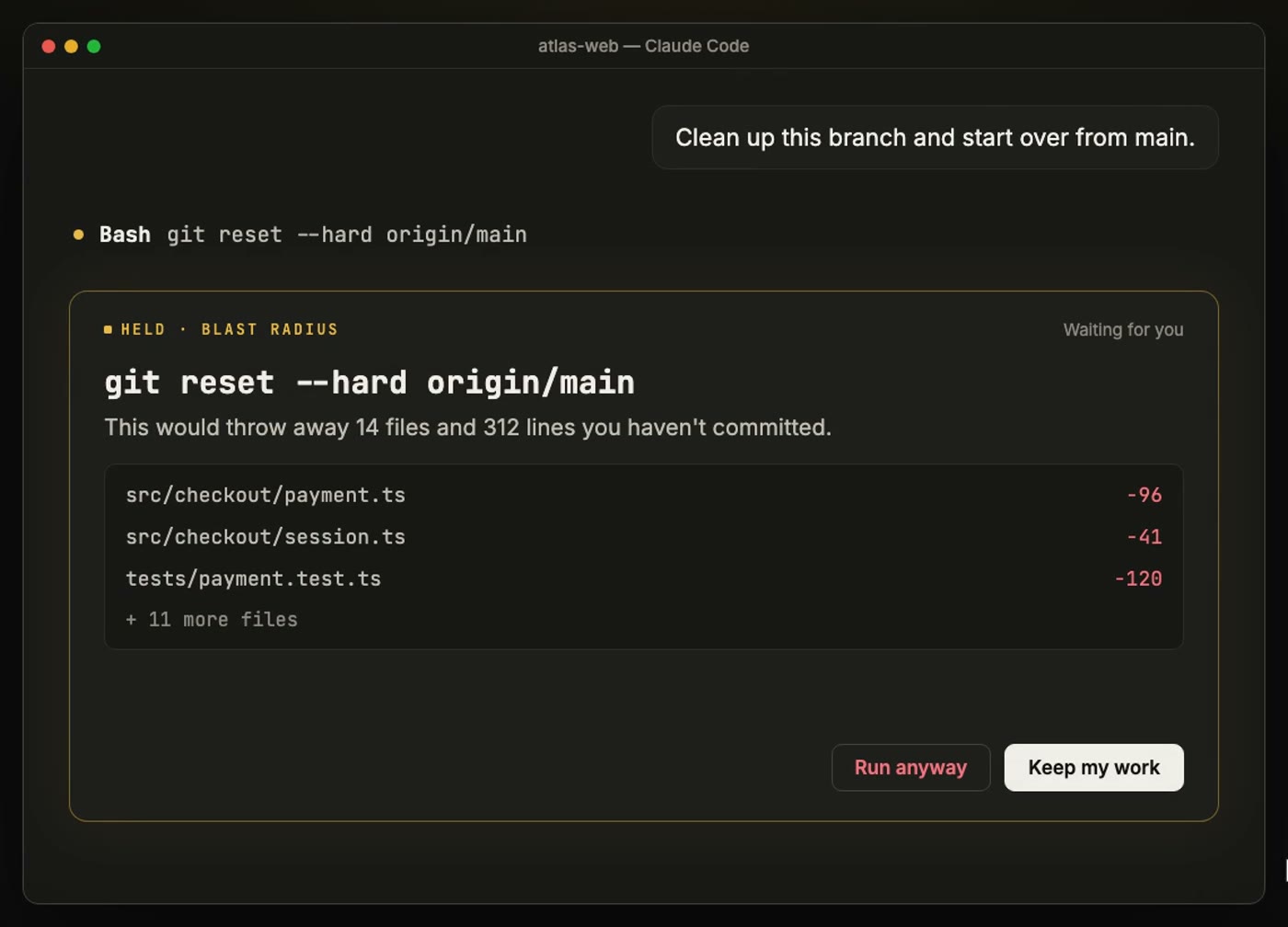
rm -rf, git reset --hard, git clean, force pushes and migrations stop before they run. The card shows exactly what each would delete or throw away, and the safe choice has the focus.
Your team, inside Claude. beta
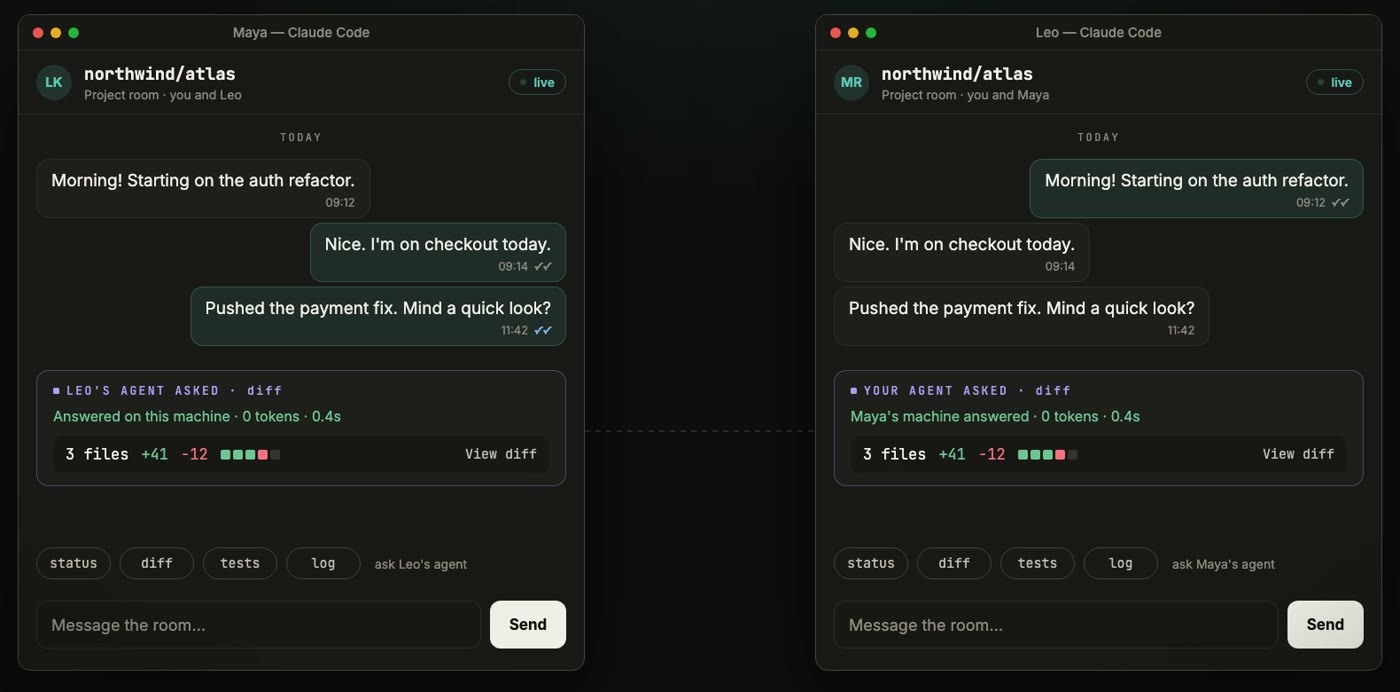
Transceiver lets you chat with teammates without leaving Claude Code. Your agent can ask theirs for status, diff, tests, log or a file. The answer is computed on their machine and costs zero tokens. Only collaborators on the repo can ask, and secrets never leave your machine. Rooms are private claude.ai artifacts; there is no extra server. Transceiver is in beta: it works end to end, and its rough edges are being found. How it works
The mods
| Mod | What it does | |
|---|---|---|
| Panel | modz |
The panel itself: one live line per mod and one click to each pane; keeps Claude replying in your language |
| Work | savvy-progress |
Agents pane and progress band: each subagent's progress, cost and time; other chats waiting on you; a home crab that levels up |
savvy-flow |
Orchestrated delivery: the session model plans, tiered worker agents build | |
filetree |
Files Claude touched this turn, what it is doing now, git status | |
plan-steps |
The plan's steps as Claude works through them; the plan comes back after /clear and compaction, and a turn that ends with steps open offers to go on |
|
handoff |
Before the context fills, writes a handoff note and hands it once to your next fresh chat | |
transceiver |
Team chat and zero-token agent questions between teammates (beta) | |
| Safety | blast-radius |
Holds destructive shell commands and shows what they would change; holds an edit to a file another chat just changed; checks other commands against your .claude/house-rules.md |
secret-guard |
Stops keys and tokens in writes, edits, git add and commits; keeps pasted keys out of the chat as placeholders; /rec masks keys, env values and e-mail addresses on screen |
|
checkpoint |
A silent git snapshot before each turn's first write; undo a turn | |
test-badge |
Runs tests and lint after edits and shows the result; watches your PR's GitHub CI | |
replay-theater |
Replays the last turn's edits step by step, and earlier turns and past sessions | |
| Meter | session-budget |
A spend budget per session, with a stop at 100%; asks before new subagents when the 5-hour window runs low |
cache-tax |
Keeps the prompt cache warm through breaks and prices a cold send, a model change included | |
hud-pro |
One line with the 5-hour and 7-day limits, context and cost; when the 5-hour window fills; what fills the context and how many turns are left; 7 and 30 days of usage history | |
effort-router |
Shows each turn's effort and model; can send light prompts at low effort | |
| Comfort | done-ping |
A notification when a long turn ends or Claude waits on you, with optional sound packs |
reflect-mod |
Saves corrections worth keeping to your CLAUDE.md; /mine turns friction that repeats across past chats into ideas |
|
skins |
Themes for the transcript, switched live with /skin, and living ASCII scenes above the prompt |
|
terminal-browser |
A browser inside the terminal that the agent can drive |
Most mods use no model tokens. These can, each with the cheapest model and never more than one call per event:
reflect-mod: one small check per correction it finds, and one per/mine.cache-tax: warming sends a request, only when you turn it on.handoff: one summary per handoff note (summarize, on by default; the note is written without it too).effort-router: one check per prompt, only inautomode.blast-radius: one check per command it judges, only when.claude/house-rules.mdexists.replay-theater: one call when a step has no description of its own.- Transceiver's free-form
ask: a small model on the other side, at most ten a day per room.
plan-steps (while it brings a plan back) and secret-guard (while placeholders exist) add a short section to the system prompt.
What each mod can touch
Read from the code, not from a promise. "Store" is the mod's own file in ~/.claude; every mod also keeps session state in memory.
| Mod | Reads | Writes | Runs | Network | Model |
|---|---|---|---|---|---|
modz |
marketplace, settings | store; once, autoUpdate for its marketplace in user settings |
|||
savvy-progress |
transcript | store | agents you start | ||
savvy-flow |
its worker agents | ||||
filetree |
project files | git, open |
|||
plan-steps |
task list, plan file | store | |||
transceiver |
repo, git | its room | git |
claude.ai | free-form ask |
handoff |
transcript, plan | .claude/handoff/*.md, store |
git status, rm (own notes) |
optional | |
blast-radius |
.claude/house-rules.md |
store | git, a read-only look at what a held command would touch |
Jev, opt-in | with house rules |
secret-guard |
written files | .env, .gitignore (on your press) |
git |
||
checkpoint |
store, git refs | git |
|||
test-badge |
project files | store | your test and lint commands, git, gh |
GitHub, through gh |
|
replay-theater |
transcripts | store | rarely | ||
session-budget |
store | ||||
cache-tax |
store | when warming | |||
hud-pro |
context breakdown | store | |||
effort-router |
prompts | store | Jev, opt-in | auto only |
|
done-ping |
store | osascript, terminal-notifier, afplay |
|||
reflect-mod |
transcripts, CLAUDE.md | CLAUDE.md (on your press), store | tail |
yes | |
skins |
settings | store | |||
terminal-browser |
web pages | a browser | yes |
Jev is TypeSafe's classifier: set MODZ_JUDGE=jev and TYPESAFE_API_KEY to use it instead of your own model account. What it is sent is masked first.
Make it yours
- Arrange the panel. Press Customize at the bottom of the MODZ panel: move rows up, hide the ones you do not use, and bring them back from Hidden. Reset puts everything back. Your layout is kept across sessions.
- Get back from any pane. Every pane the panel opens has a ← MODZ button at the top. It brings the panel forward, and opens it again if it was closed.
/modzdoes the same. - Choose what loads. Each mod is its own plugin: install or uninstall any of them, and the panel follows.
/plugin configure modz@modzturns off opening at session start.
Add your own mod to the panel
The panel lists any mod that reports to it, with no change to MODZ. Your mod talks to it through $.state:
- Report a line. Write your own
{ plugin: '<your-mod>', key: 'hub' }value:{ pane, detail, tone, at }, plus your row'stitle,hint,icon(a kit icon name),section(work,safetyormeter) and an optionalbadge.toneisidle,live,ok,warnorbad; write it only when the text changes. - Open on request. Hook
state.seton{ plugin: 'modz', key: 'open' }; when itspaneis yours, call$.ui.open({ id, title, focus: true }). - Offer the way back. While
{ plugin: 'modz', key: 'isOn' }istrue, drawHomeButtonfromkit/home.tsxfirst in your pane; its press writes your own{ plugin: '<your-mod>', key: 'home' }as{ at }.
DESIGN.md §9 has the full contract, and mods/modz/types/index.d.ts the types. bin/modz new <name> starts a mod from the template.
For AI agents
If a person asks you to install MODZ, do exactly this. Every step is safe to repeat.
- Check the version:
claude --versionmust print 2.1.295 or later. If it is older, ask the person to update Claude Code first. - Add the marketplace:
claude plugin marketplace add partalemre/MODZ. - Install the panel:
claude plugin install modz@modz. Then install each mod the person wants, by the names in the table above, asclaude plugin install <name>@modz. If they did not choose, install all twenty with the loop under Install. - Optional settings: put them in the
envblock of~/.claude/settings.json, merging with what is already there and never overwriting it:"MODZ_LANG": "tr"for a Turkish interface."CLAUDE_CODE_ARTIFACT": "1"if Transceiver is installed and this Claude Code is driven by an SDK host.
- Verify:
claude plugin listshows each<name>@modzas enabled. - Tell the person to start a new session, or run
/reload-pluginsin an open one.
To remove a mod: claude plugin uninstall <name>@modz. To remove everything: also run claude plugin marketplace remove modz. A machine-readable summary is at partalemre.github.io/MODZ/llms.txt.
Develop
mods/<name>/ holds each mod; kit/ is the shared drawing kit, copied into the mods by bin/kit-sync.
- Unit checks.
bin/modz check [name]validates each mod and runs its tests, on both the terminal engine and the desktop app's engine. - End to end.
bin/modz deskstarts a real session, speaks the desktop app's own protocol to it, and clicks through every panel. Run both before opening a pull request. - Seeing it. An agent cannot see the desktop app, so
bin/modz shot [--pane] [--title t]saves the Claude window as a PNG, even when another window covers it. Mods load when a session starts: to look at fresh code, open a new session in its own window and shoot it with--title. - Releases. No mod sets
version: Claude Code then versions each one by its commit, so every push tomainreaches every user. Keep it that way; a pinnedversionstops updates until someone bumps it. - Types. Claude Code writes its API types into
.claude-plugin/types/beside a mod it hot-reloads. Each mod'stsconfig.jsonextends them, sotsc -p mods/<name>type-checks that mod. - Kit gallery.
tools/kit-gallerydraws every kit component; its tests check contrast in both themes. - Design rules. DESIGN.md (in Turkish) covers colour, type, components and the rules every mod follows.
Credits
Several mods are adaptations of open-source projects, each under its original license, which lives in that mod's folder:
| Mod | Based on | License |
|---|---|---|
blast-radius, replay-theater |
anthropics/claude-code-playground | Apache-2.0 |
cache-tax |
karanb192/cache-tax | MIT |
filetree |
data-goblin/claude-code-filetree | MIT |
reflect-mod |
bayramannakov/claude-reflect | MIT |
savvy-progress, savvy-flow |
johnnyvizz/claude-kit | MIT |
skins |
hellosverre/claude-skins | MIT |
terminal-browser |
zenbu-labs/terminal-browser | MIT |
Everything else is MIT.
upstreams.json records the upstream date each adaptation is synced to; a weekly workflow (.github/workflows/upstream-watch.yml) keeps one open upstream issue per mod listing the newer upstream commits.
A second weekly workflow (.github/workflows/mod-radar.yml) keeps one radar issue with the most-starred new mods from the awesome-claude-code-mods catalogue that MODZ has not adapted. MODZ keeps one mod per job: an idea worth taking is folded into the mod that already does that job.
Yorumlar (0)
Yorum birakmak icin giris yap.
Yorum birakSonuc bulunamadi