the-deck-by-parthans
Health Warn
- License — License: MIT
- Description — Repository has a description
- Active repo — Last push 0 days ago
- Low visibility — Only 8 GitHub stars
Code Warn
- network request — Outbound network request in static/app.js
Permissions Pass
- Permissions — No dangerous permissions requested
No AI report is available for this listing yet.
Turn any iPad into a wireless button panel for your Mac. Apps, sites, calendar, music, Claude and voice notes from a web page. Free, no app to install.
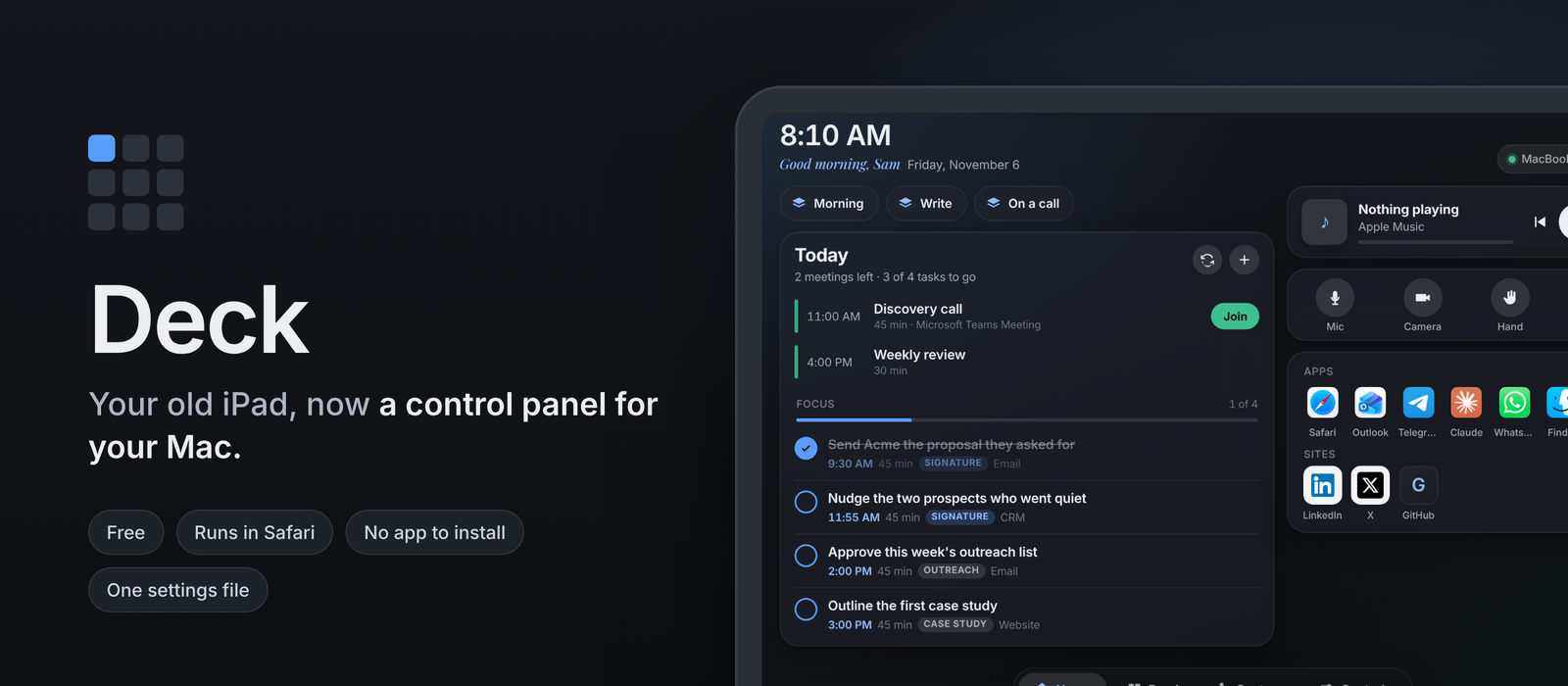
Turn any iPad into a wireless button panel for your Mac. Open apps and sites, see your calendar and join meetings, control music, send prompts to Claude and record voice notes, from a web page on the iPad. It can also show a short focus list for the day that blocks time on your calendar when you say so, and a daily reading roundup. Free, no app to install, every button set in one file.





Quick start · What you get · Settings · Security · Troubleshooting · Questions
Start here
| You want | Go to |
|---|---|
| To see what it looks like | What you get |
| To set it up in 15 minutes | Quick start |
| To change the buttons | Settings |
| Your Outlook or Microsoft 365 calendar on it | Calendar |
| A daily focus list and reading roundup | docs/DAILY.md |
| To know what it can and cannot do on your Mac | How it stays safe |
| To fix "can't open a secure connection" | Troubleshooting |
How it works
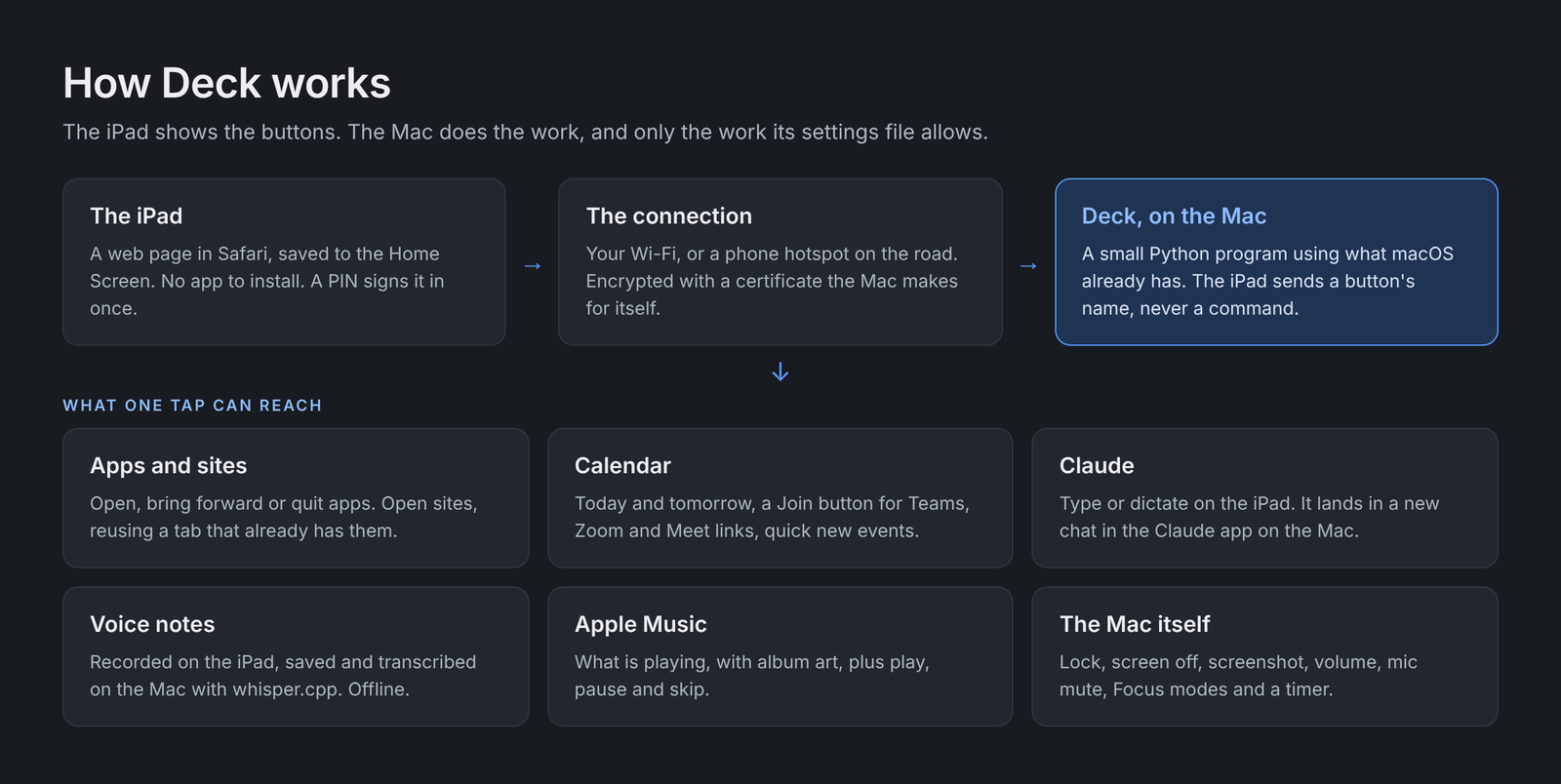
| The iPad | Shows a web page from your Mac in Safari, saved to the Home Screen so it opens full screen. No app to install. |
| The connection | Your Wi-Fi, or a phone hotspot when you are away from home. Encrypted with a certificate the Mac makes for itself. |
| The Mac | Runs a small Python program using only what macOS already has. When you tap a button, the iPad sends its name and the Mac does the rest. |
Quick start
| Step | On | What to do |
|---|---|---|
| 1 | Mac | Download Deck and run the setup script (commands below). It asks for a PIN, makes the certificate and asks macOS for the permissions it needs. |
| 2 | Mac | Start Deck: bash background.sh on keeps it running, also after a restart. |
| 3 | iPad | Open the setup address the script prints (http://your-mac.local:8080), follow the five steps on that page, then add Deck to the Home Screen. |
# 1. Download into a folder called deck in your home folder
git clone https://github.com/parthans/the-deck-by-parthans.git ~/deck
cd ~/deck

# 2. Set up: PIN, certificate, calendar helper, optional voice transcription
./setup.sh

# 3. Start in the background, now and at every login
bash background.sh on
No git? Download the ZIP from the green Code button, unzip it into your home folder, rename the folder to deck, and run the same commands from cd ~/deck on.
What you get
| Page | What is on it |
|---|---|
| Home | Workspaces that open several apps and sites at once, today's calendar with a Join button, today's focus list, Apple Music with call controls under it, then your apps (tap to open; hold, then tap again, to quit) and sites (an open tab is reused) |
| Focus list | 3 to 5 tasks for the day, written each morning by a job of your choice. They arrive as Proposed; tap Block and each gets a free 45-minute slot on your calendar. Tick a task and its block is renamed Done: |
| Read | A daily roundup of articles, posts and podcasts by section, with a summary of each, so you only click through when you want more |
| Capture | Ask Claude, voice notes with transcription, clipboard both ways between iPad and Mac, find files on the Mac by name |
| Controls | Focus modes, lock, screen off, screenshot, volume, mic mute, your own Shortcuts, a timer |
| Always | A PIN screen, a "Locked" label when the Mac is locked, and a message instead of an action when it is |
 Home in the morning. The focus list waits for your Block. |
 After Block. Each task has its slot on the calendar. |
 Read. The day's roundup, by section. |
 Capture. Prompts go to Claude, notes are transcribed on the Mac. |
 Controls. The timer also shows in the header on every page. |
 Locked Mac. Deck wakes the screen and waits for you. |
What you need
| Mac | A recent version of macOS. Built and used on an Apple silicon MacBook Pro. |
| Command Line Tools | xcode-select --install. Gives you Python 3 and the Swift compiler for the calendar helper. Nothing else to install. |
| iPad | Any iPad with a current Safari. Built on a 9.7-inch sixth-generation iPad, held sideways. |
| Same network | The iPad and the Mac on the same Wi-Fi or hotspot. Deck is not reachable from the internet. |
| Optional | Homebrew, only for voice transcription. Setup installs whisper-cpp and a 150 MB speech model if you say yes. |
| Optional | The Claude desktop app, for the Ask Claude box. |
Settings
Every button lives in config.json, which setup creates from config.example.json. Edit it while Deck runs, then tap Reload panel on the Controls page. Your config.json is never committed: it holds your PIN.
Each button has an id, a label and a do:
do |
What it does | Example |
|---|---|---|
open_app |
Opens or brings forward an app. Hold the button, then tap it again, to quit the app. | { "open_app": "Notes" } |
open_app + or_url |
Opens the app if you have it, the site if you do not | { "open_app": "Slack", "or_url": "https://app.slack.com" } |
open_url |
Opens a site, reusing a tab that already has it | { "open_url": "https://github.com", "browser": "Safari" } |
shortcut |
Runs a shortcut from the Shortcuts app by name | { "shortcut": "Start my day" } |
keys |
Presses keys, optionally in a given app first | { "keys": "cmd+shift+m", "app": "Microsoft Teams" } |
steps |
Runs other buttons in order, by id | { "steps": ["mail", "calendar", "focus-work"] } |
builtin |
A ready-made action | lock, display_sleep, screenshot, mission_control, spotlight, vol_up, vol_down, mute_toggle, mic_toggle |
Buttons go into sections: apps, sites, workspaces, call, focus, system and shortcuts. An empty section is hidden.
Set "owner": "Your name" to see a greeting at the top of Home.
A button can have its own picture: "icon": "icons/my-site.png". Put the file in an icons folder inside deck. Use this for sites behind a login, whose icons Deck cannot fetch.
Calendar
Deck reads the calendars your Mac already syncs.
| Setting | Meaning |
|---|---|
"source": "all" |
Every calendar on the Mac (the default) |
"source": "outlook" |
Only Microsoft 365 or Exchange calendars |
"match": ["Work"] |
Extra account names to count as Outlook, if yours is named differently |
"days": 2 |
Today and tomorrow |
"only_calendars": ["Calendar"] |
Only calendars with these names |
"add_to_calendar": "Calendar" |
Where + Event puts new events |
For Microsoft 365: System Settings, Internet Accounts, Add Account, Microsoft Exchange (there is no separate Microsoft 365 option), sign in, and switch on Calendars. Calendar settings take effect on the next refresh. If you change tools/agenda.swift, rebuild the helper by running ./setup.sh again.
Focus list and reading roundup
Both are optional and off until you set them up. Deck reads them each morning from a private GitHub repository with a read-only token, so whatever writes them (a scheduled Claude task, a script, or you) can run anywhere. The file formats, the slot settings (working hours, lunch, gaps around meetings) and an example prompt are in docs/DAILY.md.
Focus modes
The Focus buttons run three shortcuts you make once in the Shortcuts app: Deck Focus Work, Deck Focus Deep and Deck Focus Off, each with one Set Focus action.
Call buttons
The example uses Microsoft Teams key combinations. For another app, change app and keys to that app's own shortcuts.
Running in the background
bash ~/deck/background.sh on       # start now and at every login, no window
bash ~/deck/background.sh restart  # after changing server.py
bash ~/deck/background.sh status   # is it running?
bash ~/deck/background.sh off      # stop, and do not start at login
Messages go to ~/deck/deck.log. While you try it out, deck.command runs Deck in a Terminal window instead.
If you ran Deck from Terminal before, macOS sees the background version as a separate program and asks again for the permissions below, this time for Python.
| Permission | Why | Where |
|---|---|---|
| Accessibility | Pressing keys (lock, Claude, call buttons) | Privacy and Security, Accessibility |
| Automation | Controlling Safari, Chrome, Music and System Events | Asked the first time each is used |
| Calendars | Reading and adding events | Asked the first time |
| Screen Recording | The Screenshot button | Privacy and Security, Screen Recording |
How it stays safe
A page that can open apps and press keys on your Mac needs limits. These are Deck's:
- The iPad sends names, not commands. It can only ask for a button listed in
config.json. Nothing the iPad sends is run as a command. - A PIN signs each device in once. After five wrong tries, Deck makes you wait, longer each time.
- The connection is encrypted with a certificate authority made on your Mac during setup. Its private key never leaves the
certsfolder. - Local only. Deck listens on your network. Do not forward its port on your router or put it on the internet.
- A locked Mac stays locked. If the Mac is locked, buttons that open or type things are refused, and the Mac's screen wakes so you can unlock it. Music, volume, mute and lock still work.
- Your calendar changes only when you tap Block. A proposed list never touches it. Deck marks each block it adds and only ever renames or removes events with that mark. Links on the Read page open on the Mac only if they are in today's roundup.
- A stuck connection cannot freeze it. Any connection that does not finish within 10 seconds is dropped.
To report a security problem, see SECURITY.md.
Troubleshooting
| Problem | Fix | |
|---|---|---|
| 🔁 | iPad says it cannot open a secure connection | Run bash ~/deck/background.sh restart. If it keeps happening, check that the Mac is awake: Deck cannot answer while the Mac sleeps. To keep it awake on power, System Settings, Battery, Options, "Prevent automatic sleeping on power adapter when the display is off". |
| ⚠️ | A button does nothing | Look at the last lines of ~/deck/deck.log. Usually a missing permission from the table above. |
| ⚠️ | Calendar says no Outlook calendar found | The message lists the calendar accounts the Mac has. Add the right name to "match", or check the account in Internet Accounts with Calendars on. |
| ⚠️ | Voice notes do not record | Safari only allows the microphone on a trusted secure page. Repeat the certificate steps on http://your-mac.local:8080. |
| 🍎 | macOS will not open deck.command |
System Settings, Privacy and Security, Open Anyway. Or run xattr -c ~/deck/* once. |
| 🍎 | Voice notes fail to save in background mode | macOS keeps background programs out of Documents, Desktop and Downloads. Keep "folder" somewhere else, like the default ~/Voice Notes. |
| ⚠️ | A site opens a new tab every time | Allow Python to control Safari or Chrome when macOS asks. Deck needs that to look through open tabs. |
Questions people ask
Why not Sidecar? Sidecar makes the iPad a second screen. Deck makes it a panel of buttons. They work well together: a newer iPad as a Sidecar screen, an older one as Deck.
Does it work away from home? Yes, if the iPad and the Mac are on the same network. A phone hotspot works: join both to it.
Can someone else on my Wi-Fi use it? Not without your PIN. Deck also refuses anything that is not a button in your settings file.
Does it cost anything? No. It uses Python and Swift from Apple's free Command Line Tools, and whisper.cpp, which is free and runs on your Mac.
Do I need Claude? No. Without the Claude app, the Ask Claude box does nothing and everything else works.
Does it work on Windows or with an Android tablet? The server needs macOS. The panel is a web page, so any tablet browser can show it.
Can I change the look? Yes. All colours are a few lines at the top of static/app.css.
The story
Partha Srinivasan built Deck in an afternoon to give an old iPad a second life beside his MacBook, then spent the evening fixing what only daily use shows up. He wrote up the build, including what broke, in My old iPad is now the control panel for my Mac. Deck was built with Claude, Anthropic's AI model: Partha set the requirements, made the calls and tested it, and Claude wrote the code.
Contributing
Issues and pull requests are welcome. Keep Deck free of packages to install: the server uses only Python's standard library, and the panel uses no framework. Test on a real iPad before opening a pull request, and say which iPad and macOS you used.
Licence
MIT. Use it, change it and share it, including commercially, as long as the licence and copyright notice stay with it.
Made by Partha Srinivasan.
Reviews (0)
Sign in to leave a review.
Leave a reviewNo results found