sinew
Health Pass
- License — License: MIT
- Description — Repository has a description
- Active repo — Last push 0 days ago
- Community trust — 39 GitHub stars
Code Warn
- network request — Outbound network request in scripts/prepare-sidecars.mjs
Permissions Pass
- Permissions — No dangerous permissions requested
No AI report is available for this listing yet.
Desktop IDE with built-in AI coding agents


Sinew is a desktop AI coding harness you can actually reshape.
Every tool is toggleable, every description is editable, every provider is pluggable,
and the agent only sees the surface area you keep.
tauri 2 · react · rust · monaco · xterm · mcp
[!NOTE]
OAuth providers — a quick heads-up, then chill ✌️Sinew can sign you in to Codex, Claude Code and Antigravity through their native OAuth flow, so you can plug Sinew into the subscription you already pay for instead of double-paying through an API key.
- Codex (OpenAI) — fully in-bounds. The Codex CLI is open-source (Apache 2.0) and its OAuth flow is part of the publicly supported tooling, so third-party clients using it sit on solid ground.
- Claude Code (Anthropic) and Antigravity (Google) — the same OAuth flow is technically reserved for their own first-party clients. So in theory, those providers could flag accounts using it through a third-party harness.
In practice: no ban has ever been reported to us, and this is the exact same approach every other open-source coding agent out there uses (opencode, crush, and friends). We track the upstream clients closely and ship updates fast whenever the flow shifts — so what Sinew sends keeps looking like a normal first-party session and stays clear of any flagging heuristics.
Want to stay 100% sanctioned? Every provider also works with a plain API key or through OpenRouter — both fully in-bounds usages. Pick the path that feels right. Use at your own risk, but honestly: stay chill.
Contents
- The three modes — Act, Goal, Plan
AGENTS.md&DESIGN.md— system prompt injection- Multi-provider, one harness — Anthropic, OpenAI, Google, Kimi, OpenRouter
- Tools — the agent's toolset
clean_context— the model cleans its own contextbash/bash_input— PTY-backed shell sessions- Why dedicated
read,glob,grep read·glob·grep·edit_file·write_fileweb_search·web_fetch·create_imagequestion·todo_listload_mcp_tool·skill
- Sub-agents — configurable specialised agents
- Agent swarm — peer-to-peer team of 2–8 agents
- Compaction — auto and manual
- Rollback — checkpointed conversation
- Architecture · Install · Build from source
The three modes
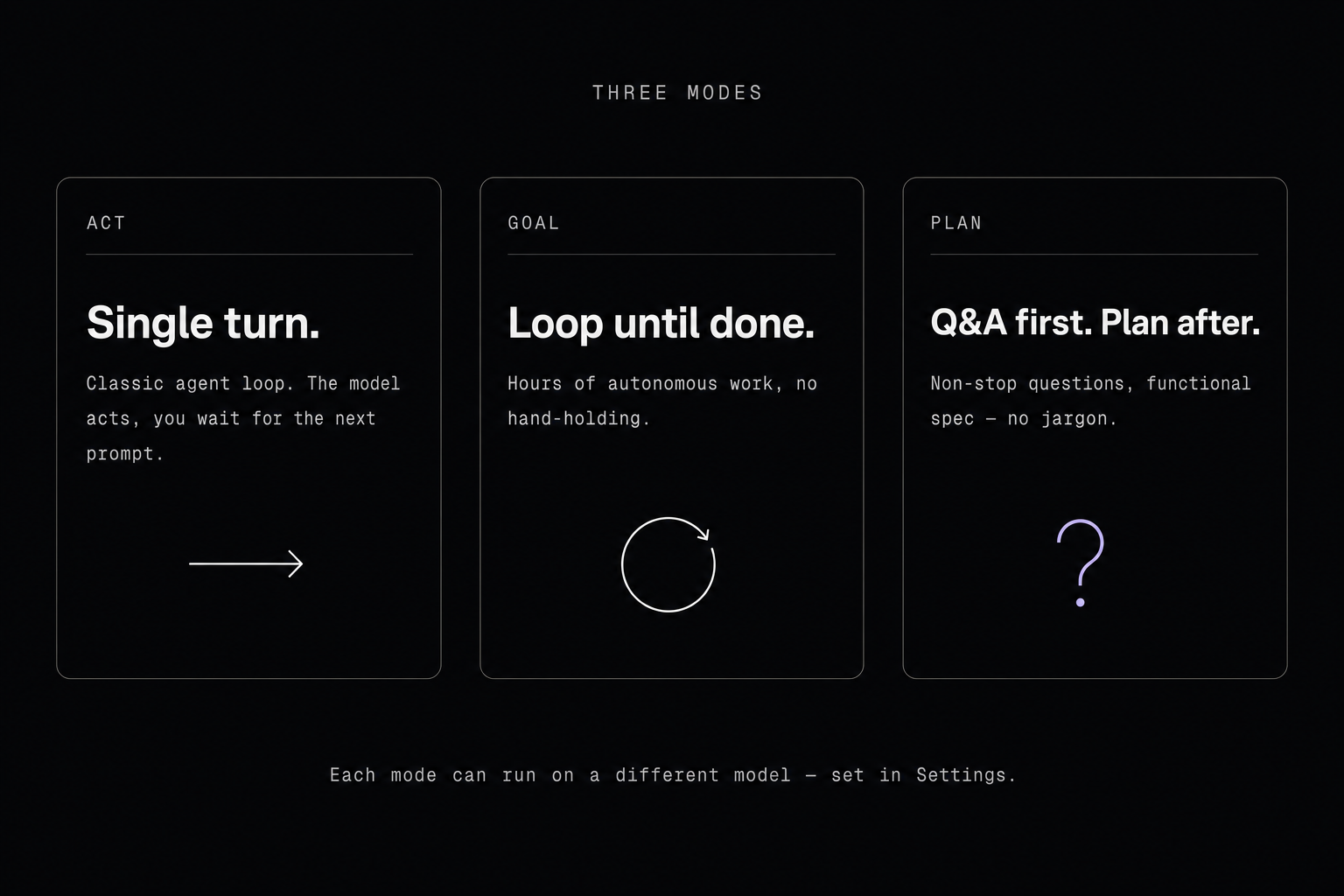
Act
The normal mode: the agent runs a classic single-turn loop. You prompt, it acts, control comes back to you.
Goal
The agent runs in a loop until the task is finished. It can keep going for hours, autonomously, without hand-holding.
Plan
A non-stop question / answer session. The agent explores the code, asks you a question, you answer, it explores some more, asks another, and so on. It never exits the loop on its own — the plan is only written when you click "Send and stop questions".
The produced plan contains no technical jargon: no code, no code map, no file list. That's a deliberate choice. After a lot of A/B against the plans produced by Claude Code, Codex and friends, the ones that work best describe the functional layer — what the app should do — without dictating the technical structure.
For a game, for example, the plan describes the expected experience, not the directory tree. Otherwise the agent burns all its reasoning before it ever touches code, and ends up boxed inside a structure forced from the start. By staying functional, you free its creativity at build time — it gets to decide how to structure things.
It's only constrained technically if the user wants to impose a specific stack.
The Plan mode prompt is fully editable in the Settings panel — so the harness adapts to how you work, not the other way around.
AGENTS.md & DESIGN.md
Sinew supports two reference files at the root of the workspace, and injects them automatically into the model's system prompt.
AGENTS.md — general instructions for the agent: project conventions, constraints, things to avoid, etc. It's the equivalent of a README you write for the model rather than for a human. Open convention popularised by Codex and shared with a whole ecosystem of other tools — one file works everywhere. For comparison, CLAUDE.md (Anthropic's own convention) is explicitly ignored in favour of this common standard.
DESIGN.md — the project's design system: colours, typography, components, UI rules, etc. Convention introduced by Google. Sinew injects it with a dedicated header so that your product, UX, visual and frontend decisions respect the design system you use, whatever it is.
Both files get a dedicated icon in the file tree.
Multi-provider, one harness
Sinew supports five model providers, each with its own connection method:
| Provider | Method |
|---|---|
| Anthropic | subscription |
| OpenAI | subscription |
| subscription | |
| Kimi | subscription |
| OpenRouter | API key |
OAuth mode — the real differentiator
When you connect to Anthropic, OpenAI, Google or Kimi via OAuth, Sinew uses your existing subscription directly (Claude Max, ChatGPT Plus / Pro, etc.) with its own harness. No API key to provide, no metered billing — you're already paying the subscription anyway, you might as well use it.
No ecosystem lock-in
Claude Code is limited to Anthropic models. Codex to OpenAI models. Sinew isn't locked anywhere: you can connect several providers in parallel and pick the right model for the right task.
Mix models by capability
Model selection happens at three levels:
- Per mode. Act, Plan and Goal can each have their own dedicated model in Settings. Typically: a large model for Plan (reasoning), a solid one for Act (execution), a fast one for Goal (long loop).
- Per sub-agent. Each configured sub-agent has its own model (see the sub-agents section).
- Per teammate in an Agent Team, through sub-agent profiles.
Tools
The agent has access to a full set of tools:
| Tool | Role |
|---|---|
bash |
Run shell commands |
bash_input |
Send input to an interactive shell session |
read |
Read files |
glob |
Find files by pattern |
grep |
Search text / regex in files |
edit_file |
Edit existing files with ordered search/replace operations |
write_file |
Write complete files with overwrite guardrails |
web_search |
Web search |
web_fetch |
Fetch the contents of a URL |
create_image |
Generate images |
question |
Ask the user questions |
todo_list |
Manage a task list |
clean_context |
Clean useless tool results out of the context |
load_mcp_tool |
Load an external MCP tool |
skill |
Load a skill on demand (active when skills are present) |
subagent_* |
Delegate a task to a configured sub-agent (one tool per enabled sub-agent) |
team_run |
Launch an agent team |
team_status |
Inspect the team's state |
team_stop |
Stop one agent or the whole team |
send_message |
Send a message between agents |
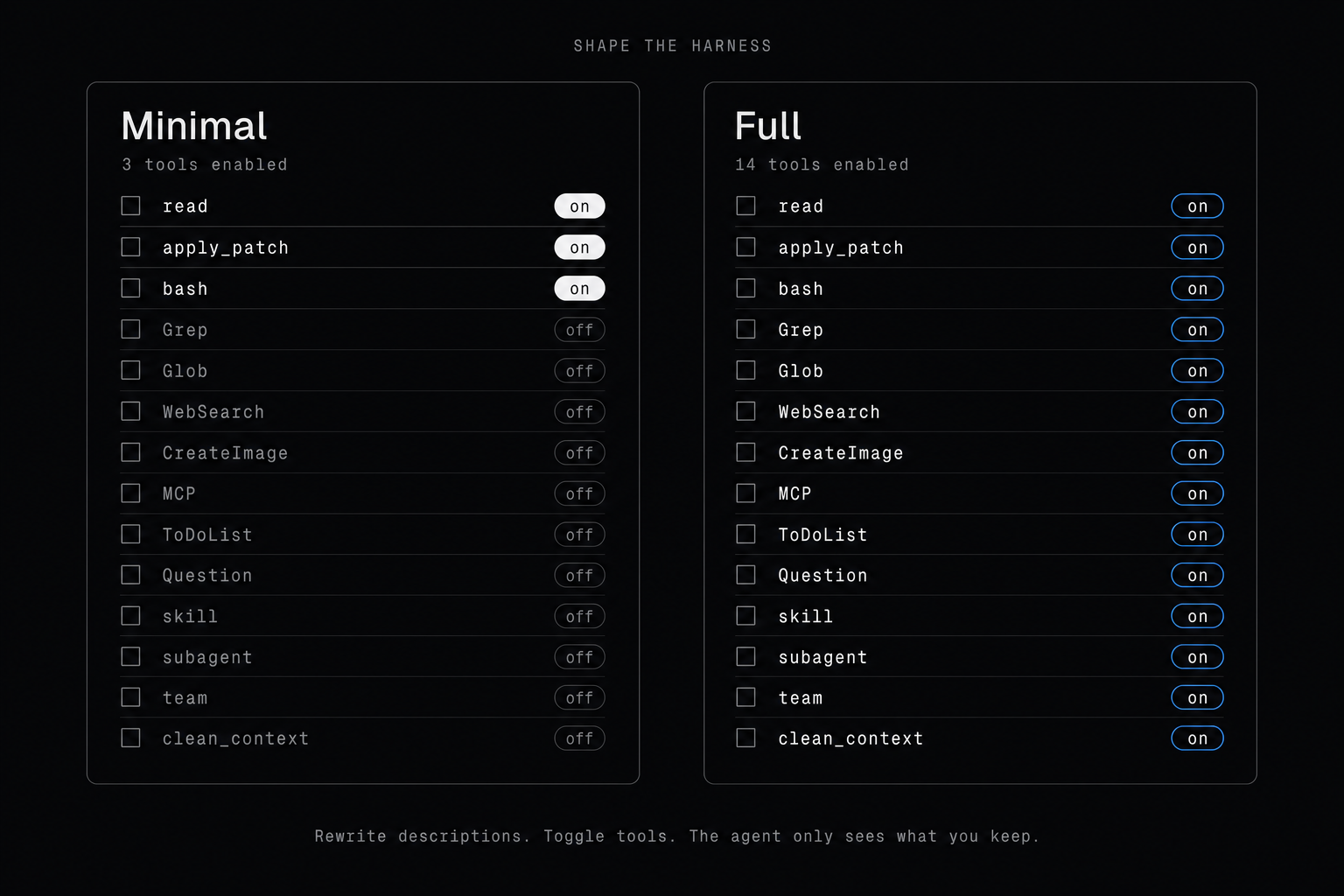
Each tool can be individually disabled in Settings, which lets you go from a full-featured setup down to a minimalist one (CLI-style, à la Pi Code). Every tool description is also editable, which gives you another lever to tweak the harness.
clean_context
Sinew is the only coding agent where the model can clean its own context. None of the others — Cursor, Claude Code, Codex, Cline — offers this.
The tool takes a list of tool_call_ids from the current turn. For each one, the content of the result is replaced in history by an ultra-short placeholder ([Tool result cleaned by you: irrelevant to future context.]). The agent does its own mental housekeeping, by itself.
The tool description is written so the agent only deletes results that are really useless: explorations that went nowhere, paths it looked at and discarded, fruitless searches. Anything it cited, referenced, or used to make a decision stays. And when in doubt, it keeps.
Two guardrails:
- The tool only touches results from the current turn (no retroactive purge of older context).
- The placeholder stays visible — the agent knows there used to be a result here that it chose to throw away. No silent forgetting.
And that "current turn only" limit solves a problem many people will anticipate: prompt caching. If we touched older tool results, we'd break the prefix cached by the provider, and every subsequent turn would replay at full price. Here, the current turn isn't cached yet, so we can purge it without losing anything on the billing side. You gain context without sacrificing the cache.
Why this is game-changing: tool results blow up the context very fast. A glob can return hundreds of paths, a read up to 500 lines, a grep a mountain of matches. On an exploration turn, most of that is noise. Without clean_context that noise piles up — especially in Goal mode where the context grows quickly. With it, the agent lives in a context that stays constantly cleaned of dead-end exploration.
bash / bash_input
bash runs a shell command, bash_input interacts with an ongoing session.
On macOS / Linux: Bash. On Windows: PowerShell (the system prompt warns the model about the syntax difference).
The interesting bit: if a command doesn't finish right away, Sinew returns a session_id and lets the process keep running. The agent can then send input, poll the output, or kill the session. PTY-backed, so vim, top, a REPL or a dev server actually work.
On the UI side, each command shows up in a card that displays the exact input and the raw shell output, untransformed.
Why dedicated tools for read, glob and grep?
Some agents like Codex rely on the terminal for most everyday operations — reading a file, searching text, listing paths. The agent has to compose the right shell command every time. Sinew does the opposite: these operations get their own dedicated tools.
The idea: a shell command returns everything raw, with no way to force a limit, and the output is often noisy. A dedicated tool lets us control exactly what comes out — clean response, readable, no redundancy. And since it covers the same flexibility as the equivalent shell command, you don't lose any expressivity.
read
Reads a file. Three parameters: path, limit and offset.
The twist: limit is required. Unlike other coding agents that leave it optional, Sinew forces the model to declare how many lines it wants. That preserves the agent's context and pushes it to target what's actually useful rather than vacuum everything up. If it needs to see more, it widens the limit and asks again. And the smarter models get, the better they exploit constraints like this in their favour.
Here's what the agent receives after a read on a React component:
path: src/components/Button.tsx
total: 124

  1 | import { forwardRef } from "react";
  2 | import clsx from "clsx";
  3 |
  4 | type ButtonProps = {
...
A header with the path and the total line count, then the requested lines, numbered.
And that's Sinew's whole philosophy: give the minimum useful information, no repetition. Just the path, the total line count (so the agent knows where it is and can paginate), and each line numbered. Nothing more. The model figures out the rest — target, cross-reference, widen if needed.
glob
Finds files in the workspace by pattern. Three parameters: pattern, limit and path.
Same rule: limit is required.
The implementation sits on top of ripgrep.
Here's what the agent receives after a glob on src/**/*.tsx:
matches: 42
shown: 25

src/components/Button.tsx
src/components/Input.tsx
...
Two counters: matches (the total found) and shown (how many are actually displayed). If they differ, it knows it was truncated and can either refine the pattern or widen limit. Same logic throughout: minimal signal, but exactly the signal that's needed.
grep
Searches text or a regex in the workspace files. Seven parameters: pattern, limit, path, include, output_mode, unique, exclude_pattern.
Same rule: limit is required.
The implementation sits on top of ripgrep. The include parameter scopes the search to a file type (*.tsx, *.rs, etc.), and path accepts an array to target several subdirectories in a single call.
The output_mode parameter lets the agent pick the result shape based on its need, rather than filter or parse afterwards:
context(default) — grouped by file with line number + contentmatches— only the matched stringsfiles— only the paths of matching filescount— number of matches per file
Two complementary filters:
uniquededups output lines (especially useful withoutput_mode=matches)exclude_patternis an anti-match: a regex that excludes lines whose content matches it. Handy to drop tests, comments, or other noise without contorting the main pattern.
Here's what the agent receives after a grep on forwardRef filtered to *.tsx (context mode):
matches: 12
files: 3
shown: 8

src/components/Button.tsx
  42 | const Button = forwardRef(...)
  87 | export default Button;

src/components/Input.tsx
  15 | const Input = ...
...
Three counters in the header: matches (total matches), files (number of files involved), shown (in case of truncation). And the results are grouped by file instead of the flat file:line:text format — same idea as RTK for those who know it: more readable and more compact for the agent to consume.
edit_file
Edits existing workspace text files with ordered search/replace operations. The agent sends top-level files grouped by file:
{
  "files": [
    {
      "path": "src/foo.ts",
      "edits": [
        {
          "oldContent": "const oldName = value;",
          "newContent": "const newName = value;",
          "replaceAll": false
        }
      ]
    }
  ]
}
oldContent must be non-empty. By default it must match once in the file's current content at that step; if it appears multiple times, the agent adds surrounding context until it is unique. The matcher first tries exact text, then falls back to whitespace-/punctuation-tolerant matching for common formatting drift. Set replaceAll: true on a replacement to replace every non-overlapping occurrence found at that step. newContent may be empty to delete the matched block.
The tool requires a successful prior read and refuses to write if the file changed since that read. Multiple replacements in the same file are applied sequentially in memory, so each edit sees the result of the previous edit; the file is still written only once after the full plan succeeds.
write_file
Writes a complete text file with path and content.
It creates new files directly, including parent directories. If the file already exists, the agent must read it first; write_file refuses to overwrite if the file changed since that read. For targeted changes, the agent should prefer edit_file.
web_search
Two providers to choose from, configurable in Settings.
LinkUp (paid, API key required) — the more powerful one. On LinkUp's side, an LLM receives the query, runs the search, and synthesises a natural-language answer with numbered inline citations, plus a list of sources (up to 12) with their excerpts. Two modes: standard for a direct answer, deep for complex multi-source research. The agent can then chain with web_fetch to drill into a specific source.
Exa (free, public MCP) — classic search. Returns a list of results with titles, URLs and content excerpts. It's what most other coding agents that offer web search rely on.
web_fetch
Fetches the contents of a URL — typically a source returned by web_search. Single parameter: url.
The page is converted to clean Markdown before it reaches the agent.
create_image
Image generation, via GPT Image 2 (OpenAI) or Nano Banana 2 (Google), your choice in Settings. In both cases the agent controls the usual parameters (size, format, quality, etc.).
For GPT Image 2, two auth modes: either an OpenAI API key, or directly your ChatGPT subscription with no API key needed.
question
A question tool inside the chat. Classic: the agent can send one or several questions at once, in single_choice or multiple_choice form.
todo_list
The agent's todo list. A single tool does everything: add, modify, mark as done, or delete a task.
The difference with Cursor, Claude Code, Codex and the rest: in their tools the todo is just another tool call. When the agent invokes it, the result stays in the conversation and eventually drowns under the tool calls that follow.
Sinew re-injects the full state at every turn into the system reminder. The model therefore always sees the up-to-date version in front of its eyes, no matter what happened since. That's what changes everything on long tasks — typically in Goal mode, where without it the agent would lose the thread.
load_mcp_tool
Sinew supports the MCP protocol. Servers are configured in Settings.
But, unlike what you might expect, MCP tools are not exposed directly to the agent. What lives in the system prompt is just a compact catalog inside the load_mcp_tool description:
Load one MCP tool before calling it. Available MCP tools:
- Context7 / query-docs
- Context7 / resolve-library-id
- Linear / create_issue
- Linear / search_issues
...
The agent calls load_mcp_tool with a server and a tool. From that point on, the tool in question is loaded into the conversation for good, with its full description and input schema. It can then use it normally.
Why the gymnastics? The classic MCP problem: if you connect several servers (Context7, Linear, Notion, GitHub…), you can end up with 50+ tools, each with a verbose description and an input schema. Dumped as-is into the system prompt, that eats thousands of tokens before the agent even starts working.
With lazy-load via catalog: only a server / tool index stays permanently in the prompt, the full schemas only inject on demand, and once loaded a tool stays available for the whole conversation.
skill
Same logic as load_mcp_tool, but for skills. The tool only appears in the system prompt if at least one skill is discovered on the machine or in the workspace.
Its description carries a compact catalog:
Load one skill by name before using it. Available skills:
- pdf-extraction
- review-checklist
- release-notes
...
The agent calls skill with a name, Sinew reads the SKILL.md of the requested skill and injects its content into the conversation. Same benefit as MCP: no skill takes up prompt space until it's explicitly loaded.
Four discovery locations, from highest priority to lowest:
<workspace>/.agents/skills/<workspace>/.sinew/skills/~/.agents/skills/(global, follows the user)~/.sinew/skills/
Each skill is a directory containing a SKILL.md file.
The .agents/skills/ format is deliberately aligned with the Claude Agent Skills convention: a skill written for Claude works in Sinew as-is, and vice-versa. The .sinew/skills/ namespace stays available for project-specific skills.
Skills can be individually enabled or disabled in Settings.
Sub-agents
Sinew lets you configure as many sub-agents as you want in Settings, each with its own name, description, system prompt, model, and an enabled flag. Every enabled sub-agent is exposed to the main agent as a tool named subagent_<id> (e.g. subagent_security-reviewer, subagent_doc-writer). The tool description reuses the one you set in Settings, and the schema reduces to a single free-form prompt.
When the main agent calls a sub-agent, Sinew launches a full real turn with the sub-agent's model and prompt, and the whole harness stays active: standard tools, clean_context, todo_list, MCP, skills, all of it. The sub-agent works in isolation, then returns a result to the main agent.
Two ways to use it:
- Direct delegation (one-shot). The main agent calls
subagent_<id>for a focused task. Handy for handing off a precise job to a specialised prompt or model without changing the global harness. - Inside an Agent Team. You assign a teammate to a sub-agent profile through
agent_profilesinteam_run. The teammate then inherits the sub-agent's prompt and model (see the next section).
Agent swarm
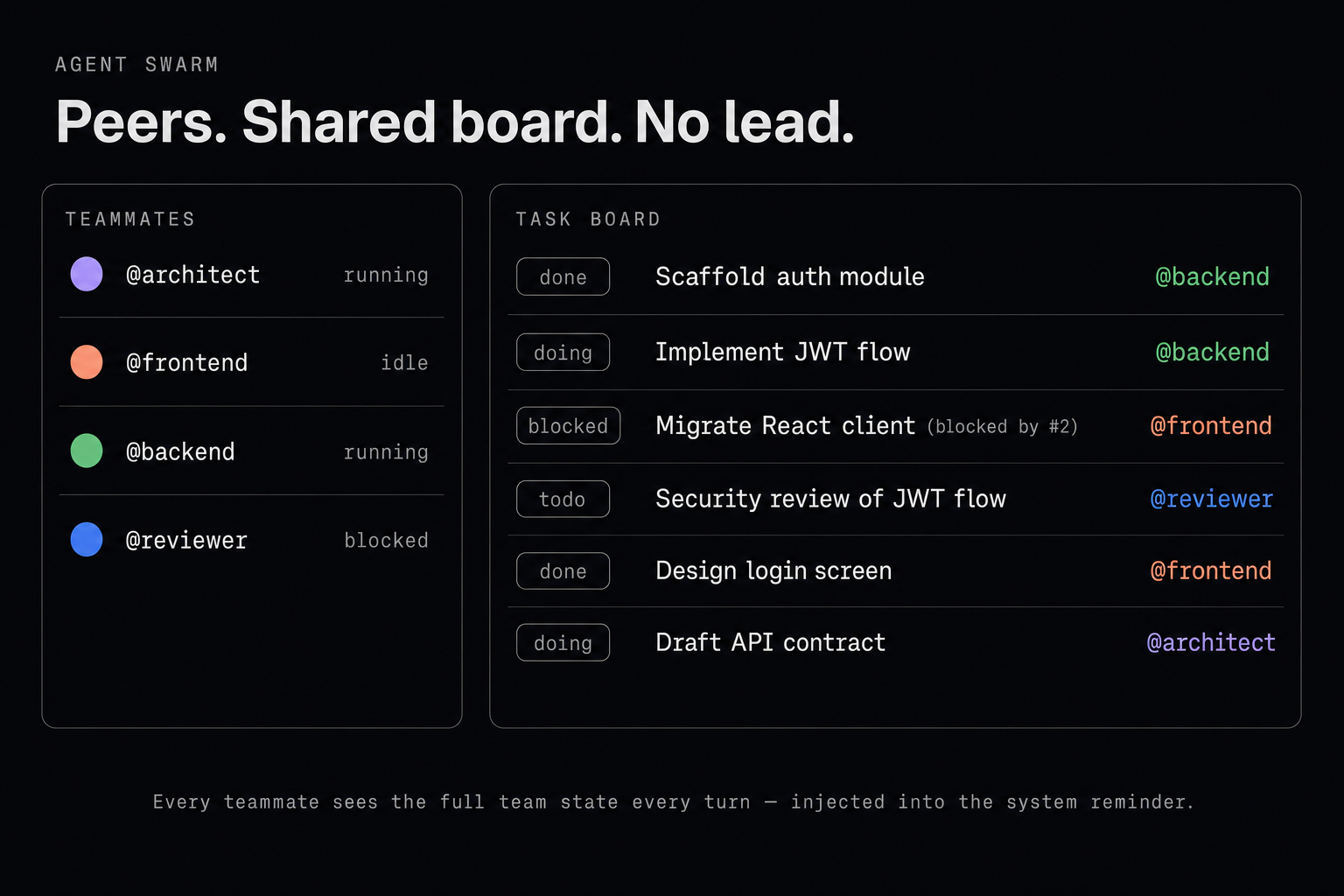
The main agent can launch a team of 2 to 8 agents to work together on an objective. No lead agent, no hierarchy: all teammates are peers and coordinate themselves through shared state.
Each teammate can inherit a sub-agent profile pre-configured in Settings (with its own prompt and model). You don't pick a model on the fly for a teammate — you assign one of the profiles you already defined.
Difference with Claude Code Agent Teams
Claude Code follows a lead / sub-agents model: a main agent dispatches work to specialised sub-agents that execute their task and report back. It's effective for short orchestration, but it stays hierarchical.
Sinew follows a peer-to-peer model: no lead, the teammates collaborate autonomously. More powerful for long, parallel tasks, where each agent needs to make progress without waiting for a conductor.
The obvious risk of a flat team with no lead is drift — agents going in diverging directions, or stepping on each other. Sinew defuses that with the mechanisms below.
Coordination — everything flows through the system reminder
At every turn of every teammate, Sinew injects into its system reminder:
- The full team state (
<agent_team_state>): who is who, each teammate's status (running,idle,error…), the whole task board, and the most recent file changes. Each agent therefore sees, at all times, what the others are doing, without having to dig through its own context. - Messages received from other teammates (
<queued_peer_messages>): when a teammate sends asend_message, the recipient receives it at the start of its next turn via the reminder. No message lost in the conversation, no risk of being buried under further tool calls.
Same philosophy as todo_list: important state is never "somewhere in history", it's always fresh in front of the model's eyes.
Example of what a teammate receives in its system reminder at the start of a turn:
<agent_team_state>
team: refactor-auth | you: @backend
teammates:
- @backend [running] you
- @frontend [running]
- @reviewer [idle]
tasks:
- #1 [completed] @backend Extract the auth module into a dedicated crate
- #2 [in_progress] @backend Implement the new JWT flow
- #3 [blocked] @frontend Migrate the React client to the new endpoint (blocked by #2)
- #4 [pending] @reviewer Security review of the JWT flow
recent file changes (newest -> oldest):
newest -> @backend edit_file modified crates/auth/src/jwt.rs (+128 -42)
            @backend write_file added crates/auth/src/lib.rs (+86 -0)
oldest -> @frontend edit_file modified src/lib/api.ts (+12 -8)
</agent_team_state>

<queued_peer_messages>
<teammate-message teammate_id="@frontend" to="@backend">
When the /auth/refresh endpoint is ready, tell me the exact response contract so I can adapt the client.
</teammate-message>
<teammate-message teammate_id="@reviewer" to="*">
Heads-up: I'm starting my review in 10 min, please push your latest commits to the refactor-auth branch.
</teammate-message>
</queued_peer_messages>
Task board with dependencies
The shared board supports explicit dependencies (blockedBy). A blocked task can't be claimed or started until its dependencies complete — auto-unblock fires automatically when they do. That prevents teammates from stepping on each other in workflows that require an order.
Swarm tools
team_run(main agent side) — launch a team with an objective, named teammates, an initial task board, and optionally per-teammate prompts or sub-agent profiles.team_status(main side) — inspect the state of the active team.team_stop(main side) — stop one teammate, or the whole team.send_message(teammate side) — DM another teammate, or broadcast to all agents in the team.- An internal
task_listtool lets teammates manipulate the shared board (create, update, claim, delete).
Compaction
Sinew handles two modes of conversation compaction.
Automatic — triggered on its own when the context window fills up. The history is summarised to free room and let the agent keep going.
Manual — triggered from a button in the UI. The twist: you can attach an optional directive to steer compaction towards a specific topic ("keep mostly what concerns X", etc.). The cleanup is then more aggressive on everything outside the requested topic.
Rollback
In the chat, every past user message is clickable. Clicking it opens a preview listing all files modified by the agent since that message, and offers to rewind to that point of the conversation.
Before confirming, a toggle lets you choose:
- Revert the workspace changes (files are restored to their previous state)
- Keep the changes as-is (you only undo the chat history)
Sinew then deletes all subsequent user / assistant messages, and optionally restores the files. The conversation can resume cleanly from that point.
Under the hood, each turn records a checkpoint that captures the before / after state of the files it touched — that's what makes revert possible at any past point.
Architecture
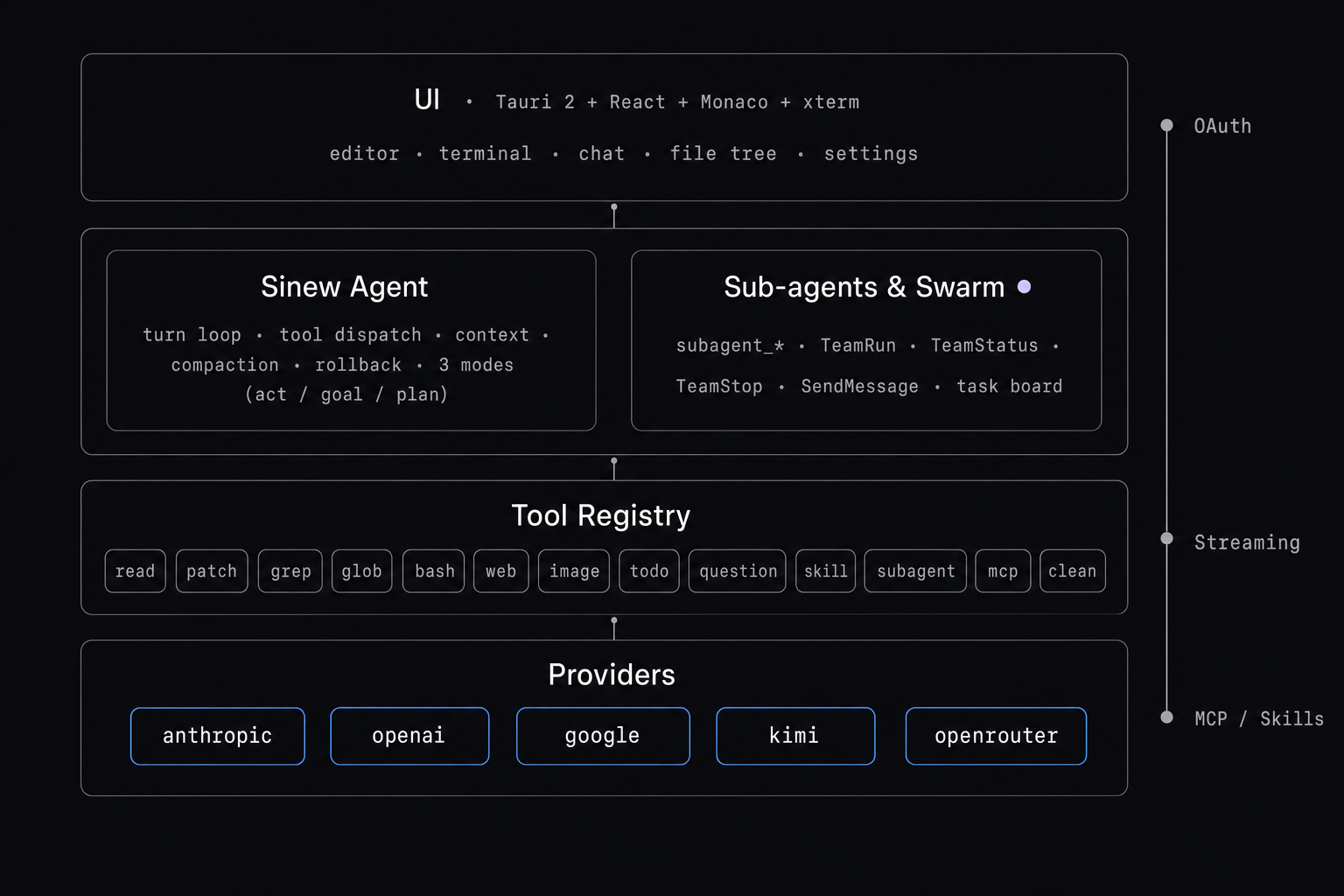
src/— React UI (Monaco editor, xterm terminal, chat, settings, file tree).src-tauri/— Tauri 2 shell, IPC commands, workspace I/O, conversation store, checkpoint store.crates/sinew-core— Provider-agnostic types: messages, tools, streams, model definitions.crates/sinew-app— Agent loop (Act / Goal / Plan), tool implementations, swarm, MCP, compaction, rollback.crates/sinew-{anthropic,openai,google,kimi,openrouter}— Provider adapters (auth, wire, streaming).
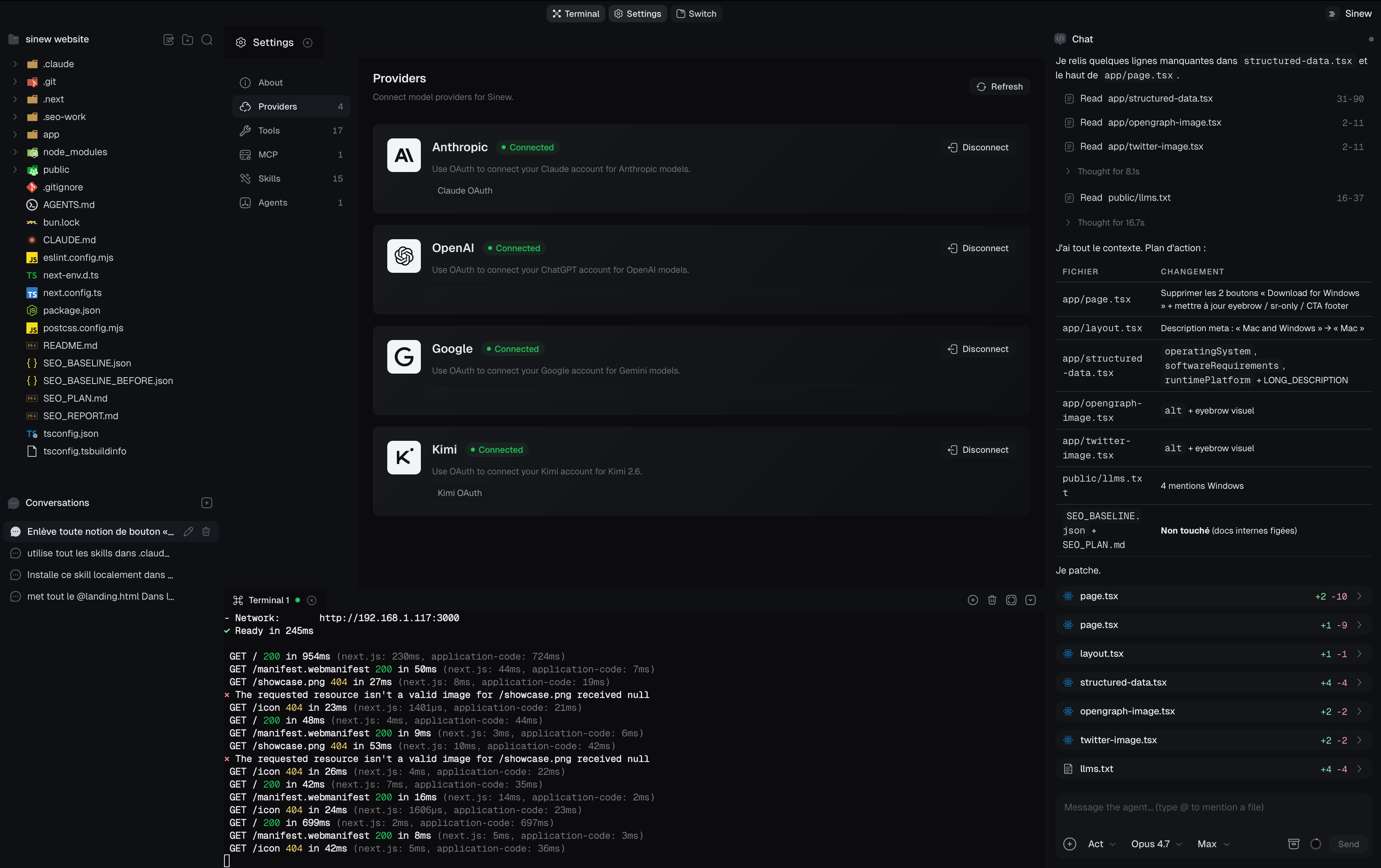
Screenshot
Install
Grab the latest build for your OS from the
releases page.
- macOS —
.dmg - Windows —
.msi/.exe - Linux —
.AppImage/.deb
The app self-updates from GitHub releases.
Build from source
# requires Rust 1.80+ and Node 20+
# see https://tauri.app/start/prerequisites/ for platform deps

npm install
npm run tauri dev      # development
npm run tauri build    # release bundle
The repo is a Cargo workspace (crates/* + src-tauri/) plus a Vite + React frontend (src/).
OAuth credentials
Provider OAuth client IDs (and Google's client secret) are embedded in the source. This follows the standard practice for "installed applications" — the same approach used by tools like gcloud. These credentials are not treated as secret in this context.
Community
- Discord — chat, support, share your harness configs
- Issues — bugs and feature requests
- Discussions — design, providers, MCP
License
Built with Tauri, Rust, and a stubborn refusal to ship a black-box harness.
Reviews (0)
Sign in to leave a review.
Leave a reviewNo results found