patchloom
Health Uyari
- License — License: MIT
- Description — Repository has a description
- Active repo — Last push 0 days ago
- Low visibility — Only 5 GitHub stars
Code Gecti
- Code scan — Scanned 12 files during light audit, no dangerous patterns found
Permissions Gecti
- Permissions — No dangerous permissions requested
Bu listing icin henuz AI raporu yok.
Single-binary CLI that gives AI agents safe, structured file editing

Patchloom











One binary. Every platform. Structured file edits for AI agents.
Patchloom is a single-binary CLI that gives AI coding agents safe, structured file editing on any operating system. It edits JSON, YAML, and TOML by selector (not regex), preserves comments, understands code structure across 20 languages, batches multiple file edits into one tool call, and works identically on Linux, macOS, and Windows.
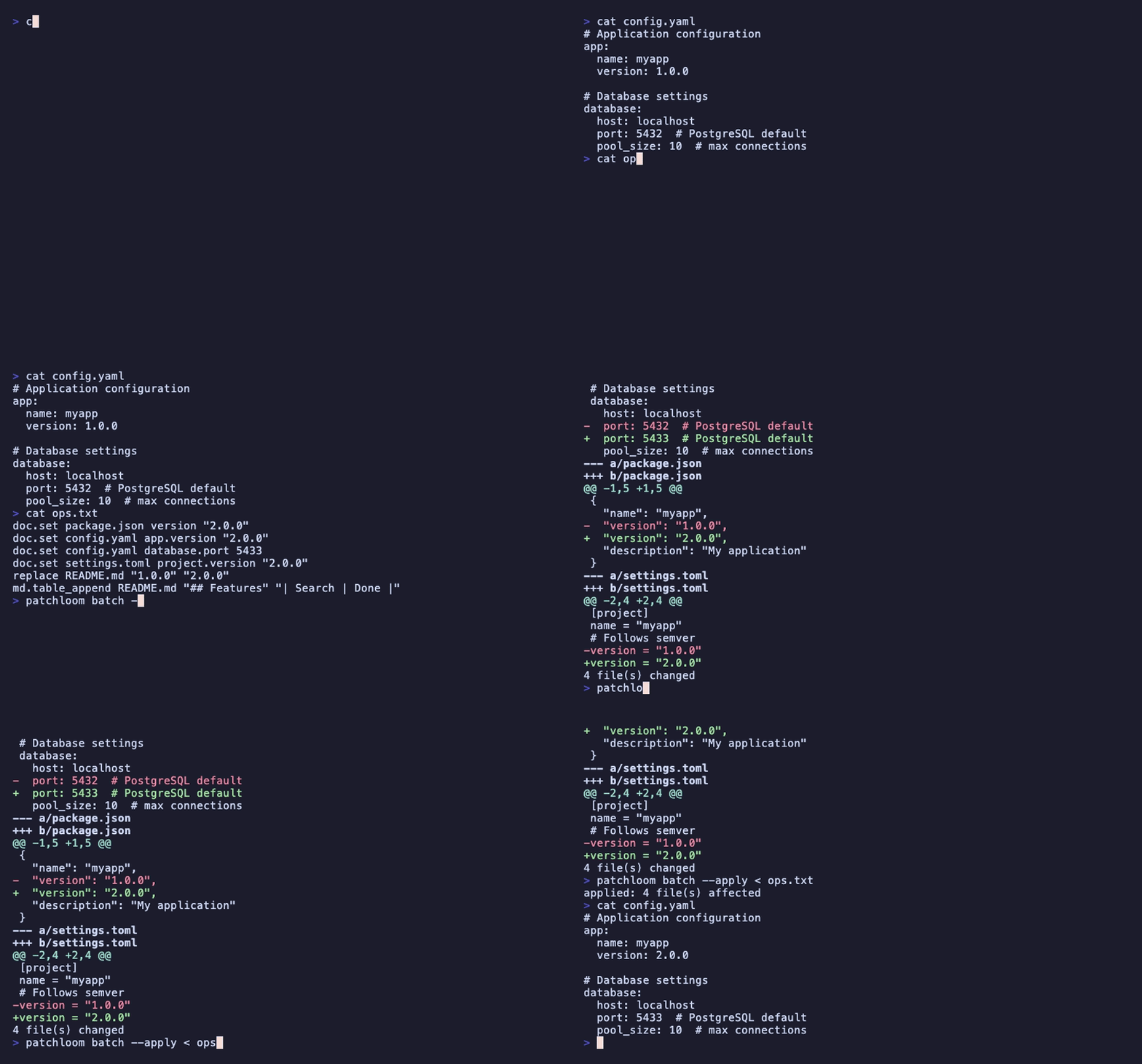
# Edit a YAML value by selector without breaking comments or formatting
patchloom doc set config.yaml database.port 5432 --apply

# Batch 6 file edits into a single tool call
patchloom batch --apply <<'EOF'
doc.set package.json version "2.0.0"
doc.set config.yaml app.version "2.0.0"
doc.set config.toml project.version "2.0.0"
replace README.md "1.0.0" "2.0.0"
replace CHANGELOG.md "1.0.0" "2.0.0"
file.create VERSION "2.0.0"
EOF
Why Patchloom? | Install | Quick start | Commands | Comparison | Architecture | Status
Why Patchloom?
The problem
AI agents edit files through tool calls. Each call is a round-trip back to the LLM. When a task touches config files, that process has three failure modes:
- Syntax corruption. The agent uses text replacement on JSON, YAML, or TOML and produces invalid output (mismatched braces, broken indentation, lost comments).
- Round-trip tax. Editing 6 files means 6 separate tool calls. Each one waits for the LLM to generate, execute, read the result, and plan the next call.
- Platform fragmentation. On Linux the agent uses
sed,jq,grep. On Windows, none of those exist. The agent falls back to verbose PowerShell or makes errors with unfamiliar syntax.
How patchloom solves each one
| Problem | How patchloom solves it |
|---|---|
| Syntax corruption | doc commands parse the file, change the value by selector path, and write valid output. Comments and formatting are preserved. No regex needed. |
| Round-trip tax | batch and tx combine N operations into 1 tool call. Six file edits become one command with atomic rollback on failure. |
| Platform fragmentation | Single static binary with zero dependencies. Same commands, same flags, same behavior on Linux, macOS, and Windows. |
What changes with patchloom
|
Without patchloom (6 tool calls) |
With patchloom batch (1 tool call) |
Key capabilities
| Capability | What it does | Example |
|---|---|---|
| Parser-backed edits | Edit JSON/YAML/TOML by selector, preserving comments and formatting | doc set config.yaml db.port 5432 --apply |
| Batch N files in 1 call | batch and tx combine operations into one tool call with rollback |
batch --apply < ops.txt |
| Comment preservation | YAML/TOML comments survive all edits, including array resizing | doc append config.yaml tags '"v2"' --apply |
| Heading-aware markdown | Edit sections, tables, and bullets by heading, not line number | md table-append README.md --heading "API" --row "| new | row |" --apply |
| AST-aware code ops | List, rename, replace, and analyze symbols across 20 languages | ast rename src/ old_name new_name --apply |
| Atomic rollback | strict: true reverts every file if format or validate steps fail |
tx plan.json --apply |
| MCP server | Expose all operations as structured MCP tool calls | patchloom mcp-server |
| Cross-platform | Identical behavior on Linux, macOS, Windows. No sed, jq, grep required. |
Same binary everywhere |
When to use patchloom vs native tools
Patchloom is not a replacement for all file operations. Its instructions tell agents exactly when to use it and when native tools are faster:
| Task | Use patchloom? | Why |
|---|---|---|
| Edit a JSON/YAML/TOML value by selector | Yes | Parser guarantees valid output, preserves comments |
| Edit 3+ files in one task | Yes | batch/tx eliminates round-trips |
| Append a row to a markdown table | Yes | Heading-aware, no line number guessing |
| Read a single file | No | Native read_file is faster |
| Simple text search | No | Native grep is faster |
| Single-file text replacement | No | Native search_replace is faster |
Correctness over speed
Patchloom is not faster than native tools for simple, single-file edits. Use native tools for those. But native text replacement cannot safely edit structured files: a sed on YAML can corrupt indentation, strip comments, or produce invalid syntax. doc set parses the file, changes the value by selector, and writes valid output. That guarantee is the point.
Where patchloom is faster is multi-file batching. Six file edits via native tools means six round-trips to the LLM. One batch call does the same work in a single round-trip.
Task                    PL-CLI    MCP    Native
──────────────────────  ──────  ──────  ──────
search                   18.5s   12.7s   13.9s  ◀ ~same
replace                  36.1s   26.6s   26.1s  ◀ ~same
doc_set                  30.9s   16.9s   13.7s  ◀ native fastest
md_table                 15.5s   13.5s   15.3s  ◀ MCP fastest
tx_multi_file            41.4s   28.5s   22.9s  ◀ native fastest
batch_6_files            50.6s   46.6s   30.3s  ◀ native fastest
batch_mixed_ops          24.7s   13.6s   20.9s  ◀ MCP fastest
yaml_comment_preserve    18.1s   11.6s   16.1s  ◀ MCP fastest
md_insert                15.0s   11.7s   15.7s  ◀ MCP fastest
file_ops                 26.0s   16.6s   17.2s  ◀ ~same
tidy                     45.0s   30.3s   41.7s  ◀ MCP fastest
──────────────────────  ──────  ──────  ──────
TOTAL                   321.9s  228.5s  233.8s
MCP mode wins overall (228.5s vs 233.8s native) because structured tool calls skip shell syntax construction entirely. MCP wins 5/11 tasks; native wins 3/11; 3 are ties. CLI mode is always slowest due to shell construction overhead.
Install
# Homebrew (macOS/Linux)
brew install patchloom/tap/patchloom

# crates.io (requires Rust 1.95+, includes MCP server)
cargo install patchloom
Pre-built binaries for Linux, macOS, and Windows are on the
Releases page.
See Installation for shell
installer scripts, source builds, and shell completion setup.
Editor extension
Install the companion extension for VS Code, Cursor, Windsurf, or VSCodium:
The extension auto-discovers the CLI (or installs it for you), generates
AGENTS.md, configures MCP servers, and adds Quick Actions to the command
palette. See the Editor Extension guide for details.
Quick start
1. Set up your project
patchloom init
This creates AGENTS.md in a new project or appends the rules to an existing agent instructions file, offers shell completions, and detects MCP configuration opportunities. Pass -y to skip confirmation prompts.
If you only want the rules text:
patchloom agent-rules >> AGENTS.md

# Or tailor the output:
patchloom agent-rules --mode mcp >> AGENTS.md            # MCP-only (no CLI examples)
patchloom agent-rules --platform windows >> AGENTS.md    # Windows-only syntax
If .vscode/ or .cursor/ exists, init also prints ready-to-copy .vscode/mcp.json or .cursor/mcp.json snippets.
Your AI agent reads AGENTS.md and learns when to use patchloom vs native tools.
2. Edit a config file safely
# Parser-backed: changes the value, preserves comments and formatting
patchloom doc set config.yaml database.port 5432 --apply
3. Batch multiple edits into one call
patchloom batch --apply <<'EOF'
doc.set config.json version "2.0"
md.upsert_bullet AGENTS.md "Rules" "- Always test"
replace src/main.rs "v1" "v2"
EOF
Or use a JSON plan with format and validate lifecycle:
{
  "version": "1",
  "operations": [
    { "op": "doc.set", "path": "config.json", "selector": "version", "value": "2.0" },
    { "op": "md.upsert_bullet", "path": "AGENTS.md", "heading": "Rules", "bullet": "- Always test" },
    { "op": "replace", "path": "src/main.rs", "from": "v1", "to": "v2" }
  ],
  "format": [{ "cmd": "cargo fmt --all" }],
  "validate": [{ "cmd": "cargo test", "required": true }]
}
patchloom tx plan.json --apply
tx plans are trusted input. format and validate run their cmd fields through the host shell (sh -c on Unix, cmd /C on Windows), so only run plans you trust.
4. Or use MCP for structured tool calls (no shell syntax)
After installing with MCP support, start the server:
patchloom mcp-server
MCP-capable agents call patchloom tools directly as structured JSON, with no shell quoting or command construction. The agent sends {"path": "config.json", "selector": "version", "value": "2.0"} instead of building patchloom doc set config.json version '"2.0"' --apply.
See the MCP setup guide for per-agent configuration and the full security model.
Using VS Code, Cursor, or Windsurf? The Patchloom extension handles setup automatically: it installs the binary, runs init, and configures your editor's MCP settings.
As a Rust library
Add patchloom as a dependency (omit CLI/MCP/AST with default-features = false):
[dependencies]
patchloom = { default-features = false }
use patchloom::api::{self, ApplyMode};
use std::path::Path;

// Replace text (preview only, no disk write)
let result = api::replace_text(
    Path::new("src/config.rs"),
    "old_value", "new_value",
    &api::ReplaceOptions::default(),
    ApplyMode::Preview,
    None,
)?;
println!("{}", result.diff);

// Set a value in a JSON file
api::doc_set(
    Path::new("config.json"),
    "version",
    serde_json::json!("2.0"),
    ApplyMode::Apply,
    None,
)?;
All API types are Send + Sync. Beyond the api module, utility modules are also public: containment (workspace path guarding), exec (shell command execution), files (file-walking and binary detection), and write (atomic file writes with policy transformations). Library users needing temp dirs (e.g. agents) can use PathGuard::builder(cwd).allow_temp_directory() (handles /tmp on macOS per #781); see the containment and api module rustdocs. See the patchloom::api module docs for the full surface (includes search_directory with context/globs/max_results for content search, added in recent library expansions). Recent work: #785 merged (assertion hygiene); gate addressed #779 (full context+multi for search_directory) and #784 (test auditor).
Getting started
| Resource | What you'll learn |
|---|---|
| Installation | Install options and shell completions |
| Core concepts | Write modes, transaction plans, exit codes |
| MCP setup | Configure patchloom as an MCP server for your agent |
| Editor extension | VS Code, Cursor, Windsurf, and VSCodium integration |
| Quickstart | 5-minute walkthrough |
| Reference | Every command, operation, and mode |
| Examples | Transaction plan templates |
Commands
Agent-optimized (these are faster or safer than native tools)
| Command | What it does | When to use |
|---|---|---|
batch |
Line-oriented multi-file edits in 1 call | Editing 3+ files with simple syntax |
tx |
JSON plan with format/validate lifecycle | Complex multi-file edits with rollback |
doc |
Parser-backed JSON/YAML/TOML edits | Changing config values without breaking syntax |
md |
Heading-aware markdown edits | Updating tables, sections, bullets in docs |
ast |
AST-aware symbol operations (20 languages) | Renaming identifiers, listing symbols, impact analysis |
patch |
Apply unified diffs with stale detection | Replaying patches safely |
tidy |
Text-file whitespace and newline normalization | CI checks for text tidiness |
mcp-server |
MCP protocol server | MCP-capable agents (no shell syntax) |
General-purpose (also useful in scripts and CI)
| Command | Description |
|---|---|
search |
Fast literal or regex search across text files (supports --glob/--exclude/--ignore-file for .blineignore-style layered filtering, --max-results, -C context, etc.) |
replace |
Mechanical string replacement across text files with diff preview |
append |
Append content to an existing file |
create |
Create a new file with content |
delete |
Delete a file |
rename |
Move (rename) a file |
read |
Read file contents with optional line range |
status |
Show which files have uncommitted changes |
explain |
Summarize a tx plan in plain English |
undo |
Restore files from a backup created by --apply |
completions |
Generate shell completions (bash, zsh, fish, elvish) |
init |
Set up patchloom in a project (agent rules, completions, MCP) |
schema |
Export operation schemas with tier filtering and system prompts |
agent-rules |
Generate agent instructions for your project |
How patchloom compares
| Tool | Strength | Where patchloom differs |
|---|---|---|
| jq | JSON query/transform | patchloom also handles YAML, TOML, markdown; batches across files; preserves comments |
| yq | YAML/JSON query/transform | patchloom preserves YAML comments via CST editing; adds markdown, batching, atomic transactions |
| dasel | Multi-format get/set | patchloom adds batching (N edits in 1 call), atomic rollback, format/validate lifecycle |
| sd | Regex find/replace | patchloom adds parser-backed structured edits; batching; never produces invalid JSON/YAML |
| comby | Structural code patterns | patchloom targets config files and agent workflows, not source code pattern matching |
The key difference: patchloom is designed for AI agent workflows. One batch or tx call replaces N sequential tool calls, cutting round-trips and eliminating partial-failure states.
vs agent-native editing tools
The table above compares patchloom to human CLI tools. But agents already have built-in editing: Claude Code's edit_file, Cursor's apply, Grok Build's search_replace, Aider's /code blocks. Why add patchloom on top?
Agent-native tools use text matching. They find a block of text and replace it. This works for source code but fails on structured config files:
|
Agent uses The agent replaces |
Agent uses The YAML parser changes the value at the selector path. Comments, indentation, key ordering, and all other formatting are preserved. The output is always valid YAML. |
| Limitation of agent-native tools | How patchloom addresses it |
|---|---|
| Comment destruction | CST-level YAML/TOML editing preserves all comments |
| One file per tool call | batch/tx edit N files in 1 call (6.7x faster in benchmarks) |
| No rollback | tx with strict: true reverts all files if validation fails |
| Platform-dependent | Same binary and syntax on Linux, macOS, Windows |
| Stale context risk | patch apply uses fuzz matching to handle context drift |
When to keep using native tools: Single-file reads, simple text search, single-file text replacement where comments don't matter. Patchloom's agent-rules tell agents exactly when to use each approach.
How it works with your AI agent
Two integration modes, same capabilities:
flowchart LR
    subgraph CLI["CLI mode (any agent)"]
        direction TB
        A["patchloom agent-rules >> AGENTS.md"] --> B["Agent reads AGENTS.md"]
        B --> C{"What kind of edit?"}
        C -->|Simple edit| D["Native tool (faster)"]
        C -->|Config edit| E["patchloom doc (safer)"]
        C -->|Markdown edit| F["patchloom md (smarter)"]
        C -->|Multi-file edit| G["patchloom batch (batched)"]
    end

    subgraph MCP["MCP mode (MCP-capable agents)"]
        direction TB
        H["patchloom mcp-server"] --> I["Agent discovers tools via MCP"]
        I --> J["Structured JSON tool calls"]
        J --> K["No shell syntax needed"]
    end
Status
2700+ tests across 22 commands. Tested with Grok 4.3, GPT-5.4, and Claude Opus 4.6.
| Component | Status |
|---|---|
| CLI | Published on crates.io and Homebrew |
| Editor extension | Published on VS Code Marketplace and Open VSX |
Full command reference
Every command, flag, transaction operation, and exit code is documented in the Command Reference (also available at docs/reference/README.md).
License
Licensed under either of:
- MIT license (LICENSE)
- Apache License, Version 2.0 (LICENSE-APACHE)
at your option.
Contributing
See CONTRIBUTING.md.
For local verification before opening a pull request, run make check. It matches the main Linux CI gate: formatting, clippy, unit tests, integration tests, and generated-doc freshness checks. While iterating locally, make check-fast runs the Rust formatting, lint, and test path without the generated-doc freshness checks.
All commits must be signed off with git commit -s.
Agent integration tests
make agent-test runs 19 pytest scenarios that verify AI agents correctly use patchloom when given instructions. make bench-agent runs 3-way benchmarks (CLI vs MCP vs native) across 11 tasks. Use MODEL=X to switch models and RUNS=N for variance reduction. Requires an LLM API key. Not part of make check. See tests/agent/README.md for details.
Security
For current security reporting guidance, see SECURITY.md.
Yorumlar (0)
Yorum birakmak icin giris yap.
Yorum birakSonuc bulunamadi