openagentisland
Health Pass
- License — License: GPL-3.0
- Description — Repository has a description
- Active repo — Last push 0 days ago
- Community trust — 15 GitHub stars
Code Fail
- rm -rf — Recursive force deletion command in bridge/test_safety.py
Permissions Pass
- Permissions — No dangerous permissions requested
No AI report is available for this listing yet.
macOS-style Dynamic Island desktop for Hyprland (Quickshell/QML on end-4) with live Claude Code agent status + Allow/Deny permission approval from the notch
Open Agent Island
A macOS-style Dynamic Island desktop for Hyprland — that puts your Claude Code agents right in the notch.
Built in Quickshell/QML on top of the end-4 / illogical-impulse framework.
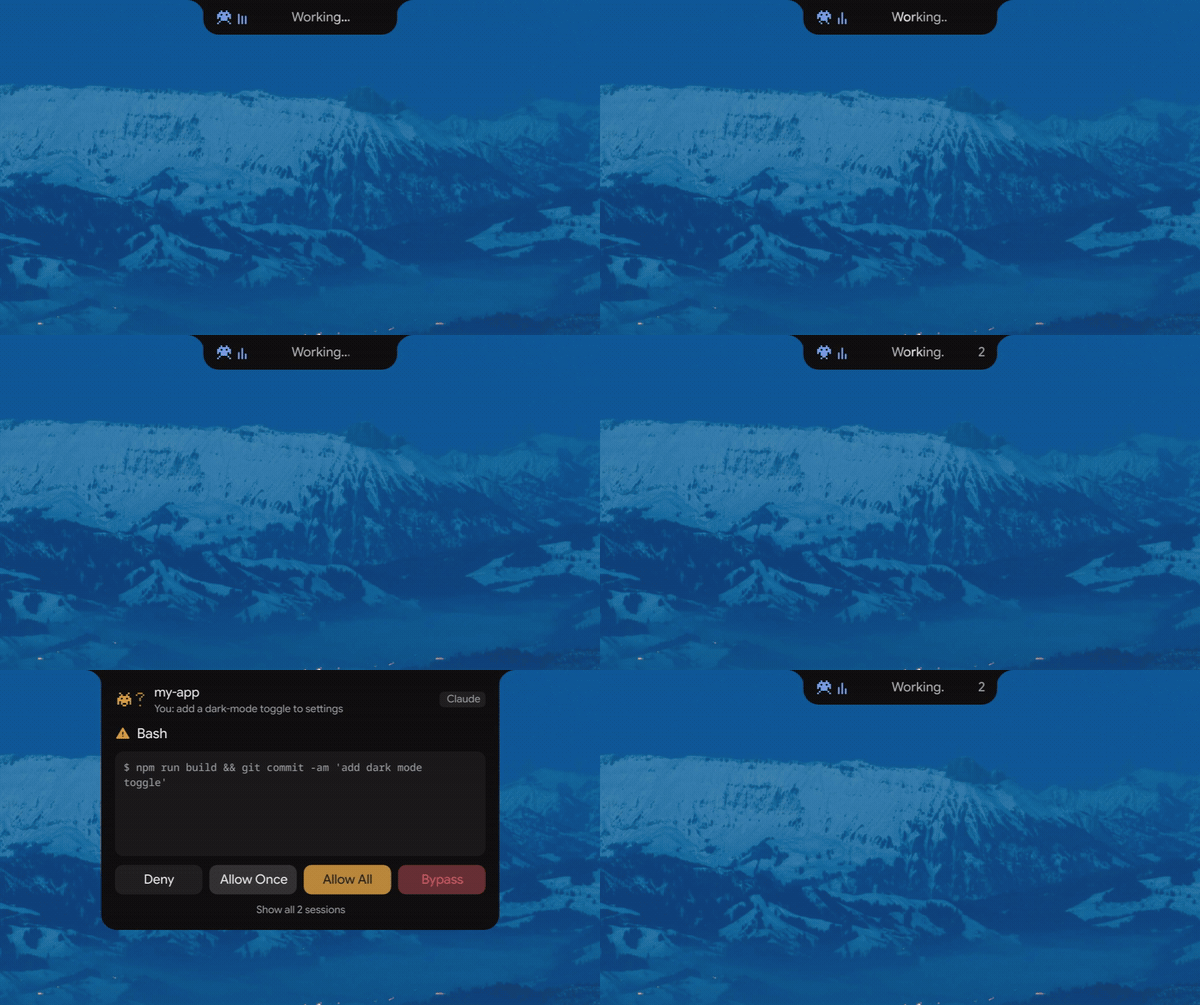
The notch morphing live — volume OSD → agent status → a Claude Code permission request, approved in place.
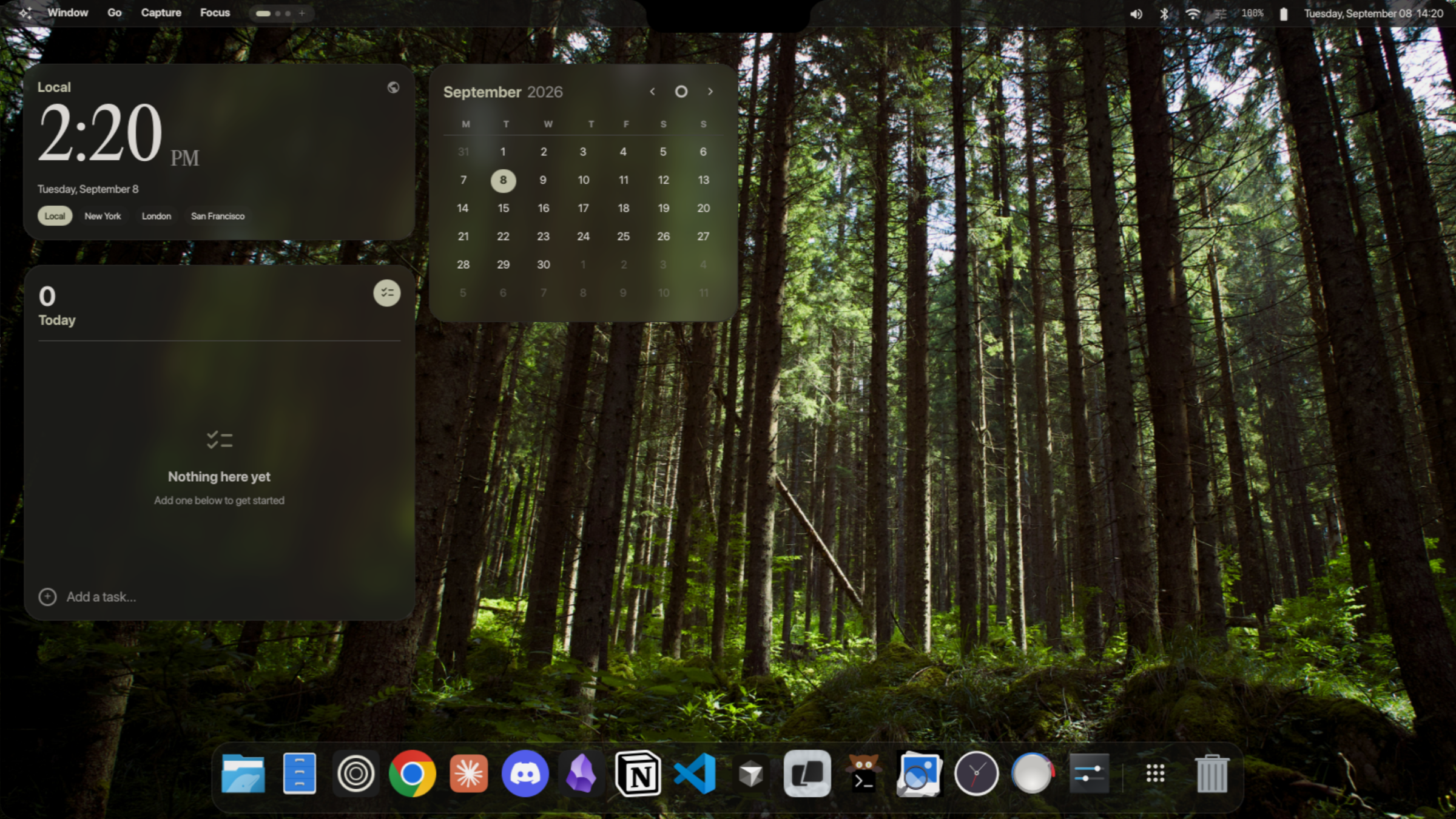
No full-width bar — three floating islands with the wallpaper breathing through the gaps. The
centerpiece is a morphing notch: a minimal clock when idle that fluidly expands for volume,
brightness, media, notifications, dashboards… and the headline act:
Live Claude Code agent status, with permission Allow / Deny right from the notch.
✨ The headline: Claude Code, in your notch
When a Claude Code session wants to run a command or edit a file, the request comes to you — the
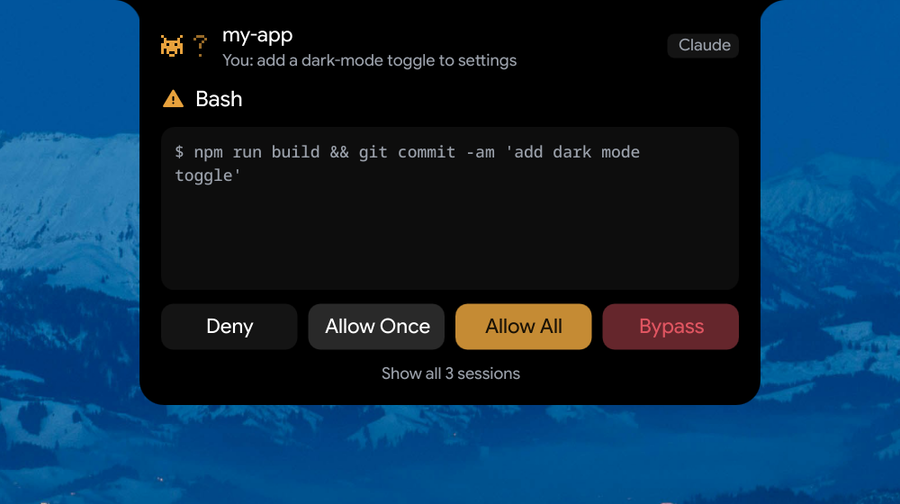
notch morphs open with the tool, a preview of exactly what it'll do, and four one-tap choices:
Deny · Allow Once · Allow All · Bypass. Approve it without ever leaving what you're doing.
 |
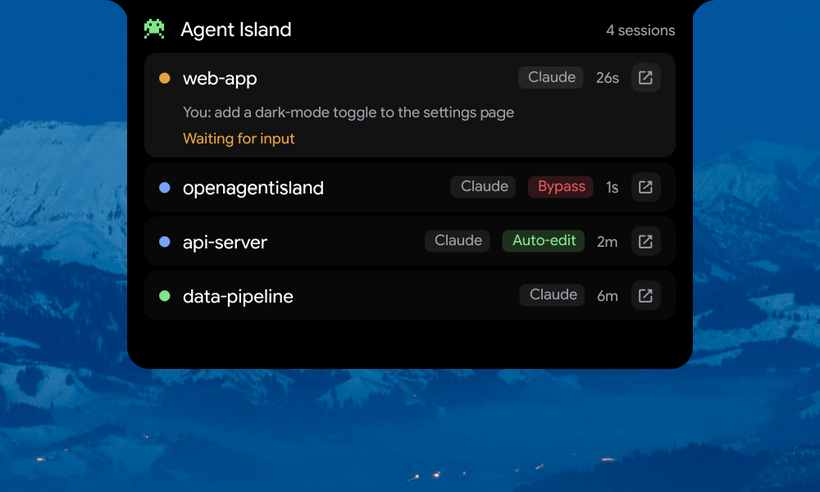 |
| Approve / deny a tool call from the notch | Every session at a glance |
- 🔔 Permission from the notch —
Bash/Write/Editrequests surface as a card with a live
preview. Allow once, allow-all-this-tool, or bypass the whole session. - 🧑🤝🧑 Multi-session — track every running
claudeat once: status, the prompt you gave it, and a
live relative time. Sorted by urgency (needs-you first). - 🚀 Jump to terminal — click a session to focus the terminal running it, switching workspace if
needed. - 🏷️ Live mode chips — each session shows its permission mode (Auto-edit, Bypass, Plan),
synced live from the terminal and updated when you Shift+Tab. - 🛟 Safe by design — the bridge is fire-and-forget; if the island isn't listening or anything goes
wrong, the hook falls back to Claude Code's normal prompt. It can never hang or break your Claude
Code. (13/13 safety checks:python3 bridge/test_safety.py.)
🏝️ Three floating islands

- Left — search · workspaces · weather · overview · network
- Center (the notch) — the morphing star (clock → OSDs → media → agent → surfaces)
- Right — resources · clock · battery · system tray · power
Fully multi-monitor: every island renders per-monitor in correct logical coordinates (scaled and
rotated displays included), and a surface opens only on the monitor you clicked.
🌀 The notch morphs
Click it — or let it react. Goey spring animations the whole way.
 |
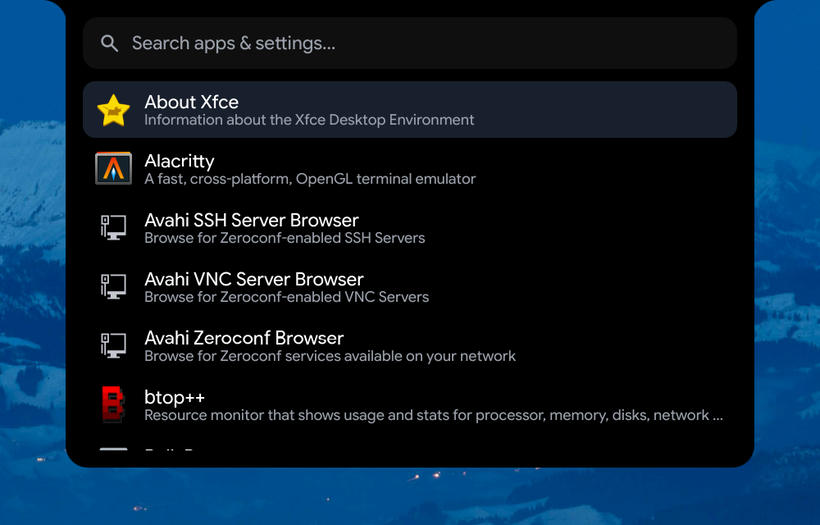 |
| Volume / brightness OSD | Fuzzy app & settings launcher |
 |
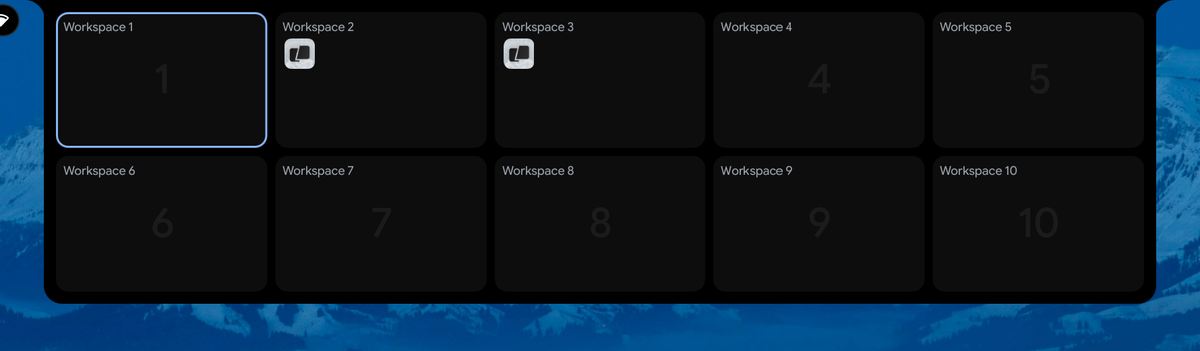 |
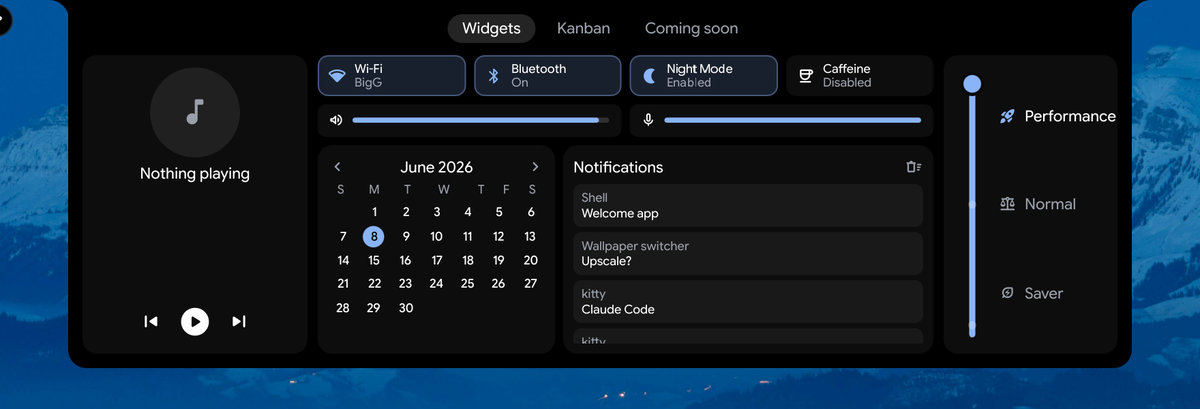
| Dashboard — toggles, media, calendar, notifications | Workspace overview (drag windows between workspaces) |
…plus media with an audio visualizer, brightness, notifications, a power menu, and screen-capture tools.
What's actually new here
The desktop chrome (islands, OSDs, overview, dashboard, launcher) builds on end-4. The genuinely novel
part is the agent bridge:
bridge/— Claude Code hooks → a Unix socket → the island. For permission events the hook blocks
on the socket; your tap in the notch sends the decision back. Safety-first throughout.- The notch agent UI — live status, the permission card, the session list, jump-to-terminal, and the
live permission-mode chips.
Requirements
- Hyprland with the end-4 / illogical-impulse setup (provides the Lua-based Hyprland config —
hl.dsp.*dispatch — plus all packages, fonts, services, and the Quickshell framework). Arch-based
(CachyOS, EndeavourOS, …) is the smoothest path. - Quickshell ≥ 0.2.1 (installed by the end-4 setup).
- Python 3 (standard library only) — for the agent bridge.
- Claude Code — for the agent feature (optional; the desktop works
great without it).
Install (set it up exactly like the screenshots)
1. Install the end-4 base first
Follow https://github.com/end-4/dots-hyprland. This sets up Hyprland (with the Lua config), Quickshell,
and every dependency. Make sure that desktop boots and works before continuing.
2. Clone OpenAgentIsland into your Quickshell configs
git clone https://github.com/patheonsceo/Dynamic-island-for-arch.git ~/Projects/openagentisland
ln -s ~/Projects/openagentisland/quickshell ~/.config/quickshell/openagentisland
Quickshell only loads configs from ~/.config/quickshell/<name>/, so the symlink points theopenagentisland config at the repo. (You can also clone straight into ~/.config/quickshell/openagentisland.)
3. Switch your desktop to it
end-4 picks the Quickshell config from ~/.config/hypr/hyprland/variables.lua:
hl.env("qsConfig", "ii")              -- before
hl.env("qsConfig", "openagentisland") -- after
Then relogin, or hot-swap without one:
pkill -f "qs -c ii"; hyprctl dispatch exec "qs -c openagentisland"
You'll see the three floating islands. To go back, set qsConfig to "ii".
4. (Optional) Enable the Claude Code agent feature
With Claude Code installed:
python3 ~/Projects/openagentisland/bridge/install-hooks.py enable
This merges only the OpenAgentIsland hooks into ~/.claude/settings.json (backing it up first) and
auto-resolves paths. Start a claude session and watch the notch.
- Disable:
python3 bridge/install-hooks.py disable· Status:… status - Prove the safety net (no island required):
python3 bridge/test_safety.py
5. (Optional) Enable voice dictation
Hold Right Ctrl to dictate straight into the focused window, with a live
waveform in the notch. It's powered by the external
hyprvoice daemon + Groq Whisper.
Full setup (dependencies, Groq key, the push-to-talk keybind translated for stock
Hyprland) is in docs/voice-dictation.md.
Notes & gotchas
- Multi-monitor / scaled / rotated displays — handled; each island renders per-monitor in logical
coordinates, surfaces open only on the monitor you clicked. - Lua-Hyprland dispatch — this config uses the
hl.dsp.*Lua dispatch API (the plaindispatch "focuswindow …"form silently no-ops on a Lua-config Hyprland). - Single-process terminals (e.g. Warp) — all windows share one PID, so jump-to-terminal matches the
right window by title; it can't switch internal tabs. - Design / architecture lives in
NOTES.md; the running work log is inPROGRESS.md.
Credits & license
- Built on end-4 / dots-hyprland (illogical-impulse) — GPL-3.0.
- Built with Quickshell.
- Notch interaction techniques studied from Hyprfabricated
(technique only — re-implemented in Quickshell/QML, no code copied).
A derivative work of end-4, released under the GNU General Public License v3.0 — seeLICENSE. If you distribute it or a modified version, it must remain GPL-3.0, keep these
notices, and provide source.
Reviews (0)
Sign in to leave a review.
Leave a reviewNo results found