agent-flow
Health Gecti
- License — License: Apache-2.0
- Description — Repository has a description
- Active repo — Last push 2 days ago
- Community trust — 518 GitHub stars
Code Basarisiz
- child_process — Shell command execution capability in app/build.js
- execSync — Synchronous shell command execution in app/build.js
- exec() — Shell command execution in app/src/server.ts
- fs module — File system access in extension/scripts/simulate-events.js
Permissions Gecti
- Permissions — No dangerous permissions requested
Bu listing icin henuz AI raporu yok.
Real-time visualization of Claude Code agent orchestration — see your agents think, branch, and coordinate as they work.
Agent Flow
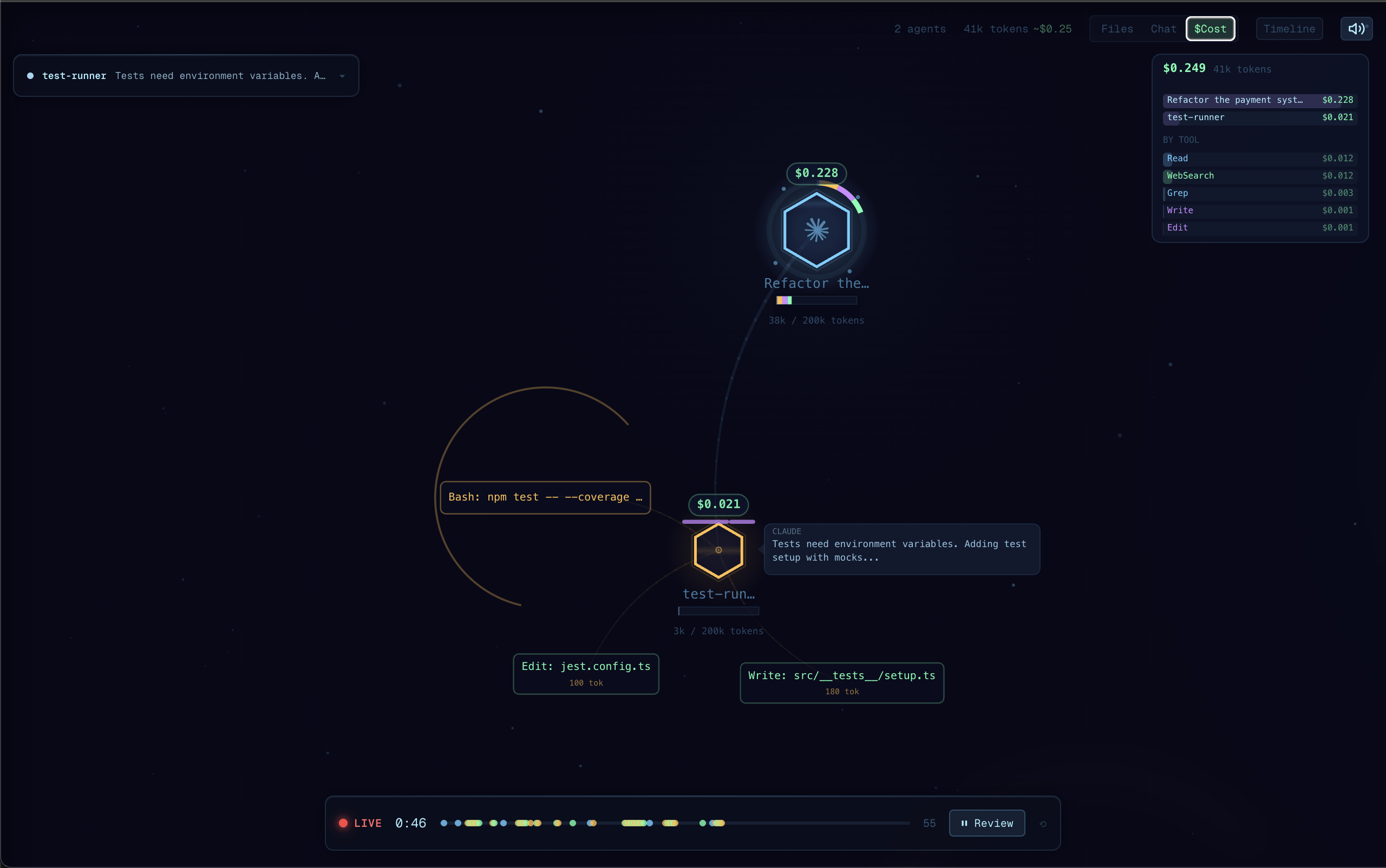
Real-time visualization of Claude Code agent orchestration. Watch your agents think, branch, and coordinate as they work. Demo video here.
Why Agent Flow?
I built Agent Flow while developing CraftMyGame, a game creation platform driven by AI agents. Debugging agent behavior was painful, so we made it visual. Now we're sharing it.
Claude Code is powerful, but its execution is a black box — you see the final result, not the journey. Agent Flow makes the invisible visible:
- Understand agent behavior — See how Claude breaks down problems, which tools it reaches for, and how subagents coordinate
- Debug tool call chains — When something goes wrong, trace the exact sequence of decisions and tool calls that led there
- See where time is spent — Identify slow tool calls, unnecessary branching, or redundant work at a glance
- Learn by watching — Build intuition for how to write better prompts by observing how Claude interprets and executes them
Features
- Live agent visualization: Watch agent execution as an interactive node graph with real-time tool calls, branching, and return flows
- Auto-detect Claude Code sessions: Automatically discovers active Claude Code sessions in your workspace and streams events
- Claude Code hooks: Lightweight HTTP hook server receives events directly from Claude Code for zero-latency streaming
- Multi-session support: Track multiple concurrent agent sessions with tabs
- Interactive canvas: Pan, zoom, click agents and tool calls to inspect details
- Timeline & transcript panels: Review the full execution timeline, file attention heatmap, and message transcript
- JSONL log file support: Point at any JSONL event log to replay or watch agent activity
Getting Started
Quick Start (no VS Code required)
npx agent-flow-app
This starts the visualizer in your browser. Start a Claude Code session in another terminal — events will stream in real-time.
Options:
--port <number>— change the server port (default: 3001)--no-open— don't open the browser automatically--verbose— show detailed event logs
Standalone Web App (from source)
git clone https://github.com/patoles/agent-flow.git
cd agent-flow
pnpm i
pnpm run setup      # configure Claude Code hooks (one-time)
pnpm run dev        # start the web app + event relay
Open http://localhost:3000 and start a Claude Code session in another terminal — events will stream to the browser in real-time.
VS Code Extension
- Install the extension
- Open the Command Palette (
Cmd+Shift+P) and run Agent Flow: Open Agent Flow - Start a Claude Code session in your workspace — Agent Flow will auto-detect it
Agent Flow automatically configures Claude Code hooks the first time you open the panel. To manually reconfigure, run Agent Flow: Configure Claude Code Hooks from the Command Palette.
JSONL Event Log
You can also point Agent Flow at a JSONL event log file:
- Set
agentVisualizer.eventLogPathin your VS Code settings to the path of a.jsonlfile - Agent Flow will tail the file and visualize events as they arrive
Commands
| Command | Description |
|---|---|
Agent Flow: Open Agent Flow |
Open the visualizer panel |
Agent Flow: Open Agent Flow to Side |
Open in a side editor column |
Agent Flow: Connect to Running Agent |
Manually connect to an agent session |
Agent Flow: Configure Claude Code Hooks |
Set up Claude Code hooks for live streaming |
Keyboard Shortcut
| Shortcut | Action |
|---|---|
Cmd+Alt+A (Mac) / Ctrl+Alt+A (Win/Linux) |
Open Agent Flow |
Settings
| Setting | Default | Description |
|---|---|---|
agentVisualizer.devServerPort |
0 |
Development server port (0 = production mode) |
agentVisualizer.eventLogPath |
"" |
Path to a JSONL event log file to watch |
agentVisualizer.autoOpen |
false |
Auto-open when an agent session starts |
Requirements
- Node.js 20+ (LTS recommended)
- pnpm
- Claude Code CLI
- For the VS Code extension: a VSCode-compatible IDE 1.85+ (e.g. VS Code, Cursor, Windsurf)
Development
pnpm i              # install dependencies for all packages
pnpm run setup      # configure Claude Code hooks (one-time)
pnpm run dev        # start dev server + event relay
pnpm run dev starts both the Next.js dev server and an event relay that receives Claude Code events and streams them to the browser via SSE.
Other scripts:
| Script | Description |
|---|---|
pnpm run dev:demo |
Start with demo/mock data |
pnpm run dev:relay |
Run the event relay server standalone |
pnpm run dev:extension |
Watch-build the extension |
pnpm run build:all |
Production build (webview + extension) |
pnpm run build:web |
Build the Next.js web app |
pnpm run build:extension |
Build the extension |
pnpm run build:webview |
Build the webview assets |
Author
Created by Simon Patole, for CraftMyGame.
License
Apache 2.0 — see LICENSE for details.
The name "Agent Flow" and associated logos are trademarks of Simon Patole. See TRADEMARK.md for usage guidelines.
Yorumlar (0)
Yorum birakmak icin giris yap.
Yorum birakSonuc bulunamadi