renor-engine
Health Warn
- License — License: AGPL-3.0
- Description — Repository has a description
- Active repo — Last push 0 days ago
- Low visibility — Only 5 GitHub stars
Code Pass
- Code scan — Scanned 12 files during light audit, no dangerous patterns found
Permissions Pass
- Permissions — No dangerous permissions requested
No AI report is available for this listing yet.
Memory for coding agents: Markdown notes in a folder, recalled later over MCP. AGPL-3.0.
Renor
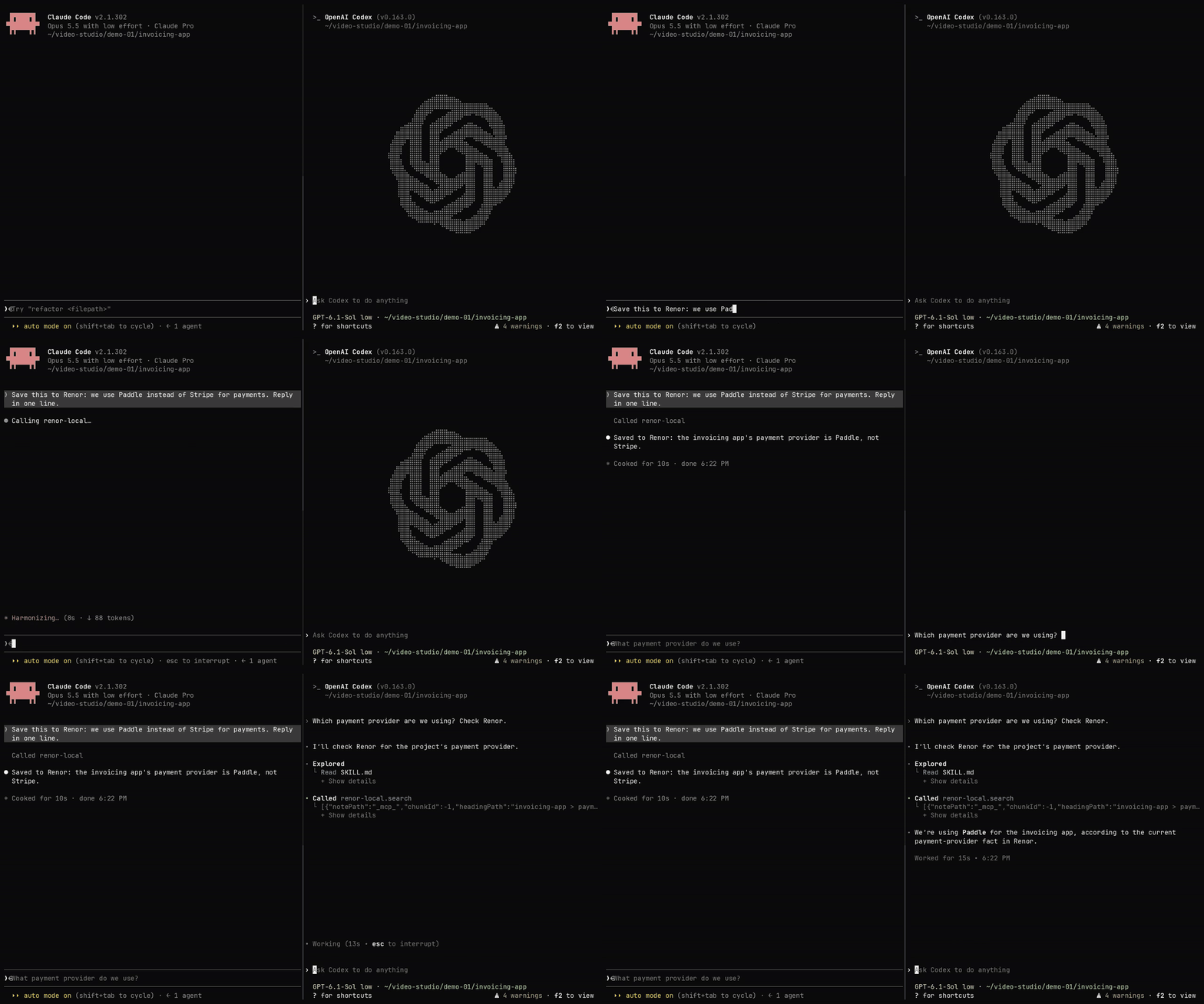
Self-hosted Renor, real session: Claude Code saves a decision, a fresh Codex session recalls it. Waiting time sped up.

Renor is memory for coding agents. You keep notes as Markdown files in a folder on your machine. Renor indexes them and serves them to any MCP client (Claude Code, Codex and others), so an agent can recall what you already decided instead of asking you to paste the same context again. A hosted version with no install is at https://renor.cloud.
Quickstart
You need Node 22 and, for this one-time install, access to the npm registry. After that nothing here needs an account, an API key or the network.
git clone https://github.com/patrickpassosb/renor-engine.git
cd renor-engine
node -v                    # must print v22.x
npm ci && npm rebuild better-sqlite3 --ignore-scripts=false && npm run build
node scripts/smoke-self-hosted.mjs
The last command starts the engine with nothing set, saves one fact (Ada favorite_color cerulean), searches for it three ways and stops. It works in a temporary notes folder that it removes afterwards and reads none of your settings, so it cannot touch notes you already have. It ends with:
PASS: self-hosted stdio MCP can remember and retrieve a current fact.
With nothing set, the engine uses no embedding model: search matches the words you saved, and nothing leaves your machine. A ZIP download has no git history to build from; section 1 has its build step.
Use it with your agent
Point Renor at a folder of Markdown notes (a new, empty folder is fine) and register the server. VAULT_PATH is the one setting you need, and it must be an absolute path:
export VAULT_PATH="$HOME/renor-notes"
node dist/cli.js index
claude mcp add --scope user renor-local -e VAULT_PATH="$VAULT_PATH" -- node "$PWD/dist/cli.js" mcp
For Codex, register it with codex mcp add renor-local --env VAULT_PATH="$VAULT_PATH" -- node "$PWD/dist/cli.js" mcp. Restart the agent, and /mcp lists renor-local. The node the agent starts must be Node 22. What the agent saves (a note or a fact) is found at once, in the same session and in later ones. node dist/cli.js index reads the notes already in the folder, so a Markdown file you add or edit by hand is found only after you run it again.
Renor sends nothing off your machine unless you give it a key for a model. EMBEDDING_PROVIDER=openai sends the text of your notes to OpenAI to embed it, and an evidence-model key (RENOR_EVIDENCE_API_KEY, or one of the OLLAMA_* keys) makes search send the notes it matched to that model. If your shell already exports such a key and you do not want that, add -e RENOR_EVIDENCE_MODE=off to the claude mcp add command. Every setting, with its default, is in docs/ENVIRONMENT-VARIABLES.md.
The problem. Every new session starts from zero. You re-explain the project, the decision you made last week and why, the thing you corrected twice. Renor keeps that context in files you own and hands the relevant part back when an agent asks.
What it does. It indexes your Markdown notes into a local SQLite database, ranks them by their words and entities (and by their meaning, once you turn embeddings on), and exposes search, recall and remember tools over MCP. Two servers ship here: a command-line server on stdin/stdout, and an HTTP server with OAuth sign-in.
Who it is for. People who run coding agents every day and are willing to run a Node service. It is a single-owner engine: one person's notes, one set of agents. It is not a multi-user product.
Run it offline or hosted. After dependencies are installed, indexing and search use no paid model and no network unless you configure one: with no embedding provider set the engine runs entirely on this machine. eval-hash is a deterministic offline stand-in the tests use, not a quality claim. If you would rather not run this yourself, a hosted service is at https://renor.cloud.
License. AGPL-3.0-only for Renor's work (LICENSE); imported upstream files remain ISC (NOTICE). Contributing: CONTRIBUTING.md. Security reports: SECURITY.md. Agent instructions, including the self-hosted setup, are in skill/SKILL.md.
Run everything below in the directory that contains this file and package.json.
Before you install: Node 22 and npm packages
Installation requires internet access to the npm registry, or a populated npm cache that can satisfy npm ci and npm rebuild. Runtime indexing and search in the Quickstart are offline after those dependencies are installed.
Renor is tested on Node 22 (.nvmrc and mise.toml pin it). Run node -v and check it prints v22.x. better-sqlite3 and sqlite-vec are native modules compiled for one Node major; on a different major a native module can fail at node dist/cli.js index with:
Error: The module '.../better_sqlite3.node' was compiled against a different Node.js version using NODE_MODULE_VERSION 127. This version of Node.js requires NODE_MODULE_VERSION 131.
(The two numbers depend on the versions involved.) The simplest fix is to switch to Node 22 and reinstall:
nvm use            # or: mise use node@22
node -v            # v22.x
rm -rf node_modules
npm ci
npm rebuild better-sqlite3 --ignore-scripts=false
Run the rebuild after every npm ci, whatever Node you use. An npm config such as ignore-scripts=true skips install scripts without an error, and the first symptom is Module did not self-register or Could not locate the bindings file at node dist/cli.js index. Rebuilding that one module fixes it without changing your global npm config:
npm rebuild better-sqlite3 --ignore-scripts=false
1. Install
The Quickstart installs from a git checkout. If you use mise, node below means mise exec node@22 -- node, and npm means mise exec node@22 -- npm. The renor name is not on PATH until you link it, so the examples call node dist/cli.js.
npm run build runs scripts/ci/stamp-build.mjs first (a prebuild step). It writes dist/BUILD.json, which /version reports as the build's commit. In a git checkout it reads that commit from git, so a local build needs nothing extra. A copy with no .git (a tarball, a GitHub "Download ZIP" or git archive) has no commit to read, so the build stops until RENOR_BUILD_COMMIT is set to a 7–40 character hex revision. That variable matters only for the stamp: the code builds and runs the same either way.
For an archive or GitHub Download ZIP, enter its extracted directory and name the build before you install. If you know the revision you downloaded, use that sha; 0000000 passes the check, and /version will report it. Then run the check from the Quickstart:
cd renor-engine-*
node -v                    # v22.x
export RENOR_BUILD_COMMIT=0000000
npm ci && npm rebuild better-sqlite3 --ignore-scripts=false && npm run build
node scripts/smoke-self-hosted.mjs
2. Command-line server
This is the server the Quickstart runs. It speaks MCP on stdin and stdout, so talk to it with a client, not by typing. VAULT_PATH names your notes folder and is the one setting it needs; every other setting has a default, listed in docs/ENVIRONMENT-VARIABLES.md.
export VAULT_PATH="$HOME/renor-notes"   # an absolute path; created if it is missing
node dist/cli.js index                  # indexes the Markdown notes already in it
node dist/cli.js mcp                    # leave it running, or let your agent start it (see "Connect Claude Code")
node dist/cli.js index exits 0. The first run on a new folder prints [migrations] applied: lines and then Done. N/N indexed, 0 errors. The server does not index on startup, so index first, and again after you add or edit a Markdown file by hand; what the agent saves is indexed as it is saved. Its stdout is the MCP protocol: the [migrations] lines go to stderr.
Search without embeddings. With EMBEDDING_PROVIDER unset the engine uses no embedding model: indexing and search run on this machine, search matches words, and what the agent saves is found at once. EMBEDDING_PROVIDER=openai with OPENAI_API_KEY embeds your notes with OpenAI, and their text is sent to it. local downloads a model on first use. eval-hash is a deterministic offline stand-in the tests use and makes no quality claim. After you change the provider on a folder that already holds notes, run node dist/cli.js rebuild so they are embedded again.
Verify it
The Quickstart's last command is the check. It starts this same stdio server, lists its tools, saves one current fact, searches for it three ways, and stops the server itself:
node scripts/smoke-self-hosted.mjs
Those are the MCP calls tools/list, tools/call for remember_fact with {"subject":"Ada","predicate":"favorite_color","object":"cerulean"}, then tools/call for search with each of {"query":"What is Ada's favorite color?"}, {"query":"Ada favorite color cerulean"}, and {"query":"cerulean"}. The tool list must include remember_fact and search; every search must return cerulean. The check exits non-zero if a call fails or the value is missing.
It makes a temporary notes folder, removes it afterwards and ignores VAULT_PATH, so it never adds anything to your notes. To check one folder instead, name it with an absolute path: node scripts/smoke-self-hosted.mjs "$VAULT_PATH". The test fact Ada favorite_color cerulean then stays in that folder's memory.
3. HTTP server
A second process, a second folder. This server needs macOS, Linux, or WSL2 on Windows: native Windows fails at startup because the OAuth client store reads a POSIX user id that Windows does not have. It serves the product tools over HTTP on 127.0.0.1. It does not read VAULT_PATH. MVP_EMBEDDING_PROVIDER=none uses no embedding model.
The OAuth client file must live in a directory that is mode 0700, owned by you, and not inside the memory directory. A normal umask is rejected at startup. The memory directory holds your statements in plain text, so it is owner-only too: the server creates it 0700 and its files 0600, and when it finds one that group or others can read it tightens it (and says so in one log line). It refuses to start only when it cannot, for example because another user owns the directory.
export MVP_MEMORY_DIR="$PWD/.smoke/memory"
export MVP_PORT=39471
export MVP_BASE_URL="http://127.0.0.1:${MVP_PORT}"
export MVP_OWNER_EMAIL="[email protected]"
export MVP_OWNER_PASSWORD="$(openssl rand -base64 18)"   # random; read it back with: echo "$MVP_OWNER_PASSWORD"
export MVP_AUTH_STATE_PATH="$PWD/.smoke/auth/clients.json"
export MVP_ALLOWED_CALLBACK_URIS="http://localhost:39472/callback"
export MVP_EMBEDDING_PROVIDER=none

mkdir -p "$MVP_MEMORY_DIR" "$(dirname "$MVP_AUTH_STATE_PATH")"
chmod 0700 "$MVP_MEMORY_DIR" "$(dirname "$MVP_AUTH_STATE_PATH")"

npm run mvp
npm run mvp runs node dist/mvp/cli.js.
MVP_OWNER_PASSWORD is the only gate on your memory, so use a long random one: the line above generates it (read it with echo "$MVP_OWNER_PASSWORD" when you sign in, or export your own). The server refuses to start on the placeholder values from older docs and on very common passwords. It must be at least 8 characters. Change MVP_PORT if 39471 is taken, and keep MVP_BASE_URL on that same port. Startup prints the MCP endpoint ($MVP_BASE_URL/mcp). A request with no token is refused:
curl -s -o /dev/null -w '%{http_code}\n' -X POST "$MVP_BASE_URL/mcp" \
  -H 'content-type: application/json' \
  -H 'accept: application/json, text/event-stream' \
  -d '{"jsonrpc":"2.0","id":1,"method":"initialize","params":{"protocolVersion":"2024-11-05","capabilities":{},"clientInfo":{"name":"smoke","version":"0"}}}'
That prints 401. A request without a valid token is refused before its body is read, so a malformed or oversized body gets the same 401, as a JSON-RPC body.
Session ceiling. With MVP_MCP_JSON=false, every open session holds a full MCP server in memory, about 0.3 MB measured. MVP_MCP_MAX_SESSIONS (default 100) caps how many stay open, and its largest accepted value is 1000: a higher value stops startup with a message that names the ceiling. Idle sessions expire after MVP_MCP_SESSION_TTL_MS.
Moving or restoring the memory folder (to another path, or from a backup) is safe: the first start at the new path removes the index rows the old path left behind and indexes the folder again before it answers, which re-embeds every note; your Markdown and the ledger are never changed.
Files in your vault
Both servers write only to regular files inside the vault. A symbolic link, a hard link or a FIFO planted in the vault (a cloned or shared notes folder, a synced folder) is refused, not followed: the write fails and says why. The vault folder itself may be a link. New files are created 0600 and new folders 0700.
On Linux the server also checks, after it opens a file and before it writes, where the kernel says that file really is, and refuses unless it is inside the vault. That closes a race in which another process with write access inside your vault swaps a folder for a link while a write is in flight. On a system without /proc (macOS, Windows) that check is skipped, so the race stays open there: it needs a process that can already write inside your vault, which can edit your notes anyway. A refused write may leave an empty file outside the vault; it never leaves content.
Two different tool lists
By default, the command-line server publishes eight tools — search, evidence, keyword, entity, remember_fact, facts, status, and note. Naming its connection adds the five hive tools, as described below. The HTTP server publishes a different set of twenty-four tools, including remember, get_context, and the five hive tools whats_new, ask_agent, list_requests, answer_request, and close_request.
Owner names
Renor treats no name as the owner by default. To have your name and first-person words ("I", "me", "my") resolve to your own facts, export RENOR_OWNER_NAMES: a comma-separated list where the first name is canonical and the others are aliases of it (for example RENOR_OWNER_NAMES="Ada Lovelace,Ada,Ada Byron"). Unset, Renor only folds case and Unicode form.
Hive connection names
The hive tools tell agents apart by connection name only. The name is not a tool argument.
- Command-line server: export
RENOR_CONNECTION_NAME=<agent name>beforenode dist/cli.js mcp. One process is one connection. With a name that does not render empty (not blank, notunnamed), the server registers the five hive tools under that name andtools/listreturns thirteen tools instead of eight. The name is read at startup only: tool arguments and later environment changes cannot rename a connection. Unset, the server keeps the eight tools above and does not publish the hive; a direct hive call is refused with the instruction to set the variable and reconnect. - HTTP server: the name is the OAuth client's
client_name. Register one client per agent, authorize it with the owner, and the server reads that name back from the bearer token. The five hive tools refuse a client that has no name.
Connect Claude Code
Command-line server, from this directory, with node dist/cli.js mcp not already occupying the terminal (the client starts it). The node on the client's PATH must be Node 22.
claude mcp add --scope user renor-local -e VAULT_PATH="$VAULT_PATH" -- node "$PWD/dist/cli.js" mcp
VAULT_PATH must be absolute. Restart Claude Code. /mcp should list renor-local. This is node dist/cli.js mcp. --scope user makes the entry available in every project; the default, --scope local, makes it appear only when Claude Code is started in the folder where you ran the command. The name is only a label for this machine's entry, so it does not collide with a hosted connector named renor. If your environment already holds a model key that you do not want Renor to use, add -e RENOR_EVIDENCE_MODE=off.
HTTP server, while npm run mvp is running. Claude Code registers the redirect http://localhost:<port>/callback (the host is localhost, not 127.0.0.1). Section 3 already allowlists port 39472. --callback-port must be that same port or registration is denied:
claude mcp add --transport http --scope local --callback-port 39472 renor-local-http "$MVP_BASE_URL/mcp"
Restart Claude Code, run /mcp, choose renor-local-http, and authenticate. Sign in as MVP_OWNER_EMAIL with MVP_OWNER_PASSWORD. If you pick a different port, change MVP_ALLOWED_CALLBACK_URIS to http://localhost:<that-port>/callback, restart npm run mvp, and pass the same port to --callback-port. The match is exact: no wildcards, and 127.0.0.1 is not localhost.
Connect Codex
Command-line server:
codex mcp add renor-local --env VAULT_PATH="$VAULT_PATH" -- node "$PWD/dist/cli.js" mcp
The node on Codex's PATH must be Node 22. This is node dist/cli.js mcp. codex mcp add writes a global entry for the whole user account, not a per-project one; codex mcp remove renor-local undoes it. Add --env RENOR_EVIDENCE_MODE=off if your environment already holds a model key that you do not want Renor to use.
HTTP server (this starts the browser sign-in). Codex's redirect is its own loopback URI, not the Claude Code URI from section 3. Registration is denied until that exact URI is also listed in MVP_ALLOWED_CALLBACK_URIS (comma-separated). Add it, restart npm run mvp, then:
codex mcp add renor-local-http --url "$MVP_BASE_URL/mcp"
If the browser does not open, run codex mcp login renor-local-http in your own terminal, then restart Codex. Sign in as the owner email and password from section 3.
Reviews (0)
Sign in to leave a review.
Leave a reviewNo results found