headroom
Health Uyari
- License — License: MIT
- Description — Repository has a description
- Active repo — Last push 0 days ago
- Low visibility — Only 5 GitHub stars
Code Basarisiz
- rm -rf — Recursive force deletion command in app/bundle.sh
Permissions Gecti
- Permissions — No dangerous permissions requested
Bu listing icin henuz AI raporu yok.
Your Claude Code usage, live in the menu bar — session + weekly % , color-coded. Zero config.
Headroom


Your Claude Code usage, live in your Mac's menu bar.
Everyone on a Claude Pro/Max plan lives with two invisible meters — the 5-hour session
window and the 7-day weekly cap — and discovers them the bad way: a hard stop mid-task.
Headroom puts the number where ambient numbers belong:
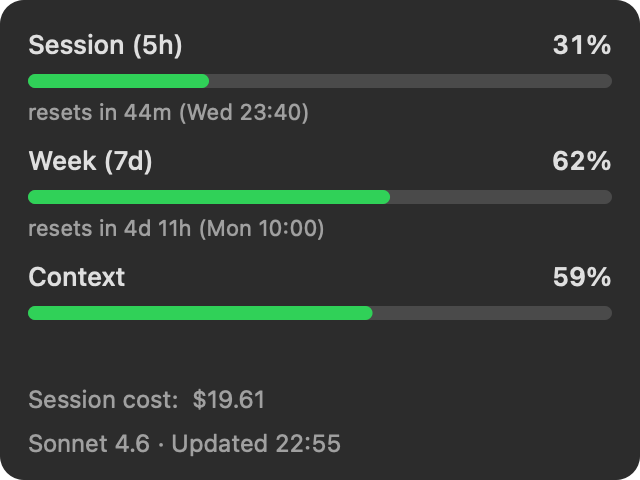
- Both meters at once in the menu bar —
CC 10%·65%shows session (5h) and weekly (7d) simultaneously, no click needed - Context window fill — a third bar so you can see how full your context is before coherence degrades
- Active model shown in the status line — Sonnet 4.6, Opus, Fable, whatever you're running
- Session cost — live dollar spend for the current session, from the same data Claude Code already tracks
- Color-coded before it bites — calm below 70%, amber at 70%, red at 90%, tracking
whichever window is closer to its limit - Reset countdowns for both windows in the dropdown
- Threshold notifications — macOS alerts at 70% and 90%, configurable via
~/.claude/headroom-prefs.json - Pace forecast — "~2h 15m at pace" when your current usage rate would hit the limit before reset
- Zero config. No API key, no login, no settings. Install it and the number is there.
Install
Download from headroom.walls.sh — free,
macOS 13+, universal (Apple Silicon & Intel), ~267 KB. Signed & notarized.
Unzip, drag Headroom.app to Applications, open it. That's the whole setup: no
permission dialogs, no API key, no login — Headroom quietly wires itself into Claude
Code's status line and the numbers appear.
Or with Homebrew:
brew install --cask patwalls/tap/headroom
Or build it yourself in ~10 seconds:
git clone https://github.com/patwalls/headroom && cd headroom/app
swift build -c release && .build/release/Headroom
How it works (the whole trick)
Claude Code already knows your usage — it receives the official 5h/7d rate-limit numbers
and renders them in its own status line. Headroom installs a tiny status-line hook that
saves that data to ~/.claude/headroom-usage.json, and the menu bar reads it. The same
numbers /usage shows, updated every time Claude Code does — no scraping, no estimating,
no API polling, the real meters.
The trust contract
An app that sits next to your credentials all day must be auditable. So:
- Headroom never touches your token, your Keychain, or your account — and it makes
zero network calls. It reads a local file Claude Code's own status line writes.
No analytics, no auto-updater, no phoning home. - The entire data surface is two small files:
Hook.swift(writes) andUsage.swift(reads). Read them. - No dependencies. AppKit + Foundation, ~780 lines total.
- MIT licensed — audit it, fork it, build it yourself.
Guides and deep-dives
- How the hook works — the
statusLineHookmechanism: JSON schema, hook chaining, recipes for tmux statusbar, terminal prompt integration, and cost logging - Claude Code rate limits explained — how the 5h session and 7d weekly rolling windows work, what triggers them, and how to track them before they fire
- Context window vs. rate limits — the third Claude Code limit most people discover too late: gradual context degradation vs. a hard rate-limit stop
- FAQ — common questions: "does Claude Code have a daily limit?", "how long until the rate limit resets?", "why does Claude Code stop mid-task?"
Seen on
Hacker News · r/ClaudeAI · r/neovim · r/vim · r/devops · r/LocalLLaMA · r/Python · r/programming · r/MacApps · r/SideProject · r/swift · r/commandline
Built in public
Headroom is Wall #003 of walls.sh — built by an autonomous
loop, in public, toward one number: 100 stranger downloads. The North Star, the
milestone ladder, and every lap's log live in VISION.md; how the loop
runs is in LOOP.md. The downloads counter on the wall is the site's own/metrics — verification probes excluded.
Yorumlar (0)
Yorum birakmak icin giris yap.
Yorum birakSonuc bulunamadi