ai-notify
Health Warn
- License — License: MIT
- Description — Repository has a description
- Active repo — Last push 0 days ago
- Low visibility — Only 9 GitHub stars
Code Pass
- Code scan — Scanned 12 files during light audit, no dangerous patterns found
Permissions Pass
- Permissions — No dangerous permissions requested
No AI report is available for this listing yet.
macOS notifications for Claude Code and Codex CLI with intelligent session tracking
ai-notify
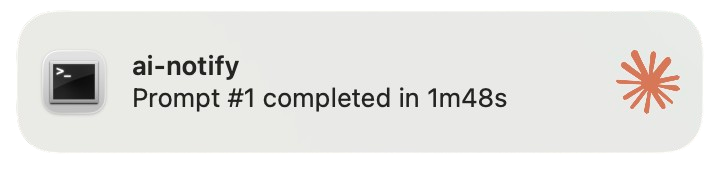
Desktop notification system for Claude Code and Codex CLI that tracks session activity and sends macOS notifications for
key events.
Installation
[!NOTE]
This CLI works only on macOS at the moment.
Prerequisites
- Python 3.12+
- uv package manager
- terminal-notifier app: Install with
brew install terminal-notifier
Installation
At the moment, the CLI can only be installed from source. You have to clone the repository and run the install command:
git clone https://github.com/PaulRBerg/ai-notify.git
cd ai-notify
uv tool install --force .
To update, git pull and re-run the install command.
Features
- Smart Notifications: Only notifies for jobs exceeding a configurable duration threshold (default: 10s)
- Prompt Filtering: Exclude specific prompt patterns (e.g., slash commands like
/commit) from notifications - Session Tracking: SQLite database tracks prompts, durations, and job numbers
- Auto-cleanup: Automatic data cleanup with optional export before deletion
- Event Handlers: CLI subcommands for Claude Code hooks and Codex CLI notify integration
- Configuration: YAML-based configuration with sensible defaults
- Rich Notifications: Custom Claude icon, configurable sounds, and click-to-focus terminal support
Comparison with CCNotify
Inspired by CCNotify with key improvements:
- Independent CLI — installable via
uv tool install, not a script symlink - Fully configurable — YAML config with
ai-notify configcommands - More events — adds
PermissionRequestand an AskUserQuestion notifier (5 hooks vs 3) - Smart filtering — configurable duration threshold and prompt exclusion patterns
- Notification modes — all/permission_only/disabled
Configuration
ai-notify uses YAML configuration stored at ~/.config/ai-notify/config.yaml.
View current configuration
ai-notify config show
Edit configuration
ai-notify config edit
Reset to defaults
ai-notify config reset
Configuration options
cleanup:
  auto_cleanup_enabled: true # Enable automatic cleanup of old data
  export_before_cleanup: true # Export data before cleanup
  retention_days: 30 # Number of days to retain session data (older data will be auto-cleaned)

database:
  path: ~/.config/ai-notify/ai-notify.db # Path to SQLite database file

logging:
  level: INFO # Log level (DEBUG, INFO, WARNING, ERROR, CRITICAL)
  path: ~/.config/ai-notify/ai-notify.log # Path to log file

notification:
  app_bundle: com.googlecode.iterm2 # Application bundle ID to focus on notification click
  mode: all # Notification mode: 'all' (default), 'permission_only', or 'disabled'
  sound: default # Notification sound (see /System/Library/Sounds for options)
  threshold_seconds: 10 # Minimum job duration in seconds to trigger notification (0 = notify all)
  exclude_patterns: # List of prompt prefixes to exclude from notifications (case-sensitive)
    - /commit
    - /update-pr
    - /fix-issue
Database durability note
ai-notify uses SQLite WAL mode with synchronous=NORMAL for speed. In the event of a sudden power loss or crash, the
latest session writes can be lost. This is acceptable for transient session tracking data, but be aware if you require
strict durability.
Prompt Pattern Filtering
The exclude_patterns configuration allows you to filter out notifications for specific prompts:
- Prefix matching: Patterns match prompts that start with the pattern (case-sensitive)
- Common use case: Exclude slash commands like
/commit,/update-pr, etc. - Examples:
- Pattern
/commitmatches:/commit,/commit --all,/commit -m "message" - Pattern
/commitdoes NOT match:Commit changes,run /commit,/Commit(different case)
- Pattern
- Default: Empty list (no filtering)
Usage
Test notifications
ai-notify test
Clean up old data
# Preview cleanup (dry run)
ai-notify cleanup --dry-run

# Clean up with confirmation
ai-notify cleanup

# Clean up with custom retention
ai-notify cleanup --days 60

# Clean up without export
ai-notify cleanup --no-export
Event handlers (Claude Code integration)
The following commands are designed to be called from Claude Code hooks:
# Track user prompt submission
ai-notify event user-prompt-submit < event_data.json

# Handle stop event (sends notifications)
ai-notify event stop < event_data.json

# Handle notification event
ai-notify event notification < event_data.json

# Handle permission request
ai-notify event permission-request < event_data.json

# Notify when Claude asks a question (PreToolUse / AskUserQuestion)
ai-notify event ask-user-question < event_data.json
For Codex CLI, use ai-notify codex via the notify setting (see below).
Claude Code Hook Integration
Claude Code reads hooks from its settings files — ~/.claude/settings.json (all projects) or a project's.claude/settings.json / .claude/settings.local.json. Install the ai-notify hooks automatically:
ai-notify link claude
This merges the hooks into ~/.claude/settings.json without touching your other settings. Use --path to target a
project or local settings file, --dry-run to preview, and --force to replace a conflicting entry. For more
information about Claude Code hooks, see the
official documentation.
The resulting hooks section uses Claude Code's nested schema (each event maps to a list of matcher groups):
{
  "hooks": {
    "UserPromptSubmit": [{ "hooks": [{ "type": "command", "command": "ai-notify event user-prompt-submit" }] }],
    "Stop": [{ "hooks": [{ "type": "command", "command": "ai-notify event stop" }] }],
    "Notification": [{ "hooks": [{ "type": "command", "command": "ai-notify event notification" }] }],
    "PermissionRequest": [{ "hooks": [{ "type": "command", "command": "ai-notify event permission-request" }] }],
    "PreToolUse": [
      {
        "matcher": "AskUserQuestion",
        "hooks": [{ "type": "command", "command": "ai-notify event ask-user-question" }]
      }
    ]
  }
}
Upgrading: older versions wrote
~/.claude/hooks/hooks.json, which Claude Code no longer reads. Re-runai-notify link claudeto install intosettings.json, then delete the stale file.
Codex CLI Integration
Codex CLI can invoke ai-notify through the notify setting in your root config file (~/.codex/config.toml).
notify = ["ai-notify", "codex"]
You can also set this automatically:
ai-notify link codex
Codex appends the JSON payload as the final CLI argument, so the effective command looks like:
ai-notify codex '<json payload>'
The Codex notify payload does not include job duration, so notification.threshold_seconds is not applied for Codex
notifications. Exclude patterns and notification mode still apply.
Integration Check
Use the built-in checker to see whether Claude Code hooks and Codex notify are configured:
ai-notify check
How It Works
- UserPromptSubmit: When you submit a prompt to Claude Code, ai-notify tracks it in the database
- Stop: When Claude finishes (or you stop it), ai-notify:
- Calculates the duration
- Checks if duration >= threshold
- Checks if prompt starts with any excluded pattern
- Sends notification only if both checks pass (by default, whether the job took longer than >10 seconds)
- Optionally runs auto-cleanup (every 24 hours)
- Notification: Detects "waiting for input" notifications (via the
idle_promptnotification type, with a keyword
fallback) and suppresses them — the Stop handler sends the job-completion notification - PermissionRequest: Sends an immediate notification when Claude requests permission to run a tool
- PreToolUse / AskUserQuestion: Sends a notification when Claude asks you a question
For Codex CLI, ai-notify runs on the agent-turn-complete notify event and sends a completion notification with the
latest assistant message as context.
File Structure
~/.config/ai-notify/
├── config.yaml             # User configuration
├── ai-notify.db            # SQLite session database
├── ai-notify.log           # Application logs
└── exports/                # JSON exports before cleanup
Documentation
License
MIT License - see LICENSE.md
Reviews (0)
Sign in to leave a review.
Leave a reviewNo results found