tablo
Health Pass
- License — License: MIT
- Description — Repository has a description
- Active repo — Last push 0 days ago
- Community trust — 36 GitHub stars
Code Pass
- Code scan — Scanned 9 files during light audit, no dangerous patterns found
Permissions Pass
- Permissions — No dangerous permissions requested
No AI report is available for this listing yet.
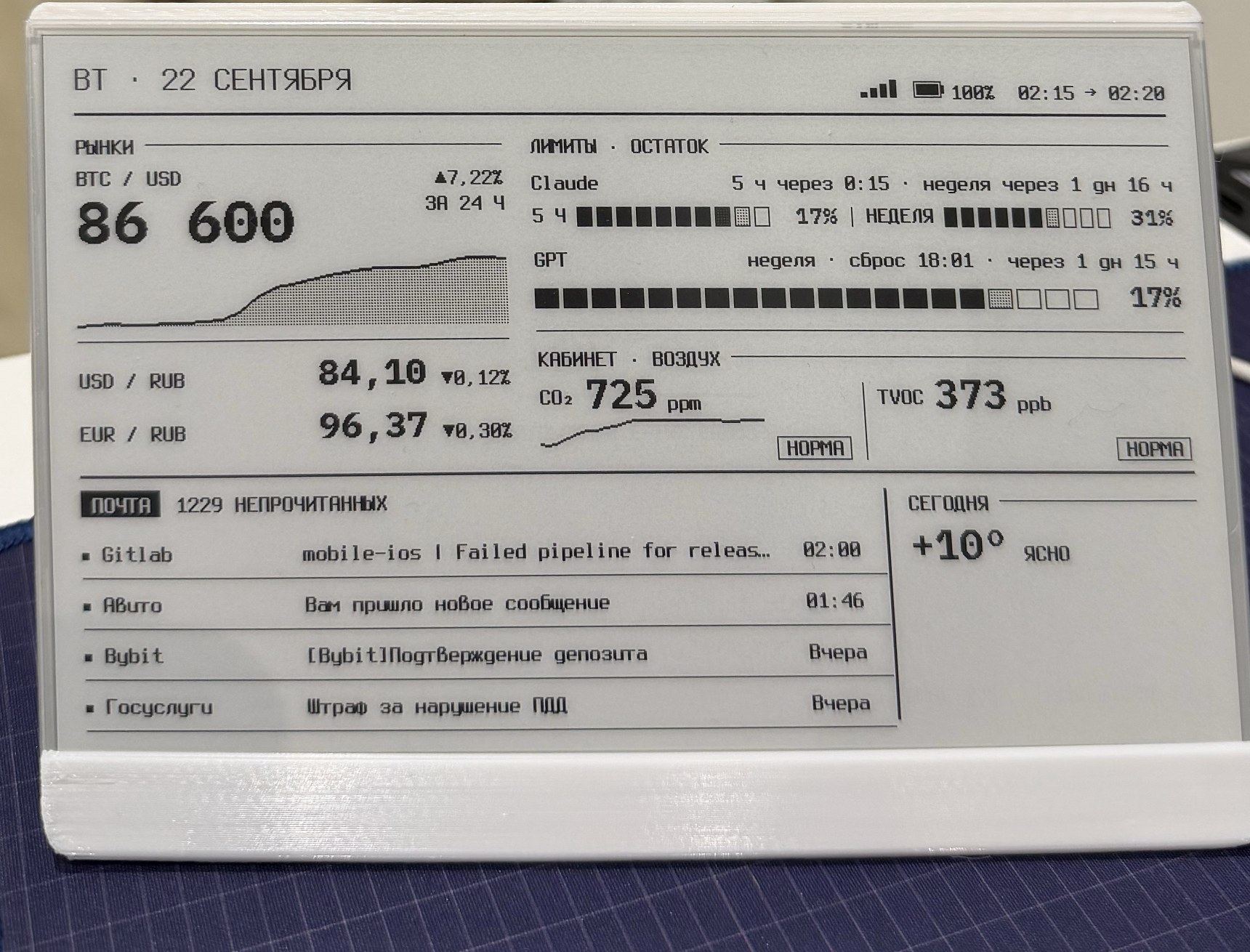
Self-contained e-ink dashboard firmware for ESP32-S3 (TRMNL 7.5" DIY kit): crypto & forex, Claude Code and Codex usage limits, air quality, mail, weather. No server needed.
tablo
Self-contained e-ink dashboard firmware for the TRMNL 7.5" DIY kit (ESP32-S3).
Crypto and forex rates, Claude Code and Codex usage limits, air quality, unread mail, weather. No server required.


English · Русский
Features
- Standalone. The ESP32 fetches data straight from Binance, the Central Bank of Russia, Anthropic, OpenAI, Open-Meteo, Home Assistant and your IMAP mailbox, then renders the frame itself. No home server, no cloud relay, no companion app.
- Claude Code and Codex limits on your desk. Remaining 5-hour and weekly windows, time to reset. OAuth tokens are refreshed on the device.
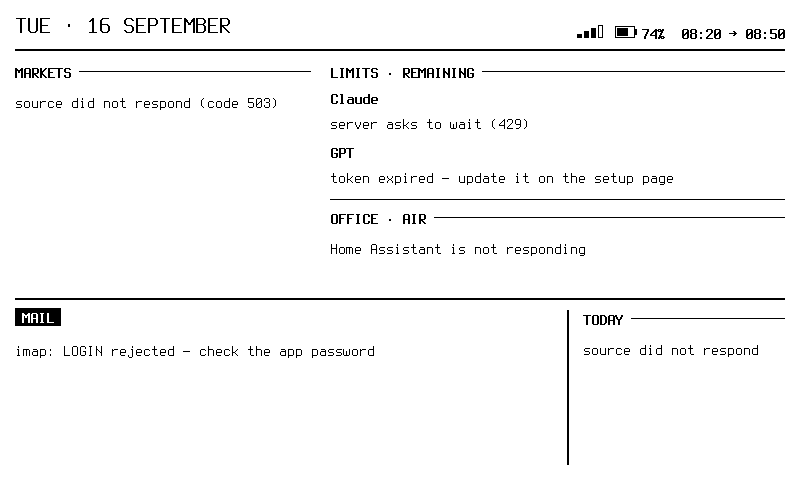
- Honest display. Stale values are marked, a failed source shows the reason instead of disappearing, zero is never drawn in place of "no data".
- Three dashboards switched with the on-board buttons, composed from widgets on the setup page.
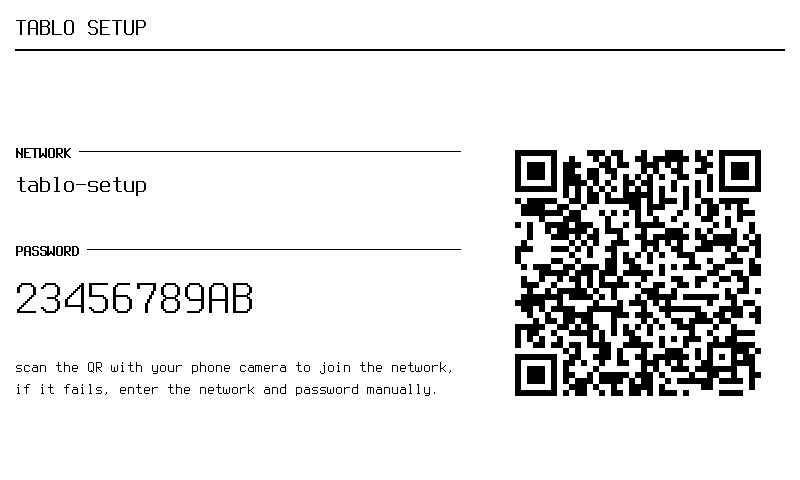
- Phone setup. Access point with a QR code on first boot, then a web page on your home network. UI in English or Russian.
- E-ink friendly. Partial refresh only when something changed, full refresh once an hour.
- Prebuilt firmware in Releases, host-side tests and frame rendering without hardware.
What's on the screen
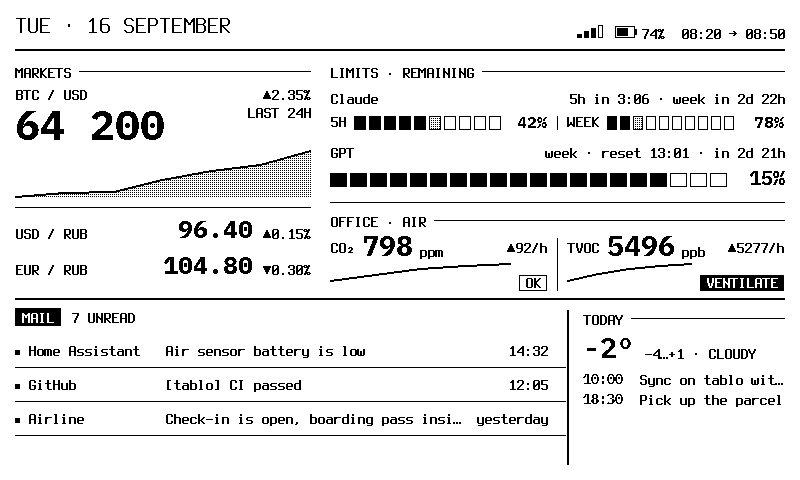
| Block | Shows | Source |
|---|---|---|
| Markets | BTC with a 24-hour chart, USD and EUR rates with daily change | Binance, Central Bank of Russia |
| Limits | Remaining Claude 5-hour and weekly windows, Codex weekly window, time to reset | Anthropic and OpenAI OAuth usage endpoints |
| Air | CO₂ and TVOC with a 6-hour chart and a "fresh / ok / ventilate" state | Home Assistant |
| Unread count and the last four messages | IMAP | |
| Today | Temperature and weather summary for your city | Open-Meteo, geocoding and time zone resolved automatically |
When sources fail, every block stays on screen and explains why:
Hardware
Seeed Studio TRMNL 7.5" OG DIY Kit:
XIAO ESP32-S3 (8 MB flash, 8 MB PSRAM), 7.5" 800×480 monochrome e-paper, three buttons, battery with charge measurement.
The stand in the photo is an L-shaped case from MakerWorld.
Install
Prebuilt firmware
Download tablo-<version>-full.bin from Releases and flash it at address 0x0:
pip install esptool
esptool.py --chip esp32s3 --port /dev/ttyACM0 write_flash 0x0 tablo-<version>-full.bin
Without a command line: open web.esphome.io in Chrome, connect the board over USB and pick the same file.
Build from source
Requires PlatformIO and Python 3.
pio run                    # build
pio run -t upload          # flash firmware
pio run -t uploadfs        # flash the setup page
./scripts/verify.sh        # build + host-side tests
firmware/src/secrets.h is optional. Copy it from secrets.h.example if you want Wi-Fi and tokens baked into the image; otherwise enter everything on the setup page.
Setup
First boot. With no known network the device starts an access point named tablo-setup and shows its password and a QR code. Point your phone camera at the code, the setup page opens.
Later. On your home network the page is at http://tablo-setup.local/ (the device name can be changed there). Sources are configured as cards: Claude, Codex, mail, Home Assistant, rates, weather and city. Secrets are entered once and never shown again. Hold button 1 for three seconds to force the access point.
Credentials.
| Source | What to enter | Where to get it |
|---|---|---|
| Claude | OAuth access + refresh token | Claude Code login: ~/.claude/.credentials.json (macOS: Keychain item "Claude Code-credentials") |
| Codex | OAuth access + refresh token | Codex CLI login: ~/.codex/auth.json |
| IMAP server, address, app password | Your provider's app passwords (Gmail: Security → App passwords) | |
| Home Assistant | URL, long-lived access token | HA profile → Security → Long-lived access tokens |
| Rates, weather | nothing | public APIs |
Anthropic and OpenAI usage endpoints are not reachable from every region. The device reports this on screen instead of showing zeros.
Dashboards and widgets
Three dashboards are switched with buttons 1–3. Each is built on the setup page from a widget palette with a live preview.
| Size | Width | Meaning |
|---|---|---|
S |
202 px | narrow column, like Today |
M |
296 px | medium, like Markets |
flex |
remaining | shares the rest of the row with other flex widgets |
A hidden widget leaves no gap, its neighbours take the space. Built-in widgets: markets, limits, air, limits + air, mail, today, metric (any slot, large) and caption.
Adding a widget is one file plus a registry entry. Widgets declare which data slots they need and how often, and the device polls a source only when some visible widget needs it. See docs/widgets.md.
Development
sources ──► connectors ──► slots ──► widgets ──► 800×480 frame
Binance,    HTTP/JSON,     btc,      markets,    1-bit canvas,
Anthropic,  OAuth refresh, limit.*,  limits,     Terminus +
OpenAI,     IMAP dialog,   co2,      air, mail,  IBM Plex Mono,
Open-Meteo, parsing        mail.*    today, …    partial refresh
scripts/verify.shbuilds the firmware and runs host-side tests (slots, config, layout, polling schedule, buttons).--fastskips tests.tools/render_frame/build_and_run.shrenders every screen to PNG with the same layout code that runs on the panel: three dashboards, boot and access point screens, failure scenarios.tools/compare_frame.pychecks the frame skeleton against the reference mockup.- CI runs the same build and tests on every push. A
v*tag publishes a release withfull,firmwareandlittlefsimages.
Documentation (Russian for now):
- docs/decisions.md — design decisions and their cost: on-device rendering, OAuth and IMAP without a relay, setup from any network, HTTPS with pinned roots.
- docs/architecture.md — slots, connectors, layout.
- docs/widgets.md — how to add a widget.
- docs/constructor.md — dashboards, palette, source wizard.
License
MIT. Fonts Terminus and IBM Plex Mono are under SIL OFL 1.1, see firmware/assets/.
Reviews (0)
Sign in to leave a review.
Leave a reviewNo results found