paxm
Health Pass
- License — License: Apache-2.0
- Description — Repository has a description
- Active repo — Last push 0 days ago
- Community trust — 77 GitHub stars
Code Pass
- Code scan — Scanned 12 files during light audit, no dangerous patterns found
Permissions Pass
- Permissions — No dangerous permissions requested
No AI report is available for this listing yet.
Persistent, provider-neutral memory for Codex, Claude Code, OpenCode, Pi, and MCP coding agents.
PAXM
Stop re-explaining your project to every new coding-agent session.



PAXM carries decisions, conventions, and working context into later Codex,
Claude Code, OpenCode, Pi, and MCP sessions. Start locally with SQLite and no
account, API key, embeddings, or extra memory-layer model calls. Change memory
providers later without rewiring every agent.
What changes after installation
In one session, record a decision:
paxm remember --profile ltm --text \
  "Production deploys run through GitHub Actions; never deploy from a laptop"
In a later session, Codex, Claude Code, OpenCode, Pi, or an MCP client can
recover it:
paxm recall --query "how do we deploy production?"
With passive integration enabled, paxm recalls relevant context before the
agent responds and durably captures completed turns afterward. Provider delays
or failures do not block the coding session.
The practical result:
- New sessions resume with project context instead of making you restate
architecture decisions, conventions, and operational constraints. - One memory path works across agents. A decision captured from Codex can
be recalled from Claude Code, OpenCode, Pi, or any MCP client. - Your storage stays your choice. Start with local SQLite, connect Zep,
Mem0, MemOS, or OpenViking, or bring a private provider through JSON-RPC. - You retain control. Credentials, hook trust, routing, data location,
disable, uninstall, and rollback remain user-owned.
Quick start
Choose the agent you already use. The Codex plugin is the shortest path to a
complete active-and-passive memory loop.
Codex plugin
codex plugin marketplace add pax-beehive/paxm --ref paxm-memory-v0.1.4
codex plugin add paxm-memory@pax-agent-nexus
curl -fsSL https://github.com/pax-beehive/paxm/releases/latest/download/install.sh | bash
paxm setup --integration codex-plugin
Start a new Codex task and trust the Pax Agent neXus hooks when /hooks asks.
The explicit installer downloads the latest published paxm binary. The plugin
registers active-memory skills and owns the passive Codex hooks after setup;
it never installs a binary, writes credentials, or bypasses hook trust on its
own.
Verify the first successful loop before relying on passive memory:
paxm config doctor
paxm remember --profile stm --text "PAXM_FIRST_RECALL_OK"
paxm recall --query "PAXM_FIRST_RECALL_OK"
paxm history --days 1
Set PAXM_VERSION before installation for a reproducible version or rollback.
Provider credentials remain user-managed.
Claude Code plugin
Install the paxm CLI, then install the Claude Code plugin:
curl -fsSL https://github.com/pax-beehive/paxm/releases/latest/download/install.sh | bash
claude plugin marketplace add pax-beehive/paxm
claude plugin install paxm-claude@pax-memory
paxm setup --integration claude-plugin
The Claude plugin includes active-memory skills, the paxm MCP server, and five
lifecycle hooks: SessionStart, UserPromptSubmit, PostToolUse,PostToolUseFailure, and Stop.
OpenCode, Pi, CLI, or MCP
Install the latest release and run interactive setup. The default SQLite
provider makes the adaptor usable without first creating an account or API
key.
curl -fsSL https://github.com/pax-beehive/paxm/releases/latest/download/install.sh | bash
paxm setup
paxm config doctor
paxm setup is where the user chooses a stable user ID, providers, and passive
agent integrations. Selected agents default to IDs such as codex-todd and
can be renamed during interactive setup. Use up/down to move, space to toggle,
and enter to confirm.
Optional team IDs create explicit durable write profiles such asteam-pax-core; non-interactive setup can pass --user-id todd --team-id pax-core.
Active recall skills remain user-installed. SQLite works without an API key;
remote providers such as Zep, Mem0, MemOS, and OpenViking require connection
details during setup.
SQLite health checks must be allowed to create WAL/SHM files beside the
configured database. A sandbox that can read the database but cannot write its
parent directory may report SQLite error 14.
Use an isolated writable SQLite path for sandboxed evaluations. The same
configuration may be healthy in the real agent process.
When Codex is using the bundled paxm-memory plugin, let the plugin own Codex's
hooks so paxm does not register a duplicate global hook:
Write and recall a memory:
paxm remember --profile ltm --text "We chose SQLite for the local memory layer"
paxm recall --query "local memory layer"
paxm history --days 7
Select OpenCode during setup to install a global local plugin under~/.config/opencode/plugins/. Select Pi to install its passive extension. Any
MCP-compatible client can use paxm mcp serve --agent codex without passive
hooks; replace codex with the configured client identity.
SQLite quality preview
SQLite gives a new user a complete local memory loop before they choose or
deploy a dedicated memory system. It uses FTS5 and BM25 retrieval with
turn-level memories and deterministic, query-focused excerpts. Memory ingestion
and retrieval call no external LLM or embedding service.
In an initial 30-question LoCoMo agent evaluation, SQLite turn memory answered
13 questions successfully, compared with 11 for Mem0 product-default.
| Memory arm | Successful answers | Mean token F1 | External models in memory layer |
|---|---|---|---|
| paxm SQLite turn memory | 13 / 30 | 0.4211 | None |
| Mem0 product-default | 11 / 30 | 0.3811 | GPT-5 mini + OpenAI embeddings |
This is an exploratory result, not an official LoCoMo score or proof that
SQLite broadly outperforms Mem0. It covers one balanced conversation with
OpenCode and DeepSeek V4 Flash, using deterministic token F1. See the
methodology and limitations.
How it works
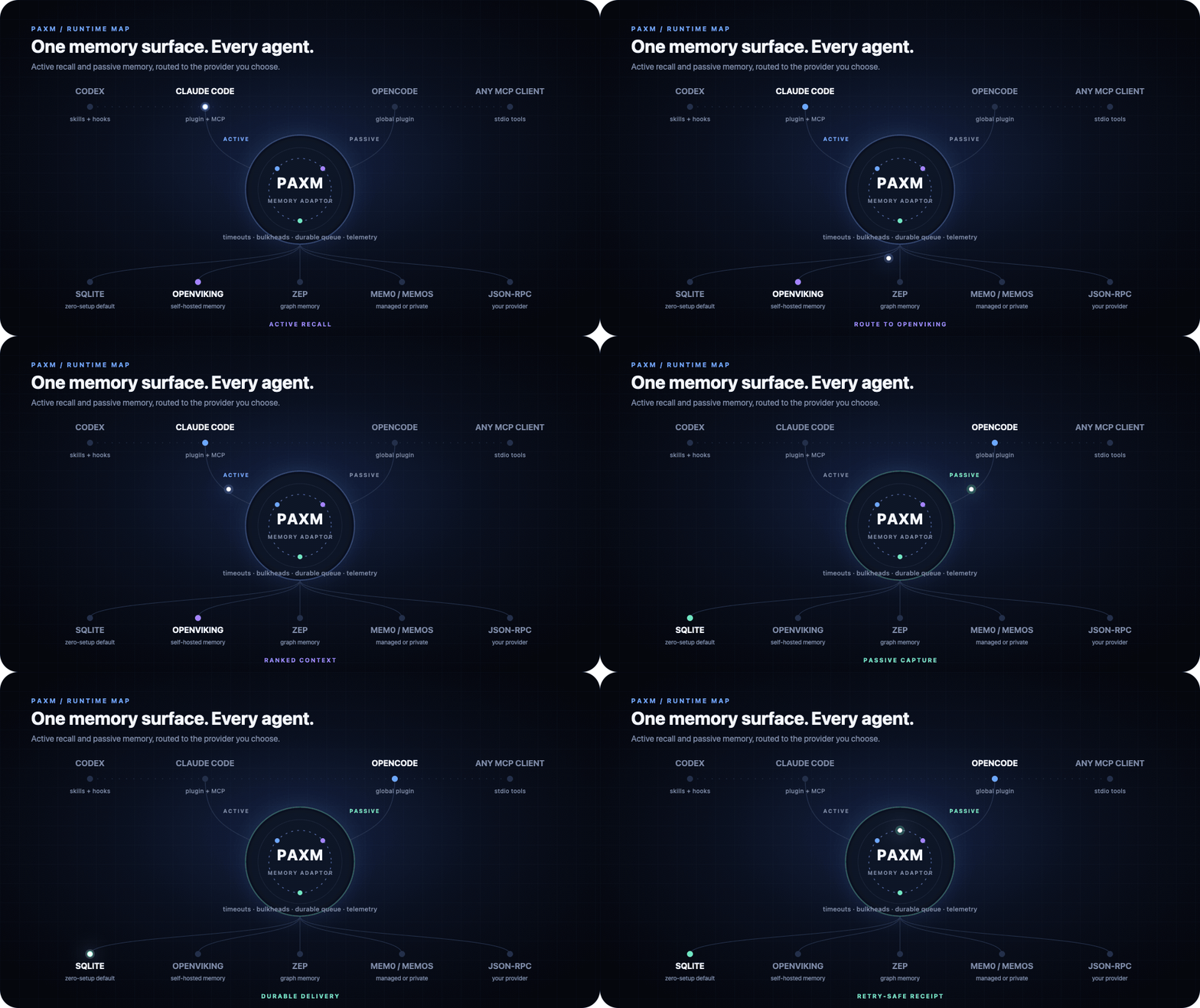
PAXM is a memory adaptor, not another hosted memory service:
AI agents -> CLI / MCP / skills / hooks -> paxm -> any memory provider
Agents reach paxm in two ways:
| Path | Entry points | Best for |
|---|---|---|
| Active | CLI, MCP, skill | Deliberate recall, explicit writes, inspection |
| Passive | Agent lifecycle hooks | Prompt-time recall and automatic turn capture |
Both paths use the same runtime and provider router. Filtering, profiles,
ranking, timeouts, telemetry, and provider behavior stay consistent across
agent surfaces.
Passive writes commit to a local durable queue before provider delivery. Slow
or unavailable providers retry in the background instead of blocking the
agent.
Passive recall uses an 800ms overall budget and 250ms per-provider budget
by default. It returns healthy partial results and records downstream
timeouts.
See it in motion
One agent surface, any memory provider
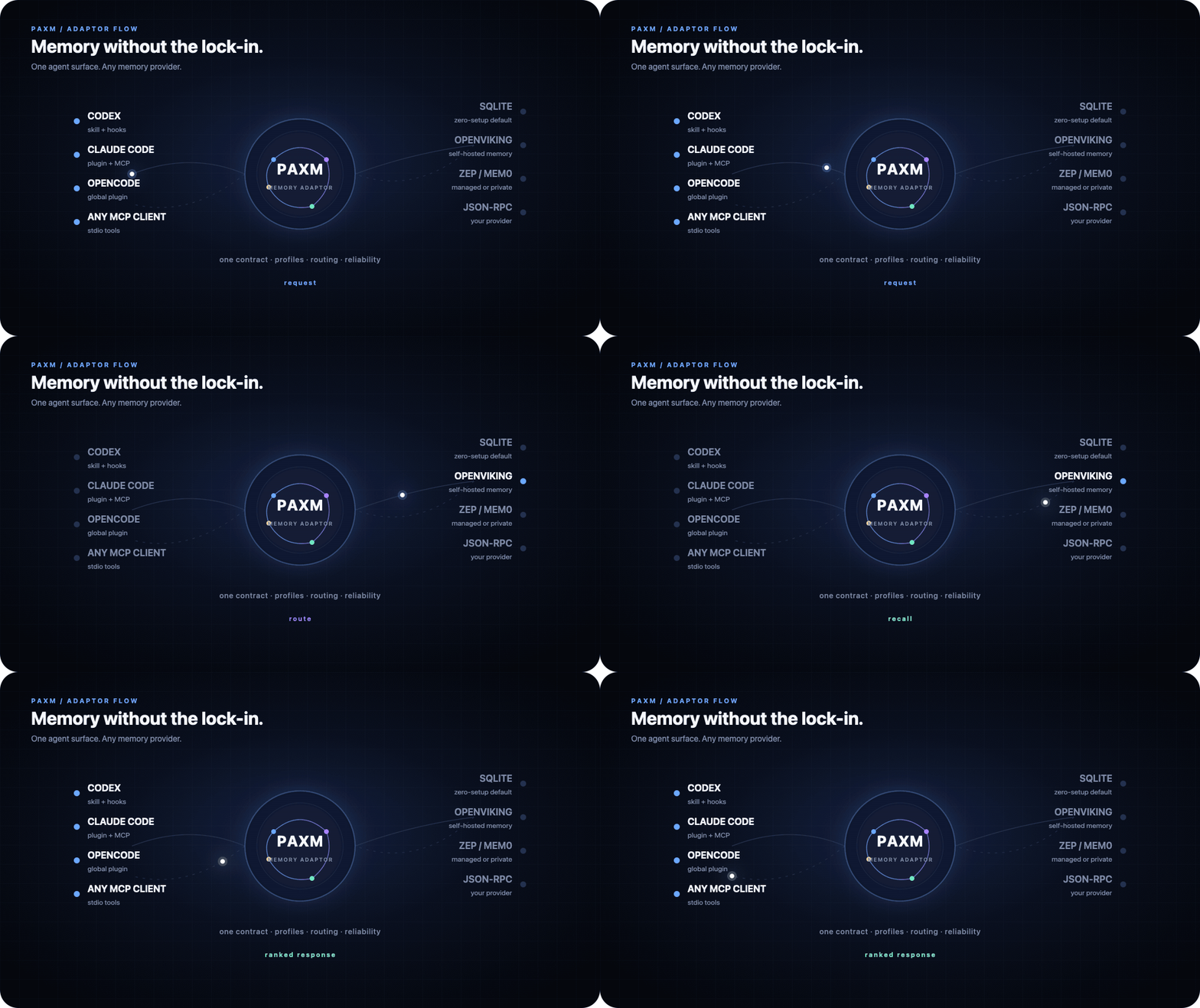
PAXM keeps the agent-facing contract stable while profiles choose providers,
failure policy, ranking, and timeouts. SQLite is the zero-setup default, not a
required storage backend.
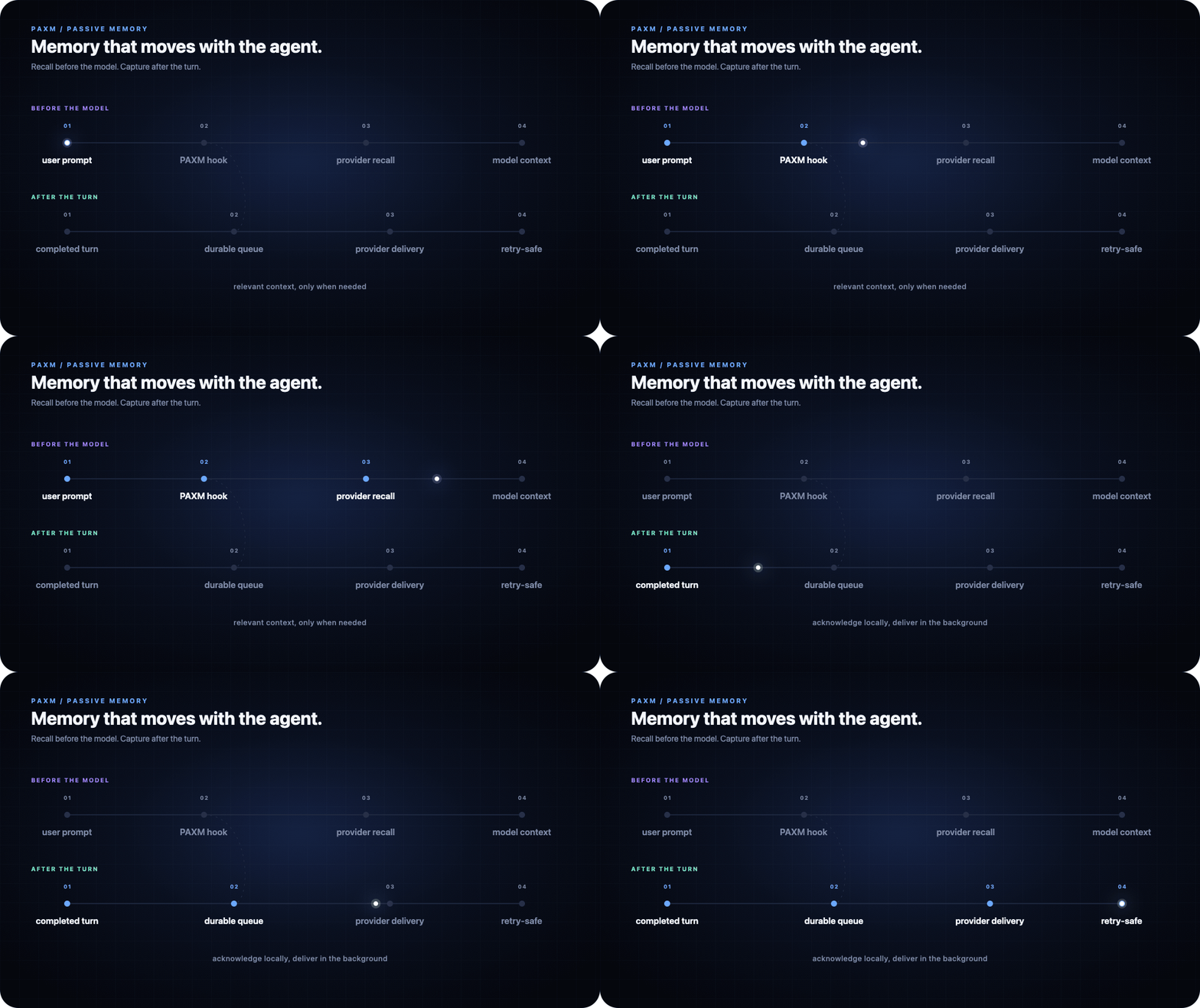
Lifecycle hooks recall context before the model request and capture completed
turns afterward. Writes enter a durable local queue before provider delivery,
so provider latency does not block the agent.
Read the detailed architecture and
provider adapter contract.
Agents and providers
Agent surfaces
| Agent/client | Active | Passive recall | Passive write |
|---|---|---|---|
| Codex | CLI, MCP, skill | Hook | Hook |
| Claude Code | CLI, MCP, skill | Hook | Hook |
| Pi | CLI, MCP, skill | Extension | Extension |
| Any MCP client | MCP tools | — | — |
Memory providers
| Provider | Mode | Notes |
|---|---|---|
| SQLite | Default, built in | Zero-setup turn memory; no API key, LLM, or embeddings |
| Zep | Built in | User or graph scoped |
| Mem0 | Built in | Self-hosted REST API |
| Mem0 Cloud | Built in | Managed Platform API with async v3 writes/search |
| MemOS | Built in | Self-hosted product API, scoped by memory cube |
| MemOS Cloud | Built in | Managed OpenMem API with Token authentication |
| OpenViking | Built in | Self-hosted session extraction and semantic memory search |
| Custom JSON-RPC | Adapter | Bring an existing or private memory system |
Enable multiple provider instances at once. Recall and write profiles control
routes, required or best-effort behavior, ranking weights, thresholds, memory
tiers, and timeouts.
Self-hosted OpenViking
OpenViking support connects paxm to a user-operated OpenViking server. Writes
are recorded through OpenViking sessions and committed for asynchronous memory
extraction. Recall uses semantic memory search through /api/v1/search/find.
The server URL and optional API key remain in the user's paxm configuration.
Run paxm setup, select OpenViking, and provide the self-hosted base URL and
API key. OpenViking can then participate in the same recall and write profiles
as SQLite or any other provider, with required or best-effort routing and
provider-specific timeouts.
MCP server
Run paxm as a local stdio MCP server:
paxm mcp serve --agent codex
{
  "command": "paxm",
  "args": ["mcp", "serve", "--agent", "codex"]
}
The server exposes four focused tools:
paxm_recallpaxm_rememberpaxm_historypaxm_config_doctor
Setup, credential management, hook installation, and backfill stay outside MCP
so an agent cannot silently take ownership of user configuration.
Writes carry user, agent, and named personal/team scope provenance. Recall does
not filter by that scope: CLI, MCP, and passive injection label every result
with its source scope, while provider-native routing and ACL remain under the
provider's control.
Agent integrations
Codex plugin
The Codex plugin packages the paxm setup skill, active memory skill, and native
Codex hooks. It does not install provider credentials or bypass hook trust.
Use paxm setup --integration codex-plugin so only the plugin owns the Codex
lifecycle hooks.
Claude Code plugin
The Claude Code plugin is a first-class integration, not a generic setup shim.
It packages skills, an MCP server, and five native lifecycle hooks.
Setup removes only legacy paxm-managed Claude hooks, preserves unrelated hooks,
and records claude-plugin ownership.
Pi extension
Pi support is installed through paxm setup. The extension handles passive
prompt recall and buffers visible user, assistant, and tool events into one
turn-end memory while excluding thinking blocks.
OpenCode plugin
OpenCode support is installed through paxm setup as a dependency-free global
plugin. The plugin uses OpenCode's chat.message and model-message transform
hooks for passive recall.
On session.idle, it reads the completed session through the official client
and writes a durable turn. It captures visible user and assistant text while
excluding reasoning and tool payloads.
The generated plugin lives at ~/.config/opencode/plugins/paxm.ts, or belowOPENCODE_CONFIG_DIR/XDG_CONFIG_HOME when configured.
See the complete configuration guide for generated paths,
event mappings, profile settings, and uninstall behavior.
Reliability by default
- Hook acknowledgement waits only for the local queue transaction.
- Provider delivery is resumable and retried in the background.
- Optional provider failures do not discard healthy provider results.
- A stuck provider is contained by its timeout and single-call bulkhead.
- Write-provider routes default to a 30-second timeout; optional failures remain
isolated while required-provider failures are returned to the caller. - Recall provenance is stripped before passive writes to prevent memory echo.
- Exact LTM consolidation limits duplicate accumulation.
- SQLite preserves completed agent turns with explicit session, turn, and time
boundaries. - Telemetry stores hashes and lengths by default, not raw recall queries.
Historical imports are also resumable:
paxm backfill scan --agent codex --before 2026-07-09
paxm backfill run --agent codex --provider mem0-company --background
paxm backfill status --agent codex --provider mem0-company
Performance
Benchmarks use runtime-generated temporary datasets modeled after real passive
agent workloads; no benchmark corpus is committed to the repository.
On an Apple M4 reference machine:
| Workload | Adapter latency |
|---|---|
| 128 KiB SQLite write | 1.84 ms |
| 2 MiB SQLite write | 14.31 ms |
| 10-item / 1.25 MiB batch | 12.36 ms |
| Recall from 100,000 short memories | 0.54 ms |
| Recall from 10,000 x 32 KiB memories | 0.61 ms |
These numbers measure the adapter, not end-to-end agent response time. See the
datasets, commands, allocations, and machine details in
SQLite adapter benchmarks.
Evaluation
paxm separates deterministic regression suites from paid, real-agent quality
evaluations. CI protects runtime behavior; opt-in benchmarks measure whether
memory helps an agent answer correctly.
The repository includes deterministic production-path evaluations:
go run ./cmd/paxm eval run --suite evals/baseline
go run ./cmd/paxm eval run --suite evals/conversation-write
- A 100-case retrieval suite reports recall@K, precision@K, MRR, false-positive
rate, latency, and category-level results. - A 50-case conversation-to-write suite checks admission, recall, forbidden
fragments, metadata preservation, and adapter contract behavior.
CI runs unit tests, vet, the retrieval report, and the adapter write contract on
every push to main and every pull request.
The opt-in LoCoMo agent benchmark exercises real
OpenCode sessions and production MCP or passive recall.
The cross-agent benchmark tests whether one
agent's experience helps another avoid the same failure.
Paid agent evaluations are never run in ordinary CI. Their reports separate
memory-layer cost from answering-model cost and state their evidence limits.
Documentation
| Guide | Contents |
|---|---|
| Configuration | Providers, profiles, agents, hooks, telemetry |
| Architecture | Runtime modules and data flow |
| Provider contract | Implementing a memory adapter |
| Benchmarks | Passive workload datasets and results |
| LoCoMo evaluation | Real-agent memory quality methodology |
| Release guide | Builds, checksums, tags, and publishing |
| Roadmap | Current product direction |
Community
- Ask setup questions, share successful workflows, and discuss early ideas in
GitHub Discussions. - Report reproducible bugs or request a demand-backed integration through the
repository's structured issue forms. - Read CONTRIBUTING.md before proposing a substantial change.
- Report suspected vulnerabilities privately according to
SECURITY.md.
Development
go test ./...
go vet ./...
go build -o /tmp/paxm ./cmd/paxm
/tmp/paxm --config /tmp/paxm-dev/config.yaml setup --force
Releases
Releases cover macOS, Linux, and Windows on amd64 and arm64. Published
archives include SHA256SUMS, and the installer verifies the selected archive
before replacing the binary.
See the release guide for validation, tagging, asset, and
installer smoke-test requirements.
Reviews (0)
Sign in to leave a review.
Leave a reviewNo results found