Griffin
Health Uyari
- License — License: MIT
- Description — Repository has a description
- Active repo — Last push 0 days ago
- Low visibility — Only 6 GitHub stars
Code Uyari
- process.env — Environment variable access in apps/broker/src/env.mjs
Permissions Gecti
- Permissions — No dangerous permissions requested
Bu listing icin henuz AI raporu yok.
Griffin: open-source, self-hosted platform for your own team of AI agents. Define agents with tools and per-caller permissions, delegate between them, and run on Claude, Cursor or any OpenAI-compatible model. Telegram, MCP, scheduled jobs.

Griffin — your own team of AI agents



A self-hosted shell for a small team of AI agents that work for you. You make the agents — what
each one is, what it may touch, who may ask it — and they answer from typed tools instead of from
the model's memory. Use it as a personal assistant on Telegram, a research or writing helper, an
assistant your colleagues can message, an MCP backend for Claude Code, or an operations agent wired
to your own systems — on Claude, Cursor or any OpenAI-compatible model, including local ones.
Node 24 · Cursor, Claude Agent SDK or any OpenAI-compatible API · SQLite · no SaaS control plane · MIT
Website: griffin.paziresh24.com · Use cases · Self-hosted AI agents · Telegram AI assistant · MCP server · فارسی

Two minutes to your own
With Docker — one line, no clone:
docker run -d --name griffin -p 3100:3100 -v griffin-data:/data \
  -e ANTHROPIC_API_KEY=sk-ant-… ghcr.io/paziresh24/griffin:latest
docker exec griffin cat /data/owner.token   # the token you log in with
Use -e OPENAI_API_KEY=… (plus -e GRIFFIN_OPENAI_BASE_URL=… for a local or other OpenAI-compatible
server) or -e CURSOR_API_KEY=… instead; the first agent uses whichever key you give it. No key yet?-e GRIFFIN_DEMO=1 runs a scripted demo.
From source:
git clone https://github.com/paziresh24/Griffin.git griffin && cd griffin
npm ci && npm run build

mkdir -p data workspace
echo "sk-ant-…" > data/anthropic.api-key && chmod 600 data/anthropic.api-key   # or openai.api-key / cursor.api-key
GRIFFIN_DATA=./data GRIFFIN_WORKSPACE=./workspace PORT=3100 node apps/server/src/index.mjs
Open http://127.0.0.1:3100, log in with the token at data/owner.token, and start talking to the
agent that is already there. No cluster, no vault, no YAML: a fresh install is a chat with one
agent, and everything else is something you add when you want it.
Or stay in the terminal:
node bin/griffin.mjs "summarise what I asked you this week"   # streams the answer
node bin/griffin.mjs -i                                       # keep the chat open
node bin/griffin.mjs agents                                   # who exists, what they may use
docker compose -f deploy/compose.yaml up -d --build builds and runs the same thing from source.
To look around before wiring anything up, GRIFFIN_DEMO=1 GRIFFIN_AUTH=off … replaces the model
with a scripted stand-in — the screenshots on this page are that demo.
Make an agent
#/agents → ایجنت جدید: an id, a name, one line about its job, and its instructions. Then switch
on the tools it may use, and say who may call it — the owner, another agent, a scheduled job, a
colleague on a messenger, or an external agent over MCP — and which of its tools each of them gets.
Agents are rows in a table, not code. Quotas are enforced where tools are handed to the model, so a
tool a caller was not given does not exist for that run. docs/agents.md explains
the model; examples/agents/ has profiles you can import as a starting point
(a personal assistant, a writer, a researcher that only reads — and, if you run servers, a platform
agent and two CDN agents).
What you get
Agents that delegate. delegate returns immediately and reports back when the subtask lands, so
the agent you are talking to stays free; ask_agent is the short blocking variant. Each agent picks
its own engine (Cursor, Claude, or any OpenAI-compatible endpoint) and model.
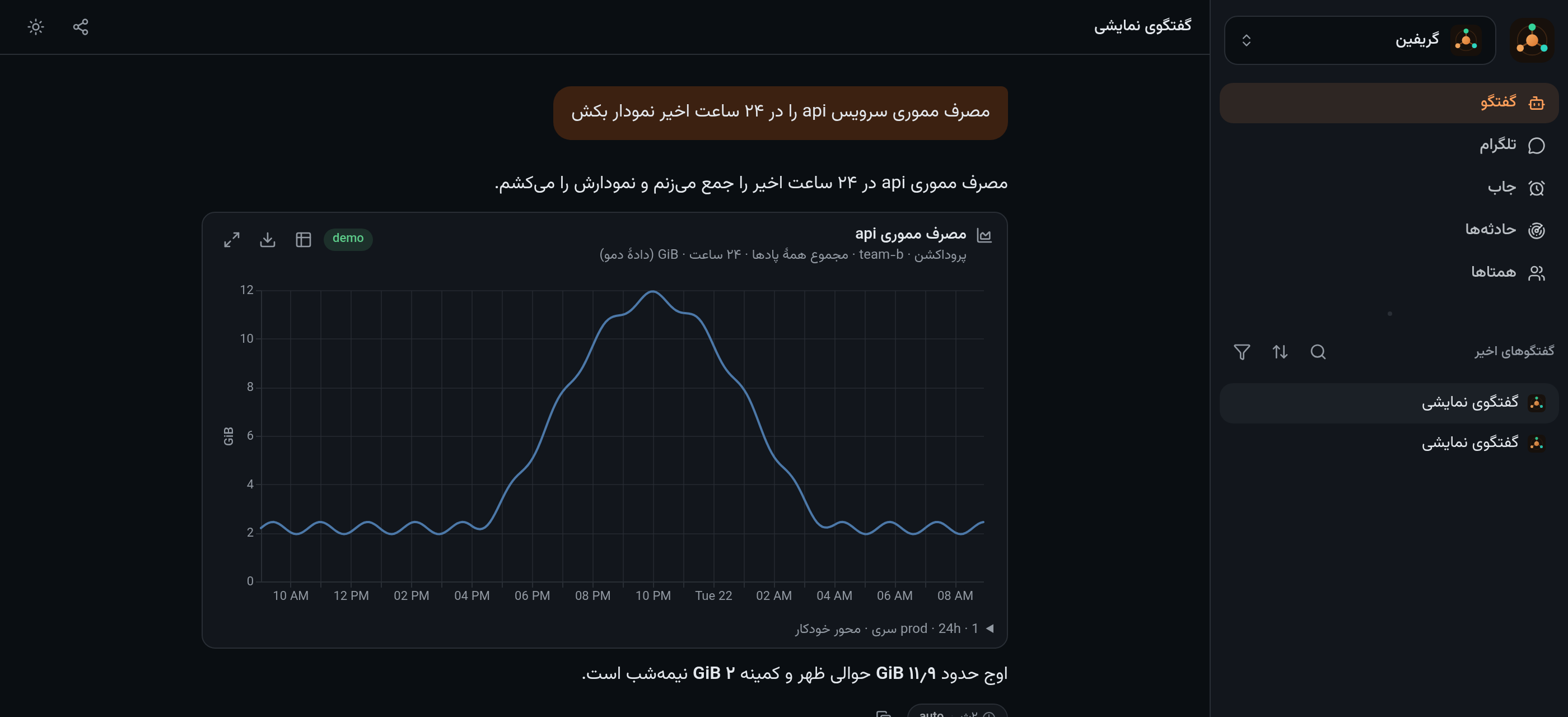
Charts and files in the conversation — the agent draws Vega-Lite from real rows, and images,
video, PDF, Markdown and CSV render inline. The same chart goes to a messenger as an image.
Scheduled jobs — a prompt, a trigger and a delivery target; each run gets its own hidden chat,
so a job that misbehaves leaves the same trace a person's chat would.
Messengers and other agents — Telegram/Bale bots and a Telegram account bridge; an MCP endpoint
where another agent (Claude Code, for instance) connects with its own scoped token and gets
task-shaped tools: send, wait, reply, cancel.
Threads with colleagues. On a Telegram account bridge, a colleague's DM opens a Griffin thread
only when a small classifier says it is real work (thanks and small talk stay yours); the thread
closes with the result, and messages that arrive while it works are answered together, once.
Rehearse before it talks to anyone. A simulation chat runs the whole delegation tree for real
but records side effects instead of executing them; apps/server/scripts/eval.mjs replays
scenarios against it and checks the answers.
No interface, when that is better. The core is the product; the UI is one client of it. There is
a terminal client, a Bearer-authenticated HTTP API, MCP for other agents, messengers, and scheduled
jobs that deliver where you already are — and GRIFFIN_WEB=off runs the whole thing headless. See
docs/interfaces.md.
Tools for your own systems, if you want them. A separate broker process holds credentials and
exposes typed tools. The packs that ship today are operational — Kubernetes (status, get, logs,
in-pod df, secrets, CNPG), Prometheus and Grafana, PostgreSQL, S3, GitLab, MikroTik routers,
ArvanCloud and NSIN CDNs, DNS/HTTP/TLS probes — and a new pack is one module with a schema. Each pack
appears only once you configure what it needs, so an agent never sees a tool that cannot work.
The UI speaks English and Persian (right-to-left), picked from your browser and switchable in Settings.
Use it as an MCP server
Griffin is also an MCP server: Claude Code, Claude Desktop, Cursor or any other MCP client can hand
it a task and follow it to the end (griffin_send, griffin_wait, griffin_reply,griffin_cancel, griffin_tasks). Each client gets its own scoped token from #/peers.
# streamable HTTP (Claude Code)
claude mcp add --transport http griffin https://griffin.example.com/mcp --header "Authorization: Bearer grf_…"
For stdio-only clients, bin/griffin-mcp.mjs bridges stdio to the same endpoint and needs nonpm install:
{ "mcpServers": { "griffin": { "command": "node", "args": ["/path/to/griffin/bin/griffin-mcp.mjs"],
  "env": { "GRIFFIN_URL": "https://griffin.example.com", "GRIFFIN_TOKEN": "grf_…" } } } }
How it fits together
browser · Telegram · MCP client
            │
     ┌──────▼─────────────────────────┐
     │ app     chats, agents, jobs,   │  holds the model key
     │         charts, files, MCP     │  no infrastructure credentials, no shell
     └──────┬─────────────────────────┘
            │ unix socket · typed JSON tools     (optional)
     ┌──────▼─────────────────────────┐
     │ broker  kube · metrics · pg    │  holds every credential
     │         s3 · gitlab · routers  │  guards enforced in code
     └────────────────────────────────┘  public API first, emergency SSH second
The split is the point: the process running the model holds no credential and has no shell, and the
process that holds them exposes only named tools with schemas. More in
docs/architecture.md.
Connect your own systems (optional)
- Copy
config/site.example.jsontoconfig/site.jsonand describe your world: clusters and their
emergency SSH paths, GitLab, object storage, routers, shell hosts. - Put the credentials in a vault (OpenBao/Vault KV) —
docs/configuration.md
lists the item names the broker looks up. - Start the broker:
COMPOSE_PROFILES=tools docker compose -f deploy/compose.yaml up -d --build. - In #/agents, switch the new tools on for the agent that should have them — or import
examples/agents/platform.jsonand edit it.
This repository ships no environment. There are no hosts, clusters, tokens or organisation
knowledge in it: unconfigured tools say "not configured" instead of guessing an endpoint, and the
tests declare their own fixture site.
Layout
| Path | What |
|---|---|
apps/server/ |
Hono + SQLite + SSE, agent runtime, auth, jobs, incidents, MCP |
apps/broker/ |
every credential, typed tools over a unix socket, guards in code |
apps/web/ |
the UI (assistant-ui + streamdown, RTL, PWA) |
packages/timeline/ |
folds stored events into messages (shared by server and UI) |
config/ |
the site inventory shape |
examples/agents/ |
importable agent profiles |
deploy/ |
compose, environment example, egress proxy notes, backup script |
bin/griffin.mjs |
the terminal client |
bin/griffin-mcp.mjs |
MCP over stdio, forwarding to a Griffin server |
docs/ |
agents · interfaces · architecture · configuration |
Security posture
- The agent process has no shell tool and no infrastructure credential; the broker holds them and
never returns a secret value to the model. - Tool access is filtered per caller before the tools reach the model — quota is code, not prompt
text — and a caller with no quota row gets nothing. - Write tools are narrow by construction: router changes only touch items Griffin itself created, S3
is GET/HEAD only,gitlab_proposeopens a draft MR on a new branch and never merges, secret copies
return key names only. - Irreversible actions ask the owner and wait; in an unattended chain (a job, the ops room) they are
refused rather than guessed. Every approval is recorded. - Owner auth is local: the token in
data/owner.tokenbecomes a signed cookie in the browser, or aBearercredential for the terminal and scripts. It keeps working when your SSO is down. Put it
behind TLS you control; it is not built to face the open internet unauthenticated.
Read the code before you point this at production: it is opinionated, and the guards assume one
owner.
License
MIT — see LICENSE.
Yorumlar (0)
Yorum birakmak icin giris yap.
Yorum birakSonuc bulunamadi