Jnpz
Health Warn
- License — License: MIT
- Description — Repository has a description
- Active repo — Last push 0 days ago
- Low visibility — Only 6 GitHub stars
Code Warn
- network request — Outbound network request in lib/client.js
Permissions Pass
- Permissions — No dangerous permissions requested
No AI report is available for this listing yet.
改配置+重启才能加 MCP?DeepSeek Harness (DSH) 插件「技能配置」解决:设置页粘贴 JSON 即连 MCP 服务器、热加载免重启;上传 zip/.skill 自动识别 SKILL.md,创建/编辑/启停技能,即点即用
🛠 Jnpz · 技能配置(Skills & MCP)—— DeepSeek Harness 插件
一个 DeepSeek Harness (DSH) 的 Web 插件:
在设置页新增「技能配置」分类 —— MCP 服务器管理(JSON 粘贴、后台自动转换、热加载)+ 技能(Skill)管理(zip/.skill 上传智能解析、创建、编辑、启停)。





🏷️ DSH plugin · DeepSeek Harness 插件 · MCP 管理器 · MCP server manager · Skill manager · 技能管理 · AI Agent 工具 · Model Context Protocol · no-restart hot reload · 热加载
✨ 这是什么?
Jnpz(技能配置) 是 DeepSeek Harness Web 界面的一个纯插件(不修改 DSH 源码)。它把 MCP(Model Context Protocol)服务器和技能(Skill)的日常管理搬进了设置页:
- 在 设置 → 左侧导航「Agent 预设」下方新增 「技能配置」 分类;
- MCP 管理:粘贴 JSON 即可添加 MCP 服务器(支持
mcpServers标准格式、单个对象、stdio/local/streamable-http/sse、command数组写法、timeout),后台自动转换并立即连接——无需重启 DSH,即加即用; - 技能管理:上传
zip/.skill/.md自动识别SKILL.md的 YAML 元数据并回填表单,或手动创建;支持改名、编辑指令、启停、删除,写入~/.dsh/skills后 DSH 自动发现、即时生效。
适合所有用 DSH + MCP 工具(IDA Pro、JADX、Yakit、x64dbg、Kali、AnythingLLM……)和自定义技能做 AI Agent 工作流的开发者。
📸 界面预览
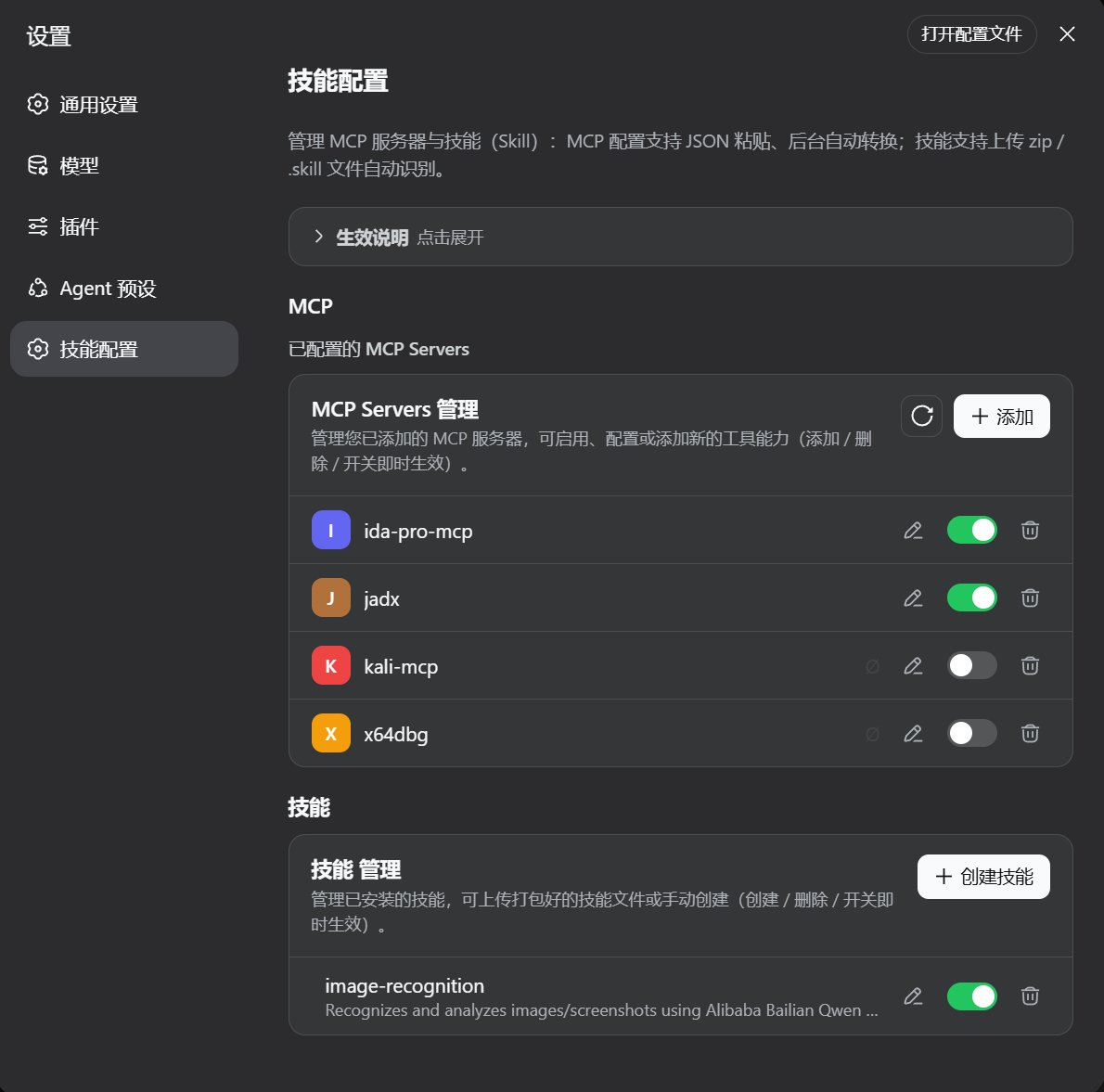
技能配置主页(MCP 管理 + 技能管理)
上方「生效说明」卡片可折叠;MCP 列表每行有彩色图标、连接状态(✓ 已连接 / Ø 已禁用)、编辑 ✏️、启停开关、删除 🗑。
添加 MCP 服务器(JSON 粘贴,后台自动转换)
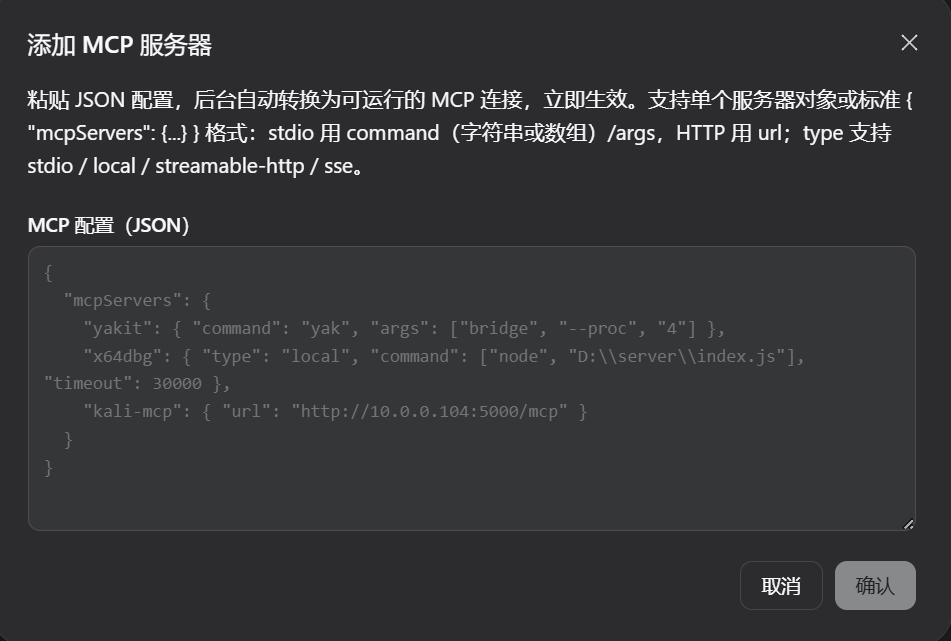
支持标准
{ "mcpServers": {...} }格式与单个服务器对象;示例覆盖yakit(stdio)、x64dbg(local + command 数组 + timeout)、kali-mcp(HTTP url)。
创建技能(上传智能解析 + 表单)
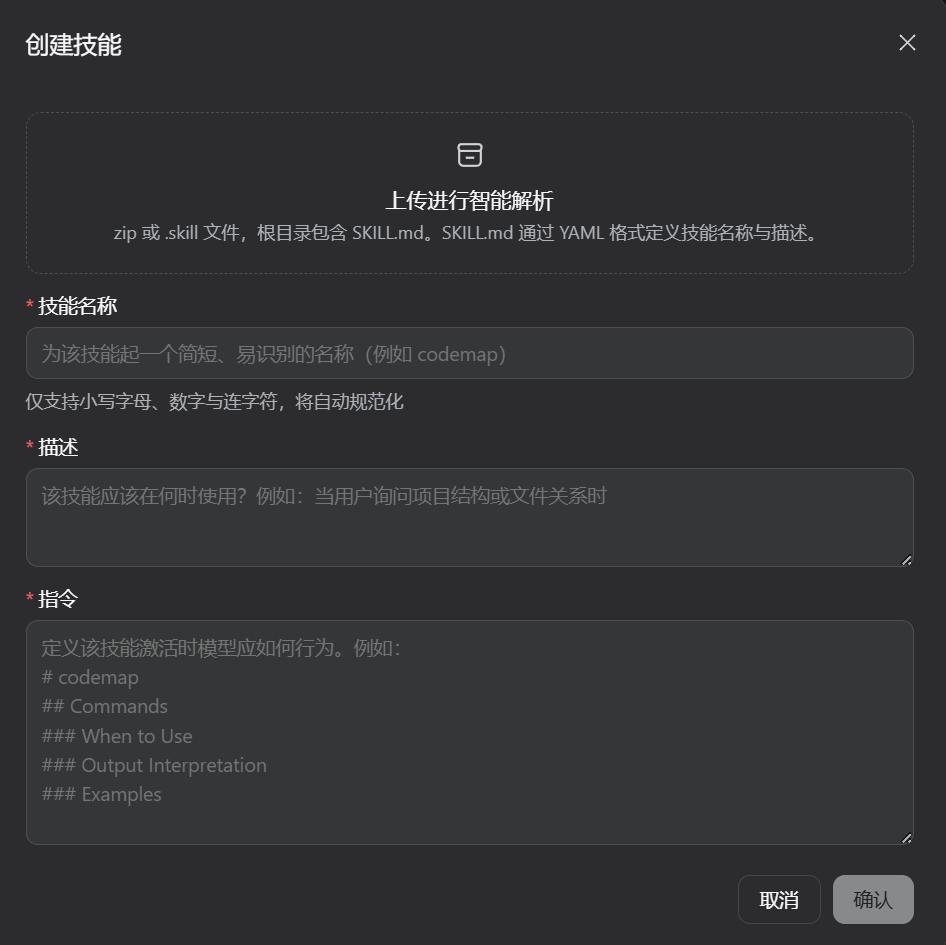
拖拽/点击上传
zip或.skill(根目录含SKILL.md),自动识别 YAML 中的技能名称与描述并回填「技能名称 / 描述 / 指令」三个必填项。
🎯 功能特性
| 模块 | 能力 |
|---|---|
| MCP 管理 | ✅ 粘贴 JSON 一键添加(批量 mcpServers 或单个对象)✅ 后台自动转换: stdio / local / streamable-http / sse,command 支持字符串或数组,timeout 自动映射✅ 热加载:添加/删除/启停即时生效,无需重启 ✅ 实时连接状态(✓/Ø/⏳),断开自动重试 ✅ 行内编辑 ✏️(JSON 预填)、删除 🗑(自定义确认弹窗) ✅ 读取 cordis.patch.yml 中的 MCP 并支持运行时启停 |
| 技能管理 | ✅ 上传 zip / .skill / .md 自动解析 SKILL.md(YAML frontmatter)✅ 手动创建:技能名称 / 描述 / 指令(Markdown) ✅ 编辑:改名(自动规范化)、改描述、改指令 ✅ 启停开关( disable-model-invocation / user-invocable)✅ 删除(自定义确认弹窗) ✅ 写入 ~/.dsh/skills/<name>/SKILL.md,DSH 自动发现 |
| 体验 | ✅ 深色/浅色主题自适应 ✅ 中英双语界面 ✅ 「生效说明」可折叠提示卡 ✅ 全部操作走插件自有 HTTP 接口,纯插件实现、可完全卸载 |
🚀 快速开始
环境要求:DeepSeek Harness(DSH)Web profile(
~/.dsh/profiles/web)、Node.js、pnpm。
# 一键安装(Windows)
powershell -ExecutionPolicy Bypass -File .\install.ps1
脚本会:打包 → 安装到 web profile(包名 Jnpz)→ 注册进 cordis.patch.yml(DSH 热加载,无需重启进程)。
完成后:
- 刷新
http://127.0.0.1:3080; - 设置 → 左侧导航 「技能配置」;
- (可选)设置 → 插件 → 全部 中看到 Jnpz。
手动安装
cd ~/.dsh/profiles/web
pnpm add -w ./Jnpz-latest.tgz        # 由 install.ps1 生成,或自行 pnpm pack
# 向 cordis.patch.yml 追加:
#   - insert:
#       - id: skill-config
#         name: 'Jnpz'
卸载
cd ~/.dsh/profiles/web
pnpm remove -w Jnpz
# 删除 cordis.patch.yml 中 skill-config 条目;
# 状态文件 ~/.dsh/plugins/dsh-skill-config/ 可一并删除
🧩 使用说明
MCP 配置:支持三种 JSON 写法
// ① 标准 mcpServers 批量格式(推荐)
{
  "mcpServers": {
    "yakit": { "command": "yak", "args": ["bridge", "--proc", "4"], "env": {} },
    "kali-mcp": { "url": "http://10.0.0.104:5000/mcp", "headers": {} }
  }
}

// ② 单个服务器对象(自动识别 stdio / HTTP)
{ "serverName": "jadx", "command": "uv", "args": ["run", "jadx_mcp_server.py"] }
{ "type": "sse", "serverName": "remote", "url": "http://host/mcp" }

// ③ local 类型 + command 数组 + timeout(x64dbg 等客户端格式)
{ "x64dbg": { "type": "local", "command": ["node", "D:\\server\\index.js"], "timeout": 30000 } }
type支持stdio/local/streamable-http/sse(transport键同理);command支持字符串或数组(数组首元素为可执行文件,其余自动并入参数);timeout自动映射为工具调用超时;- 确认后后台自动转换为
dsh-mcp-client实例,立即连接、状态实时可见。
技能(Skill)
- 上传智能解析:
zip/.skill/.md,根目录(或一级子目录)含SKILL.md,自动读取 YAML frontmatter 的name/description并回填表单; - 手动创建:技能名称(自动规范化为小写连字符,如
codemap)、描述、指令(Markdown); - 编辑:行内 ✏️ 打开编辑弹窗,可改名 / 改描述 / 改指令;
- 启停:关闭后写入
disable-model-invocation: true+user-invocable: false,DSH 不再调用该技能;再次打开即恢复。
🛠 架构
| 文件 | 作用 |
|---|---|
lib/index.js |
Host 端:注册 /plugins/skill-config/* 路由;JSON → MCP 转换;ctx.plugin() 动态启停 MCP;技能文件读写;状态持久化 |
lib/core.js |
纯逻辑:zip 解压(零依赖)、SKILL.md frontmatter 解析、MCP JSON 规范化、名称处理 |
lib/client.js |
浏览器端 bundle:settings.section(order 30,Agent 预设之后)+ 全部界面 |
客户端与宿主端通过同源 POST /plugins/skill-config/*(JSON)通信;MCP 配置保存在 ~/.dsh/plugins/dsh-skill-config/state.json,重启后自动重连。
❓ 常见问题
Q:添加/删除 MCP 需要重启 DSH 吗? 不需要。JSON 转换、启停、删除全部热加载,即点即生效。
Q:技能创建后多久生效? 立即。dsh-skill-filesystem 会监听 ~/.dsh/skills 目录并自动发现。
Q:插件管理里为什么叫 Jnpz? npm 包名不允许中文;设置左侧导航的分类名仍为中文「技能配置」。
Q:更新插件后怎么生效? 重跑 install.ps1:仅 lib/client.js 改动浏览器自动热更新(刷新即可);lib/index.js 改动需重启 DSH(npx @deepseek-ai/dsh web)。
Q:为什么有些 MCP 行没有编辑/删除按钮? 带 cordis.yml 徽标的是配置在 cordis.patch.yml 中的服务器:开关即时生效,永久增删请编辑该文件(保存后自动热加载)。
📚 Keywords / 关键词
DeepSeek Harness DSH DSH plugin dsh-plugin MCP MCP server Model Context Protocol mcp-client AI Agent AI tools LLM tools skill skills skill manager SKILL.md agent preset 智能体 技能配置 技能管理 热加载 hot reload 无重启 插件 IDA Pro JADX Yakit x64dbg Claude Code cursor chef antigravity
📄 License
MIT © Jnpz contributors
🇬🇧 English
Jnpz — Skills & MCP configuration plugin for DeepSeek Harness (DSH).
Adds a new “技能配置 / Skills & MCP” section to the DSH web settings (right below Agent Presets):
- MCP manager — paste JSON (
mcpServersor a single server object), it is converted host-side into livedsh-mcp-clientinstances. Supportsstdio/local/streamable-http/sse, string or arraycommand,timeout. Add / remove / toggle take effect immediately, no restart. - Skill manager — upload
zip/.skill/.mdand theSKILL.mdYAML frontmatter is parsed automatically to prefill the create form; create, rename, edit instructions, toggle and delete skills stored under~/.dsh/skills.
Install (Windows):
powershell -ExecutionPolicy Bypass -File .\install.ps1
Then refresh http://127.0.0.1:3080 → Settings → 技能配置. The plugin shows up as Jnpz under Settings → Plugins.
Reviews (0)
Sign in to leave a review.
Leave a reviewNo results found