rampart
Health Pass
- License — License: Apache-2.0
- Description — Repository has a description
- Active repo — Last push 0 days ago
- Community trust — 57 GitHub stars
Code Fail
- rm -rf — Recursive force deletion command in bench/corpus.yaml
Permissions Pass
- Permissions — No dangerous permissions requested
No AI report is available for this listing yet.
Open-source firewall for AI agents. Policy engine that audits and controls what OpenClaw, Claude Code, Cursor, Codex, and any AI tool can do on your machine.
🛡️ Rampart
A firewall for AI coding agents.




Claude Code's --dangerously-skip-permissions mode — and similar autonomous modes in Cline and Codex — give agents unrestricted shell access. Your agent can read your SSH keys, exfiltrate your .env, or rm -rf / with no guardrails.
Rampart sits between the agent and your system. Every command, file access, and network request is evaluated against your policy before it executes. Dangerous commands never run.
Install
# Homebrew (macOS and Linux) — recommended
brew install peg/tap/rampart

# One-line install (no sudo required)
curl -fsSL https://rampart.sh/install | bash

# Go install (requires Go 1.24+)
go install github.com/peg/rampart/cmd/rampart@latest
Windows (PowerShell):
irm https://rampart.sh/install.ps1 | iex
After installing, run rampart quickstart or follow the setup steps below.
Quick start
Pick your agent and run one command:
# Claude Code
rampart setup claude-code

# OpenClaw
rampart setup openclaw --patch-tools

# Cline
rampart setup cline

# Codex CLI
rampart setup codex

# Any other agent (wraps $SHELL)
rampart wrap -- your-agent
That's it. Verify everything is working:
rampart doctor
Then watch your agent in real time:
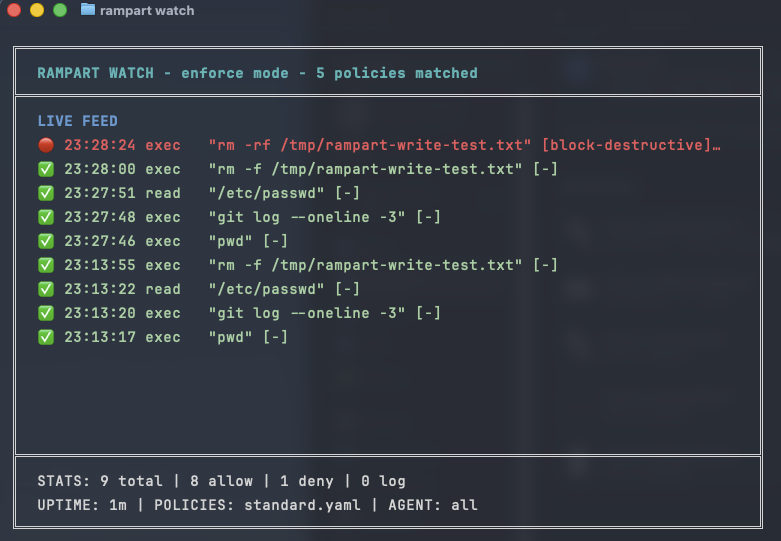
rampart watch
Once running, every tool call goes through Rampart's policy engine first:
✅ 14:23:01  exec  "npm test"                          [allow-dev]
✅ 14:23:03  read  ~/project/src/main.go                [default]
🔴 14:23:05  exec  "rm -rf /tmp/*"                      [block-destructive]
🟡 14:23:08  exec  "curl https://api.example.com"       [log-network]
👤 14:23:10  exec  "kubectl apply -f prod.yaml"         [require-approval]
🔴 14:23:12  resp  read .env                            [block-credential-leak]
                    → blocked: response contained AWS_SECRET_ACCESS_KEY
How it works
Pattern matching handles 95%+ of decisions in microseconds. The optional rampart-verify sidecar adds LLM-based classification for ambiguous commands. All decisions go to a hash-chained audit trail.
| Agent | Setup command | Integration |
|---|---|---|
| Claude Code | rampart setup claude-code |
Native PreToolUse hooks via ~/.claude/settings.json |
| OpenClaw | rampart setup openclaw --patch-tools |
Native bridge + shell shim + tool patches |
| Cline | rampart setup cline |
Native hooks via settings |
| Codex CLI | rampart setup codex |
Shell wrapper (v0.4.5+); LD_PRELOAD fallback for older versions |
| Any agent | rampart wrap -- <agent> |
Shell wrapping via $SHELL |
| MCP servers | rampart mcp -- <server> |
MCP protocol proxy |
| System-wide | rampart preload -- <cmd> |
LD_PRELOAD syscall interception |
Getting Started: Install · Quick start · Claude Code · OpenClaw · Wrap any agent
Core Features: Policies · Approval flow · Audit trail · Live dashboard · Webhook notifications
Advanced: LD_PRELOAD · MCP proxy · SIEM integration · Webhook actions · Preflight API
Reference: Performance · Security · OWASP coverage · CLI reference · Compatibility · Building from source
Claude Code
Native integration through Claude Code's hook system — every Bash command, file read, and write goes through Rampart before execution:
# Install background service
rampart serve install

# Wire up hooks
rampart setup claude-code
Then use Claude Code normally. Rampart runs invisibly in the background.
To remove:
rampart setup claude-code --remove
OpenClaw
Full native integration — one command covers everything:
sudo rampart setup openclaw --patch-tools
This installs three layers of protection:
1. Native bridge — Rampart connects to the OpenClaw gateway and intercepts exec approval events. Hard deny rules resolve before the Discord UI shows. When you click "Always Allow", the rule is written to ~/.rampart/policies/user-overrides.yaml — a file that survives upgrades and is never overwritten by rampart setup.
2. Shell shim — intercepts exec calls from Claude Code and other agents running under OpenClaw.
3. Tool patches — patches web_fetch, browser, message, and exec tools in OpenClaw's dist files so URL fetches, browser navigation, and outbound messages are all policy-checked.
Requires write access to the OpenClaw dist directory (typically needs sudo for global npm installs).
After each OpenClaw upgrade, re-run the tool patches:
sudo rampart setup openclaw --patch-tools --force
The native bridge survives upgrades automatically — exec approval interception never stops. Between upgrade and re-patch, web_fetch/browser/message tools bypass Rampart; exec enforcement via the bridge remains active throughout.
Run rampart doctor at any time to see exactly which patches are applied. Use rampart doctor --fix to re-apply missing patches automatically.
Wrap any agent
For agents without a hook system, wrap sets $SHELL to a policy-checking shim. Works with any agent that reads $SHELL (Aider, OpenCode, Continue, and more):
rampart wrap -- aider
rampart wrap -- opencode
rampart wrap -- python my_agent.py
Protect any process (LD_PRELOAD)
For agents with no hook system and no $SHELL support, preload intercepts exec-family syscalls at the OS level:
rampart preload -- codex
rampart preload -- python my_agent.py
rampart preload -- node agent.js

# Monitor mode — log only, no blocking
rampart preload --mode monitor -- risky-tool
Intercepts execve, execvp, system(), popen(), and posix_spawn(). Denied calls return EPERM.
Platform notes: Works with all dynamically-linked binaries on Linux. Works on macOS with Homebrew/nvm/pyenv binaries; blocked by SIP for /usr/bin/* (AI agents don't live there).
Protect MCP servers
Drop-in proxy between your agent and any MCP server:
rampart mcp -- npx @modelcontextprotocol/server-filesystem /path
In your MCP config (Claude Desktop, etc.):
{
  "mcpServers": {
    "filesystem": {
      "command": "rampart",
      "args": ["mcp", "--", "npx", "@modelcontextprotocol/server-filesystem", "."]
    }
  }
}
Auto-generate policies from an MCP server's tool list:
rampart mcp scan -- npx @modelcontextprotocol/server-filesystem .
Writing policies
Policies are YAML. Glob matching, hot-reload on file change.
rampart setupcreates~/.rampart/policies/custom.yamlas a starter template. It's never overwritten by upgrades.
version: "1"
default_action: allow

policies:
  - name: block-destructive
    match:
      tool: ["exec"]
    rules:
      - action: deny
        when:
          command_matches: ["rm -rf *", "mkfs.*", "dd if=*", ":(){ :|:& };:"]
        message: "Destructive command blocked"

  - name: block-credential-reads
    priority: 1
    match:
      tool: ["read"]
    rules:
      - action: deny
        when:
          path_matches: ["**/.ssh/id_*", "**/.aws/credentials", "**/.env"]
        message: "Credential access blocked"

  - name: block-exfil
    match:
      tool: ["fetch"]
    rules:
      - action: deny
        when:
          domain_matches: ["*.ngrok-free.app", "*.requestbin.com", "webhook.site"]
        message: "Exfiltration domain blocked"
Use command_contains for substring matching (case-insensitive):
  - name: block-dangerous-substrings
    match:
      tool: ["exec"]
    rules:
      - action: deny
        when:
          command_contains: ["DROP TABLE", "rm -rf"]
        message: "Dangerous substring detected"
Use action: ask to trigger an approval prompt:
  - name: ask-before-sudo
    match:
      agent: ["claude-code"]
      tool: ["exec"]
    rules:
      - action: ask
        when:
          command_contains: ["sudo "]
        message: "This command needs your approval"
No YAML editing required for common cases. When a command is blocked, Rampart suggests what to run:
# When "npm install lodash" gets denied:
#   💡 To allow this: rampart allow "npm install *"
rampart allow "npm install *"
#  ✓ Rule added — policy reloaded (12 rules active)
Evaluation: Deny always wins. Lower priority number = evaluated first. Four actions: deny, ask, watch, allow.
Project-local policies
Drop .rampart/policy.yaml in any git repo for project-specific rules. Commit it so every team member gets the same rules automatically:
rampart init --project
Security note: Set RAMPART_NO_PROJECT_POLICY=1 to skip project policy loading when working in untrusted repos.
Built-in profiles
rampart init --profile standard    # allow-by-default, blocks dangerous commands
rampart init --profile paranoid    # deny-by-default, explicit allowlist
rampart init --profile ci          # strict — all approvals become hard denies
rampart init --profile yolo        # log-only, no blocking
Approval flow
For commands that need a human to decide:
policies:
  - name: production-deploys
    match:
      tool: ["exec"]
    rules:
      - action: ask
        when:
          command_matches: ["kubectl apply *", "terraform apply *"]
        message: "Production deployment requires approval"
How approval reaches you depends on your environment:
| Environment | How you approve |
|---|---|
| Claude Code | Native approval prompt in the terminal |
| OpenClaw | Discord/Telegram message with buttons |
| Any | rampart approve <id> via CLI, dashboard, or signed URL |
rampart pending          # What's waiting
rampart approve abc123   # Let it through
rampart deny abc123      # Block it
Pending approvals expire after 2 minutes by default (--approval-timeout to change).
Audit trail
Every tool call logged to hash-chained JSONL — tamper with any record and the chain breaks:
rampart audit tail --follow    # Stream events
rampart audit verify           # Check chain integrity
rampart audit stats            # Decision breakdown
rampart audit search           # Query by tool, agent, decision, time range
Live dashboard
rampart watch # TUI — live colored event stream
Web dashboard at http://localhost:9090/dashboard/ when rampart serve is running. Three tabs: live stream, history, and a policy REPL to test commands before they run.
Webhook notifications
notify:
  url: "https://discord.com/api/webhooks/your/webhook"
  on: ["deny"]

policies:
  # ...
Works with Discord webhooks, Slack incoming webhooks, or any HTTP endpoint.
SIEM integration
# RFC 5424 syslog (Wazuh, QRadar, ArcSight, Sentinel)
rampart serve --syslog localhost:514

# Common Event Format (Splunk, QRadar)
rampart serve --syslog localhost:514 --cef
Webhook actions
Delegate allow/deny decisions to an external service:
rules:
  - action: webhook
    when:
      command_matches: ['*production*']
    webhook:
      url: 'http://localhost:8090/verify'
      timeout: 5s
      fail_open: true
See rampart-verify — an optional LLM sidecar for ambiguous commands (~$0.0001/call).
Preflight API
Check if a call would be allowed without executing it:
curl -s localhost:9090/v1/preflight/exec \
  -H "Authorization: Bearer $TOKEN" \
  -d '{"agent":"a","session":"s","params":{"command":"rm -rf /"}}'
# → {"allowed":false,"decision":"deny","matched_policies":["block-destructive"]}
Performance
Policy evaluation in single-digit microseconds:
| Command | Decision | Time |
|---|---|---|
rm -rf / |
deny | 8µs |
sudo reboot |
watch | 6µs |
.ssh/id_rsa read |
deny | 3µs |
git status |
allow | 4µs |
curl ngrok.io |
deny | 3µs |
Security recommendations
Self-modification protection. Agents cannot bypass their own policy by running rampart allow or rampart block — these are blocked when executed by an agent. Policy modifications must be made by a human.
Don't run your AI agent as root. Root access defeats user separation. Run agent frameworks as an unprivileged user.
Run rampart serve as a separate user in production to prevent agents from reading audit logs or modifying policies.
For a full discussion of the threat model, see docs/THREAT-MODEL.md.
OWASP coverage
Rampart maps to the OWASP Top 10 for Agentic Applications:
| Risk | Coverage |
|---|---|
| ASI02: Tool Misuse | ✅ Every tool call evaluated before execution |
| ASI05: Unexpected Code Execution | ✅ Pattern matching + optional LLM verification |
| ASI08: Data Exfiltration | ✅ Domain blocking, credential response scanning |
| ASI09: Human-Agent Trust | ✅ ask actions enforce human-in-the-loop |
| ASI10: Rogue Agents | ✅ Hash-chained audit trail, response scanning |
| ASI01: Goal Hijack | 🟡 Policy limits blast radius even if goals are altered |
| ASI06: Context Poisoning | 🟡 Response scanning blocks credentials from context window |
| ASI07: Inter-Agent Communication | ❌ Not addressed |
CLI reference
# Setup
rampart quickstart                           # Auto-detect, install, configure, health check
rampart setup claude-code                    # Claude Code native hooks
rampart setup cline                          # Cline native hooks
rampart setup openclaw --patch-tools         # OpenClaw full integration
rampart setup codex                          # Codex CLI shell wrapper (Linux, macOS)
rampart setup <agent> --remove               # Clean uninstall

# Run
rampart wrap -- <command>                    # Wrap any agent via $SHELL
rampart preload -- <command>                 # LD_PRELOAD syscall interception
rampart mcp -- <mcp-server-command>          # Proxy MCP with policy enforcement
rampart mcp scan -- <server>                 # Auto-generate policies from MCP tools

# Serve
rampart serve [--port 9090]                  # Start approval + dashboard server
rampart serve install                        # Install as a boot service (systemd/launchd)
rampart serve --background                   # Start in background
rampart serve stop                           # Stop background server

# Diagnose
rampart doctor                               # Health check (colored output)
rampart doctor --fix                         # Auto-apply missing patches
rampart doctor --json                        # Machine-readable (exit 1 on issues)
rampart status                               # Quick dashboard — what's protected
rampart watch                                # Live TUI event stream

# Policy
rampart init [--profile standard|paranoid|ci|yolo]   # Initialize global policy
rampart init --project                                # Create .rampart/policy.yaml
rampart policy lint [file]                            # Lint policy file
rampart policy explain "git status"                   # Trace evaluation
rampart policy list                                   # Browse community registry
rampart policy fetch <name>                           # Install community policy

# Rules (no YAML editing required)
rampart allow "npm install *"               # Allow a command pattern
rampart block "curl * | bash"               # Block a pattern
rampart rules                               # List custom rules
rampart rules remove 3                      # Remove by number
rampart allow "docker *" --for 1h          # Temporary allow

# Test
rampart test "rm -rf /"                     # Dry-run against policies
rampart test --json                         # Structured output for CI

# Approvals
rampart pending                             # What's waiting
rampart approve <id>                        # Allow
rampart deny <id>                           # Deny

# Audit
rampart audit tail [--follow]
rampart audit verify
rampart audit stats
rampart log --deny                          # Recent denies

# Upgrade
rampart upgrade                             # New binary + refresh policies
rampart upgrade --no-binary                 # Refresh policies only
Compatibility
| Agent | Method | Platforms |
|---|---|---|
| Claude Code | rampart setup claude-code |
Linux, macOS, Windows |
| OpenClaw | rampart setup openclaw --patch-tools |
Linux, macOS |
| Cline | rampart setup cline |
Linux, macOS, Windows |
| Codex CLI | rampart setup codex |
Linux, macOS (shell wrapper v0.4.5+; LD_PRELOAD fallback) |
| Claude Desktop | rampart mcp |
All |
| Aider, OpenCode, Continue | rampart wrap |
Linux, macOS |
| Python agents | rampart preload or HTTP API |
Linux, macOS |
| Node.js agents | rampart preload or HTTP API |
Linux, macOS |
| Any MCP server | rampart mcp |
All |
| Any process | rampart preload |
Linux, macOS |
| Custom agents | HTTP API at localhost:9090 |
All |
Building from source
git clone https://github.com/peg/rampart.git
cd rampart
go build -o rampart ./cmd/rampart
go test ./...
Requires Go 1.24+.
Upgrading from v0.9.8?
v0.9.9 contains three breaking changes:
action: require_approval is now a hard error.
Update your policies from:
- action: require_approval
to:
- action: ask
  ask:
    audit: true
Run rampart policy lint to find all occurrences.
--serve-token flag removed.
Use the RAMPART_TOKEN environment variable instead:
# Before (v0.9.8 and earlier)
rampart serve --serve-token mysecrettoken

# After (v0.9.9+)
RAMPART_TOKEN=mysecrettoken rampart serve
GET /v1/policy endpoint removed.
Use GET /v1/status for server health or GET /v1/policies to list active policies.
Companion Tool: Snare
Rampart blocks. Snare catches.
Snare plants canary tokens in your AI agent's environment — API keys, cloud credentials, file paths. If your agent (or something that compromised it) uses those tokens, you get an instant alert.
Rampart + Snare = preventive + detective controls. Use both.
Contributing
Contributions welcome. Open an issue first for anything beyond small fixes. All work goes through the staging branch. PRs to main require one approving review.
License
Reviews (0)
Sign in to leave a review.
Leave a reviewNo results found