CCCPlayer
Health Warn
- No license — Repository has no license file
- Description — Repository has a description
- Active repo — Last push 0 days ago
- Low visibility — Only 5 GitHub stars
Code Fail
- rm -rf — Recursive force deletion command in scripts/build-macos.sh
Permissions Pass
- Permissions — No dangerous permissions requested
This is a macOS desktop application that orchestrates a dual-agent loop between Claude Code and OpenAI's Codex. You set a goal, and the two local AI agents automatically plan, build, and review code against that objective until the task is finished.
Security Assessment
Overall risk is Medium. The tool operates entirely locally and makes zero network calls, which is a strong privacy baseline. It does not request dangerous system permissions or contain hardcoded secrets. However, because it is designed to autonomously drive coding agents, it inherently executes shell commands and makes file system changes on your machine. The automated rule scan flagged a recursive force deletion command (`rm -rf`) inside a build script, which introduces a slight risk of unintended data loss if modified or triggered improperly.
Quality Assessment
The project is actively maintained, with its most recent code push happening today. However, it suffers from low community visibility, having accumulated only 5 GitHub stars. More importantly, the repository completely lacks a license file. While the code is open for viewing, the absence of a formal license means legal usage rights are technically undefined, which may be a blocker for enterprise or commercial adoption.
Verdict
Use with caution. The local-only architecture is excellent for privacy, but the untested community traction, missing license, and presence of destructive shell commands mean you should inspect the build scripts thoroughly before integrating this autonomous agent into your workflow.
Claude Code × Codex dual-agent loop for macOS. Set a goal, hit ▶, walk away — two AI coding agents build, review, and iterate until done.
CCCPlayer
Claude Code & Codex Player — burn compute, not your time.
A macOS desktop app that hands a local folder to two AI coding agents and
walks away until the work is done. · 让两个 AI coding agent 接管本地目录,
按一次 Play 之后就别管了。

- English · 中文说明
- Download / 下载:
dist/ - Source / 源码:github.com/pekinlcc/CCCPlayer
English
What is this
Set a local folder + describe a goal in plain English (e.g. "pixel-perfect
clone of some.app, but drop the paid features"). Hit the ▶ play button.
CCCPlayer drives Claude Code and Codex on your machine in a loop —
Claude plans + implements, Codex reviews, they iterate over a shared PRD.md
and codex_review_v{N}.md until both agree the goal is met.
The name is a nod to Winamp: this is a player for two code agents.
Triangle ▶ Play, double-bar ⏸ Pause, square ■ Stop. Neon cyan / magenta / lime
on black chrome. Everything runs locally; the app itself makes zero network
calls. Your tokens, your code, your machine.
Core capabilities
- Two-agent loop, one state machine. Claude Code plans and implements; Codex
reviews in a separate process. They iterate over a sharedPRD.mdand
versionedcodex_review_v{N}.mdfiles until both agents agree the goal is
done. Every transition flows through a single-writer reducer, so the UI
never sees torn state. GOAL.mdis the only sacred thing. Your goal is locked — agents
literally cannot edit it. Everything else (PRD milestones, sub-goals, already
accepted findings) is explicitly revisable evidence; every phase is anchored
back toGOAL.mdwith agoal_anchor/goal_impactline.- Disagreement protocol. When Claude and Codex disagree on a review
finding, the refiner resolves it explicitly asaccept | partial | reject | shelve. Shelved items are tracked verbatim in PRD's## Shelved disagreements— so nothing is silently dropped by agent forgetfulness. - Rate-limit auto-pause + auto-resume. When Codex exhausts quota, the
session transitions toPAUSEDand a scheduler auto-resumes when the window
clears. No manual babysitting at 3 AM. - Stagnation detection. If the
missing[]count fails to strictly
decrease for 3 rounds, the session ends asSTOPPEDwith a plain-English
reason — so a stuck loop doesn't silently burn tokens forever. - Per-round snapshots, always rollbackable. Every round start writes a
tar.zstinto.cccplayer/snapshots/.round-00is your untouched
original code and is never deleted, so any session is rewindable. - Close the window, walk away. Close ≠ quit — the loop keeps running in
the background. Cmd+Q to actually exit (confirms first). App Nap is
suppressed so hidden windows don't get throttled. - Robust CLI autodiscovery. Finds
claude/codexunder Homebrew, nvm,
fnm, asdf, volta,n, and~/.cargo/bin— even when Finder-launched.
Falls back to a 5-second login-shell probe ($SHELL -l -i -c 'command -v <cli>') so whatever PATH your Terminal sees, CCCPlayer sees too. - Rich end-of-session report.
DONE/STOPPED/ERROREDbanner shows
duration, rounds, per-agent tokens, both agents' final goal checks side by
side (done/missing/shelved/ rationale), plain-English exit
reason, a chronological highlights timeline, and artifact paths. - Safe-by-default workspace handling. Home dir and system paths are
refused;.cccplayer/is auto-added to.gitignore; stdout/stderr are
redacted inline before they hit disk or the UI. - Zero telemetry. The app itself makes no network calls. Your Claude +
Codex accounts, your tokens, your code, your machine.
Prerequisites
macOS 13+ with both CLIs installed and logged in inside your Terminal:
# Claude Code CLI (Anthropic)
# Install per https://docs.anthropic.com/en/docs/claude-code
claude --version

# Codex CLI (OpenAI, via npm)
npm i -g @openai/codex
codex --version
codex login
Tokens are billed to your Claude + Codex accounts — CCCPlayer is just the
harness, not a proxy.
Download
Latest Apple Silicon build lives in dist/:
| File | Size | How to install |
|---|---|---|
CCCPlayer-<ver>-arm64-install.zip |
~4.5 MB | Easiest. Unzip, double-click install.command. First run: right-click → Open to clear the Gatekeeper script warning. |
CCCPlayer-<ver>-arm64.dmg |
~5.7 MB | Traditional macOS install: mount, drag into /Applications. Then see "unblock" below. |
CCCPlayer-<ver>-arm64.app.tar.gz |
~4.5 MB | Just the .app — for developers / CI. |
Apple Silicon only for now (M1/M2/M3/M4). Intel builds can be produced from
source (see Build from source below).
Unsigned build — why and how to unblock
The build is ad-hoc signed but not notarized — there is no paid Apple
Developer Program account behind the release. On a fresh Mac, Gatekeeper
will refuse the first launch with "CCCPlayer cannot be opened because the
developer cannot be verified". Three ways to get past it:
-install.zip+install.command(recommended).
The installer script clears the quarantine flag and copies the app to/Applications. The script itself may also trip Gatekeeper the first
time — right-click it → Open → confirm once.- Right-click → Open on
CCCPlayer.appdirectly, confirm in the
dialog. Subsequent launches work normally. - Strip quarantine in Terminal (power user):
xattr -cr /Applications/CCCPlayer.app
open /Applications/CCCPlayer.app
How to use
Open CCCPlayer.app. Top-right says
◇ NO SESSIONuntil you start one.Fill FOLDER with a local path — empty dir or existing project, both
work. CCCPlayer surveys existing code first and builds on top, never wipes.
Home dir / system paths are rejected.Type your goal in the terminal-style box. One or two short paragraphs.
Wait for both preflight rows to turn green (CLAUDE CODE CLI + CODEX CLI).
Click the lime ▶ Play button in the bottom-left transport.
The UI switches to Running state:
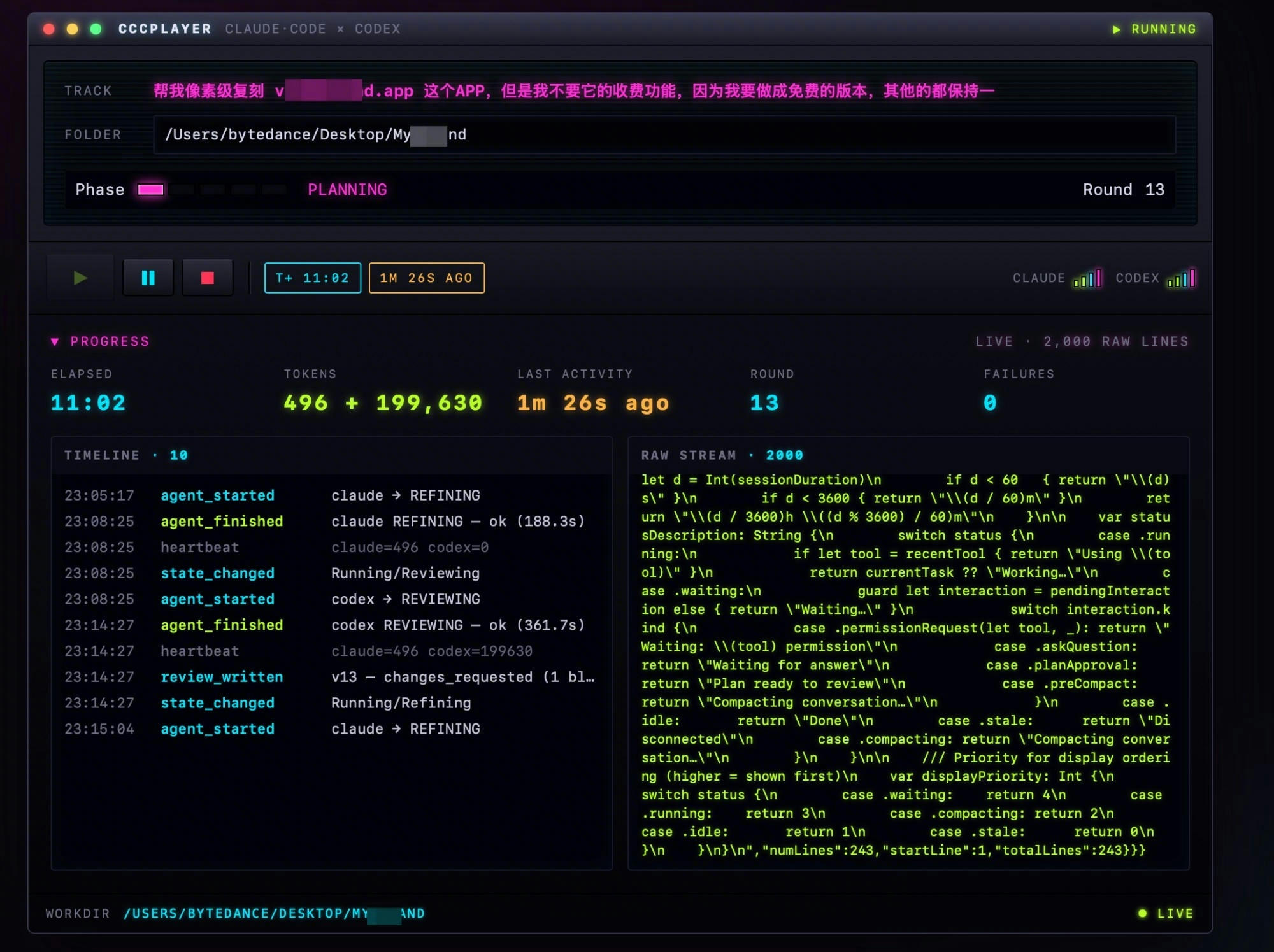
- Phase LEDs progress through
PLANNING → IMPLEMENTING → REVIEWING → REFINING → GOAL_CHECK; - Progress panel shows live Elapsed · Tokens · Last activity · Round ·
Failures (color-coded so you can glance from 20 feet away); - Left pane: structured Timeline (lime = ok, red = failed, amber = note);
- Right pane: raw stdout/stderr from both CLIs, ring-buffered to 2000 lines.
- Phase LEDs progress through
You can close the window and walk away. Close ≠ quit — the session
keeps running in the background. Use Cmd+Q to actually exit (it'll confirm).When done: a result banner replaces the Progress panel with two buttons —
New session (same folder) or ← Back to start.
What lives in your workdir
CCCPlayer stashes runtime state inside your workspace — auto-added to.gitignore on session start:
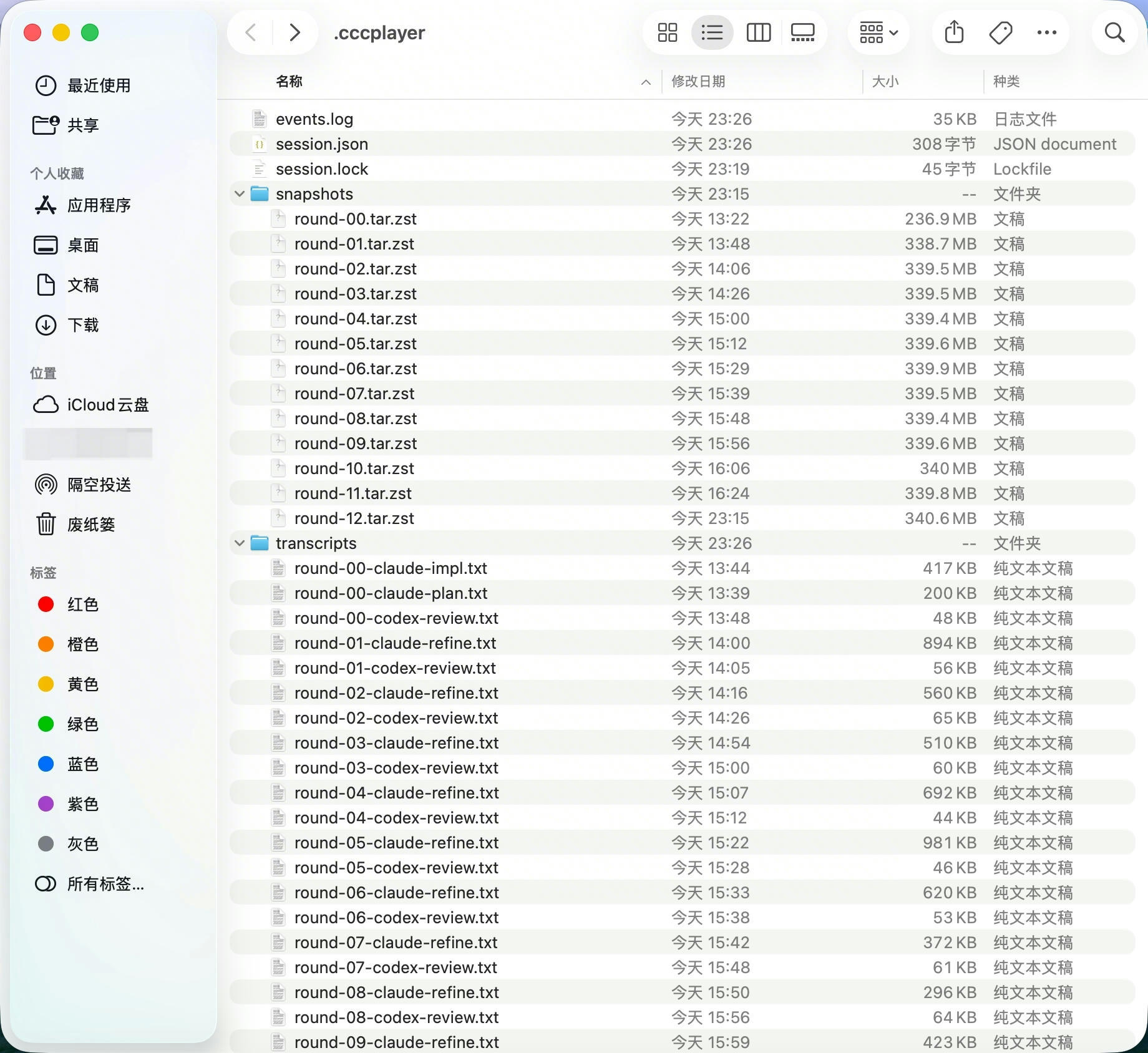
your-workdir/
├── GOAL.md               immutable — your goal, agents can't edit
├── PRD.md                the shared product spec Claude writes
├── codex_review_v1.md    Codex's review (one per round)
├── codex_review_v2.md
├── …
└── .cccplayer/           runtime state (gitignored)
    ├── session.json      state machine · round counter · usage totals
    ├── events.log        JSONL event stream, append-only
    ├── transcripts/      per-turn stdout + stderr
    └── snapshots/        round-00…round-N tar.zst snapshots
round-00.tar.zst is your original code — never deleted, so you can roll back.
Build from source
# Rust-only checks (no macOS deps needed):
cargo check --workspace
cargo test  --workspace

# Frontend
cd ui && npm install && npm run build && cd ..

# macOS .app bundle (must be on macOS — no cross-compile path):
./scripts/build-macos.sh --arch arm64    # Apple Silicon
./scripts/build-macos.sh --arch x86_64   # Intel
./scripts/build-macos.sh                 # Universal
./scripts/build-macos.sh --dev           # Hot-reload dev mode
Artifacts land in target/<triple>/release/bundle/macos/CCCPlayer.app.
Architecture at a glance
crates/
├── core/       cccplayer-core      state machine · persistence · snapshots
├── harness/    cccplayer-harness   CLI runner · stall watcher · orchestrator
└── fake-cli/   cccplayer-fake-*    used by integration tests (no token burn)
app/
└── src-tauri/  Tauri desktop shell + IPC commands + icon
ui/             React + Vite frontend (Shell / Welcome / Running / Terminal)
prompts/        default agent prompt templates (embedded at build)
scripts/        build-macos.sh
dist/           latest macOS artifacts
docs/           screenshots
Full design in PRD.md. Line-by-line conformance inAUDIT.md. Approved visual mockupui/mockups/cyberpunk-preview.html.
Key engineering choices
- Single-writer state machine — every transition flows through
core::reducer::Reducerbehind one Tokio mutex; side-effects never write
state back. - Harness owns the CLI —
HarnessRunnerspawns each agent in a fresh
process group (setsid+kill_on_drop), redacts stdout/stderr inline,
and watches for stalls onCLOCK_MONOTONIC(lid-close doesn't trip it). - Two Tauri event channels —
cccplayer://eventcarries structured
events;cccplayer://rawstreams annotated stdout/stderr lines so you can
diagnose CLIs that crash before producing structured output. - Claude 2.x adaptation —
-p+ stream-json requires--verbose; usage
parsing handles nestedassistant.message.usage; goal-check JSON extracted
from stream-json envelopes by pulling.message.content[*].text
and.result. - Codex 0.1x adaptation — invoked via
codex exec <prompt>; token count
scraped from its plain-texttokens used\n<N>tail. - Finder-launched PATH fix — on startup,
augment_pathprepends
Homebrew, nvm, fnm, asdf, volta,n, bun, and~/.cargo/binto the
processPATH(dynamically scanning~/.nvm/versions/node/*/binand
friends). When that still misses,preflight::find_clifalls back to a
5-second$SHELL -l -i -c 'command -v <cli>'probe so whatever PATH your
Terminal sees, CCCPlayer sees too. - Zero telemetry — no network calls from the app itself.
Status
M1 scope (two-agent loop + macOS shell + cyberpunk UI) is shipped and
packaged. M2 is open: interactive 3-way merge for PRD conflicts, TCC
deep-links, full prompt-override settings page, multi-window sessions. SeeAUDIT.md for row-by-row status.
Contributing / Issues
This is a personal project — open a PR or file an Issue on GitHub.
中文说明
这是什么
CCCPlayer(Claude Code & Codex Player)。叫「Player」是想到当年的 Winamp。
设定一个本地文件夹和你要达成的目标,比如「完全复刻某某 app 的功能,但去掉收费
模块」,你电脑上的 Claude Code 和 Codex 就会轮流干活并互相检查——
Claude 规划 + 实现,Codex 评审,两者通过共享的 PRD.md 和 codex_review_v{N}.md
反复迭代,直到双方都认为目标已达成。
一次 Play 按下去,然后就可以合盖去干别的。产品哲学是:烧算力,不烧你的时间。
核心能力
- 双 agent 循环,单写者状态机。Claude Code 规划 + 实现,Codex 在独立进程
里评审,通过共享的PRD.md和每轮递增版本号的codex_review_v{N}.md迭代,
直到两方都判定目标已达成。所有状态跳转走同一个 reducer,UI 永远不会看到
「半个状态」。 GOAL.md是全系统唯一不可变的东西。你的目标被锁死,agent 不能改。其他
一切(PRD 里程碑、子目标、已接受的 review findings)都是可被新证据推翻的
假设——每个 phase 都要带goal_anchor/goal_impact一句话回扣到GOAL.md,证明这步让我们更近而不是漂移。- 分歧协议。Claude 和 Codex 对某条 review 意见不一致时,refiner 必须显式
判为accept | partial | reject | shelve。shelved 的条目会照抄进 PRD 的## Shelved disagreements,不会因 agent 健忘而悄无声息消失。 - 配额耗尽自动暂停 + 自动恢复。Codex 撞到 rate-limit 后 session 自动切
PAUSED,定时器到点后自动恢复——不用你半夜三点爬起来点按钮。 - 停滞检测。连续 3 轮
missing[]不严格递减,session 以STOPPED收尾
并给出 plain 英文原因,避免卡住的循环无声烧 token。 - 每轮快照,随时回滚。每轮开始在
.cccplayer/snapshots/里写一个tar.zst。round-00是你原始代码的完整备份——永不删除,任何 session 都能
回到起点。 - 关窗走人,session 在后台继续跑。关窗 ≠ 退出;要真退出用 Cmd+Q(会弹
确认)。App Nap 被抑制,隐藏窗口不会被降频。 - 稳健的 CLI 自动发现。支持 Homebrew、nvm、fnm、asdf、volta、
n、~/.cargo/bin下的claude/codex,Finder 启动也能找到。找不到时
fallback 到 5 秒 login-shell 探测($SHELL -l -i -c 'command -v <cli>')
——你 Terminal 能看到的 PATH,CCCPlayer 就能看到。 - 富信息结束报告。
DONE/STOPPED/ERRORED横幅展示时长、轮数、两
agent 各自 token、双栏最终 goal check(done/missing/shelved/
rationale)、plain 英文结束原因、按时间轴的事件高亮、产物路径。 - 默认安全的目录处理。家目录和系统路径被拒收;
.cccplayer/自动加进.gitignore;stdout/stderr 入盘 / 进 UI 前实时脱敏。 - 零遥测。app 本身不发任何网络请求。你自己的 Claude + Codex 账户,你
自己的 token,你自己的代码,你自己的机器。
使用前提
在你的 macOS Terminal 内同时配置并登录 Claude Code 和 Codex CLI:
# Claude Code CLI(Anthropic 官方)
# 按 https://docs.anthropic.com/en/docs/claude-code 的指引安装
claude --version

# Codex CLI(OpenAI 官方,npm 安装)
npm i -g @openai/codex
codex --version
codex login
整个过程中 完全使用你本人的 Claude Code 和 Codex 账户 + token。CCCPlayer
本身不发任何网络请求,不是代理。
下载
最新 Apple Silicon 构建产物在 dist/:
| 文件 | 大小 | 安装方式 |
|---|---|---|
CCCPlayer-<ver>-arm64-install.zip |
~4.5 MB | 推荐。解压后双击 install.command,第一次右键→打开一次确认,脚本自动去掉 quarantine + 复制到 /Applications + 启动 |
CCCPlayer-<ver>-arm64.dmg |
~5.7 MB | 传统 macOS 装法:挂载 DMG → 拖进 /Applications。之后按下方"解除 Gatekeeper"操作 |
CCCPlayer-<ver>-arm64.app.tar.gz |
~4.5 MB | 纯 .app —— 给开发者 / CI 用 |
目前只有 Apple Silicon(M1/M2/M3/M4)版本。Intel 可以自己编(见下方「从源码编译」)。
未签名的说明 · 三种解除 Gatekeeper 的方法
本次构建做了 ad-hoc 签名 但没有公证——因为没买 Apple Developer
Program($99/年)。别人首次下载打开会被 macOS 拦「无法打开,因为无法验证
开发者」。三选一解除:
- 用
-install.zip+install.command(最省事)。
脚本自动清 quarantine + 拷到/Applications+ 启动。脚本本身首次也会
被 Gatekeeper 拦,右键脚本 → 打开 → 确认即可,仅一次。 - 右键 CCCPlayer.app → 打开,对话框里再点一次"打开"。后续双击正常。
- 终端放行(懂命令行的):
xattr -cr /Applications/CCCPlayer.app
open /Applications/CCCPlayer.app
怎么用
双击打开 CCCPlayer.app。初始化界面如下,右上角显示
◇ NO SESSION:FOLDER 填工作目录(随便挑一个本地项目路径,已有代码或空目录都行——
CCCPlayer 会先盘点现状再在上面增量,不会清空)。禁止家目录~或系统路径。Goal 里用自然语言写你想让它做的事,一两段话足够:
例:「帮我像素级复刻 vibeisland.app,但不要做收费模块,其他都保持一致。」
例:「给这个项目加 CSV 导入并补完集成测试。」等底下两行 CLI 状态都变绿(CLAUDE CODE CLI ● + CODEX CLI ●)。
点左下角绿色 ▶ Play。客户端就调用你电脑上的 Claude Code 和 Codex 开始干活,
过程中先由 Claude Code 规划和实现,Codex 来检查:- 上方 Phase LED 灯条按
PLANNING → IMPLEMENTING → REVIEWING → REFINING → GOAL_CHECK推进; - Progress 面板实时显示 Elapsed(已耗时)/ Tokens(累计 token)/ Last activity
(上次输出距今多久,超 60 秒会变黄警告可能卡住)/ Round(第几轮)/ Failures
(失败计数); - 左栏 Timeline 是结构化事件(ok 绿、失败红、note 琥珀);
- 右栏 Raw stream 是两个 CLI 的原始 stdout/stderr,环形缓冲 2000 行。
- 上方 Phase LED 灯条按
可以关窗走人。关窗 ≠ 退出——进程继续在后台跑。真要退出请 Cmd+Q(会弹确认)。
结束时(DONE / STOPPED / ERRORED)Progress 面板会替换为结果横幅,两个按钮:
New session (same folder) 保留目录重开、← Back to start 清空重来。
过程中的产物
Claude Code 和 Codex 的交流过程保存在工作目录下的隐藏文件夹 .cccplayer/ 中
(session 创建时会自动加到 .gitignore):
your-workdir/
├── GOAL.md               你的目标(被锁,agent 不许改)
├── PRD.md                Claude 写的产品需求文档(两 agent 的共识)
├── codex_review_v1.md    Codex 的评审(每 round 一个版本)
├── codex_review_v2.md
├── …
└── .cccplayer/           运行时私有(gitignored)
    ├── session.json      状态机当前态 / round 计数 / 累计 usage
    ├── events.log        结构化事件流 JSONL,append-only
    ├── transcripts/      每个 turn 的 stdout + stderr 归档
    └── snapshots/        round-00…round-N 的 tar.zst 快照,可回滚
round-00.tar.zst 是你原始代码的完整备份——永远不会被删,出错能回到起点。
从源码编译
# 纯 Rust 检查(不需要 macOS 原生依赖)
cargo check --workspace
cargo test  --workspace

# 前端打包
cd ui && npm install && npm run build && cd ..

# macOS .app 打包(必须在 Mac 上跑,没有 Linux→macOS 交叉编译路径)
./scripts/build-macos.sh --arch arm64    # Apple Silicon
./scripts/build-macos.sh --arch x86_64   # Intel
./scripts/build-macos.sh                 # Universal
./scripts/build-macos.sh --dev           # 开发热重载模式
产物在 target/<triple>/release/bundle/macos/CCCPlayer.app。
架构速览
crates/
├── core/        cccplayer-core      状态机 / 持久化 / 快照 / 脱敏
├── harness/     cccplayer-harness   CLI runner / stall watcher / orchestrator
└── fake-cli/    cccplayer-fake-*    集成测试用假 CLI(不烧 token)
app/
└── src-tauri/   Tauri desktop 壳 + IPC 命令 + 图标
ui/              React + Vite 前端(Shell / Welcome / Running / Terminal)
prompts/         默认 prompt 模板(编译期嵌入)
scripts/         build-macos.sh
dist/            最新 macOS 产物
docs/            截图等
详细设计见 PRD.md,实现细节的行级对照见 AUDIT.md。
UI 视觉原型图:ui/mockups/cyberpunk-preview.html
(浏览器直接打开)。
关键工程决策(节选,完整版见 PRD §16 / §18)
- 单写者状态机——所有状态跳转都经过
core::reducer::Reducer,一个 Tokio
mutex 保护,side-effect 不回写 state。 - harness 独占 CLI——
HarnessRunner用setsid+kill_on_drop(true)在
独立进程组里跑 agent,stdout/stderr 实时脱敏,stall watcher 走CLOCK_MONOTONIC(合盖不会误判卡死)。 - Tauri 双事件通道——
cccplayer://event结构化事件 +cccplayer://raw
带 agent/phase 标注的原始流,UI 2000 行环形缓冲。 - Claude 2.x 适配——
-p+ stream-json 必须加--verbose;usage 解析兼容
嵌套assistant.message.usage;goal-check JSON 从 stream-json 外壳里抽.message.content[*].text与.result。 - Codex 0.1x 适配——走
codex exec <prompt>;token 计数扫tokens used\n<N>明文。 - Finder 启动 PATH 注入——启动时
augment_path把 Homebrew、nvm、fnm、
asdf、volta、n、bun、~/.cargo/bin前插到进程PATH,并动态扫~/.nvm/versions/node/*/bin这类带版本号的目录。都找不到时preflight::find_cli降级到 5 秒$SHELL -l -i -c 'command -v <cli>'
探测——Terminal 能看到的 PATH,CCCPlayer 就能看到。 - 零遥测——app 本身不发任何网络请求。
当前状态
M1 范围(双 agent 循环 + macOS 壳 + 赛博朋克 UI)已落地并打包。M2 未完成:
交互式三路合并、TCC 深链、完整 prompt 覆盖设置页、多窗口 session。逐条对照
见 AUDIT.md。
反馈 / 提 Issue
这是个人项目,欢迎直接开 PR 或在 GitHub 仓库里开 Issue。
Reviews (0)
Sign in to leave a review.
Leave a reviewNo results found