perch
Health Uyari
- License — License: Apache-2.0
- Description — Repository has a description
- Active repo — Last push 0 days ago
- Low visibility — Only 8 GitHub stars
Code Gecti
- Code scan — Scanned 12 files during light audit, no dangerous patterns found
Permissions Gecti
- Permissions — No dangerous permissions requested
Bu listing icin henuz AI raporu yok.
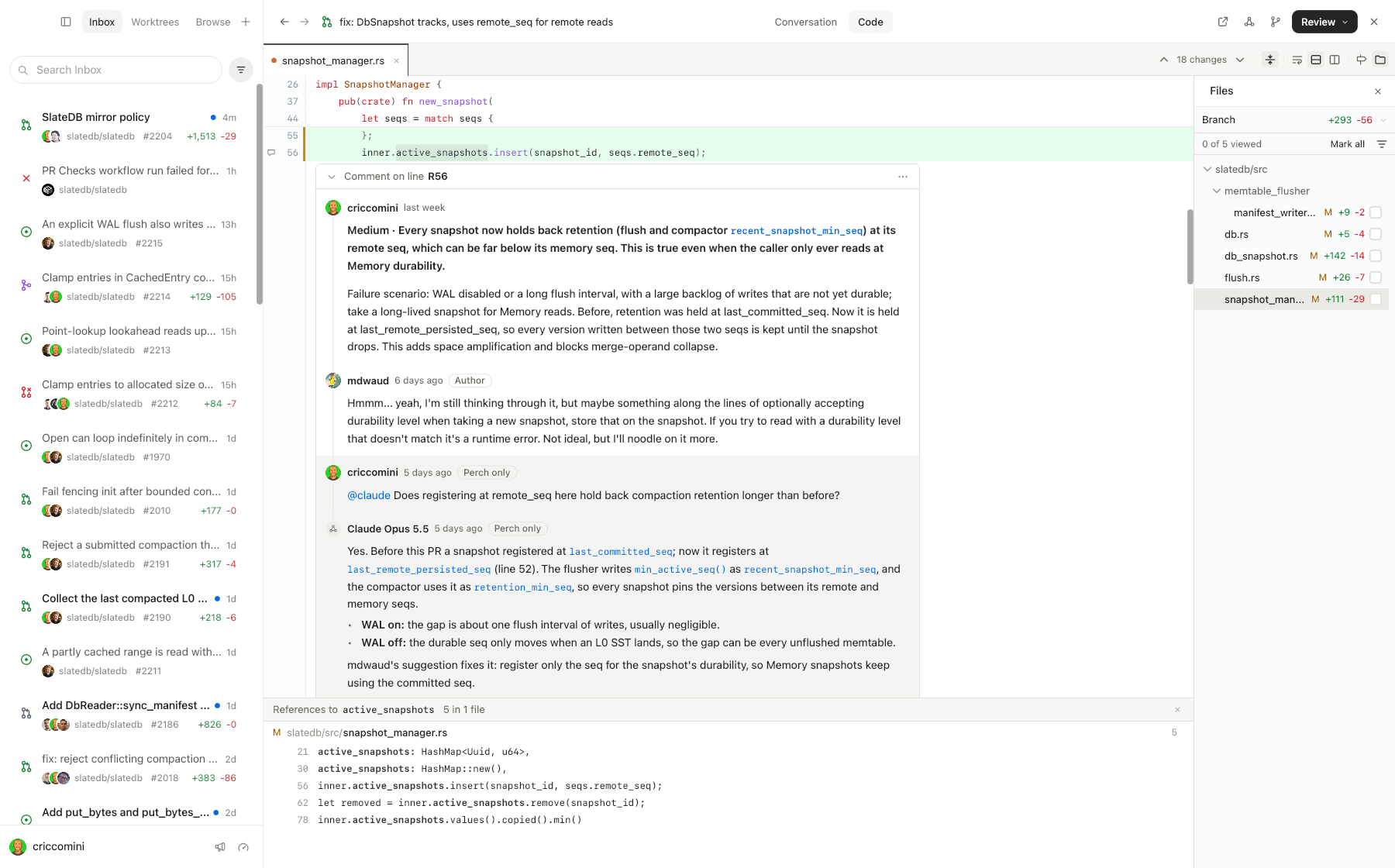
A native app that puts GitHub, a code browser, and Claude/Codex in one window.
Perch
I got tired of flipping between github.com, VS Code, and Claude/Codex, so I
made Perch to combine them into one native application.
Features:
- Uses
gh,claude, andcodexCLIs for everything. - Fully integrated with GitHub's inbox, PRs, and issues.
- Completely browsable codebase for each PR and code review.
- Language server protocol (LSP) support, so you can "find references",
"open call hierarchy", and so on. - Threaded GitHub-style conversations with humans and agents.
- Code walkthroughs for PRs.
- Fully integrated client-side Claude/Codex reviews.
Install
You need:
- A Mac (Apple Silicon or Intel) or Linux (x86_64 or arm64, glibc 2.35+,
GTK 3), with git - The GitHub CLI, signed in with
gh auth login - For agents: Claude Code 2.1.223+ and/or
Codex CLI 0.155.1+, signed in
Then install the latest release:
curl -fsSL https://raw.githubusercontent.com/perch-code/perch/main/install.sh | sh
On a Mac, install.sh puts Perch.app in /Applications. On Linux, it unpacks Perch
into ~/.local/share/perch and links ~/.local/bin/perch to it.
After that, Perch checks for new releases. Click "Restart to update" to
upgrade when one is detected.
Setup
Configure Perch with ~/.perch/config.toml. See
docs/configuration.md for all settings.
GitHub
Perch looks for a GitHub token in this order: GITHUB_TOKEN, GH_TOKEN,gh auth token, then token in the config. Apps launched from Finder don't
see your shell's environment, so gh auth login is the simplest route.
GitHub rate-limits each account to 5,000 REST requests an hour, plus a
separate GraphQL budget. Run gh api rate_limit to see what's left, and
raise poll_interval_secs in the config if Perch is using too much.
Repositories
[[repo]]
github = "slatedb/slatedb"
root = "~/Code/slatedb"         # your local clone

[[repo]]
root = "~/Code/side-project"    # a local-only repo works too
root is where Perch finds your branches and worktrees. Removing a
repository leaves its checkouts and worktrees on disk.
Language servers
Perch starts language servers when you browse a codebase. The following LSPs
are currently supported:
| Language | Server |
|---|---|
| Rust | rust-analyzer |
| Go | gopls |
| TypeScript, JavaScript | typescript-language-server |
| Java | jdtls |
| Python | ty |
Perch will offer to install missing LSPs as needed. rust-analyzer and jdtls
run the checkout's build code, so outside your own work Perch asks before
starting them. To always trust a repository:
[[repo]]
github = "slatedb/slatedb"
lsp.trust = true
Agent safety
Agents run sandboxed.
- You choose each agent's permission level: Read only, Ask me, Auto-review,
or Allow all. - Agents never get your GitHub token or other secrets from the environment.
- Nothing is posted to GitHub unless you trigger it.
License
Apache 2.0. See LICENSE.
Yorumlar (0)
Yorum birakmak icin giris yap.
Yorum birakSonuc bulunamadi