herdr-telegram-agents
Health Gecti
- License — License: MIT
- Description — Repository has a description
- Active repo — Last push 0 days ago
- Community trust — 11 GitHub stars
Code Basarisiz
- rm -rf — Recursive force deletion command in scripts/verify-install.sh
Permissions Gecti
- Permissions — No dangerous permissions requested
Bu listing icin henuz AI raporu yok.
Drive your coding agents from Telegram like from the terminal. A topic per agent, live status in the topic icon, two-way chat with inline buttons for choices.
Telegram Agents for Herdr
One Telegram forum topic per live Herdr agent: status in the topic icon, messages both ways.
A Herdr plugin that mirrors the Herdr Agents panel into a
Telegram forum supergroup, so you can watch and drive your coding agents
(Claude Code, Codex, Gemini, ...) from a phone. Every agent gets its own topic,
the topic icon follows the agent's status, its questions land in the topic with
a notification, and what you write there goes back to the agent. One command
installs it; no Go, no Node, nothing else on your machine.
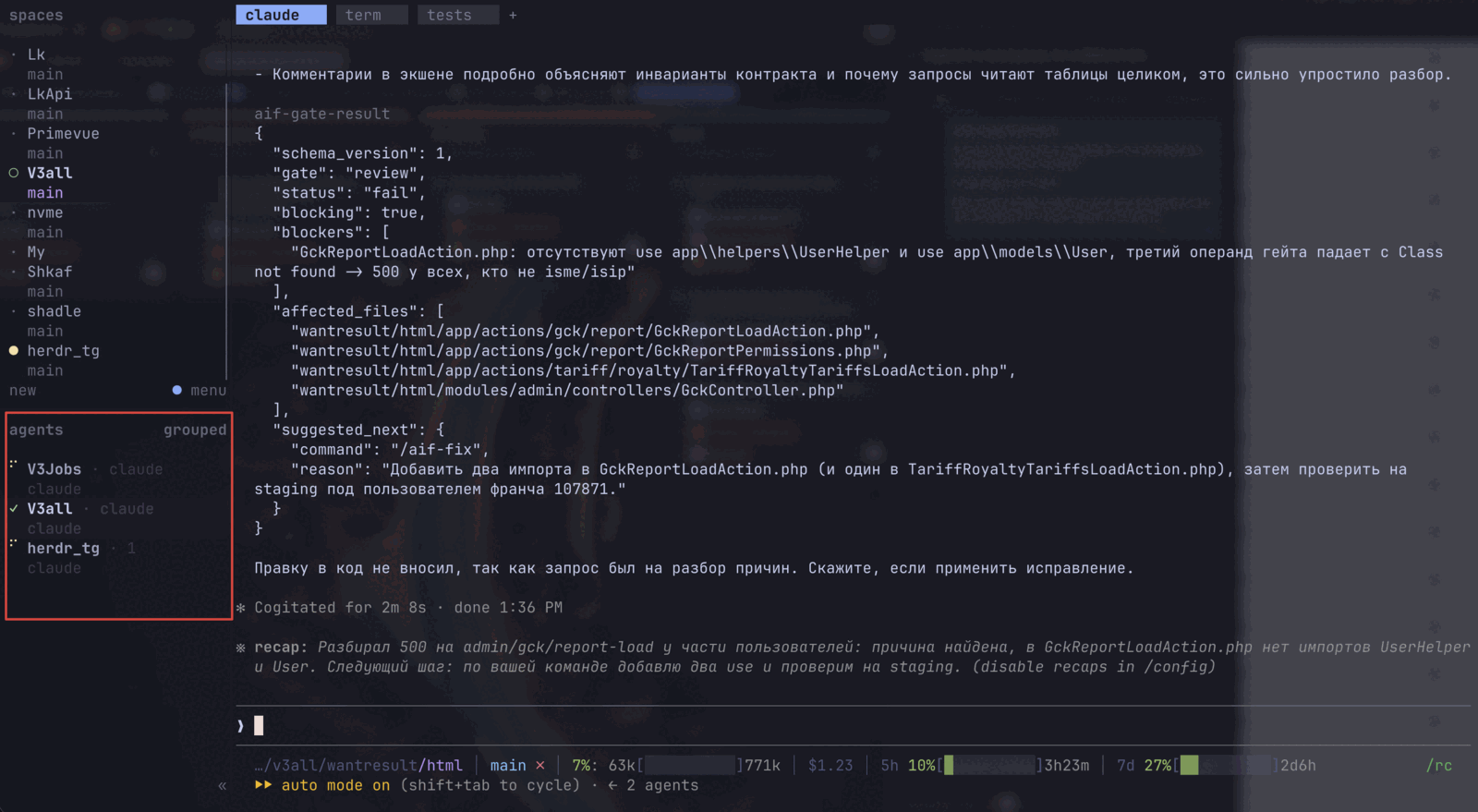
The Herdr agents panel: three agents, one working, one idle, one waiting.
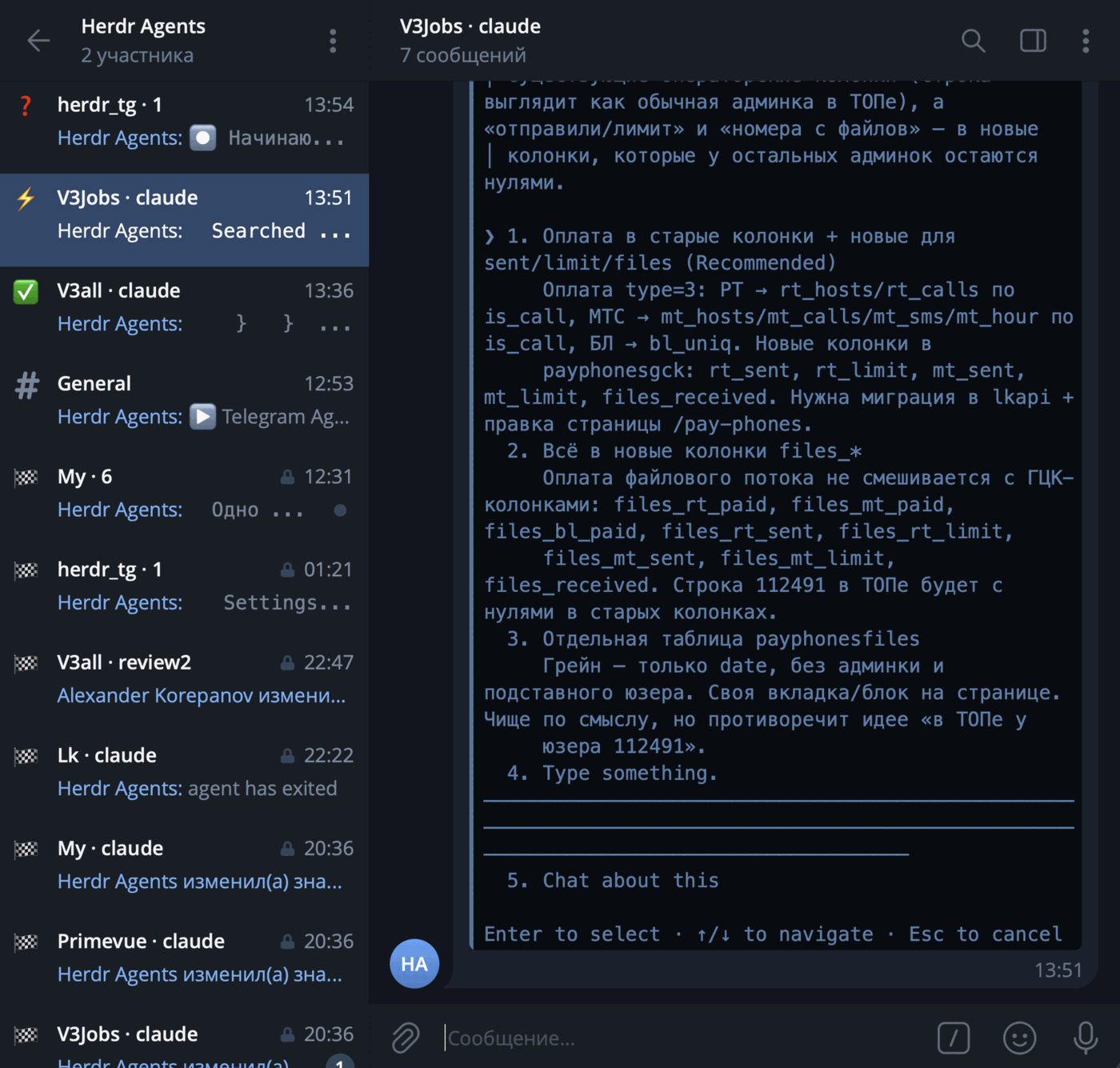
The same agents in Telegram: one topic each, the icon is the status, and the
open topic shows a Claude Code question you can answer from the phone.
What you get
- A topic per agent, named like the Agents panel row (
V3Jobs · claude),
created when the agent appears and reused after a restart. - Status at a glance: the topic icon is ⚡ working, ✅ idle, ❓ blocked,
🏆 done, 👀 unknown, 🏁 exited. - Questions come to you: when an agent gets blocked on a question or an
approval, the screen is posted with a notification and, for a numbered
dialog, with one button per option; when it finishes, the tail is posted
silently. - Answers go back: plain text becomes a prompt,
y/n/1..9/enter/escanswer dialogs,/keyssends raw keys. - Look at the screen with
/screen, or/screen allfor everything the
agent printed since your last message. - Claude Code commands
/clear,/compact,/usage,/modelare typed
into the agent and the result is posted back. - Rename or close a topic in Telegram to rename or mute the agent in Herdr.
- A control panel in the General topic:
/statuswith links to every
agent,/options,/away,/here,/help, daemon notices. - Quiet while you are at the machine: topic edits wait and screen posts
go silent while your keyboard or mouse is active; when you leave,
everything catches up and a question still waiting rings once. macOS and
Windows; Linux has no idle source yet. - Settings from the phone:
/optionsopens a panel with buttons to pause
the mirror, tune quiet mode, pick the status icons, mask secrets in posts
and delete the topics of exited agents after a while. - A daemon that looks after itself: starts with Herdr, exits when Herdr
is gone, heals topic drift on start and onresync.
Version 0.4.0. macOS and Linux are verified end to end; Windows is built and
unit-tested on every change but has not been run against a real Herdr yet.
Requirements
- Herdr
0.7.5or newer - A Telegram bot token from @BotFather
- A Telegram supergroup with Topics enabled, where you can promote the bot
shandcurl(macOS, Linux) or PowerShell 5.1+ (Windows) for the install step
Install
herdr plugin install permgps/herdr-telegram-agents
Herdr clones the repository and runs the plugin's build step, which downloads
the release binary for your OS and architecture into bin/, verifies its
SHA-256 against the release checksums and makes it executable. Supported
targets: darwin/amd64, darwin/arm64, linux/amd64, linux/arm64,windows/amd64. The plugin is listed on the
Herdr marketplace; the command above is the one
the card shows.
Then run the setup below. Herdr shows the Telegram Agents actions listed
further down and runs bin/herdr-tg startup after every session restore.
If you download a binary with a browser instead, macOS marks it quarantined;xattr -d com.apple.quarantine bin/herdr-tg clears that. Binaries fetched by
the install script carry no quarantine attribute.
Setup
- Create a bot with @BotFather and copy its token.
- Create a supergroup and enable Topics in its settings (this makes it a
forum). You must be its owner or an administrator who can add admins. - In Herdr run the action Telegram Agents: setup (from a Herdr pane:
herdr plugin action invoke permgps.telegram-agents.setup). A popup asks
for the token (typed visibly; the popup closes when setup ends) and prints
ahttps://t.me/<bot>?start=setuplink. - Open the link, press Start and tap Choose group. Telegram lists your
forum groups and adds the bot to the one you pick as an administrator with
Manage topics and Delete messages. The person who picks the group
becomes the operator. Adding the bot to a forum group by hand with those
rights works as well. - Back in the popup confirm the group. The wizard saves
config.jsonand
starts the daemon. From now on the daemon starts automatically with Herdr
while a configuration exists.
Run the setup action again to reconfigure; it asks before overwriting. The
token, the mapping, the options and the logs live in Herdr's plugin config
and state directories; the files are listed under
Files, logs and state.
Talking to agents
A blocked agent posts its screen with a notification, a finished one posts
its tail silently. Anything you write in the agent's topic goes back:
| You write | The agent gets |
|---|---|
| plain text | typed as a prompt and submitted |
y, n, 1..9, enter, esc while the agent is blocked |
the matching key; a button under the question does the same |
/keys esc enter |
raw key names |
/screen, /screen 40, /screen all |
the visible screen, its last 40 lines, or everything since your last message |
/focus |
the pane is brought to the front in Herdr |
/clear, /compact, /usage, /model |
typed into an idle agent as a Claude Code command; the result is posted back |
/status, /help |
this agent's status line, the command list |
The General topic is the control panel: /status lists every agent with
a link to its topic, /options opens the settings panel, /away [2h] and/here override the presence check, /help lists the commands, and the
daemon posts its notices there. Only the configured group and the operators
from setup are accepted.
Timings, buttons, how the Claude Code commands are forwarded, how /screen all collects its history and what /status shows in General are in
docs/commands.md.
Settings
/options in General opens a panel of buttons, one message edited in place.
Its groups:
| Group | What it holds |
|---|---|
| Sync | Herdr → Telegram sync: untick to pause topic edits and screen posts; what you send keeps working |
| Quiet | quiet mode while you are at the desk: Away after (3 min), Hold topic edits, Screen posts (Silent, Held, Normal), Re-announce on leaving |
| Posts | Done post: what a finished agent posts, the screen tail (default), its last reply from the Claude Code transcript, or that reply rendered with bold, lists, links and code |
| Appearance | one topic icon per status, from Telegram's topic-icon pack |
| Privacy | Redact secrets: API keys, tokens, passwords and private keys are masked in every post |
| Topics | Delete closed topics after: the topics of exited agents go after 30 days by default |
The choices are saved in options.json and survive restarts. Every option,
its default and what it does: Options; how
presence is measured and what happens when you leave:
Quiet while at the desk; which
secrets are masked: Secrets in posts;
when topics are deleted: Topic cleanup.
Actions
| Action | What it does |
|---|---|
Telegram Agents: setup |
Opens the setup popup |
Telegram Agents: start |
Starts the daemon if it is not running |
Telegram Agents: stop |
Asks the daemon to exit (SIGTERM as the Unix fallback, then SIGKILL after 10 s) |
Telegram Agents: restart |
Stop followed by start |
Telegram Agents: status |
Whether the daemon runs, its pid and uptime, and the daemon's own line: version, live agents, dropped jobs, Herdr socket health, sync, topic cleanup and quiet state |
Telegram Agents: resync |
Asks the running daemon to re-check every topic against the live agents |
Telegram Agents: logs |
Opens an overlay with the last 100 log lines and follows the file |
Telegram Agents: doctor |
Opens an overlay with one line per check: config, options, bot token, group rights, Herdr socket and version, daemon, mapping file |
Telegram Agents: send test message |
Posts a test message into General straight from the action (the daemon need not run) and reports the outcome |
Every action reports its outcome as a Herdr notification. stop, resync
and status talk to the daemon through a local control channel; see
Files, logs and state.
Upgrade
Herdr has no plugin update: reinstall to move to a newer version.
herdr plugin uninstall permgps.telegram-agents
herdr plugin install permgps/herdr-telegram-agents
The two commands name the same plugin in the two forms Herdr uses: uninstall
takes the plugin id, as printed by herdr plugin list, and install takes the
GitHub repository.
Your config.json, mapping.json, options.json and the Telegram topics
survive: Herdr keeps the plugin's config and state directories and never
deletes their contents, so the daemon picks up the same group and the same
topics after the upgrade. The manifest version always equals the release
tag, so a checkout runs the binary that tag was built from.
Documentation
| Page | What it covers |
|---|---|
| docs/commands.md | What gets posted, every command in a topic and in General, the Claude Code commands, /screen all |
| docs/behaviour.md | Topic naming and icons, exit and resume rules, manual rename and close, the options panel, quiet mode, secret redaction, topic cleanup, files and logs |
| docs/development.md | Building from source, make targets, publishing a release, the dev subcommand, the tree layout |
| docs/testing.md | Automated gates and the manual checklist run before a release |
License
MIT.
Yorumlar (0)
Yorum birakmak icin giris yap.
Yorum birakSonuc bulunamadi