pad
Health Warn
- License — License: Apache-2.0
- Description — Repository has a description
- Active repo — Last push 0 days ago
- Low visibility — Only 5 GitHub stars
Code Pass
- Code scan — Scanned 12 files during light audit, no dangerous patterns found
Permissions Pass
- Permissions — No dangerous permissions requested
This is a local-first project management tool designed for developers and AI agents. It runs entirely on your machine using an SQLite database, providing a CLI, web UI, and native AI integration without requiring cloud accounts or remote servers.
Security Assessment
The overall risk is Low. The tool strictly uses a local SQLite database to store your project data, explicitly guaranteeing that no information leaves your machine. The automated code scan reviewed 12 files and found no dangerous patterns, hardcoded secrets, or requests for dangerous permissions. Because it is designed to run a local server and web UI, it naturally listens on a local port (localhost:7777). However, it does not make external network requests to sync data. No high-risk behaviors such as unauthorized shell execution or covert data exfiltration were detected.
Quality Assessment
The project is under active development, with its most recent push occurring today. It uses the permissive Apache-2.0 license, making it safe for commercial and personal use. The repository includes standard development hygiene, such as a clear README, a Go Report Card, and continuous integration (CI) testing. However, community trust and visibility are currently very low. With only 5 GitHub stars, it is a very new or niche project. While the initial code quality looks solid, you are largely relying on the primary maintainer rather than a broad community consensus.
Verdict
Safe to use, though keep in mind that the project is young and has a small community footprint.
Project Management for the agent era
Pad
Project Management for the agent era.





One binary. Local-first. No accounts required. Pad gives you a CLI, a web UI, and an AI agent skill — all backed by SQLite, all running on your machine. Your project data never leaves your laptop.
Quick Start
brew install PerpetualSoftware/tap/pad
cd your-project
pad init                    # configure, auth, workspace, AI skill — all in one
pad server open             # opens the web UI at localhost:7777
pad init is the smart entry point — it auto-detects what's needed, walks you through each step, and is safe to re-run anytime (it skips finished steps and prints a status summary).
Why Pad?
Tools like Linear, Jira, and Notion are built for teams on the cloud. Pad is built for developers on their machine — and for the AI agents working alongside them.
| Pad | Linear / Jira | Notion | |
|---|---|---|---|
| Setup | pad init |
Create account, invite team, configure | Create account, pick template |
| AI agents | Native /pad skill for 7+ tools |
Third-party integrations | Third-party integrations |
| Data | Local SQLite, you own it | Their cloud | Their cloud |
| Offline | Full functionality | Read-only cache at best | Limited |
| CLI | First-class | Afterthought | None |
| Price | Free, open source | Per-seat pricing | Per-seat pricing |
Features
For Developers
CLI that doesn't get in your way. Create tasks, search items, check status — without leaving the terminal.
pad item create task "Fix OAuth redirect" --priority high
pad item create idea "Real-time collaboration" --category infrastructure
pad item list tasks --status in-progress
pad item search "authentication"
pad project dashboard                   # Project dashboard
pad project next                        # What should I work on?
pad server info                         # How this client is connected to Pad
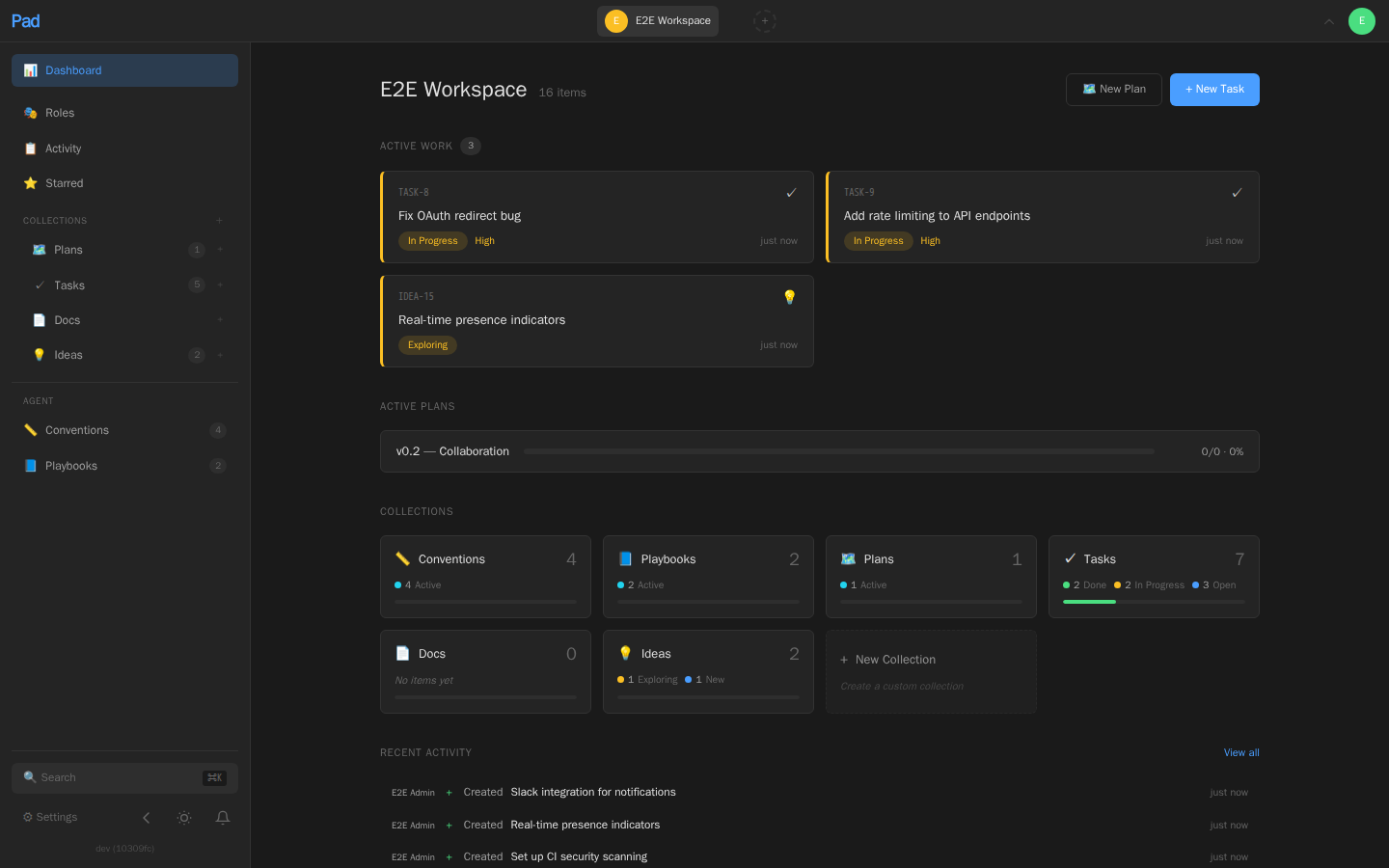
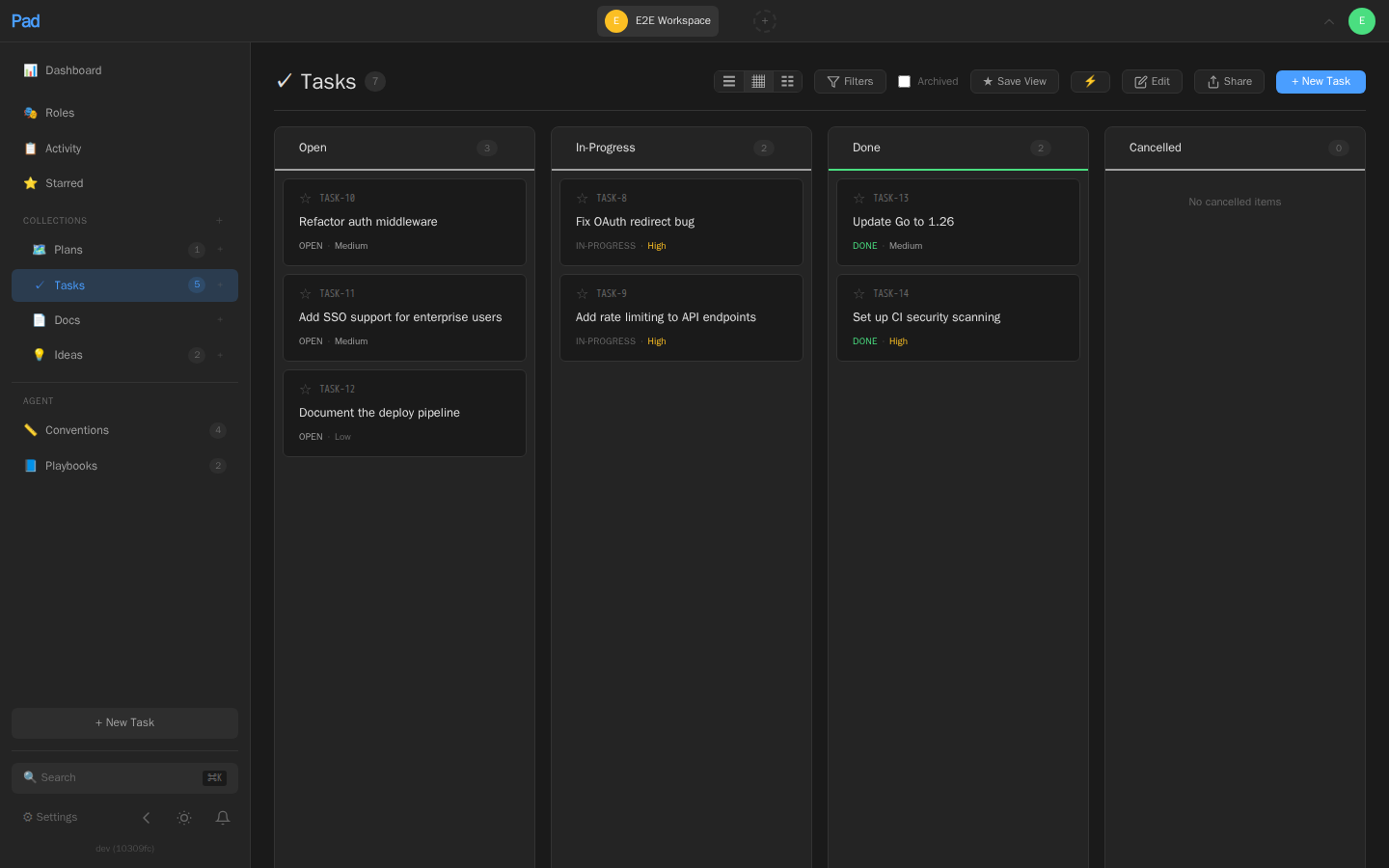
Web UI that stays out of your way. A clean, dark-themed interface at localhost:7777 with:
- Board, list, and table views — drag-and-drop between status columns
- Keyboard navigation —
j/kto move,Enterto open,Escto go back,Cmd+Kto search - Rich text editor — Tiptap-based with markdown, formatting toolbar, and auto-save
- Wiki-links — type
[[Title]]to link between items - Real-time updates — agent creates a task in the terminal, it appears in the browser instantly (via SSE)
- Dashboard — collection overview, active work, plan tracking, activity feed
For AI Agents
Your agent becomes a project partner. Install the /pad skill once, and your AI coding tool can read, create, and update project items through natural language.
pad agent install # Auto-detects your tools and installs the skill
Works with Claude Code, Cursor, Windsurf, Codex, GitHub Copilot, Amazon Q, and JetBrains Junie.
Then just talk to your project:
> /pad what should I work on next?
> /pad I finished the OAuth fix
> /pad create a task to add rate limiting
> /pad let's brainstorm about the API redesign
Conventions and playbooks teach agents how your project works:
- Conventions — trigger-based rules like "run tests before marking a task done" or "use conventional commits"
- Playbooks — multi-step workflows like "when implementing a feature: read the spec, create a branch, write tests first, then implement"
pad item create convention "Run tests before completing tasks" \
  --field trigger=on-task-complete \
  --field scope=all \
  --field priority=must
Agents load relevant conventions automatically. All agent actions are attributed in the activity feed, so you always know what the AI changed.
Onboard agents to a new codebase:
pad workspace onboard # Analyzes project structure, saves workspace context, and suggests conventions
Collections & Custom Fields
Pad organizes work into collections — typed containers with structured fields.
Built-in collections:
| Collection | Purpose |
|---|---|
| Tasks | Work items with status, priority, assignee, effort, due date |
| Ideas | Feature ideas with impact and category |
| Plans | Project milestones with progress tracking |
| Docs | Documentation, decisions, reference material |
| Conventions | Project rules that guide agent behavior |
| Playbooks | Multi-step workflows for agents to follow |
Create your own with typed fields — select, text, date, number, url, relation, checkbox:
pad collection create "Bug Reports" \
  --fields "severity:select:low,medium,high,critical; browser:text; reproducible:checkbox"
Items get reference numbers automatically (TASK-5, BUG-12) and can be moved between collections with field migration.
Installation
Homebrew (macOS and Linux)
brew install PerpetualSoftware/tap/pad
Build from Source
git clone https://github.com/PerpetualSoftware/pad
cd pad
make build
cp pad ~/.local/bin/   # or /usr/local/bin/
Requires Go 1.26+ and Node.js 22+.
The go install github.com/PerpetualSoftware/pad/cmd/pad@latest path is not supported for the full Pad binary, because the web UI must be built and embedded during the source build.
Docker
docker run -p 127.0.0.1:7777:7777 -v pad-data:/data ghcr.io/perpetualsoftware/pad
This publishes Pad to localhost:7777 on the host machine, which is the recommended default for local use.
Single user, more than one device? Publish to all interfaces so you can reach Pad from your phone, tablet, or another machine on the same LAN, Tailscale network, or home VPN:
docker run -p 7777:7777 -v pad-data:/data ghcr.io/perpetualsoftware/pad
For multi-instance deployments, Pad supports Postgres + Redis via docker-compose.yml — see docs/deployment.md for the full setup.
Binary Download
Pre-built binaries for macOS, Linux, and Windows are available on the releases page.
Getting Started
1. Set up Pad
cd ~/projects/myapp
pad init "My App"
pad init is the smart entry point that handles everything in one command:
- Configures this client's connection (local server, remote, or Docker)
- Auto-starts the local server
- Creates the first admin account on a fresh local install (Docker / remote hosts run
pad auth setupon the server instead) - Logs you in if needed
- Creates or links a workspace for the current directory (writes
.pad.toml) - Installs the
/padskill for any AI tools detected in the project
Run from your project root. Safe to re-run anytime — it skips finished steps and prints a status summary if nothing's needed.
Choose a template with --template, or omit it for an interactive picker grouped by category (Software / People / …):
pad workspace init --list-templates                   # See the full catalog grouped by category
pad init "My App" --template scrum                    # Scrum-style with sprints
pad init "My App" --template product                  # Product management focused
pad init "My Hiring" --template hiring                # Company-side: requisitions, candidates, interview loops, feedback
pad init "Job Search" --template interviewing         # Candidate-side: applications, interviews, companies, contacts
Pad ships templates for software (startup / scrum / product), people workflows (hiring, interviewing), and has reserved categories for research, content, operations, and personal use so the same project-management primitives fit well beyond code projects.
2. Start working
# From the CLI
pad item create task "Set up CI pipeline" --priority high
pad item create idea "Add WebSocket support" --category infrastructure
pad project dashboard

# From the web UI
pad server open              # Opens localhost:7777 in your browser

# From your AI agent
# Just use /pad in Claude Code, Cursor, etc.
3. Teach your agents the rules
pad workspace onboard        # Auto-analyze project, save workspace context, and suggest conventions
# Or browse the convention library
pad library list --type conventions  # Pre-built conventions you can adopt
pad library list --type playbooks    # Pre-built multi-step workflows
4. Optional — connect a desktop AI app via MCP
Pad ships an MCP (Model Context Protocol) server so Claude Desktop, Cursor, or
Windsurf can manage items, plans, ideas, and dependencies as native tools, read
workspace state by URL, and load multi-step workflows as prompts.
pad mcp install claude-desktop   # or: cursor, windsurf, --all
# Restart the client; pad shows up as the "pad" MCP server.
Tool catalog (v0.2) — eight resource × action tools, no flat verb explosion:
| Tool | Actions |
|---|---|
pad_item |
create, update, delete, get, list, move, link, unlink, deps, star, unstar, starred, comment, list-comments, bulk-update, note, decide |
pad_workspace |
list, members, invite, storage, audit-log |
pad_collection |
list, create |
pad_project |
dashboard, next, standup, changelog |
pad_role |
list, create, delete |
pad_search |
query |
pad_meta |
server-info, version, tool-surface |
pad_set_workspace |
session-default workspace pinning |
Plus resources at pad://workspaces, pad://workspace/{ws}/dashboard,pad://workspace/{ws}/items, pad://workspace/{ws}/items/{ref},pad://workspace/{ws}/collections, and pad://_meta/version.
Stability contract — two version constants, both advertised in the
initialize handshake under capabilities.experimental.padCmdhelp andcapabilities.experimental.padToolSurface (and queryable atpad://_meta/version):
cmdhelp_version: "0.1"— CLI help-tree contract (used at dispatch time)tool_surface_version: "0.2"— MCP tool catalog contract
External agents pin against these so a future rename doesn't break them
silently. Errors come back as structured envelopes ({error: {code, message, hint, available_workspaces, ...}}) with a closed eight-code
taxonomy.
Full guide at getpad.dev/mcp/local — install
paths, action enums per tool, error taxonomy, troubleshooting.
CLI Reference
pad auth configure                    Configure how this client connects to Pad
pad auth setup                        Initialize the first admin account
pad auth login                        Sign in
pad auth whoami                       Show current user

pad server start                      Start the Pad API server
pad server stop                       Stop the Pad server
pad server info                       Show client, connection, and local server status
pad server open                       Open web UI in browser

pad workspace init [name]             Initialize workspace in current directory
pad workspace link <workspace>        Link current directory to an existing workspace
pad workspace list                    List all workspaces
pad workspace switch <workspace>      Switch active workspace
pad workspace context                 Show structured workspace context
pad workspace context set --file X    Update structured workspace context from JSON
pad workspace onboard                 Analyze project, save workspace context, and suggest conventions
pad workspace members                 List workspace members
pad workspace invite <email>          Invite a workspace member
pad workspace join <code>             Accept an invitation
pad workspace export                  Export workspace data
pad workspace import <file>           Import workspace data

pad project dashboard                 Project dashboard
pad project next                      Recommended next task
pad project ready                     Query actionable next items
pad project stale                     Query stalled or attention-worthy items
pad project standup [--days N]        Daily standup report
pad project changelog [--days N]      Release notes from completed items
pad project watch                     Real-time activity stream
pad project reconcile                 Reconcile item and PR state

pad item create <coll> "title"        Create item (task, idea, plan, doc, ...)
pad item list [collection]            List items (filters: --status, --priority, --all)
pad item show <ref>                   Show item detail
pad item update <ref>                 Update item fields
pad item delete <ref>                 Delete item
pad item move <ref> <collection>      Move item between collections
pad item edit <ref>                   Open item in $EDITOR
pad item search "query"               Full-text search across all items
pad item comment <ref> "text"         Add comment to an item
pad item comments <ref>               View item comments
pad item note <ref> "summary"         Append an implementation note to an item
pad item decide <ref> "decision"      Append a decision log entry to an item
pad item block <src> <target>         Create dependency
pad item blocked-by <item> <blk>      Mark item as blocked
pad item deps <ref>                   Show dependencies
pad item unblock <src> <target>       Remove dependency
pad item related <ref>                Show direct relationships for an item
pad item implemented-by <ref>         Show incoming implementers for an item
pad item bulk-update --status X       Batch update multiple items

pad collection list                   List collections with item counts
pad collection create <name>          Create a custom collection

pad library list                      Browse convention and playbook library
pad library activate <title>          Activate a convention or playbook

pad agent install [tool]              Install /pad skill for AI coding tools
pad agent status                      Show supported tools and installation status
pad agent update                      Update installed tool integrations

pad github link [item-ref]            Link current branch's PR to item
pad github status [item-ref]          Show PR status for linked items
pad github unlink <item-ref>          Remove PR link from item

pad webhook list             List workspace webhooks
pad webhook create <url>     Create webhook
All commands accept --format json for machine-readable output and --workspace to target a specific workspace.
Authentication
Pad runs without authentication by default for frictionless local use. For local installs, pad init creates the first admin account inline. The lower-level commands are useful when you're hosting a Pad server (Docker / remote) and need to set up auth on the server host directly:
pad auth setup         # Initialize the first admin account (server host, non-local mode)
pad auth login         # Sign in
pad auth whoami        # Show current user
pad auth logout        # Sign out
Once a user exists, all API requests and web UI access require authentication. Credentials are stored in ~/.pad/credentials.json. Multiple users can be invited to workspaces with role-based access control (owner, editor, viewer).
pad workspace members               # List workspace members
pad workspace invite [email protected]
pad workspace join <code>
Architecture
┌──────────────────────────────────────────────┐
│              pad (single binary)              │
│                                               │
│  ┌──────────┐  ┌──────────┐  ┌────────────┐  │
│  │   CLI    │  │  REST    │  │  Embedded  │  │
│  │ (Cobra)  │  │  API     │  │  Web UI    │  │
│  └────┬─────┘  └────┬─────┘  │ (SvelteKit)│  │
│       │    HTTP      │        └────────────┘  │
│       └──────────────┤                        │
│                ┌─────▼─────┐                  │
│                │  SQLite   │                  │
│                │  + FTS5   │                  │
│                └───────────┘                  │
└───────────────────────────────────────────────┘
- Go backend — chi router, SQLite via modernc.org/sqlite (pure Go, no CGO), FTS5 full-text search, SSE for real-time updates
- SvelteKit frontend — Svelte 5, Tiptap editor, drag-and-drop, adapter-static, embedded via
go:embed - Single binary — serves the API and web UI, runs on macOS, Linux, and Windows
- Workspace-per-project — each project gets its own workspace linked by a
.pad.tomlfile
All data lives in ~/.pad/pad.db. Your data. Your machine. No telemetry, no cloud, no accounts required.
Contributing
See CONTRIBUTING.md for the development guide.
make build      # Build web UI + Go binary
make test       # Run Go tests
make dev-web    # SvelteKit dev server with hot reload
make install    # Build, install to ~/.local/bin, restart server
Security
See SECURITY.md for reporting vulnerabilities.
License
Reviews (0)
Sign in to leave a review.
Leave a reviewNo results found